 MetaTrader 5
 Experts
 Indicators
 Scripts
 Libraries
 Storage
Join our fan page

TesterVsLive - match a Strategy Tester report against your real account, trade by trade - indicator for MetaTrader 4

- Views:
- 127
- Rating:
- Published:
-
 You are missing trading opportunities:
- Free trading apps
- Over 8,000 signals for copying
- Economic news for exploring financial markets
Registration Log inYou agree to website policy and terms of use
If you do not have an account, please register -
 Need a robot or indicator based on this code? Order it on Freelance
Go to Freelance
Need a robot or indicator based on this code? Order it on Freelance
Go to Freelance
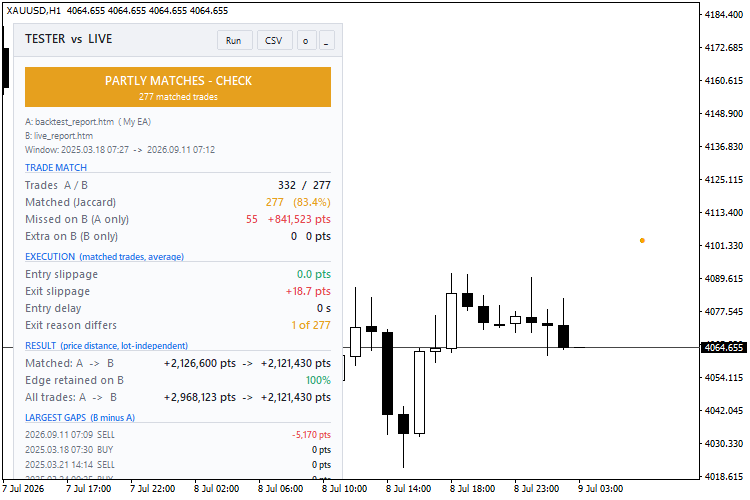
A backtest looks great. Then the EA runs live and the numbers are different, and nobody can say why. Was it slippage, missed signals, a restart or a manual trade? Or was the backtest flattering?
TesterVsLive answers that trade by trade. It never opens, modifies or closes orders.
What you get:
- Verdict: green (live matches backtest), amber (partly matches) or red (live differs).
- Trade match:
- trades on each side and the match rate (Jaccard)
- trades the backtest took but live missed, and what they earned
- extra live trades the backtest never took
- Execution: average entry slippage, exit slippage and entry delay, plus trades where one side hit SL/TP and the other did not.
- Result:
- price distance captured on matched trades, backtest vs live (independent of lot size)
- the % of the backtest edge retained live
- real commission and swap
- Largest gaps: the 5 matched trades where live did worst against the backtest.
- Chart marks:
- blue = backtest entry, orange = live entry, a dotted line joins a matched pair
- red ✕ = missed by live, magenta ✕ = extra on live
- every mark has a tooltip
- CSV export of the full trade-by-trade table.
Two modes:
- Report vs account history: the main use.
- Report vs a second report: compare two brokers, two data feeds, or two versions of an EA.
Quick start:
- In the Strategy Tester, right-click the report and choose Save as Report.
- Copy the .htm file to MQL4\Files .
- In the Account History tab, choose All History.
- Attach TesterVsLive to the traded symbol. Set the report name and the EA's magic number.
How matching works:
- Only closed trades are used, within the window where both sides overlap.
- Backtest trades are processed in time order. Each takes the nearest unused live trade in the same direction within the tolerance (default 180 s).
- Match rate = matched / (backtest + live − matched).
- Slippage is signed: positive means live got a worse price.
Limitations:
- MT4 tester reports have commission = 0, so costs are shown for the live side only.
- Partial-close remainder tickets are skipped.
- For grid or basket EAs, lower the match tolerance.
- The verdict thresholds are practical rules of thumb, not statistics:
- green = match ≥ 90 % and edge retained ≥ 80 %
- amber = ≥ 70 % and ≥ 50 %
Free to use, modify and share (MIT). No warranty, and nothing here is trading advice.
UT Bot Alerts for MT4 - faithful port with signal statistics panel and daily session filter
An MT4 port of QuantNomad's "UT Bot Alerts", one of the most-used scripts on TradingView. It draws the ATR trailing stop, Buy/Sell signals and bar colors, and adds a panel that counts what the signals would have done, after costs, inside your trading hours.
Range Filter Buy and Sell for MT4 - faithful port of DonovanWall / guikroth with signal statistics
An MT4 port of the popular TradingView "Range Filter Buy and Sell 5min". The filter line only moves when price exceeds a smoothed average range, which filters out small swings. Includes Buy/Sell signals, target bands and bar colors, plus a signal statistics panel with a daily session filter.
Three Colors
Example: Moving Average indicator filling by different colors
 MACD Sample
Classical MACD Sample.