 MetaTrader 5
 Experts
 Indicators
 Scripts
 Libraries
 Storage
Join our fan page

After-Exit Analyzer - what price did after you closed: stopped-out trades that later hit TP, profit left after exits - script for MetaTrader 5

- Views:
- 86
- Rating:
- Published:
-
 You are missing trading opportunities:
- Free trading apps
- Over 8,000 signals for copying
- Economic news for exploring financial markets
Registration Log inYou agree to website policy and terms of use
If you do not have an account, please register -
 Need a robot or indicator based on this code? Order it on Freelance
Go to Freelance

Most trade reports end at the exit. This script looks at what happened next.
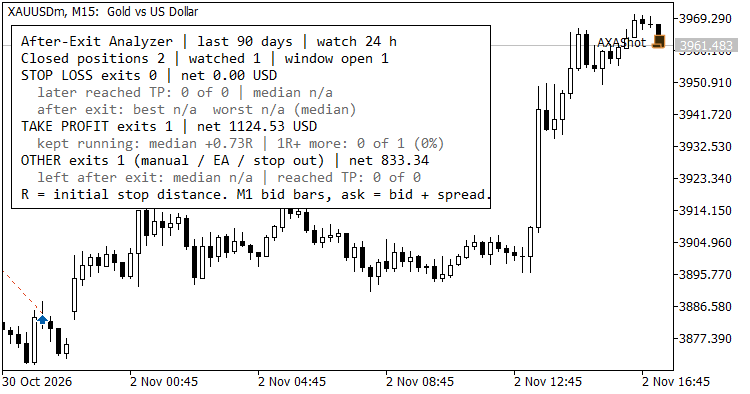
For every closed position in the selected period it reads the following M1 bars and measures, from the exit price: the best move in the trade's direction (how much was left on the table), the worst move against it (how much the exit saved), and whether the take-profit level was reached after the exit, and how many minutes later.
What the results tell you
- Stop-loss exits - how many later reached their take profit, the median time until they did, and the median move after the stop. Many stopped-out trades that later reach the target point to a stop that is too tight or placed at an obvious level.
- Take-profit exits - how far price kept running after the target, and how often it ran a further 1R or more. A large share suggests the target or exit rule cuts winners short.
- Other exits (manual, EA logic, mobile, stop out) - the median move left after the exit and how often the original target was still reached.
Moves are shown in R (multiples of the initial stop distance) when the position had a stop loss, otherwise in points.
Output
- A summary panel on the chart.
- A per-position table in the Experts tab, newest exit first.
- A CSV file in MQL5\Files (AfterExit_<login>.csv) with one row per position for your own analysis.
Inputs
| Input | Default | Meaning |
|---|---|---|
| History to analyse (days) | 90 | Exit time window |
| Symbol filter | "" | Empty = all symbols |
| Magic number filter | -1 | -1 = all, 0 = manual trades |
| Market hours to watch after each exit | 24 | Counted in M1 bars, so weekends do not use up the window |
| Positions listed in the Experts log | 25 | Rows printed in the Experts tab |
| Write a CSV file | true | Writes AfterExit_<login>.csv |
| Draw the summary panel | true | false removes the panel from the chart |
How it is measured
- Positions are built from deals by position ID. Commission, swap and fee are included in the net result.
- Positions with more than one entry deal, reversals and partly closed positions are skipped, because they do not have one clear entry and stop.
- The initial stop is the SL recorded on the entry deal (or on the exit deal if the entry had none). The tested target is the TP at exit time.
- M1 bars hold bid prices. For sell positions the ask is estimated as bid plus the bar's recorded spread.
- A position counts as "watched" only when the full window of M1 bars after the exit exists. Recent exits are shown as "window open" and are left out of the statistics.
- Results inside one bar are approximate: M1 data does not show the order of the high and the low within a minute.
- The script only reads history. It does not trade, uses no DLLs and changes no terminal settings.
Run it on any chart: drag the script from the Navigator, set the inputs and press OK. Run it again with Draw the summary panel = false to remove the panel.
 Algo: EMA Trend Cross on Closed Bars — XAUUSD M30
Free educational EA — a single-position trend-following EMA crossover system for XAUUSD M30, released as open source for beginners to study trade ownership guards, preflight order validation, risk-based lot sizing, and server-time session filtering. This code demonstrates how a strategy - identifies and manages only its own positions and orders through MagicNumber and comment tags, - wraps CTrade with an OrderCheck preflight that blocks invalid or margin-breaking requests, - sizes each trade from a fixed stop-loss and risk percentage, - and restricts entries to a configurable broker session window with a daily close-all — all evaluated on completed bars only, so signals never repaint.
 Fair Value Gaps
Non-repainting fair value gaps on closed bars, with zone states (active, touched, mitigated) and iCustom buffers for EAs.
Trend Regime Indicator
Trending up, trending down or ranging: a verdict for every bar, and how long it has held. Each stretch of one regime is boxed on the price chart, ADX columns below show how strong it is, and a one-line panel gives the regime, its age and the ADX. Values for Expert Advisors and an alert on closed bars.
MACD Signals
Indicator edition for new platform.