 MetaTrader 5
 Experts
 Indicators
 Scripts
 Libraries
 Storage
Join our fan page

VpsToolkit - safe order send and restart-safe state for VPS EAs - library for MetaTrader 5

I help traders answer two questions before real money is at risk:
1) Is this strategy real, or just fitted to the past?
2) Will the account survive when something goes wrong?
Protection against overfitting
- Views:
- 52
- Rating:
- Published:
-
 You are missing trading opportunities:
- Free trading apps
- Over 8,000 signals for copying
- Economic news for exploring financial markets
Registration Log inYou agree to website policy and terms of use
If you do not have an account, please register -
 Need a robot or indicator based on this code? Order it on Freelance
Go to Freelance
Need a robot or indicator based on this code? Order it on Freelance
Go to Freelance

VpsToolkit is a small include file ( VpsToolkit.mqh ) for EAs that run 24/7 on an MQL5 VPS or on your own PC. It has no trading logic. You include it and call only the parts you need. VpsToolkit_Demo.mq5 shows how to plug it into an EA.
It covers the problems that usually show up only after an EA goes live: the same EA running on the VPS and on the PC at once, a duplicate order after a timeout, counters reset by a restart, trades closed while the EA was off, and logs you cannot read because the files stay on the VPS.
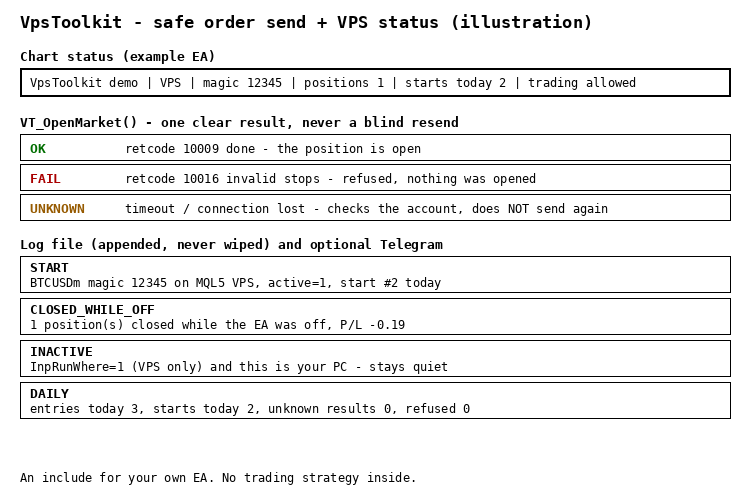
What is inside
- Where to run: VT_ActiveHere() with a run-where switch (anywhere / only on MQL5 VPS / only on this PC), so a copy that should not work stays quiet. VT_CanTrade(why) tells you why trading is blocked (no connection, Algo Trading off, account not allowed).
- Safe order send: VT_OpenMarket() returns OK, FAIL or UNKNOWN. Only "done" counts as OK. On a timeout or lost connection it looks at the account for a few seconds instead of sending again, so a bad connection does not create a second position.
- Restart-safe state: VT_Init() and VT_Ready() wait until the account is loaded (right after a VPS start the login can still be 0). Global variable names include the login, symbol and magic number. VT_TradesToday() reads the deal history instead of a counter in memory.
- Closed while off: VT_ClosedWhileOff() reports positions of your magic number that were closed while the EA was not running (SL/TP, manual close, stop out), with total P/L.
- Restart counter: VT_RestartsToday() and VT_ShouldAnnounce() , so a "started" message is not sent on every VPS restart.
- Append-only log: VT_Log() writes a UTF-8 CSV that is never wiped on restart, plus daily counters ( VT_CountInc() / VT_CountGet() ).
- Telegram (optional): VT_TgSend() , a daily summary at your local hour ( VT_DailyDue() , works at weekends), and VT_CsvNewRows() to send new log rows, because files on an MQL5 VPS cannot be downloaded.
Quick start
- Put VpsToolkit.mqh next to your EA and add #include "VpsToolkit.mqh" .
- In OnInit : VT_Init(_Symbol, magic, runWhere, "MyEA_log.csv") and start a timer.
- In OnTimer : return while !VT_Ready() , then call VT_Heartbeat() . In OnDeinit : VT_Deinit() .
- Open trades with VT_OpenMarket() . On UNKNOWN do not send again on the same signal; decide again on the next bar.
- For Telegram add https://api.telegram.org to Tools > Options > Expert Advisors > Allow WebRequest. Messages are sent from the timer only, never in the Strategy Tester.
The demo EA
On a live or demo chart VpsToolkit_Demo never trades. It shows the status on the chart, counts restarts, reports positions closed while it was off and writes a daily summary. In the Strategy Tester only (InpTesterDemo) it opens one example trade a day through VT_OpenMarket() . InpRunSelfTest runs the built-in self-test.
What was tested
- Compiled with 0 errors and 0 warnings. Self-test: 38 checks passed, in the tester and on a live chart.
- Strategy Tester, EURUSD H1, January to March 2025: 62 example trades through VT_OpenMarket() , a daily summary every day including weekends.
- Live demo account (hedging, BTCUSD): a normal order returned OK (10009), an order with the SL on the wrong side returned FAIL (10016). A position closed while the EA was off was reported after the restart (1 position, P/L -0.19). With run-where = "only on VPS" the copy on the PC stayed inactive. Restarts were counted 1, 2, 3 and the log kept every line.
- Not yet confirmed: Telegram delivery, a run on an MQL5 VPS, and the UNKNOWN path on a real connection loss (covered by the self-test only). Please report anything that does not work as described.
Free to use. Feedback in the comments is welcome.
Garch: GARCH, GJR-GARCH and EGARCH volatility models with forecasts
Fits GARCH(1,1), GJR-GARCH and EGARCH with normal, Student t or GED shocks by maximum likelihood, with robust standard errors and variance forecasts.
 Session Time Highlighter
Highlights the Asia, London and New York sessions and the London/New York overlap using real local time and daylight saving rules, so the session boxes are correct on any broker.
Accelerator Oscillator (AC)
The Acceleration/Deceleration Indicator (AC) measures acceleration and deceleration of the current driving force.
MACD Signals
Indicator edition for new platform.