
GDS Renko Trade Manager is an Expert Advisor for traders who open positions themselves and want systematic, transparent stop management. It follows eligible positions on the chart symbol, constructs classic fixed-size Renko bricks from broker **Bid ticks** and uses only **completed bricks** to advance its management thresholds.
The EA **does not generate entries**, place pending entry orders or automatically open positions. This first public release also **does not partially close or exit positions**: these optional experimental modules were kept out of the release until their broker-execution and restart cases can be verified. Existing TP values are preserved when SL is modified.
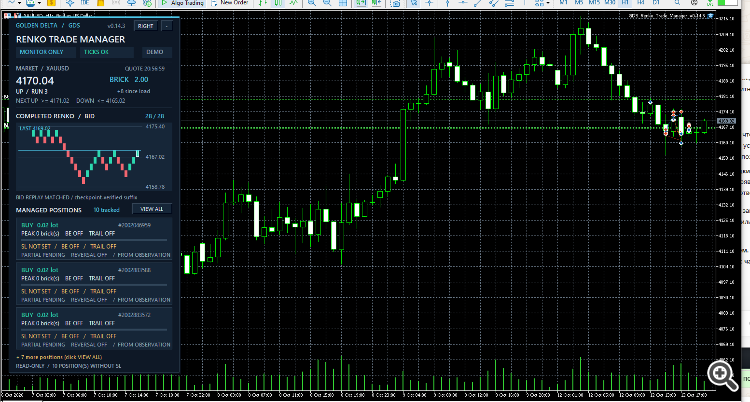
## Main features
- **Break-even:** after N favorable completed bricks since a position was first observed, the EA can move its Stop Loss toward the position entry (with an optional brick-based offset).
- **Renko trailing:** after M favorable completed bricks, it can propose a trailing Stop Loss at a configurable distance from the best completed Renko close. Existing stops are never intentionally loosened.
- **Manual position filter:** by default the EA checks the historical opening deal to verify that a position originated from a manual action. Alternatively, manage positions with an exact positive Magic Number.
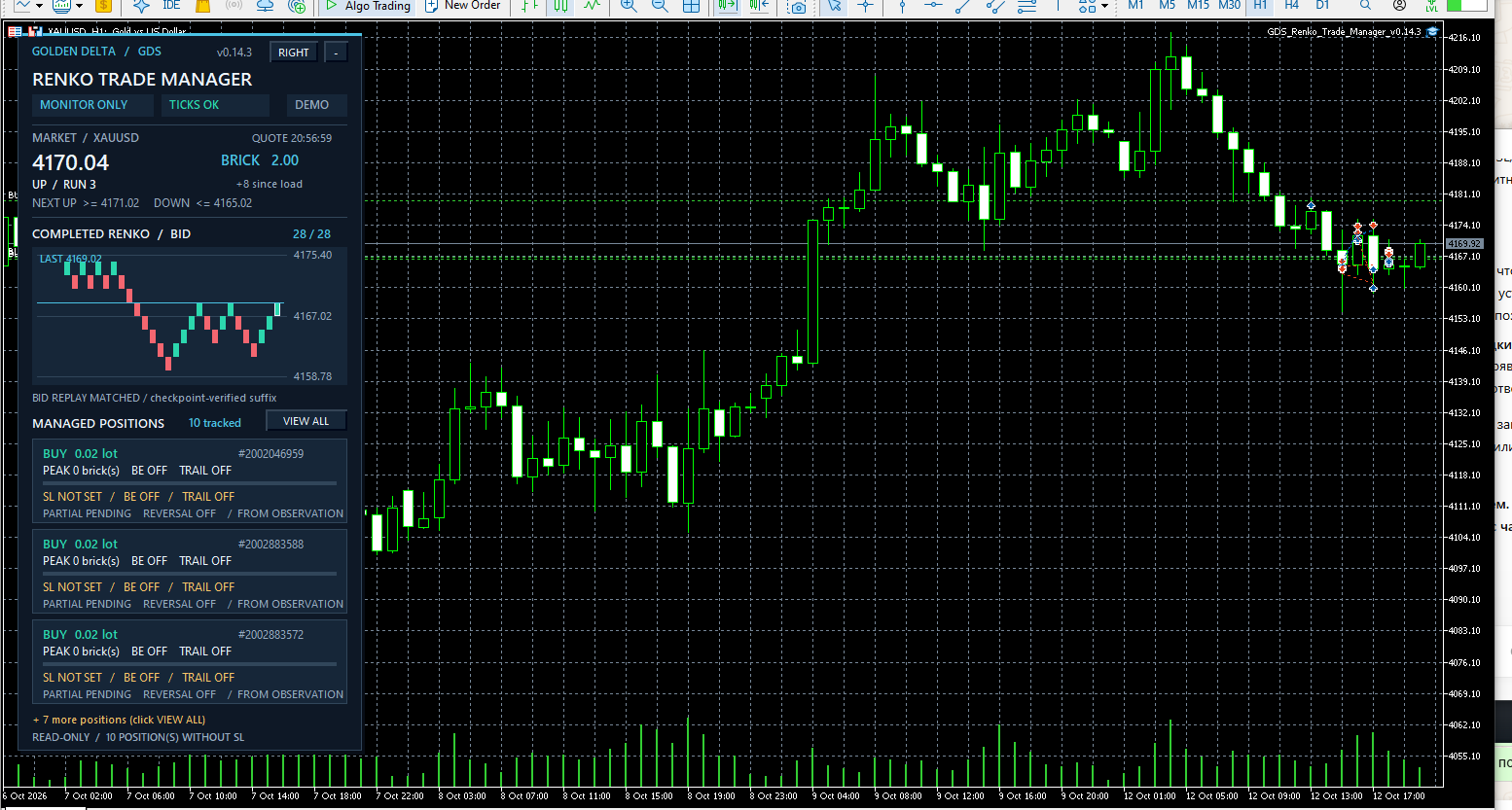
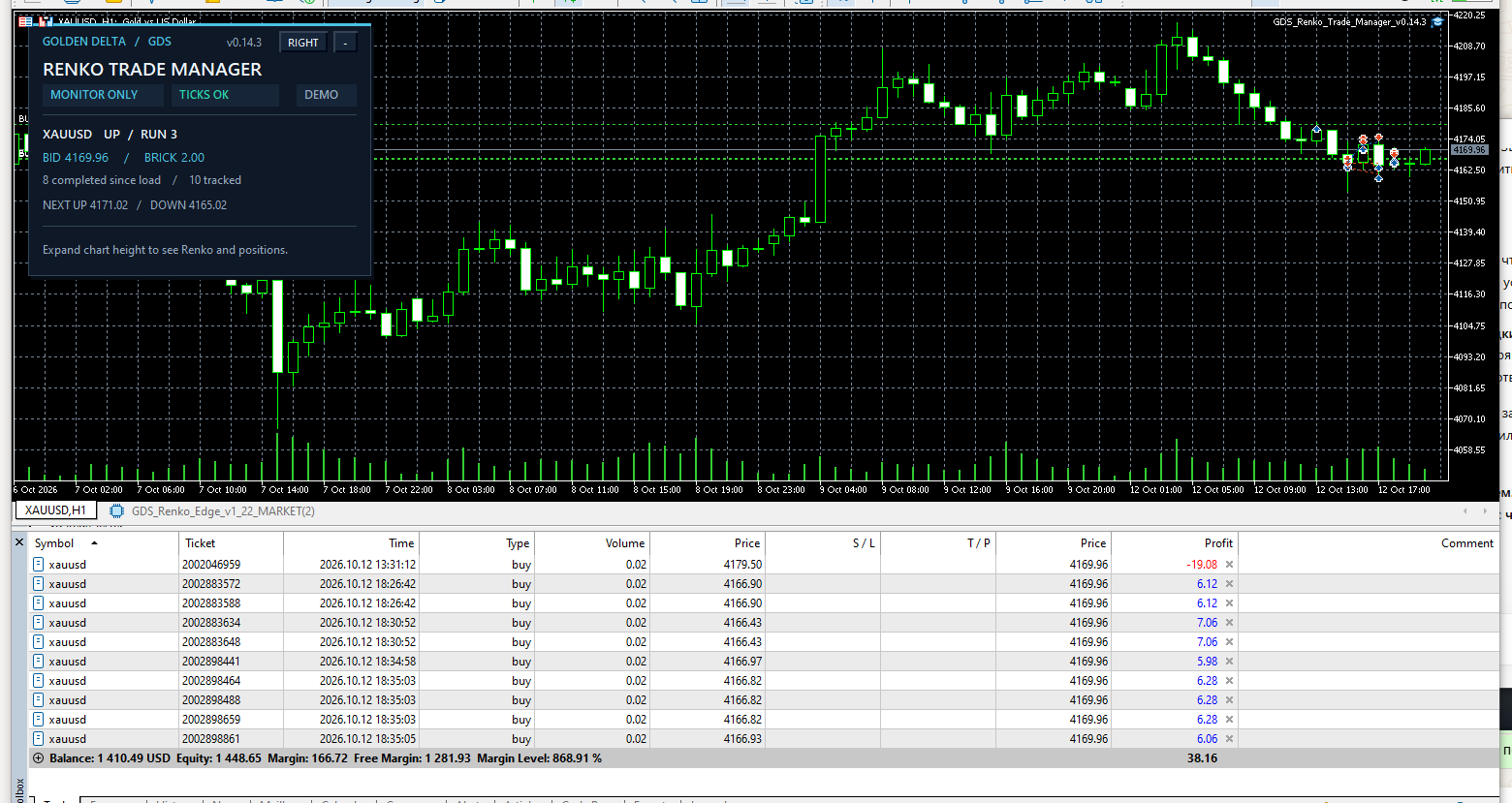
- **Multi-position dashboard:** track separate BUY/SELL tickets, current broker-reported SL, progress and thresholds. Pagination keeps the display usable with several positions.
- **Renko inset:** show the last completed bricks inside the information panel; green/red colors indicate direction. The horizontal axis represents brick sequence, **not candle time**.
- **Visual history replay:** bounded visual-only replay from broker tick history is checked against a saved stream checkpoint. Unverified reconstruction is not presented as a matched history. It never modifies the trading Renko engine.
- **State/recovery safety:** terminal Global Variables hold Renko and per-position checkpoints. If tick data, state or instance ownership is uncertain, the EA can suspend trade requests instead of silently rebuilding trading state.
## Important before use
1. Use `GDS_TM_MONITOR_ONLY` first; this is the **default** and sends no trade requests.
2. Active management requires an MT5 **hedging** account, enabled Algo Trading and `GDS_TM_MANAGE_LIVE`. When active, SL modifications are real broker requests on the account where the EA is running.
3. **Set an initial protective Stop Loss yourself.** This manager does not automatically set a stop immediately after entry, and it is not a comprehensive loss-limiting system.
4. A newly discovered position is observed **from that moment forward**. Historical favorable bricks before observation do not retroactively count toward management.
5. Reaching a brick threshold does not guarantee an accepted modification. Current price, spread, stop/freeze distance, market conditions and broker permissions can prevent it. Confirm the actual SL in MT5 and inspect the *Experts* journal.
6. Do not attach several active copies to manage the same symbol/filter. A per-account/symbol/filter single-instance lock is used.
## Selected inputs
| Input | Default | Purpose |
| --- | --- | --- |
| `InpMode` | `GDS_TM_MONITOR_ONLY` | Monitoring only, or explicitly enable SL management. |
| `InpBrickSize` | `2.0` | Renko brick size in **price units**, rounded only if exactly tick-aligned. Adapt to the symbol. |
| `InpManualOnly` | `true` | Track manually originated positions. |
| `InpMagicFilter` | `0` | Positive exact Magic Number when manual-only mode is disabled. |
| `InpBEAfterBricks` | `3` | Start break-even after this many favorable completed bricks; `0` disables. |
| `InpBEOffsetBricks` | `0.0` | Optional offset for the break-even level. |
| `InpTrailStartBricks` | `5` | Start Renko trailing after this many favorable completed bricks; `0` disables. |
| `InpTrailGapBricks` | `2` | Distance behind best favorable completed Renko close. |
| `InpTrailStepBricks` | `1` | Minimum proposed SL improvement, in bricks. |
| `InpRecoveryMaxHours` | `24` | Maximum permitted time gap for state recovery. |
| `InpShowDashboard` | `true` | Display the information panel. |
| `InpShowRenkoBricks` | `true` | Display completed Renko bricks. |
| `InpVisibleBricks` | `28` | Number of bricks shown (12–36). |
| `InpReplayVisualTicks` | `true` | Bounded, visual-only historical Bid-tick scan. |
| `InpAvoidOneClickOverlap` | `true` | Avoid overlap with MT5 One Click Trading controls. |
## How Renko-based progress works
The manager builds one shared classic Renko sequence for the symbol from broker Bid ticks. A completed reversal needs a two-brick movement in the opposite direction (standard fixed-brick convention). If a large price jump completes several bricks in one tick, all resulting bricks are processed in sequence. Trading progress is based on completed closes, not live candle shapes.
`PEAK` indicates the best favorable Renko movement from the **saved first-observation reference**. It is not the number of all bricks on screen and not floating profit. The panel displays thresholds as `MET` once the brick count is reached; this does not imply that a Stop Loss update was accepted.
## Compatibility and limitations
- Designed for MetaTrader 5, preferably on a hedging account for position management. On unsupported account modes, active trading is not enabled.
- Uses broker tick history; quote availability and tick continuity matter.
- Existing positions can be recognized, but their brick progress begins on discovery, not at the original entry time.
- Stops are evaluated on Bid/Ask quotes and the symbol's tick size and stop/freeze rules. Broker execution may differ from requested levels.
- Closing a position at its Stop Loss may still produce costs or slippage. The EA does not promise a zero-net result at break-even.
- The EA uses only a position's broker-reported SL as evidence that a stop exists; calculated targets and on-screen labels are not proof of execution.
- Does not offer a profitable entry strategy. No trading results are promised.
## Suggested first test
Attach to an MT5 chart, keep the default monitoring mode, and open one small manual position on a **demo account** with an initial protective SL. Watch the position's Renko `PEAK` progress and visual bricks. For a separate, carefully controlled test on a hedging demo account, enable live management and verify the actual SL change and Experts log after a favorable confirmed brick movement.
**Release scope:** break-even, trailing SL, manual/Magic filtering, dashboard, tick-based Renko and state recovery. **Not included in this release:** automatic entries, partial close, reversal exit.
 MetaTrader 5
 Experts
 Indicators
 Scripts
 Libraries
 Storage


 You are missing trading opportunities:
 Need a robot or indicator based on this code? Order it on Freelance
Go to Freelance
Need a robot or indicator based on this code? Order it on Freelance
Go to Freelance

 CLiveTradeInfo - CHistoryTradeInfo
 Accelerator Oscillator (AC)