 MetaTrader 5
 Experts
 Indicators
 Scripts
 Libraries
 Storage
Join our fan page

BotGuard - Terminal Health Heartbeat for VPS Monitoring - expert for MetaTrader 5

What I do:
- Views:
- 29
- Published:
-
 You are missing trading opportunities:
- Free trading apps
- Over 8,000 signals for copying
- Economic news for exploring financial markets
Registration Log inYou agree to website policy and terms of use
If you do not have an account, please register -
 Need a robot or indicator based on this code? Order it on Freelance
Go to Freelance
Need a robot or indicator based on this code? Order it on Freelance
Go to Freelance

BotGuard is a small helper Expert Advisor for anyone who runs trading robots on a VPS. It never opens, closes or modifies trades. Its only job is to report the health of the terminal, so that problems are noticed in minutes instead of days.
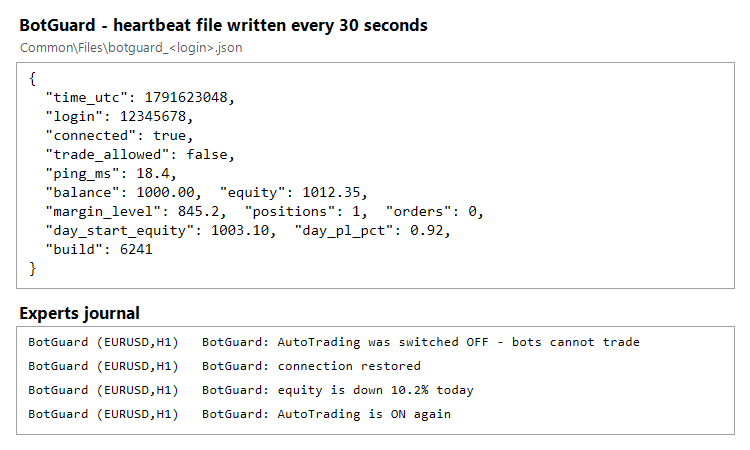
Figure 1. BotGuard heartbeat and equity log on a VPS terminal
What it does
- Every 30 seconds it writes a heartbeat file botguard_<login>.json to the common Files folder (Terminal\Common\Files). The file contains the server time in UTC, account login, server and company, connection state, AutoTrading state, last ping, balance, equity, margin level, open positions and orders, start-of-day equity, daily P/L in percent and the terminal build.
- Every 5 minutes it appends one line to botguard_<login>_log.csv (time, balance, equity, positions, connected). This log can be used to build equity curves and uptime reports.
- It sends an MT5 push notification and prints to the Experts journal when AutoTrading is switched off or back on, when the connection is restored, and when equity drops below a set percentage of the start-of-day equity.
Why a heartbeat file
A terminal that has frozen or crashed cannot send alerts about itself. Because the heartbeat file is rewritten every 30 seconds, any external monitor (a PowerShell script, a scheduled task or another program) only needs to check the file's age. If the file stops updating, the terminal is frozen or BotGuard was removed, and the monitor can restart MetaTrader 5 and notify you. The file is written to a temporary name first and then swapped in, so a monitor never reads a half-written file.
Input parameters
- InpHeartbeatSec - heartbeat interval in seconds (default 30, minimum 5).
- InpLogEveryMin - equity log interval in minutes (default 5).
- InpEquityDropPct - send a push alert if equity falls this percentage below the start-of-day equity (default 10, 0 disables it).
- InpPushAlerts - send MT5 mobile push notifications (requires a MetaQuotes ID in Tools - Options - Notifications).
How to use
- Attach BotGuard to one spare chart in each terminal you want to monitor. Any symbol and timeframe works, because it does not trade.
- Close the terminal normally once (File - Exit) so the chart with BotGuard is saved in the profile and loads automatically after every restart.
- Point your monitor at the heartbeat file. Each account writes its own file, so several terminals on one VPS can be monitored separately.
Tested on MetaTrader 5 build 6241 with a crash test and a freeze test: the external watchdog restarted the terminal and the heartbeat resumed within 15 seconds.
 Fractal Dimension Trend Strength Index
A rolling, Katz-style fractal dimension of price that collapses toward 1.0 during directional moves and rises toward 2.0 during choppy, range-bound action, giving traders a single number for how "trendy" the current market is.
Risk Calculator Panel with Draggable SL and TP Lines
Position size calculator for MT5. Drag the SL and TP lines on the chart and the panel shows the lot size for your risk %, the real risk after rounding, the reward and R:R. Never trades.
Accelerator Oscillator (AC)
The Acceleration/Deceleration Indicator (AC) measures acceleration and deceleration of the current driving force.
MACD Signals
Indicator edition for new platform.