 MetaTrader 5
 Experts
 Indicators
 Scripts
 Libraries
 Storage
Join our fan page

Risk-Based Lot Size Calculator Script with On-Chart Panel - script for MetaTrader 5

With over 10 years of active trading experience in XAUUSD (Gold) and deep hands-on expertise in automated trading systems, I specialize in diagnosing, modifying, and validating Expert Advisors for both MetaTrader 4 and MetaTrader 5 (MQL4/MQL5).
- Views:
- 74
- Rating:
- Published:
-
 You are missing trading opportunities:
- Free trading apps
- Over 8,000 signals for copying
- Economic news for exploring financial markets
Registration Log inYou agree to website policy and terms of use
If you do not have an account, please register -
 Need a robot or indicator based on this code? Order it on Freelance
Go to Freelance
Need a robot or indicator based on this code? Order it on Freelance
Go to Freelance


This script answers one question before every trade: how many lots should I open so that a stop loss hit loses exactly the percentage of my account that I decided to risk?
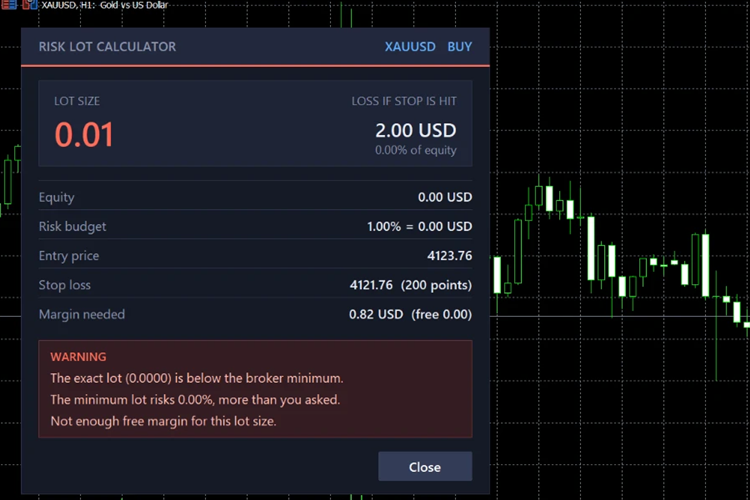
You drop it on a chart, set the risk percent and the stop loss distance in points, and it shows the lot size in a panel on the chart. The calculation uses OrderCalcProfit(), so the tick value, the contract size and the account currency are handled by the platform. It works on forex pairs, gold, indices and crypto without any symbol specific setting.
How the lot is calculated
The script takes the risk base (equity, balance or free margin) and multiplies it by the risk percent to get the amount of money you accept to lose. It then asks the platform how much 1 lot would lose if the price moves from the entry price to the stop loss, and divides the two numbers. The result is rounded down to the volume step of the symbol and kept between its minimum and maximum lot, so the real risk never goes above what you asked for.
If the exact lot is below the broker minimum, the panel shows a warning, because the minimum lot risks more than you asked. A second warning appears when the free margin is not enough for the calculated lot.
Input parameters
- Risk per trade, % of the base below - the percent of the risk base you accept to lose if the stop loss is hit (default 1.0).
- Risk base - equity, balance or free margin.
- Direction - true for a buy, false for a sell. The entry price is the current Ask for a buy and the current Bid for a sell.
- Stop loss distance, in points - distance between the entry price and the stop loss (default 200).
- Take profit as a multiple of risk - optional. Enter 2.0 to see the take profit level at 2R. Leave 0 to hide it.
How to use
- Copy RiskLotCalculator.mq5 to the MQL5\Scripts folder and compile it in MetaEditor.
- Drag the script from the Navigator onto the chart of the symbol you want to trade.
- Set the inputs and press OK.
- Read the lot size, the money at risk and the margin needed in the panel. Press Close to remove the panel.
The script does not open, modify or close any trade. It only reads the account and symbol information and draws the panel.
 Portfolio Allocation Planner — budget-to-lots dashboard and CSV
Before configuring a basket, see which target weights fit your broker's minimum lots. Portfolio Allocation Planner turns an explicit hypothetical notional budget and percentages into a chart table: minimum-lot notional, lots rounded down, calculated allocation, target shortfall and row status. Recalculate on demand, inspect row tooltips, paginate longer lists, and optionally export the displayed snapshot to CSV. No trades are sent and no account balance, equity or positions are read.
Broker Basket Preflight — read-only contract and minimum-volume diagnostics
Read-only MT5 script for exact Market Watch symbols: contract and volume rules, quote age and spread, isolated BUY/SELL margin, one-tick price moves and spread-only results in account currency. MIT source; Experts journal output.
 Accelerator Oscillator (AC)
The Acceleration/Deceleration Indicator (AC) measures acceleration and deceleration of the current driving force.
MACD Signals
Indicator edition for new platform.