 MetaTrader 5
 Experts
 Indicators
 Scripts
 Libraries
 Storage
Join our fan page

Portfolio Allocation Planner — budget-to-lots dashboard and CSV - expert for MetaTrader 5

- Views:
- 109
- Rating:
- Published:
- Updated:
-
 You are missing trading opportunities:
- Free trading apps
- Over 8,000 signals for copying
- Economic news for exploring financial markets
Registration Log inYou agree to website policy and terms of use
If you do not have an account, please register -
 Need a robot or indicator based on this code? Order it on Freelance
Go to Freelance
Need a robot or indicator based on this code? Order it on Freelance
Go to Freelance
Portfolio Allocation Planner
Before configuring a basket, see which target weights fit your broker's minimum lots. This free open-source tool turns an explicit hypothetical notional budget and percentages into a chart dashboard. It shows the minimum-lot notional, lots rounded down, calculated allocation, target shortfall and status of each row. Recalculate on demand, hover for details, paginate longer baskets and optionally export the displayed snapshot to CSV.
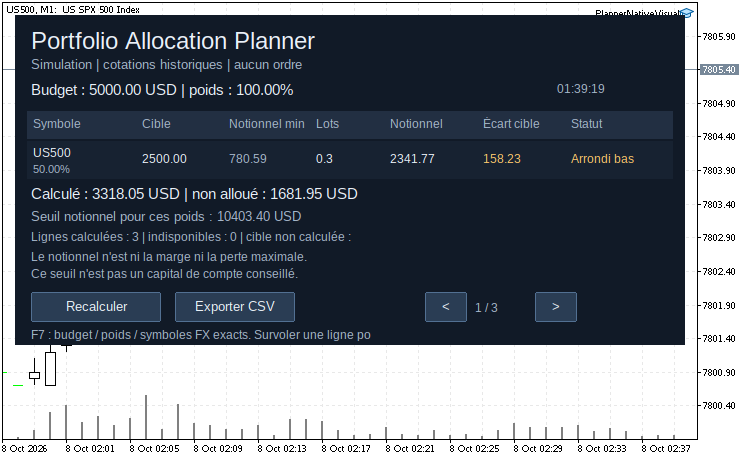
Native MT5 snapshot: hypothetical 5,000 USD notional budget, weights 50/30/20, quote age limit = 0 (historical quotes permitted). Page 1/3: US500 rounded down to 0.3 lot.
Install and use
- Copy PortfolioAllocationPlanner.mq5 to MQL5/Experts and compile with F7 in MetaEditor.
- Select the exact broker symbols in Market Watch and wait for quotes.
- Attach the utility to a separate chart without a trading EA. It is an interface EA with no trading function.
- Enter InpBudget, the explicit InpBudgetCurrency, comma-separated InpSymbols and matching InpWeightsPct. Use a decimal point; total weights must be greater than zero and at most 100%. Weights are not normalized. Empty symbols uses the chart symbol with one weight.
- Click Recalculate for a new snapshot; press F7 to change inputs. Choose PAP_FR or PAP_EN for the panel language.
- CSV export is off by default. Enable InpAllowCSVExport and click Export CSV to create a uniquely named UTF-8 semicolon-separated file in MQL5/Files.
InpPanelMaxWidth caps the panel width (default 1100 pixels, minimum 580 pixels). The panel also adapts to the chart window; longer portfolios use pages when available height is limited.
What the results mean
Long-side notional is Ask × contract size × an explicit currency conversion rate. Volume is rounded down on the broker lot-step grid, capped by the per-order maximum and static directional limit. Below-minimum targets stay at zero lots. The minimum notional budget estimate is the largest minimum-lot notional / target weight among resolved positive rows. It is not a recommended account deposit; unresolved rows make the basket incomplete, and the estimate does not guarantee exact weights or accepted orders.
The broker profit currency determines the native notional currency. For a different budget currency, supply exact already selected direct/inverse Forex symbol names in InpFXSymbols. Q/B uses Ask and B/Q uses 1/Bid. The route is verified from base/profit currency metadata; names and cross rates are never guessed. Quotes older than InpMaxQuoteAgeSeconds (120 by default) are unavailable; 0 explicitly permits historical estimates.
Supported calculation modes: Forex, Forex No Leverage, CFD, CFD Index, CFD Leverage, Exchange Stocks and Exchange Stocks MOEX. Futures, bonds, options and custom/synthetic symbols are unsupported. Notional is neither margin nor maximum loss. Existing exposure, session availability, funds, commission, swap, slippage and liquidity are outside scope. Static directional caps do not account for existing positions.
No orders are sent and no account number, balance, equity or positions are read. Only uniquely prefixed objects belonging to this tool are drawn and removed. Chart settings, other chart objects, Market Watch selection and terminal globals are unchanged. Files are written only after CSV opt-in and an explicit export click. No DLL, WebRequest or external library. Original utility by Fabien Martino; MIT license is included in the source.
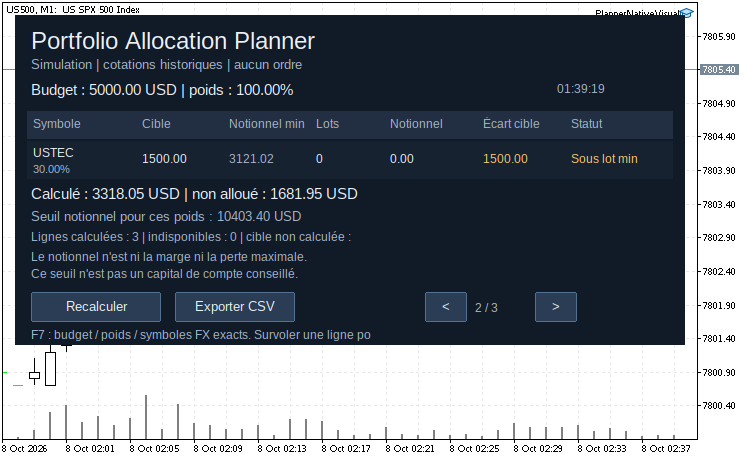
Same snapshot, page 2/3: USTEC target is below the broker minimum lot; calculated volume remains zero.
 Broker Basket Preflight — read-only contract and minimum-volume diagnostics
Read-only MT5 script for exact Market Watch symbols: contract and volume rules, quote age and spread, isolated BUY/SELL margin, one-tick price moves and spread-only results in account currency. MIT source; Experts journal output.
AgentGuard — Independent Risk Guard for AI Agents in MetaTrader 5
AgentGuard — an independent risk layer for AI-driven trading in MetaTrader 5. AI agents (including MCP-connected agents since build 6060) trade at machine speed — and platform safety settings alone can't catch every mistake. AgentGuard watches every open position on a 5-second timer and enforces four hard limits: maximum total volume, maximum position count, mandatory stop-loss on every position, and a daily-loss circuit breaker that closes everything and latches until the next day. It works alongside any EA, manual trading, or AI agent — it doesn't care how a position was opened, only whether it violates a limit. Status panel, alerts on every intervention, monitor-only mode for safe calibration. Free. No DLLs. It manages risk — it never generates signals.
 Accelerator Oscillator (AC)
The Acceleration/Deceleration Indicator (AC) measures acceleration and deceleration of the current driving force.
MACD Signals
Indicator edition for new platform.