 MetaTrader 5
 Experts
 Indicators
 Scripts
 Libraries
 Storage
Watch how to download trading robots for free
Find us on Telegram!
Join our fan page
Join our fan page
You liked the script? Try it in the MetaTrader 5 terminal

Symbol Spec Export - volume step, filling mode and stops level to CSV - script for MetaTrader 5
Tim Wanke

I built Twelora, a generator that produces MQL5 code for 75 indicators.
That is why I know the places where Expert Advisors fail silently: volume
steps, filling modes, unchecked return codes, points versus pips.
What you get:
- Full .mq5 source code, commented, no obfuscation
That is why I know the places where Expert Advisors fail silently: volume
steps, filling modes, unchecked return codes, points versus pips.
What you get:
- Full .mq5 source code, commented, no obfuscation
- Views:
- 805
- Rating:
- Published:
-
 You are missing trading opportunities:
- Free trading apps
- Over 8,000 signals for copying
- Economic news for exploring financial markets
Registration Log inYou agree to website policy and terms of use
If you do not have an account, please register -
 Need a robot or indicator based on this code? Order it on Freelance
Go to Freelance

Writes the trading specification of every symbol to a CSV file.
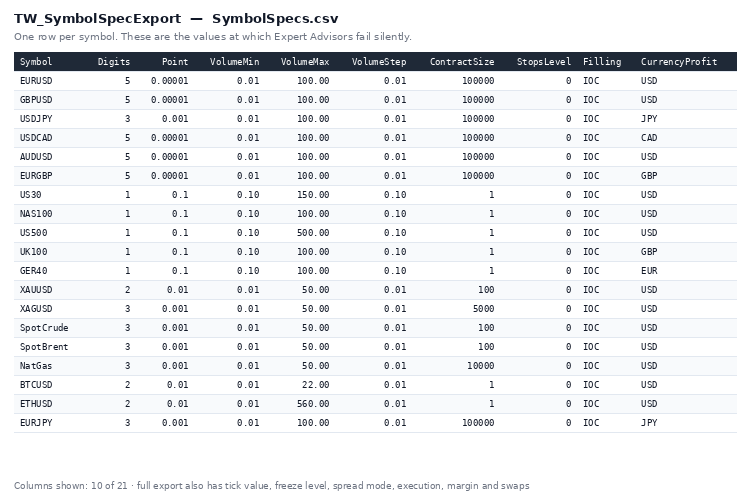
Columns: digits, point, tick size and tick value, volume min/max/step,
contract size, stops level, freeze level, current spread, floating or fixed
spread, allowed filling modes, execution mode, trade mode, initial margin,
swap long and short, profit currency.
Why it is useful: these are exactly the values at which Expert Advisors stop
working when you move them to another broker or another instrument. Volume
step, filling mode and stops level are the three most common silent failures.
Export the file once and you can see before the first trade what will break.
Inputs:
- Market Watch symbols only, or every symbol the broker offers
- Write into the common Files folder
- File name (empty = auto)
Symbols that are not in the Market Watch are selected temporarily so their
data can be read, and deselected again afterwards - your Market Watch is left
the way you found it.
This is a script. It reads symbol data and writes a file. It does not trade.
 DailyLossGuard — Hard Daily Loss Protection
 (Prop-Firm Challenge Essential)
Broker Clock Auditor
Reads the server clock from the symbol's own H1 history. The forex and CME week closes at 17:00 New York, so the server time of every weekly close gives the server's UTC offset for that week. Over 60 weeks it flags irregular closes, dates every clock change and tests it against the US and European daylight saving calendars, cross-checks TimeTradeServer minus TimeGMT, and lists the server time of the London, New York, Tokyo and Sydney opens for the coming weeks. Writes every close to CSV. Read only: no trade function, no DLL, no network.
Manual Trade Pad for Strategy Tester
A lightweight manual trading panel for MetaTrader 5 with market order execution, risk-based position sizing, Break-Even, partial close and position management. Works in both live trading and the Strategy Tester.
AgentGuard — Independent Risk Guard for AI Agents in MetaTrader 5
Independent Risk Guard for AI Agents in MetaTrader 5.