 MetaTrader 5
 Experts
 Indicators
 Scripts
 Libraries
 Storage
Join our fan page

Broker Clock Auditor - expert for MetaTrader 5

- Views:
- 62
- Rating:
- Published:
-
 You are missing trading opportunities:
- Free trading apps
- Over 8,000 signals for copying
- Economic news for exploring financial markets
Registration Log inYou agree to website policy and terms of use
If you do not have an account, please register -
 Need a robot or indicator based on this code? Order it on Freelance
Go to Freelance
Need a robot or indicator based on this code? Order it on Freelance
Go to Freelance
Every session filter in an Expert Advisor is written in server time, and server time is whatever clock the broker chose. Some servers run on UTC, some on UTC+2 in winter and UTC+3 in summer, and the ones that move do not all move on the same weekend. This tool reads the clock from the symbol's own price history instead of from a forum post: the forex and CME week closes at 17:00 New York time, so the server time of each weekly close, compared with that instant in UTC, gives the server's offset for that week. Over the last 60 weeks that is about 60 measurements, one per close, and from their sequence the tool tells whether the clock moved, when, and on which calendar — US or European daylight saving time. It then prints the server time at which London, New York, Tokyo and Sydney open on each of the coming weeks.
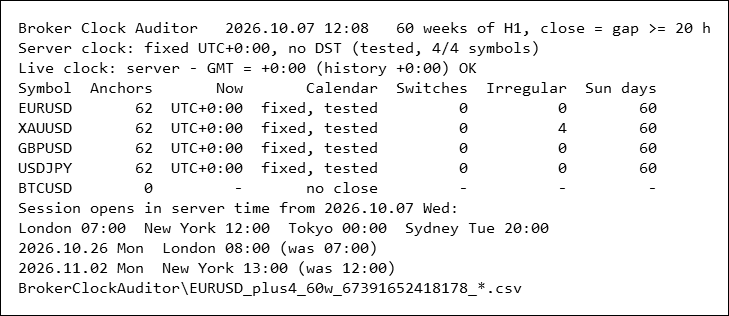
Exness demo server, five Market Watch symbols, 60 weeks of H1 bars each, one pass in 12.3 ms. Now is the offset of the latest regular close; Calendar says fixed, US or EU and whether a US and a European switch date lie inside the window (tested); Irregular counts closes that disagree with the closes around them, here gold's four US-holiday early closes; Sun days counts server Sundays with at least one bar. BTCUSD trades around the clock and has no close to measure. Shot at panel font size 4 to fit the page; the default is 8.
The problem
A session filter such as "trade from 10:00 to 13:00" is a promise about London or New York, written in the server's clock. It stays right only as long as the distance between the two clocks stays the same, and twice a year it does not. Europe and the United States change their clocks on different weekends — in 2026 the US moved forward on 8 March and Europe on 29 March, and in autumn Europe moves back on 25 October and the US on 1 November. For three weeks in spring and one week in autumn London is four hours ahead of New York instead of five, and a server that follows one of the two calendars is out of step with the other city.
Which of those weeks hit a given EA depends on the server's own rule, and the rule is rarely written anywhere a program can read. TimeTradeServer() − TimeGMT() gives today's offset, but it is computed from the PC's clock and time zone, and it says nothing about last March, when the backtest was taken, or about next month.
What it measures
The anchor. The interbank forex week, and the CME week for metals and US index futures, ends at 17:00 America/New_York. For every pause in the symbol's H1 history of at least InpMinGapHours hours (default 20) the tool takes close = open time of the last H1 bar before the pause + 1 hour, and U = the 17:00 New York instant nearest to it, converted to UTC with the US daylight saving rules. close − U is the server's offset at that close. Holiday pauses (Christmas Eve, New Year's Eve) end at the same 17:00 and count as anchors too.
- Irregular closes. A close whose offset differs both from the last regular close before it and from the close after it is flagged and kept out of everything below (the first and last closes are never flagged): a feed that ran one hour late on one Friday, or a hole in the history long enough to look like a pause, would otherwise read as two clock changes.
- Switches. Two consecutive regular closes with different offsets bracket a clock change. The tool dates it between the two closes and tests the bracket, in UTC, against the US switches (second Sunday of March, first Sunday of November) and the European ones (last Sunday of March, last Sunday of October), with the direction checked: a spring switch has to move the offset up, an autumn switch down. Each switch is labelled US, EU, US+EU (the bracket holds both, data too sparse) or other.
- Regime. No switch = fixed offset; all switches US = US calendar; all EU = European calendar; anything else = mixed. A fixed verdict is only called *tested* when the window contains at least one US and one European switch date — four weeks of history in July cannot tell a fixed clock from a moving one, and the tool says so.
- Sunday bars. The number of server Sundays (and Saturdays) with at least one H1 bar. A server on UTC opens the forex week on Sunday evening, which gives every D1-based indicator a sixth, small daily candle.
- Live cross-check. On a live chart TimeTradeServer() − TimeGMT() is printed next to the offset the history gives. A difference points at the PC's clock or time zone, not at the server.
- Projection. From the latest offset and the detected calendar, the server time of the London, New York, Tokyo and Sydney opens (local times are inputs) for every weekday of the next InpProjectWeeks weeks. Only the days on which one of them changes are listed.
With several symbols the most common offset and calendar is the verdict, and symbols that disagree are named in the journal — a stock CFD that closes at 16:00 New York reads one hour low, a 24/7 crypto symbol has no close at all.
Three demo servers, three clocks
Attached to a EURUSD, H1 chart on 7 October 2026; 60 weeks of H1 bars up to the newest bar (2025.08.13 to 2026.10.07); every input at its default except the symbol list (* on Exness, the symbols named on the other two).
| server | symbols | closes | offset now | calendar | switches seen (first close after) | irregular closes | Sundays with bars |
|---|---|---|---|---|---|---|---|
| Exness-MT5Trial17 | EURUSD, GBPUSD, USDJPY, XAUUSD | 62 each | UTC+0 | none, tested | — | XAUUSD 4, others 0 | 60 |
| ICMarketsSC-Demo | EURUSD, GBPUSD, USDJPY | 62 each | UTC+3 | US | 2025.11.08 −1 h, 2026.03.14 +1 h | 0 | 0 |
| MetaQuotes-Demo | EURUSD, GBPUSD, USDJPY, XAUUSD | 62 / 40 / 40 / 62 | UTC+3 | EU on all 4; offset: 3 of 4 agree | 2025.10.31 −1 h, 2026.04.04 +1 h | EURUSD 1, XAUUSD 4 | 0 |
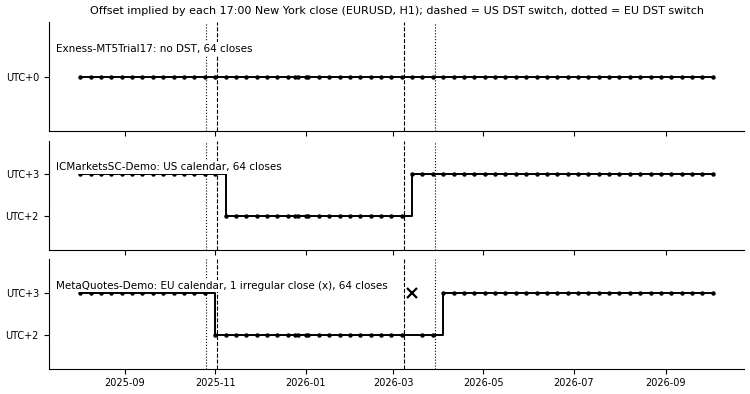
Offset implied by each 17:00 New York close of EURUSD on three demo servers, H1 bars 2025.08.01 to 2026.10.07, 64 closes per server, one dot per close; dashed lines are the US switches, dotted lines the European ones. Drawn from H1 bar times read with the MetaTrader5 Python package and the terminal's MCP interface, not from the tool's own output.
Exness: UTC all year. Every one of the 62 closes reads +0:00, including the Christmas Eve and New Year's Eve pauses. What moves is the close itself: the last H1 bar of the week ends at 21:00 server time while New York is on summer time (mid-March to early November) and at 22:00 for the rest of the year. Every Sunday has bars from 21:00 or 22:00, so daily charts get a sixth, short candle. Gold reads the same offset and adds four irregular closes, all US holiday early closes: Black Friday 2025.11.28 (−2 h), Christmas Eve (−3 h), Juneteenth 2026.06.19 and Friday 2026.07.03 (−4 h each).
IC Markets: UTC+2 in winter, UTC+3 in summer, on the US calendar. The offset changes between the closes of 1 and 8 November 2025 and of 7 and 14 March 2026, the weekends the US changed its clocks. The forex week runs from Monday 00:00 to Friday 24:00 server time all year, with no Sunday bars.
MetaQuotes-Demo: UTC+2 / UTC+3 on the European calendar. The switches fall between the closes of 25 and 31 October 2025 and of 27 March and 4 April 2026. One EURUSD close is irregular: on Friday 13 March 2026, between the US and the European switch, the last bar ended at 00:00 server time, one hour after 17:00 New York, while the closes before and after it were on time. GBPUSD and USDJPY have H1 history only from January 2026 on this terminal, so they show the spring switch alone. Gold disagrees with the three pairs and is named in the journal: since the European switch of spring 2026 its weekly close stays at 23:00 server time, one hour before 17:00 New York, so on its own it reads UTC+2:00 now.
What it means for the coming weeks. The three projections from 7 October 2026: on Exness, London opens at 07:00 server time until 23 October and at 08:00 from 26 October, New York at 12:00 until 30 October and at 13:00 from 2 November. On IC Markets London opens at 10:00 except in the week of 26 October, when it is 11:00. On MetaQuotes-Demo New York opens at 15:00 except in the same week, when it is 14:00. A filter written as "London 10:00" or "New York 15:00" is right on both UTC+2/+3 servers for 48 of the 52 weeks of 2026 and wrong for the other four — three in spring, one in autumn, each filter on a different server; in 2027 and 2028 the spring gap is two weeks.
On all three live connections the cross-check agreed with the history: TimeTradeServer() − TimeGMT() gave +3:00 on IC Markets and on MetaQuotes-Demo, +0:00 on Exness. While preparing this page one terminal was started without a login; offline, the same difference read +0:00 on the +3:00 server. The tool therefore skips the check, with one journal line, when the terminal is not connected.
Verifying the report independently
The report can be recounted outside MetaTrader. The script used for this page reads only the window from the summary file, pulls the same H1 bar times — through the terminal's MCP interface on Exness and through the MetaTrader5 Python package on the other two servers — and recomputes everything described above with Python's time zone database instead of the tool's own daylight saving rules: every anchor row, every switch row and its calendar, every summary counter, the verdict's offset and calendar, and every projection row. On the three runs shown here it agrees on 328, 250 and 284 values without a single difference. Its own definitions were checked first on ten hand-worked cases — eight synthetic bar series (fixed, US, European, inverted switches, holiday pauses, a hole in the data, two early closes a week apart) and two projections — and ten errors planted in it on purpose were all caught.
How to use it
Attach the Expert Advisor to any chart. With InpSymbols empty it audits the chart symbol; * audits every symbol in the Market Watch; a comma-separated list audits those symbols. Pick symbols that stop at the weekend — majors, gold, index futures; a crypto symbol has no close to measure. The audit runs once (or every InpRefreshMinutes), prints one line per symbol, its irregular closes, the switches, the verdict and the projection to the Experts journal, draws the table on the chart and writes the CSV files. It reads history only: there is no trade function in the code, no DLL and no network access. With * it reads only symbols already in the Market Watch. The tool never selects a symbol, but when a listed symbol is not in the Market Watch and its history has to be downloaded first, the terminal adds it there by itself (measured: EURCHF and AUDNZD were added on their first read, AUDUSD read a second time was not); the journal names such symbols before the first read.
Read the journal first. On IC Markets the EURUSD line is
EURUSD 62 anchors (60 weekend, 2 holiday) | now UTC+3:00 | seen +2:00 +3:00 | 2 switches: 2025.11.08 US -60, 2026.03.14 US +60 | regime US, dst_tested 1 | irregular 0 | Sunday bars 0 days
It says that EURUSD closed 62 times in the window, the server is three hours ahead of UTC now and has also been two, and the clock moved twice, back by an hour in the week before 8 November 2025 and forward in the week before 14 March 2026, both on US dates. The projection lines that follow list the server time of each open on the days it changes, for example
projection 2026.10.26 Mon offset +3:00 London 11:00 New York 15:00 Tokyo 03:00 Sydney Sun 23:00 (london)
Use several symbols that stop at the weekend: the verdict is their majority, and a symbol that disagrees is named.
Inputs
| input | default | meaning |
|---|---|---|
| InpSymbols | "" | Symbols: empty = chart symbol, * = Market Watch, else CSV list |
| InpWeeks | 60 | Weeks of H1 history to read (60 covers both DST seasons) |
| InpMinGapHours | 20 | A pause in quotes this long is a market close (weekend/holiday) |
| InpProjectWeeks | 8 | Weeks of session opens to project in server time |
| InpLondonOpen | 08:00 | London open, London local time |
| InpNewYorkOpen | 08:00 | New York open, New York local time |
| InpTokyoOpen | 09:00 | Tokyo open, Tokyo local time |
| InpSydneyOpen | 07:00 | Sydney open, Sydney local time |
| InpMaxExamples | 5 | Journal: irregular anchors printed per symbol |
| InpWriteCsv | true | Write anchors, switches, summary, projection and verdict CSV files |
| InpShowPanel | true | Draw the result table on the chart |
| InpPanelCorner | CORNER_LEFT_UPPER | Panel corner |
| InpPanelFontSize | 8 | Panel font size |
| InpPanelX | 10 | Panel X offset, px |
| InpPanelY | 18 | Panel Y offset, px |
| InpRefreshMinutes | 0 | Re-audit every N minutes (0 = audit once) |
Out-of-range values (weeks outside 2 to 520, a pause outside 6 to 60 hours, a projection outside 1 to 52 weeks, an open time that is not HH:MM) are clamped or reset to the default with one journal line each; the Expert Advisor never refuses to start.
Output files
All files go to MQL5\Files\BrokerClockAuditor\, semicolon-separated with a header row, named <symbols>_<weeks>w_<chart id>_… so that two charts never overwrite each other.
- …_<symbol>_anchors.csv — one row per close: server time, the 17:00 New York instant in UTC, offset in minutes, weekend or holiday, length of the pause, reopen time, regular or irregular.
- …_<symbol>_switches.csv — one row per clock change: the two closes around it, offsets before and after, calendar.
- …_summary.csv — one row per symbol with every counter above.
- …_projection.csv — the projected session opens, one row per day on which one of them changes.
- …_verdict.csv — the overall offset and calendar, how many symbols agree, and the live offset.
Limits, stated plainly
- The anchor is the 17:00 New York close. A symbol that closes at another time (stock CFDs at 16:00, some indices) reads shifted by the difference; mix it with majors and the journal names it as disagreeing.
- The resolution is the H1 bar: offsets come out in whole hours. A server on a half-hour offset would read rounded to the hour of its bars.
- A broker that changes its clock on a date unrelated to US or European daylight saving time gets other, and its projection assumes the latest offset stays as it is.
- The projection extends the calendar the history shows. It cannot know that a broker will move its servers to another time zone next month.
- On the first read of a symbol whose history the terminal does not hold yet, only a few weeks may be there (measured: EURCHF came with 2.8 weeks). The journal says "window shortened" and the calendar shows "untested"; run it again once the history is in.
- Weeks with no regular close on either side of a switch widen the bracket; when the bracket holds both a US and a European date the switch is labelled US+EU instead of guessed.
- The figures above describe three demo servers on the dates shown. They say nothing about the same brokers' real-money servers, which may run on other clocks.
 Prop Daily Loss Meter
Shows how much of the daily loss limit of a prop firm account is already used, and how much is left. Read-only indicator.
 Server Clock Check
Measures how far your PC clock is from the trade server's clock, from the server time stamped on live ticks, and tells you how to fix it.
DailyLossGuard — Hard Daily Loss Protection
DailyLossGuard — Hard Daily Loss Protection (Prop-Firm Challenge Essential) The #1 reason funded challenges fail is breaking the daily loss rule. DailyLossGuard enforces it automatically: it tracks your daily P/L every tick against your limit (% of day-start balance or a fixed amount). On breach, it closes ALL positions instantly (optional), fires an Alert + push notification, and shows a red BREACHED panel till next day. Features: Magic Number filter (guard one EA or the whole account), live top-center dashboard (daily P/L, limit, ARMED/BREACHED status) that self-heals on timeframe changes and resizes. Built for: prop-firm challenge & funded accounts, multi-bot EA traders, and manual traders who want a hard, emotion-free daily stop. Honest note: no EA can force other EAs to stop opening trades (MetaTrader API limitation) — this guard closes positions and alerts you instantly so you stay in control. Free. No DLLs. No profit promises — it manages risk, it doesn't generate signals
MACD Signals
Indicator edition for new platform.