 MetaTrader 5
 Experts
 Indicators
 Scripts
 Libraries
 Storage
Join our fan page

- Views:
- 57
- Published:
-
 You are missing trading opportunities:
- Free trading apps
- Over 8,000 signals for copying
- Economic news for exploring financial markets
Registration Log inYou agree to website policy and terms of use
If you do not have an account, please register -
 Need a robot or indicator based on this code? Order it on Freelance
Go to Freelance
Need a robot or indicator based on this code? Order it on Freelance
Go to Freelance
ExportBars is a script that writes the bars of any symbol and timeframe to a CSV file prepared for analysis outside the terminal. The file loads with a plain pandas.read_csv() call, with no encoding, separator or date-format arguments. It covers the routine first step of any research: getting the terminal's own quotes into Python or a spreadsheet exactly as the terminal stores them.
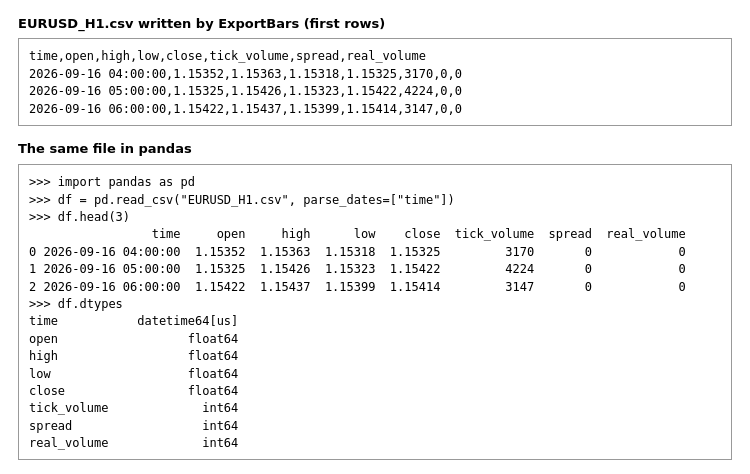
EURUSD H1 exported with the default settings: the raw file and the same file loaded with pandas.read_csv()
The problem
A file written by an MQL5 program with the default flags is UTF-16, which read_csv does not parse until the encoding is passed explicitly. TimeToString produces dates such as 2026.10.02 10:00, with dots and without seconds, which need a custom format string. Prices converted without the symbol's digits may come out with a different number of decimals from row to row.
ExportBars fixes these three points in the file itself, so the loading code stays one line and the same file can be handed to somebody else without instructions. A switchable separator is added for Excel installations that use a comma as the decimal mark, where a comma-separated file is split into the wrong columns.
What the file looks like
- One header row: time, open, high, low, close, tick_volume, spread, real_volume.
- The time column is the bar opening time in server time, written in ISO 8601 form: YYYY-MM-DD HH:MM:SS.
- Prices are written with the number of digits of the symbol (SYMBOL_DIGITS), never in scientific notation.
- Rows are in chronological order, oldest bar first, the same order as on the chart.
- The text is single-byte (FILE_ANSI), not UTF-16.
Input parameters
| Parameter | Default | Description |
|---|---|---|
| Symbol (InpSymbol) | empty | Symbol to export. Empty means the symbol of the chart the script is started on. The symbol is added to Market Watch if it is not there. |
| Timeframe (InpTimeframe) | current | Timeframe of the bars. The default is the timeframe of the chart. |
| Export mode (InpMode) | Last N bars | Last N bars, or Date range. |
| Bars (InpBars) | 5000 | Number of bars for the Last N bars mode, counted back from the current bar. If fewer bars are available, all of them are written and a message is printed. |
| From (InpFrom) | 2025.01.01 | Start of the range for the Date range mode. |
| To (InpTo) | 2026.01.01 | End of the range for the Date range mode. Must be later than From. |
| Separator (InpSeparator) | Comma | Comma, semicolon or tab. |
| Write to the common folder of all terminals (InpCommonDir) | false | false: the MQL5\Files folder of the current terminal. true: the Common\Files folder shared by all terminals on the computer, which is convenient when another program picks the file up. |
| File name (InpFileName) | empty | Empty means Symbol_Timeframe.csv, for example EURUSD_H1.csv. A relative path inside the Files folder is allowed. |
Loading the file
With the default comma separator no arguments are required. Because the timestamps are in ISO 8601 form, adding parse_dates turns the time column into datetime values without a format string. For a file exported with a semicolon or a tab, pass the matching sep argument.
import pandas as pd

df = pd.read_csv("EURUSD_H1.csv", parse_dates=["time"])
Notes
- The result is reported in the Experts log: symbol, timeframe, number of bars, time of the first and the last bar, and the file path.
- If the history for the requested bars is not available, the script prints the error code and does not create a file.
- An existing file with the same name is overwritten.
- In the Last N bars mode the last row is the current bar, which is still forming and will change until it closes.
- Volumes and spread are written as they are stored in the bar history; real_volume is 0 for symbols without exchange volume.
 StopDistance - bar range in points with a suggested stop level
Shows the range of every bar in points, its moving average (SMA or EMA) and a suggested stop distance (average x factor). A stop tighter than the typical bar range gets taken out by ordinary noise; the indicator makes that threshold visible in points, the same unit a stop loss is set in.
 Buffer Inspector Kb
Shows what every buffer of an indicator holds - arrows, a line or a colour index - and labels the arrows on the chart with their buffer numbers. Works with compiled indicators without source code.
Support and Resistance Channels Ranked by Strength
Support and resistance channels built from price pivots and ranked by strength: each pivot inside a channel and each bar that touched it adds to its score. The strongest channels run across the whole chart, colored by where price is, with break arrows, pivot marks, two averages and alerts.
 EMA Cross Scalper M15 (XAUUSD, WIB session filter)
EMA(10) x EMA(30) scalper for XAUUSD on the M15 timeframe with a Jakarta session filter. Educational example: fixed lot size, SL/TP in points, maximum of 1 position, spread filter. Tested on 100% real ticks.