 MetaTrader 5
 Experts
 Indicators
 Scripts
 Libraries
 Storage
Join our fan page

Global Variable Inspector: list, export, delete and restore terminal global variables with filters - script for MetaTrader 5
- Published by:
-
Timon-pascal Krueger
 Systematic index trader and MT5 developer from Germany.
I trade my own capital and funded accounts, including a live FTMO account, with time anchored breakout strategies on DAX, FTSE, Dow and Nasdaq. - Views:
- 26
- Published:
-
 You are missing trading opportunities:
- Free trading apps
- Over 8,000 signals for copying
- Economic news for exploring financial markets
Registration Log inYou agree to website policy and terms of use
If you do not have an account, please register -
 Need a robot or indicator based on this code? Order it on Freelance
Go to Freelance
Need a robot or indicator based on this code? Order it on Freelance
Go to Freelance


Expert Advisors keep their state in global variables of the terminal: daily start balance, lock flags, heartbeats, last trade times. After a few months a terminal collects dozens of them, and the built-in F3 window shows them unsorted, without filters and without any way to back them up. When an EA behaves strangely after a restart, the first question is usually which variable it read, and that question is hard to answer from the F3 window.
Global Variable Inspector is a small script for that job. It takes a snapshot of all variables that pass your filters, sorts them by name and prints them to the Experts journal with value, last access time and age. Values between the years 2000 and 2100 that are whole numbers are also shown as a date, because many EAs store timestamps as doubles. The same snapshot can be written to a CSV file, deleted, or later restored from that file.
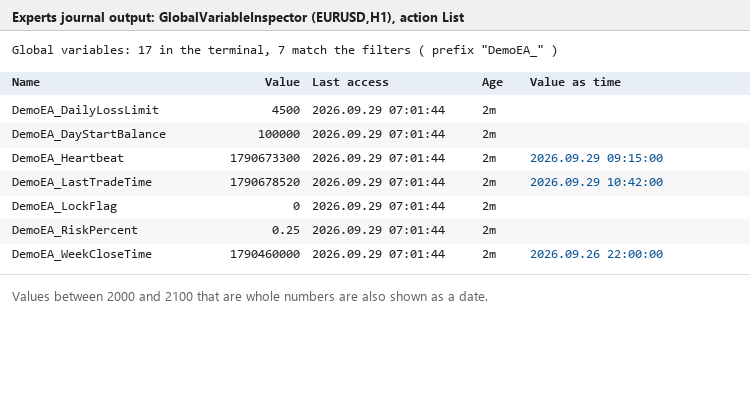
Output of the List action with a prefix filter, taken from the Experts journal: name, value, last access, age and the value read as a date
Actions
- List in the journal: prints the table and the number of matching variables. Nothing is changed.
- Export to CSV: writes name, value, last access and value as date into MQL5\Files\GlobalVariableInspector\gv_export_<date>_<time>.csv, or into the file name you enter.
- Delete matching variables: prints the table first, asks for confirmation, writes a backup CSV and only then deletes. If the backup cannot be written, nothing is deleted. Without any filter the dialog warns that all variables of the terminal will be removed.
- Import from CSV: reads a file written by the export or the backup and sets the variables again. Existing variables are kept unless you allow overwriting; the journal reports created, overwritten, kept and failed rows.
Reading a global variable counts as an access in MetaTrader 5 and refreshes its last access time, which also restarts the four week expiry of unused variables. The script therefore reads all names and access times first and only then reads the values of the variables that passed the filters. The age filter works on the untouched times, and variables outside your filter are not refreshed by a run.
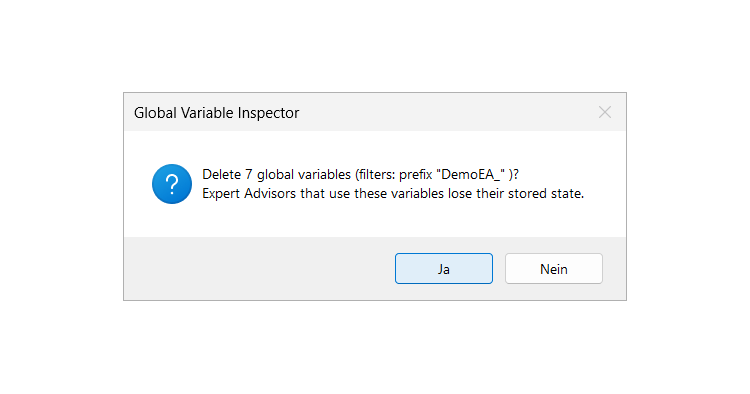
Delete asks first and names the number of variables; a backup CSV is written before anything is removed
Input parameters
| Parameter | Default | Meaning |
| InpAction | List in the journal | List, Export to CSV, Delete matching variables or Import from CSV |
| InpPrefix | empty | Only names that start with this text, empty means any |
| InpContains | empty | Only names that contain this text, empty means any |
| InpMinAgeHours | 0 | Only variables not accessed for at least this many hours, 0 means any |
| InpCaseSensitive | true | Case sensitive prefix and substring filters |
| InpFileName | empty | CSV file relative to MQL5\Files; empty creates an automatic name for export, import needs a name |
| InpBackupBeforeDelete | true | Write a backup CSV before deleting |
| InpImportOverwrite | false | Import replaces the values of variables that already exist |
| InpAskConfirmation | true | Ask before delete and import |
Typical uses
- Find the variables of one EA by its prefix and check what it stored before and after a restart.
- Clean up leftovers of EAs you no longer run: prefix of the old EA plus a minimum age of a few days.
- Move EA state to a new terminal or VPS: export on the old one, copy the CSV into MQL5\Files of the new one, import there.
- Keep a backup before you test a new EA version that writes into the same variables.
Limitations
- The script works on the global variables of the terminal it runs in; each terminal has its own set.
- Deleting a variable that a running EA uses changes that EA's state. Stop the EA first or filter carefully.
- Ages are calculated against the local computer clock (TimeLocal).
- Names that contain a semicolon are skipped in the CSV, because the semicolon is the column separator.
- Values are written with 15 significant digits. Integer values, prices and timestamps survive the round trip unchanged; values with more precision may differ in the last digits.
- Import cannot tell whether a variable was temporary, it is always restored as a normal variable. In the strategy tester delete and import are refused while confirmation is switched on.
- The confirmation is a standard Windows dialog, so its Yes and No buttons follow the language of Windows. Closing the terminal while the dialog is open counts as No.
Quick start
- Run the script on any chart with the default inputs and read the table in the Experts journal.
- Enter a prefix to narrow the list, then switch to Export if you want a copy on disk.
- For a clean up choose Delete, keep backup and confirmation switched on and answer the dialog.
The script is a free companion of my prop firm utilities in the Market (PropGuardian, PropMirror, PropSizer). It works on its own and needs nothing else.
 Broker Contract Change Watch MT5
Tracks changes to 18 broker contract properties against a saved baseline, with before and after values, a chart panel and a local CSV audit trail.
Adaptive Kalman Trend Filter Indicator
The Adaptive Kalman Trend Filter smooths price fluctuations to highlight the underlying market trend, adapting its responsiveness as market conditions change.
Accelerator Oscillator (AC)
The Acceleration/Deceleration Indicator (AC) measures acceleration and deceleration of the current driving force.
MACD Signals
Indicator edition for new platform.