 MetaTrader 5
 Experts
 Indicators
 Scripts
 Libraries
 Storage
Join our fan page

Symbol Spec Auditor - indicator for MetaTrader 5

- Views:
- 26
- Published:
-
 You are missing trading opportunities:
- Free trading apps
- Over 8,000 signals for copying
- Economic news for exploring financial markets
Registration Log inYou agree to website policy and terms of use
If you do not have an account, please register -
 Need a robot or indicator based on this code? Order it on Freelance
Go to Freelance
Need a robot or indicator based on this code? Order it on Freelance
Go to Freelance
Symbol Spec Auditor shows, in one panel on the chart, the parts of a symbol's contract specification that decide position size and trading cost: point value, spread cost, margin, swap, execution rules and sessions. The values are converted into money per 1.00 lot in the account currency, and broker settings that silently break lot-size code are listed as warnings. One click exports the same audit for every Market Watch symbol to CSV.
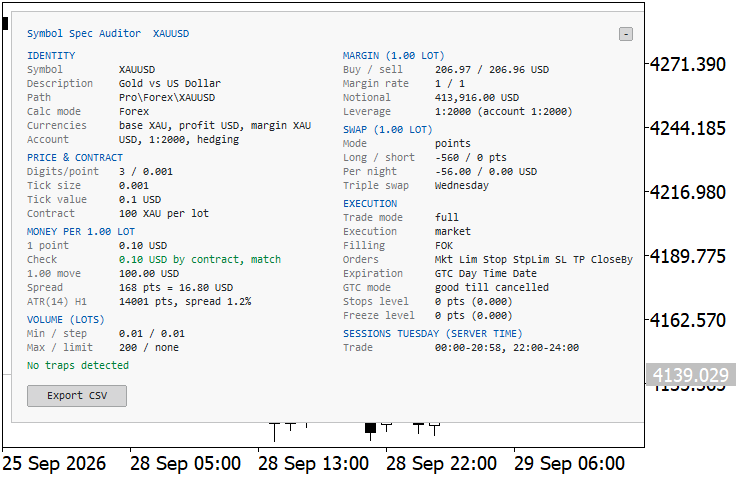
XAUUSD H1: the full two-column panel on a symbol without traps
The problem
Code that works on one broker often misbehaves on the next because of a specification detail nobody checked. The symbol specification window shows all of it, but spread over several tabs and in raw units, so a difference between two brokers or two account types is easy to miss. An Expert Advisor that sizes positions from an assumed contract or point value then risks the wrong amount without any error in the journal. Typical cases:
- Gold with a contract of 1 oz instead of 100 oz, or a forex "mini" symbol with 10,000 units. A lot formula that assumes the usual contract is off by 100 or 10 times.
- A cent account, where balance, tick value and margin are all in cents.
- A stops level or freeze level that rejects SL/TP or modifications close to the price.
- Daily orders: the broker deletes pending orders, and sometimes SL/TP, at the end of the trading day.
- A tick size that differs from the point, so prices off the tick grid are rejected.
- A minimum volume or volume step that forces rounding, a symbol in close-only mode, or an unusual triple-swap day.
This indicator collects these values in one place, converts them into money per 1.00 lot and lists what deserves a second look, each warning with a one-line consequence. It is a checking tool only: it places no orders, uses no DLLs and writes no files except the CSV export you ask for. The panel and the CSV use the same calculations, so what you see on one chart can be compared with the whole Market Watch.
What the panel shows
The panel describes the chart symbol. It is refreshed once per second and rebuilt when you change the symbol or the timeframe, so switching the chart symbol audits one symbol after another. A value that cannot be determined is shown as n/a together with the reason, and a row whose value triggers a warning is drawn in the warning color. Rows are grouped in sections:
- Identity: symbol, description, path, calculation mode, base, profit and margin currency, account currency, account leverage and margin mode.
- Price and contract: digits, point, tick size, tick value (profit and loss), contract size, and the expiry date for symbols that expire, such as futures.
- Money per 1.00 lot: the value of 1 point computed from the tick value, cross-checked against contract size x point x conversion rate; the value of a 1.00 price move; the current spread in points and in money; ATR(14) of the chart timeframe and the spread as a percentage of it.
- Volume: minimum, step, maximum and limit.
- Margin for 1.00 lot: buy and sell margin, initial margin rates, notional value, and the effective leverage (notional divided by margin) next to the account leverage. When a value cannot be computed, the panel says why, for example "no quotes", "margin rate is 0", "account leverage is 0" or a missing conversion rate.
- Swap for 1.00 lot: swap mode, long and short values, money per night in the account currency (points, currency and interest modes) and the triple-swap day. A day number outside Sunday to Saturday is shown as "not set".
- Execution: trade mode, execution mode, filling policies (FOK, IOC, BOC, Return), allowed order types, expiration modes, GTC mode (how long pending orders and SL/TP live), and stops and freeze level in points and in price.
- Sessions: today's trade sessions in server time.
Warnings
The Warnings block at the bottom of the panel lists the settings that need attention, most serious first. Each warning names the value and its consequence for trading code. If none applies, the panel shows "No traps detected". The checks compare against common reference values, so a warning is not always a broker error: it marks a setting that your code has to read from the specification instead of assuming it.
- Contract size unusual for the asset class: forex 100,000, gold 100, silver 5,000.
- Tick value or tick size is 0, or the point value from the tick value and the point value from the contract size differ by more than 1%.
- Cent account currency (USC, EUC and similar).
- Trade mode other than full: disabled, long only, short only or close only.
- Expiring contract, with its expiry date.
- No current bid/ask.
- Tick size different from the point.
- Stops level or freeze level above 0.
- Daily orders (GTC mode). "Daily" deletes SL/TP and pending orders at the end of the trading day; "daily excluding stops" deletes pending orders and keeps SL/TP.
- Minimum volume above 0.01 or volume step above 0.01, on forex and CFD symbols only. Exchange instruments often trade in whole lots, so they are not flagged.
- Spread above the chosen percentage of ATR(14) on the chart timeframe.
- Triple swap on a day other than Wednesday, for forex and metals only. Thursday is accepted for USD against CAD, TRY, RUB and PHP, which settle one day earlier. Indices, crypto and other CFDs often roll on Friday, so for them the day is shown but not flagged.
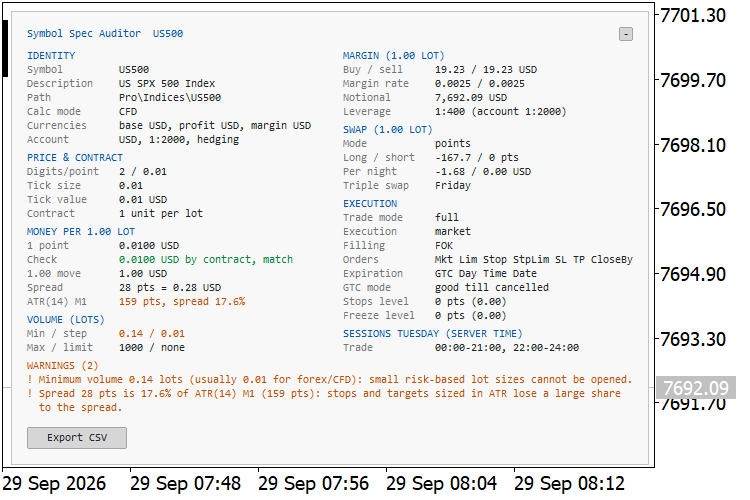
US500 M1 (CFD): minimum volume 0.14 lots, and a spread of 28 points that is 17.6% of the M1 ATR
CSV export
The Export CSV button, or the start-up option, writes MQL5\Files\SymbolSpecAudit_<server>_<yyyymmdd_hhmm>.csv with one row per Market Watch symbol. Its 55 columns hold all the values above, including the GTC mode and the contract expiry, plus a Warnings column (joined with " | ") and a Notes column that says why a value is missing. Two exports from two brokers or account types can be compared line by line.
The file is UTF-8 with BOM, comma separated, with standard quoting of fields that contain commas or quotes. Numbers use a dot as the decimal separator and no thousands separators. In locales where the list separator is a semicolon, open the file through the spreadsheet's import dialog. The full path of the file is printed in the Experts tab.
Panel handling
- Any chart corner, one or two columns (automatic by default), and a compact warnings-only mode.
- A collapse button that stays collapsed across symbol and timeframe changes.
- Colors follow the chart by default: a light panel on a light chart background and a dark panel on a dark one. Each color can also be set by hand.
- The layout is measured from the actual font metrics, so it stays aligned with other fonts and on high-DPI screens. Long warnings wrap at the panel width.
- Only labels whose text or position changed are updated, so the panel does not flicker.
- On start, panel objects left on the chart by an earlier instance (for example from a saved template) are removed.
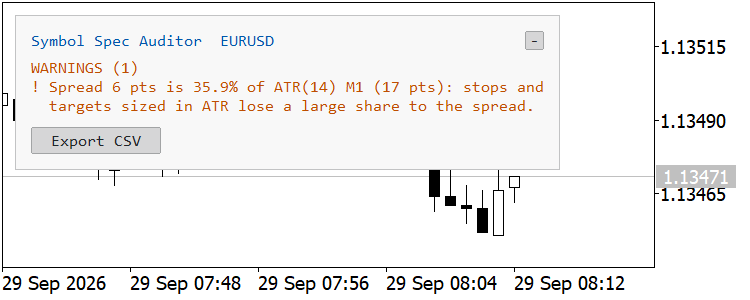
EURUSD M1, warnings-only mode: the spread of 6 points is 35.9% of the M1 ATR
Inputs
| Input | Default | Description |
|---|---|---|
| Panel corner | Left upper | Chart corner the panel is anchored to. |
| X offset (pixels at 100% screen scaling) | 10 | Horizontal distance from the corner. Scaled automatically on high-DPI screens. |
| Y offset (pixels at 100% screen scaling) | 30 | Vertical distance from the corner. Scaled automatically on high-DPI screens. |
| Layout | Auto | Auto uses one column when the panel fits the chart height, otherwise two columns. One column and Two columns force the layout. |
| Font name | Consolas | A monospaced font keeps the columns tidy; any installed font works. |
| Font size | 9 | From 4 to 24; other values are clamped to this range. |
| Show warnings only | false | Compact panel with the title, the warnings and the Export CSV button. |
| Text (None = automatic) | None | Text color. None picks it from the chart background. |
| Headings (None = automatic) | None | Color of the section headings. |
| Warnings (None = automatic) | None | Color of the warnings and of the rows behind them. |
| OK / no traps (None = automatic) | None | Color of the "No traps detected" line. |
| Background (None = automatic) | None | Panel background. Key labels, borders and buttons are blended from the text and background colors. |
| Warn if spread exceeds % of ATR(14) (0 = off) | 15.0 | Threshold for the spread warning. 0 turns it off. |
| Export all Market Watch symbols to CSV at start | false | Writes the CSV once when the indicator starts, not again on a symbol or timeframe change. |
How to use
- Attach the indicator to any chart. It draws no plots and can run next to an Expert Advisor.
- Read the Warnings block first; the rows above it hold the numbers behind each warning.
- Switch the chart symbol to audit other symbols, or press Export CSV to audit all Market Watch symbols at once.
- Use the "-" button to collapse the panel to its title bar.
A typical use is to run the export on a new broker or account type before moving an Expert Advisor there, and to compare contract sizes, tick values, volume steps, stops levels, GTC modes and swap days with the account the Expert Advisor was developed on. Differences in these columns are the ones that most often change the risk per trade or the cost of a strategy without any visible error.
Notes and limitations
- Margin and the point-value cross-check use formulas. MetaTrader 5 does not allow indicators to call OrderCalcMargin or OrderCalcProfit (they fail with error 4014), so the indicator applies the formulas that the MQL5 documentation gives for each calculation mode: a fixed initial margin when the broker sets one, the initial margin rate from SymbolInfoMarginRate, and conversion into the account currency at ask for buys and at bid for sells. On Forex, Forex no leverage, CFD and CFD leverage symbols the results matched OrderCalcMargin, called from an Expert Advisor at the same prices, to within cent rounding.
- Margin is shown as n/a for bond and collateral symbols, for futures without an initial margin, and for CFD index symbols whose currencies differ from the account currency. Volume-dependent margin tiers and rules applied only on the trade server are not reflected.
- For futures and bonds the broker's tick value is the specification, so the point-value cross-check is shown as n/a there.
- Swap money for the interest modes uses the notional and a 360-day year. For the reopen modes no fixed amount exists, so it shows n/a.
- Currency conversion uses only Market Watch symbols with live quotes, directly or through USD. Without one, the affected money values show n/a or the notional is shown unconverted. Add the conversion pair to Market Watch to fill them in.
- MetaTrader 5 adds a conversion symbol to Market Watch when the tick value of a symbol with a foreign profit currency is read. The indicator therefore reads the tick value only when a quoted Market Watch symbol already links the profit currency and the account currency, and it never enumerates symbols outside Market Watch; otherwise the tick value shows n/a with the missing pair, for example "no quoted KRW/USD symbol in Market Watch". In tests it never added a symbol. The terminal picks its own conversion symbol, though, so on a broker whose conversion symbol has a different name from the one in Market Watch a symbol may still be added.
- Cent accounts are recognized by the account currency code (USC, EUC, GBC and similar) and converted as 1/100 of the major currency, so 1 USD = 100 USC. This path was checked with a simulated account currency, not on a real cent account. A cent account that reports its currency as USD is not detected by this check.
- The usual contract sizes and triple-swap days are reference values. A broker may legitimately use other sizes (micro or cent symbols) or another rollover day; the warning is there so that your code reads the specification instead of assuming it.
- ATR is ATR(14) of the last closed bar of the chart timeframe. For the other symbols in the CSV it is computed from their bar history; right after start-up that history may still be loading, in which case the Notes column says so and a second export fills it in.
- The panel is refreshed by a 1-second timer, not on every tick. The collapsed state is kept in a temporary terminal global variable named SymbolSpecAuditor_<chart id>, which is deleted when the indicator is removed or the chart is closed. Use one instance per chart.
- The screenshots were taken on a demo account and a 192 DPI screen with Font size 4 (6 in warnings-only mode), so that the panel fits a 750-pixel image. The default size 9 gives a larger panel.
Sensible Guide Confluence
H1 indicator that combines support/resistance confluence from H4, D1 and W1 with EMA trend alignment and candlestick confirmation. Shows non-repainting BUY/SELL arrows with ATR-based stop and reward/risk filtering.
 Global Variable Inspector: list, export, delete and restore terminal global variables with filters
Script that lists the global variables of the terminal with value, last access time and age, filtered by prefix, substring and age. It exports them to CSV, deletes the matching ones after a confirmation and a backup, and restores them from a CSV file.
Spread Profile by Hour
Shows the real spread for each server hour, measured from your broker's own tick history: median and 90th percentile per hour, optional cost as a share of your stop and per lot, and CSV export.
MACD Signals
Indicator edition for new platform.