THE PROBLEM
Most news filters read the MQL5 economic calendar (CalendarValueHistory). That calendar does not exist in the Strategy Tester, so those filters silently do nothing in backtests: the EA trades straight into NFP, CPI or rate decisions, and the backtest no longer matches live behaviour. In one of my tests, a pending order on XAUUSD was filled 5 minutes before a US CPI release and the stop loss was executed with 45 USD of slippage - a single trade lost 6.5 times the planned risk.
A second, less known issue: the terminal converts historical calendar times with the CURRENT server offset. Exporting in summer on a GMT+2 / GMT+3 broker, every winter event comes out one hour late (NFP at 16:30 instead of 15:30 server time). A filter built on those times blocks the wrong hour for half of the year.
THE SOLUTION - THREE FILES
NewsCalendarExport.mq5 (script) - exports the events to Terminal\Common\Files\NewsCalendar.csv and recalculates each event with the server offset of its own date. At the end, it prints a self-check: the most frequent time of USD events must be identical in winter and in summer.
NewsFilter.mqh (class CNewsFilter) - one filter for both live trading and backtests. Live it reads the economic calendar (queried at most once per minute); in the Strategy Tester it reads the CSV. Only the currencies of the symbol are used (EURUSD: EUR + USD, XAUUSD: USD, index CFDs quoted in USD: USD).
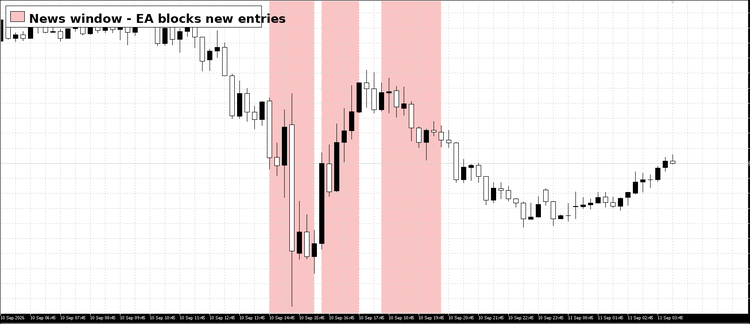
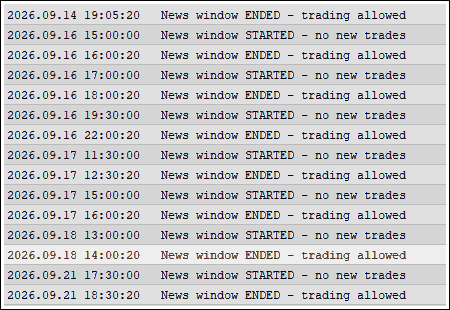
NewsFilter_Example.mq5 - a minimal EA that prints when a news window starts and ends, and paints the blocked windows on the chart, so you can see the filter working in the tester's visual mode.
HOW TO USE
Copy NewsFilter.mqh to MQL5\Include, NewsCalendarExport.mq5 to MQL5\Scripts and NewsFilter_Example.mq5 to MQL5\Experts. Compile the script and the example (the .mqh is compiled together with them).
Run NewsCalendarExport once, on any chart of a connected terminal. In the Experts tab you should see: "OK: same time in winter and summer".
In your EA, add the following code:
C++
#include <NewsFilter.mqh>
CNewsFilter news;
int OnInit()
{
news.Init(_Symbol, 30, 30); // block 30 minutes before and after each event
return(INIT_SUCCEEDED);
}
void OnTick()
{
if(news.IsBlocked())
return; // no new entries during news
// ... your entry logic ...
}
Backtest as usual. The journal shows how many events were loaded for the symbol.
SCRIPT INPUTS
Export events from: start date of the export.
Also export scheduled events N days ahead: includes upcoming events.
Currencies: comma separated list (default USD,EUR,GBP,JPY,CAD,AUD,NZD,CHF).
Importance: high impact only, or medium + high impact.
Broker server DST rule: US rule (default, server = New York + 7h, most GMT+2/+3 brokers), EU rule, or no DST.
File name: stored in Terminal\Common\Files.
CNewsFilter::Init(symbol, minutesBefore, minutesAfter, mediumToo = false, csvFile = "NewsCalendar.csv")
NOTES AND LIMITATIONS
Tested on FTMO (GMT+2 / GMT+3, US DST rule) and on IC Markets EU. Example output: 5645 events exported, 1897 of them shifted by one hour; before the correction the most frequent USD time was 16:30 in winter and 15:30 in summer, after the correction 15:30 in both seasons.
If the self-check still shows different winter and summer times, try another "Broker server DST rule".
The MQL5 calendar history is limited and depends on the terminal; on my terminal it starts in 2020, so older backtests will contain no events.
Only the currencies of the symbol are used, so for indices and commodities the quote currency decides which events apply.
Remote and cloud agents cannot read Common\Files - optimize with local agents.
Some currencies have very few high-impact events in the MQL5 calendar (AUD for example). Use "Medium + high impact" for them.
The filter only tells your EA when NOT to open new trades. Managing already open positions is up to your EA.
Re-run the script from time to time to include new events.
NEED HELP INTEGRATING THIS?
If you are not a coder and want this news filter integrated into your existing EA, or if you need custom risk management rules tailored for your prop firm evaluations, contact me directly via my MQL5 Freelance profile. I'd be happy to code it for you!
 MetaTrader 5
 Experts
 Indicators
 Scripts
 Libraries
 Storage


 You are missing trading opportunities:
 Need a robot or indicator based on this code? Order it on Freelance
Go to Freelance
Need a robot or indicator based on this code? Order it on Freelance
Go to Freelance

 Safe Risk Manager EA - Daily Loss, Break-Even and Trailing Stop
 Accelerator Oscillator (AC)