Oldest loser first, slice by slice: how Drawdown Minimizer decides what to close

Out of drawdown #4 – part 3 explained the savings book: how much money is available to close old losers. This part explains how that money is spent. The rules are short: only the losers of the EAs you choose, the oldest one first, one paid slice at a time, and a small rest is closed in full.
Which positions are candidates at all
Drawdown Minimizer never opens a trade, and it does not touch everything that is red. A position is a candidate only if all of this is true:
- It belongs to an EA you named – by magic number, by a magic range like 1000-1999 (for EAs that give every grid level its own magic) or by a text in the trade comment.
- It is in loss, counted including swap and commission.
- It is old enough, if you set Min position age (days). Younger positions are never touched.
Winners are never closed, and neither are positions of other EAs or your manual trades.
Why the oldest goes first
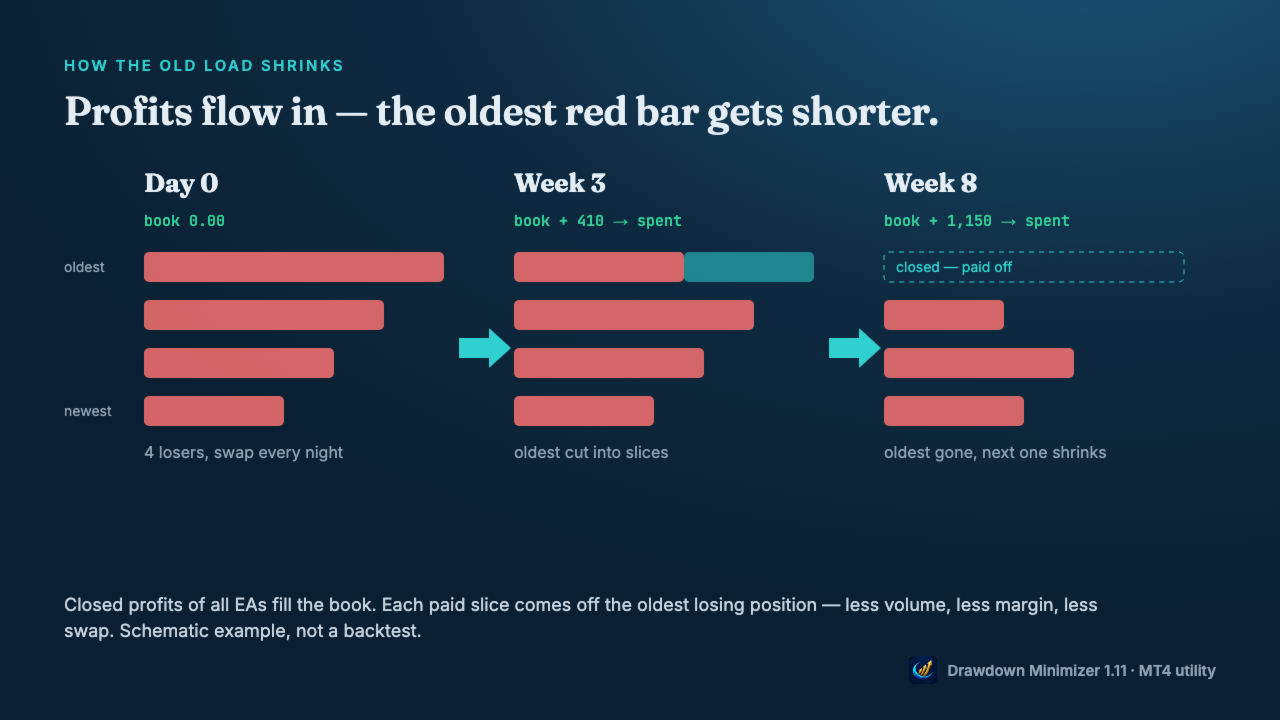
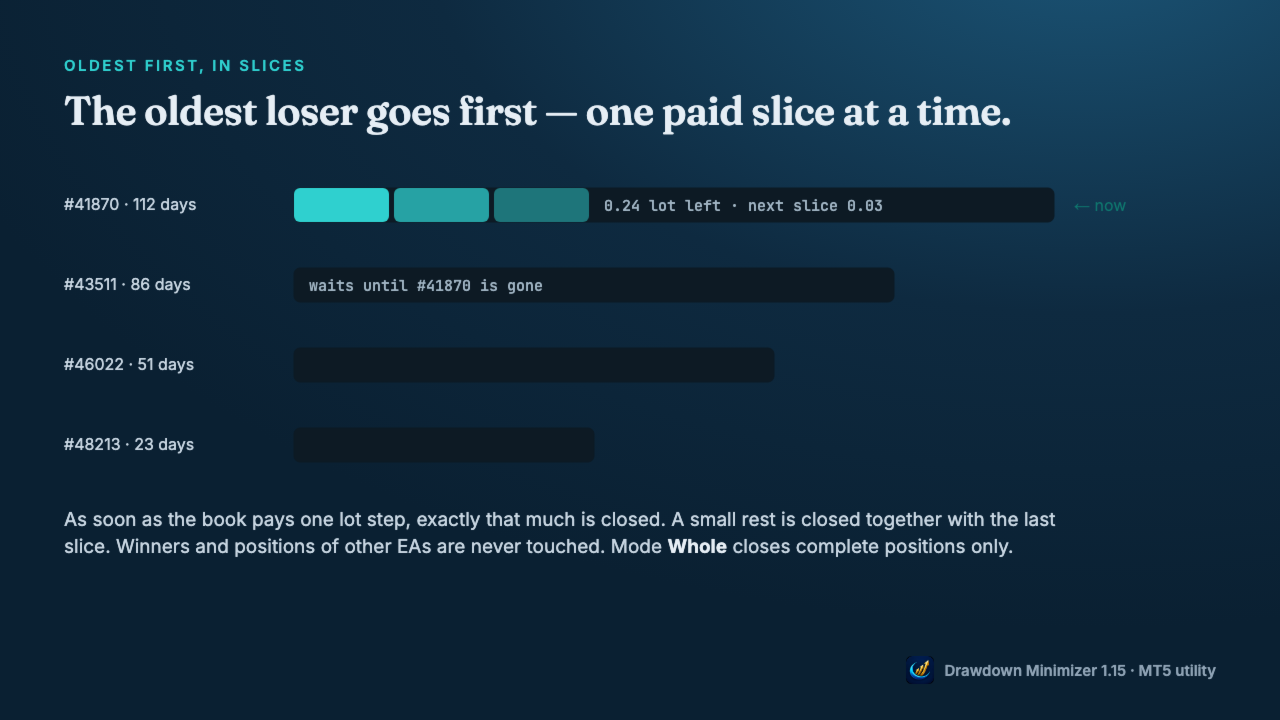
Among the candidates the order is fixed: the oldest losing position goes first, and it is reduced completely before the next one is touched. A younger position is never preferred because it is cheaper.
The reasoning: in a stuck grid basket the oldest position is usually the one that is furthest from the current price, has paid swap for the longest time and is the least likely to be reached again soon.
The uncomfortable consequence: the oldest position is often the most expensive one per lot. The book may need a while before it can pay the first step. In that time nothing is closed, and the panel shows how much is still missing for the next slice.
What a slice is
A slice is a part of a position, measured in lot steps of the symbol (for example 0.01). The rule is: the book has to pay for it first. As long as Available does not cover at least one lot step of the oldest loser, nothing happens.
How much is closed once the money is there is described per version on the product pages:
| Version | Size of a close |
|---|---|
| MT5 | As soon as the book pays one lot step, exactly that much is closed |
| MT4 | As soon as the book pays the minimum lot, the tool closes as many lot steps as the book can pay |
On MT4 this means: with a large book, the first close can be a big part of the position, or all of it. Keep that in mind when you backdate the book with Start counting from – and limit Max spend per day if you want the reduction to go slowly.
A short illustration (example numbers, not a result): the oldest loser has 0.10 lots and an open loss of −200.00, so one step of 0.01 costs about 20.00. With 20.00 available, 0.01 is closed and 0.09 stays open.
The small rest: Close fully if rest below

Cutting a position down to a crumb of 0.01 lots is not useful. That is what Close fully if rest below (lots) is for. The default is 0.02.
If a slice would leave less than this value open, the tool does not cut that slice. It waits until the book pays for the whole rest and closes it in one go. In the example above: when 0.02 lots are left, closing 0.01 would leave 0.01 – below 0.02. So the last 0.02 are closed together once they are paid for. After that, the next oldest loser is first in line.
Mode Whole: complete positions only
Close mode has two values: Slices (default) and Whole. Whole closes complete positions only – the book has to cover the entire loss of the oldest position before anything is closed.
When is Whole the better choice? When your grid EA does not cope well with a position that suddenly has less volume. Some grid EAs size the next level from the open volume, and on MetaTrader 4 a partial close gives the rest a new ticket, which some EAs no longer recognise. The MT4 product page recommends: test in dry run first, then start with Close mode Whole or a single slice. Part 12 of this series looks at MT4 partial closes in detail.
The trade-off: with Whole, a large old position can wait a long time for its payment, and it keeps its full volume and swap until then.
Pace and when a close is held back
Two settings keep the closing calm:
- Min seconds between closes (default 30): at most one close per interval. It protects against request floods.
- Max spread (points) (default 0 = off): no closes during spread spikes.
A close is held back when the symbol is not tradable, the spread is above your limit or the broker rejects the request; the tool retries with a pause. On MT4, if the oldest position is blocked this way, the next one in line is used.
How to check what was closed
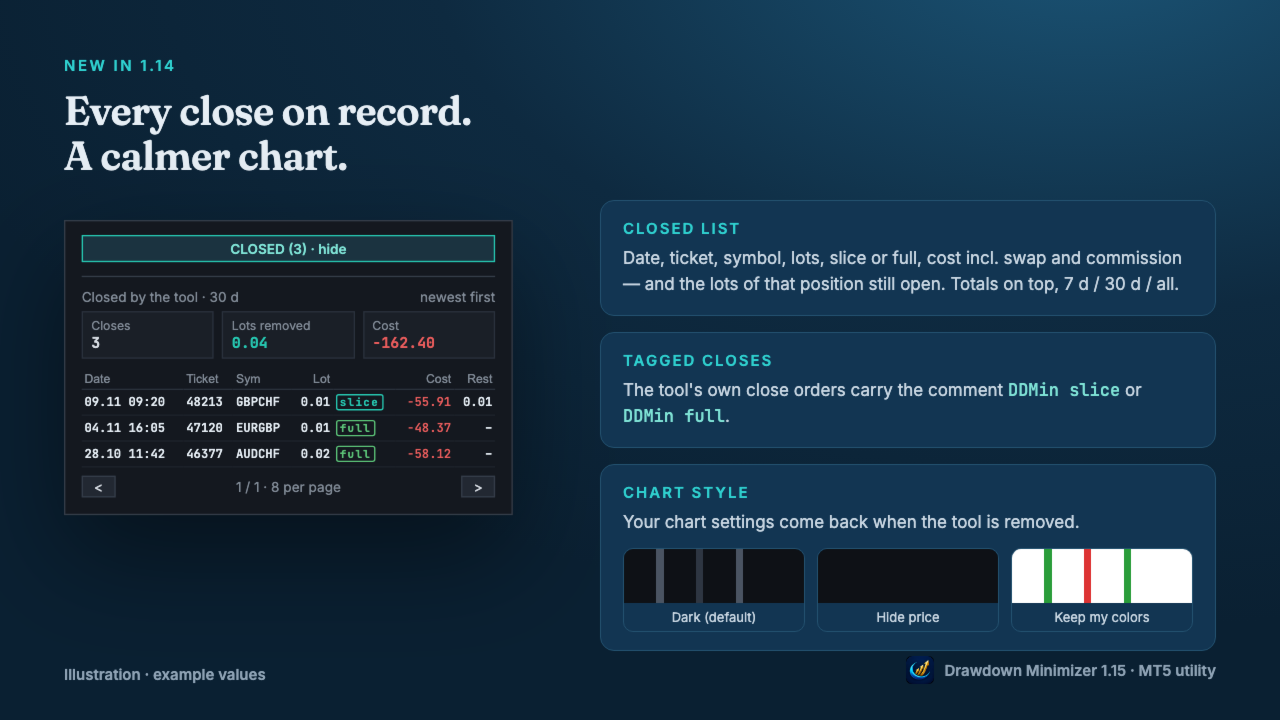
Every close of the tool carries the comment DDMin slice or DDMin full, so you find it in the deal history at a glance. On MT5 the CLOSED button below the panel lists each close: date, ticket, symbol, lots, slice or full, cost including swap and commission, and the lots of that position still open.
Before any of this happens for real, Dry run is on by default: the journal only shows what would be closed. Watch it for one or two weeks.
What this order does not do
Oldest first does not predict anything. Closing a slice with saved profit does not change your equity, apart from slippage: a floating loss becomes a realized one. What changes is the load – less open volume, less margin, no more swap on the closed volume. The price: if the market would have come back, that way back is gone for the closed slices.
The next part looks at exactly that: what Drawdown Minimizer does not do.
3-minute video: https://www.youtube.com/watch?v=0Mw6uRqK3K8
Complete guide with the video: https://www.mql5.com/en/blogs/post/778023
Drawdown Minimizer MT5: https://www.mql5.com/en/market/product/201728