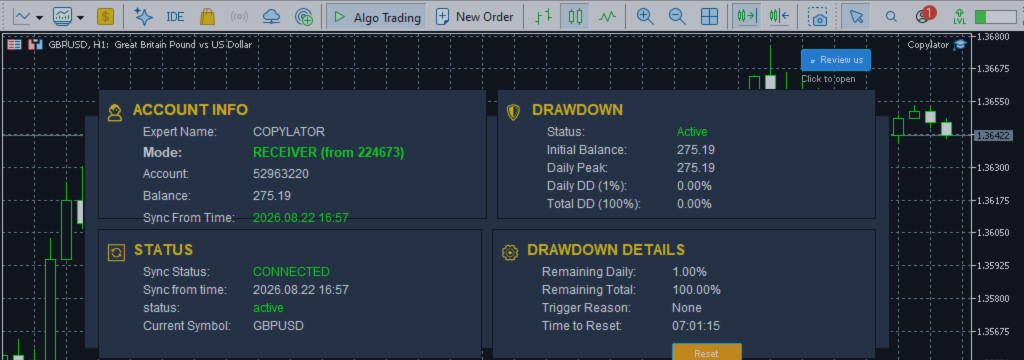
How to Enable Reverse Mode and What It Is Actually For — COPYLATOR – MT5 Trade Copier

Product link:
https://www.mql5.com/en/ market/product/191385
Reverse mode is a single setting with a straightforward function, yet it is one of the most misunderstood features in copy trading. Traders enable it expecting one outcome, observe something different, and conclude that either the feature is not working or they misunderstood what it does.
The feature itself is not complicated. The challenge is understanding what changes, what stays the same, and what reverse mode is actually suitable for. That begins with knowing where the setting is configured.
Where the Setting Lives
Reverse mode is a receiver-side setting. It is configured on the account that receives copied trades, not on the account sending them.
This is an important distinction. The sender provides trading activity. The receiver determines how that activity is handled, including whether the copied trade should follow the original direction or use the opposite direction.
As a result, one sender can potentially serve two receivers at the same time: one operating in normal mode and another operating in reverse mode. Each receiver applies its own configuration to the same incoming trading activity.
Three Things to Check Before Enabling Reverse Mode
1. Confirm That Normal Copying Works
The receiver should first be connected and copying correctly in normal mode. Check symbol mapping, lot sizing, stop-loss and take-profit handling, and position management.
Changing the direction before verifying the basic configuration makes troubleshooting more difficult. If something goes wrong, it may be unclear whether the problem comes from the original setup or the reversal setting.
2. Review Existing Open Positions
Before enabling reverse mode, check whether the receiver has open positions.
Changing the setting should not be treated as a way to reverse positions that are already open. Existing positions generally remain in their original direction and continue to be managed according to the copier's position-management rules. Decide in advance whether to leave them open, close them manually, or handle them through a separate plan.
3. Reassess the Lot Size
A reversed strategy is a different trading approach, with a different risk profile. Its results cannot be assumed to match the original strategy with the profit and loss signs simply exchanged.
Spread, commission, swap, bid/ask differences, slippage, and execution conditions can all affect the result. Starting with a smaller lot size during testing is a sensible precaution.
How to Enable Reverse Mode
In COPYLATOR, reverse mode is configured through the receiver's settings. The relevant parameter is the reverse-copy option, such as CopyWithReversal , where available in the installed version.
- Open the receiver's configuration in MetaTrader 5.
- Locate the reverse-copy setting.
- Set the option to true .
- Save or apply the configuration.
- Restart the copier or reload its settings if required by the version you are using.
After the receiver applies the new configuration, subsequent signals should be processed in the opposite direction. Do not assume that changing the setting automatically reverses existing positions.
The exact parameter label and whether a restart is required can depend on the installed version and configuration interface. Always check the available inputs rather than relying on a parameter name from another release.
What to Verify After Enabling It
Do not assume that the setting is working correctly just because it has been enabled. Check the first copied trade carefully.
- Trade direction: Confirm that the receiver opens the opposite direction to the sender.
- Stop loss: Check that the stop is on the appropriate side of the receiver's entry. For a reversed Buy, the stop should normally be above the entry; for a reversed Sell, it should normally be below the entry.
- Take profit: Confirm that the target is on the opposite side of the entry from the stop loss.
- Distances: Compare the stop-loss and take-profit distances with the intended reversed configuration. Actual prices and distances may differ because of execution prices, broker rules, and instrument specifications.
- Position management: Verify that the receiver's position can still be identified and managed correctly when the sender modifies or closes the corresponding trade.
If the direction or protection levels are incorrect, stop further copying and investigate the configuration before continuing. Handle any position already opened according to your risk-management plan.
The First Use: Controlled Strategy Verification
One possible use of reverse mode is to investigate whether a strategy's historical losses are associated with its directional decisions.
For example, if a sender has experienced a prolonged losing period, a trader may want to test whether taking the opposite side of its signals produces different results. A reversed receiver can be used as part of that experiment.
However, reverse mode does not provide an automatic answer. A losing strategy does not necessarily become profitable when its direction is reversed. The comparison must account for transaction costs, execution differences, stop-loss and take-profit behavior, and the timing of trades.
A controlled test using separate demo accounts can help compare normal and reversed results without mixing the positions. Evaluate both equity curves over a sufficiently meaningful sample of trades, rather than drawing conclusions from a short period.
The Second Use: A Deliberate Contrarian Approach
A trader may agree with the sender's timing and trade selection but disagree with its directional conclusions. Reverse mode offers a way to test that contrarian approach without selecting a different sender.
In this situation, the trader is no longer following the sender's original strategy. The trader is following a new approach based on the sender's signals but taking the opposite side.
That distinction matters: the sender's historical performance does not describe the performance of the reversed strategy. The reversed approach needs its own testing, risk limits, and ongoing evaluation.
The Third Use: Testing a Partial Hedge
Reverse mode can also be considered when testing whether opposite positions on a separate account can offset part of an existing exposure.
For example, a trader may use a smaller receiver account to take opposite positions to those on a primary account. The intention may be to reduce some portfolio exposure rather than generate an independent profit.
However, an opposite copied position is not automatically an effective hedge. Differences in entry prices, execution timing, lot sizes, spreads, commissions, swaps, and closing conditions can leave substantial residual exposure. In some circumstances, the additional positions may increase costs or create new risks.
Any hedge configuration should therefore be evaluated at the combined portfolio level. The relevant question is not whether the hedge account is profitable by itself, but whether the overall arrangement produces the intended change in risk.
The Fourth Use: Researching the Effect of a Filter
Reverse mode may also be included in a research setup designed to evaluate trading filters.
For example, two demo receivers can be configured with comparable settings, one in normal mode and one in reverse mode. The trader can then compare how each performs under the same intended filtering rules.
This experiment requires care. A filter may behave differently for Buy and Sell trades, and reversing a position can change how stop losses, take profits, and other direction-dependent conditions operate. Therefore, the difference between the two equity curves cannot automatically be attributed to directional edge alone.
Document the test conditions, use comparable execution settings, and examine the actual trades as well as the final account results. This is a research application, not proof that one direction is inherently superior.
What Reverse Mode Is Not For
It Is Not a Recovery Mechanism
Enabling reverse mode while a losing position is open does not close that position, reverse its direction, or turn its floating loss into a gain. Existing positions need to be handled separately.
It Does Not Repair a Weak Strategy
Reverse mode changes the direction of copied trades. It does not improve the sender's entry timing, remove transaction costs, or guarantee better results. The reversed approach may also lose money.
It Is Not a Substitute for Testing
A losing streak is not enough evidence that a strategy should be reversed. Losses may be part of a strategy's normal drawdown, or they may indicate a more fundamental problem. The distinction requires analysis, not an automatic change of direction.
It Is Not a Set-and-Forget Decision
Market conditions, strategy behavior, and execution quality can change. A reversal that appeared useful in one test period may not remain suitable. Review the results and risk settings regularly.
How to Disable Reverse Mode
Disabling reverse mode follows the same basic procedure:
- Open the receiver's configuration.
- Set the reverse-copy option to false .
- Save or apply the configuration.
- Restart the copier or reload the settings if required.
- Check the next copied trade to confirm that it follows the sender's direction.
Positions opened while reverse mode was active do not automatically change direction when the setting is disabled. They may continue to be managed under the copier's position-matching rules. Verify that the corresponding sender and receiver positions remain correctly linked and that subsequent modifications and closing instructions are handled as expected.
The Most Common Mistake
One of the most common mistakes is enabling reverse mode as an emotional reaction to a losing streak.
A trader sees several months of losses, assumes the sender is consistently choosing the wrong direction, and immediately switches to reverse mode. The reversed approach then experiences losses as well.
There are several possible explanations. The original strategy may have been experiencing a normal drawdown. Its losses may have resulted from poor timing, excessive risk, or unfavorable market conditions rather than simply choosing the wrong direction. Reversal also introduces different execution costs and trade outcomes.
The better approach is to test before making the change. Use separate demo accounts where practical, define the comparison period and risk limits in advance, and evaluate a meaningful sample of trades. A few successful reversed trades are not sufficient evidence of a durable advantage.
Summary
Reverse mode is a receiver-side setting that changes the direction in which new copied signals are executed. It does not automatically reverse positions that are already open.
It can be useful for controlled strategy research, deliberate contrarian testing, and evaluating a possible portfolio hedge. It can also help investigate how a strategy behaves when its directional decisions are changed.
But it is not a recovery tool, a guaranteed way to improve a losing strategy, or a setting that should be enabled simply because the sender has experienced a losing streak.
Enable it on the receiver, verify the first reversed trade, review the stop-loss and take-profit placement, and begin testing with appropriately controlled risk. When disabling it, check that new trades return to the sender's direction and that existing positions continue to be managed correctly.
The setting is simple. Deciding whether it is appropriate requires evidence, careful testing, and an understanding of the risks introduced by reversing trades.
Product link:
https://www.mql5.com/en/ market/product/191385



