Request Budget Trailer is a free utility for MetaTrader 5. It counts the trade requests that the Expert
Advisors in your terminal send per day, shows which of them send the most, and alerts you when a daily
budget fills up. It can also trail stop losses in steps. This guide explains the panel, the settings and
the limits of what it can know.
Why count requests
Some brokers and prop firms publish a limit for the number of requests an account may send per day and
warn or restrict accounts that exceed it. A trailing stop that moves on every tick is a common cause: each
move is one request. MetaTrader does not show this number anywhere, so most traders only learn about it
when the warning arrives.
First start
1. Attach Request Budget Trailer to one chart. Any symbol and timeframe will do.
2. The panel appears in the upper left corner. Counting starts immediately.
3. Enter your daily budget in the inputs. Use the limit your broker or prop firm states. The utility does
not know that limit.
Counting does not need permission for Algo Trading. One instance counts all Expert Advisors in the
terminal. If you attach a second instance on another chart, it refuses to start and tells you why.
Reading the panel
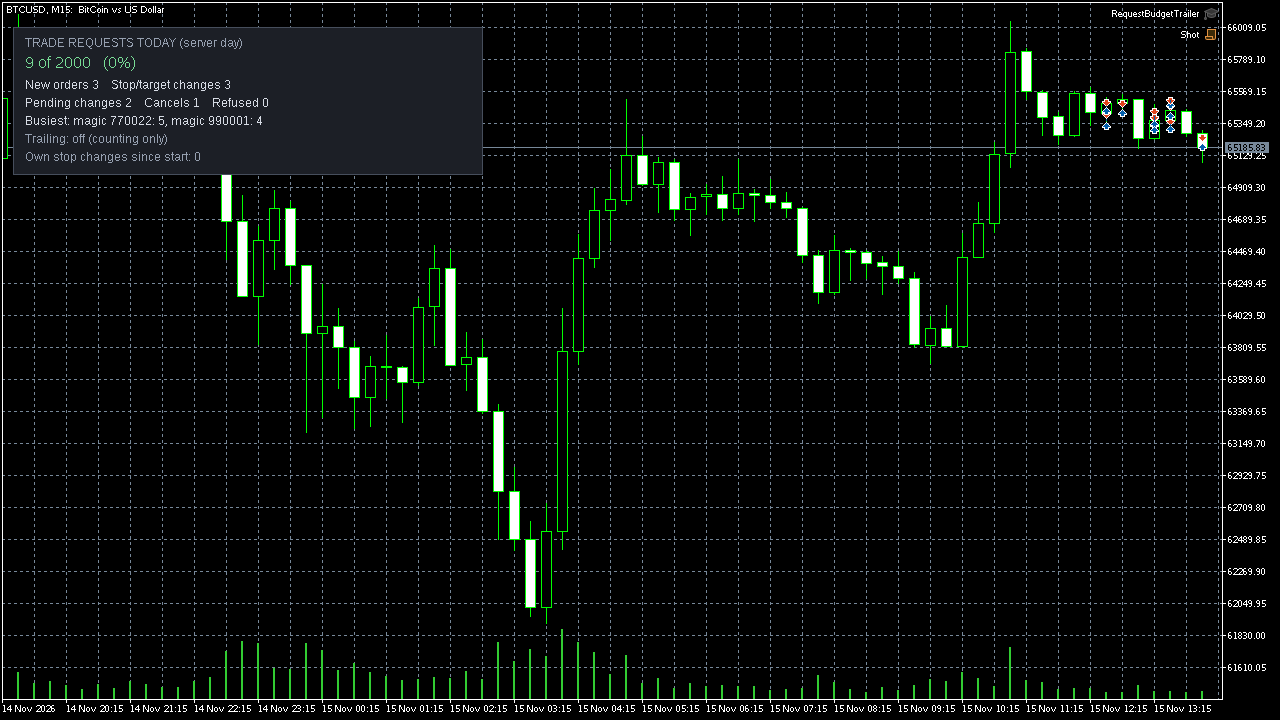
- Trade requests today. The server day, not your local day. The counter starts again at server
midnight.
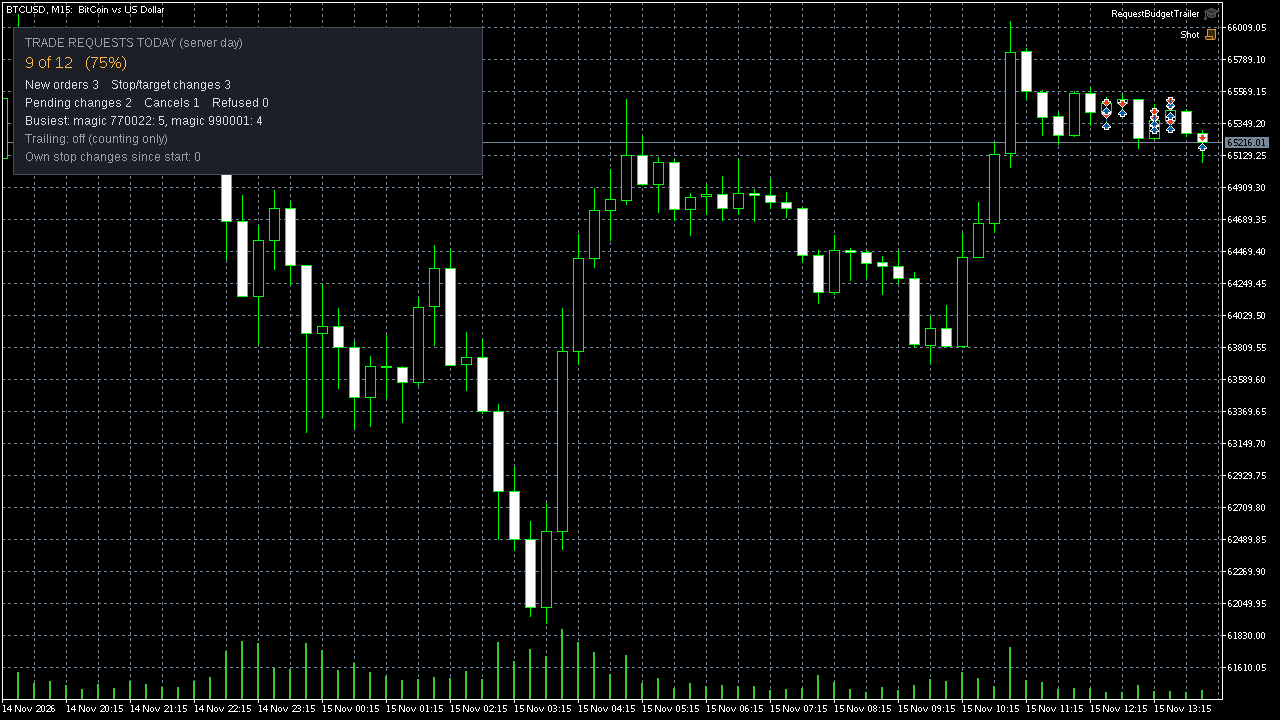
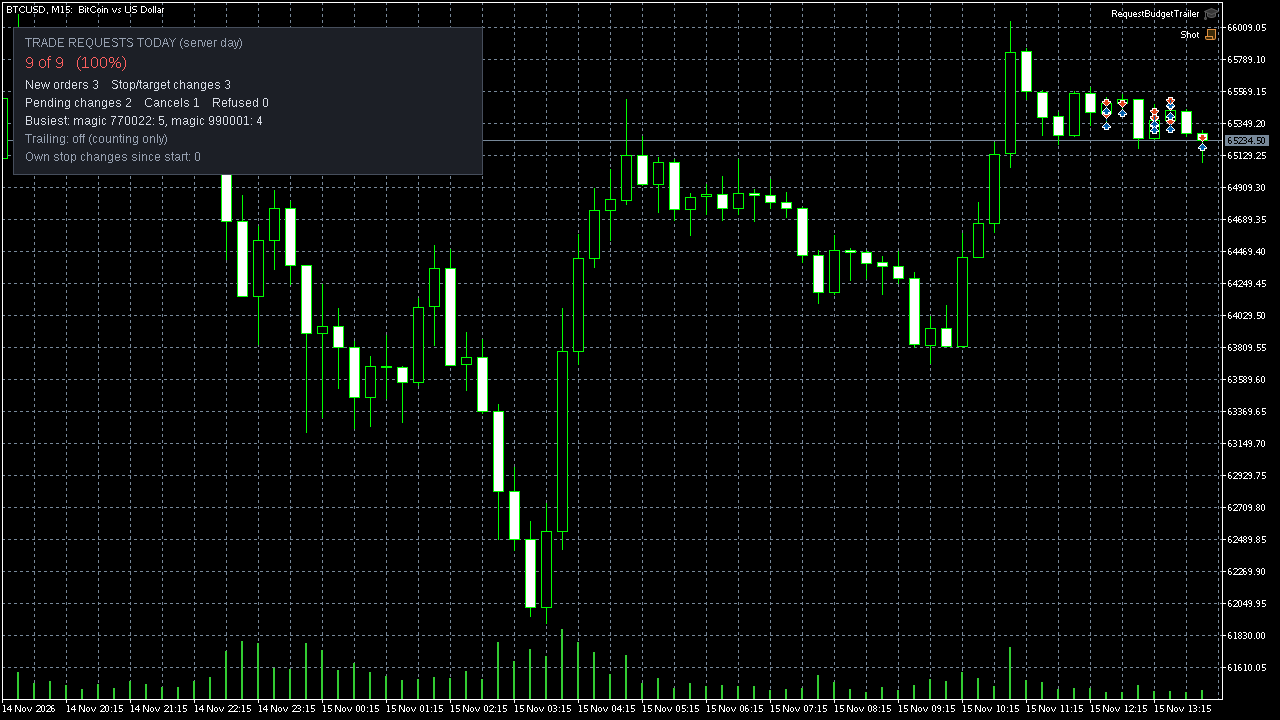
- 9 of 2000 (0%). Requests so far, your budget, and the share used. Green below the alert level,
orange from the alert level, red when the budget is reached.
- New orders. Market orders and pending orders, including orders that close a position.
- Stop/target changes. Changes of stop loss or take profit of open positions. A trailing stop shows
up here.
- Pending changes, Cancels. Changes and cancellations of pending orders.
- Refused. Requests of this utility's own trailing that the server refused.
- Busiest. The two programs that sent the most requests today, by magic number.
- Trailing. Off, active, slowed down, paused, or waiting for permission.
What is counted and what is not
Counted: every request the server accepted from an Expert Advisor in this terminal. That includes the
requests of other Expert Advisors, not only this utility's own.
Not counted:
- Requests of other programs that the server refused. The terminal does not report them to other
programs, so the real number can be higher than the number shown.
- Requests sent from another terminal or from a mobile app on the same account.
- Orders the server creates itself when a stop loss, take profit or stop out is hit. Those are not
requests of your account.
Treat the number as a lower bound and keep a margin below your limit. Staying below the budget does not
guarantee that an account will not be warned or restricted.
The daily budget
- Budget of trade requests per server day. 0 switches the budget off; the counter still works.
- Alert level. At this share of the budget you get an alert, and a push notification if you switch
that on.
- At 100 percent you get a second alert.
The utility cannot slow down or stop other Expert Advisors. The alert tells you that it is time to act,
for example by switching off the tick trailing of the Expert Advisor that the "Busiest" line names.
Step trailing
Step trailing is off by default. Switch on "Trail stops" and allow Algo Trading for the utility if you
want it. Until you allow it, the panel shows "WAITING".
How it works: once a position is in profit by the start value, the stop follows the price at the chosen
distance. It moves only when it can improve by at least one step, and not more often than the interval.
Three rules always apply:
- A stop only moves towards the price, never away from it.
- A position without a stop gets its first stop at the entry price or better, never on the losing side.
- The take profit is left unchanged.
All values are in points. On a five-digit EURUSD quote, 50 points are 5 pips. On instruments with a
different price scale the same number means something else, so check the point size of your symbol. A
step that is small for the instrument saves few requests.
Which positions it manages:
- Magic number -1 manages all positions of the chart symbol, including positions opened by other Expert
Advisors and by hand. Enter a magic number to limit it to one Expert Advisor.
- "All symbols" extends it to every symbol.
- "Skip positions that share a take profit" leaves grid baskets with the Expert Advisor that owns them.
To replace the tick trailing of another Expert Advisor, switch its trailing off in its own settings and
let this utility trail with that Expert Advisor's magic number.
When the alert level is reached, the utility doubles its own step and interval. At the budget it pauses
its own trailing until the next server day. After a refused change it leaves that position alone for
10 seconds.
Test results
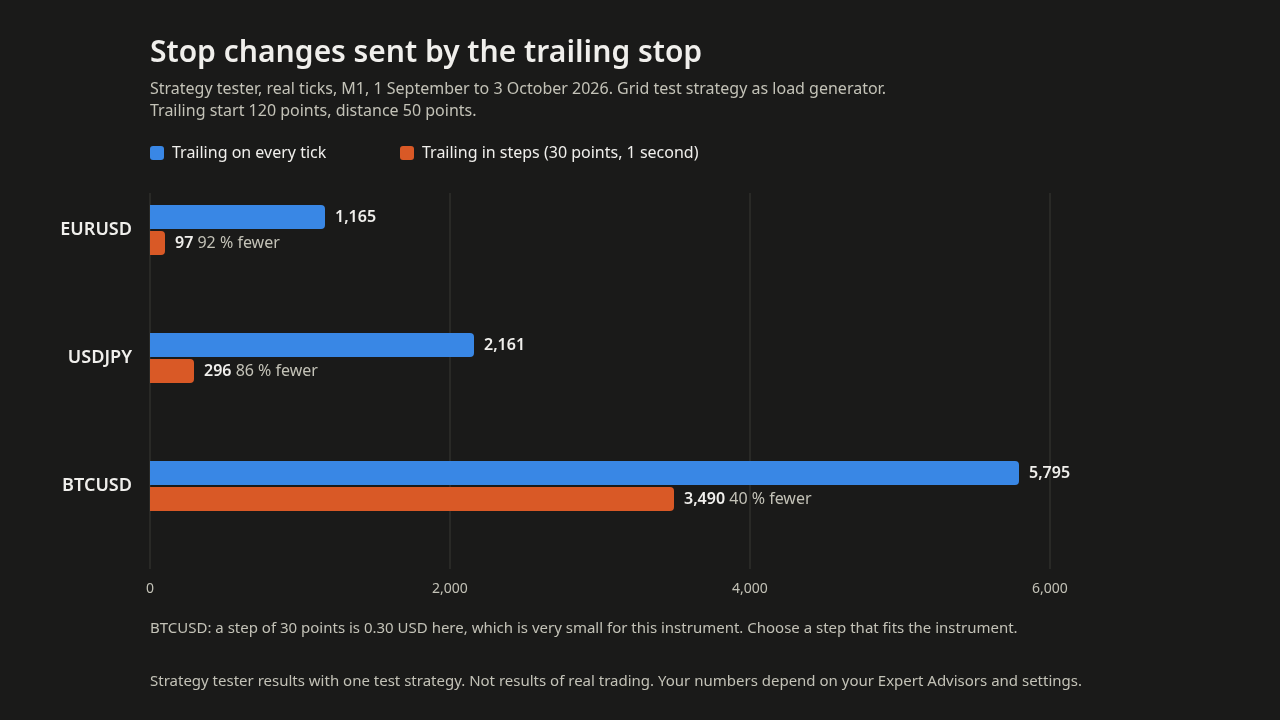
Strategy tester, real ticks, M1, 1 September to 3 October 2026, with a grid test strategy as load
generator, trailing start 120 points, distance 50 points. Stop changes sent by the trailing stop:
- EURUSD: 1,165 on every tick, 97 with a step of 30 points and an interval of 1 second
- USDJPY: 2,161 on every tick, 296 with the same step and interval
- BTCUSD: 5,795 on every tick, 3,490 with the same step and interval. A step of 30 points is 0.30 USD
there, which is very small for that instrument.
These are tester results with one test strategy, not results of real trading. Your numbers depend on your
Expert Advisors and settings.
Questions
The panel shows WAITING. Trailing is switched on but Algo Trading is not allowed for the utility.
Open its properties and tick "Allow Algo Trading", and check that Algo Trading is on in the terminal.
The counter stays at 0. No Expert Advisor in this terminal has sent a request today. Requests from
another terminal or the mobile app are not counted.
The counter restarted during my day. It follows the server day. Server midnight is usually not your
local midnight.
I restarted the terminal. Today's counters and the split by program are kept.
A second instance does not start. One instance counts the whole terminal. Remove the first one if you
want to move it to another chart.
Your feedback
If you use it, please tell me in the comments of the product which daily limit your broker or prop firm
states and what you would like the utility to show in addition. That decides what comes next.
Trading involves risk of loss. Test on a demo account first.