How Median World works: test your EA on 200 histories, not one

Product: Median World on the MQL5 Market. It's a MetaTrader 5 utility. It doesn't trade and it isn't a forecast.
The problem: a backtest is one path
A backtest shows what your Expert Advisor did on the one price history that actually happened. It can't tell you how much of the profit came from the strategy and how much from that particular path. Optimisation makes this worse: each adjustment fits that history a little better, accidents included. Only a different history can show the difference.
Step 1: build alternative worlds
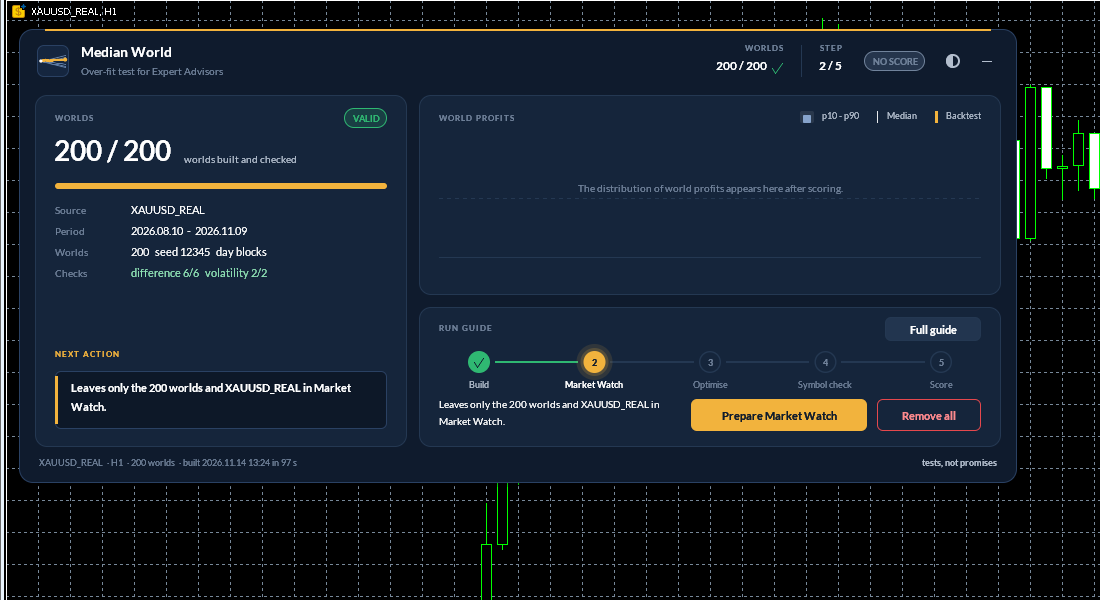
Attach Median World to a chart of the symbol your EA trades and press Build worlds. The tool:
- takes the symbol's M1 history (last 7 months by default, or your own months or dates),
- removes the drift, so just holding a rising market earns nothing,
- reshuffles whole days on the real calendar (a Monday is replaced by another Monday; bars inside each day are real),
- saves each world as a custom symbol with the original's contract specifications.
You choose 30 to 1000 worlds (200 by default). It shows a disk estimate first and asks you to confirm. Every build is then checked: each world must differ from the real path and from the other worlds, and its volatility must match the original, overall and hour by hour. A build that fails is marked FAILED and can't be scored.
Step 2: one optimisation over all worlds
Press Prepare Market Watch (it leaves only the worlds and the real symbol as reference). Then, in the Strategy Tester:
- Pick your EA, your timeframe and a date range inside the worlds' period.
- Use "1 minute OHLC" or "Every tick" (worlds have no real ticks).
- Load your .set file and untick every optimisation box.
- Choose Optimization = "All symbols selected in Market Watch" and start: one pass per world, plus the real symbol.
- Export the results to XML in MQL5\Files\MedianWorld .
- Run one single test on the first world and save its report there as symcheck... , so the tool can confirm your EA trades only its chart symbol.
MetaTrader 5 doesn't let a program start the tester, so you run this part yourself. The panel's run guide lists each step.
Step 3: score
Press Score. You get four numbers:
- Edge: the share of worlds that ended profitable with equity drawdown below a limit (30% by default).
- Replication: the median world's profit divided by your real backtest's profit.
- World profit at p10, median and p90: a bad world, a typical world and a good world.
- Percentile: where your real backtest ranks among its own worlds.
You also get a verdict, using these rules:
- NOT TESTABLE: the real backtest isn't profitable, so there's nothing to replicate.
- NO EDGE: the median world is at or below zero, or edge is under 40%, and the backtest is below the 95th percentile.
- OVER-FITTED: the backtest is at or above the 95th percentile, and either the median world is at or below zero, edge is under 40%, or replication is under 0.25.
- ROBUST: edge is at least 60%, replication at least 0.50, and the backtest at or below the 90th percentile.
- INCONCLUSIVE: everything else. Part of the edge survives, so treat the backtest with caution.
The practical reading is on the panel: expect the median world, not the backtest.
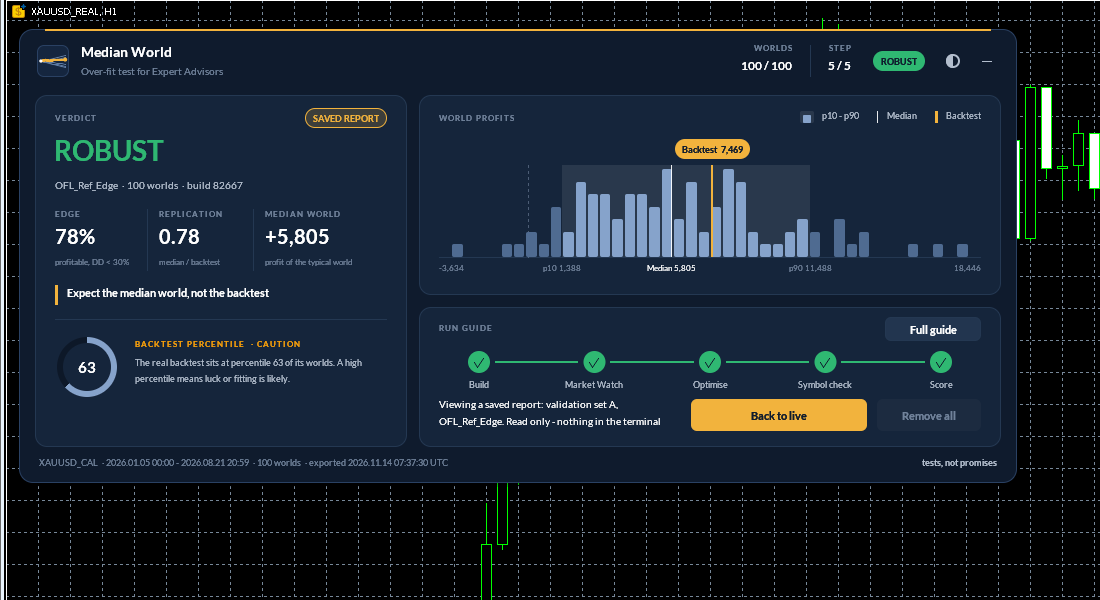
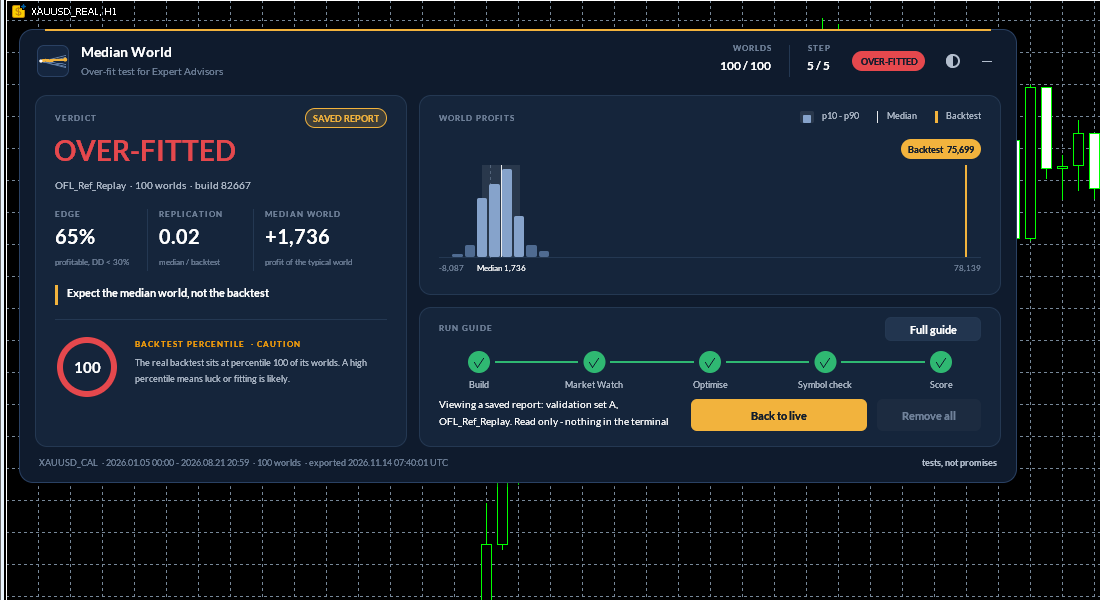
Both screenshots are validation tests on a calibration symbol with a known planted effect: Strategy Tester results on synthetic data, not trading results. The EA trading the planted effect was ROBUST (backtest 7,469, median world 5,805, 63rd percentile). An EA replaying trades chosen with hindsight was OVER-FITTED (replication 0.02, 100th percentile).
On my gold EA Pullback Sniper X (V4, live set), the last 12 months made +1,568 USD on 3,000, while the median world made about +750: replication 0.48, INCONCLUSIVE. The plain reading: plan for about half the backtest's profit.
Built-in safeguards
- Seed check: build again with another seed and score again. The report compares it with earlier builds of the same EA (same verdict, Edge within 10 points, Replication within 0.15; verdict only for NOT TESTABLE). It's informational and never changes the verdict.
- Refusals: it won't score when the result could mislead, for example an old or already-scored XML, real symbols mixed into the run, or an EA that uses other symbols.
- Safety: no DLL, no trading functions, no network requests. It writes only custom symbols and files in MQL5\Files\MedianWorld . Remove all worlds deletes every world symbol it created.
Limits
- It isn't a forecast. The worlds are rebuilt from past prices.
- Ticks are generated from M1 bars. An EA whose results change a lot with real ticks can't be judged on these worlds alone.
- Reshuffling days removes multi-day trends and volatility clustering, on purpose. That's hard on daily trend systems: NO EDGE then means no edge without the multi-day path, not certain losses.
- Warm-up: EAs with long daily filters need history before the scored window. Build longer worlds and start the tester later inside them.
- Single-symbol EAs only.
Try it with the one-month rental. The Market demo can't show it working, because MetaTrader 5 can't create custom symbols inside the tester: Median World on the MQL5 Market.