How to Combine Crypto Investor EA with WallStreet Crypto Indicator for Manual Trading

Crypto Investor EA MT4 product page: https://www.mql5.com/en/market/product/118963
Crypto Investor EA MT5 product page: https://www.mql5.com/en/market/product/118964
WallStreet Crypto Indicator MT4 product page: https://www.mql5.com/en/market/product/194173
WallStreet Crypto Indicator MT5 product page: https://www.mql5.com/en/market/product/194174
Automated trading can save time and simplify the process of managing positions. However, some traders still prefer to decide for themselves when to enter the market. If you belong to this group, there is an interesting feature of Crypto Investor EA that you may want to explore.
Although Crypto Investor EA is designed to operate automatically, it also allows users to initiate trades manually. The BUY and SELL buttons available on its information panel make it possible to open positions without placing orders through the standard trading interface.
What makes this feature particularly interesting is the possibility of combining manual entry decisions with the EA's trade management system. You can analyze the market, choose a potential entry point, and let Crypto Investor EA manage the resulting position according to its programmed strategy and configuration.
In this article, we will demonstrate how to use this functionality together with WallStreet Crypto Indicator. The goal is to show you how to create a simple workflow in which an indicator helps identify potential trading opportunities while the Expert Advisor handles trade management.
Manual Entries, Automated Trade Management
Let's begin with the basic principle behind this approach.
When Crypto Investor EA is running on your chart, its information panel provides two buttons for initiating manual trades:
- BUY: Used to open a new BUY position.
- SELL: Used to open a new SELL position.
Instead of waiting for the EA to generate its own entry, you can use these buttons when you identify an opportunity that you want to trade.

After a manual position is opened, Crypto Investor EA can manage it through its trading logic. Depending on the strategy and current settings, trade management may involve monitoring the position, closing trades when the relevant profit conditions are satisfied, or opening additional and recovery positions when required.
This creates a useful distinction between two tasks. You make the decision about when to enter the market, while the EA performs the trade management functions supported by its strategy.
Of course, the quality of your entry decisions remains important. Clicking BUY or SELL at an unfavorable moment can lead to a difficult trading situation. Therefore, the next step is to find a practical way to identify potential entry points.
Using an Indicator to Identify Trading Opportunities
Technical indicators can help traders interpret price movements and recognize situations that may deserve further attention. Depending on the indicator, the available information might include trend direction, possible reversals, breakouts, or visual BUY and SELL signals.
There is no shortage of indicators for MetaTrader 5, including both free and commercial products. For this example, we will use WallStreet Crypto Indicator, one of our tools developed for analyzing cryptocurrency markets, including Bitcoin and Ethereum.
The indicator displays directional arrows on the chart to highlight potential trading opportunities. These visual signals can be used as a reference when deciding whether to open a manual position through Crypto Investor EA.
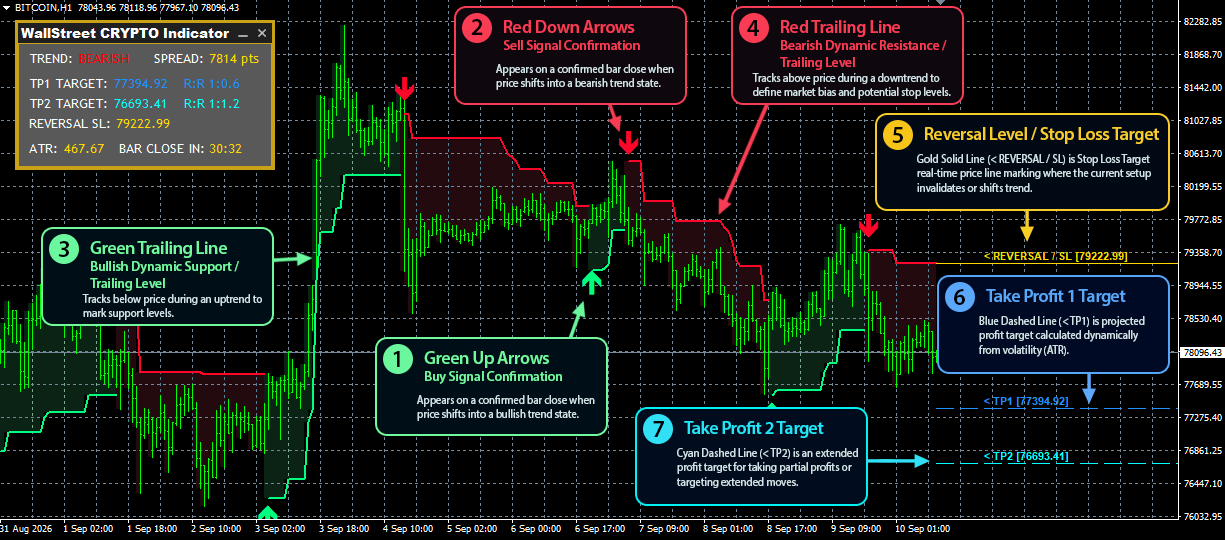
You can find additional information about the indicator, its dashboard, target levels, and MetaTrader 5 version in our dedicated article:
https://www.mql5.com/en/blogs/post/775837
Let's now put the two tools together and walk through the setup.
Preparing the Chart
For this demonstration, we will use BTCUSD on the 15-minute timeframe (M15). The same general workflow may be adapted to other supported instruments and configurations, but the example below focuses on this specific setup.
- Open a BTCUSD chart in MetaTrader 5 and select the M15 timeframe.
- Attach Crypto Investor EA to the chart and configure its settings as required.
- Add WallStreet Crypto Indicator to the same chart.
- Arrange the two information panels so that both remain visible and accessible.
- Check the indicator's alert settings if you want to receive notifications when new signals appear.
Once the setup is ready, you can wait for the indicator to display a potential entry signal.
The process does not require you to monitor every price movement continuously if you have configured suitable alerts. You can review the chart when a notification arrives, assess the current conditions, and decide whether to act on the signal.
Trading with a Green Upward Arrow
Let's first consider a potential BUY opportunity.

When WallStreet Crypto Indicator displays a green upward arrow, it identifies a potential BUY opportunity according to its signal logic.
After reviewing the chart and deciding that the setup is suitable, click the BUY button on the Crypto Investor EA information panel.
The EA will then manage the position according to its programmed trading rules and active configuration. Depending on the market situation, its management logic may involve additional actions as part of its normal trading process.
The important point is that the indicator provides a reference for your entry decision, while Crypto Investor EA provides the trade management functionality.
Trading with a Red Downward Arrow
The procedure for a potential SELL opportunity is very similar.

When the indicator displays a red downward arrow, it signals a potential SELL opportunity according to its logic.
Review the chart and, if you decide that the opportunity is suitable, click the SELL button on the Crypto Investor EA information panel.
Crypto Investor EA can then manage the resulting position using its configured trading strategy.
With this approach, both BUY and SELL entries follow the same straightforward process: identify a potential opportunity, evaluate the market, and use the appropriate button to initiate the trade.
Practical Tips for a Better Trading Experience
Although the procedure is simple, there are several practical details worth considering before using this method on a live account.
Keep the Information Panels Visible
When several tools are attached to the same chart, their information panels can overlap. This may hide important information or make the EA's trading buttons difficult to access.
WallStreet Crypto Indicator includes a configurable information panel that can be moved, minimized, and maximized. Use these options to arrange the chart in a way that allows you to see the indicator's signals and access the Crypto Investor EA controls comfortably.
A well-organized chart makes the process easier to follow and reduces the chance of clicking the wrong control.
Avoid Acting on Every Signal Automatically
A directional arrow is a signal to examine a potential opportunity, not a guarantee that the next price movement will follow the expected direction.
One situation that deserves particular attention is a sideways or choppy market. During these periods, the price may fluctuate within a relatively narrow range without establishing a clear trend. An indicator may consequently produce several alternating signals in a short time.
If you notice frequent arrows but little meaningful price movement, consider waiting until market conditions become clearer. Stronger directional movement may provide more attractive opportunities, although it does not eliminate the possibility of losses.
Understand the EA's Trading Logic
Before opening manual positions, familiarize yourself with the Crypto Investor EA settings and the way it manages manually initiated trades.
Pay particular attention to its position management rules, recovery functionality, and any settings that influence how additional trades are opened or how positions are closed. Understanding these mechanisms will help you make informed decisions when using the EA in combination with an external signal source.
Always verify the behavior of your particular configuration on a demo account before applying the approach to a live trading account.
Consider the Risks of Delayed Entries
Trading signals and price movements can change quickly, particularly in cryptocurrency markets. If you receive an alert but open the position later, the price may already have moved away from the original entry area.
Crypto Investor EA's trade management functionality does not remove the risks associated with delayed entries or unfavorable market movements. Before acting on a signal, check whether the opportunity still makes sense under the current market conditions.
What Makes This Combination Useful?
The main advantage of this method is the separation of entry decisions from trade management.
Some traders prefer to remain involved in the decision-making process rather than allow an automated strategy to select every entry. At the same time, they may prefer not to handle every open position manually.
Crypto Investor EA provides a way to open positions through its information panel and then apply its trade management logic. WallStreet Crypto Indicator complements this functionality by presenting visual signals that can help users identify potential market opportunities.
Together, the two tools offer an alternative workflow for traders who want to combine their own market assessment with automated position management.
However, the effectiveness of this approach depends on several factors, including the quality of the entry decisions, market conditions, the indicator's behavior, and the EA's configuration. Neither indicator signals nor automated management can guarantee profitable results.
Final Thoughts
Manual trading with Crypto Investor EA is a straightforward way to explore a more interactive approach to using the Expert Advisor.
By adding WallStreet Crypto Indicator to the same chart, you can use its directional arrows as a reference when evaluating potential BUY and SELL entries. Once you decide to open a position, Crypto Investor EA can handle the trade management supported by its programmed strategy.
The workflow is simple: prepare the chart, wait for a signal, evaluate the market conditions, open a position using the appropriate button, and monitor the overall trading process.
If this approach interests you, start by testing it on a demo account. This will allow you to become familiar with the controls, observe how the EA handles manual entries, and determine whether the method suits your trading preferences.
Have you tried opening manual trades with Crypto Investor EA? Share your experience or questions in the comments. We would be happy to discuss this feature and help clarify how the EA and indicator can be used together.