One Bad Day Should Not End Your Prop Challenge: How I Built a Drawdown Guard for MT5

Even a well-planned prop challenge can be derailed by one bad trading day — a revenge trade after a stop-out, a position sized too large before the news, or a loss that quietly crosses the daily limit while you are still watching the chart.
I trade on MT5 myself, and I kept running into the same problem: the daily loss limit lived in my head or on a sticky note, not in the terminal. So I built a panel that keeps track of it for me.
This post explains what the panel does, what it does not do, and how you can try it.
Start with the free version
EA Pro Risk Panel is free on the Market and has been downloaded by traders in more than 90 countries. It covers the everyday work of a manual trader:
- lot size from your risk percentage and stop-loss distance,
- Entry, Stop Loss and Take Profit lines you drag on the chart,
- up to three take-profit levels with partial closes,
- moving the stop to break-even at TP1 or TP2.
If that is all you need, the free version is enough.
What the Pro version adds
EA Pro Risk Manager is built for accounts that have loss limits you must stay inside.
DD Pro — drawdown limits
- daily, weekly, monthly and total loss limits, in percent or account currency;
- monitoring on Balance, Equity, or the lower of the two;
- a progress bar showing how much of today's allowance is used and how much is left;
- a daily reset at your broker's server time;
- when a limit is reached: close and block, close only, or lock new panel entries;
- a preventive check: a panel order that would risk more than the remaining daily allowance is stopped before it is sent.
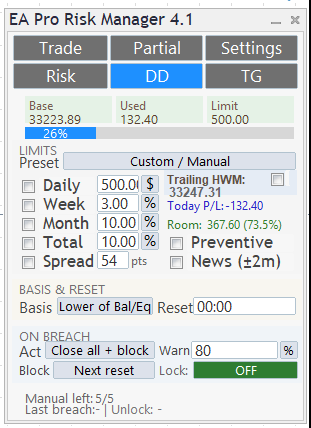
The DD tab: limits, used allowance, monitoring basis and breach action.
Entry blocking applies to orders placed through the panel. It does not prevent manual orders outside the panel or orders from other EAs.
Phone alerts — MT5 Push & Telegram
Receive drawdown warnings and breach notifications on your phone through MT5 push — no Telegram connection required. Telegram is an optional additional channel.
- a warning at the level you choose, and a critical warning at 90%;
- each alert shows the amount used, the limit, the percentage, the monitoring basis and the reset time;
- after a breach action, a follow-up report tells you how many positions were closed and the result;
- with Telegram, you can also receive trade notifications, economic-news alerts and daily/weekly summaries.
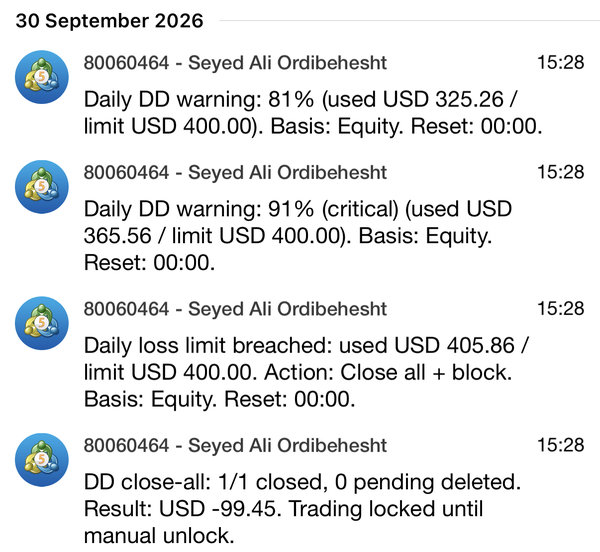
MT5 push notifications on my phone during a demo-account test (30 September 2026): two warnings, the breach, and the close-all report — no Telegram needed. Note that the loss reached USD 405.86 against a USD 400 limit before the position was closed. That is a real example of why no tool can promise an exact maximum loss.
Risk Pro — position management
- three trailing-stop methods (TP levels, candle structure, classic distance);
- one-click break-even, close profitable positions, close all, and panic close.
What it does not do
I want to be clear about this, because a risk tool that overpromises is itself a risk:
- It does not trade for you and does not give signals. Every entry is yours.
- It cannot guarantee a maximum loss. Closing actions depend on your connection, the terminal running, and your broker's execution. A gap or a disconnect can still push a loss past the limit.
- Prop-firm rules differ. Set the limits to match your firm's rules, and test on a demo account first.
- It helps you monitor and respond to your limits; it cannot guarantee that a challenge rule will never be breached.
How to try it
You can try Pro for free in the Strategy Tester: download the demo, turn on Visual mode and press Start. The panel appears on the chart, and you can place test trades and watch the drawdown limits react. Phone and Telegram alerts do not work in the tester. On a live account, the free version covers trade planning at no cost; to use Pro on your own account, you can buy it or rent it for one month.
- Free version: EA Pro Risk Panel
- Pro version: EA Pro Risk Manager
Questions and feature requests are welcome in the product comments.



