MT5 Trade Copier: The Manual Reset Button in Drawdown Protection – When and How to Use It

Product link:
https://www.mql5.com/en/ market/product/191385
Drawdown protection is an important part of risk management in an MT5 Trade Copier, but understanding how to resume trading after a protection limit is triggered is equally important.
When a configured drawdown limit is exceeded, COPYLATOR can block new copying activity on the Receiver. Depending on the configuration, it can also close positions opened by COPYLATOR and delete COPYLATOR pending orders.
Once the account enters this protection state, there are two different ways the protection cycle can be reset:
- Automatic Daily Reset
- Manual Reset
These two mechanisms do not perform the same function. The automatic daily reset starts a new daily monitoring period, while the manual reset establishes a new total-drawdown baseline based on the account's current balance.
1. What Happens When Drawdown Protection Is Triggered?
Before discussing the Reset button, it is important to understand what happens when a drawdown limit is exceeded.
COPYLATOR can monitor:
- Daily Drawdown
- Total Drawdown
Daily Drawdown can be calculated from the highest Equity or Balance reached during the current trading day, according to the configured DrawdownBasedOn setting.
Total Drawdown is measured against the initialBalance baseline established when the protection cycle starts or after a manual reset.
When a configured limit is exceeded, new copying is blocked. This can include new market trades, pending orders, and supported modifications.
If CloseOrdersOnDrawdown=true , COPYLATOR can also close positions opened by COPYLATOR and delete COPYLATOR pending orders.
If it is set to false , the protection blocks new copying without automatically closing existing COPYLATOR positions or deleting pending orders.
2. Automatic Daily Reset vs. Manual Reset
| Feature | Automatic Daily Reset | Manual Reset |
|---|---|---|
| Triggered automatically | Yes | No |
| Controlled by broker server time | Yes | No |
| Resets daily drawdown | Yes | Yes |
| Changes initialBalance | No | Yes |
| Resets total drawdown baseline | No | Yes |
| Requires trader action | No | Yes |
This distinction is fundamental. The automatic reset starts a new daily measurement period, but it does not erase the account's historical relationship with its total-drawdown baseline.
3. How the Automatic Daily Reset Works
The automatic daily reset is controlled by the configured ResetHour and ResetMinute , using the broker's server time.
When the reset occurs, COPYLATOR removes the daily protection block and resets the daily drawdown measurement.
However, the initialBalance is not changed.
This means that if the account is still below its original total-drawdown baseline, the total drawdown remains active.
For example, suppose:
- Initial balance: $10,000
- Current balance: $8,500
- Total drawdown limit: 15%
The account is approximately 15% below its original baseline.
When the new trading day begins, the daily drawdown can reset to zero. But the total-drawdown calculation still uses the original $10,000 baseline.
Therefore, the account may immediately remain blocked or become blocked again if the total-drawdown threshold is still exceeded.
4. Why the Manual Reset Is Different
The manual Reset button on the Receiver is designed for a different purpose.
When the manual reset is performed, COPYLATOR:
- Removes the drawdown block.
- Resets the daily drawdown measurement.
- Resets the total drawdown measurement.
- Sets the current account balance as the new initialBalance .
This creates a new drawdown protection cycle based on the account's current balance.
For example:
Previous baseline: $10,000 Current account balance: $8,500 Before manual reset: Total DD baseline = $10,000 After manual reset: New initialBalance = $8,500 Current Total DD = 0%
The important point is that the manual reset does not recover the lost $1,500. It simply establishes a new reference point for future drawdown calculations.
5. The Manual Reset Is Not a Loss-Recovery Tool
This distinction is critical.
A manual reset does not make the account profitable again. It does not restore the previous balance, improve the trading strategy, or reduce the actual historical loss.
It only changes the baseline from which future drawdown is measured.
If the account had $10,000 and fell to $8,500, resetting the baseline to $8,500 does not mean the account has recovered. The $1,500 historical loss still exists.
The reset simply says:
The next protection cycle will be measured from the account's current balance.
6. When a Manual Reset Can Be Appropriate
A manual reset should be performed deliberately. Several situations can justify establishing a new baseline.
After a Meaningful Recovery
If the account has gone through a drawdown and later recovered to a new stable level, the trader may decide that the old baseline is no longer the appropriate reference for the next protection cycle.
A manual reset can establish the current balance as the new baseline.
After a Withdrawal
Withdrawals are particularly important because a reduction in account balance is not necessarily a trading loss.
For example:
Account balance before withdrawal: $10,000
Withdrawal:                       $2,000
New balance:                      $8,000
If the original $10,000 baseline remains unchanged, the drawdown calculation could interpret the reduction as a loss relative to the previous balance.
After confirming that the balance change was intentional and unrelated to trading losses, a manual reset can establish the new account balance as the appropriate baseline.
After a Major Strategy Change
If the account switches to a substantially different Sender, strategy, or trading framework, the trader may decide to begin a new risk-monitoring cycle.
The manual reset can provide a clear starting point for evaluating the new configuration.
After Deliberately Redefining Account Capital
Sometimes the trader intentionally changes the capital allocated to the account. In such circumstances, resetting the baseline can make the drawdown protection correspond to the new capital level.
7. When the Manual Reset Should Be Avoided
The Reset button should not be used simply because the drawdown protection is inconvenient.
If an account reaches its drawdown limit because the underlying strategy is experiencing sustained losses, resetting the protection does not solve the underlying problem.
It only allows the account to begin copying again from a new baseline.
The most dangerous pattern is repeated resetting during an unresolved losing period:
Loss ↓ Drawdown limit reached ↓ Protection triggered ↓ Manual reset ↓ Copying resumes ↓ More losses ↓ Drawdown limit reached again ↓ Manual reset ↓ Repeat
Repeated resets can effectively undermine the protection system if they are used without reviewing the reason for the drawdown.
8. Review the Cause Before Resetting
Before pressing the Reset button, the trader should determine why the protection was triggered.
Possible causes include:
- A single unusually large losing trade
- A sequence of normal strategy losses
- Unexpected market volatility
- News-driven price movement
- Abnormal spread conditions
- Incorrect lot sizing
- An incorrectly configured multiplier
- Unexpected balance-ratio scaling
- Incorrect symbol mapping
- A problem with the Sender strategy
- Incorrect Receiver configuration
The correct response depends on the cause.
If the problem is configuration-related, changing the configuration may be more important than resetting the drawdown protection.
9. Pause and Review Before Resetting
A practical workflow is to review the Receiver before manually resetting it.
- Confirm that the drawdown trigger was genuine.
- Review recent trades.
- Check the current account balance and equity.
- Review lot sizing settings.
- Check the maximum lot cap.
- Review spread and time filters.
- Check the Sender and Receiver logs.
- Review symbol mapping.
- Determine whether the trading strategy has changed.
- Only then decide whether a new baseline is appropriate.
10. Should Open Positions Be Closed Before a Manual Reset?
A manual reset changes the drawdown baseline. Therefore, the trader should understand the state of any existing positions before resetting.
If positions remain open, their unrealized profit or loss can affect the account's equity and subsequent drawdown calculations.
For operational clarity, many traders may prefer to complete or close the current trading cycle before establishing a new baseline.
The important principle is consistency: understand which positions belong to the previous risk cycle and which trades will belong to the new cycle.
11. Reducing Risk After a Drawdown
A manual reset does not require the Receiver to return immediately to its previous risk settings.
After a significant drawdown, the trader may choose to reduce copied volume or tighten filters while monitoring the new cycle.
Possible adjustments include:
- Lowering the lot multiplier
- Reducing FixedLotSize
- Reducing the maximum lot cap
- Using more restrictive spread conditions
- Reducing the number of copied directions
- Restricting trading hours
These are configuration choices rather than guarantees of improved performance. Their suitability depends on the strategy and account objectives.
12. Manual Reset and Daily Reset Should Not Be Confused
A common configuration mistake is treating the daily reset as if it were a complete reset of the entire drawdown system.
It is not.
The automatic daily reset affects the daily drawdown cycle. It does not replace the total-drawdown baseline.
The manual reset, by contrast, establishes a new initial balance and therefore changes the reference point for total drawdown.
This difference can be summarized as:
Automatic Daily Reset
        ↓
New daily cycle
        ↓
Original total baseline remains

Manual Reset
        ↓
New daily cycle
        ↓
New total-drawdown baseline
13. ResetHour and ResetMinute
COPYLATOR allows the automatic daily reset time to be configured using:
- ResetHour
- ResetMinute
These values are based on the broker's server time, not necessarily the trader's local clock.
Therefore, when configuring the automatic reset, the broker's server time should be confirmed first.
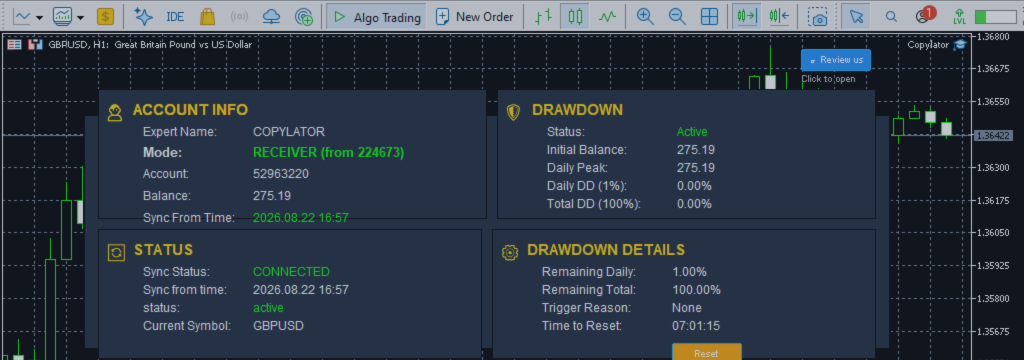
14. The Receiver Dashboard
The Receiver dashboard provides important information about the drawdown protection state.
Depending on the configuration and current account condition, the dashboard can help the trader monitor:
- Current drawdown status
- Protection state
- Daily drawdown
- Total drawdown
- Reset information
- Account information
- Copying status
This makes the Receiver dashboard an important part of monitoring a multi-account copy-trading environment.
15. A Practical Example
Consider the following account:
| Parameter | Value |
|---|---|
| Original initial balance | $10,000 |
| Current balance | $8,500 |
| Total drawdown limit | 15% |
| Protection state | Triggered |
The automatic daily reset occurs.
The daily drawdown measurement is reset, but the initial balance remains $10,000.
The account is still approximately 15% below the original baseline, so the total drawdown condition can remain active or immediately trigger again depending on the exact equity/balance calculation and configured threshold.
If the trader determines that $8,500 is now the deliberate capital baseline for a new trading cycle, a manual reset can establish:
New initialBalance = $8,500 New total DD = 0% Daily DD = 0% Protection block = removed
From that point forward, future drawdown is measured against the new baseline.
16. Manual Reset and Withdrawals
Withdrawals deserve special attention because they can change the account balance without representing a trading loss.
For example, if a trader withdraws $2,000 from a $10,000 account, the balance becomes $8,000. If the original baseline remains $10,000, the drawdown system may interpret the difference as part of the account's decline.
After verifying that the change was an intentional withdrawal, a manual reset can establish $8,000 as the new baseline.
The same principle applies to other deliberate changes in account capital, provided the trader understands the resulting change in risk exposure.
17. Manual Reset Is a Risk-Management Decision
The Reset button may look like a simple interface control, but its effect is significant.
It changes the reference point used by the total drawdown protection system.
Therefore, pressing Reset should be treated as a risk-management decision rather than a routine troubleshooting action.
A useful question before resetting is:
Why should the account's current balance become the new risk baseline?
If the answer is clear and documented, the reset may be appropriate. If the only reason is that copying is blocked, the underlying cause should be investigated first.
18. Common Mistakes
- Confusing daily reset with total reset: The automatic daily reset does not change initialBalance.
- Resetting immediately after every loss: This can repeatedly bypass the intended protection cycle.
- Ignoring the cause of the drawdown: A reset does not repair a failing strategy or incorrect configuration.
- Forgetting broker server time: Automatic reset uses broker server time.
- Ignoring withdrawals: Capital withdrawals can affect drawdown calculations if the baseline is not updated appropriately.
- Changing the baseline without documentation: This makes later performance analysis more difficult.
19. Recommended Manual Reset Checklist
- Confirm why the drawdown protection was triggered.
- Check current balance and equity.
- Review open positions.
- Review recent trading performance.
- Check lot sizing settings.
- Check MaxLotSize.
- Review filters.
- Check symbol mappings.
- Review Sender and Receiver logs.
- Confirm whether a withdrawal or capital change occurred.
- Decide whether a new baseline is justified.
- Document the reason for the reset.
- Consider whether risk settings should be changed for the new cycle.
Conclusion
The manual Reset button is an important part of drawdown protection in an MT5 Trade Copier, but it should be understood correctly.
The automatic daily reset starts a new daily monitoring cycle while keeping the existing total-drawdown baseline.
The manual reset goes further: it removes the protection block, resets the drawdown measurements, and establishes the Receiver's current balance as a new initialBalance .
This makes the manual reset useful when the old baseline no longer represents the account's intended capital structure—for example, after a deliberate withdrawal, a meaningful change in account capital, or the start of a new trading cycle.
At the same time, the reset should not be used simply to bypass losses. A new baseline does not erase historical losses, improve a strategy, or guarantee safer future trading.
The most effective approach is to treat the Reset button as a deliberate risk-management action: understand the reason for the drawdown, review the account and configuration, establish a clear new baseline when justified, and then monitor the new protection cycle carefully.
Product link:
https://www.mql5.com/en/ market/product/191385