MT5 Trade Copier: Managing Partial Closes and Volume Changes in Copy Trading

Product link: https://www.mql5.com/en/ market/product/191385
Partial closing and volume modification are among the more technically demanding scenarios in copy trading. Unlike opening or fully closing a position, which are relatively straightforward events, partial closes and volume changes introduce intermediate position states that an MT5 Trade Copier must track accurately across Receiver accounts.
A reliable copy-trading system should not only replicate the initial opening of a position. It should also be capable of handling important changes throughout the position's lifecycle, including volume increases, partial closes, Stop Loss and Take Profit modifications, and the eventual full closure.
What Is a Partial Close?
A partial close occurs when a trader closes only part of an existing position while leaving the remaining volume open.
For example, a trader may open a 1.00-lot Buy position and later close 0.40 lots. The remaining exposure is then 0.60 lots.
In copy trading, the Receiver should recognize that this is not a complete position closure. The corresponding copied exposure needs to be reduced while the remaining position stays active.
Partial closing is commonly used to take partial profits, reduce exposure, or manage a position progressively while allowing the remaining volume to continue running.
Why Partial Close Support Matters in an MT5 Trade Copier
A basic copier may focus primarily on two events: opening a position and closing a position. Real-world trading, however, often involves several intermediate changes.
A trader may:
- Open an initial position.
- Add additional volume later.
- Close part of the position.
- Modify Stop Loss.
- Modify Take Profit.
- Close another portion.
- Eventually close the remaining volume.
Each of these actions can affect the exposure that should exist on the Receiver account.
This is why Partial Close Support is an important feature for traders who use multi-account copy trading and actively manage position size.
Example of a Partial Close
| Stage | Sender Position | Action |
|---|---|---|
| 1 | 1.00 lot | Position opened |
| 2 | 0.60 lot | 0.40 lot partially closed |
| 3 | 0.40 lot | Additional partial close |
| 4 | 0.00 lot | Remaining position fully closed |
A copier must distinguish these stages instead of interpreting every volume reduction as a complete closure.
Volume Changes Are More Than Partial Closes
Volume synchronization also includes situations where the Sender increases its exposure.
For example, a trader may initially open a 0.50-lot position and later add another 0.50 lot. The total exposure becomes 1.00 lot.
This is often called scaling into a position.
From the perspective of a trade copier, this is another important state change that needs to be handled correctly.
Depending on the account structure and configuration, the additional exposure may need to increase the corresponding Receiver exposure or be represented through another copied position.
The Technical Challenge of Tracking Position Changes
One of the main challenges in partial-close synchronization is that brokers and account types may represent position changes differently.
Depending on the trading environment, a partial close may result in:
- A single position with reduced volume.
- A changed ticket structure.
- Multiple related tickets.
- A modification of a net position on a Netting account.
A robust copier therefore needs to recognize the actual change rather than relying only on a simple open-or-close event model.
Hedging Accounts and Partial Closes
Hedging accounts can maintain multiple individual positions on the same symbol.
This makes individual position tracking particularly important. If several positions exist on the same symbol, the copier needs to identify the corresponding Receiver position when a specific Sender position is partially closed.
For example, a Sender account could have:
- EURUSD Buy – 0.50 lot
- EURUSD Buy – 0.30 lot
- EURUSD Sell – 0.20 lot
A partial close of one of these positions should not automatically be interpreted as a change to every EURUSD position.
COPYLATOR supports Hedging accounts and provides ticket-based trade replication appropriate for this type of account structure.
Netting Accounts and Volume Changes
Netting accounts operate differently because the account maintains one net position per symbol.
When a partial close occurs, the result may appear as a reduction in the net position rather than as an independent ticket-level event.
This makes volume synchronization more complex than on a Hedging account.
COPYLATOR automatically detects whether an account is using Hedging or Netting and applies the appropriate synchronization method. On Netting accounts, certain features may be adjusted or ignored when they are not applicable to the single-position-per-symbol structure.
How COPYLATOR Handles Partial Close Support
COPYLATOR – MT5 Trade Copier supports partial closing of copied positions, allowing part of a copied position to be closed while the remaining volume stays open.
This makes partial position management part of the broader trade-copying lifecycle.
For example:
- A position is opened on the Sender.
- The corresponding exposure is copied to the Receiver.
- The Sender partially closes the position.
- The copied position is reduced accordingly.
- The remaining Receiver volume remains active.
This approach allows traders to use staged position management while maintaining synchronization between their MT5 accounts.
Partial Close vs. Full Close
It is important to distinguish between a partial close and a complete position closure.
| Action | Position Result |
|---|---|
| Full Close | The entire position is closed. |
| Partial Close | Only part of the position is closed and the remaining volume stays open. |
| Volume Increase | Additional exposure is added to the position or copied according to the account structure and configuration. |
SL/TP Synchronization After Volume Changes
Volume changes should also be tested together with Stop Loss and Take Profit synchronization.
For example, a trader may partially close a position while keeping the same SL and TP on the remaining exposure. Alternatively, the trader may adjust the protective levels after reducing the position.
COPYLATOR supports real-time SL/TP synchronization, including changes made after a trade has already been opened.
A practical test should therefore verify not only the new volume but also the status of the remaining SL and TP.
Recommended Test Sequence
- Open a position on the Sender.
- Verify the Receiver position.
- Add or modify Stop Loss.
- Add or modify Take Profit.
- Partially close the Sender position.
- Verify the remaining Receiver volume.
- Modify SL/TP again if required.
- Partially close the position again.
- Close the remaining position.
Lot Management and Partial Closes
COPYLATOR provides several volume-management methods:
- Fixed Lot
- Lot Multiplier
- Balance-Ratio Scaling
- Maximum Lot Cap
When testing partial closes, traders should consider how the selected lot-management configuration affects the Receiver volume.
Balance-ratio scaling can adjust copied volume according to the Sender/Receiver balance ratio, while a multiplier can increase or decrease the copied volume according to the configured factor.
The Maximum Lot Cap provides an absolute upper limit on volume.
These settings control volume calculation, but they do not guarantee identical monetary or percentage risk between different accounts. Actual risk can also depend on leverage, symbol specifications, Stop Loss distance, contract size, and broker conditions.
Adding to an Existing Position
Volume increases are another important scenario in copy trading.
A trader may add to a position after the initial entry, for example:
| Stage | Sender Exposure |
|---|---|
| Initial entry | 0.50 lot |
| Additional volume | +0.50 lot |
| Total exposure | 1.00 lot |
The Receiver must process this additional exposure according to its account type and configured lot-management rules.
This is particularly important in multi-account environments where each Receiver may have a different balance and different volume configuration.
Avoiding Duplicate Position Creation
One of the challenges in volume synchronization is distinguishing an actual new trade from a modification to an existing position.
If a Sender increases exposure, the copier needs to recognize the relationship between the original position and the additional volume so that the Receiver does not unintentionally create an incorrect duplicate exposure.
Reliable trade mapping and state tracking are therefore important components of professional copy-trading systems.
Multi-Sender and Multi-Receiver Environments
COPYLATOR supports one-to-many, many-to-one, and many-to-many configurations.
In a one-to-many setup, one Sender may distribute trades to several Receiver accounts. Each Receiver can have its own balance, broker conditions, lot-management settings, and account type.
When a Sender performs a partial close, the corresponding volume change should therefore be checked across the relevant Receiver accounts.
Testing one Receiver does not necessarily validate every possible configuration in a larger multi-account environment.
Partial Close and Drawdown Protection
Partial closes can also interact with the broader risk-management environment.
COPYLATOR includes daily and total drawdown protection on Receiver accounts. Depending on configuration, reaching a drawdown limit can block new copying and, when enabled, close COPYLATOR-opened positions and delete COPYLATOR pending orders.
For this reason, traders testing partial closes should also understand how their drawdown configuration behaves when positions are being reduced or modified.
Drawdown protection is a separate risk-control mechanism and should not be confused with partial-close functionality.
Testing Partial Closes on a Demo Account
Before using Partial Close Support in a live environment, a structured demo test is recommended.
A complete test can include:
- Open a position with a suitable test volume.
- Verify that the position is copied.
- Increase the position volume.
- Verify the Receiver exposure.
- Partially close the Sender position.
- Verify the remaining Receiver volume.
- Modify SL and TP.
- Perform another partial close.
- Verify the remaining exposure again.
- Finally close the remaining position.
This tests the complete position lifecycle rather than only the initial trade opening.
Testing Different Account Types
If a trading setup contains both Hedging and Netting accounts, each environment should be tested separately.
The same trading action can produce different position structures depending on the account type.
At minimum, test:
- Initial position opening.
- Volume increase.
- Partial close.
- SL/TP modification.
- Final position closure.
This helps identify account-structure differences before real capital is used.
Broker Volume Restrictions
Broker rules can also affect volume modifications.
Before going live, traders should verify:
- Minimum lot size.
- Maximum lot size.
- Volume step.
- Position modification rules.
- Supported account type.
- Symbol contract specifications.
For example, if a broker supports volume steps of 0.01 lot, a partial close must result in a valid volume according to the broker's trading rules.
These restrictions should be considered when designing and testing a multi-account copier configuration.
Monitoring Volume Synchronization
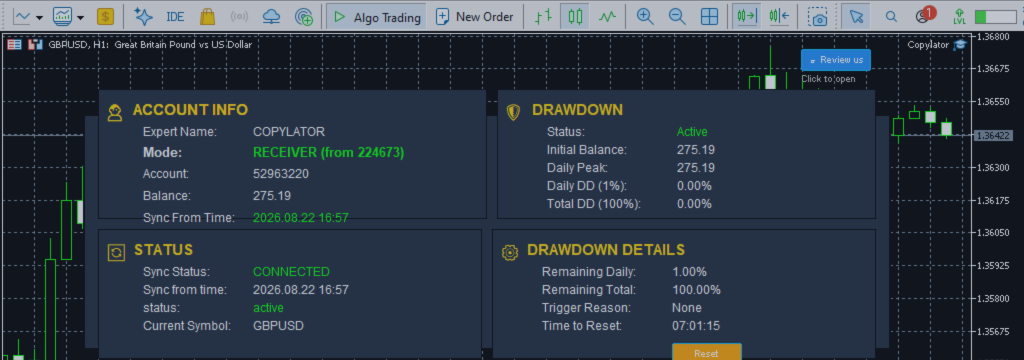
The COPYLATOR graphical dashboard provides operational information including account information, copier mode, synchronization status, Receiver information, and Drawdown Protection status.
During testing, monitoring the dashboard can help identify configuration or synchronization issues.
After every partial close or volume change, traders should verify the Receiver position rather than assuming that the expected change was applied correctly.
Common Mistakes to Avoid
- Testing only initial position openings.
- Testing only complete position closures.
- Ignoring partial-close behavior.
- Failing to verify the remaining Receiver volume.
- Ignoring differences between Hedging and Netting accounts.
- Not checking SL/TP after a volume change.
- Ignoring broker minimum-volume and volume-step restrictions.
- Assuming one Receiver test validates every Receiver configuration.
- Moving directly to live trading without testing the complete position lifecycle.
Best Practices
- Test partial closes on a demo account before live deployment.
- Verify Receiver volume after every partial close.
- Test both volume reductions and volume increases.
- Check SL and TP after volume modifications.
- Test Hedging and Netting configurations when applicable.
- Verify broker volume-step and minimum-volume requirements.
- Use the COPYLATOR dashboard to monitor synchronization.
- Test multiple Receivers in multi-account configurations.
- Confirm that the remaining position eventually closes correctly.
Practical Partial Close Checklist
| Test | Verified |
|---|---|
| Initial position copied | ✓ |
| Volume increase tested | ✓ |
| Partial close tested | ✓ |
| Remaining volume verified | ✓ |
| SL synchronization verified | ✓ |
| TP synchronization verified | ✓ |
| Hedging account tested | ✓ |
| Netting account tested | ✓ |
| Lot-management settings verified | ✓ |
| Maximum lot cap verified | ✓ |
| Final position closure verified | ✓ |
Conclusion
Partial closes and volume changes are important parts of real-world trade management. A modern MT5 Trade Copier needs to handle more than simply opening and closing positions.
COPYLATOR – MT5 Trade Copier includes Partial Close Support together with flexible lot management, real-time SL/TP synchronization, Hedging and Netting support, Multi-Sender / Multi-Receiver trade replication, drawdown protection, and other trade-management capabilities.
For traders who use partial profit-taking, scaling into positions, or dynamic exposure management, testing volume changes is an important part of preparing a reliable copy-trading setup.
The recommended workflow is straightforward: open the position, modify the volume, partially close, verify the remaining exposure, check SL/TP synchronization, and finally close the remaining position.
By testing the complete position lifecycle on demo accounts first, traders can identify configuration or broker-specific issues before exposing live capital.
Product link: https://www.mql5.com/en/ market/product/191385




