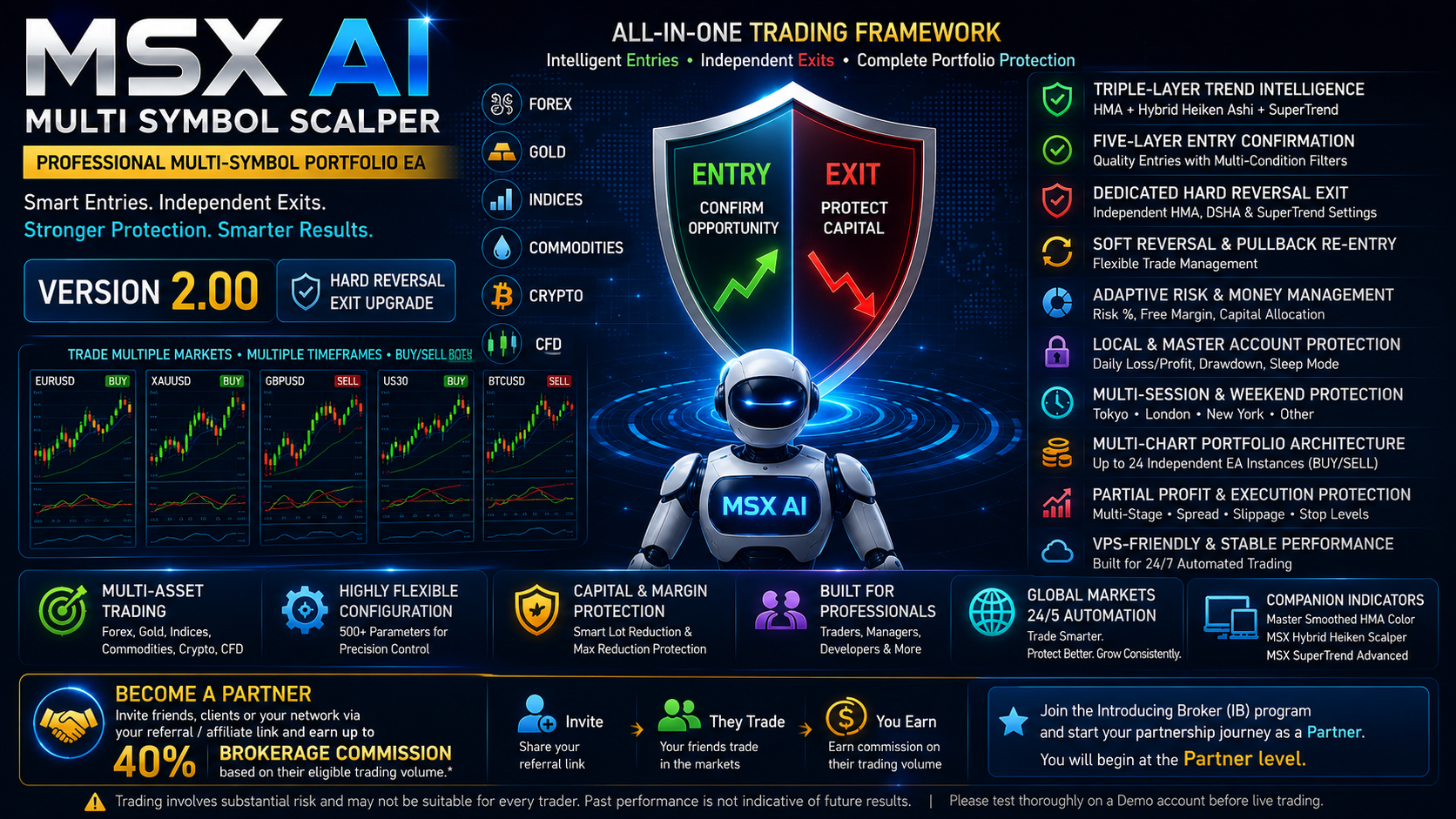
MSX AI Multi Symbol Scalper — A Complete Multi-Symbol Portfolio Trading Framework for MetaTrader 5

MSX AI Multi Symbol Scalper v2.00 — A Complete Multi-Symbol Portfolio Trading Framework for MetaTrader 5
Modern automated trading is not only about finding an entry signal. A practical portfolio system must also consider trend confirmation, position sizing, available capital, margin, trade management, reversals, sessions and account-level protection.
That is the philosophy behind MSX AI Multi Symbol Scalper v2.00, a configurable Expert Advisor for MetaTrader 5 designed for multi-symbol, multi-chart portfolio deployment.
Version 2.00 introduces a major architectural improvement: a dedicated Hard Reversal Exit Engine with independent Exit HMA, DSHA and SuperTrend settings, allowing the Exit configuration to be optimized separately from the Entry configuration.
With up to 24 independently configurable EA instances in a multi-symbol BUY/SELL portfolio deployment, users can configure symbols, timeframes, trading direction, sessions, risk, capital allocation and protection parameters according to their requirements.
Who Is MSX AI Multi Symbol Scalper Designed For?
The EA is designed as a configurable trading framework for different types of automated-trading users, including:
Independent Traders — Forex, Gold, Index, Commodity and Crypto traders seeking structured automated multi-symbol trading.
Scalping and Intraday Traders — Traders preferring configurable short-term and session-based portfolio configurations.
Trend-Following Traders — Traders seeking structured trend participation with multiple confirmation, reversal and pullback controls.
Master Copy Trading Providers — Users operating multi-symbol master accounts for copy-trading services.
Trading Signal Providers — Providers using the EA as an automated portfolio execution framework, subject to applicable platform and service requirements.
Prop-Firm and Funded-Trader Users — Users requiring configurable risk, capital allocation, daily protection, drawdown and session controls. Actual compliance depends on the firm's current rules and configuration.
Fund Houses and Portfolio Managers — Users requiring configurable position sizing, portfolio-aware capital allocation and account-wide protection.
Multi-Chart Portfolio Operators — Users deploying multiple independent trading engines across symbols, timeframes and trading directions.
Strategy Developers and Advanced Optimizers — Experienced users requiring extensive parameters for testing and optimization.
The important point is that MSX AI Multi Symbol Scalper is a configurable framework rather than one fixed configuration intended for every trader.
Become a Partner Program Providers
MSX AI Multi Symbol Scalper can also be suitable for traders who want to build a partnership opportunity around their trading network.
Any trader, Master Copy Trader or Trading Signal Provider after Buy/Rent/Setup this EA may invite friends, relatives, clients or other traders through their broker's referral / affiliate link, where available, and potentially earn a share of eligible brokerage commissions generated from the referred traders' trading activity.
Partner earnings are calculated according to the applicable brokerage IB / Affiliate commission structure, which may be linked to the referred traders' eligible trading volume or transaction activity.
Start Your Partnership Journey
Interested users can join the Introducing Broker (IB) program and start their partnership journey as a Partner.
You will begin at the Partner level, with opportunities to develop your referral network and earn eligible commission according to the applicable program terms.
Important: Commission rates, eligibility, calculation methods, payment conditions and maximum earnings are determined by the applicable broker/IB or affiliate program and may vary by jurisdiction, account type, instrument and trading activity. Past or potential commission earnings are not guaranteed.
Highly Flexible User Configuration
Users can configure trading direction, symbols, timeframes, trend parameters, Entry confirmation, Entry strength, Hard Reversal Exit parameters, Soft Reversal, Pullback Re-Entry, Stop Loss, Take Profit, risk percentage, fixed lot size, Free Margin Reserve, Per-EA Capital Allocation, Maximum Adaptive Lot Reduction, spread, slippage, partial profit taking, sessions, weekend protection and account-wide capital protection.
Portfolio-Oriented Architecture
Multiple independent EA instances can operate simultaneously across different symbols, timeframes and trading directions while sharing the same account capital environment.
Symbol, Magic Number and Instance Tag controls provide instance-level organization for multi-chart portfolio deployments.
1. Triple-Layer Trend Intelligence
The EA combines three synchronized analytical engines:
- Master Smoothed HMA Trend Engine
- Hybrid Heiken Ashi Trend Engine
- MSX SuperTrend Advanced Engine
Additional trend-quality controls include Trend Strength, Reversal Strength and ATR Volatility Spike mechanisms.
The objective is to build a structured trend framework rather than depend on a single indicator condition.
2. Five-Layer Entry Confirmation
The Entry architecture uses multiple confirmation conditions before a new trade becomes eligible.
The system can also apply optional:
- Trend Birth Protection
- One Trade Per Trend Hard Lock
- Entry Strength Validation
- Spread and execution protection
- Session and weekend restrictions
- Capital and margin checks
This creates multiple decision layers between an analytical signal and actual order execution.
3. The Major v2.00 Upgrade — Dedicated Hard Reversal Exit
The most important change in v2.00 is the separation of Entry configuration from Hard Reversal Exit configuration.
Previously, the same HMA, DSHA and SuperTrend settings could be involved in both Entry and Hard Reversal decisions.
Version 2.00 introduces dedicated Exit settings.
The Hard Reversal Exit now evaluates four core conditions:
1. Exit DSHA State
2. Exit HMA State
3. Exit DSHA Close vs Exit HMA Line
4. Exit SuperTrend Direction
The confirmation uses the last closed candle.
An optional independent Exit Reversal Strength Filter can provide additional confirmation.
Independent Exit Parameters
The user can separately configure:
Exit HMA / HUL
- Exit HMA Period
- Exit HMA Smoothing
Exit DSHA
- Exit DSHA Period
Exit SuperTrend
- Heiken Ashi Source
- Heiken Ashi Source Price
- ATR Period
- Multiplier
- Source Price
Exit ATR Spike
- Enable/Disable
- ATR Spike Threshold
Exit Reversal Strength
- Enable/Disable
- Minimum Reversal Strength
This means the trader can make the Entry engine selective while configuring the Hard Reversal Exit independently according to the desired exit sensitivity.
4. ATR Spike Filtering
The ATR Spike mechanism is integrated into the SuperTrend construction.
For the dedicated Hard Reversal Exit, the Exit ATR Spike settings influence the Exit SuperTrend's internal behavior rather than acting as a separate final execution gate.
This distinction preserves the intended role of the ATR mechanism while allowing the SuperTrend to handle volatility spikes according to the user's configuration.
5. Soft Reversal and Pullback Re-Entry
Hard Reversal is not the only position-management mechanism.
The EA also supports:
- Soft Reversal Exit
- Pullback Re-Entry
- One Trade Per Trend
- ATR-Based Stop Loss
- ATR-Based Take Profit
- Fixed Stop Loss
- Fixed Take Profit
- Session-End Position Closure
- Weekend Position Protection
This allows different parts of the trade lifecycle to be controlled independently.
6. Flexible BUY / SELL Deployment
The EA supports:
- BUY + SELL
- BUY Only
- SELL Only
Symbol, Magic Number and Instance Tag controls allow independent EA instances to be organized across a larger portfolio.
This is particularly useful when separate BUY and SELL engines are deployed on the same symbol/timeframe.
7. Adaptive Money Management
MSX AI Multi Symbol Scalper is not restricted to one fixed lot-sizing model.
The framework supports:
- Fixed Lot Trading
- Equity-Based Risk Position Sizing
- Free Margin Budgeting
- Configurable Free Margin Reserve
- Margin-Aware Lot Reduction
- Per-EA Capital Allocation
- Fixed or Percentage-Based Per-EA Capital Limits
- Minimum Projected Margin Level
- Broker Volume Validation
- Automatic Lot Normalization
The intention is to make position sizing responsive to the actual account environment rather than treating every trade as an isolated calculation.
8. Maximum Adaptive Lot Reduction Protection
Version 1.90 introduced another important capital-management layer: Maximum Adaptive Lot Reduction Protection.
The EA compares the initial adaptive lot with the final lot after capital and margin protections have been applied.
For example:
Initial Lot: 0.32
Final Lot: 0.12
Reduction: 62.50%
If the user has configured a maximum permitted reduction of 50%, the trade can be blocked.
This does not replace the existing margin or capital controls. It adds another user-defined boundary to the adaptive position-sizing process.
9. Multi-Stage Partial Profit Management
Open trades can also be managed through multi-stage partial closing.
The framework includes:
- Tick-by-Tick Monitoring
- Multiple Partial-Close Stages
- Configurable Profit Trigger
- Maximum Close Ratio
- Broker Minimum-Lot Validation
- Broker Volume-Step Validation
- Remaining Runner Protection
- Partial-Close Retry Protection
This allows a position to be progressively reduced while retaining a remaining portion when the configuration permits it.
10. Local and Master Account Protection
The protection architecture operates at two levels.
Individual EA Protection
An EA instance can use:
- Per-Trade Loss Protection
- Local Daily Loss Protection
- Local Daily Profit Target
- Local Maximum Drawdown Protection
- Daily Sleep Mode
Master Account Protection
The account-wide layer can monitor:
- Master Daily Loss
- Master Daily Profit
- Master Account Drawdown
This allows multiple EA charts to operate within a shared account-level protection framework.
11. Persistent Protection State
Important protection states and equity baselines can be stored using MetaTrader Global Variables.
The architecture is designed to preserve applicable states through events such as:
- MT5 restart
- VPS restart
- EA reload
- Chart refresh
- EA reattachment
The purpose is to prevent a simple terminal restart from unintentionally defeating an already-triggered protection condition.
12. Full Fresh Start Architecture
The system includes a centralized Full Fresh Start mechanism for applicable broker-day and session resets.
Depending on configuration, the reset framework can refresh or reset:
- Local Start Equity
- Master Start Equity
- Local Protection State
- Master Protection State
- Sleep States
- Daily Protection Locks
- Master Protection Locks
- One Trade Per Trend state
- Signal Memory
- Trend Birth Runtime State
- Reversal Runtime State
This provides a consistent reset architecture rather than relying on unrelated reset mechanisms.
13. Four Trading Sessions
Trading can be organized around four broker-server-time windows:
- Tokyo
- London
- New York
- Other / Custom
Each session has its own Enable/Disable, Start and End settings.
Additional controls include:
- Fresh Start at Session
- Entry Blocking Near Session End
- Automatic Position Closure
- Overlapping Session Handling
- Cross-session operation
14. Session-End and Weekend Protection
Session management can prevent new entries near the end of a configured trading window and can close existing positions after the applicable trading window ends.
Overlapping enabled sessions are considered so that a position is not unnecessarily closed simply because one session ended while another enabled session remains active.
Weekend protection can additionally provide:
- Friday Entry Blocking
- Pre-Weekend Entry Buffer
- Existing Position Closure
- Sunday Resume-Time Control
All session and weekend timing is based on broker server time.
15. Multi-Symbol / Multi-Chart Portfolio Architecture
This is one of the defining characteristics of MSX AI Multi Symbol Scalper.
Different EA instances can operate across:
- Multiple Symbols
- Multiple Timeframes
- Different Trading Directions
- Different Sessions
- Different Risk Configurations
The instances share the actual account equity, free margin and broker environment, while Symbol, Magic Number and Instance Tag provide instance-level organization.
A typical portfolio deployment can contain:
12 Symbols × BUY Engine + SELL Engine = up to 24 independent EA instances.
This is intended for traders who want to manage a broader automated portfolio rather than operate only one chart.
16. Execution Protection
Before execution, the EA can evaluate a broad range of conditions:
- Maximum Spread
- Maximum Slippage
- Trading Session Permission
- Session-End Entry Protection
- Weekend Protection
- Terminal Trading Availability
- Symbol Trading Availability
- Free Margin Availability
- Broker Stop-Level Requirements
- Broker Volume Requirements
- Projected Margin Requirements
- Projected Margin-Level Protection
The trading signal therefore passes through the applicable execution and capital-management layers before an order is submitted.
17. Companion Indicators
Three companion indicators are available separately through the MQL5 Marketplace:
- Master Smoothed HMA Color
- MSX Hybrid Heiken Scalper
- MSX SuperTrend Advanced
When configured consistently with the EA, these indicators can help users visualize important components of the trading framework directly on the chart.
18. Strategy Tester vs Portfolio Deployment
The Demo version can be evaluated through the MetaTrader 5 Strategy Tester.
However, the Strategy Tester is a single-symbol simulation environment, while the full EA is designed for multi-symbol, multi-chart portfolio deployment.
Consequently, Strategy Tester cannot reproduce several portfolio-level behaviors such as:
- Simultaneous multi-symbol trading
- Multiple BUY/SELL engine coordination
- Shared free-margin allocation
- Portfolio-aware money management
- Master account protection
- Multi-session portfolio scheduling
For evaluation of the complete portfolio architecture, the product documentation recommends renting the full version and deploying it on a Demo account before considering live trading.
Ready-to-use portfolio .set files are also provided for the recommended deployment structure.
19. VPS and Continuous Operation
For continuous automated operation, particularly with multi-chart deployments, a stable trading environment or VPS is recommended.
The EA supports multi-symbol trading, multi-chart deployment, multi-instance operation, continuous session monitoring, automated position management and portfolio capital protection.
However, network quality, broker execution, server availability and VPS performance remain external factors outside the EA's control.
The v2.00 Philosophy
The most important concept introduced with v2.00 can be summarized simply:
Entry and Exit have different jobs.
Entry:
Determine whether a new trading opportunity satisfies the configured conditions.
Hard Reversal Exit:
Determine whether an existing position has reached a sufficiently confirmed reversal condition.
By giving the Hard Reversal Exit its own HMA, DSHA and SuperTrend parameters, traders can configure these two functions independently.
That is the core architectural improvement of MSX AI Multi Symbol Scalper v2.00.
Version 2.00 — Key Highlights
Trend & Entry
✔️ Triple-Layer Trend Intelligence
✔️ Five-Layer Entry Confirmation
✔️ Trend Birth Protection
✔️ One Trade Per Trend Hard Lock
✔️ Entry Strength Validation
Exit & Trade Management
✔️ Dedicated Hard Reversal Exit
✔️ Independent Exit HMA/HUL
✔️ Independent Exit DSHA
✔️ Independent Exit SuperTrend
✔️ Independent Exit ATR Spike Settings
✔️ Independent Exit Reversal Strength Filter
✔️ Four-Term Hard Reversal Confirmation
✔️ Soft Reversal Exit
✔️ Pullback Re-Entry
✔️ Multi-Stage Partial Profit Management
Money & Protection
✔️ Equity-Based Risk Position Sizing
✔️ Free Margin Budget Engine
✔️ Per-EA Capital Allocation
✔️ Projected Margin-Level Protection
✔️ Maximum Adaptive Lot Reduction Protection
✔️ Local Capital Protection
✔️ Master Account Protection
✔️ Persistent Protection States
Portfolio & Operations
✔️ BUY / SELL / Both-Side Deployment
✔️ Multi-Instance Architecture
✔️ Four Trading Sessions
✔️ Session-End Protection
✔️ Weekend Protection
✔️ Companion Indicators
✔️ Multi-Symbol Portfolio Deployment
✔️ VPS-Friendly Continuous Operation
Final Thoughts
MSX AI Multi Symbol Scalper v2.00 is built around a broader concept than simply generating trading signals.
It combines trend intelligence, entry confirmation, independent reversal management, adaptive position sizing, capital allocation, margin protection, partial profit management, session control and account-wide protection into one configurable MetaTrader 5 portfolio framework.
The headline improvement in v2.00 is the Dedicated Hard Reversal Exit Engine.
Instead of forcing the Exit process to use the same indicator configuration required for a new Entry, the system now gives the trader independent Exit parameters and a dedicated four-condition Hard Reversal framework.
For multi-symbol traders, this creates a more structured separation between finding a trade and managing the trade after it has already been opened.
⚠️ Risk Disclosure
MSX AI Multi Symbol Scalper is an automated trading tool. It does not guarantee profitability and cannot eliminate trading losses.
Trading leveraged Forex, Metals, Indices, Commodities, Cryptocurrencies and CFDs involves substantial risk. Historical performance, backtests and previous results do not guarantee future results.
Users should thoroughly test their selected configuration on a Demo account, understand the EA's settings and select risk and capital-allocation parameters appropriate to their circumstances before considering live deployment. The user remains responsible for EA configuration, portfolio exposure and trading risk.
🏷️ 10 Unique Tags for This Blog Post
#MultiAssetAutomation
#SystematicTrading
#TradingInfrastructure
#QuantitativeStrategies
#CapitalAllocation
#MarginManagement
#PositionSizing
#TradeLifecycle
#MarketTrendSystems
#MT5PortfolioStrategy