

Osloma FlipPro MT5 Expert Advisor is a combination of 3 standalone proven Grid Systems for GOLD (XAUUSD). Each of these strategies scans for multi-timeframe breakouts and enters the market on pullbacks. It then deploys a structured grid system to exit each trade basket with some profit.
This page serves as the Input & Setup Guide for Osloma FlipPro v1.2, updated as on 22/08/2026.

Common Settings
- Lot Size Method: Selects between FixLot and AutoLot. FixLot uses the manually specified lot size, while AutoLot automatically calculates the lot according to account capital.
- FixLot Input: Sets the lot size used when Lot Size Method is set to FixLot. Default is 0.01 lot.
- Trade Comment Prefix: Sets the prefix shown in the MT5 trade/order comments, making FlipPro trades easier to identify.
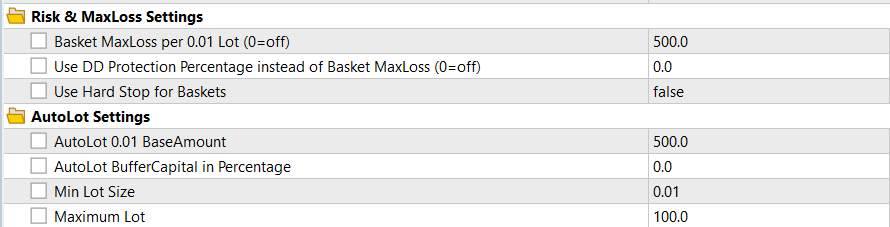
Risk & MaxLoss Settings
- Basket MaxLoss per 0.01 Lot: Sets the maximum loss allowed for each basket per 0.01 base lot. Default is $500 per 0.01 lot, and the amount scales proportionally with the basket's base lot size.
- Use DD Protection Percentage instead of Basket MaxLoss: If set above 0, the basket risk is calculated as a percentage of the protected account capital instead of using the fixed Basket MaxLoss. Set it to 0 to use the normal Basket MaxLoss.
- Use Hard Stop for Baskets: If enabled, FlipPro places a broker/server-side hard stop based on the active basket risk limit. It is disabled by default.
AutoLot Settings
- AutoLot 0.01 BaseAmount: Sets how much usable account capital is required for every 0.01 lot when using AutoLot. Default is $500 per 0.01 lot, meaning 0.01 lot will be entered for every $500 in balance.
- AutoLot BufferCapital in Percentage: Sets aside a percentage of the account capital from AutoLot calculation. For example, a 20% buffer means only 80% of the available sizing capital is used for calculating the lot size.
- Min Lot Size: Sets the minimum lot size FlipPro is allowed to use. Default is 0.01 lot.
- Maximum Lot: Caps the maximum lot size that FlipPro can calculate or trade, providing an additional limit on AutoLot compounding.
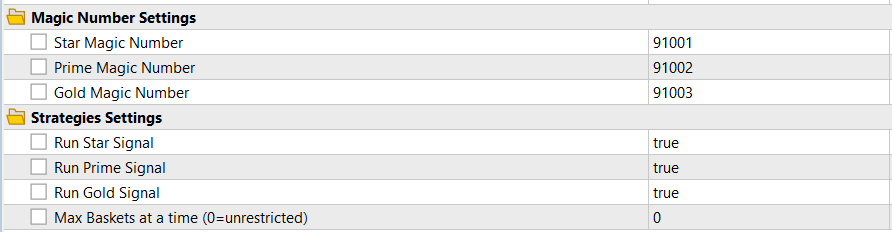
Magic Number Settings
- Star Magic Number: Unique Magic Number used to identify and manage trades belonging to the Star strategy.
- Prime Magic Number: Unique Magic Number used to identify and manage trades belonging to the Prime strategy.
- Gold Magic Number: Unique Magic Number used to identify and manage trades belonging to the Gold strategy. Each strategy should use a different Magic Number.
Strategies Settings
- Run Star Signal: Enables or disables new entries from the Star strategy.
- Run Prime Signal: Enables or disables new entries from the Prime strategy.
- Run Gold Signal: Enables or disables new entries from the Gold strategy.
- Max Baskets at a Time: Limits how many FlipPro strategy baskets can remain open simultaneously. Set to 0 for unrestricted baskets on hedging accounts; netting accounts are automatically limited to one basket at a time.
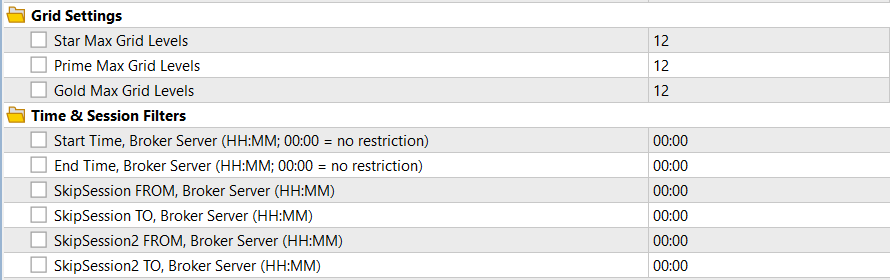
Grid Settings
- Star Max Grid Levels: Sets the maximum number of additional grid positions Star can add after its original entry. Default is 12 grid levels.
- Prime Max Grid Levels: Sets the maximum number of additional grid positions Prime can add after its original entry. Default is 12 grid levels.
- Gold Max Grid Levels: Sets the maximum number of additional grid positions Gold can add after its original entry. Default is 12 grid levels.
Time & Session Filters
- Start Time: Sets the broker-server time from which FlipPro is allowed to open new original entries. 00:00 together with End Time 00:00 means no trading-hour restriction.
- End Time: Sets the broker-server time after which new original entries are blocked.
- SkipSession FROM: Sets the beginning of the first period during which new original entries should be blocked.
- SkipSession TO: Sets the end of the first SkipSession period.
- SkipSession2 FROM: Sets the beginning of an optional second period during which new original entries should be blocked.
- SkipSession2 TO: Sets the end of the second SkipSession period. Open baskets continue to be managed normally while these entry filters are active.
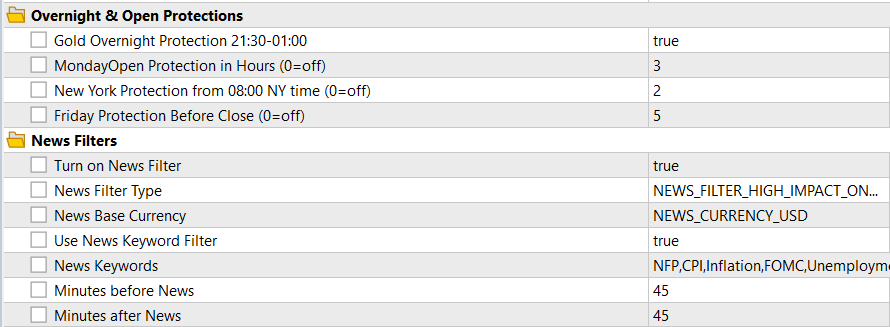
Overnight & Open Protections
- Gold Overnight Protection 21:30-01:00: When enabled, FlipPro blocks new original entries during the overnight protection window while continuing to fully manage existing baskets. It also enables Gold's deep-grid Smart BE/Timeout protection.
- MondayOpen Protection in Hours: Blocks new original entries during the first specified number of hours after Monday begins. Default is 3 hours; set to 0 to disable.
- New York Protection from 08:00 NY Time: Blocks new original entries from 08:00 New York time for the selected number of hours. Default is 2 hours; set to 0 to disable.
- Friday Protection Before Close: Blocks new original entries during the final specified number of hours of Friday. Default is 5 hours; set to 0 to disable.
News Filters
- Turn on News Filter: Enables or disables the economic-news protection. When enabled, FlipPro can block new original entries around selected high-impact news events; open baskets continue to be managed.
- News Filter Type: Default is High Impact Only, which is the only option available for now.
- News Base Currency: Selects the currency whose economic events should be monitored. Default is USD.
- Use News Keyword Filter: If enabled, only high-impact events containing one of the specified keywords are used for entry protection.
- News Keywords: Comma-separated list of news keywords to monitor. Default includes NFP, CPI, Inflation, FOMC and Unemployment.
- Minutes before News: Sets how many minutes before a matching news event FlipPro should stop opening new original entries. Default is 45 minutes.
- Minutes after News: Sets how many minutes after the event FlipPro should continue blocking new original entries. Default is 45 minutes.

Miscellaneous
- Show InfoPanel: Shows or hides the FlipPro information and control panel on the chart.
- Cooldown in Days after Max Basket Stop Hit: After a basket reaches its maximum-loss protection, FlipPro pauses new original entries for the specified number of days. Default is 1 day; set to 0 to disable the cooldown.
- Debug Logging: Enables additional operational messages in the MT5 Experts log for troubleshooting. Keep it disabled during normal trading unless detailed logs are required.
Please go through each of these inputs to understand them before changing anything. If you still have any query, please feel free to post a comment on the product page or send a private message to the author. For product related updates, please consider subscribing to the OslomaFx Public Channel on MQL5.



