Platform: MetaTrader 5 | Type: Utility (risk control only — opens no trades) | Version: v1.0
Product page: https://www.mql5.com/en/market/product/190324
This is the full manual for the product. Each panel element is explained on a numbered diagram — read it once and you're ready to use it.
1. The problem it solves
Anyone who has taken an FTMO / MFF-style prop challenge knows the truth: most accounts fail not because you can't trade, but because one bad day — or a single oversized position — breaches the daily or overall drawdown limit. The evaluation is over in an instant.
Prop Firm Risk Guardian is a lightweight monitoring utility that watches those rules for you, 24/5: daily drawdown, overall drawdown, open stop-loss risk, spread and trading session. The moment any limit is approached or breached, it locks trading (auto-closing, or simply blocking new orders) and keeps your account inside the rules.
It is a pure protection tool:
- ❌ Opens no trades, sends no signals, promises no profit;
- ✅ Only executes the risk rules you set, accurately;
- ✅ Magic-number agnostic — manages all positions/orders on the account (your manual trades and any other EA's trades);
- ✅ Lock state survives a terminal restart / VPS reconnect.
2. Feature overview
| Category | Features |
|---|---|
| Drawdown locks | Daily drawdown lock (from prop day-start or day-high equity); overall drawdown lock (from initial balance) |
| Risk locks | Per-trade risk limit, total open-risk limit (real % risk from real stop-losses; no-SL trades flagged) |
| Proactive guards | Projected-loss headroom (warn/block before you breach), spread guard, block trades outside session |
| Timezone / session | Prop-timezone trading-day boundary, trading-session window |
| Symbol filter | In multi-strategy accounts, apply risk / session / spread rules to selected symbols only |
| Evaluation tracker | Profit %, trading days, profitable days, consistency |
| Alerts | Terminal pop-up / mobile push / email (on state change, debounced) |
| Dashboard | Draggable on-chart panel + 8-state status badge + one-click manual actions |
| Reliability | Persistent lock state, auto-restored across restart / VPS reconnect |
3. The panel, element by element
The panel can be dragged anywhere on the chart and its position is remembered. Each number below maps to one readout or control.
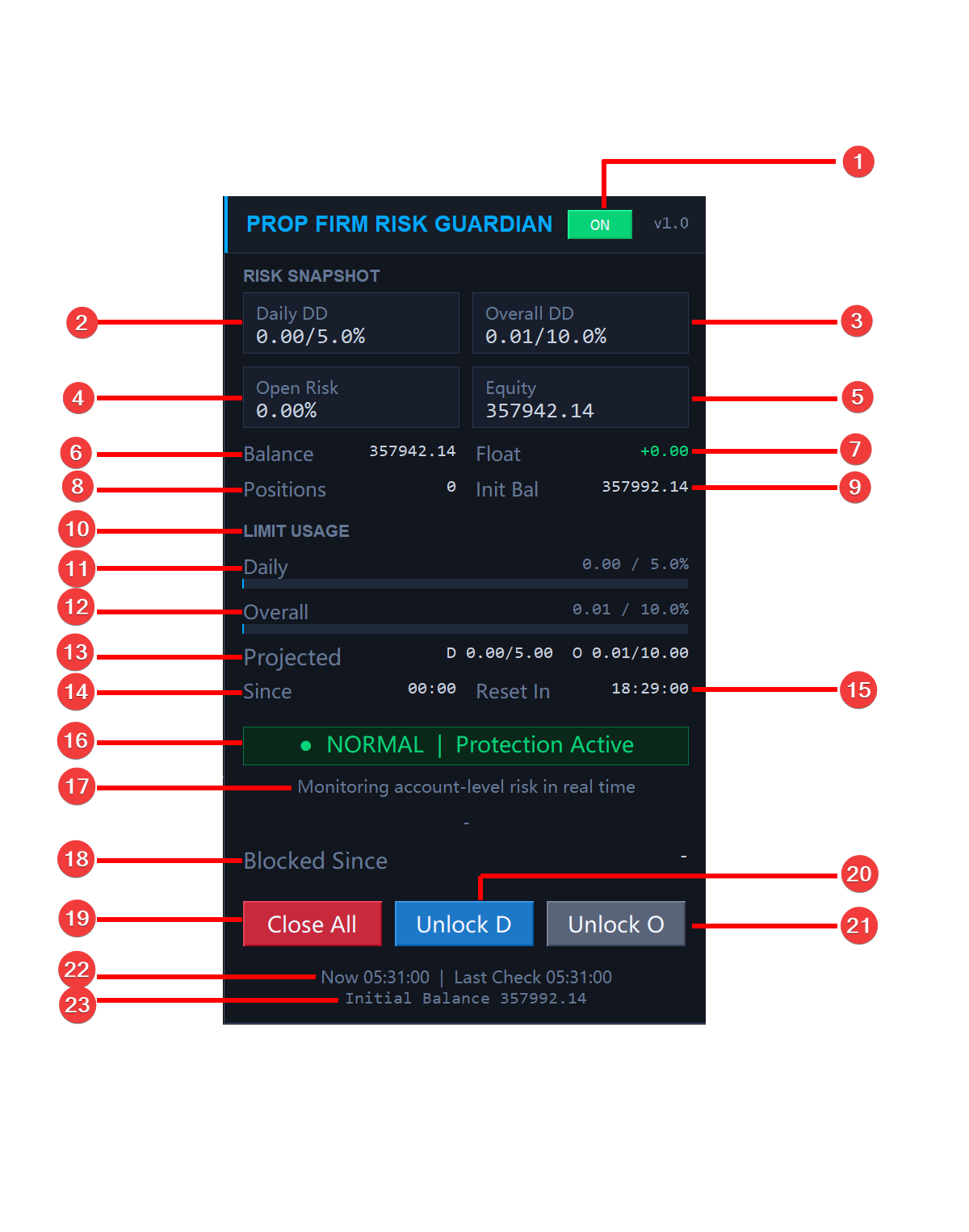
Top
① Master switch (ON / OFF) — the main risk-control switch. Green ON = running and enforcing. Clicking asks for confirmation; when off, the badge shows PAUSED and the panel only displays data — nothing is closed or blocked.
Risk Snapshot (four cards)
② Daily DD — today's equity drawdown, used / limit, e.g. 0.00 / 5.0% . Changes color as it approaches the limit.
③ Overall DD — total drawdown against your initial balance, used / limit, e.g. 0.01 / 10.0% .
④ Open Risk — combined % risk of all open positions, computed from their stop-losses. Trades with no stop-loss are excluded and flagged (undefined exposure).
⑤ Equity — live account equity (green).
Secondary account info (two columns)
⑥ Balance — account balance.
⑦ Float — current floating P/L; green positive, red negative.
⑧ Positions — number of open positions.
⑨ Init Bal — the baseline for overall drawdown. AUTO locks the current balance on first run; MANUAL uses the challenge size you enter.
LIMIT USAGE
⑩ Section label — limit-usage area.
⑪ Daily usage bar — daily-drawdown usage bar + value 0.00 / 5.0% .
⑫ Overall usage bar — overall-drawdown usage bar + value 0.01 / 10.0% .
⑬ Projected — used loss + open exposure risk, projected: D = daily projection, O = overall projection. Drives the Headroom early-warning.
⑭ Since — the start of the current prop trading day (daily drawdown is measured from here).
⑮ Reset In — countdown to the next prop day-boundary; the daily lock auto-clears at that reset.
Status bar (the product's face)
⑯ Status badge — always shows your single most important state + a phrase (see Section 4).
⑰ Status note — a plain-language explanation under the badge.
⑱ Blocked Since — timestamp when the lock triggered; shows - when not blocked.
Manual actions
⑲ Close All — closes all positions + deletes all pending orders in one click (with a confirmation dialog to prevent misclicks).
⑳ Unlock D — manually clears the daily / risk / consecutive lock; the account moves to OVERRIDE, and the cleared limit won't immediately re-trigger.
㉑ Unlock O — manually clears the overall drawdown lock (disabled by default; enable "allow manual overall unlock" in the inputs).
Footer
㉒ Now / Last Check — current time / time of the last risk check (confirms the engine is running).
㉓ Initial Balance — restates the baseline initial balance for easy reference.
4. Eight real-time states (the state machine)
The badge in the middle of the panel is the product's core face — it always shows one current state, by priority, so you know at a glance where the account stands. Priority (high → low):
Hard locks (OVERALL > DAILY > RISK) > OVERRIDE > SESSION > HEADROOM > WARNING > NORMAL
| Badge | Color | Meaning |
|---|---|---|
| NORMAL | Green | Everything within limits; trading is clear; all guards armed |
| WARNING | Amber | Daily/overall usage ≥ 70% of a limit, but no lock yet — early heads-up |
| HEADROOM | Orange | Projection (used + exposure) is near the hard limit — last warning before breach; can block new orders |
| SESSION | Blue | Currently outside the allowed trading-session window |
| RISK LOCK | Red | A single trade or total open SL-risk exceeds the limit (block-only: keeps existing trades, blocks new ones) |
| DAILY LOCK | Red | Today's drawdown breached the limit |
| OVERALL LOCK | Red | Total drawdown breached the limit (manual release only) |
| OVERRIDE | Purple | After you manually unlock — the cleared rule stands down and won't re-trigger |
5. Features in depth
1) Daily drawdown lock (DAILY LOCK)
Based on today's equity drawdown, with two basis options:
- FROM_DAY_START — from the prop trading day's starting equity;
- FROM_DAY_HIGH — from the day's high equity (stricter).
The day boundary follows your prop timezone (see session settings). On breach it closes all (+ deletes pendings) or blocks only, per your config. The daily lock auto-clears at the next prop day-boundary, or you can clear it manually with Unlock D.
2) Overall drawdown lock (OVERALL LOCK)
Based on total drawdown against the initial balance: (initial balance − equity) / initial balance . Initial balance can be AUTO (locks current balance on first run) or MANUAL (enter your challenge size). The overall lock never auto-clears — it's the "account is done" red line, cleared only after human review (and manual clearing is disabled by default; enable it explicitly).
3) Open-risk lock (RISK LOCK)
Reads each position's stop-loss and computes real % risk:
- Per-trade limit — any single trade over the limit locks;
- Total open-risk limit — the sum of all trade risks over the limit locks;
- No-stop-loss trades are counted and flagged (undefined exposure; not included).
The risk lock is block-only: existing trades are kept (they already have stops, exposure is defined), only new orders are blocked. It follows daily-lock semantics — clear with Unlock D / auto-clears next prop day.
4) Projected-loss headroom
Adds your current used loss + open exposure risk and projects the total. Once the projection nears the hard limit (enters your buffer), the badge turns HEADROOM; optionally, block new orders while in headroom — stopping you from adding size before you actually breach. This is a proactive guard, not a post-mortem.
5) Prop timezone / trading session
- Timezone day boundary — using your prop's GMT offset and day-start hour, it redefines the "trading day" boundary (which changes when the daily drawdown / daily lock resets).
- Session window — restricts trading to your allowed hours (supports overnight windows); outside it the badge turns SESSION and new orders can be blocked. The panel shows Session OPEN / CLOSED live.
6) Spread guard
The instant a new market order appears, it checks the spread; if it exceeds your threshold it closes that new order immediately — avoiding entries during abnormal spread spikes.
7) Symbol filter (multi-strategy accounts)
Scope managed symbols with a comma list (e.g. XAUUSD,EURUSD ; substring match handles broker suffixes). Open risk / session / spread / order-blocking apply only to listed symbols. ⚠️ Account-level daily & overall drawdown always covers the whole account (a prop-rule requirement, unaffected by the filter).
8) Evaluation tracker
The panel's Evaluation area shows profit %, trading days, profitable days, and consistency (largest profitable day as a share of total profit), against your challenge targets — so you can watch your progress at a glance.
9) Alerts
On a state change (e.g. NORMAL → a lock) it fires terminal pop-up / mobile push / email, debounced: one alert per state, plus one "resumed" alert when it returns to NORMAL. Push/email require MetaQuotes ID / SMTP configured in the terminal.
10) Persistent locks
All lock state is stored locally and auto-restored across restart / VPS reconnect — after a server restart or a dropped connection the block is still in force, so there's no "gap" in protection.
6. Quick start
- Attach it to any one chart (it manages the whole account, not a single symbol) — one instance per account.
- Set your challenge's daily / overall drawdown limits; to match the exact challenge size, set the initial balance to MANUAL and enter the figure.
- Enable as needed: open-risk limits, projected guard, session, spread, symbol filter, alerts.
- Test on a demo account first — trigger each lock with small settings to see exactly how it behaves.
- After a trigger: wait for the prop day-boundary auto-clear (daily / risk / consecutive), or clear manually with Unlock D / Unlock O.
7. Input parameters (by group)
Every input has an English description in the dialog. Defaults are conservative — tighten them to your prop's rules.
- Daily Loss Limit: MaxDailyLossPercent (daily DD limit %, 0 = off), DailyLossMode (FROM_DAY_START / FROM_DAY_HIGH).
- Overall Loss Limit: MaxOverallLossPercent , InitialBalanceMode (AUTO / MANUAL), ManualInitialBalance .
- Open Risk (Risk Lock): EnableRiskPerTradeLimit / MaxRiskPerTradePercent , EnableTotalOpenRiskLimit / MaxTotalOpenRiskPercent , LockOnRiskLimitBreak .
- Projected (Headroom): EnableProjectedLossGuard , ProjectedLossBufferPercent , BlockNewTradesOnProjectedGuard .
- Prop Timezone & Session: UsePropTimezone , PropGMTOffsetHours , PropDayStartHour , EnableSessionControl , SessionStartHour / SessionEndHour , BlockTradesOutsideSession .
- Spread Guard: EnableSpreadGuard , MaxAllowedSpreadPoints .
- Symbol Filter: UseSymbolFilter , SymbolList .
- Consecutive Loss: Inp_MaxConsecutiveLosses (0 = off).
- Trigger & Unlock: CloseAllOnDailyHit / CloseAllOnOverallHit , AutoBlockNewTrades , AllowManualUnlockDaily , AllowManualUnlockOverall .
- Alerts: EnableTerminalAlert / EnablePushNotification / EnableEmailNotification .
- Evaluation: EnableEvaluationTracker + profit target % / min trading days / min profitable days / profitable-day threshold.
- Manual: Inp_ManualReset (set true before reloading to rebuild the protection baseline).
8. FAQ & tips
- Changed an input but nothing happened? It may be overridden by locally-saved inputs — click Reset in the inputs dialog to load new defaults, or use the panel Reset ( Inp_ManualReset ) to rebuild the baseline.
- No confirmation before an automatic close? Automatic enforcement is by design; only the manual Close All and the master switch ask for confirmation.
- Push feels slow? Delivery depends on your broker and MetaQuotes servers; the tool degrades gracefully (no spam when offline or unconfigured).
- Do I need stop-losses? Exposure risk is computed from stop-losses; trades without one are flagged but not counted toward exposure.
9. Disclaimer
Prop Firm Risk Guardian is a risk-management and monitoring utility. It does not open trades, provides no trading signals, and does not guarantee any profit or that you will pass any prop-firm evaluation — it only executes the risk rules you configure. Trading leveraged products carries a high level of risk; always test on a demo account first. The author is not responsible for any trading losses. Support is provided through the MQL5 comments and private-message system only.
Questions or suggestions? Leave a comment on the product page. Good luck with your challenge.
Product page: https://www.mql5.com/en/market/product/190324