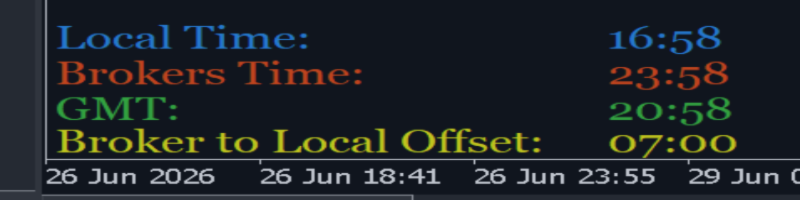

I don't know about you but If I have to think too much about time zone conversion without a visual aid, my head starts to spin. So... I modified Nikolay Kositsin's real-time clock indicator to display a custom "Broker to Local Offset" time.
This utility, really, can keep you informed in real-time of the potentially changing time offset that you need to set in Aleksandr Slavskii's Period Converter─when running a custom time zone chart.
Similarly, this utility is valuable if you're running an EA with a time filter based on your local (pc) time because your broker's time might not adjust for daylight savings while your local time does adjust─you may need to adjust your time filter settings in your EA accordingly in real time.
The clock.mq5 file should go in your MQL5==>Indicators folder. The getfontname.mqh file (for custom fonts) goes in your MQL5==>Include folder. I made no changes to the original mqh file. I reserve no copyrights. All rights are reserved by Nikolay Kositsin. The original indicator, from 2012, had some minor bugs which I fixed.
I added an optional pop-up alert for daylight savings time changes as well.
As daylight savings generally occurs over a weekend (while most markets are closed), the values used to calculate Broker to Local Offset are stored to the MT5 terminal as GlobalVariables. Those GV's are not deleted upon removal of the indicator from a chart, and will persist for 3 weeks unless manually deleted.
Also, an alert will pop up upon first attaching the indicator to a chart because times are not initialized. Those features are intended because they prevent a time change from being missed over a weekend and in the event of a indicator removal, chart closure, MT5 shutdown, crash, power outage, etc.
If you want to delete the GV's for any reason, just go to Tools==>Global Variables in MT5.
Note that this modification was done on a high resolution widescreen monitor, and the default settings of the indicator reflect that. Just change the X and Y related input settings for your particular display resolution/size.
clock.mq5 was updated to avoid repeated calls to the same forms of time without assigning a new indicator version number on 08/15/2026 at 4:43pm New York time.
Happy trading!🙂