
Introducing SafeScalperPro Prime EA - Advanced scalping system — Complete User Guide (v1.00 r16)

Premium Multi-Symbol Edition for MetaTrader 5 — by AlgoSphere Quant
Zero martingale. Zero grid. Zero gambling.
This post is the full operating manual for SafeScalperPro Prime. It is also the release note for update r16, which ships six correctness fixes on top of the v1.00 base. If you already own Prime, read the r16 section below — there is one EA-side behavior change you should verify on validation. If you are evaluating, start from "What Prime is and is not."
The current version is v1.00 build r16 (2026-05-14). Updates push automatically through the MQL5 Market — restart your terminal to install.
What's new in r16
Six correctness fixes. No change to the entry engine, no change to existing presets, full backwards compatibility.
- Portfolio risk cap fixed. Open exposure across all positions is now tracked correctly in real time. The risk cap and the dashboard Active risk value reflect true open risk.
- Lot sizing fixed for fine-step brokers. Symbols with SYMBOL_VOLUME_STEP finer than 0.01 (many ECN forex, indices, crypto CFDs) are now sized correctly. The EA previously skipped trades silently on those symbols.
- Stricter pre-trade margin check. Any order whose affordability the EA cannot verify is refused, eliminating "not enough money" failures. Behavior change versus r15 — re-run your validation backtests to confirm trade counts.
- Partial close fixed on fine-step brokers (same volume-step root cause as lot sizing).
- New InpLogLevel input. Set it to DEBUG to see in the Experts log exactly why a trade was skipped — useful for diagnosing quiet sessions.
- Demo build only: the trial gate now handles broker clock changes correctly.
What Prime is — and what it is not
Prime is a fully automated breakout scalping Expert Advisor for MT5. It is built primarily for XAUUSD on M5, but its multi-symbol engine makes it equally suitable for the major Forex pairs and other liquid instruments your broker offers.
It inherits the seven-condition entry engine from our free SafeScalperPro baseline — a strategy validated across years of live trading. The Prime tier wraps that engine in six professional layers: a multi-symbol portfolio with built-in correlation guard, an adaptive risk engine, a Telegram bridge, a library of eight tuned strategy presets, a CSV/JSON performance journal, and cross-restart persistence.
Prime is the right tool if you trade gold or Forex with at least USD 500 of risk capital, prefer rule-based systems, and want institutional-grade risk management without paying institutional prices. It is particularly well-suited to prop firm participants — the PropFirmConservative preset enforces typical 4% drawdown and 1% daily loss caps automatically.
It is not a get-rich system. We do not promise daily profits, do not guarantee win rates, and do not advertise unrealistic returns.
Quick start (five minutes, demo first)
- Open a chart for XAUUSD on M5. M5 is the optimal timeframe for the breakout engine.
- Drag SafeScalperPro_Prime from the Navigator onto the chart. Accept all defaults for the first run.
- Confirm the AutoTrading button in the top toolbar is green.
- The Gold Amber dashboard appears within one second. The cockpit bar at the bottom shows live status.
- Prime is now scanning for valid breakout signals.
If your broker uses a symbol suffix (XAUUSD.m, XAUUSDecn, XAUUSD-pro), check Market Watch (Ctrl+M) and either rename the chart symbol or set the exact name in the multi-symbol inputs. A wrong symbol shows up as INIT FAIL in the symbols table.
Run on demo for at least 48 hours before going live. Verify symbol names match your broker, check Telegram works if you enabled it, and observe how the adaptive risk responds to your specific spreads.
The dashboard
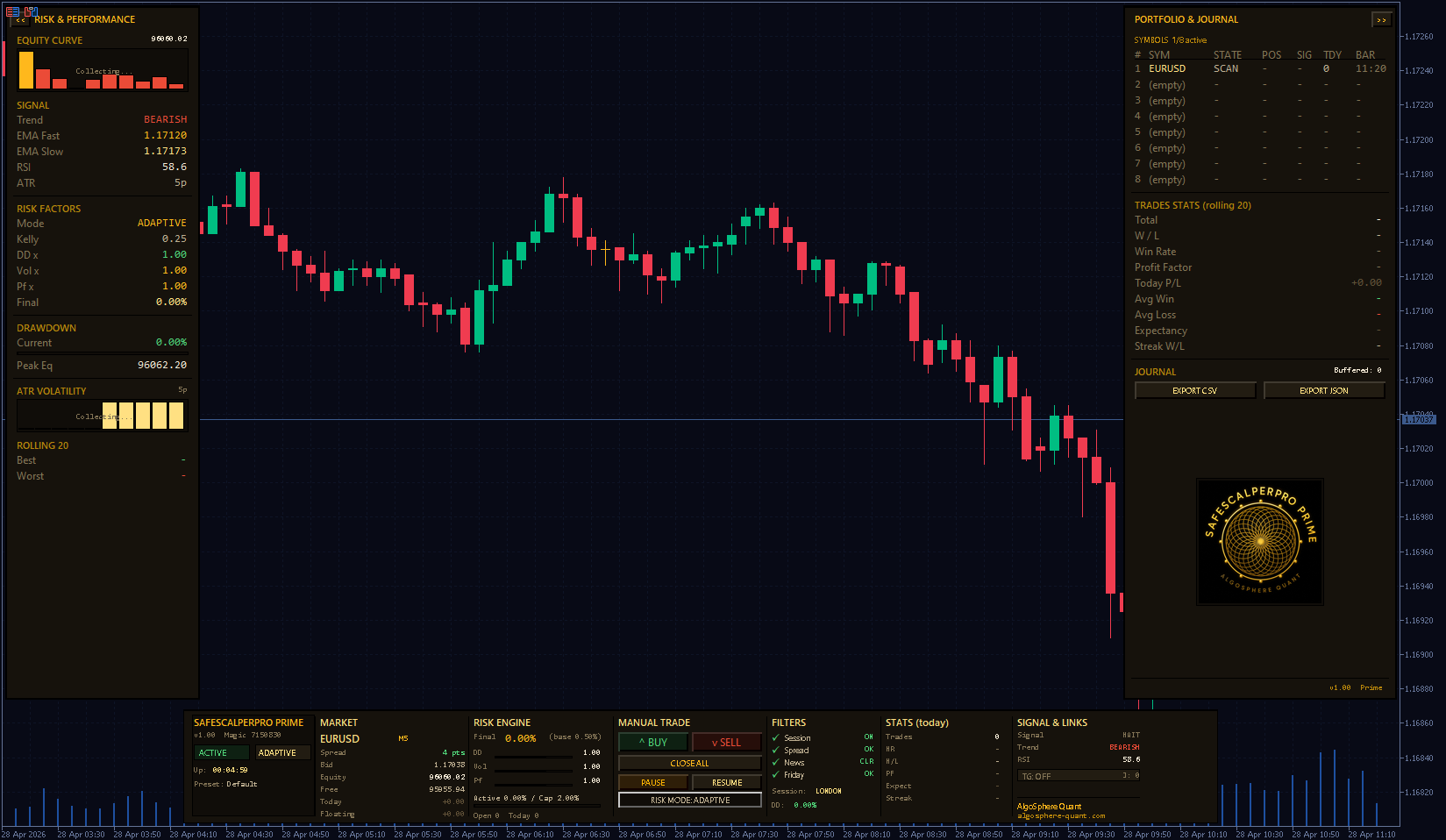
Three zones: the cockpit bar at the bottom (always visible), the Risk & Performance panel on the left, and the Portfolio & Journal panel on the right. The two side panels collapse with the << and >> buttons when you want more chart space.
Cockpit bar — seven columns, left to right

Brand block. EA identity. Two pills show operating status ( ACTIVE , MANUAL , DD WARN , DAY STOP , PROP HALT ) and risk mode ( ADAPTIVE or FIXED ). The Up: line is uptime since last attach; Preset shows which configuration is loaded.
Market. Live data for the chart symbol. Spread in points (green when OK, red when too wide), Bid, Equity, Free margin, Today P/L, Floating P/L. Profit numbers are color-coded green/red.
Risk Engine. The number you watch most: Final risk % — what Prime will actually risk on the next trade after all adaptive adjustments. Below it, three small bars show the individual multipliers (drawdown, volatility, performance). The Active / Cap line shows how much of your portfolio risk budget is currently in use.
Manual trade buttons. BUY and SELL open at market using the current strategy preset. CLOSE ALL is two-step — first click arms it (button turns red, reads CONFIRM CLOSE ALL? ), second click within three seconds executes. PAUSE ALL / RESUME ALL halt or restart automatic entries without closing positions. RISK MODE toggles Adaptive ↔ Fixed sizing on the fly.
Filters. Four checks show which protective filters are currently allowing trades. Green tick = pass, red cross = block. Session, Spread, News, Friday. The Last block: line tells you which filter most recently blocked an entry attempt — a one-line answer to "why isn't the EA trading right now."
Performance (rolling 20). Live stats on your last 20 closed trades. Trades count, Win Rate (green if ≥55%), Profit Factor, Expectancy (avg pips), current Streak.
Links. Telegram pill ( ONLINE or OFF ). Below it, journal buffer count.
Risk & Performance panel (left)
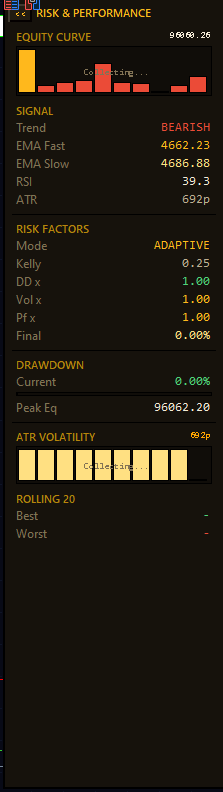
Top to bottom:
- Equity Curve. 20-point sparkline of account equity, sampled every 30 seconds. Bars above the first sample are gold, bars below are red.
- Risk Factors. Detail of the adaptive engine — Mode , Kelly fraction, the three live multipliers, and Final % .
- Drawdown. Current DD with a color-coded progress bar (green <50% of cap, amber 50–80%, red >80%). Peak Eq shows the highest equity reached.
- Prop Firm. Visible only when prop firm mode is enabled. Daily and total halt status.
- ATR Volatility. 20-point sparkline of ATR in pips. Taller bars are a visual cue that the volatility multiplier is shrinking your position size.
- Rolling 20. Best and worst trade in pips over the last 20 closed.
Portfolio & Journal panel (right)
- Symbols table. Eight slots. Active symbols show in gold, empty slots show (empty) . Columns: slot, symbol, state ( TRADE , SCAN , WAIT , NEWS , OFF , SPREAD , FRI , DD , FAIL ), open position direction, latest signal direction, trades today on that symbol, time of the last completed bar.
- Trades Stats (rolling 20). Total, W/L, Win Rate, Profit Factor, Today P/L, Avg Win, Avg Loss, Expectancy, Streak W/L.
- Journal. EXPORT CSV for Excel, EXPORT JSON for Python or prop firm reporting. Files land in your MT5 Files folder (File → Open Data Folder). Every trade is logged with full metadata: all entry condition values, spread at execution, exact risk % applied, exit reason.
Multi-symbol portfolio
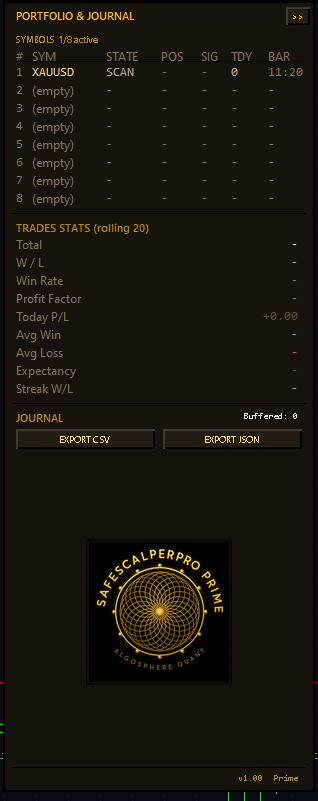
The Prime headline feature. Instead of attaching the EA to multiple charts — each with no awareness of the others — you configure up to eight symbols inside a single Prime instance. The EA trades all of them simultaneously with portfolio-level risk balancing.
Why it matters. When you run the same EA on multiple charts independently, two of them can open highly correlated positions at the same time (long EUR/USD and long GBP/USD, for example) and silently double your USD exposure. Prime's multi-symbol engine prevents this with a built-in correlation guard: when a position is already open on one symbol, the EA refuses a same-direction trade on a highly-correlated symbol (USD majors, metals, JPY crosses).
Configuration. In the inputs, find the MULTI-SYMBOL section. Each slot has Symbol, Timeframe, and Weight. Symbol names must exactly match the format your broker uses — check Market Watch.
Typical setup for a USD 5,000 account:
| Slot | Symbol | TF | Weight |
|---|---|---|---|
| 1 | XAUUSD | M5 | 1.0 |
| 2 | EURUSD | M5 | 0.7 |
| 3 | GBPUSD | M5 | 0.7 |
| 4 | USDJPY | M5 | 0.7 |
Lower weights on the Forex pairs because XAUUSD is the primary edge.
Portfolio risk cap. No matter how many symbols are active, total simultaneous open risk is capped at 2% of account by default. If two symbols both want to open a 1% risk trade, one will go and the other will be skipped until the first one closes. The Active / Cap bar in the cockpit shows current usage. This cap is enforced strictly as of r16 — see the release notes section above.
The adaptive risk engine
Prime sizes each trade with three independent multipliers applied to your base risk %. Result: a system that protects capital during losing streaks and lets it work harder when conditions favor your edge.
Drawdown-aware sizing. Below 2% DD, no reduction. Between 2% and 10%, the multiplier scales linearly down to 0.3 — a hard floor that keeps the system from freezing entirely during recovery.
Volatility-adjusted sizing. When the market is more volatile than usual, position size shrinks so dollar risk per trade stays stable even though stops are wider. In unusually quiet markets, sizing increases slightly.
Performance-aware sizing. Prime tracks the last 20 closed trades and applies a Kelly-fractional adjustment (quarter Kelly by default — the professional standard). Winning sequences nudge sizing up, losing sequences cut it back.
How they combine. final_risk = base × DD_factor × Vol_factor × Perf_factor , then clamped to the range [0.1%, 2 × base] . So if base is 0.5%, applied risk will always sit between 0.1% and 1.0% — never more, never less. All three factors are live in the Risk Engine column and in the Risk Factors block on the left panel.
Fixed mode ( RISK MODE button in the cockpit) bypasses all multipliers and uses base risk as-is. Useful for prop firm evaluations that require predictable sizing.
Telegram bridge
Real-time push notifications and remote control from your phone.
One-time setup. In Telegram, message @BotFather to create a new bot — copy the token. Message @userinfobot to get your numeric chat ID. In MT5, go to Tools → Options → Expert Advisors, tick Allow WebRequest for listed URL, and add https://api.telegram.org . In Prime inputs, set CfgTelegramEnabled = true and paste your token and chat ID. The Telegram pill flips to ONLINE within five seconds.
Automatic alerts. Trade opened (symbol, direction, lot, entry, SL, TP, risk %), trade closed (reason, P/L, duration), breakeven moved, partial close at TP1, drawdown auto-pause, daily cap reached, news pause starting, EA started/stopped.
Commands you can send back:
| Command | Effect |
|---|---|
| /status | Reply with full portfolio state |
| /stop | Pause new entries (open trades stay) |
| /halt then /halt confirm | Close ALL positions and freeze (two-step, 30s window) |
| /resume | Re-enable new entries |
| /pause SYMBOL | Pause one specific symbol |
| /risk X | Change base risk % (0.1 to 2.0) |
| /journal | Send today's summary |
| /help | List all commands |
Strategy presets — eight tuned configurations
Right-click the EA → Properties → Inputs tab → Load… → pick a preset file.
- LondonOpenGold — XAUUSD during the London open (08:00–10:00 GMT). Tight session window for high-volume breakouts.
- NYReversal — XAUUSD during New York hours (13:30–16:00 GMT). Captures the typical NY reversal pattern.
- FridayCloseDefensive — all symbols on Fridays. Risk halved, Friday cutoff at 14:00 to avoid weekend gap risk.
- PostNFP_Volatility — Forex majors after Non-Farm Payrolls. Wider stops to survive post-news volatility.
- AsianRangeBreakout — USDJPY and AUDUSD during the Asian session. Trades the morning breakout from the overnight range.
- HighSpreadBroker — for brokers with wider-than-average spreads. Increased spread tolerance and breakout buffer.
- PropFirmConservative — for FTMO, MyForexFunds, The5ers, etc. 0.25% risk, 4% total DD cap, 1% daily loss cap.
- AggressiveRecovery — post-drawdown ramp. Slightly higher risk per trade, no Friday cutoff. Use sparingly.
Recommended starting settings
| Account | Symbols | Base risk | Mode | Preset |
|---|---|---|---|---|
| $500 – $2k | XAUUSD only | 0.25% | Adaptive | Default |
| $2k – $10k | XAUUSD + 1–2 majors | 0.5% | Adaptive | LondonOpenGold |
| $10k – $50k | Full 4-symbol portfolio | 0.5% | Adaptive | LondonOpenGold or NYReversal |
| $50k+ | Full 8 symbols | 0.5% | Adaptive | Mix per session |
| Prop firm | XAUUSD or 2 majors | 0.25% | Adaptive | PropFirmConservative |
Smaller accounts should run fewer symbols to avoid over-correlation. The portfolio risk cap protects you mathematically, but spreading thin across too many instruments dilutes your edge.
Best practices
- Always demo first. 48 hours minimum before live capital touches it.
- One Prime per chart. Do not attach Prime to multiple charts of the same symbol — the magic number is shared and they will fight over the same positions. Use the multi-symbol engine, which is exactly designed for this.
- Check the filters when the EA seems quiet. The Last block: line in the cockpit identifies which filter is currently keeping you out. Spread spikes during low-liquidity sessions are the most common cause.
- Trust the drawdown pause. When DD WARN or DAY STOP fires, do not override it. Either the market is in a regime your edge does not handle, or you need to step back. Forcing trades in those moments is how accounts blow up.
- Export your journal weekly. Even if you never look at it, the CSV builds a record you will want if you ever need to diagnose a losing month or show a prop firm your discipline.
- Use presets as starting points. The eight shipped presets are calibrated for typical conditions. Your broker is not typical. After a week of demo, you will probably want to tune a parameter or two — that is normal and encouraged.
- Sync your VPS clock. Session and news filters depend on accurate broker time.
FAQ
Will it work on my broker? Any MT5 broker that offers XAUUSD or major Forex pairs. No DLLs, no special permissions.
Minimum account size? USD 500 for single-symbol XAUUSD. USD 2,000 recommended for the full multi-symbol experience. Below USD 500 the broker minimum lot will frequently exceed the calculated risk-based size and the EA will skip trades — that is the safe behavior, but you will see very few entries.
How many trades per day? Highly variable. 0 to 5 per day per symbol on M5 is typical. The strategy is selective by design; SCAN is the normal state.
VPS recommended? Strongly. MQL5's own virtual hosting is the simplest option.
Martingale or grid? Absolutely not. One trade at a time per symbol. Fixed SL/TP at entry. No averaging, no recovery cycles.
What happens if MT5 crashes? On restart, Prime restores its full state — peak DD tracker, daily counters, performance buffer, Telegram session. Open positions are managed by the broker and reattach automatically.
Prop firm compatible? Yes — one of its strongest use cases. Load PropFirmConservative .
Where to get it
- Product page (MQL5 Market): mql5.com/en/users/robin2.0 — search "SafeScalperPro Prime"
- Free open-source baseline: SafeScalperPro on Code Base (same 7-condition engine, no Prime layers)
- AlgoSphere Quant website: algosphere-quant.com
A 7-day demo build is available on the product page for anyone who wants to verify Prime against their own broker conditions before purchase. The demo runs the full engine — same signals, same risk management, same dashboard — and disables new entries after 7 days (existing positions continue to manage their exits normally).
For technical support, message me through the MQL5 product page. I reply within 24 hours on business days.
Risk disclaimer
Trading FX and CFDs on margin carries a high level of risk and is not suitable for all investors. Leverage works against you as well as for you. You should not invest money you cannot afford to lose, and you should seek advice from an independent financial advisor if you have doubts.
Past performance, whether in backtests or live records, is not necessarily indicative of future results. No representation is being made that any account will or is likely to achieve profits or losses similar to those shown in any historical record. AlgoSphere Quant publishes this software for educational and informational purposes. We do not provide investment advice. The user is solely responsible for trading decisions made with this software.
AlgoSphere Quant — Zero martingale. Zero grid. Zero gambling.


