How to Use the User Interface of My Expert Advisors
This blog post is a generalized user guide explaining the graphical user interface used in my Expert Advisors.
First, I will explain why traditional Expert Advisor interfaces are often limited, then I will show the goal of this interface, its main features, and how it can be tested inside the MetaTrader strategy tester.
Why Traditional EA Interfaces Are Limited
Many advanced Expert Advisors operate as portfolios of multiple trading strategies. However, these portfolios are often difficult to monitor properly. In many cases, the user cannot clearly see the performance, drawdown, or win rate of the individual strategies running inside the system. As a result, underperforming strategies may remain hidden behind the overall portfolio performance.
Another challenge is that no strategy performs equally well under all market conditions. Exceptional events such as geopolitical conflicts, unexpected economic announcements, flash crashes, or periods of abnormal volatility may temporarily create unfavorable trading conditions. Most Expert Advisors provide little or no operational control during such situations.
The Goal of the User Interface
The goal of the graphical user interface is to provide transparency and operational control without changing the autonomous nature of the trading system.
It allows the user to monitor both the portfolio as a whole and the individual strategies inside it. At the same time, it provides high-level manual controls that can be used during exceptional conditions, such as temporarily stopping a strategy, disabling buy or sell trades, or stopping the entire portfolio for the current trading day.
These controls are not designed for constant manual intervention. Their purpose is to give the user practical risk-control tools while keeping the Expert Advisor systematic by default.
The User Interface
If the Expert Advisor runs only a single strategy, the portfolio layout is automatically hidden and only the strategy-level layout is displayed.
The following image shows the portfolio-level layout of the interface:
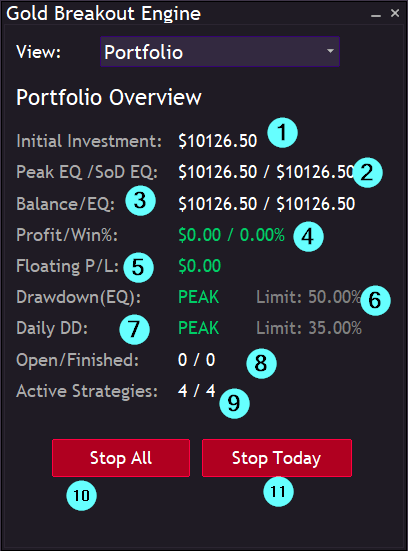
- Initial investment allocated to the portfolio. This is the combined investment of all strategies included in the portfolio.
- Peak portfolio equity and portfolio equity at the start of the current trading day.
- Current portfolio balance and equity.
- Total realized profit of the portfolio
- Current floating profit or loss of all active strategies combined.
- Current portfolio drawdown calculated from the peak equity.
- Current daily drawdown calculated from the start-of-day equity.
- Number of currently open and finished trades.
- Number of active strategies running inside the portfolio.
- Stop all strategies. This closes all open positions and removes all pending orders opened by the Expert Advisor.
- Stop all strategies for today. This closes all open positions and removes all pending orders, while automatically allowing trading to continue on the next trading day.
There is also an option to switch from the portfolio-level layout to the layout of an individual strategy.
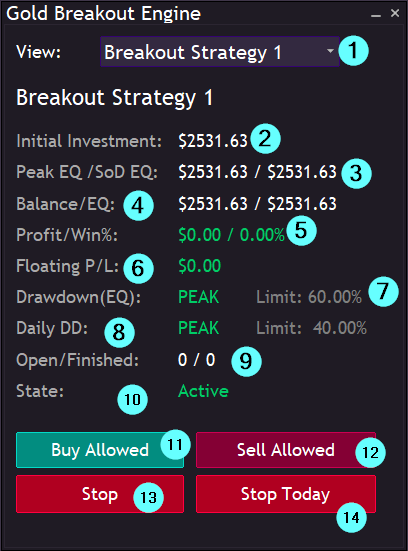
- View selection used to switch between the portfolio layout and the layouts of the individual strategies.
- Initial investment allocated to the selected strategy.
- Peak equity and start-of-day equity of the selected strategy.
- Current balance and equity of the strategy.
- Realized profit and win rate of the strategy.
- Current floating profit or loss of the strategy.
- Current drawdown of the strategy together with the configured drawdown limit.
- Current daily drawdown calculated from the start-of-day equity together with the configured daily drawdown limit.
- Number of currently open and finished trades.
- Current strategy state (Active / Stopped).
- Buy trades allowed. Allows or disables buy trades for the selected strategy. Disabling buy trades will close all currently open buy positions opened by the strategy. At least one of the directions are always enabled, or the strategy is technically stopped.
- Sell trades allowed. Allows or disables sell trades for the selected strategy. Disabling sell trades will close all currently open sell positions opened by the strategy.
- Stop / Restart the strategy. Stops or restarts the selected strategy. Stopping the strategy closes all positions and removes all pending orders opened by it.
- Stop Today. Temporarily disables the strategy until the next trading day. All currently open positions and pending orders opened by the strategy will be closed.
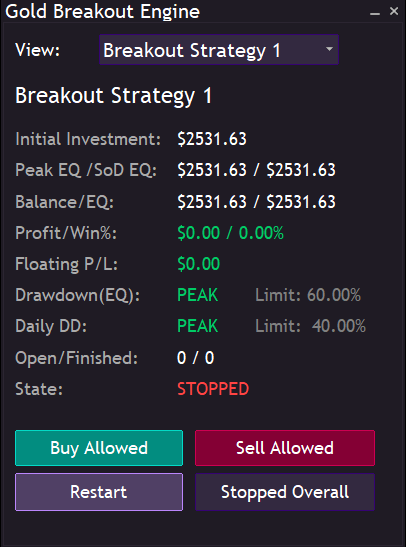
If a strategy is stopped, the interface changes accordingly and the strategy state is displayed as inactive:
Testing the Interface in the Strategy Tester
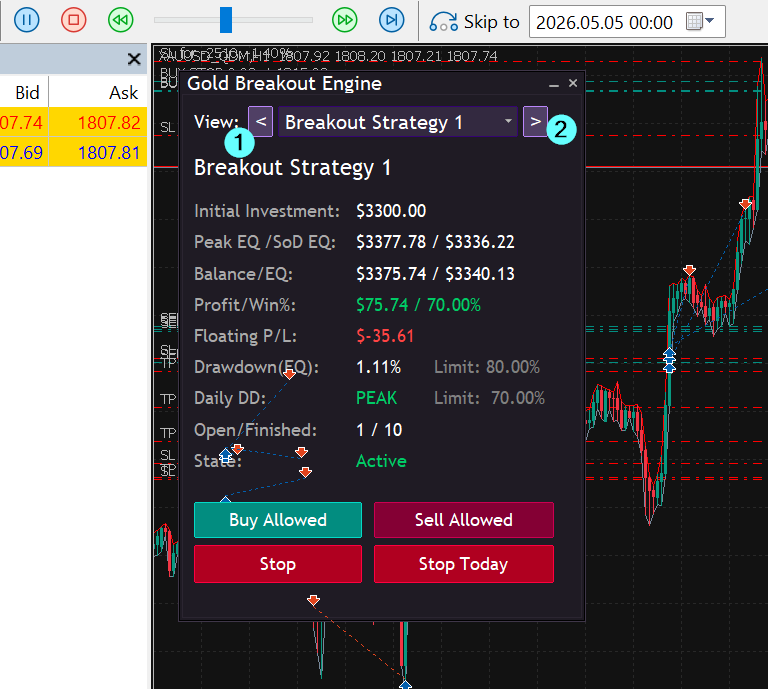
The graphical user interface can also be tested inside the visual mode of the MetaTrader strategy tester.
Since chart events are not processed while the tester is paused, the interface can only be interacted with while the test is actively running.
Inside the strategy tester, the view selector can be controlled using the keyboard buttons 1 and 2 to switch between the portfolio-level and strategy-level layouts.
The operational control buttons inside the tester work with a single click for easier testing. During live trading, however, confirmation message boxes appear before executing actions such as stopping strategies or closing positions in order to prevent accidental operations.
Important Note
One of the main advantages of algorithmic trading systems is the removal of emotional decision making. For this reason, the manual controls implemented inside the graphical user interface are not intended for constant intervention or day-to-day modification of the trading strategy.
These features are primarily designed for exceptional market conditions that are difficult or impossible to model directly inside an algorithmic trading system. Examples may include geopolitical conflicts, flash crashes, exchange outages, unexpected central bank announcements, or periods of abnormal market volatility.
The purpose of the interface is to provide additional operational risk control while still allowing the Expert Advisor to operate autonomously under normal market conditions.