
Trade Time Settings

The Trade Time settings allow you to control when the EA is permitted to open trades. These rules are applied only when the Initial Trade Type is set to Auto Trading.
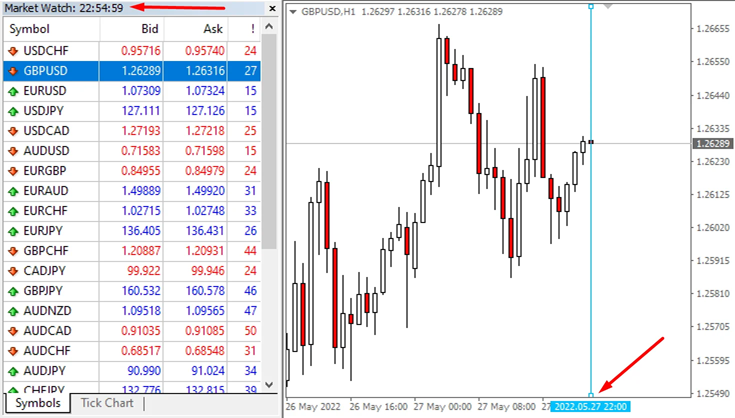
⏰ Time Reference:
All time conditions are evaluated using your trading terminal time, not your local computer time.
Enable Trade Time
-
On → The EA will follow the defined trading schedule.
-
Off → The EA ignores all time rules and can trade at any time.
Trade Time Use For
This option defines which trades are affected by time restrictions:
-
For Initial Trade
-
Time rules apply only to opening the first (initial) trade.
-
Once an initial trade is active, the EA can continue grid, hedge, or recovery trades even outside the allowed time.
-
-
For All Trade
-
Time rules apply to all trade actions, including Initial, Grid, and Recovery trades.
-
No new trades will be opened outside the allowed time windows.
-
Trading Time Groups
You can define up to three separate trading time windows per day.
Each group can be enabled or disabled independently.
-
Trade Group #1 → Enable or disable this time window
-
Group #1 Time → Set the start and end time
-
-
Trade Group #2 → Optional additional time window
-
Group #2 Time → Set the start and end time
-
-
Trade Group #3 → Optional additional time window
-
Group #3 Time → Set the start and end time
-
This allows you to trade in multiple sessions, such as London, New York, or custom periods.
Trading Days Filter
You can control which days of the week the EA is allowed to trade:
-
Sunday to Saturday → Set each day to True or False
-
True → EA is allowed to trade on that day
-
False → EA will not open any trades on that day
Time Format Rules
-
All time values must follow this exact format:
HH:MM - HH:MM
Example: 08:00 - 17:30 -
Do not change the format or add extra spaces.
-
The EA reads time strictly based on terminal time, not system time.
Important Notes
-
Trade Time settings are designed for Auto Trading only.
-
Manual trades, external EA trades, panel trades, and button trades are not blocked by Trade Time.
-
Incorrect time formatting may cause the EA to ignore the time filter.



![[iVISTscalp5]: XAUUSD. Forecast First. Market Reaction Afterwards](https://c.mql5.com/6/1035/splash-preview-777232.png "[iVISTscalp5]: XAUUSD. Forecast First. Market Reaction Afterwards")
