Additional Close Filters
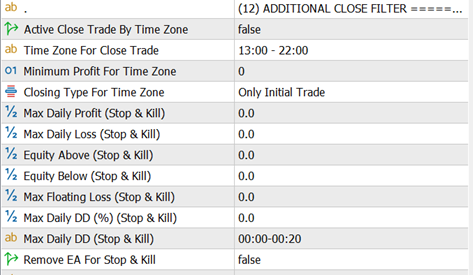
This section provides advanced exit controls that allow the EA to close trades automatically when specific conditions are met. These rules help protect profits, limit risk, and enforce strict trading discipline beyond the core recovery logic.
The filters can close trades based on time, profit, equity, drawdown, or signal behavior.
Close Trades by Time Window
This feature allows the EA to force close trades during a defined time range, regardless of market direction.
Active Close Trade by Time Zone
-
Enable or disable time-based trade closing.
-
When enabled, the EA will monitor terminal time and apply the rules below.
Time Zone for Close Trade
-
Defines the time range when trades should be closed.
-
Example: 13:00 - 22:00
-
When terminal time enters this range, the EA triggers trade closure logic.
Minimum Profit for Time Zone
-
By default, time-based closure does not consider profit or loss.
-
If a minimum profit value is set, trades will only be closed when the total position is in profit.
-
If grid or recovery trades are active, profit is evaluated as combined (average) profit.
Closing Type for Time Zone
Choose which trades are affected:
-
Initial Trade Only → Time filter applies only when no grid or recovery trades exist.
-
All Trades (Initial + Recovery Trade) → Time filter applies regardless of trade stage.
Close Trades on Opposite Signal
This feature allows trades to be closed when the EA detects a signal opposite to the current trade direction.
Close Trade on Opposite Signal
-
Enable or disable this behavior.
-
When enabled, the EA checks for reverse signals during trading.
Minimum Profit for Opposite Signal Close
-
Defines the minimum required profit before closing trades due to an opposite signal.
-
Helps avoid premature exits during temporary signal fluctuations.
Stop & Kill Protection Rules
These rules act as hard safety limits.
When any condition is triggered, the EA will close all active trades and stop opening new ones.
All values in this section are evaluated in account currency, not points.
Max Daily Profit / Max Daily Loss
-
Includes:
-
Current open trade profit/loss
-
Plus profit/loss already realized during the day
-
-
When the limit is reached, all trades are closed and trading stops for the day.
Equity Above / Equity Below
-
If account equity reaches the defined upper or lower threshold:
-
All trades are closed
-
Trading remains paused until equity returns to a safe range
-
Max Floating Loss
-
Triggers when current floating loss reaches the specified value.
-
EA immediately closes all trades to prevent further drawdown.
Max Daily Drawdown (%)
-
Drawdown is calculated as:
Recorded Daily Balance − Current Balance -
If the percentage loss reaches this limit, all trades are closed.
Max Daily DD Reset Time
-
Defines when the EA records the daily starting balance.
-
Drawdown calculations reset at this time every day.
Remove EA After Trigger
Remove EA
-
If enabled, once any Stop & Kill rule is triggered:
-
EA closes all trades
-
EA removes itself from the chart automatically
-
This option is recommended for strict risk-control environments.
Important Notes
-
These filters override normal trade logic, including recovery cycles.
-
Designed for capital protection, not trade optimization.
-
Strongly recommended to test these settings in Strategy Tester or demo accounts before live use.