Konstantin Kulikov
Konstantin Kulikov
4.1 (274)
  • 信息
11+ 年
经验
35
产品
1011
演示版
0
工作
16
信号
85
订阅者
Trader, programmer, engineer.
Email for investors and partners: konstantin@aster.cx

Find my official products only on MQL5: https://www.mql5.com/en/users/test-standart/seller
✔ Free lifetime updates
✔ Responsive customer support
✔ Access to the latest author's settings: https://www.mql5.com/en/blogs/post/747929

+ Get spread and commission rebates on every trade with any broker, paid directly to your wallet: https://fxcash.net/en/?id=-FOREX-

My Communities
• MQL5 group: https://www.mql5.com/en/messages/011e4f235b10dc01
• Discord group: https://discord.com/invite/yjVR5x4rvf
• MQL5 channel: https://www.mql5.com/en/channels/trendsandlevels
• Telegram channel: https://t.me/EAFXPRO

Helpful Information
• Set Up Combo Profile: https://www.mql5.com/en/blogs/post/779420
• Autostart of terminals when rebooting VPS: https://www.mql5.com/en/blogs/post/736914
• Disable Windows updates to avoid losing mql products activations: https://www.mql5.com/en/blogs/post/742676
• Saving VPS resources: https://www.mql5.com/en/blogs/post/746138
• Profile loading instructions: https://www.mql5.com/en/blogs/post/740359
• Checking automatic GMT in EAs: https://www.mql5.com/en/blogs/post/748027
• Manual setting of GMT_OFFSET parameter in experts: https://www.mql5.com/en/blogs/post/682539
• EAs access to sites: https://www.mql5.com/en/blogs/post/750708
• Trading lot size and money management: https://www.mql5.com/en/blogs/post/748029
• The danger of using StopLoss in scalping systems: https://www.mql5.com/en/blogs/post/700262
• VPS and clipboard: https://www.mql5.com/en/blogs/post/770761
• VPS and password saving: https://www.mql5.com/en/blogs/post/770772
• Limit on the number of open terminals in Windows: https://www.mql5.com/en/blogs/post/774470
• Step-by-Step Guide on how to use Expert Advisors: https://www.mql5.com/en/blogs/post/750723
Konstantin Kulikov 已发布产品
评论: 6
199.00 USD

An automated trading system with smart entry/exit algorithms that uses grid and martingale techniques to maximize profits. You can search for current signals on this page, or write me a personal message: https://www.mql5.com/en/signals/author/test-standart The default settings ( M1 timeframe ) are suitable for currency pairs, especially for pairs with GBP. All new sets appear here:  https://www.mql5.com/en/blogs/post/747929 A description of the Expert's parameters can be found in the

Konstantin Kulikov
Konstantin Kulikov
Statistics from the ICMarkets MT5 account.

EA for MT4 by link:
https://www.mql5.com/en/market/product/17470
EA for MT5 by link:
https://www.mql5.com/en/market/product/38826
Konstantin Kulikov
Konstantin Kulikov
Calm start for EA Breakthrough in 2021💠

EA for MT4 by link:
https://www.mql5.com/en/market/product/23001
EA for MT5 by link:
https://www.mql5.com/en/market/product/52858
#Breakthrough
Konstantin Kulikov
Konstantin Kulikov
Hello! This is an important post! Check it out⚠️

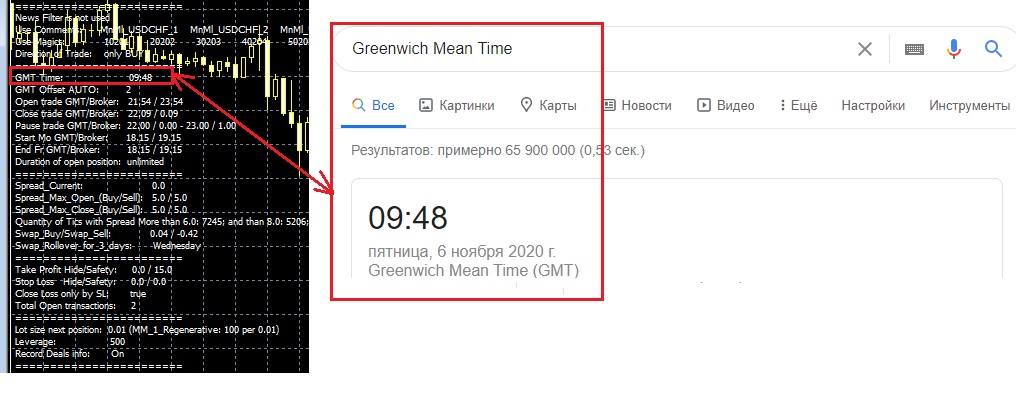
All my EAs (like most EAs) have time settings. To make sure that it is correct, expand any one chart in the terminal (if it is correct on one chart, then it is also correct on the others) and compare the GMT time in the advisor's information field with the GMT time on the Internet (for example, from the site https://time.is/GMT ). This must be done on a weekday when the currency market is open. This check must be performed when you first launch an Expert Advisor on a new VPS, as well as during the time change period (winter/summer).

So, if the GMT values coincide on the chart of the expert and the website on the Internet, then everything is correct, no action is required. And if the values do not match, then you need to change the EA parameters:

"GMT_Offset_AUTO"=false and set the "GMT_Offset_Manual" value yourself, according to the instructions https://www.mql5.com/en/blogs/post/682539
Konstantin Kulikov
Konstantin Kulikov
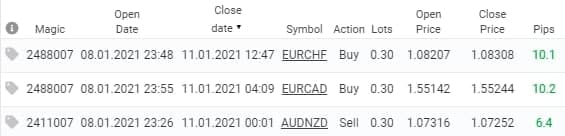
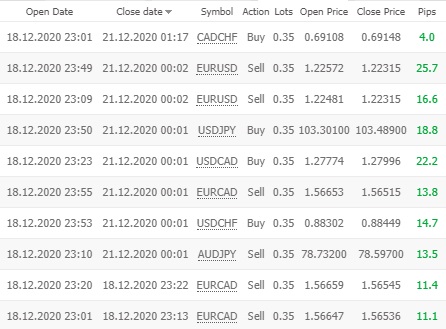
The last trading day for "Breakthrough Strategy" this year was successful. The system is fine.
The next two Fridays are public holidays (not working days), so trading stops. Trading will resume on January 5th.

"Breakthrough Strategy" MT4 version: https://www.mql5.com/en/market/product/23001
"Breakthrough Strategy" MT5 version: https://www.mql5.com/en/market/product/52858
Konstantin Kulikov
Konstantin Kulikov
✴️ Review on "Breakthrough Strategy" from trader Alan Lee: https://youtu.be/DCLF3fo1lHI
❇️Link to all experts: https://www.mql5.com/en/users/test-standart/seller
Konstantin Kulikov
Konstantin Kulikov
✴️"Breakthrough Strategy" video presentation: https://www.youtube.com/watch?v=6mntyLHyqkA
❇️Link to all experts: https://www.mql5.com/en/users/test-standart/seller
Konstantin Kulikov
Konstantin Kulikov
🤖About EA "Friday Monday".
"Friday Monday" and "Breakthrough Strategy" are similar, but not the same.
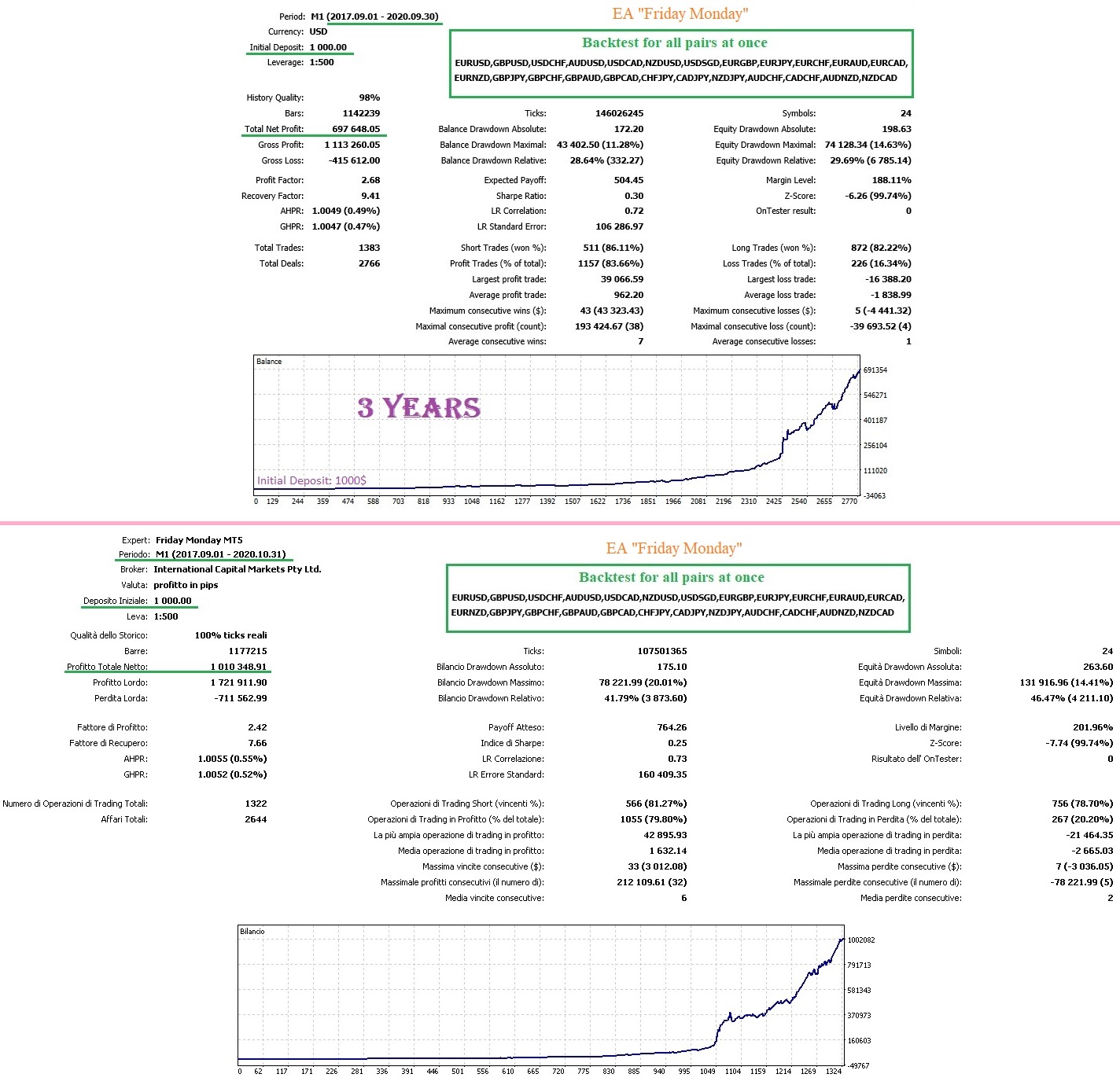
I tried to take all the best for "Friday Monday" and at the same time make the EA as simple and convenient to use as possible. Essentially, "Friday Monday" is "Breakthrough Strategy" with new thorough optimization, well as with simple parameters and the possibility of simultaneous backtesting of all pairs. I intentionally did not over-optimize the sets for "Breakthrough Strategy", as they have been showing good results for a long time on a real account. And I created new optimized sets for the last 4 years in a new EA "Friday Monday", because I like this strategy and I want more sets.

Let's see what wins, a long real record or a new optimization with great backtest.❔❔❔
Since brokers have different trading conditions, it is quite possible that "Breakthrough Strategy" will work better on some, and "Friday Monday" will work better on others.💹

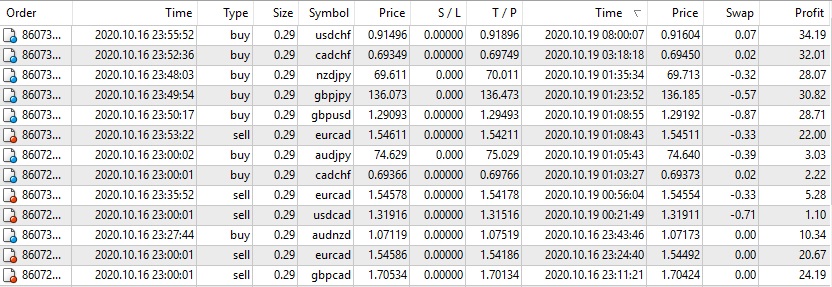
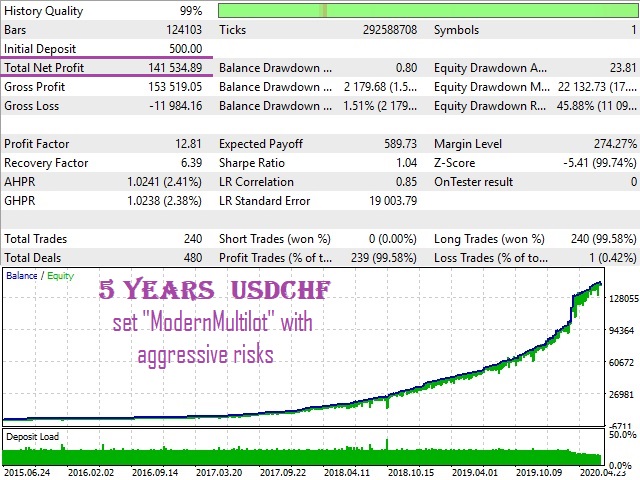
The pictures show "Friday Monday" Backtets at different quotes of different brokers (1 - Alpari and 2 - ICMarkets), also the difference in profit calculation (1 - in $, 2 - in points).

EA version for MT4 - https://www.mql5.com/en/market/product/56050
EA version for MT5 - https://www.mql5.com/en/market/product/56052
Konstantin Kulikov
Konstantin Kulikov
Hi, I'll explain about new ea "Friday Monday" 🤖
It is similar to "Breakthrough Strategy". And I intentionally did not over-optimize the sets for "Breakthrough Strategy", as they have been showing good results for a long time on a real account. And I created new optimized sets for the last 4 years in a new ea "Friday Monday". 🔺Because I like this strategy and I want more sets🔻 All settings are inside EA, so that you can do a simultaneous test of all sets for all pairs (in the strategy tester MT5) and 🔸no settings are required for real trading, just attach it to the chart of the desired currency pair (good for those who find it difficult to deal with sets or profiles).🔸
The "Breakthrough Strategy" and "Friday Monday" are configured to see each other's trades and thus not open a trade if another Expert has already opened a trade on this currency pair (there will be no two deals on one currency pair). This will protect the account from an excessive number of transactions, but at the same time, we will get more transactions and currency pairs than using one Expert.
🟢As a result, If you use both Breakthrough and FridayMonday (on the same account with my profiles), then the deals will be about 30% more (🔹deals will not be repeated for one symbol🔹), and the result will be averaged between them.
Versian for MT4: https://www.mql5.com/en/market/product/56050
Versian for MT5: https://www.mql5.com/en/market/product/56052
Konstantin Kulikov
Konstantin Kulikov
Gerardo Javier Sokorov Martinez
Gerardo Javier Sokorov Martinez 2020.10.20
pure gold! which EA/s is/are performing in this account and current balance for this lotsize? thx in advance
Konstantin Kulikov
Konstantin Kulikov 2020.10.20
ea Breakthrough Strategy lotsize 0.01 per 100$ of balance min balance=100 recomend balance=1000
Konstantin Kulikov 已发布产品
评论: 2
199.00 USD

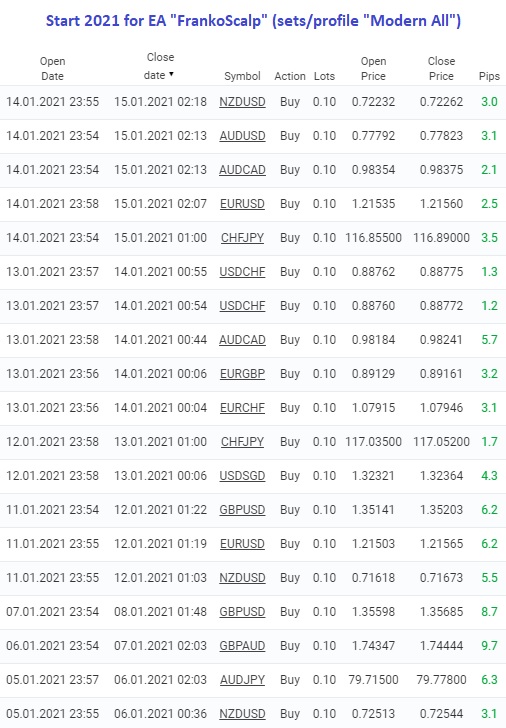
This EA trades a weekly GAP, opening trades on the Friday before the market close and closing trades on Monday morning. The expert works from one chart for all currency pairs:   EURUSD, GBPUSD, USDCHF, AUDUSD, USDCAD, EURJPY, EURCHF, EURAUD, EURCAD, EURNZD, GBPJPY, GBPCHF, GBPAUD, GBPCAD, CHFJPY, AUDJPY, CADJPY, AUDCHF, AUDCAD, AUDNZD. If the symbols in the "Market Watch" have a suffix, then specify it in the expert parameter "Symbol_suffix". Signals monitoring Version for MT5 >>>

Konstantin Kulikov 已发布产品
评论: 7
199.00 USD

This EA trades a weekend gap, opening trades on the Friday before the market close and closing trades on Monday morning. The expert works from one chart for all currency pairs: EURUSD, GBPUSD, USDCHF, AUDUSD, USDCAD, EURJPY, EURCHF, EURAUD, EURCAD, EURNZD, GBPJPY, GBPCHF, GBPAUD, GBPCAD, CHFJPY, AUDJPY, CADJPY, AUDCHF, AUDCAD, AUDNZD. If the symbols in the "Market Watch" have a suffix, then specify it in the expert parameter "Symbol_suffix". Signals monitoring Version for MT4 >>> Chat

Konstantin Kulikov 已发布产品
评论: 9
199.00 USD

This system was developed to work with a large number of sets and after a certain time it showed itself well when working at the close of trading on Friday. As a result, this direction of trading became the main one for working with this Expert Advisor. However, you can create your own trading settings and choose any day of the week for trading. The collection of settings sets can be expanded. Currency pairs for which sets are developed: EURUSD, EURCAD, EURAUD, EURNZD, GBPCAD, GBPAUD, AUDNZD

Konstantin Kulikov
已发布文章Good Monday
All parameters for EA Good Monday and Good Monday MT5 ==== Lot and MM ==== Use_Fix_Lots - enable/disable a fixed trading lot; Value_Fixed_Lot - the value of the fixed lot; Use_MM_1 - enable/disable the lot value based on balance; Funds_for_001_Lot - amount of funds for 0...
· 1 1507 6
Konstantin Kulikov
已发布文章Good Monday
Все параметры для EA Good Monday и Good Monday MT5 ==== Lot and MM ==== Use_Fix_Lots - вкл/выкл фиксированный лот при торговле; Value_Fixed_Lot - размер фиксированного лота; Use_MM_1 - вкл/выкл размер лота, исходя из баланса; Funds_for_001_Lot - количество средств на 0...
Konstantin Kulikov
已发布文章Autostart of terminals when rebooting VPS
In order for the trading terminals to automatically start (and the experts continued their work) after a scheduled or unscheduled reboot of the VPS (remote computer), the following steps must be performed on it (instruction for Windows systems). 1) Auto-login to VPS account...
· 6 2262 3