The VIZUALIZER

THE [VIZUALIZER] is a MetaTrader (MT4) Script designed to visualize an account history. It will read the account statement and then will visualize the positions on chart in form of rectangles, showing the OpenTime, OpenPrice, CloseTime and ClosePrice.

Generally, it has been developed to analyze the trading history, to observe how risky the particular positions were, allowing you to analyze the trading strategy from the account statement.
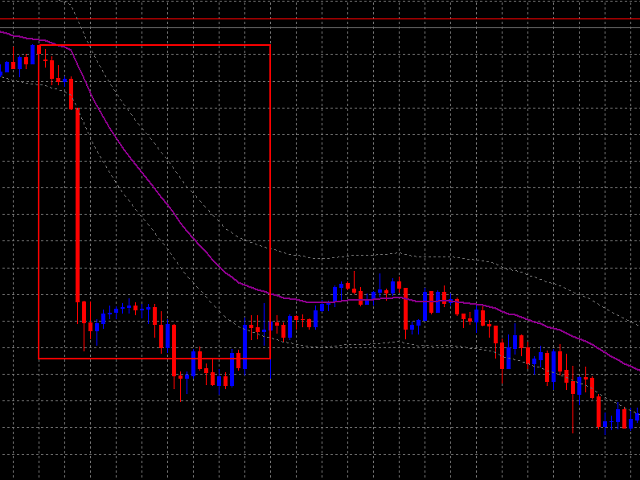
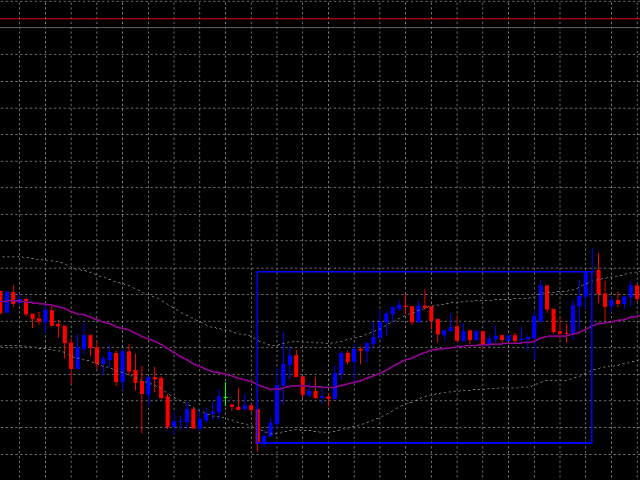
  • It is working with standard MS Excel CSV files
  • It is visualizing only one currency pair at a time
  • Showing separately LONG and SHORT positions

THE [VIZUALIZER] features:

  • Can be individually set-up to display positions including T/Ps and S/Ls
  • You can choose individual colours for LONG and SHORT positions
  • Works on different timeframes / you are free to drop it anywhere

Make sure to synchronize the account Statement with your MT4/Broker Server time.

IF YOU ALREADY PURCHASED THE PRODUCT:

Please write a private message to us, we will give you recommendations on how to set-up and use the VIZUALIZER, how to work with the account Statements and CSV files.

AUTHOR:

Antonin Skaryd, private investor and market analyst, software developer and founder of the FUTURE ENTERPRISE company.

The [VIZUALIZER] is useful tool to display the account Statement on chart. Generally, it has been developed to analyze the trading history, to observe how risky the particular positions were, allowing you to analyze the trading strategy from the account statement.

推荐产品
Symbol Order Close EA was developed to handle the closing and trailing of profit per symbol. The expert can also trail by dollars and the user can specify a particular magic number in case multiple experts are used on the same account. You can close by total profit on a symbol, start trailing, stop trailing and trailing step, all in a dollar value This EA is VERY handy if you are running an expert that trades multiple symbols and ends up with a floating profit. It can also be used to close man
This tool will perform Trailing stop loss and Break even management for orders. Helps you limit or reduce the time spend watching orders on the screen, especially when you need to go to sleep. Just add this EA to 1 chart, you can manage all pairs. You can filter orders by comment, magic number, symbol, and order ticket number. When Breakeven it can add shift/offset pips (to cover the commission...). You can try in strategy tester before purchase. The EA will add Buy and Sell alternately, so yo
How to Use the Features       MT5 VERSION   TRADE COPIER Select Role: On the account sending trades, choose Sender (Master Account) . On the account receiving trades, choose Copier (Receiver Account) . Lot Size Mode: Same Lot Size as Master: Ignores multipliers, copies exactly what the Master has. Multiply Master Lot Size: Uses the "Lot Multiplier" field (e.g., Master 0.10, Multiplier 2.0 = Copier 0.20). Use Fixed Lot Size: Ignores Master's volume entirely, uses the "Fixed Lot Size" field for ev
該產品可讓您控制您的訂單和帳戶,具有許多功能 1- 它將根據您的帳戶大小/停損大小/1 手數的對點值計算正確的手數。 2-它將為您提供當前訂單情況,具體取決於線路位置(目標 sl tp )。 3-按下 1 個按鈕即可移動所有訂單 target / sl 。 4-它將為您提供有關您的帳戶的資訊以及開立訂單所需的保證金。 5-它具有關閉所有訂單(符號或全部)的功能。 6-具有保本、保利功能。 7- 所有配對都易於使用。 請不要忘記添加您的評論 該產品可讓您控制您的訂單和帳戶,具有許多功能 1- 它將根據您的帳戶大小/停損大小/1 手數的對點值計算正確的手數。 2-它將為您提供當前訂單情況,具體取決於線路位置(目標 sl tp )。 3-按下 1 個按鈕即可移動所有訂單 target / sl 。 4-它將為您提供有關您的帳戶的資訊以及開立訂單所需的保證金。 5-它具有關閉所有訂單(符號或全部)的功能。 6-具有保本、保利功能。 7- 所有配對都易於使用。 請不要忘記添加您的評論
Manual Trade Panel EA MT4
Juvenille Emperor Limited
5 (5)
手动交易面板 EA MT4 是您可以找到的最简单易用的 MT4 交易面板。它的所有选项和功能都集中在一个表面上,无需打开额外的窗户或面板。它是一个订单管理、风险计算器、部分关闭和帐户保护实用程序,都在一个极其方便的界面中使用! 通过使用 手动交易面板 EA MT4 ,您可以比传统的手动交易方法更快、更准确地进行多次交易,这让您有更多时间和更清晰的头脑专注于您的交易决策。 账户保护是我们的首要任务,因此 手动交易面板 EA MT4 也是一个很好的账户保护实用程序,它可以在账户止盈或止损后关闭所有未平仓交易、删除所有挂单并关闭所有附加有任何 EA 的终端图表已达到亏损净额。这在盈利情况下非常方便,当您的资产低于您想要的止损水平时,可以避免您的交易账户进一步亏损。 提示: 您可以在您的模拟账户中下载并试用 手动交易面板 EA MT4 模拟版: 这里 将下载的免费演示文件粘贴到您的 MT4 >> 文件 >> 打开数据文件夹 >> MQL4 >> 专家文件夹并重新启动您的终端。   免费演示版本每次可在 4 小时内发挥全部功能,仅限演示帐户。 要重置试用期,请转至 MT4 >> 工具 >>
Trade Auto Close
Makarii Gubaydullin
自动平仓:按时间或达到利润/亏损触发 通过此工具,您可以在给定条件下自动平仓。 多功能工具 : 66+ 功能,包括此工具  |   如有疑问请联系我   |   MT5版本 要激活自动平仓,您需要设置以下参数(在面板上): 1. 交易品种   应用此功能的: 针对特定   [Symbol]   / 或针对   [ALL]   所有品种。 2.   条件,   何时平仓: [if total] / [if single] / [at time]:   根据此参数,可以选择 在  达到利润/亏损时平仓 ,或  在指定时间平仓。 [close at Profit / Loss] 选项的设置: 1. [if total] / [if single]:   计算 P/L 方式:所有  选定交易  合计,  或每笔交易  单独计算; 2. [Floating] / [Potential]: 计算  浮动 P/L  (未平仓交易), 或计算  潜在 P/L  (当达到 TP / SL 水平时); 3. [Profit] / [Loss] / [P/L]: 计算内容:  利润、亏损或 [利润或亏损]
Trade Assistant Pro 36 in 1
Makarii Gubaydullin
4.76 (21)
多功能交易工具:手数计算器、网格订单、风险回报比、交易管理、供需区、价格行为分析等 演示版   |   用户手册 交易助手 不能在策略测试器中运行:您可以下载 演示版 来测试此 实用工具 。 如有任何问题 /改进想法/发现错误 ,请 联系我 如需MT5版本,请点击 此处 简化、加速并自动化您的交易 流程 。通过此 仪表板 扩展标准终端功能。 交易面板 适用于任何交易品种:外汇、股票、指数、加密货币等。 1. 开立新交易 :手数/风险/风险回报比计算:手动交易的风险管理 手数计算器(基于风险规模计算交易量) 风险计算器(基于手数计算风险金额) 风险回报比 网格订单: + 动态间距选项和分割手数选项 订单激活触发器,+ 买入止损限价/卖出止损限价:MT4也可用 虚拟止损,虚拟止盈(隐藏止损,隐藏止盈:经纪商不可见) 智能止损/入场价位:如果K线收盘价超越此价位(避免错误触发) 隐藏订单(虚拟订单) 计划订单:即使市场休市也可下单(周末计划器) 附加多级止盈(多重获利了结) OCO订单(一单取消另一单),具有不同ID 交易可视化 + 图表上调整 以买入价(Bid)设置的止损/入场价位:避
Trade Manager MT4 DaneTrades
Levi Dane Benjamin
4.09 (11)
交易管理器可帮助您快速进入和退出交易,同时自动计算风险。 包括帮助您防止过度交易、报复性交易和情绪化交易的功能。 交易可以自动管理,账户绩效指标可以在图表中可视化。 这些功能使该面板成为所有手动交易者的理想选择,并有助于增强 MetaTrader 4 平台。多语言支持。 MT5版本  |  用户指南+演示 交易经理在策略测试器中不起作用。 如需演示,请参阅用户指南 风险管理 根据%或$自动调整风险 可选择使用固定手数或根据交易量和点自动计算手数 使用 RR、点数或价格设置盈亏平衡止损 追踪止损设置 最大每日损失百分比,在达到目标时自动平仓所有交易。 保护账户免遭过多提款并阻止您过度交易 最大每日损失(以美元为单位)在达到目标时自动关闭所有交易。 保护账户免遭过多提款并阻止您过度交易 一键实现所有交易的盈亏平衡 自动计算从手机/电话发送的交易的风险 OCO 在设置中可用 交易和头寸管理 通过设置每月、每周、每天、每小时或每分钟的最大交易次数,停止过度交易和报复性交易。 高级挂单管理。 调整何时关闭挂单的规则 追踪挂单 支持市价订单和挂单 每日最大利润目标(以美元为单位)以确保头寸并停止
Smart Key Trade Manager
Stephen Sanjeeve Sahayam
大多数零售交易者无法通过过度冒险或过度交易来管理风险和亏损账户。该工具完全自动化回撤和风险管理,让交易者只关注他们的条目。它是第一个也是唯一一个使用价格行为及其 Aggressive Risk Control 功能的交易管理器,当价格不利于交易时自动关闭部分头寸。这确保了损失始终小于胜利。 可用于任何入场方式和任何交易方式;剥头皮交易、盘中交易或波段交易。 特征: 与所有订单类型一起使用;市价单、止损单和限价单。 带有警报的激进风险控制 (ARC) - 当价格与交易背道而驰时减少回撤。 限制您进行的交易数量 - 减少过度交易。 自动批量计算。 自动或手动设置止损和多个获利水平。 自动或手动将止损移动到盈亏平衡点。 获利时自动或手动关闭部分头寸。 当达到每日收益百分比时关闭所有未平仓交易。 在图表上显示交易历史的选项。 购买后请在 mql5 中留言以获得全面的用户手册。
ChangePeriod MT4
Kazuya Yamaoka
You can change the time period of the chart at the touch of a button. You can also change multiple charts at the touch of a button. You can also change multiple charts at the touch of a button, saving you the trouble of changing time periods. We are live-streaming the actual operation of the system. https://www.youtube.com/@ganesha_forex We do not guarantee your investment results. Investments should be made at your own risk. We sharll not be liable for any disadvantage or damage caused by th
Order Block Draw MTF
Jorge Delgado Segura
4 (1)
Just $30 for six months!!!. This will draw Order Blocks just by clicking on a candle with different colors for different timeframes. It will use the body or the wicks. It can also draw the mean threshold of the candle open/close or high/low. As a drawing tool, it is not active all the time after adding it to the chart. Activate by pressing 'b' twice on the keyboard within a second. If activated but then decided not to draw, deactivate by pressing 'b' once.  Box color depends if candle is abov
Easy Lot Size Calculator – MT4 Risk and Position Size Utility Overview The Easy Lot Size Calculator is an on-chart tool designed for MetaTrader 4. It calculates position size based on a user-defined risk percentage and the stop-loss distance measured from a Fibonacci retracement object. The tool provides a structured way to view risk information directly on the chart and includes optional trade management features. The calculator reads the distance and direction of a Fibonacci retracement object
The trading panel is designed to close trading positions on the current instrument. The panel shows the account situation for the instrument it is attached to. The panel displays the following information: Balance - account balance; Equity - account equity; Margin - used margin; Free margin - free margin; Total Position - the summary position on the account for the current instrument, in lots; Position buy - the summary position of the buy direction for the current instrument, in lots; Position
Expert Advisor for MT4 Useful utility MUST have for all traders.  With 1 click button, you're able to close all your open positions. Its come with a warning pop up notification when you click to close all your trades, to avoid an accident press the button. Just press 'Yes' to confirm or 'No' to cancel it. The expert will close all your open positions no matter what pairs you currently open or directions. Just attach the expert on 1 of your chart, and you're good to go.
EasyTradePad
Sergey Batudayev
5 (5)
EasyTradePad – MetaTrader 4 交易面板 EasyTradePad 是一款用于手动和半自动交易的工具。该面板可帮助您快速管理订单和持仓,并可一键计算风险管理参数。 面板功能: 按预设的风险比例(% 或账户货币)开仓和平仓 设置止损(SL)和止盈(TP):以点数、百分比或金额表示 自动计算风险回报比(Risk-to-Reward Ratio) 将止损移动至无损位置(保本) 部分平仓 移动止损(Trailing Stop):按点数或K线影线 加仓与均价操作 修改已开仓订单的参数 额外功能: 金字塔加仓 随着价格朝向预设止盈方向运行,分批加仓。每次新加仓可设置减少风险。加仓次数可灵活设置。 均价操作 在图表上手动选择加仓位置,最终按平均价格平仓。 无损转移 当价格达到设定的利润距离后,止损自动移动到开仓价。考虑点差和掉期。 移动止损 支持两种模式: 按点数(可设置启动点数、距离和步长) 按K线影线(可选时间周期) 核心设计理念: 简单易懂的下单方式 高效直观的操作界面 实盘交易中的稳定性与可靠性 您可通过产品页面提供的 演示版本 体验全部功能。 更多信息和支持
【分析大师】 简介 分析大师是一款强大的MT4交易数据,交易策略统计分析软件,可以为用户体提供直观的账户表现,同时具有复盘交易轨迹的功能。 可以有效帮助用户做基础的盈亏统计,并直观看到自己的交易是否稳定,自己的交易策略是否需要调整。 使用方法 将其拖入任意货币对图表中,即可展示其效果。 如果统计数据不全,请检查历史交易记录是否完全显示,因为程序是从历史记录中读取并转化成可视数据图像的。 功能 根据历史盈亏,将交易成绩可视化,直接查看盈亏曲线。 统计不同币种历史盈亏及交易单量,方便我们总结什么品种好盈利,什么品种容易亏损。 可以复盘交易轨迹在K线图标上,方便观察交易策略。 显示每日/每周/每月交易盈亏数据,方便查看账户收益率。 如果遇到问题,可以咨询我,为你提供使用帮助。
RFX EasyTrade
Rasoul Mojtahedzadeh
5 (1)
RFX EasyTrade  is a professional panel to make your trades as easy as possible. You can perform scalping by acting fast and efficient. You can draw a box or a trend line and let RFX EasyTrade to catch a breakout and manage the trade automatically. You can set pending orders and set Order-Cancels-Order easily. If you are a fan of Martingale strategy just set a few settings on the panel and let RFX EasyTrade to automatically manage the trades. You can trade based on time without waiting long time
BreakEven Grid Utility for MT4 BreakEven Grid is a powerful utility for manual trade management on the MetaTrader 4 platform. It provides a convenient on-screen panel with buttons to help you manage your open positions with a single click.  Features: Set BE+Profit: Automatically sets Take Profit to breakeven + desired profit in pips or money. Close BUY/SELL: Instantly close all Buy or Sell orders for the current symbol. Close +$/-$/Old/New: Close only profitable, losing, oldest or newest tra
TesterPro
Miguel Angel Barahona Ochoa
TesterPro 是一个专为 MT4 策略测试器设计的面板。它允许你模拟买入和卖出订单,设置手数、止盈和止损。你可以随时修改已开的订单并部分平仓。你还可以通过鼠标拖动相应的线条来调整止盈和止损水平。 在回测过程中, TesterPro 会实时提供详细的绩效报告,包括赢单、亏单、总利润和浮动利润。面板可以通过单击轻松隐藏或显示。 TesterPro 是一个模拟器,旨在帮助你高效且真实地进行交易策略回测。通过直观的面板,你可以轻松执行操作,在任何品种和时间周期上测试策略,分析结果并提升交易技能。所有这些都通过一个实用且易于使用的控制面板完成。 ---------------------------------------- 主要功能 • 仅在 MT4 策略测试器中运行 • 兼容所有品种 • 兼容所有时间周期 • 可开任意数量的订单 • 可同时开买单和卖单 • 止盈和止损可通过移动线条来修改 • 订单可随时修改 • 止盈和止损可选择以点数或价格水平设置 • 支持部分平仓 • 可同时开多个订单 • 一键关闭所有订单 • 回测期间实时报告所有订单(已开和已平) • 可访问 MT4 报告
Possibilities: Provides the opening of an order with a specified% risk of the deposit Automatic calculation of lot and other parameters of a trade for a given% risk, StopLoss and TakeProfit levels Transaction support. You can accompany an order opened by another robot. It is possible to transfer the order to breakeven and carry out a step trailing profit Graphic information panel, can be converted into a minimalistic look. Displays information about the current spread, swap, deposit load, profit
Fixer
Dimitri Nepomniachtchi
Track your orders, build a unified equity across selected symbols, magic numbers, terminals, and trading accounts. Closes orders when specified conditions are met. Creates new portfolios and adapts to already running portfolios according to your conditions. In short, take a look — it is worth it. If you have questions, write. If you are not sure about the settings, ask, I will help. Virtual SL, TP, Trailing.  * * * * It may seem like nothing special, but in practice they often help more than
Basket Trades Panel
Opengates Success International
Basket trading is very interesting for those who are familiar with it. It is also very profitable if you know your way round BUT can be very destructive to anyone’s account if care is not taken. However, there are Basket traders all around making good incomes with it with ease. What it can do: This utility is created for them to remove the stress of opening trade on each of the currency symbol group. At just a click, it opens the symbol’s entire group of currency pair ORDERS in any of the direct
所选期间的详细交易统计 查看我的 #1 交易助手 :66+ 功能,包括此工具 | 如有疑问,请联系我 该工具包含2个独立功能: 交易统计 周交易日分析器 统计显示模式: 针对 选定 的货币对/交易工具 针对 所有交易 (" ALL ") 您可以选择获取统计数据的时段: 1天 1周 1个月 2 个月 3 个月 6 个月 1年 2年 全部交易历史 1. 交易统计: 毛利润 毛亏损 总利润/亏损 交易次数 买入盈利交易百分比 卖出盈利交易百分比 总盈利交易百分比 平均持仓时间 盈利交易的平均持仓时间 亏损 交易的平均 持仓时间 2. 周交易日分析器:  寻找最佳入市日 您将看到每周各天的统计数据:盈利/亏损次数以及各天的胜率。 红色和绿色区域将帮助您直观地看到交易最成功的日子以及不宜交易的日子。 界面优势: 您可以 折叠面板 ,从而释放图表上的空间:([^] 按钮 ); 您可以 移动面板  到图表上的任何位置:([move] 按钮 ); 深色/浅色界面主题 :("[Dark]" 开关 ); 启用/禁用周交易日统计显示;
Dhokiyas Market Screener MT4
Dhokiyas Money Map Investment Consultants - FZCO
Dhokiya's Market Screener 用户指南 适用于 MetaTrader 5 的多品种分析面板 支持一键交易和完整技术概览 官方更新频道 加入频道 : Dhokiyas 技术支持 直接联系 : Contact 1. 产品功能说明 Dhokiya's Market Screener   是一款适用于 MetaTrader 5 的多品种技术分析工具。 它扫描多个交易品种 并基于多重技术确认生成方向信号和评分。 本产品旨在帮助交易者快速掌握市场整体情况 在一个清晰的面板中完成分析。 2. 重要说明 本产品不保证盈利 也不承诺任何特定收益。 交易存在风险 请合理管理资金。 信号基于技术指标和终端可用的市场数据生成。 实际表现取决于经纪商条件 点差 执行速度 以及交易品种规格。 3. 安装步骤 打开 MetaTrader 5。 如有需要 在 MetaEditor 中编译产品文件。 将产品加载到任意图表。 在 MetaTrader 5 中开启 Algo Trading。 在设置窗口中允许自动交易。 4. 首次使用 加载后 面板会显示在图表上。 点击 SCAN 按钮开始
This tool is developed  to make your trading risk and profit management easier. It is able to move all of your opened transaction's take profit and stop loss on to one similar price. How to use Draw a trend line/horizontal line and name it to "tp_" as the take profit line and "sl_" as the stop loss line. The EA will modify all of your orders' and pending orders' take profit and stop loss to the given line. You can drag the gray box to drag the line. You can see the risk in the account currency
Slow Pips OCO Trade Panel is an advanced trading panel for placing pending orders. Traders can use this panel to place two pending orders at once. One pending order would be of buy entry type and the other one would be of sell entry type. Both orders will have Stop Loss and Take Profit parameters. Since two pending orders are placed at the same time, the pending order for which the price hits first gets converted into a market order and the other pending order gets deleted (one order cancels the
助理交易待定订单MT4   交易助理是一个专为手动交易而设计的交易面板。 该面板允许您计算风险,使用限价单管理头寸, 和其他有用的功能。 面板的主要功能 1. 它适用于任何交易工具 - 货币对,差价合约,股票,指数,期货,加密货币。 2. 将止损和止盈设置为以点表示的距离。 3. 设置并显示潜在亏损与利润比率。 4. 该面板支持挂单。 5. 在开盘前在图表上显示计算仓位交易量和利润。 6. 功能限制顺序。 Trade Assistant is a trading panel designed for manual trading. The panel allows you to calculate risk, manage positions using Limit orders, And other useful features. Key features of the panel It works with any trading instruments - currency pairs, CFDs, stocks, indices, futures, cryptocu
Utility, which draws buy or sell trendlines, which can also become support or resistances able to close any position on the screen Algorithm that calculates the gain of the position, at the touch closure of the line.   The benefits you get: Works on forex and CFD, timeframe from M1 to Weekly. Easy to use screen control panel. Audible warning messages at the touch of the line. Easy to use.
Robi Auto
Yvan Musatov
Robi Auto Expert Advisor works using sharp tick movements. It goes through the entire history and all currency pairs with one single setting. The more latency your broker has in the amount of the Internet channel, the higher you need to set stop loss, take profit and trailing stop so that the server can process them at the desired price and the lower the trading frequency will be. The uniqueness of the Expert Advisor is that it can be run on any hourly period, on any currency pair and on the se
Commodity Channel Index Message is an indicator for the MetaTrader 4 trading platform. Unlike the original indicator, this three in one version has a system of alerts that inform on market situation changes. It consists of the following signals: when the Main line crosses the levels of extreme zones and 50% level; when the Main line crosses the Trend line in the indicator window; Divergence on the last bar. Values of the middle and extreme levels and divergence zones are customizable. Parameter
该产品的买家也购买
The product will copy all telegram signal to MT4   ( which you are member  ) , also it can work as remote copier.  Easy to set up, copy order instant, can work with almost signal formats, image signal, s upport to translate other language to English Work with all type of channel or group, even channel have "Restrict Saving Content", work with  multi channel, multi MT5 Work as remote copier: with signal have ticket number, it will copy exactly via ticket number. Support to backtest signal. How to
The product will copy all  Discord  signal   to MT4   ( which you are member  ) , also it can work as remote copier.  Easy to set up. Work with almost signal formats, support to translate other language to English Work with multi channel, multi MT4. Work with Image signal. Copy order instant, auto detect symbol. Work as remote copier: with signal have ticket number, it will copy exactly via ticket number. How to setup and guide: Let read all details about setup and download Discord To MetaTrader
ManHedger MT4
Peter Mueller
5 (2)
THIS EA IS A SEMI-AUTO EA, IT NEEDS USER INPUT. Manual & Test Version Please TEST this product before   BUYING  and watch my video about it. Contact me for user support or bug reports, or if you want the MT5 version! MT5 Version I do not guarantee any profits or financial success using this EA. With this Expert Advisor, you can: Implement your own   Zone Recovery   strategy to capitalize on trending markets. Create   Grid   trading strategies, to profit from ranging markets. Place orders easil
Ultimate Trailing Stop EA
BLAKE STEVEN RODGER
4.33 (15)
This EA Utility allows you to manage (with advanced filtering) unlimited open orders (manual or EA) with 16 trailing stop methods: fixed, percent, ATR Exit, Chandelier Exit, Moving Average, Candle High Low Exit, Bollinger Bands, Parabolic, Envelope, Fractal, Ichimoku Kijun-Sen, Alligator, Exit After X Minutes or Bars, RSI and Stochastic. The trailing stop can be either real or virtual, and you can exit fully or with a partial close percent on touch or bar close.  Moreover, you can add (overrid
Riskless Pyramid
Snapdragon Systems Ltd
5 (1)
Introduction This powerful MT4 trade mangement EA offers a way potentially to aggressively multiply trade profits in a riskfree manner. Once a trade has been entered with a defined stoploss and take profit target then the EA will add three pyramid add-on trades in order to increase the overall level of profit. The user sets the total combined profit target to be gained if everything works out. This can be specified either as a multiple of the original trade profit or as a total dollar amount. Fo
Ultimate Trade Copier
BLAKE STEVEN RODGER
5 (2)
This trade copy utility allows you to instantly and seamlessly replicate and synchronize unlimited orders from multiple master accounts to multiple slave accounts on your local machine. You can create custom channels (or portfolios) with advanced filtering capabilities to copy from multiple master accounts to multiple slave accounts. Moreover, you can tailor these channels with a range of lot sizing and trade condition options to ensure that copied trades outperform the original source. You can
Rocket FX Trading Manager PRO Note: Once you download the manager, message me for the background files The Ultimate All-in-One Trade Management Solution for MetaTrader 4 Version:   4.5 |   Platform:   MetaTrader 4 |   Category:   Utility / Trade Manager   Overview Rocket Fx Trading Manager v4.5 is a comprehensive, all-in-one trade management system designed to transform your trading experience. This powerful utility combines   intelligent position sizing ,   multi-target order placement
Ultimate Extractor - Professional Trading Analytics for MT4 Ultimate Extractor transforms your MetaTrader 4 trading history into actionable insights with comprehensive analytics, interactive charts, and real-time performance tracking. Ability to combine multiple accounts and MT4 and MT5 into a single dashboard. What It Does Automatically analyzes your MT4 trading history across all Expert Advisors and generates detailed HTML reports with interactive visualizations. Tracks live performance metric
Live Forex Signals 专为现场信号交易而设计   https://live-forex-signals.com/en   和  https://foresignal.com/en . Live Forex Signals for MetaTrader 5  https://www.mql5.com/ru/market/product/81448 参数 如果您已订阅网站,则用户名和密码live-forex-signals.com/foresignal.com ,然后您应该使用您的凭据填写这些参数;如果没有订阅,则将字段留空; 评论对正在开启的交易的评论 风险风险作为交易存款的百分比,如果风险=0,则使用价值地段 固定交易量 使用获利使用从网站获利 UseStopLoss从网站使用止损 FrequencySignalUpdateInMinute顾问访问网站的频率 交易的最大点差交易的最大允许点差,如果点差较高,则设置的挂单被取消 使用追踪止损 TrailingStop跟踪止损的值以点为单位 为了使实时外汇信号正常工作,您需要放置网站地址 https://live-fore
Crystal Trade Manager PRO – 高级 MT4 风险与交易控制系统 免费版: https://www.mql5.com/en/market/product/150632 概述 Crystal Trade Manager PRO(CTM)是一款为 MetaTrader 4 打造的完整专业级风险管理与交易控制工具。 它专为需要严格执行、稳定风险保护和智能自动化的交易者而设计。 系统可全面管理风险、保护账户权益、执行每日限制、自动设置 SL/TP,并提供专业级的一键式快速交易面板。 非常适合参与 prop firm 挑战、日内交易、剥头皮交易以及专业资金管理的交易者。 同时提供完整的 MT5 版本。 核心亮点功能 1. 高级风险与回撤保护 支持每日回撤限制 1%–70% 。 一旦达到回撤上限,系统将立即平掉 所有仓位 。 可选:突破后自动删除 所有挂单 。 每日锁仓模式:当天达到限制后阻止新下单,次日自动恢复。 完全符合各大 prop firm 的规则与要求。 2. 日内盈利与亏损目标自动化 可设置每日 盈利目标 与 亏损限制 (账户货币,例如 USD)。 达到任何目
Averaging Helper
Sergey Batudayev
5 (2)
平均助手——这种交易辅助工具将使用两种技术帮助您平均之前无利可图的头寸: 标准平均 对冲,随后根据趋势开仓 该实用程序能够 一次性筛选出多个不同方向的未平仓头寸,包括买入和卖出头寸。例如,您建了一个卖出仓位和一个买入仓位,但两个仓位均未盈利,或者一个仓位亏损,一个仓位盈利但盈利不足,您想对这两个仓位进行平均,以便平仓——我的“平均助手”实用程序可以帮助您。 平均助手实用程序 - 允许您自动计算下一个仓位的规模、下单价格、平均仓位和平仓的方向以及您指定的获利规模。 该实用程序还允许您使用“买入”和“卖出”按钮开仓。您只需指定所需的止盈大小和起始手数即可。实用程序本身将以最初指定的止盈价或平均价平仓,并会尝试以平均价平仓,同时考虑您为平均系列设置的止盈。 事实上,对于那些接受并理解平均线逻辑,同时又了解其风险的人来说,这款工具将是一个非常实用的助手。在 95% 的情况下,这项技术将帮助您全自动平仓并获利。 要开始工作,只需将实用程序拖到图表上,设置平均的 TP 大小并单击“开始平均”按钮,实用程序将尝试通过单个获利来关闭图表上所有未平仓交易。 使用此实用程序时,您初始开仓的交易量不应过大
With this Expert Advisor, you can seamlessly integrate various channel, arrow, and reversal indicators. It offers the flexibility to use all popular channel trading strategies, while also providing powerful tools to customize your trading conditions and risk management system.   The Expert Advisor opens orders when the price crosses the channel boundaries. Multiple crossing conditions are available for customization: Price touches boundary on re-entry into the channel Price touches boundary on
Unlimited Trade Copier Pro is a tool to copy trade remotely to multiple MT4, MT5 and cTrader accounts at different computers/locations over internet. This is an ideal solution for you if you are a signal provider and want to copy your trades to other receivers globally on your own rules. One provider can copy trades to multiple receivers and one receiver can get trade from multiple providers as well. The provider can even set the subscription expiry for each receiver, so that receiver will not b
欢迎使用 信号分析大师  使用教程视频 功能介绍:  本工具可以将MT4信号或者MT5信号的交易记录复盘到MT4图表上,方便直接观察信号的交易状况,从而了解信号的策略,比如可以比较容易看出是马丁策略,还是网格策略,还是早盘头皮策略,是否一次一单,或者带加仓等。 从而更好分析账号的安全性,稳定性等。 使用方法: 1.下载工具后,将它拖入MT4图表中(当成专家来使用,也就是方Experts目录里)。 2.到MQL5信号里面去下载信号 历史记录。 3.将下载好的历史记录文件粘贴到 MT4 文件->打开数据文件夹->MQL4->Files文件夹里面,并复制下文件的名字。 4.点击MT4上工具的笑脸图标,将复制文件名复制到  FIleName那一栏。 5.选择SignalType,默认MT4 信号复盘,如果是MT5信号复盘,请选择MT5_Signal. 6.点击确定,即可看到相应品种的交易记录状况。 7.如果需要切换查看品种的交易记录,可以直接将新的品种拖入已经加载了工具的图表上。
Custom Alerts AIO:多市场智能监控,一键启动,无需设置 概述 Custom Alerts AIO 是一款“开箱即用”的高级市场扫描工具,无需额外安装任何其他指标或进行复杂设置。它内置了 Stein Investments 的所有核心指标(FX Power、FX Volume、FX Dynamic、FX Levels 和 IX Power),可帮助您轻松监控所有主要资产类别,如外汇、黄金、指数和加密货币。如果您的经纪商支持股票,您也可以手动添加个股进行监控。 1. 为什么选择 Custom Alerts AIO? 无需额外购买任何指标 • 所有关键指标均已内置,开箱即用。 • 专注于实时预警,不包含任何图形元素,性能高效,界面简洁。 全面覆盖所有主要市场 • 支持监控外汇、金属、加密货币和指数市场。 • 无需手动输入任何交易品种,只需在设置中勾选资产类别即可启用。 • 股票并不属于默认类别,如有需要可手动通过参数输入添加。 高效、专业、便捷 • 无需图表模板和手动加载,适合自动化或远程交易环境。 • 非常适合 VPS 上长期运行,或作为后台市场预警工具使用。 2
EasyInsight AIO MT4
Alain Verleyen
4 (2)
EASY Insight AIO – 全能智能交易一站式解决方案 概述 想象一下,您可以在几秒钟内扫描整个市场——外汇、黄金、加密货币、指数,甚至股票——无需手动筛选图表、繁琐安装或配置指标。 EASY Insight AIO 是您专为 AI 交易打造的即装即用数据导出工具。它将整个市场快照一次性输出为简洁的 CSV 文件,直接支持 ChatGPT、Claude、Gemini、Perplexity 等各类 AI 平台的即时分析。 无需窗口切换,无需图表叠加,也没有任何杂乱。只需纯净、结构化的数据自动导出,让您专注于基于数据的高效决策,无需再盯盘耗时。 为什么选择 EASY Insight AIO? 真正的一体化 • 无需设置,无需安装指标,无图表叠加。只需安装、运行并导出——就是这么简单。 多资产全覆盖 • 扫描分析外汇、金属、加密货币、指数、股票——您的券商所能提供的一切市场。 AI 专属数据导出 • 高度结构化、针对 AI 优化的 CSV 文件,直接适配主流智能工具和平台。 完整导出内容: • 三个可选周期的货币强度分析 • 净多头头寸变化体现市场情绪 • 成交量变化、
Strategy Builder offers an incredible amount of functionality. It combines a trade panel with configurable automation (covert indicators into an EA), real-time statistics (profit & draw down) plus automatic optimization of SL, TP/exit, trading hours, indicator inputs. Multiple indicators can be combined into an single alert/trade signal and can include custom indicators, even if just have ex4 file or purchased from Market. The system is easily configured via a CONFIG button and associated pop-up
RedFox Copier Pro
Rui Manh Tien
4.7 (10)
Time saving and fast execution Whether you’re traveling or sleeping, always know that Telegram To Mt4 performs the trades for you. In other words, Our   Telegram MT4 Signal Trader  will analyze the trading signals you receive on your selected Telegram channels and execute them to your Telegram to MT4 account. Reduce The Risk Telegram To Mt4   defines the whole experience of copying signals from   Telegram signal copier to mt4 platforms. Users not only can follow all instructions from the signa
Remote Trade Copier   is an advanced tool designed for efficiently copying trades between accounts in both   local   and   remote   modes. It allows for lightning-fast order replication from a master account to a slave account. In local mode, trades are copied instantly, while in remote mode, the copying process takes a second.  In new version, in remote mode , the copy operation can be performed with a delay of milliseconds or zero . After purchase, ask how to activate it MT4 Version (Only Loc
Trade Copier Pro
Vu Trung Kien
4.57 (14)
Trade Copier Pro 是一个强大的工具,多账户之间进行远程复制的贸易超过互联网不同的位置。这是一个信号提供商的理想解决方案,谁想要与全球范围内对自己规则的人分享他的贸易。一个供应商的交易可以复制到多接收器和一个接收器可以得到贸易额从多供应商也是如此。 供应商和接收器可与供电内置的数据库管理系统来管理他的合作伙伴名单。 这个工具允许全局配置模式(copy过来互联网)和本地模式(在同一台PC/服务器内复制)之间进行选择。 要求: MetaTrader4的4.00版构建670或以上。 参考: 如果你只需要在本地复制与更低的价格,你可以检查Auto Trade Copier在: https://www.mql5.com/en/market/product/4676 以下是亮点功能:     在一个工具提供商或接收器之间转换角色。     一个供应商的交易可以复制到多接收器和一个接收器可以从多个供应商收到交易。     供应/接收器可通过供电数据库管理系统,而无需额外的工具管理自己的接收器/供应商名单(添加,删除,编辑,启用/禁用)。     全球模式(copy过来互联网)和本
Smart Channel M4
Vahidreza Heidar Gholami
The trend in the market can be predicted using trend lines but the problem is you don’t know where exactly the price is going to touch the trend line where you can put your pending orders on. Smart Channel Expert Advisor makes it possible to put an advanced channel around the price data, which can be configured to handle placing orders, opening and closing positions, managing risk per trade, spread, slippage, and trailing stop-loss and take-profit automatically. Features Money Management (Calcul
Hedge Trade
Mothusi Malau
1 (1)
️ Hedge Trade — Smart Fixed-Offset Hedging EA Turn adverse moves into controlled recovery cycles. Hedge Trade is a professional-grade MetaTrader 4 Expert Advisor that protects any open trade by automatically placing and managing one intelligent hedge order. It’s built for traders who prefer to open their own base position but want an automated, disciplined hedging system to manage drawdown and capture counter-moves — safely, transparently, and without martingale. Key Features Automatic Hedg
If you need an advisor on any arrow indicator signals - this utility will definitely help you.  You will be able, with the help of this utility to form an unlimited number of EAs on YOUR signals , with your set of settings, with your copyright and complete source code . You will be able to use the resulting EAs unlimitedly , including adding them to the Market and other resources. Free simple version of the generation script to help you understand how it works - here What does the utility do? 
Ultimate MT4 to Telegram (UMT) sends controlled trades (via symbol, magic, comment) to your telegram channel. It sends open and closed trades, including pending orders and TP/SL modifications, along with chart screenshots, to any telegram channel. Additionally, you can send trade reports of open trades and summary profit/pip reports for day, week, or month. You can customize the design of the trade actions or reports with variables and emoticons.  A beautiful panel allows you to visualize all t
The Expert Advisor will help you forward all pop-up alert with screenshot from  MetaTrader 4 to Telegram channel/ group, also forward all notifications to Telegram. Parameters  -  Telegram Bot Token - create bot on Telegram and get token.  -  Telegram Chat ID  - input your Telegram user ID,  group / channel ID  -  Forward Alert - default true, to forward alert.  -  Send message as caption of Screenshot - default false, set true to send message below Screenshot  How to setup and guide  - Telegram
This is an Expert Adviser use for manual trading as a background EA or combine with external EA to open orders. Loss Recovery Trading is one of your options to handle the lose positions instead of using stop loss by setting a zone recovery area and target to exit the turn rounds sequence. How It Work? If the market goes against your first positions direction at the specific of losing points, the EA will open an opposite direction position with calculated larger lot size and also keep the first
Telegram To MT4 Receiver
Levi Dane Benjamin
3.67 (6)
将信号从您所属的任何渠道(包括私人和受限渠道)直接复制到您的 MT4。 该工具在设计时充分考虑了用户的需求,同时提供了管理和监控交易所需的许多功能。 该产品采用易于使用且具有视觉吸引力的图形界面。 自定义您的设置并在几分钟内开始使用该产品! 用户指南 + 演示  |     MT5版本  |     不和谐版本 如果您想尝试演示,请参阅用户指南。 Telegram To MT4 接收器在策略测试器中不起作用! Telegram 至 MT4 功能 一次复制多个通道的信号 从私人和受限频道复制信号 不需要机器人令牌或聊天 ID(如果出于某种原因需要,您仍然可以使用这些) 使用风险百分比或固定手数进行交易 排除特定符号 选择复制所有信号或自定义要复制的信号 配置单词和短语以识别所有信号(默认值应适用于 99% 的信号提供商) 配置时间和日期设置以仅在需要时复制信号 设置一次打开的最大交易量 交易和头寸管理 使用信号或自动设置的管理 通过设置每月、每周、每天、每小时或每分钟的最大交易次数,停止过度交易和报复性交易。 支持市价订单和挂单 每日最大利润目标(以美元为单位)以确保头寸并停止过度
Trade Copier for MT4   Supports multiple master and slave terminals   Local operation without DLL usage   Optional slow monitoring mode   Compatible with prop firm and personal accounts Trade Copier MT4 To MT4 Advanced Multi-Account Trade Copier for MT4/MT5 – Master & Slave Synchronization This Expert Advisor is a fully automated multi-account trade copying system designed for professional traders who require fast, stable, and flexible synchronization between MT4/MT5 accounts. It supports
This means now you can trade on multiple MetaTrader 4 accounts simultaneously, mirror the trades of any trading bot to your friends and family accounts (even if it is locked to your MT4 account number), create investment portfolios of many MT4 accounts, remove risk of unregulated Forex brokers, turn losing trading strategy into a winner and become an independent account manager immediately without the need to sign any contracts or opening expensive PAMM accounts with the broker. Reverse Trading
面板 FFx 隐藏管理 轻松帮助您在图表上直接管理您的订单。下面描述所有特征: 止盈, 止损和尾随停止均隐藏 每笔交易在图表上都有自己的指示线 可按您的需要拖拽任何线来改变止盈/止损 当止盈 #1 到达,自动将止损位移到盈亏平衡位置的选项 选择止盈/止损类型的选项 (通过点数或价格) 选择尾随停止类型的选项 (通过点数, MA, 分形, PSAR 或 ATR) 定义哪些订单您希望在当前图表上进行管理 (所有订单或特定单号) 最大化 / 最小化面板按钮 在图表上将面板拖拽到任意位置 显示交易信息的选项 如何使用它? (参看以下截图) 选择您希望管理的订单 (所有或特定的) 设置您的目标, 止损和尾随停止 … 之后点击 “放置”。它们都独立工作,这样您就只需设置一次。 如果您希望删除一个止盈, 止损或尾随停止, 选择正确的订单 … 然后点击 “删除” 当您选择设置 “所有当前符号”, 则 “当前设置”显示在面板里。这些设置将自动用于所有新开订单。若要重置/删除这些设置, 点击 “重置所有”。 如果 “显示交易信息”被选中, 一个新的小表格显示在面板之下, 包括每笔订单及其当前的目标和尾随停
作者的更多信息
EA ENTERPRISE LT
Antonin Skaryd
[ EA] ENTERPRISE LT is a MetaTrader (MT4) Expert Advisor designed for use with most currency pairs and Gold. It implements complete, fully functional trading strategy. It is NOT based on any indicators or Price Action. It is very easy to set up and supervise. The strategy is timeframe-independent. [EA] ENTERPRISE LT has a set of unique features: It can be individually adjusted, according to your strategy. It has complete money management and risk management. Advanced functions to respond to diff
THE GRAFF III
Antonin Skaryd
The [GRAFF] III manual trading system is based on multiple MetaTrader (MT4) indicators. Together, the entire PACK of GRAFF III indicators makes an advanced trading tool. The system consists of over 20 different custom-built indicators which have been carefully selected and tested in the long term to produce strong and efficient trading signals. The particular indicators are based on different mathematical formulas, so the entire system is calibrated to remove false signals from its own indicator

EA MECHANIC
Antonin Skaryd
[EA] MECHANIC is a MetaTrader (MT4) Expert Advisor designed for use with three basic currency pairs EURUSD, GBPUSD and AUDUSD. With individual settings, it can work very well on any currency pair as well. The EA implements complete, fully functional and exact mechanical trading strategy, with no place for emotions. It is based on standard MT4 indicators "Bollinger Bands" and "Parabolic SAR". The strategy is working on Timeframe M5 only. It is very easy to set up and supervise. Features It can b
EA EMAGIC
Antonin Skaryd
[EA] EMAGIC is a MetaTrader (MT4) Expert Advisor designed for use with two basic currency pairs EUR/USD and GBP/USD. With individual settings, it can work very well on other currency pairs as well. The EA implements complete, fully functional and exact mechanical trading strategy, with no place for emotions. It is based on standard MT4 indicators "EMA" and "Stochastic Oscillator". The strategy is working on Timeframe M5 only. It is very easy to set up and supervise. [EA] EMAGIC has a set of uniq
筛选:
无评论
回复评论