AuroraSync MT4 Trade Copier

AuroraSync — The MT4 Trade Copier That Gets Safety Right

------------------------------------------------------------

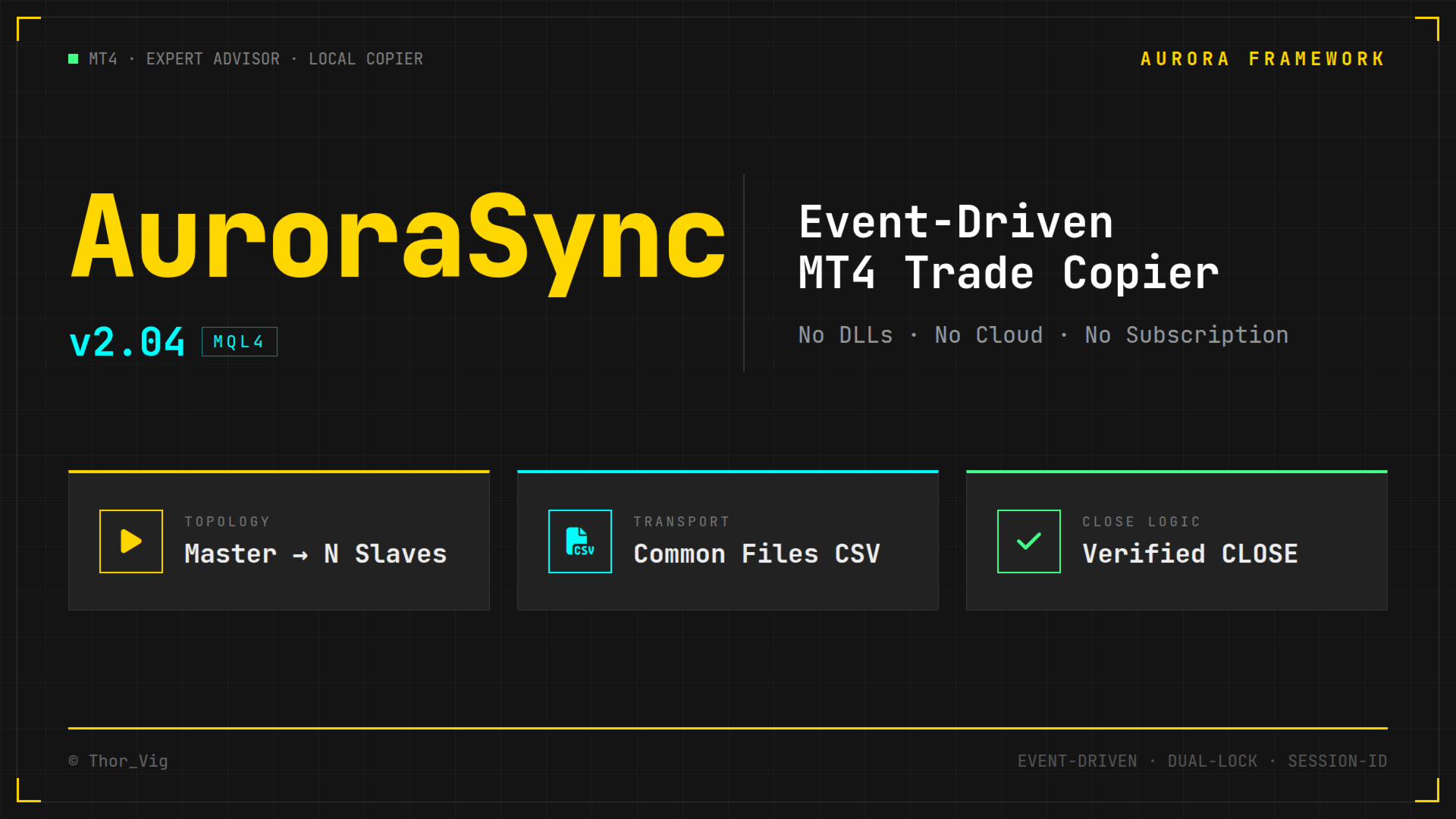
Copies trades locally between MT4 terminals — event-driven, not state-mirrored. No DLLs, no cloud service, no subscription. Built from a real incident where a standard copier closed positions across four live accounts.

------------------------------------------------------------

Full Description

The Problem With Other Trade Copiers

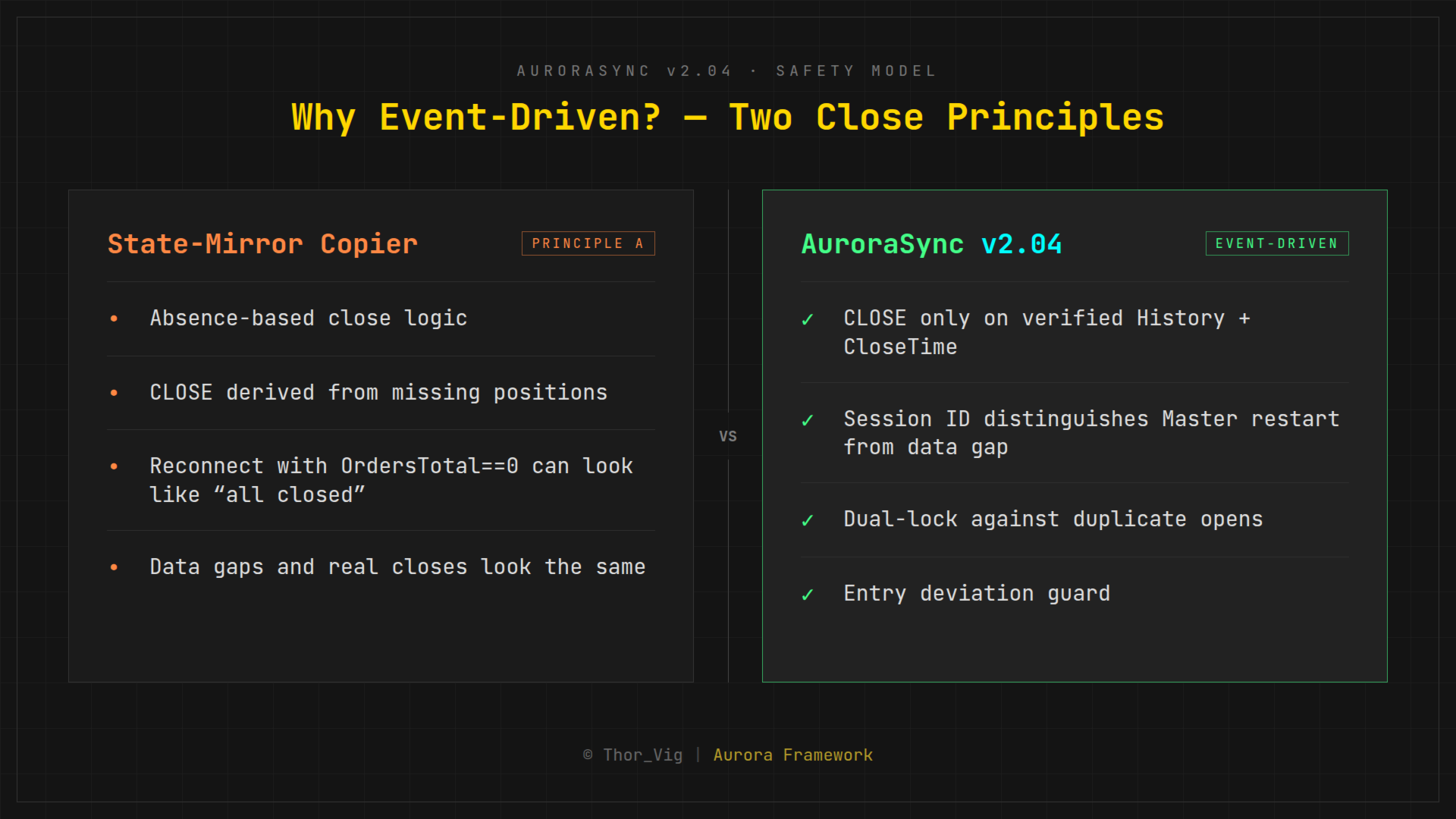
Most trade copiers work by state mirroring: on every tick, they compare the current state of the master terminal to the slave and derive what action to take. Simple, right?

Too simple.

When the master's connection drops briefly and OrdersTotal() returns 0, a state-mirror copier concludes that all positions were closed — and closes them on the slave. This is not a theoretical risk. It happened. On live accounts, with real money.

AuroraSync was built in direct response to that incident.

------------------------------------------------------------

The AuroraSync Principle: Event-Driven Commands

AuroraSync does not mirror states. It sends explicit commands:

 |  Event  |  What is sent  |
 |  Position opened  |  OPEN command — symbol, type, lots, SL, TP  |
 |  SL/TP changed  |  MODIFY command — new SL/TP values  |
 |  Position closed  |  CLOSE command — only when ticket is found in History WITH CloseTime confirmed  |

A CLOSE command is never inferred from the absence of a position. It is only sent when the master has positively verified the close in its trade history. That distinction is everything.

------------------------------------------------------------

Double-Lock Duplicate Protection

Even if a slave receives a command twice, it will never open duplicate positions:

- GlobalVariable lock: AS2S_<AccountNumber>_<Ticket> — set on first OPEN, never removed
- Order comment lock: "AS:<MasterTicket>" embedded in the order comment — independent second layer that survives GlobalVariable loss

Both locks must simultaneously be absent for a duplicate to occur. In practice, this does not happen.

------------------------------------------------------------

Session ID: Protection Against Restart Errors

Every master instance generates a unique session ID on startup (Unix timestamp). This ID is written into every command file header. The slave uses it to immediately detect: is this a genuine new command, or did the master restart and the file was reset from zero?

Without the session ID, a master restart could, in the worst case, be misread as a data gap — triggering follow-on commands that were never intended.

------------------------------------------------------------

Scalping Safety

When a position is opened on the master but the slave executes it with delay, the entry price on the slave can be significantly worse than the master's original. AuroraSync calculates:


Deviation =  | SlaveBid - MasterEntry |  / StopDistance


If this deviation exceeds the configurable threshold S_MaxEntryDevR, the position is not copied. A skipped entry is better than a catastrophic one.

------------------------------------------------------------

Technical Architecture


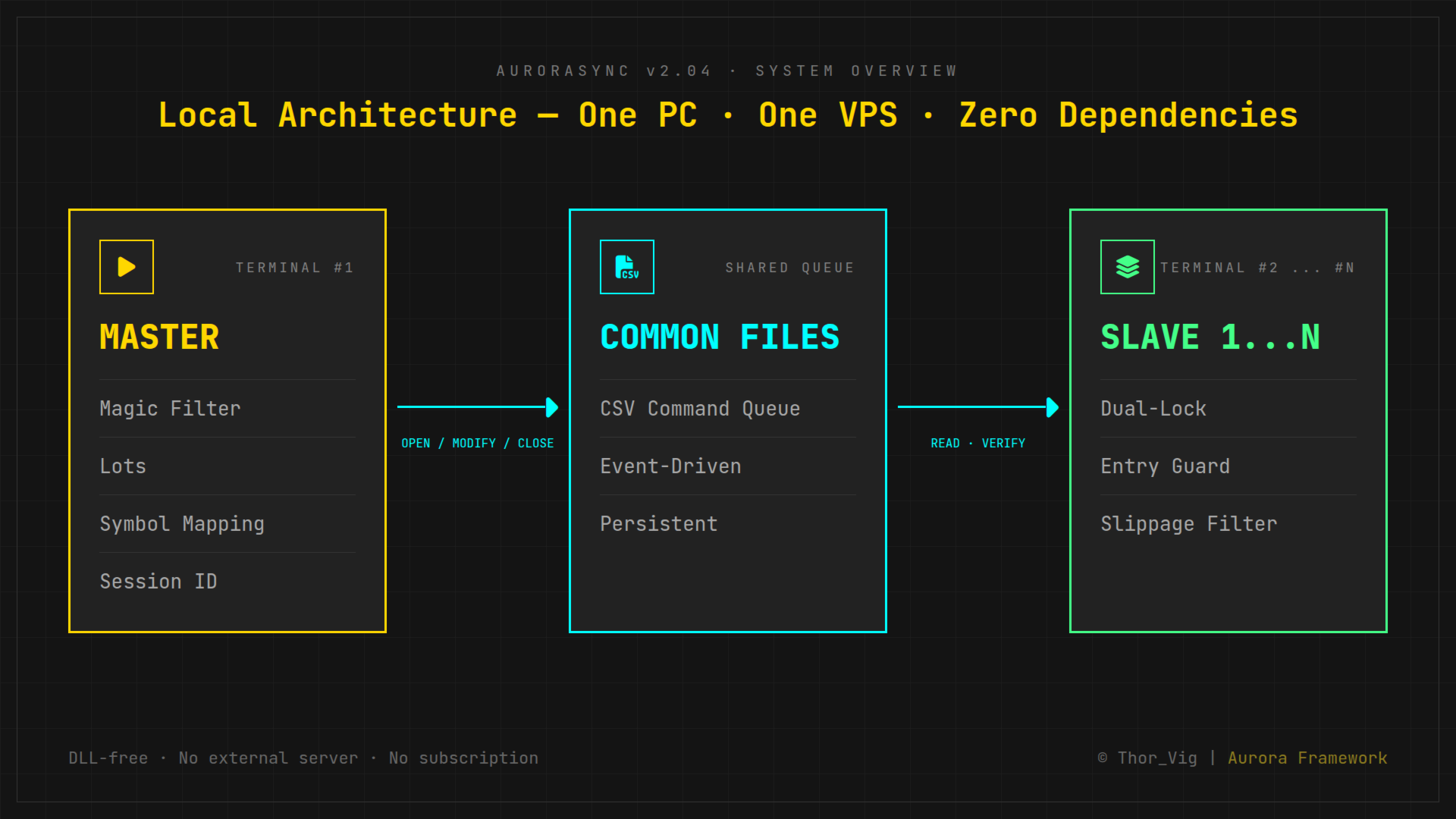
Master MT4 Terminal
        │
        ▼
  Common Files (CSV)
  on local PC / VPS
        │
   ┌────┴────┐
   ▼         ▼
Slave 1   Slave 2  (... Slave N)
MT4       MT4


- All terminals on one PC or VPS — no network overhead
- Communication via Common Files — the only DLL-free, serverless method with true persistence
- No cloud, no external server, no third-party dependency
- No DLLs — runs on any MT4 without special permissions

------------------------------------------------------------

Parameters

Master:

 |  Parameter  |  Description  |
 |  M_Lots  |  Fixed lot size (0 = proportional)  |
 |  M_Prefix  |  Broker symbol prefix (e.g. "m.")  |
 |  M_Suffix  |  Broker symbol suffix (e.g. ".+")  |
 |  M_Magic  |  Magic number filter (0 = all)  |
 |  M_Comment  |  Comment filter  |

Slave:

 |  Parameter  |  Description  |
 |  S_Lots  |  Fixed lot size (0 = proportional to master)  |
 |  S_RiskFactor  |  Proportional scaling factor  |
 |  S_Prefix / S_Suffix  |  Broker symbol mapping  |
 |  S_MaxEntryDevR  |  Max entry deviation (× stop distance)  |
 |  S_MaxSlippage  |  Max allowed slippage in points  |
 |  S_AutoRecon  |  Automatic reconciliation check (true/false)  |

------------------------------------------------------------

What AuroraSync Does NOT Do

- Not a network copier (no cross-VPS or LAN operation without shared file system)
- No built-in risk management or position sizing calculator
- No strategy tester support (requires live terminal environment)
- No MT5 version

------------------------------------------------------------

System Requirements

- MetaTrader 4
- All terminals on one PC or VPS sharing the MQL4/Files/Common directory
- No additional broker, cloud service, or subscription required

------------------------------------------------------------

Tested On

- Windows VPS (standard configuration)
- Up to 4 simultaneous MT4 terminals (1 Master + 3 Slaves)
- Live trading, multiple months

------------------------------------------------------------

Why No MT5?

MT4 offers decisive advantages for this use case: cleaner order model, reliable Global Variables as kill-switch mechanism, straightforward pending order behavior, and broader broker support for prop firm accounts. AuroraSync is built for MT4 and stays MT4.

------------------------------------------------------------

About the Developer

AuroraSync is part of the Aurora Framework family by Thor_Vig — a trader and MQL4 developer who builds his own tools for live deployment on real accounts. Everything published on MQL5 Market has been tested on live accounts for weeks before release.

------------------------------------------------------------

Changelog

 |  Version  |  Changes  |
 |  2.04  |  Scalping safety (MaxEntryDevR), DST bug fixed: TimeLocal → TimeGMT  |
 |  2.03  |  Session ID mechanism introduced  |
 |  2.02  |  Dual-lock duplicate protection  |
 |  2.01  |  First public release candidate  |
 |  2.00  |  Complete rewrite after the reconnect incident  |

------------------------------------------------------------

Price

USD 99 (introductory price — limited to first buyers)

One-time payment — no monthly fees, no activation limits.

------------------------------------------------------------

Copyright © Thor_Vig  |  Aurora Framework  |  MQL4
推荐产品
Risk Commander
Adisorn Soodkanueng
Product Name: Risk Commander: Trade Assistant & Strategy Simulator Risk Commander is more than just a trade panel—it is a complete Manual Trading Ecosystem . It serves two powerful purposes: Live Assistant: Helps you execute trades with speed, precision, and perfect risk management in real-time markets. Training Simulator: Fully compatible with the Strategy Tester (Visual Mode) , allowing you to practice manual trading on historical data without risking a cent. NEW! Built-in Simulator Mode Stop
Mega Indicator MT4
Szymon Palczynski
Price reach indicator. It also serves as the perfect term for supports and resistance. I use it in two experts. The basic tool for professional trading. The indicator analyzes the last 500 bar and uses this to determine the levels ( but it doesn't predict the future ) . Personally, I use it on TF H1.  It is very simple. Four lines on chart and that's all. Only two input parameters.  Thousands of indicators. Why this? Is good ? No! Is very good. Please test the indicator prior to purchasing.
FREE UNTIL FEBRUARY 14, 2023 SPEND MORE TIME WITH YOUR FAMILY. ENJOY LIFE… DO NOTHING. This version is only auto set of Takeprofit and StopLoss Main Version  of  TropangFX:   MT4 Version  |  MT5 Version Recommended timeframe:   H1 Supported currency pairs:  GBPUSD, EURUSD, EURCHF ,   USDCAD, USDCHF ,  AUDCAD, EURCAD, EURAUD and many more... Requirements The EA requires good brokerage conditions:   low spread   and   slippage   during the rollover time. I advise using a really   good ECN brok
FREE
Candle Pattern Finder Candle Pattern Finder is a powerful MT4 indicator designed to help traders easily detect key candlestick patterns in real-time. Whether you're trading trends, reversals, or consolidations, this tool highlights important price action signals directly on the chart — helping you make faster and more confident trading decisions. Detects popular candlestick patterns: Bullish/Bearish Engulfing Hammer & Inverted Hammer Shooting Star & Hanging Man Three White Soldiers Three Black
FREE
Auto Fibo Pro m
DMITRII GRIDASOV
“Auto FIBO Pro” Crypto_Forex 指标 - 是交易中的绝佳辅助工具! - 指标自动计算并放置在图表斐波那契水平和局部趋势线(红色)上。 - 斐波那契水平指示价格可能反转的关键区域。 - 最重要的水平是 23.6%、38.2%、50% 和 61.8%。 - 您可以将其用于反转剥头皮或区域网格交易。 - 还有很多机会可以使用 Auto FIBO Pro 指标来改进您当前的系统。 - 它具有信息价差掉期显示 - 它显示所连接的外汇对的当前价差和掉期。 - 显示屏还显示账户余额、净值和保证金。 - 可以将信息价差掉期显示定位在图表的任何角落 . 点击这里查看高质量的交易机器人和指标! 这是仅在此 MQL5 网站上提供的原创产品。 ...............................................
Magical Arrow
Ranguni Abdulsamir Abdulmajid
Magical Arrow Indicator – Clear & Reliable Signals The Magical Arrow Indicator is a non-repainting, trend-following tool that gives you crystal-clear Buy and Sell signals . It  high-probability reversals and entries . No more guesswork – just follow the arrows on your chart! The Magical Arrow Indicator is a powerful, easy-to-use trading tool that helps you catch the most profitable Buy and Sell opportunities in the Forex market. It is designed for beginners and professional traders , giving you
CoPilot dashboard MT4
Frederic Jacques Collomb
CoPilot — 每日交易仪表板 掌握你的数据。清晰地交易。 MT5 版本 什么是 CoPilot? CoPilot 是一款 专业级 交易助手,可将您每日的交易绩效统计数据 实时 显示在图表上——配备 实时权益曲线 ,逐笔更新。专为需要在不离开图表的情况下即时了解交易状态的活跃交易者而设计,CoPilot 汇总 当日所有交易品种的每笔已平仓交易 ,并以简洁、色码化的交互面板呈现。 无需再切换到终端历史选项卡,无需手动计算。CoPilot 就像您的 副驾驶 ——时刻守候,持续计算,始终在您眼前。 实时统计面板 CoPilot 显示完整的每日绩效指标,分为三个部分: 活动 — 今日总交易数、已平仓交易、持仓数量、盈利/亏损笔数、 胜率 (%) 及保本交易。胜率颜色动态调整:高于 50% 显示绿色,低于 50% 显示红色。 盈亏 — 净盈亏 、 盈利因子 、每笔平均盈利和平均亏损、 平均风险回报比 、当日最佳交易和最差交易。每个数值根据其含义以绿色或红色显示。 时间与点数 — 平均持仓时间、最短和最长持仓时间、所有交易品种累计 总点数 ,以及 最大连续盈利/亏损次数 。 所有统计数据均基于
Harvest GOLD
Sayan Vandenhout
Harvest GOLD USES THE TREND WAVE INDICATOR AND IT CAN IDENTIFY THE BEGINNING AND THE END OF A NEW WAVE TREND MOVEMENT. AS AN OSCILLATOR, THE INDICATOR IDENTIFIES THE OVERBOUGHT AND OVERSOLD ZONES. IT WORKS GREAT TO CATCH THE SHORT TERM PRICE REVERSALS AND USES A MARTINGALE STRATEGY TO CLOSE ALL TRADES IN PROFIT. USE DEFAULT SETTINGS ON H1 OR HIGHER TIME FRAME ON ANY PAIR FOR MORE ACCURATE TRADES WHY THIS EA : Smart entries calculated by 3 great strategies The EA can be run on even a $30000
Indicador Taurus All4
Fabio Oliveira Magalhaes
Taurus All4 Taurus All4 is a high-performance indicator, it will tell you the strength of the trend, and you will be able to observe the strength of the candle. Our indicator has more than 4 trend confirmations. It is very simple and easy to use. Confirmation Modes Candle Trend Confirmations: When the candle switches to light green the trend is high. When the candle switches to light red the trend is reverting down. When the candle changes to dark red the trend is low. Trendline Trend Confirm
Point61 Indicator
Evgeniy Machok
5 (1)
The Point61 indicator is the result of many years of monitoring of price behavior of currency pairs and metals. It is not a secret, that in times of uncertainty, traders are looking for possible levels of support and resistance - the point, where price should stop its movement. There are 2 possible scenarios at these points: 1. Reverse (correction) to the opposite direction; 2. Breakthrough to continue movement. Very often these points are used to set stop orders - TakeProfit or StopLoss
Quantum Falcon Signal Free is a smart visual trading indicator for MetaTrader 4 designed for Forex and Gold traders. The indicator combines: • Trend analysis • RSI momentum confirmation • MACD momentum filtering • ATR volatility filtering • Higher timeframe confirmation • Smart exit signal detection Main Features: • Smart Buy and Sell signals • Exit Buy / Exit Sell alerts • Real-time dashboard on chart • Professional candle arrows • Multi-timeframe trend confirmation • ATR market volatility filt
FREE
TradePilot
Hossein Khalil Alishir
TradePilot Expert Advisor (EA) for MetaTrader 4 TradePilot is a professional and user-friendly Expert Advisor (EA) for MetaTrader 4 (MT4) . It simplifies automated trading , risk management , and trade execution using a smart trading panel . Perfect for beginners and experienced traders looking for a reliable trade manager EA with automated lot size calculation . Key Advantages User-Friendly Trading Panel: Customizable panel with buttons and hotkeys. Smart Risk Management: Supports percen
Trendiness Index
Libertas LLC
5 (3)
"The trend is your friend" is one of the best known sayings in investing, because capturing large trendy price movements can be extremely profitable. However, trading with the trend is often easier said than done, because many indicators are based on price reversals not trends. These aren't very effective at identifying trendy periods, or predicting whether trends will continue. We developed the Trendiness Index to help address this problem by indicating the strength and direction of price trend
P Y R A M I D   E X P E R T    This Forex utility is a complex exit strategy and order management tool that executes four trading methods; scalping, pyramid style, hedging, and scaling method to close trades with a profit.           V E R Y  I M P O R T A N T     This is not a stand alone expert advisor. Use it with your own volatility-based strategy. Once you found the currency pair to trade, you can just attach this tool to the chart of the chosen pair and it will do the
VN Trade Panel II
Vyacheslav Nekipelov
4 (1)
The new version of the trading panel, which now has the ability to separately close Buy and Sell orders, display targets for all orders on the chart, as well as the ability to use the panel to trade with brokers working on the FIFO rule. Also, the new version adds option buttons for separate management of open orders. It has a convenient visualized interface and intuitive control without a lot of additional tabs to which traders have to be distracted and switch their attention. Thanks to this,
VR Cub
Vladimir Pastushak
VR Cub 这是获得高质量切入点的指标。该指标的开发是为了促进数学计算并简化对仓位入场点的搜索。多年来,该指标所针对的交易策略已被证明其有效性。交易策略的简单性是其巨大的优势,即使是新手交易者也能成功进行交易。 VR Cub 计算开仓点以及获利和止损目标水平,这显着提高了效率和易用性。查看使用以下策略进行交易的屏幕截图,了解简单的交易规则。 设置、设置文件、演示版本、说明、问题解决,可以从以下位置获取 [博客] 您可以在以下位置阅读或撰写评论 [关联] 版本为 [MetaTrader 5] 计算入场点的规则 开仓 要计算入场点,您需要将 VR Cub 工具从最后一个高点拉伸到最后一个低点。 如果第一个点在时间上早于第二个点,交易者等待柱线收于中线上方。 如果第一个点在时间上晚于第二个点,交易者等待柱线收于中线下方。 根据上述条件,严格在 柱线收盘 后建仓。 换句话说,如果我们在小时图上进行交易,那么从最高点到最低点的时间距离必须超过24小时,最高点和最低点之间的点数必须大于或等于平均价格变动每天。 维持和改变市场地位 可以有多个未平仓头寸;每个头寸都可以单独修改。 VR Cub
TrendMaster Alert Pro
Andrei Telegin
5 (1)
TrendMaster Pro Alert: Your Professional Manual Trading Station Stop chasing the market and start leading it.   TrendMaster Pro Alert   is an interactive trading dashboard designed to simplify complex analysis and execute flawless trades. Key Features of TrendMaster Pro: Multi-Tier Trend Control:   Stay on the right side of the market by monitoring M15, H1, and H4 trends simultaneously. No more trading against the major flow. Advanced Filter Suite:   A powerful blend of ADX (momentum), RSI, and
FREE
Program Overview: This program is a trading tool designed to monitor and analyze the 7 major currency pairs. It is a variant of a similar program used for tracking stock indices, but this version focuses on the seven major currency pairs. The program helps in identifying and calculating significant price movements (gaps) between the high and low prices of these currency pairs over a specified time frame. It then provides insights through comments and alerts based on the calculated gaps. Major Cu
Scalper Positions Analyzer - the tick history may be necessary for development of trading strategies and market analysis. Setup Open a chart of any currency pair. Open the Navigator window. Drag the indicator to the chart of the currency pair. Enable sending information (MainMode = true). Open "File". Select "Open Offline". Open an offline chart of the currency pair with the name that appeared on the main chart (for example, R_EURUSD). Drag the indicator to the offline chart. Enable receiving i
Blahtech Market Profile
Blahtech Limited
4.53 (15)
Was: $249  Now: $99   Market Profile defines a number of day types that can help the trader to determine market behaviour. A key feature is the Value Area, representing the range of price action where 70% of trading took place. Understanding the Value Area can give traders valuable insight into market direction and establish the higher odds trade. It is an excellent addition to any system you may be using. Blahtech Limited presents their Market Profile indicator for the MetaTrader community. Ins
Revenge Trading Protector
Konstantinos Kalaitzidis
5 (1)
报复交易保护器对于可能成为报复交易受害者的交易者来说是一个简单但有效的工具。作为一名日间交易者,我了解报复性交易的心理层面以及弥补损失的愿望。 因此,我开发了这个工具(我自己也在使用),以百分百确定我能够在损失后保持耐心,而不是做出不合理的交易决定。 当您遭受损失时,复仇交易保护器 EA 会阻止您开立另一个订单 (限价订单、止损订单或市场执行订单),   直到所需的时间间隔过去。  例如,如果您在上午 10:45 亏损,并且设置了 30 分钟的休息时间,则您在上午 11:15 之前设置的任何订单都将被 EA 立即取消。一旦您再次获得允许,您将收到警报通知。 如果您在 30 分钟内尝试进行交易,您将会收到相应通知。 附加功能:最大净值回撤旨在防止当您超过所需的最大净值回撤时在当天剩余时间(日历日)出现任何类型的挂单。  例如,假设您将最大回撤设置为 2%,并且当天的亏损已经为 -1.75%,如果您进行另一笔交易并且浮动亏损超过 0.25%(因此为 -2%), 则EA将自动关闭交易并禁止当天剩余时间的交易 用户插入 3 个参数的值: Max DD :这是所需的最大回撤百分
Crypto_Forex MT4 指标“强力指数和两条移动平均线”。无需重绘。 .............................................................................. - 此指标非常适合顺势交易,顺应趋势方向。 - “强力指数和两条移动平均线”指标可让您查看强力指数的快速和慢速移动平均线。 - 强力指数是将价格和成交量数据合并为单一数值的顶级指标之一。 - 强力指数本身是一个强大的震荡指标,用于衡量推动价格波动的力量。 - 指标让您有机会尽早发现趋势变化。 - 此指标可通过参数轻松设置,适用于任何时间范围。 - 您可以在图片上查看买入和卖出入场条件。 .................................................... 点击这里查看高质量的交易机器人和指标! 此为原创产品,仅在本 MQL5 网站提供。
PropFolio Copy trading Hub Pro MT5 Slave: Cross-Platform Trade Copier Lightning-Fast Execution & Precision Risk Scaling for Retail and Prop Firm Traders The PropFolio Copy trading Hub Pro MT5 Slave is the receiving engine of the ultimate trade management ecosystem. Designed to work exclusively with the PropFolio Copytrading Hub Pro Master EA, this high-performance bridging tool allows you to instantly replicate trades across multiple accounts and platforms with sub-millisecond precision. Whethe
FREE
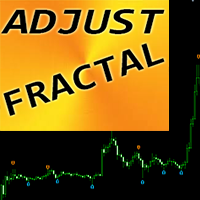
“可调分形” - 是分形指标的高级版本,非常有用的交易工具! .................................................................... - 众所周知,标准分形 MT4   指标根本没有设置 - 这对交易者来说非常不方便。 - 可调分形解决了这个问题 - 它具有所有必要的设置: - 指标的可调周期(建议值 - 高于 7)。 - 价格高点/低点的距离可调。 - 可调分形箭头设计。 - 指标内置移动和 PC 警报。 点击这里查看高质量的交易机器人和指标! 这是仅在此 MQL5 网站上提供的原创产品。 ....................................................
AP VWAP Bands Pro (MT4) Volume-weighted average price with ±σ bands for clear intraday bias, mean-reversion zones, and dynamic support/resistance. Works on crypto (incl. BTC), FX, indices, and metals. Uses tick-volume when real volume isn’t available. What it shows VWAP line (volume-weighted mean price). Two envelopes around VWAP (default ±1σ and ±2σ) to highlight balance vs. extension. Reset modes: Day, Week, or Anchor Time (HH:MM) to start VWAP where you need it (e.g., exchange open). Why
FREE
Trend PA
Mikhail Nazarenko
5 (3)
The Trend PA indicator uses   Price Action   and its own filtering algorithm to determine the trend. This approach helps to accurately determine entry points and the current trend on any timeframe. The indicator uses its own algorithm for analyzing price changes and Price Action. Which gives you the advantage of recognizing, without delay, a new nascent trend with fewer false positives. Trend filtering conditions can be selected in the settings individually for your trading style. The indicator
Multicurrency indicator in table format. Signals appear with confirmation, do not redraw. The indicator works on the current (open) timeframe. Notifications come for an open instrument. The strategy includes: price touching the moving average in the direction of the trend, as well as an extraordinary recalculation of the classic ADX indicator to determine the trend as an additional filtering of entries. Entries are displayed on the chart as arrows and, as mentioned above, the arrows are not redr
交易水平指标是一个交易系统,旨在确定入场点、持有仓位和趋势方向。 包括在一个复合体中工作的多种机制、趋势方向的波浪分析、构建信号时的水平分析、显示可能的 TP 和 SL 目标。 指标能力 信号箭头出现在当前蜡烛上并且不会重新着色。 使用特殊算法来搜索价格反弹的水平。 根据趋势进行工作。 该系统具有通用性,可适用于各种交易工具。 箭头警报有多种类型。 信号箭头的输入参数在自动模式下配置和运行。 根据时间范围更改“趋势波周期”参数 “目标水平 SL TP”参数是针对主要货币对定义的;用于其他交易工具时,可以增加 10 或更多。 指标如何工作 判断趋势,该指标有一条波浪线;如果它高于价格,则趋势看跌;如果低于价格,则趋势看涨。 红色信号箭头用于购买,黄色信号箭头用于销售。 水平虚线是构建信号的电平;构建该线时,信号处于活动状态。 目标水平 SL 和 TP 的存在是为了方便技术分析和选择趋势参数。
Trade Indicator Assistant is a powerful MT4 utility designed to turn indicators into automated trading systems. Its main feature is the ability to automatically detect an indicator’s   BUY and SELL signal buffers , without requiring you to know the buffer numbers, search through indicator settings, or modify the indicator source code. Bonus Indicator: After purchasing Trade Indicator Assistant, contact me to receive Trade Signal Pro completely free as a bonus indicator. [Download Demo Version]
其中一个数字序列称为“森林火灾序列”。它被公认为最美丽的新序列之一。它的主要特点是该序列避免了线性趋势,即使是最短的趋势。正是这一属性构成了该指标的基础。 在分析金融时间序列时,该指标试图拒绝所有可能的趋势选项。只有当他失败时,他才会认识到趋势的存在并给出适当的信号。这种方法可以让人们正确地确定新趋势开始的时刻。然而,误报也是可能的。为了减少它们的数量,该指标添加了一个额外的过滤器。当新柱打开时会生成信号。在任何情况下都不会发生重绘。 指标参数: Applied Price - 应用价格常数; Period Main - 指标的主要周期,其有效值在 5 - 60 之间; Period Additional - 附加周期,此参数的有效值为 5 - 40; Signal Filter - 附加信号滤波器,有效值 0 - 99; Alerts - 启用后,指示器会在出现新信号时提醒您; Send Mail - 允许指标向电子邮件发送消息; Push - 允许您发送 Push 消息。
该产品的买家也购买
Telegram to MT4 Multi-Channel Copier   可将您 Telegram 和 Discord 频道中的交易信号自动复制到 MetaTrader 4。无需机器人、无需浏览器扩展、无需手动复制。信号一到 Telegram 或 Discord,EA 几秒内就在您的终端开仓。 在复制某个频道之前,内置回测器还能告诉您该频道在您的账户上会有怎样的表现。 产品包含两个组件:一个监听您 Telegram 频道的 Windows 应用程序,以及在 MT4 终端执行信号的本 EA。同时提供 MT5 版本   点此 . 设置指南与应用下载:   https://www.mql5.com/en/blogs/post/768988 了解如何 回测任何 Telegram 信号频道 。 当前价格将来会上调。 工作原理 应用通过您自己的 Telegram 账号连接,因此能看到您关注的所有频道、群组、话题和机器人,包括私密和 VIP 频道。信号到达时,应用读取它,EA 按您的手数和设置在终端中开仓。 整个过程全自动,无需守在电脑前。专为 24/7 无人值守运行设计:Telegram 连接
The product will copy all telegram signal to MT4   ( which you are member  ) , also it can work as remote copier.  Easy to set up, copy order instant, can work with almost signal formats, image signal, s upport to translate other language to English Work with all type of channel or group, even channel have "Restrict Saving Content", work with  multi channel, multi MT5 Work as remote copier: with signal have ticket number, it will copy exactly via ticket number. Support to backtest signal. How to
Unlimited Trade Copier Pro is a tool to copy trade remotely to multiple MT4, MT5 and cTrader accounts at different computers/locations over internet. This is an ideal solution for you if you are a signal provider and want to copy your trades to other receivers globally on your own rules. One provider can copy trades to multiple receivers and one receiver can get trade from multiple providers as well. The provider can even set the subscription expiry for each receiver, so that receiver will not b
Strategy Builder offers an incredible amount of functionality. It combines a trade panel with configurable automation (covert indicators into an EA), real-time statistics (profit & draw down) plus automatic optimization of SL, TP/exit, trading hours, indicator inputs. Multiple indicators can be combined into an single alert/trade signal and can include custom indicators, even if just have ex4 file or purchased from Market. The system is easily configured via a CONFIG button and associated pop-up
Riskless Pyramid
Snapdragon Systems Ltd
5 (1)
Introduction This powerful MT4 trade mangement EA offers a way potentially to aggressively multiply trade profits in a riskfree manner. Once a trade has been entered with a defined stoploss and take profit target then the EA will add three pyramid add-on trades in order to increase the overall level of profit. The user sets the total combined profit target to be gained if everything works out. This can be specified either as a multiple of the original trade profit or as a total dollar amount. Fo
VirtualTradePad PRO SE MT4 — MetaTrader 4 高级交易面板和图表工作区 VirtualTradePad PRO SE 是一款适用于 MetaTrader 4 的专业交易面板和交易管理工作区。它帮助交易者通过一个基于图表的界面,更快速地开仓、管理、保护、平仓和分析交易。 该产品专为需要的不只是简单按钮集合的活跃手动交易者而创建。PRO SE 将一键执行、挂单、持仓控制、部分平仓、篮子利润/亏损逻辑、加仓均价层级、ATM 规则、信号监控、市场信息、策略测试器流程和面向 VPS 的准备整合到一个结构化工作区中。 MT5 版本 | 完整说明和截图 | 如何购买 | 如何安装 | 如何获取日志文件 | 如何测试与优化 | Expforex 的所有产品 为什么交易者会选择这套面板 图表一键交易 ,并支持键盘快速操作 快速完成开仓、平仓、修改、反转、锁仓与部分平仓 深度控制仓位、挂单、总利润与风控逻辑 自动参数计算,减少手动输入与重复劳动 相对于普通手动交易的优势 一个工作区替代多个窗口 — 交易执行、持仓控制、风险信息和管理工具都保留在图表上。 更快处理交易
EasyInsight AIO MT4
Alain Verleyen
4 (2)
EASY Insight AIO – 全能智能交易一站式解决方案 概述 想象一下,您可以在几秒钟内扫描整个市场——外汇、黄金、加密货币、指数,甚至股票——无需手动筛选图表、繁琐安装或配置指标。 EASY Insight AIO 是您专为 AI 交易打造的即装即用数据导出工具。它将整个市场快照一次性输出为简洁的 CSV 文件,直接支持 ChatGPT、Claude、Gemini、Perplexity 等各类 AI 平台的即时分析。 无需窗口切换,无需图表叠加,也没有任何杂乱。只需纯净、结构化的数据自动导出,让您专注于基于数据的高效决策,无需再盯盘耗时。 为什么选择 EASY Insight AIO? 真正的一体化 • 无需设置,无需安装指标,无图表叠加。只需安装、运行并导出——就是这么简单。 多资产全覆盖 • 扫描分析外汇、金属、加密货币、指数、股票——您的券商所能提供的一切市场。 AI 专属数据导出 • 高度结构化、针对 AI 优化的 CSV 文件,直接适配主流智能工具和平台。 完整导出内容: • 三个可选周期的货币强度分析 • 净多头头寸变化体现市场情绪 • 成交量变化、
面板 FFx 隐藏管理 轻松帮助您在图表上直接管理您的订单。下面描述所有特征: 止盈, 止损和尾随停止均隐藏 每笔交易在图表上都有自己的指示线 可按您的需要拖拽任何线来改变止盈/止损 当止盈 #1 到达,自动将止损位移到盈亏平衡位置的选项 选择止盈/止损类型的选项 (通过点数或价格) 选择尾随停止类型的选项 (通过点数, MA, 分形, PSAR 或 ATR) 定义哪些订单您希望在当前图表上进行管理 (所有订单或特定单号) 最大化 / 最小化面板按钮 在图表上将面板拖拽到任意位置 显示交易信息的选项 如何使用它? (参看以下截图) 选择您希望管理的订单 (所有或特定的) 设置您的目标, 止损和尾随停止 … 之后点击 “放置”。它们都独立工作,这样您就只需设置一次。 如果您希望删除一个止盈, 止损或尾随停止, 选择正确的订单 … 然后点击 “删除” 当您选择设置 “所有当前符号”, 则 “当前设置”显示在面板里。这些设置将自动用于所有新开订单。若要重置/删除这些设置, 点击 “重置所有”。 如果 “显示交易信息”被选中, 一个新的小表格显示在面板之下, 包括每笔订单及其当前的目标和尾随停
FFx Risk Calculator panel will help you to calculate very easily your trades size, SL or the risk directly on the chart. All features are described below: Option to select which parameter to calculate: Risk, Stop Loss or Lot Size The panel will show if the lot size is allowed according to the current account free margin Button to maximize/minimize the panel Drag and Drop the panel anywhere on the chart How to use it? Select the parameter you want to be calculated. It will be based on the 2 other
Trade Copier Pro
Vu Trung Kien
4.29 (14)
Trade Copier Pro 是一个强大的工具,多账户之间进行远程复制的贸易超过互联网不同的位置。这是一个信号提供商的理想解决方案,谁想要与全球范围内对自己规则的人分享他的贸易。一个供应商的交易可以复制到多接收器和一个接收器可以得到贸易额从多供应商也是如此。 供应商和接收器可与供电内置的数据库管理系统来管理他的合作伙伴名单。 这个工具允许全局配置模式(copy过来互联网)和本地模式(在同一台PC/服务器内复制)之间进行选择。 要求: MetaTrader4的4.00版构建670或以上。 参考: 如果你只需要在本地复制与更低的价格,你可以检查Auto Trade Copier在: https://www.mql5.com/en/market/product/4676 以下是亮点功能:     在一个工具提供商或接收器之间转换角色。     一个供应商的交易可以复制到多接收器和一个接收器可以从多个供应商收到交易。     供应/接收器可通过供电数据库管理系统,而无需额外的工具管理自己的接收器/供应商名单(添加,删除,编辑,启用/禁用)。     全球模式(copy过来互联网)和本
News Trader Pro
Vu Trung Kien
4.38 (16)
新闻操盘手专业版 是一个独特的机器人,让您使用您预先定义的策略进行消息交易。它从几个流行的外汇网站加载的每条消息的片断。您可以选择任何消息和预设的策略进行交易,之后新闻操盘手专业版根据选定的策略,在新闻来临时自动进行交易。 新闻发布给出了赚点数的机会,因为在那个时刻,价格通常有大动作。现在,利用这款工具,新闻交易变得比以往任何时候更容易,更灵活,更令人兴奋。不要等待,不要错失,不要再迷惑了。每周只需针对重要新闻设置一次,这个工具将完全按照您的计划进行精准交易。 演示版: 由于这不是一个自动交易机器人 (它是半自动), 您需要下载单独的演示版本: https://www.mql5.com/zh/market/product/5931 参考: 如果您只需要加载新闻 (无需交易), 您可以购买新闻加载机专业版: https://www.mql5.com/zh/market/product/5463 功能 包括所有 新闻加载机专业版 的功能 (查看详情)。 针对每条新闻构建您自己的策略,具有非常灵活的参数。 支持五种高级策略,带有大量控制参数 (止损, 止盈, 尾随, 网格间隔, 手数缩放,
FFx Watcher PRO
Eric Venturi-Bloxs
The FFx Watcher PRO is a dashboard displaying on a single chart the current direction of up to 15 standard indicators and up to 9 timeframes. It has 2 different modes: 1. Watcher mode: Multi Indicators User is able to select up to 15 indicators to be displayed User is able to select up to 9 timeframes to be displayed 2. Watcher mode: Multi Pairs User is able to select any number of pairs/symbols User is able to select up to 9 timeframes to be displayed This mode uses one of the standard indicat
NickZ Tool
Nicolas Zouein
This is a must have tool for a serious trader. It saves your precious time spent for opening/closing trades, creating pending trades and modifying your TP/SL in bulk according to either pips or price. If you need to quickly open several pending orders (Buy Stop, Sell Stop) at a certain distance from each other, this script will do all the routine for you! The first time you use this handy tool, you will realize it has already paid for itself. Instructions: Drag and drop this script onto a chart.
The product combines a manual trade panel with the ability to perform actions automatically in a highly configurable way. Actions include capturing indicator values and then based on those values raising alerts, open/close or partially close trades, scale-in, setting up pending orders, adjusting stop loss, take profit and more. On-chart controls can be configured, such as tick boxes and buttons, so can be fully interactive. The EA also handles money management, news events, hidden stop loss, tak
Binary Options Copier Remote is an EA that allows to copy binary options trades between MT4 accounts at different computers. This is an ideal solution for signal provider, who want to share his trade with the others globally on his own rules. Provider can give free bonus license to 10 receivers. That means those 10 receivers can copy from provider by using Binary Options Receiver Free (no cost). From 11th one, receiver have to buy Binary Options Receiver Pro (paid version) in order to copy from
This panel is very simple to use and it is a very ally to manage your positions and orders. Also you can modify your risk, writing in fields directly on Panel. One click on buttons and the operation on market is done! Operations possible: BUY/SELL Break Even Split (close 50% all orders) Close All positions Hedging (opens reverse positions to cover) Close only BUY positions Close only SELL positions Close All pending orders Reverse all positions Please watch the video to verify the very simple u
Slow Pips OCO Trade Panel is an advanced trading panel for placing pending orders. Traders can use this panel to place two pending orders at once. One pending order would be of buy entry type and the other one would be of sell entry type. Both orders will have Stop Loss and Take Profit parameters. Since two pending orders are placed at the same time, the pending order for which the price hits first gets converted into a market order and the other pending order gets deleted (one order cancels the
This indicator changes the timeframe and chart profile for multiple charts. If you dispatched many charts (10~20 or more) in single MetaTrader terminal, it is very boring and difficult work to manage the timeframe and chart profile individually. If the indicators you use in a chart are numerous and the setting values are different from the default one, you might give up adding all the indicators to all charts. The changing of timeframes on multiple charts has the same problem, too. Whenever you
The Price Action Dashboard is an innovative tool to help the trader to control a large number of financial instruments. This tool is designed to automatically suggest signals and price conditions. The Dashboard analyzes all major Time Frame suggesting price action conditions with graphic elements. The Dashboard can suggest you the strength of the trend identifying directional movement, it is an indispensable tool for those who want to open position themselves using market trends identifiers. The
Elliott Wave Counter 是一个面板,用于快速和用户友好地手动标记 Elliott 波浪。可以选择一种颜色和一个级别的标记。还有用于删除最后一个标记和工具制作的整个标记的功能。一键制作标记。点击五次 - 有五波!艾略特波浪计数器对于艾略特波浪的初学者和专业分析师来说都是一个很好的工具。 艾略特波浪计数器安装和输入指南 如果你想得到   关于 EA 添加 URL (   http://autofxhub.com   ) MT5 终端的 通知 (见截图)。 MT4版本 https://www.mql5.com/en/market/product/14016 MT5版本 https://www.mql5.com/en/market/product/15081 一般输入: 波形类型按钮: 此按钮允许用户选择他们想要在图表上突出显示的波形类型。可用的选项包括推动波、调整波和其他自定义波模式。 波级按钮: 这个按钮   允许用户选择他们想要在图表上突出显示的波形级别。可用的选项包括初级、中级和次级波级别。 波浪颜色: 这个   按钮   允许用户选择他们想要在图表上突出显示的波浪图
If you wish to draw Support and Resistance lines, view: daily market opening, classical pivot levels, Fibonacci pivot levels, trend lines, Fibonacci levels, the remaining time to candle closing, and current spread. If you seek to place your orders with the exact lot that meets your desired stop loss risk. If you wish to do all this and more with just one click, then this is the perfect tool to use. This tool will allow you to feel more relaxed when deciding to open orders, as well as predicting
一键式分析工具是   基于键盘快捷键的对象创建   和 MetaTrader 的复制工具。只需单击一下,即可轻松使用 MetaTrader 中的分析工具。使用我们的工具,您可以在图表上快速绘制支撑和阻力位、斐波那契位、形状、通道、趋势线和所有其他对象。只需单击按钮,移动鼠标,一键式分析工具将为您完成剩下的工作。这可以节省您的时间并使您的图表分析更有效率,让您可以专注于根据您的分析做出明智的交易决策。 除了对象创建之外,一键式分析工具还包括   对象复制器 (   c   hart sync)   ,允许您轻松地将对象从一个图表复制到另一个图表。如果您打开了多个图表并且需要在它们之间复制对象,这会特别有用。 一键式分析工具允许您   对所有符号使用一个图表   在元交易者中。这意味着您可以在同一窗口中查看不同的图表,而无需在多个图表之间切换。当您切换到不同的符号时,一键式分析工具会自动从其他符号中隐藏对象,并在您返回第一个符号时再次显示它们。这可以帮助您节省时间并提高交易效率,让您可以轻松地在同一窗口上比较和分析不同的图表。 一键分析   安装和输入指南 如果您想获得有关 EA 添加 U
部分平仓专家 是一款将多种功能整合到一个自动化系统中的工具。该 EA 提供多种风险管理选项,并最大化潜在收益,从而帮助交易者更有效地管理仓位。 使用部分平仓专家,交易者可以设置   部分关闭   锁定利润的水平,     追踪止损   保护利润和限制损失的水平,     收支平衡   水平,以确保即使价格朝着不利于交易的方向变动,交易也能实现盈亏平衡,以及其他一些功能。 使用这款一体化智能交易系统,交易者可以节省时间和精力,因为他们无需时刻监控交易。相反,EA 会根据市场情况执行预设指令,从而为交易者提供更大的灵活性和对交易的控制力。 附加部分关闭专家,     按下键盘上的“p”   ,更改设置,然后就可以开始了。 部分关闭专家   安装和输入指南 如果您想收到有关 EA 的通知,请添加 URL(   http://www.betasoft.dev   )MT4/MT5 终端(见截图)。 MT4版本 https://www.mql5.com/en/market/product/14965 MT5版本 https://www.mql5.com/en/market/product/15
Master Trend Dashboard is a new generation indicator, compact, light and efficient. Each element of this Dashboard is designed to return specific signals as: Price Action, Breakout, Net Change (performance of the instrument), algorithmic studies, correlations and statistical calculations. This tool will change your way of trading allowing you to receive important information. See the Graphic Signals to understand every single signal below: Graphic Signals Symbol name and arrow color Green = Cur
Trade Copier Agent 旨在复制多个 MetaTrader(4/5) 账户/终端之间的交易。 使用此工具,您可以充当提供者(源)或接收者(目的地)。所有交易行为都将立即从提供者复制到接收者。 该工具允许您在同一台计算机上的多个 MetaTrader 终端之间复制交易,复制速度快如闪电,不到 0.5 秒。 贸易复印机代理安装和输入指南 请在开始复制之前或没有订单时在提供商帐户上应用设置! 有订单时的任何更改都会影响收款人帐户。 例如:如果提供者账户应用买单然后禁用接收者账户上的所有买单将被关闭。 如果您想获得有关 EA 添加 URL (   http://autofxhub.com   ) MT4 终端的通知(请参阅屏幕截图)。 MT5版本 https://www.mql5.com/en/market/product/77134 以下是亮点功能: 在 MT4 和 MT5 账户之间复制。 在一个工具内切换提供者或接收者。 每个账户既可以作为Provider又可以作为Receiver,因此账户之间可以通过2种传输方式相互复制。这就像一个贸易共享网络。 一个提供者可以将交易
Unlimited Binary Options Copier Remote is a powerful tool to copy binary options trades remotely between multiple accounts at different locations over internet. This is an ideal solution for signal provider, who want to share his binary options trades with the others globally on his own rules. One provider can copy trades to unlimited receivers and one receiver can get trade from unlimited providers as well. The provider can set the subscription expiry for each receiver, so that receiver will no
This is an Expert Adviser use for manual trading as a background EA or combine with external EA to open orders. Loss Recovery Trading is one of your options to handle the lose positions instead of using stop loss by setting a zone recovery area and target to exit the turn rounds sequence. How It Work? If the market goes against your first positions direction at the specific of losing points, the EA will open an opposite direction position with calculated larger lot size and also keep the first
如果产品有任何问题或者您需要在此产品上添加功能,请联系我 Contact/message me if you encounter any issue using the product or need extra feature to add on the base version. Dashboard Super Candle is an intuitive, and handy graphic tool to help you to: Have 28 pairs under control with one dashboard. Monitor candle direction, identify possible price movement and trend. Provide trading signals based on the candle direction selected by you. Automatically manage order once signal are generated. Have the ability to select which p
如果产品有任何问题或者您需要在此产品上添加功能,请联系我 Contact/message me if you encounter any issue using the product or need extra feature to add on the base version. There is Demo version of this panel Dashboard Super MA RSI CCI Demo in my product list, pls try it out to get familiar with all functionalities free . Dashboard Super MA RSI CCI is an intuitive, and handy graphic tool to help you to: Have 28 pairs under control with one dashboard Monitor price movement, identify possible trend based on MA, RSI, and CCI i
如果产品有任何问题或者您需要在此产品上添加功能,请联系我 Contact/message me if you encounter any issue using the product or need extra feature to add on the base version. Dashboard Super Currency Strength is an intuitive, and handy graphic tool to help you to: Have 28 pairs under control with one dashboard. Monitor price movement, identify possible trend based on currency strength gap of two currency on 3 timeframe. Provide trading signals based on the CSM (currency Strength Meter) selected. Manage order automatically onc
作者的更多信息
Aurora Sentinel Gold
Thorsten Fuehrmann
AURORA SENTINEL PRO 面向黄金(XAUUSD)的趋势跟踪系统 针对 XAUUSD 的纯趋势跟踪方法 无马丁格尔 • 无网格 一键方向控制(多头 / 空头 开关) D1 宏观过滤器判定总体方向 在 H1 周期上执行 基于规则的金字塔加仓,严格只朝盈利方向 无需 set 文件,加载后即可运行 为那些希望获得清晰、有纪律的黄金趋势跟踪系统的交易者而打造——并且明白这样的系统在行情特征鲜明的阶段才显示实力,而不是在每一个单独的周里。 专才,而非全能 Aurora Sentinel Pro 被刻意设计为专才。系统只交易黄金,并遵循一个清晰的原则:在日线图上判定总体方向,在 H1 上寻找与该趋势一致的入场点。没有逆势交易,也没有隐藏策略。 本 EA 不去追逐每一次波动。它的设计目的是伴随清晰而持续的趋势,并在趋势不断得到确认的过程中逐步扩大仓位。 系统如何运作 Aurora Sentinel Pro 的决策分三个连续阶段: • 方向
Aurora Momentum Explosion (AME) Is a clean momentum indicator for any instrument and timeframe. It shows, in a sub-window, how strongly price is being pushed in a direction and whether that push is expanding or fading: Trend-power histogram — green for up-momentum, red for down-momentum Explosion line — momentum expanding beyond volatility signals real drive Dead-zone threshold — filters out weak, going-nowhere momentum Works on any symbol and timeframe (built with defaults suited to
FREE
Aurora Lot Dashboard
Thorsten Fuehrmann
Aurora P&L Dashboard — Free Aurora P&L Dashboard puts your profit and loss right on the chart — so you can close the crowded terminal window and still keep the overview. Live on your chart: Today — realized P&L since midnight (server time) N days — realized P&L over a period you set Positions — number of open positions and total lot Floating — current open P&L Two modes: Account-wide — all symbols together Single symbol — type any symbol (e.g. EURUSD, USDJPY), or leave blank for the chart
FREE
ACCOUNT GUARDIAN MT4 – PROFESSIONAL CAPITAL PROTECTION SYSTEM Account Guardian is a specialized risk management tool designed to protect your trading account from uncontrolled losses. The system continuously monitors your open positions and account equity, automatically intervening when predefined risk thresholds are reached. MAIN FEATURES • Automatic
TREND PILOT MT4 – SMART MONEY TREND-FOLLOWING SYSTEM Trend Pilot is a fully automated Expert Advisor based on Smart Money Concepts and structural market analysis. The system identifies trend reversals through Break of Structure (BOS) and Change of Character (CHOCH), utilizing precise entry mechanisms for optimal position openings. NEW: Includes a trading
SESSION PILOT MT4 – MARKET SESSION & NEWS FILTER Session Pilot is an intelligent filtering tool designed to focus trading activity on the most liquid market sessions and avoid trades during high-volatility news events. The system continuously monitors current time and upcoming economic announcements. MAIN FEATURES • Automatic detection of London, New Y
AURORA SENTINEL PRO — HYBRID EDITION 自动黄金趋势跟踪系统 + 手动交易管理面板,二合一 面向黄金(XAUUSD)的全自动趋势跟踪引擎 图表上直接操作的手动交易管理面板 全自动、纯手动,或两者同时使用 一键方向控制(多头 / 空头 开关) 无马丁格尔 • 无网格 在 H1 周期上执行 无需 set 文件,加载后即可运行 Aurora Sentinel Pro Hybrid Edition 将两个工具整合进同一个 EA:经过验证的黄金自动趋势跟踪引擎,以及一个让您用鼠标点击就能精确下单与管理自有仓位的手动面板。由您决定:让机器人替您交易、自己掌控,或者两者同时使用。 自动引擎 自动部分是纯粹的黄金趋势跟踪系统,决策分三个连续阶段: • 方向(日线图):D1 上的高周期趋势过滤器决定是否交易以及交易方向。  没有明确的日线趋势时,引擎保持观望。 • 入场(H1):在已确认的日线趋势内,系统在 H1 的回调中寻找入场点并  等待确认信号。每笔交易立即设置固定止损。 •
AURORA AUTO FIBONACCI — GOLD EDITION 自动斐波那契回撤 + 可选布林带 自动找出最近一段有意义的摆动 干净地绘制斐波那契回撤,并自行更新 黄金口袋(0.618–0.65)以填充区间突出显示 同一指标内可选布林带 不提供买卖信号——纯分析工具 无需 set 文件 Aurora Auto Fibonacci 免去了您手动画线的麻烦。指标会自行找出最近一段有意义的高点与低点,并在两者之间干净地放置斐波那契回撤位。一旦形成新的摆动,各回撤位会自动更新。 指标做什么 • 依据您设定的搜索深度与回溯范围,自动识别最近一段有意义的摆动。 • 绘制 0、23.6、38.2、50、61.8、78.6 与 100 各回撤位,并附清晰的  价格标签。 • 将 0.618 至 0.65 之间的黄金口袋以填充区间突出显示——这是许多交易者  在回调中特别关注的区域。 • 出现新的摆动时自动更新,您无需重新画任何东西。 可选布林带 此
Aurora Zones
Thorsten Fuehrmann
AURORA ZONES — 自适应支撑与阻力区间 会随波动率调整的区间,而不是处处等宽的线条 区间宽度由 ATR 推导,而非固定点数 重叠的区间自动合并 只绘制最近的区间——图表不会杂乱 更高周期(H4、D1)的区间直接显示在您的工作图表上 四级评定:未测试、已测试、强劲、已跌破 可选的接近提醒 纯分析工具——不提供交易信号 Aurora Zones 找出价格中的显著摆动点,将彼此靠近的点归并成区间,并根据价格实际尊重该区间的次数为其评级。结果是一张干净的图表,只有少数几条有意义的价带,而不是一梯子的线。 有哪些不同的做法 多数区间类指标都栽在同样的三个问题上。Aurora Zones 正是从这三点入手: • 区间宽度来自 ATR  平静的一周与剧烈波动的一周,同一个区间的合理宽度并不相同。固定点数  在两种情况下都是错的——要么太窄,要么太粗。Aurora Zones 从当前波动  幅度推导宽度,因而能自行适应。 • 重叠区间会被合并  否则每一个小摆动都会生成自己的区间,最后形成一梯子几乎
AURORA COMMAND — 一体化黄金交易终端 它不是一个打开后只能干等的机器人,而是一个面向新手与专业交易者的完整指挥中心——全部在同一张图表上。 自动黄金趋势引擎(XAUUSD,H1),基于规则的金字塔加仓 实时市场驾驶舱:趋势对齐、区域、时机,以及一份可直接读取的交易计划 一键「Take Plan」——将驾驶舱的计划直接送入手动面板 手动交易面板:用鼠标设定入场与止损,其余交由终端管理 手动开的仓位会被自动接管并加以保护 内置随机指标提示与 Aurora Momentum Explosion(AME)——既是读数,也是可视化仪表 一键方向控制(多头 / 空头 开-关) 无马丁 • 无网格 • 每笔交易都有固定止损 单一文件,拖放即用——无需 .set 文件,加载后即可运行 AURORA COMMAND 究竟是什么 大多数产品只给你一样东西:一个引擎、一个指标,或一个面板。Aurora Command 给你的是整张交易台。它就是一位自主交易者若有时间便会为自己打造的指挥中心——自
筛选:
无评论
回复评论