Trade Panel Four Eighty Eight

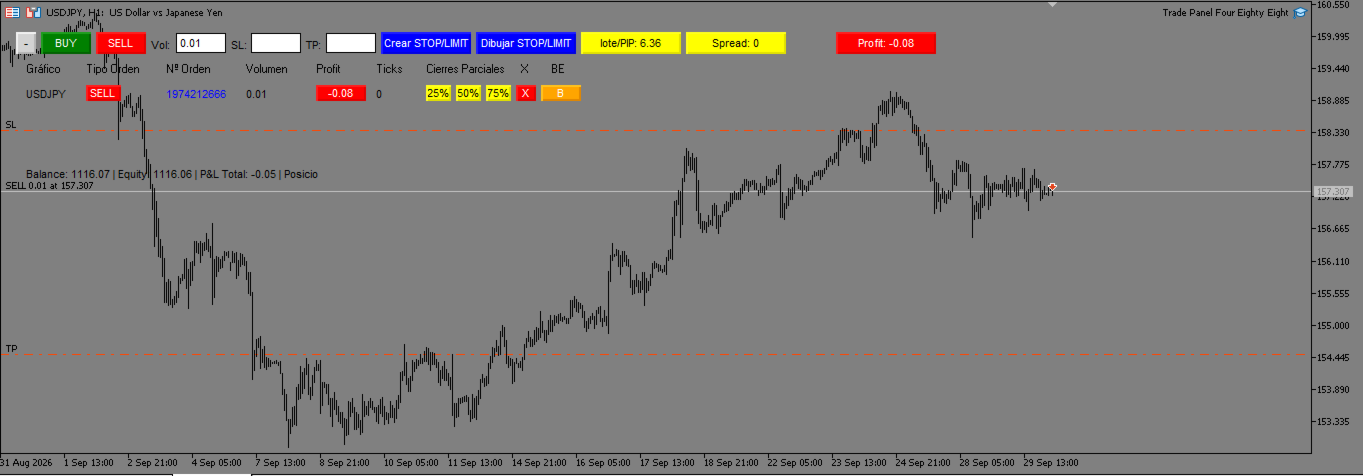
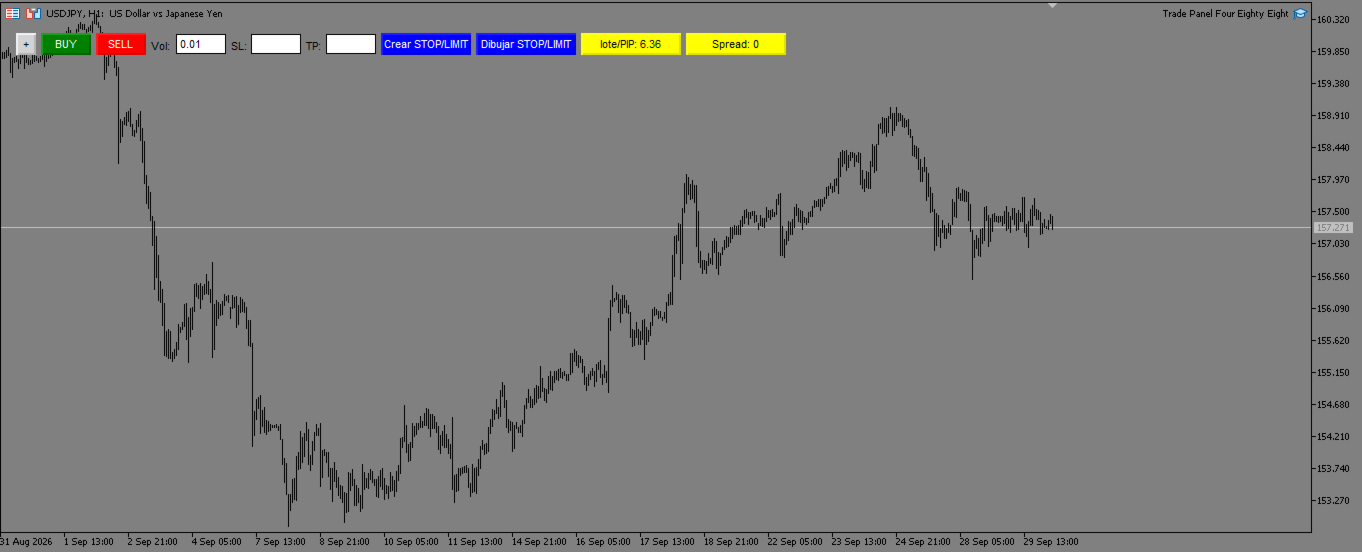
Trade Panel Four Eighty Eight es un panel de control interactivo y gestor de riesgo avanzado para MetaTrader 5, diseñado para traders manuales que buscan ejecutar, gestionar y proteger sus operaciones con la máxima precisión.

NOTA IMPORTANTE: Este programa NO es un robot de trading automático ni genera señales de entrada autónomas. Es una Utilidad / Panel de Control ("Trade Manager") que ejecuta únicamente las órdenes ordenadas por el usuario y automatiza la protección y gestión de la cuenta (Break Even, Trailing Stop y cierres parciales).

CARACTERÍSTICAS PRINCIPALES Y EJECUCIÓN:
• Ejecución Rápida a Mercado: Botones dedicados de BUY y SELL con cálculo de riesgo dinámico al instante.
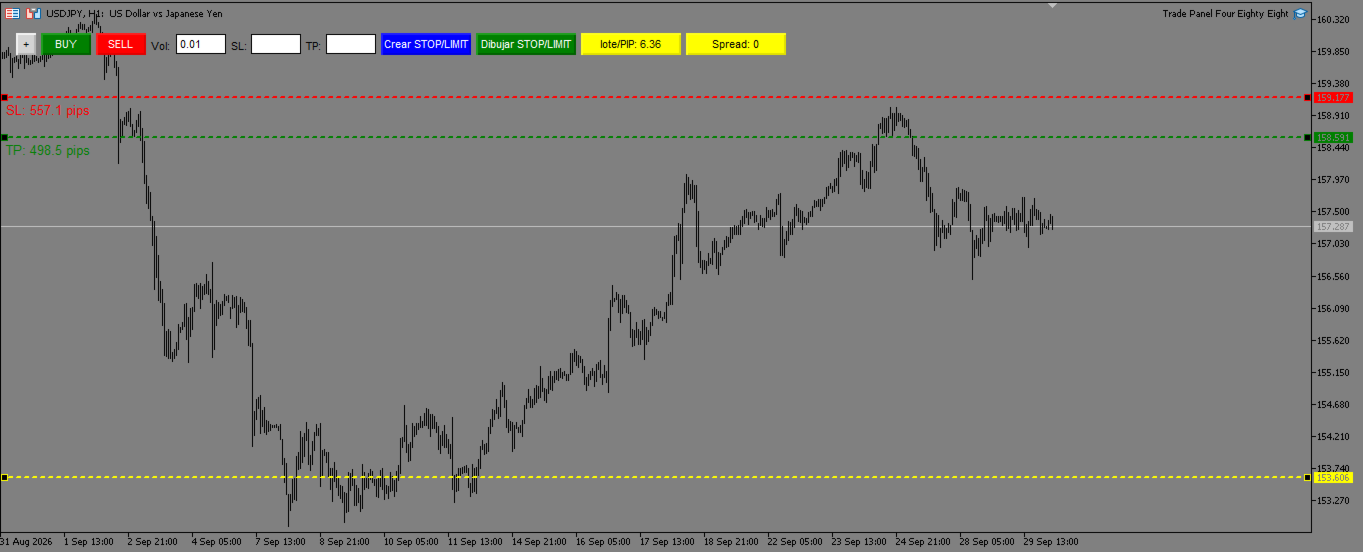
• Módulo de Dibujo Visual en Gráfico: Dibuja y arrastra líneas interactivas de Entrada, Stop Loss y Take Profit directamente sobre la pantalla antes de confirmar la orden.
• Cálculo Automático de Lotaje: Define tu riesgo por Lote Fijo o por porcentaje dinámico sobre el Balance, Equidad o Margen Libre.
• Órdenes Pendientes Inteligentes: Coloca BUY/SELL STOP y LIMIT con validación previa de niveles mínimos exigidos por el bróker (Stops Level).

GESTIÓN DE RIESGO Y PROTECCIÓN AUTOMÁTICA:
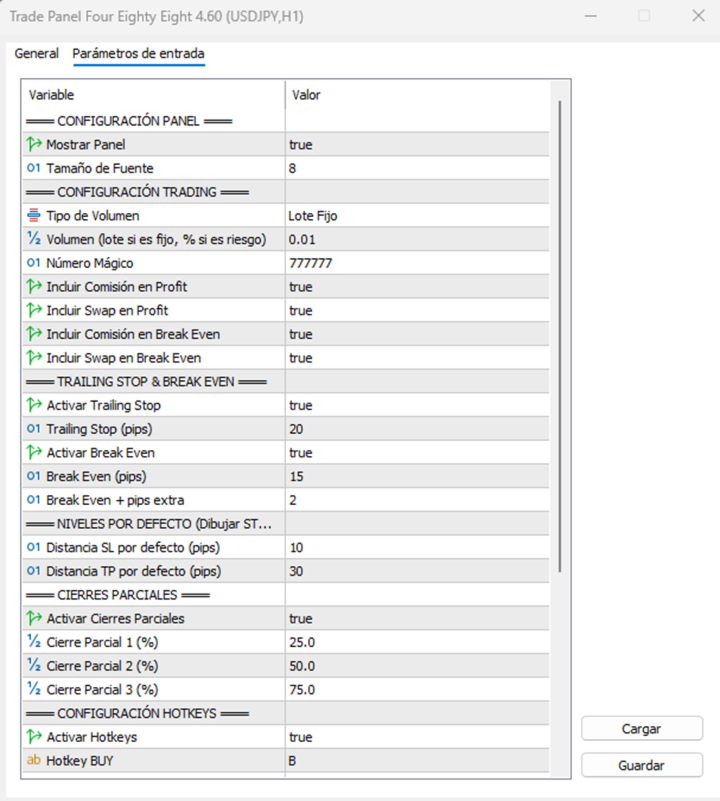
• Break Even Inteligente: Protege la posición a precio de entrada sumando pips extra y compensando automáticamente el costo de comisiones y swaps acumulados.
• Trailing Stop Dinámico: Ajusta el Stop Loss automáticamente a favor del mercado según la distancia en pips configurada.
• Cierres Parciales en 1-Clic: Botones dedicados para cerrar porcentajes específicos de la posición (25%, 50%, 75%) directamente desde la tabla del panel.
• Control de Spread Máximo: Filtro de seguridad que bloquea la apertura de operaciones si el spread del mercado excede tu límite.

UTILIDADES Y NOTIFICACIONES:
• Atajos de Teclado (Hotkeys): Ejecuta Compras (B), Ventas (V) o Cierra Todo (C) al instante.
• Alertas Push al Móvil: Notificaciones automáticas directas a la app de MetaTrader en tu teléfono al abrir, modificar o cerrar posiciones.
• Interfaz Limpia y Expandible: Diseñado sin fondos molestos para no obstruir tu análisis técnico, con opción de expandir o contraer el panel en un solo clic.
推荐产品
EA Pause Manager
David Enrique Barrera Moncayo
4.33 (6)
EA Pause Manager — Your Smart Risk Guard & Scheduler (MT5) What It Does Stops conflicting trades before they happen , based on active market positions and, optionally, pending orders. Pauses or resumes your EAs automatically based on: A simple leader rule : the first EA to trade becomes the leader and blocks the rest. A time schedule you define — now configurable per EA. For example, you can run one EA during the day session and another EA overnight. Optionally cleans up after simultaneous openi
News With Sessions
Muhammad Jawad Shabir
News With Sessions Professional Session Tracker with Integrated Economic Calendar for MT5 News With Sessions is a professional trading intelligence indicator for MetaTrader 5 that combines live market session tracking with the MT5 economic calendar on a single chart. It shows when institutional sessions are active and which news events are driving price , without external websites, manual time-zone work, or extra tools. Built for traders who rely on time, liquidity, and fundamentals , this indic
Quick start (2 minutes) Drag the utility onto the chart of the symbol you trade. "Allow Algo Trading" can stay off: it never sends orders. The mini HUD shows the live spread. Click Open for the full panel. Tabs on top: Session · Trades · News . Small pills below choose the view. News › Broker profile : how far your broker widens the spread on NFP, CPI and rate decisions, ready after about one minute. Details › HTML report : a one-page summary you can open in any browser. Unsure what a value mea
Follow Trend Steps Follow Trend Steps: See Your Price Zones Before the Market Moves Plan your trades around clear price zones, not guesswork. Follow Trend Steps draws clean, color-coded zones directly on your chart, showing where price has recently turned and where it may react again, so you can plan entries, exits and risk with confidence. Available for Meta Trader 4 and Meta Trader 5. Why traders use Follow Trend Steps Every chart is full of noise. Support and resistance lines are drawn dif
COPYLATOR – MT5 Trade Copier Key Highlights Multi-Sender / Multi-Receiver Trade Replication – supports one-to-many, many-to-one, and many-to-many configurations, with complete real-time copying of market orders, pending orders, SL, and TP. Advanced drawdown protection – closing, blocking, pending-order deletion, manual and automatic reset mechanisms. Automatic symbol mapping – finds correct symbols, alerts if missing, allows manual override. Hedging & Netting support – auto-detected, no manual s
Multi-Level Trading Dashboard - Professional Market Analysis Tool Transform Your Trading Experience with Advanced Multi-Symbol Monitoring The Multi-Level Trading Dashboard is a sophisticated MetaTrader indicator that revolutionizes how you monitor and analyze multiple currency pairs simultaneously. Built with professional traders in mind, this comprehensive tool combines real-time market data, technical analysis, and account management in one intuitive, Windows-style interface. Key Features
SMC Trend Master EA PRO — Professional Smart Money Trading System Advanced Expert Advisor combining Trend Breakout Strategy with Smart Money Concept (SMC) confirmation. Developed and optimized for GOLD (XAUUSD) with excellent results on Forex majors. STRATEGY OVERVIEW The EA identifies strong trend breakouts and confirms entries using institutional trading zones: • **Order Blocks** — areas where smart money placed orders. • **Fair Value Gap
This is a series of gauges that can be loaded on any Chart time frame. You can use this gauge indicators to decide when to enter and exit market with high degree of confident. Gauge No 1: Ichimoku Kinko Hyo Tenken Sen Crosses Kijun Sen. This will tell Bull and Bear and the timing to enter market. When the value move from above 0 towards below 0, the Tenken Sen line is moving to cross the Kijun Sen line and appears value is the Delta for the difference. Same goes to the opposite. The positive val
Strategy Manager is a  Multi-Time-Frame & Multi-Currency  Dashboard for  Metatrader 4 and 5. Thanks to a free, external graphical user interface, build your own strategy by combining any indicators and loading them into the dashboard to see the result ! In addition, you can precisely  set-up your Auto-trading & Notifications and use indicators for Stop-Loss, partial profit or limit. Filter your automatic trading & notifications with forex calendar and more. Open and Manage your orders directly w
A Simple Moving Average (SMA) is a statistical indicator used in time series analysis. This indicator represents the arithmetic mean of a sequence of values over a specific period of time. SMA is used to smooth short-term fluctuations in data, helping to highlight the overall trend or direction of changes. This aids analysts and traders in better understanding the general dynamics of the time series and identifying potential trends or changes in direction.  More information you can find in Wiki 
Peregrine Gold Quant
Elie Bou Abdallah
## Category and tags - Category: **Experts** - Tags: `XAUUSD` `gold` `trend following` `volatility targeting` `Kalman filter` `no martingale`   `prop firm` `risk management` `systematic` `H1` ## Short description > Systematic trend book for XAUUSD H1: seven volatility-normalised trend signals incl. a Kalman > filter and a USD factor, volatility-targeted sizing, stop on every position. No martingale, no grid. --- ## Full description PEREGRINE GOLD QUANT - XAUUSD H1 A systematic trend book
必须安装免费的 Windows Telegram Bridge SENDORIQ Telegram Signal Copier MT5 使用 Bot API 或 MTProto 时,均需要免费的 SENDORIQ Telegram Bridge v1.32。 Bridge 需要单独安装在 Windows x64 上,并在接收 Telegram 消息期间持续运行。MQL5 Market 提供的是 MetaTrader 5 EA;Bridge 接收来自获授权 Telegram 来源的消息,并将解析后的信号传递给 EA。无需安装 SENDORIQ Control Center。 安装教程与免费 Bridge 下载: SENDORIQ Telegram Signal Copier MT5 - Installation and Setup Guide (MQL5 Blog) . 教程包含 ZIP 下载地址、SHA-256 校验值、截图以及两种连接方式的设置步骤。 Telegram 连接方式 Bot API: 使用您自己创建的 Telegram 机器人的 Token;机器人必须能够读取每个已配置来
EA B10 Mini Indice
Marcus Vinicius Juste Belizario
723% de lucro desde Janeiro de 2021 até Agosto de 2021 Opera exaustões de preço, detectando momentos de sobrecompra ou sobrevenda do ativo para o dia. Parametrizado para abrir apenas 1 ordem por dia, diminuindo sua exposição e com pouco custo de taxas de corretagem de sua corretora. Assertividade de 69% em suas operações. Rendimento médio mensal de 14,6% de 01/01/2018 até 2022 Investimento mínimo recomendado : R$2.000,00 para 1 mini contrato. Parâmetros prontos para rodar no mini índice futuro
BasketLens - Basket Profit and Loss Manager for MT5 Grids, martingales, hedges, copied trades, several EAs on one account: the result that matters is the TOTAL of all the positions, not each single trade. BasketLens treats the selected positions as one basket and closes them all together when the basket reaches your profit target or your loss limit. It is a utility Expert Advisor: it never opens trades. It manages the positions opened by you or by any other EA on the same account. Choose the
Quant Trade Freedom All Market
Renan De Souza Quinelato
O que é “QUANT TRADE FREEDOM ALL MARKET” ? QUANT TRADE FREEDOM ALL MARKET é um software de negociação totalmente automatizado, especialmente projetado para negociação lucrativa com a plataforma de negociação METATRADE 5 (MT5). Pode negociar Forex e derivativos ( Mini Índice e Mini Dólar ) na bolsa brasileira. Como funciona o robô QUANT TRADE FREEDOM NEWS? QUANT TRADE FREEDOM ALL MARKET é um software 100% automatizado que define a melhor tendência para entrar em ordens de negociação no lugar de u
US500 Scalper
Sergey Batudayev
标准普尔 500 剥头皮交易顾问是一款创新工具,专为希望成功交易标准普尔 500 指数的交易者而设计。该指数是美国股市最广泛使用、最负盛名的指标之一,涵盖了美国最大的 500 家公司。 特点: 自动交易解决方案:     该顾问基于先进的算法和技术分析,可以根据不断变化的市场条件自动调整策略。 多种方法:     该顾问结合了多种策略,包括了解指数趋势、振荡价格分析以及最大化利润和最小化风险的算法。 灵活性和可定制性:     交易者可以自定义 EA 设置以适合他们的交易目标、风险水平和交易策略偏好。 风险管理:     顾问不断监控市场并采取措施管理风险;您可以设置在达到某些损失水平时自动终止交易。 透明度和报告:     交易者可以访问详细的报告和分析来评估顾问的表现并做出明智的投资决策。 机器人策略: 机器人设置已准备好进行交易   标准普尔 500 指数,同时考虑到该指数的价格行为。 该策略包括不使用马丁格尔的平均法。 该顾问拥有 解决一系列亏损交易的智能算法 ,可让您减少存款负担并快速克服亏损。 优点: 通过领先的标准普尔 500 指数进入全球金融市场。 基于先进技术和算法的
MOST IMPORTANT INFORMATION <1> Exactly this program was used to set World Record in Trading 2020 Account Equity was increased from $1,000,000 to $100,000,000 in 16 days Details => www.mql5.com/en/users/AIS <2> In the last days of this record the position was creating by 1000-2000 orders It was used the computer with 1 core Pentium 4 CPU at 2.8 GHz and 1 GB memory In the last two days the daily profit was $40,000,000 every day <3> It was 100% manual trading And this special program was used to s
XAU Expansion Price Level Hourly XAU Expansion Price Level Hourly 是一款简单实用的工具,旨在帮助交易者测量和分析 黄金(XAU)的小时级价格扩张 。 该指标以每个小时的 开盘价作为测量起点 ,帮助您清晰地观察价格从小时开盘价开始向上或向下扩展了多少。 您可以根据自己的交易分析需求,选择不同的小时周期: 上一小时 当前小时 下一小时 通过这些设置,您可以更加方便地比较不同小时的价格水平,并观察市场在每个小时内的价格扩张情况。 该指标专为 MetaTrader 5 设计,能够在图表上以清晰、直观的方式显示小时价格扩张水平。 简单。清晰。实用。 将小时价格扩张作为您黄金交易分析中的另一个参考维度。
Chimpanzee Gold Force
Putu Hery Siswanto
THE BEAST GOLD FAMILY CHOOSE YOUR CHOICE https://www.mql5.com/en/blogs/post/773863 FOX CUSTOMER BENEFITS Verified customers with qualifying MQL5 Market purchases may be eligible for complimentary FOX commercial Expert Advisors. Learn more about the FOX Customer Benefits Program: https://www.mql5.com/en/blogs/post/774575 THE BEAST GOLD FAMILY Chimpanzee Gold Force is a member of THE BEAST GOLD FAMILY by Dua Putra International Foreign Exchange — a collection of independent MetaTrader 5 trading
SkyGeniX
ʿAsm Mhmd Samy Asmaʿyl Rmdan
SkyGeniX: Innovative Solutions for Intelligent Automation SkyGeniX is a cutting-edge tool designed to simplify and enhance your workflows with intelligent automation. Whether you're managing complex tasks or optimizing performance, SkyGeniX offers a seamless, user-friendly experience tailored to your needs. Key features include: Smart Optimization : Enhance efficiency and achieve your goals faster with advanced algorithms. Customizable Settings : Tailor the tool to your specific requirements for
FREE
OG2 Trading Assistant is a comprehensive trading panel for MetaTrader 5, designed to simplify the manual and semi-automated management of your positions directly from the chart. Key features: Risk management: automatic position size calculation based on a defined risk amount Automatic break-even: secures your positions once a specific risk/reward ratio is reached Partial Take Profit: closes part of the position at a first target while letting the remainder run to a second target Trai
Trade Assistant Professional
Itumeleng Mohlouwa Kgotso Tladi
TradeAssistantPro — 可视化面板 | 7种追踪模式 | 本地跟单 MQL5 市场描述(可直接粘贴) 语言简洁清晰 — 为市场审核与评分优化 更智能交易,管好风险,本地扩展 — 三合一专业工具 TradeAssistantPro 是为严肃交易者打造的 三合一专业工具 : 可视化交易面板 + 智能风险计算器 、 7种追踪与持仓管理系统 、以及 本地多终端跟单(主端/从端) 。无 DLL。无 WebRequest。无云端。纯 MQL5 编写,通过 MT5 市场验证 — 支持 外汇、贵金属、指数、加密货币、CFD ,同时支持 对冲账户与单边账户 。 您将获得 精准入场、自动利润保护与账户一键扩展 — 全部在 MT5 内完成。 为什么选择 TradeAssistantPro? 大多数EA只做一件事。这款用一个快速、经过验证的方案替代了3个独立工具,每一跳都在保护您的资金。 核心功能一览 1. 可视化交易面板 + 智能风险计算 直接在图表上拖动 入场价(蓝色)/止损(红色)/止盈(绿色) 水平线 实时自动计算 手数 (基于您的风险%) 实时显示: 手数、风险%、止损/止
PEPITO MANUAL ASSISTANT A trading panel for MetaTrader 5 for traders who decide their own entries. You choose when to buy or sell; the panel sizes the trade, places the stops, manages the open positions and shows you where support and resistance are. It does not open trades by itself. Every entry is your click. Pepito Agent Assistant helps traders identify and evaluate potential opportunities. It does not automatically open trades if is not enable from trade panels. Trading decisions remain u
Welcome to Smart Algo Trade Panel Manager MT5 - the ultimate   risk management tool designed to make trading more effective based on user needs.  It is a comprehensive solution for seamless trade planning, position management, and enhanced control over risk. It does not matter weather you a beginner or an advanced trader, or a scalper needing rapid executions, SmartAlgo Trade Panel  adapts to your needs offering flexibility across all markets of your choice. You can put SL, Lot and TP of choice
Isobar Event Shield
Syarief Azman Bin Rosli
Isobar Event Shield 在 MetaTrader 5 中保护您的交易免受经济新闻冲击。它读取终端内置的经济日历,对影响您交易品种的每次数据发布进行倒计时,并在发布前不久对您或其他智能交易系统已持有的仓位和挂单执行您选择的保护措施。它从不自行开仓。 快速入门 将工具加载到一个图表上(每个终端一个副本),并在终端工具栏中启用 Algo Trading。 图表品种的基础货币和报价货币会被自动监控。可在 Extra Currencies to Watch 中添加更多货币(例如 USD,EUR,JPY),并将 Protection Scope 保持为 Linked,以保护使用这些货币的所有品种。 选择 Open Position Action 和窗口长度(Window Opens 和 Window Closes,默认 15 和 10 分钟)。 保持面板在图表上。窗口打开时保护会自动执行;窗口关闭后,暂存的挂单会重新挂出。 想查看效果时,按服务器时间输入一个几分钟后的手动事件,例如 14:35 USD Test,观察状态变为 SHIELD ACTIVE。 面板按钮 [-] / [
Pro Trade Utility for MetaTrader 5 Pro Trade Utility is a professional manual trading assistant designed for traders who want precision, speed and clarity — without automated strategies. This tool does not trade automatically . It helps you execute and manage trades correctly with proper risk control. Key Features  Risk & Position Management Risk-based automatic lot size calculation Risk shown clearly in account currency Adjustable Stop Loss (points) Fixed Risk:Reward display  Trade Executio
止损放在哪里由你决定,手数由面板算。Risk Lock Trade Panel 是一款 MetaTrader 5 手动交易面板,会根据设定的风险计算每一笔订单的手数,连同止损一起下单,还能在同一个窗口里管理持仓。它不会自己开单,不给建议,也不发信号。 风险可以按账户余额或净值的百分比输入,也可以是固定金额;止损距离用点数设定,或者按下 Show line 后在图表上拖动止损线。每次拖动,距离、手数和风险金额都会重新计算:止损离得越近手数越大,离得越远手数越小,风险金额本身始终不变。风险回报预设可以按止损距离的倍数(1:1、1:1.5、1:2 或不设)自动放置止盈,和止损一起附在订单上。 手数会按品种做规范化处理——步长、最小和最大手数都从经纪商那里读取,而某个止损距离下一手的亏损则由 MetaTrader 自己计算,所以货币对、黄金、指数和其他 CFD 都能用同一个面板处理。取整之后,面板还会再检查一次结果,宁可把手数往下调,也不会发出超过所设风险的手数;如果结果低于最小手数,或者被限制在最大手数,面板会在发送任何东西之前先说明。 如果止损线在价格下方,只有 BUY 可用;在价格
UMNi-CMND MT5 Remote Command & Trade Control System UMNi-CMND turns Telegram into a full remote control panel for your MetaTrader terminal. Send commands from your phone to open trades, manage positions, query account status, and receive complete trade telemetry — all without touching the platform. KEY FEATURES Full remote trade execution via Telegram Open, close, and manage positions by command Move SL/TP, set breakeven, partial close Live status, account, and position q
QUANITION EA PERFORMANCE DASHBOARD PRO — 你的交易尽在一屏。哪台机器人在撑起账户、哪台在失血,以及背后的月份,都画在图表上。 余额是平均值,平均值会掩盖真相。本面板读取已平仓交易,再按 Magic Number 把那个数字拆开。 这是免费版。在实盘账户的实图表上运行,而不只在策略测试器中。 首次使用 在 MT5 中于 工具 → 选项 → Community 登录你的 MQL5 账户。 打开 导航器 → Market ,找到本免费产品并下载。 从 导航器 → 指标 拖到在线终端的图表上。 面板打开即表示安装完成。当 MT5 有相关账户历史或持仓时会出现行。选择 ALL 或 TODAY 。本免费产品无需购买。 问题 MetaTrader 只给你一个数:账户盈亏。跑三台 EA,这个数也说不清是谁赚的——或谁在静静失血、别人在替它遮掩。 做什么 读取交易历史与持仓,按 Magic Number 分组,并以半透明全屏 HUD 画在图表上——若你喜欢也可换成紧凑角落面板。 Magic Number 行如何归属 一行对应开仓该仓位的 Magic Number,
FREE
DeepTrade SessionIntel
Yasir Mohammed Sachit Sachit
Most session tools try to cover everything. DeepTrade Session Intel does the opposite — it focuses on what actually moves the market: the London and New York sessions, tuned for Gold (XAUUSD) and US30. It maps the liquidity and the real activity window so you trade when the market is alive, not when it's dead.   WHAT IT SHOWS - London and New York session boxes drawn at their real server hours - Session HIGH and LOW lines — the liquidity that price hunts - Pre-session breakout range — the conso
该产品的买家也购买
Trade Assistant MT5
Evgeniy Kravchenko
4.43 (216)
它有助于计算每笔交易的风险,容易安装新的订单,具有部分关闭功能的订单管理, 7 种类型的追踪止损和其他有用的功能。   附加材料和说明 安装说明   -   应用程序说明 线条功能  - 在图表上显示开仓线、止损线、止盈线。 有了这个功能,就可以很容易地设置一个新的订单,并在开仓前看到它的附加特性。   风险管理  - 风险计算功能在考虑到设定的风险和止损单的大小的情况下,计算新订单的成交量。它允许你设置任何大小的止损,同时观察设定的风险。 批量计算按钮 - 启用 / 禁用风险计算。 在 " 风险 " 一栏中设置必要的风险值,从 0 到 100 的百分比或存款的货币。 在 " 设置 " 选项卡上选择风险计算的变量: $ 货币, % 余额, % 资产, % 自由保证金, % 自定义, %AB 前一天, %AB 前一周, %AB 前一个月。   R/TP 和 R/SL - 设置止盈和止损的关系。 这允许你设置相对于损失的利润大小。 例如, 1 : 1 - 这决定了 TP = SL 的大小。 2 : 1 - 这意味着 TP 是 SL 的两倍。 RR - 它禁用比率。   订单管理 该面板支
Farmed Hedge Yield Farming | All Markets (Manual - Hybrid - Semi/Automated EA) VERIFIED TRADING RESULTS - Farmed Hedge Yield Axi Copy:  https://www.mql5.com/en/signals/2356376 - Farmed Hedge Yield Exn Copy:   https://www.mql5.com/en/signals/2356404 - Farmed Hedge Yield V Copy:  https://www.mql5.com/en/signals/2357156 IMPORTANT NOTICE: FarmedHedge is a MANUAL-FOCUSED TRADING UTILITY ,not a fully automated EA. Results shown on this Signal include manual trades and overall strategic management.
欢迎来到 Trade Manager EA——这是一个终极风险管理工具,旨在使交易变得更直观、精准和高效。它不仅仅是一个下单工具,而是一个用于无缝交易计划、仓位管理和风险控制的全面解决方案。不论您是新手交易员、资深交易员,还是需要快速执行的剥头皮交易员,Trade Manager EA 都可以满足您的需求,适用于外汇、指数、大宗商品、加密货币等各种市场。 借助 Trade Manager EA,复杂的计算已成过去。只需分析市场,在图表上用水平线标记入场、止损和止盈,设置您的风险水平,Trade Manager 就会立即计算出理想的头寸规模,并实时显示以点、账户货币计价的止损和止盈。每笔交易都得以轻松管理。 主要功能: 头寸规模计算器 :根据定义的风险瞬间确定交易规模。 简单的交易计划 :在图表上用可拖动的水平线直接计划交易,设置入场、止损和止盈。 实时显示 SL 和 TP :以账户货币、点或分显示止损和止盈,便于分析。 高级保护工具 盈亏平衡选项 : 基本盈亏平衡 :当您的交易达到设定水平时自动保护利润。 多级盈亏平衡 :设置多达 4 个级别以逐步保护利润。 尾随止损选项 : 基本尾随
Telegram to MT5 Multi-Channel Copier   可将您 Telegram 和 Discord 频道中的交易信号自动复制到 MetaTrader 5。无需机器人、无需浏览器扩展、无需手动复制。信号一到 Telegram 或 Discord,EA 几秒内就在您的终端开仓。 在复制某个频道之前,内置回测器还能告诉您该频道在您的账户上会有怎样的表现。 产品包含两个组件:一个监听您 Telegram 频道的 Windows 应用程序,以及在 MT5 终端执行信号的本 EA。同时提供 MT4 版本   点此 . 购买前先试用:   应用程序可免费下载。连接您自己的频道,查看每条信号的读取结果。Backtest 选项卡和实际交易需要已购买或已租用的 EA。本页面的免费演示版只能在策略测试器中运行,而策略测试器无法读取 Telegram 和 Discord。 设置指南与应用下载:   https://www.mql5.com/zh/blogs/post/779480 了解如何 回测任何 Telegram 信号频道 。 当前价格将来会上调。 工作原理 应用通过您自己的 Te
TradePanel MT5
Alfiya Fazylova
4.89 (174)
交易面板是一款多功能交易助手。该应用包含超过50种手动交易功能,并允许您自动执行大多数交易任务。 应用程序说明 : https://www.mql5.com/zh/blogs/post/761102 用于模拟账户的应用程序试用版: https://www.mql5.com/zh/blogs/post/762579 如何安装应用程序: https://www.mql5.com/zh/blogs/post/762580 如何在可视化模式下测试应用程序: https://www.mql5.com/zh/blogs/post/770278 如何在VPS MetaTrader上安装应用程序: https://www.mql5.com/zh/blogs/post/770196 贸易. 只需单击一下即可执行交易操作: 打開掛單和頭寸,並自動計算風險。 一鍵打開多個訂單和頭寸。 打開訂單網格。 按組別關閉掛單和頭寸。 反轉頭寸方向(關閉買入>打開賣出,關閉賣出>打開買入)。 鎖定頭寸(通過開啟缺少的頭寸,使買入和賣出頭寸的數量相等)。 一鍵部分關閉所有頭寸。 將所有頭寸的止盈和止損設置在同一價格水平。
EA Overfitter
Stephen J Martret
5 (4)
回测看起来很漂亮。但它明天、下周、下个月还能继续赚钱吗? EA Overfitter 让您的 EA 在 100 段它从未见过的价格历史上重新运行。一个分数告诉您这个优势是否真实。 回测告诉您的,是 EA 在某一段价格历史上的表现——那段恰好发生过的历史。您无法从中判断,这个结果有多少来自策略本身,又有多少只是那一条特定路径带来的。 EA Overfitter 回答的正是这个问题。它构建最多 100 段您的 EA 从未交易过的合成价格历史,让策略在全部这些历史上重新运行,并展示它所产生的完整结果区间。您得到的不再是一条幸运或不幸路径上的单个数字,而是一幅真实的图景:策略在陌生数据上多久能赚钱、典型结果是什么样(而不是最好的那一次),以及您的回测离它有多远。 这些世界是由您自己的近期历史重建而成,因此这不是预测——任何从历史数据出发的检验都不可能是预测。它告诉您的是:这个优势是否依赖于价格的某一种特定排列,以及回测数字距离典型结果有多远。在投入资金之前,这才是值得回答的问题。 三个步骤 1. 构建。在图表上选择时间区间和世界数量,然后按 Build。EA Overfitter 会
按照自己的交易规则复制 Telegram 信号 Telegram to MT5 Signal Trader 可将 Telegram 公开及私密频道和群组中的文字交易信号自动复制到 MetaTrader 5。通过一个桌面应用管理多个信号提供者和 MT5 账户,并为 每个提供者单独设置风险和交易参数 。 复制信号无需 Telegram 机器人,也无需配置 API。 只需通过手机号或二维码登录您自己的 Telegram 账户,然后选择您已加入的频道或群组。您无需创建机器人,也无需提供 Telegram API 令牌、API ID 或 API hash。 自行选择仓位大小,将平仓分配到多个止盈价位,并自动执行保本止损和移动止损。在跟随信号提供者的同时,掌握信号的实际交易方式。 本产品由这款 MT5 EA 和必须配合使用的 Windows 桌面应用组成。请参阅 安装指南及应用下载 。 管理多个信号提供者和账户 为每个提供者单独设置: 为每个频道设置专属的仓位计算方式、入场规则、止损、止盈和交易管理参数。 灵活分配至不同账户: 将同一提供者的信号复制到多个已连接的 MT5 账户,并为每个账户使用不
News Trade EA MT5
Konstantin Kulikov
4.55 (11)
在此向大家介绍一款我本人使用多年的机器人。该产品支持半自动和全自动交易模式。 >>> Chat <<< 本程序包含基于经济日历新闻的灵活交易设置功能。不支持策略测试器检验。仅可进行实际操作。 下載最新的設定檔: https://www.mql5.com/en/blogs/post/747929 訊號監控: https://www.mql5.com/en/signals/author/test-standart 请参考博客中各类参数说明自行实现个性化设置   : https://www.mql5.com/en/blogs/post/748545   。 主要默认设置说明 单一图表英镑/GBP(英镑美元/GBPUSD、欧元英镑/EURGBP、英镑日元/GBPJPY、英镑加拿大元/GBPCAD、英镑澳大利亚元/GBPAUD、英镑瑞士法郎/GBPCHF)货币对操作。英镑/GBP是波动性最大的货币,能够为用户顺利完成交易提供更多机会。 Use_Symbols_from_Line = true; Symbols_Line = GBPUSD, EURGBP, GBPJPY, GBPCAD, GB
================================================================================ POC BREAKOUT - V20.72. Full Professional Grade Toolkit ================================================================================ POC Breakout is a full MetaTrader 5 trading dashboard for discretionary traders who want breakout signals, Point of Control (POC) context, volume profiles, order flow, market structure, news, alerts, and advanced trade planning in one professional workspace. Attached directly to you
The product will copy all telegram signal to MT5 ( which you are member) , also it can work as remote copier.  Easy to set up, copy order instant, can work with almost signal formats, image signal,  s upport to translate other language to English Work with all type of channel or group, even channel have "Restrict Saving Content", work with  multi channel, multi MT5 Work as remote copier: with signal have ticket number, it will copy exactly via ticket number. Support to backtest signal. How to s
下一次更新 — 版本 2.52 即将推出![全新功能] 准备迎接 4 项重大新功能,全面提升您的市场分析能力与交易流程! 我们将通过 4 项全新功能,进一步提升市场分析水平,满足您的交易需求。现为您介绍: 1. TRADE OVERVIEW DASHBOARD 2. CONFLUENCE AT ZONE 3. STRONG & WEAK HIGH/LOW 4. OTE 1. TRADE OVERVIEW DASHBOARD 一个帮助您更轻松地了解整体市场状况的仪表盘,为您的交易决策提供参考指引,帮助您系统地分析市场并规划交易,所有信息尽在一个屏幕中。 多时间周期市场概览(Multi-Timeframe Market Overview) 更清晰地了解市场方向与价格结构 快速查看市场状况 为系统化市场分析和入场规划提供指引。 2. CONFLUENCE AT ZONE 当价格进入关键区域时……您将了解有多少项支持因素相互吻合。 关键区域是交易决策至关重要的地方。但仅仅是价格进入某个区域还不够。此功能可帮助您在入场交易前,识别相互吻合的因素,包括信号及其他相关因素,从而进行更全面的分析,并
EA Auditor
Stephen J Martret
5 (7)
EA Auditor is an independent analysis tool for traders evaluating Expert Advisors and trading signals on MetaTrader 5. It audits backtest reports, reviews posted developer signals, and cross-verifies the two against each other to help traders assess strategies before committing capital. The MQL5 market offers a wide range of Expert Advisors from many developers, with varying approaches, quality, and transparency. EA Auditor provides a consistent, data-driven framework for reviewing them, answer
News Filter EA
Rashed Samir
5 (2)
News Filter EA: Advanced Algo Trading Assistant News Filter EA is an advanced algo trading assistant designed to enhance your trading experience. By using the News Filter EA , you can integrate a Forex economic news filter into your existing expert advisor, even if you do not have access to its source code. In addition to the news filter, you can also specify trading days and hours for your expert. The News Filter EA also includes risk management  and equity protection features. MT4 Version Ma
MT5 to Telegram Signal Provider 是一个易于使用且完全可自定义的工具,它允许向 Telegram 的聊天室、频道或群组发送 指定 的信号,将您的账户变为一个 信号提供商 。 与大多数竞争产品不同,它不使用 DLL 导入。 [ 演示 ] [ 手册 ] [ MT4 版本 ] [ Discord 版本 ] [ Telegram 频道 ]  New: [ Telegram To MT5 ] 设置 提供了逐步的 用户指南 。 不需要了解 Telegram API;开发者提供了您所需的一切。 关键特性 能够自定义发送给订阅者的订单详情 您可以创建分层的订阅模型,例如铜、银、金。其中金订阅获得所有信号等。 通过 id、符号或评论过滤订单 包括执行订单的图表截图 在发送的截图上绘制已关闭的订单,以便额外核实 延迟发送新订单消息的可能性,以便在发送前对位置进行调整 订单详情完全透明: 新的市场订单*带截图 订单修改(止损、获利) 已关闭的订单*带截图 部分关闭的订单** 新的挂单 修改的挂单(进场价格) 挂单激活(作为新的市场订单附加) 已删除的挂单 历史订单报告
VirtualTradePad PRO SE MT5 — MetaTrader 5 专业交易控制中心 VirtualTradePad PRO SE 是一款基于图表的高级交易面板,也是适用于 MetaTrader 5 的交易管理工作区。它专为希望获得更快执行、更清晰持仓控制、结构化交易管理、可视化价位规划,以及直接在图表上完成专业交易流程的交易者而设计。 这不仅仅是一个 BUY / SELL 面板。PRO SE 将手动交易、挂单、持仓管理、部分平仓、篮子利润/亏损控制、加仓均价层级、ATM 规则、信号监控、实时市场信息、策略测试器 (Strategy Tester) 流程以及面向 VPS 的运行方式整合到一个互相关联的界面中。 MT4 版本 | 完整说明和截图 | 如何购买 | 如何安装 | 如何获取日志文件 | 如何测试与优化 | Expforex 的所有产品 为什么交易者会选择这套面板 图表一键交易 ,并支持键盘快速操作 快速完成开仓、平仓、修改、反转、锁仓与部分平仓 深度控制仓位、挂单、总利润与风控逻辑 自动参数计算,减少手动输入与重复劳动 为什么 PRO SE 比标准手动交易更高
Trader Evolution
Siarhei Vashchylka
5 (7)
" Trader Evolution " - A utility designed for traders who use wave and technical analysis in their work. One tab of the utility is capable of money management and opening orders, and the other can help in making Elliott wave and technical analysis. Manual (Be sure to read before purchasing) | Version for MT4 Advantages 1. Trading in a few clicks. Immediate and pending orders are available in the panel 2. Money management. The program automatically selects the appropriate lot size 3. Simplifies
AW Trade Manager
AW Trading Software Limited
AW Trade Manager 是一款 MetaTrader 5 交易面板,在图表上提供风险/回报工具。交易通过用鼠标拖动 Entry、Stop Loss 和 Take Profit 线来规划:标签显示价格、距离和金额,区域显示盈利和亏损,手数按风险计算。发送之前,确认窗口完整显示这笔交易,包括风险、保证金和该仓位的规则。 使用手册与说明 -> 这里 / 免费 LIVE 演示版 -> 这里 入场后的仓位管理方面,面板提供保本、追踪止损、部分平仓、按时间平仓和隐藏价位。这些功能可在 Rules 选项卡中为所有新交易开启,也可在仓位窗口中只为单个仓位开启。在单笔交易之上,还有账户风险限制、篮子、定时任务、提醒和 MT5 经济日历统一发挥作用。 优势: 图表上的交易计划:Entry、Stop Loss 和 Take Profit 线,带标签、区域和 R:R 按百分比或金额形式的风险计算手数,手数向下取整,入场前即可看到实际风险 市价单和挂单、Stop-Limit、在图表上用标尺设置到期时间、OCO:Mirror、Fork、Pair 保本、7 种追踪止损及 Step lock、TP 和 SL
RETAILBERG FOOTPRINT CHART PRO — Order-Flow Workspace for MetaTrader 5 Version 7.00  |  Professional System  |  31 tools  |  One chart A full 150-page illustrated User Manual is included. Please read the full manual to understand this feature packed footprint chart elements and ui. https://www.mql5.com/en/blogs/post/777982 DEMO / STRATEGY TESTER — PLEASE READ FIRST
图表交易助手与风险管理面板 功能全面的图表级交易工具:支持多模式止损(SL)和止盈(TP)(ATR、风险收益比R:R、点数、账户货币)、实时分析和财经日历 Ergotick Trade Manager 是一款专为主观交易员、自营挑战交易员和剥头皮交易员打造的多合一专业交易面板。它将瞬时自动手数计算、多模式止损止盈设置、高级一揽子订单(Basket)管理、实时账户统计以及集成的财经新闻日历融为一体,提供单一、清爽的 MetaTrader 5 交互界面。 告别手动计算仓位大小!在毫秒级内自动计算出精准手数,立即执行带风险管理的订单,并通过内置的每日亏损限制保护来捍卫您的资本安全。 核心功能 1. 交互式视觉工具与手数自动计算器 图表拖拽设置(Drag & Drop): 在入场交易前,直接在图表上拖放和调整入场线、止损(SL)、止盈(TP)、保本(BE)、移动止盈1(TP1)和移动止盈2(TP2)线条。 自动手数计算器: 根据您的 账户风险百分比(%) 或 固定美元风险($) 立即计算出精确的仓位大小;或者输入 固定手数 来自动反向计算您的美元风险。 内置风险计算与 ATR 仓位管理: 支持
Master Your Trading Discipline   Stop losing your hard-earned gains to overtrading and emotional decisions. The Discipline Tool is your ultimate trading assistant, ensuring strict risk management in real-time. Key Protection Features: Advanced Drawdown Defense : Automatically halts trading if your daily drawdown exceeds a preset threshold (percentage or dollar amount). Real-Time Equity Lock : Safeguard profits by referencing peak equity, ensuring drawdown stays within control. Hard Profit Target
Dealer's Panel No signal decides anything here — a hand does. One click, and the panel calculates what's underneath: lot size from risk, target from a 30-step balance ladder that remembers exactly how far an account has climbed. Toggle between market and pending without touching an input field. Set a stop, and the take-profit can write itself — a fixed share of the balance, translated into price with no arithmetic left for the trader to get wrong. One trade live at a time; it won't let a seco
Astro Trade MT5
Indra Maulana
5 (8)
25% discount on the release of the tool: only for the next 3 buyers Send a message to receive a demo version. AstroTrade Trading Assistant AstroTrade is a comprehensive multi-functional trading utility developed for the MetaTrader 5 platform. It integrates essential tools for trade execution, risk management, and technical monitoring into a single unified interface. The application is designed to assist traders in managing their daily operations through a visual and structured environment. Vi
Bneu Prop Firm Pass System
Marvinson Salavia Caballero
5 (1)
BNEU PROP FIRM PASS SYSTEM v2.37 PRODUCT OVERVIEW Bneu Prop Firm Pass System is a professional risk management and account protection utility for MetaTrader 5. Attach to any chart and configure your account rules. The system monitors daily loss, maximum drawdown, profit target, trading days, open risk, margin usage, news events, pending orders, weekend restrictions, and rollover restrictions from one dashboard. It includes a 5-tab premium dashboard, prop firm presets, custom rules, Risk Sentine
Anchor Trade Manager
Kalinskie Gilliam
5 (8)
Your EAs cannot see each other, but Anchor can. Anchor gives you one place to coordinate your EAs, manage risk, and decide when trading is allowed. It works alongside the trading bots you already use without any changes to them. The Problem One EA opens a trade. Then another starts trading. The next thing you know, you wake up to multiple grids built across your account. Each EA may be doing exactly what it was designed to do, but together they can place far more risk on your account than you in
REVDEN AI Desk:依托 REVDEN 的市场背景,在与您自己的 AI 的一场对话中运作您的交易 设想一下,在一场对话中运作您的全部交易。 REVDEN AI Desk 将这一切带入 MetaTrader 5:您询问自己的 AI 如何解读市场,它依据 REVDEN 对您所交易品种的完整背景信息作答,包括这些品种的状态、风险画像和即将到来的数据发布。它的提案附带入场、止损、目标和风险,您批准合适的那些。您的规则也以同样的方式修改:写下需要改变的内容,您的 AI 就会为您起草新的规则手册,采用与否由您决定。围绕这场对话,整个市场呈现在同一个屏幕上。 查看交易台和设置指南。 每个界面、每项设置,以及与您自己的 AI 共同迈出的第一步: stein.investments/products/revden-ai-desk 与您的 AI 进行一场对话,用一个屏幕纵览市场,两者共享同一个数据基础。  用您自己的话: 就在图表旁边,询问市场、某个品种或某项提案。  依托 REVDEN 的背景信息: 您的 AI 读取您所选每个品种的状态、风险画像、即将到来的数据发布,以及您的持仓和您的规则手
Power Candles Strategy Scanner:自我优化的多品种交易设置扫描器 一个风吹草动就提醒的扫描器,只会让您学会忽略它。一根K线收盘时行情一热闹,提醒接连不断,您真正要做的那个交易设置就被淹没在噪音里。 Power Candles Strategy Scanner 在您 Market Watch 中的每个品种上运行自我优化的 Power Candles 引擎,只针对通过您自己筛选条件的内容发出提醒:最后一根已收盘K线的强度、交易设置的盈亏比、实时点差,以及您交易的资产类别。一旦某个品种进入您的列表,扫描器就会通知您。被您筛掉的一切保持安静,同一根K线收盘的所有命中合并成一条消息送达。 购买前先看看面板和每一个筛选条件。 截图、完整功能导览以及与 Power Candles 的配合流程: stein.investments/products/power-candles-scanner 本工具属于 Stein Investments 生态系统:18 款以上工具,外加 Max,您的一对一 AI 交易导师。  全天候在线,深入了解每一个指标,在您需要把事情想清楚的那一刻
Smart Renko Chart
Gianny Alexander Lugo Sanchez
This Expert Advisor creates a custom symbol (for example EURUSD_RK) from the symbol of the chart and converts the same chart to Renko. The chart keeps updating tick by tick. A control panel on the chart lets you change the Renko type and the way the brick size is calculated without restarting. Markets It works on any symbol that your broker offers in the terminal: forex pairs, stocks, indices, metals, energies, cryptocurrencies and synthetic indices. The brick size can be set in points, as a per
Telegram Signal Copier 把您关注的 Telegram 频道里的交易信号复制到 MetaTrader 5——包括入场区间、多个止盈、被编辑过的消息,以及信号发布者之后发出的所有跟进指令:保本、全部平仓、平一半或按百分比平仓、移动止损或止盈、取消挂单、"TP1 已到"、"止损已触发"。它围绕每个跟单用户都关心的问题设计: "它真的读懂我的频道了吗?" ——并让您在投入真金白银之前就能验证。 支持 Windows、macOS 和 Linux。 免费配套程序 TSC Reader 使用您自己的 Telegram 账户读取频道,并通过终端公共文件夹(Common)中的文件把信号交给 EA。没有 DLL,没有 WebRequest,中间没有任何第三方服务。Reader 可运行在 Windows、与 MT5 for Mac 并存的 macOS,以及无界面的 Linux VPS 上。 您的 Telegram 账户是安全的。 Reader 只读 :从不发送消息、从不加入或退出频道、从不点赞、从不把消息标为已读。它只与 Telegram 以及您自己电脑上的 EA 通信—— 不会向我们
KT Equity Protector MT5
KEENBASE SOFTWARE SOLUTIONS
3.6 (5)
An equity protection EA for MetaTrader that enforces your loss limits and profit target for you: when your account reaches a rule you set, it closes your trades on every symbol, before one bad day turns into a lost account. It suits prop firm challenges and personal accounts alike. Attach it to one chart, answer a few questions in the on-chart setup wizard, and it watches your whole account in the background while you trade by hand or with other EAs. What it protects Daily loss limit: a percenta
Trade Manager DaneTrades
Levi Dane Benjamin
4.13 (31)
交易管理器可帮助您快速进入和退出交易,同时自动计算风险。 包括帮助您防止过度交易、报复性交易和情绪化交易的功能。 交易可以自动管理,账户绩效指标可以在图表中可视化。 这些功能使该面板成为所有手动交易者的理想选择,并有助于增强 MetaTrader 5 平台。多语言支持。 MT4版本  |  用户指南+演示 交易经理在策略测试器中不起作用。 如需演示,请参阅用户指南 风险管理 根据%或$自动调整风险 可选择使用固定手数或根据交易量和点自动计算手数 使用 RR、点数或价格设置盈亏平衡止损 追踪止损设置 最大每日损失百分比,在达到目标时自动平仓所有交易。 保护账户免遭过多提款并阻止您过度交易 最大每日损失(以美元为单位)在达到目标时自动关闭所有交易。 保护账户免遭过多提款并阻止您过度交易 一键实现所有交易的盈亏平衡 自动计算从手机/电话发送的交易的风险 OCO 在设置中可用 交易和头寸管理 通过设置每月、每周、每天、每小时或每分钟的最大交易次数,停止过度交易和报复性交易。 高级挂单管理。 调整何时关闭挂单的规则 追踪挂单 支持市价订单和挂单 每日最大利润目标(以美元为单位)以确保头寸并停止
作者的更多信息
TradeInfo Heatmap Edition
Fabian Orlando Moraes Sequeira
TradeInfo Heatmap Edition es una herramienta profesional de análisis visual para MetaTrader 4, diseñada para transformar el seguimiento de tu rendimiento en una experiencia clara, rápida e intuitiva. A diferencia de los informes tradicionales, este indicador consolida todo tu historial de trading en un panel gráfico dinámico directamente en tu gráfico, eliminando la necesidad de exportar datos a Excel o plataformas externas. Funcionalidades Principales: • Matriz de Rendimiento Anual y Mensual
StructurePro 50
Fabian Orlando Moraes Sequeira
Descripción del indicador StructurePro 50 StructurePro 50 es un indicador avanzado de Market Structure diseñado para traders que buscan identificar de manera clara y objetiva los puntos clave de la acción del precio. Con él podrás detectar automáticamente Higher Highs (HH), Higher Lows (HL), Lower Highs (LH) y Lower Lows (LL) , así como rupturas de estructura ( BOS ) y cambios de carácter ( CHoCH ). El indicador simplifica la lectura del mercado y elimina la subjetividad, permitiéndote cent
Performance Heatmap Pro MT5
Fabian Orlando Moraes Sequeira
Performance Heatmap Pro es una solución de auditoría visual y analítica avanzada de 3 niveles para MetaTrader 5. Diseñada para traders profesionales y gestores de capital que exigen un control detallado de su rendimiento diario, mensual y por operación. A diferencia de los paneles tradicionales, esta versión PRO incorpora un sistema dinámico interactivo ("Drill-down") que te permite navegar desde la visión global de tu cuenta hasta el detalle individual de cada trade ejecutado. SISTEMA DE NAV
筛选:
无评论
回复评论