Precision Market Structure Indicator
1. Introduction
The All-in-One Trading Dashboard is a comprehensive MQL5 solution designed for traders who follow Smart Money Concepts (SMC) and Price Action strategies.
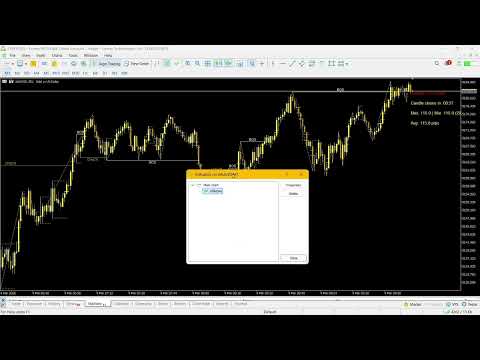
Traders often face the "cluttered chart" problem when using multiple separate indicators, which leads to lagging terminals and overlapping visual elements. This indicator solves that by merging three essential tools—Market Structure (BOS/CHoCH), Supply/Demand elements (FVG & Gann Swings), and Real-time Execution Stats (Spread & Timer)—into a single, high-performance execution.
2. Key Features
-
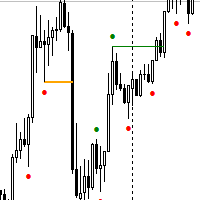
Automated Market Structure: Real-time identification of BOS (Break of Structure) and CHoCH (Change of Character) based on price swings, helping you identify trend shifts instantly.
-
Gann Swing & FVG Mapping: Visualizes the market's "skeleton" using Gann Swings and highlights Fair Value Gaps (FVG) to identify potential entry/exit liquidity zones.
-
Candle Pattern Recognition: Automatically draws boxes for Inside Bars and highlights Outside Bars, allowing you to spot volatility expansion or contraction phases.
-
Execution Utility Dashboard: * Live Spread Monitor: Tracks Current, Max, Min, and Average spreads over a custom period.
-
Candle Timer: Counts down the remaining time for the current bar to close.
-
-
Resource Optimized: Built with efficient object management (prefix-based) and timer-driven updates to ensure smooth chart performance without lag.
3. Setup Guide (Important Inputs)
The indicator is divided into 4 main input groups for easy customization:
Group 1: Spread & Timer Settings
-
InpShowInPips: Toggle between Points and Pips display.
-
InpSpreadWarnThr: Sets a threshold (e.g., 2.0 pips). The spread value turns Red if it exceeds this limit.
-
InpMonitorPeriod: How many minutes of history to use for calculating the Average Spread.
-
InpCorner / InpX / InpY: Controls the UI position on your chart.
Group 2: Gann Swing & FVG Settings
-
InpIgnoreInsideBars: If true, the Gann Swing logic will only consider "Impulse" moves, filtering out noise.
-
InpDrawFVG: Toggle the Fair Value Gap lines.
-
InpFVGExtendBars: Choose how many bars to extend the FVG lines into the future.
Group 3: Bar Patterns (Inside/Outside)
-
InpDrawInsideBox: Draws a horizontal corridor based on the "Mother Bar" of an Inside Bar pattern.
-
InpColorOutsideBar: Fills the body of Outside Bars with a specific color (e.g., DimGray) to highlight "Engulfing" or "Stop-run" candles.
Group 4: Market Structure (BOS/CHoCH)
-
InpStructHistory: The number of historical bars the indicator analyzes to plot the structure.
-
InpColorBOS / InpColorCHoCH: Customize the colors of your trend breaks for better visual clarity.