Symbol Changer Pro

SymbolChangerPro v1.00 - Quick Reference Guide

What It Does

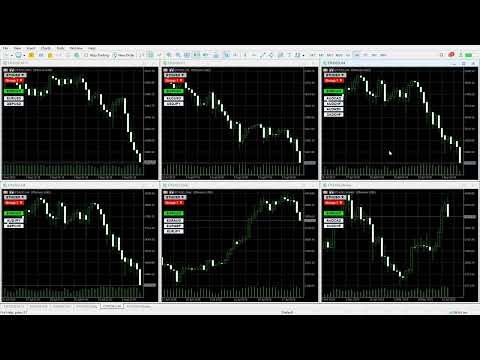
SymbolChangerPro creates smart buttons on your charts to quickly switch symbols. It can change symbols on individual charts or groups of charts, shows buttons for your active trades, and lets you pin favorite symbols for easy access.

Main Settings

Where to Get Symbols

  • Symbol Source - Choose Market Watch, All Symbols, Forex Only, Crypto, etc. (All Symbols are auto-loaded into the indicator.)
  • Custom Symbol List - Type your own symbols (like "EURUSD,GBPUSD,USDJPY")
  • Sort Symbols - Put symbols in alphabetical order

Symbol Filtering

  • Always Show Symbols - Symbols that always appear (like "EURUSD,GBPUSD")
  • Symbol Filter - Include/exclude symbols (USD=only USD pairs, -EUR=remove EUR pairs)

Chart Groups

  • Chart Group - Which group this chart belongs to (0=affects all charts, 1-99=specific groups)

Button Appearance

  • Auto-size Buttons - Buttons adjust to fit text automatically
  • Button Width/Height - Fixed size when auto-size is off
  • Main Button Font - Font and size for main button

Trading Buttons

  • Show Trading Buttons - Show buttons for symbols with open trades
  • Show Ordering Buttons - Show buttons for symbols with pending orders
  • Standard Trading Width - Make all trading buttons same size

Pin Buttons

  • Show Pin Buttons - Show buttons for your favorite symbols
  • Pin Symbol List - Your favorite symbols (like "XAUUSD,GBPUSD,EURUSD")

Export

  • Auto Export on Load - Create CSV file of all symbols when indicator starts
  • Quick Export Mode - Faster export with less data

Key Functions (What They Do)

Symbol Loading

  • LoadSymbolList() - Gets symbols from your chosen source
  • LoadMarketWatchSymbols() - Gets symbols from Market Watch
  • LoadForexMajorPairs() - Gets the 28 major forex pairs
  • ExploreAvailableBrokerCategories() - Shows what symbol categories your broker has

Button Creation

  • CreateButton() - Makes the main symbol button
  • CreateGroupButton() - Makes the group selection button
  • CreateTradingButtons() - Makes buttons for symbols with trades
  • CreatePinButtons() - Makes buttons for your pinned symbols
  • ShowMenu() - Shows the symbol selection menu
  • HideMenu() - Hides the symbol selection menu

Chart Groups

  • RegisterChartInGroup() - Adds this chart to a group
  • ChangeSymbolOnAllCharts() - Changes symbol on all charts (or just your group)
  • ChangeSymbolOnGroup() - Changes symbol only on charts in same group

Trading Integration

  • UpdateTradingButtons() - Finds symbols with open trades/orders
  • ShowTradingButtons() - Shows buttons for trading symbols
  • ProcessPinSymbols() - Sets up your pinned symbols

Maintenance

  • OnTimer() - Keeps buttons working properly
  • CleanupObjects() - Removes old buttons
  • ForceCreateAllButtons() - Recreates all buttons (for troubleshooting)

Export

  • ExportBrokerSymbolsToCSV() - Creates Excel file with all symbol data
  • AutoExportFull() - Full export with trading data
  • AutoExportQuick() - Basic export (faster)

Manual Controls (Backup Options)

  • Manual Register - Force chart into Group 1
  • Force Buttons - Recreate all buttons
  • Force Trading Buttons - Recreate trading buttons only
  • Force Pin Buttons - Recreate pin buttons only
  • Full Export - Create complete CSV export
  • Quick Export - Create basic CSV export

How It Works

  1. Main Button - Click to see symbol menu
  2. Group Button - Click to change chart group (0-99)
  3. Symbol Buttons - Click any symbol to switch to it
  4. Trading Buttons - Green=profit, Red=loss, Orange=pending orders
  5. Pin Buttons - Quick access to your favorite symbols
  6. Range Buttons - Navigate through symbol pages (A-Z)

Color System

  • Green - Current symbol or profitable trades
  • Red - Losing trades
  • Orange - Pending orders
  • Light Blue - Always-show symbols
  • White - Market Watch symbols
  • Light Yellow - Other symbols

Group System

  • Group 0 - Changes ALL charts (except those in groups 1-99)
  • Groups 1-99 - Only changes charts in that specific group
  • Each group has its own color for easy identification

推荐产品
MetaTrade Hub   is an easy-to-use and customizable tool. This product is presented in an attractive   graphical interface  that allows you to send adjustable signals in two ways ( Manual or Automatic ) from   Metatrader5   to the   Telegram channel or Discord channel.   In this case, your account becomes a   Signal Provider.  You can also share N ews reports with others. All   message formats   -   language   -   emojis   can be adjusted and personalized. You can   Enable   or   Disable   certai
Prism Smart
VALU VENTURES LTD
Prism Smart High Performance V12.45 - API Enhanced Complete Edition Professional Trading System with Real-Time Intelligence 37 Independent Strategies | Live API Integration | Banking Grade Control | AI/ML Enhancement KEY HIGHLIGHTS 37 Individual Strategies - Complete independence with individual tracking. Real API Integration - Live news, economic data, and VIX volatility feeds. Banking Grade Quality - Institutional-level performance standards. Smart Auto-Lot System - Dynamic position sizing wi
SR Edge
Disanayaka Pindakala Mudiyanselage Supun Priyanga Bandara
SR Edge – Smart Support & Resistance Entry Assistant for XAUUSD SR Edge is a smart trading assistant designed for traders who want cleaner entries with the help of support and resistance structure, trend direction, and retracement-based confirmations. This indicator is built to reduce blind entries and help traders focus on higher-quality opportunities. Instead of giving random buy and sell signals everywhere, SR Edge is designed to wait for market direction, watch for retracements, and highligh
--- StudentK Sync Chart --- 1. Move charts at the same time 2. Cross check among different Symbols and Timeframes 3. Plan your own trading strategies --- Context --- StudentK is not indicated as a master or K Sir for knowledgeable person who claims for winning all the time. (But lots of traders should know the fact that it is rarely truth, especially in fluctuated period of time) StudentK is a group of years-experienced traders who want to share amazing tools in Free and Paid versions. Aiming
N/B: All our product purchase comes with our free ‘’DAILY   SCALPER EA’’ Whatsapp Developer for yours after successful purchase   THE ARCHITECTURE OF A PERFECT TRADING SYSTEM Let me break down how all the components in this Ultimate Semafor system work together like a Swiss watch mechanism. This is a multi-layered confirmation system where each piece validates the others.   SYSTEM PHILOSOPHY: "TRIPLE CONFIRMATION" This system follows a simple but powerful principle: No single indicator can
--- StudentK Strategy EA --- 1. Various strategies available 2. Private channel for discussion 3. Keep going improvements for opportunities 4. Adapt StudentK's Indicators for advanced usage 5. ** Price must be increased from time to time (old 1-year members will get discount) ** --- Context --- StudentK is not indicated as a master or K Sir for knowledgeable person who claims for winning all the time. (But lots of traders should know the fact that it is rarely truth, especially in fluctuated p
白宝祥黄金网格篮子交易器是一款全自动智能交易系统,专为MT5平台上的XAUUSD(黄金)交易而设计。它结合了多层马丁格尔网格系统和篮子管理,能够在波动剧烈的市场环境中获取利润,尤其在伦敦和纽约交易时段表现尤为出色。 工作原理 该EA会在检测到的方向上开立初始仓位。如果市场走势与仓位相反,它会以固定的间隔(网格步长)增加层数,构建交易篮子。当篮子总利润达到目标时,所有仓位将同时平仓。多头和空头篮子可以同时独立运行。 主要功能 双向篮子——多头和空头网格独立运行 可配置网格步长——两阶段距离控制(第一阶段/第二阶段) 自动手数调整——手数随层数增加,以缩小盈亏平衡距离 时段过滤器——将交易限制在指定的时间段内 止损保护 风险提示 本EA采用马丁格尔策略。虽然马丁格尔策略系统在设计时已考虑风险控制,但在持续的趋势行情中,仍存在大幅回撤的固有风险。请在实盘交易前,使用策略测试器进行充分测试,并仅使用您可以承受损失的资金进行交易。 提示:使用 LotMultiplier 设置来调整 EA 的交易规模,使其与您的账户规模相匹配。例如,对于 400 美元的账户,请将 L
N/B: All our product purchase comes with our free ‘’DAILY   SCALPER EA’’ -   bit.ly/4qlFLNh Whatsapp Developer for yours after successful purchase   DAY TRADER PLUS: The Institutional Order Flow System   Finally See Where Banks Place Their Orders - And Profit With Them   ARE YOU SICK OF THIS? "I entered the trade at what seemed like the perfect time... only to watch price reverse immediately and hit my stop loss." "I took profits too early, then watched the market run another 100 pips w
Geek Engine
VALU VENTURES LTD
Geek Engine EA is a professional-grade automated trading system that combines multiple proven technical analysis strategies with sophisticated risk management and performance tracking capabilities. Designed for both novice and experienced traders seeking consistent, rule-based trading execution. KEY FEATURES Multi-Strategy Trading System - MA Crossover Strategy with multi-timeframe confirmation - RSI Momentum Strategy with divergence detection - MACD Signal Strategy with histogram analysis -
Momentum Breakout Master - Multi-Strategy Trading Expert Momentum Breakout Master is an Expert Advisor for MetaTrader 5 that combines multiple trading strategies with advanced risk management features. Trading Strategies Strategy 1: RSI Momentum Detection Multi-timeframe RSI analysis with divergence detection Swing high/low identification for entry timing EMA trend confirmation filter Momentum threshold validation Strategy 2: Breakout + Volume Confirmation Dynamic Support/Resistance level ident

Justo mini indice
Pedro Augusto Escoque Marin
Este indicador calcula e exibe no gráfico o preço justo do mini índice (WIN) com base em dados fundamentais do mercado. Além disso, ele traça automaticamente linhas de suporte e resistência percentuais , ajudando você a visualizar zonas importantes de preço. É como ter uma régua financeira no gráfico, mostrando onde o preço "deveria estar", de forma objetiva, considerando o cenário macroeconômico! O indicador usa uma fórmula de precificação de contratos futuros baseada em: O preço à vista do Ib
Discipline Trading is a professional behavioral risk management Expert Advisor for MetaTrader 5 designed to help traders eliminate overtrading, emotional decisions, and rule violations. This EA does not generate trading signals and does not promise profits . Its sole purpose is to enforce discipline by applying predefined trading rules automatically. Key Features Daily Trade Limit Automatically blocks new trades once the daily trade limit is reached. Discipline Score System Tracks trader be
--- StudentK CCI --- 1. Advanced strategy based on CCI 2. EA adapted (especially for StudentK's EA) --- Context --- StudentK is not indicated as a master or K Sir for knowledgeable person who claims for winning all the time. (But lots of traders should know the fact that it is rarely truth, especially in fluctuated period of time) StudentK is a group of years-experienced traders who want to share amazing tools in Free and Paid versions. Aiming helping people getting out of "The Rat Race" by u

Telegram to mt5 pro
Janet Abu Khalil
3.67 (3)
Telegram to MT5 Pro — 高级 Telegram 信号复制器(Auto-Fix,多TP,风险控制,完整交易管理) Telegram to MT5 Pro — 专业 Telegram 信号复制系统 Telegram to MT5 Pro 可将来自 Telegram 的交易信号实时复制到您的 MetaTrader 5 账户,并提供完整的风险控制、执行管理与交易管理功能。 系统由两个组件组成: • 运行在 MetaTrader 5 内的 Expert Advisor(EA) • 连接 Telegram 并将信号发送到 EA 的桌面桥接程序 两个组件必须在同一台电脑运行。由于 MQL5 限制,EA 无法直接连接 Telegram。 支持与安装 提供完整 PDF 安装指南。 支持内容: • 完整 PDF 使用手册 • 分步安装指导 • 在线聊天支持 • 交易商设置帮助(前缀、后缀、符号映射) 功能说明 • 读取任意 Telegram 群组或频道信号 • 自动解析交易品种、方向、入场、止损、止盈 • 秒级执行交易 • 管理交易(移动止损、保本、部分平仓) • 支持多账户与多信号
Trader Assistance
Tsog Erdene Borjigon Enkhkhudulmur
It can help with manual traders. EA have following features with risk management. Sell Buy Close sell Close buy Close all Manual Trade Panel EA MT5 Installation In order to buy Manual Trade Panel EA MT4/5 from MQL5.com Market you need to have a MQL5 community account. If you don’t have one, you can register here: https://www.mql5.com/en/auth_register. 1. First make sure that you have the necessary funds required for your purchase in your MQL5 account, it's always easier to pay with your MQL5 bal
E2C Lines
Eduardo Cristian De Carvalho
Descubra o poder do nosso indicador de alta precisão, projetado para identificar as regiões de alvo e exaustão de qualquer ativo. Testado e validado por mais de 3 anos nos mercados de mini dólar e mini índice, ele oferece confiabilidade e eficácia incomparáveis. Transforme sua estratégia de trading e alcance novos patamares de sucesso com nossa ferramenta inovadora.
Gold Monster
Tsog Erdene Borjigon Enkhkhudulmur
This EA is based on ADX strategy.  Advantage:     - Stable   - No grid martingale   - No scalper  We recommend with following settings.   Symbol : XAUUSD   Period : 30M Lot: recommend following rule:    100usd  - 0.01 lots   1000usd - 0.1 lots or lower   2000usd - 0.2 lots or lower    10000usd - 1 lots or lower We do not recommend higher lots. Need gold spreadless broker.  Maybe VIP or Pro user with your broker.
BTC Miner Pro MT5
Rahman Pavaleh
5 (4)
BTC Miner Pro   EA works on Time and Price theory. As the price patterns change, there will be no difference in performance of the EA, which is why this system has long-term stability and performance. The EA finds important and valuable price and executes trades based on them. This system works 100% automatically. Suitable for BITCOIN or BTCUSD . MT4 :  https://www.mql5.com/en/market/product/149981 Public channel :  https://www.mql5.com/en/channels/mqlexp Note : If you have any problems runn
I started of as a complete novice in trading not understanding what a pip was, not understanding leverage or how to factor in risk to manage my trades. Its been almost 3 years. I am more knowledgeable in trading. My trading continues to improve as I work on my strategy, technical analysis, trading psychology and risk management. One thing I am not worried about though is getting the right volume to match the risk for each trade. Not too long after I began trading, I learned how to code to make m
ToTheMoonDominus
Marius Ovidiu Sunzuiana
The ToTheMoonDominus is a cutting‑edge indicator built for traders who want to operate with the same clarity and precision as institutional systems. Powered by a multi‑layer analytical engine inspired by modern AI decision‑making models, this tool evaluates market conditions in real time and highlights high‑probability BUY and SELL opportunities with remarkable consistency. This edition includes a proprietary yield‑curve sensitivity layer , allowing the system to adapt its decision logic to deep
Quick Order Closer
Danny Giovanni Romero Lozano
Demo Version Here : https://www.mql5.com/en/market/product/170598 The fastest on the entire platform, try it with 50 open trades or more This Expert Advisor provides a fast and intuitive way to manage and close open trading positions directly from the chart using a clean button-based interface. With a single click, traders can instantly close positions based on different conditions, improving execution speed and overall trade management efficiency. Key Features Close all open positions instant
Gamma Volatility Levels
Carlos Pascual Perez Maturano
Gamma & Volatility Levels Pro [XAUUSD Edition] – The indicator used by professional gold traders in 2025 Fully automatic indicator developed exclusively for XAUUSD (Gold). Displays in real time the most powerful institutional levels that move gold price every single day: • HVL (High Volatility Level) – Orange dashed line Dynamic extreme volatility level (20-period SMA + 1 standard deviation). Gold bounces or breaks this level 87 % of sessions with moves of +$40 to +$120. • CALL RESISTANCE – Blue
SuperTrend ATR EA — Smart, Adaptive Trading Automation This EA is designed for traders who want a robust, volatility-aware system that adapts to market conditions and avoids false signals. It combines SuperTrend trend detection, ATR-based SL/TP logic, RSI filtering, and multi-timeframe confirmation to deliver disciplined entries and dynamic risk management. Key Features :  Multi-Timeframe SuperTrend Confirmation Uses SuperTrend on intraday, hourly, and daily charts. Only trades when all
GOLD Trending EA MT5 (M5) This Expert Advisor is designed for automated trading on XAUUSD (M5 timeframe). It uses a trend-following approach with defined entry conditions, profit management, and risk controls. The description provides full transparency: no results are hidden. Backtest data includes both profitable and losing periods to show realistic behavior. Backtest Results (2025 Full Year) These are results from the Strategy Tester using real-tick data (99.9% modeling quality). Backtest per
Supply and Demand DE 灵感 EA 专业供需区交易系统与多时间框架确认 概述 这个高级专家顾问使用机构交易原则自动识别和交易高概率供需区。EA将经典的供需区检测与现代确认过滤器相结合,包括结构突破(BoS)、公允价值缺口(FVG)和更高时间框架验证。 设置文件链接: https://drive.google.com/drive/folders/1nkK8_dy0gi7G2bFvy-Gdq9vZxq8Gsd0q?usp=drive_link 核心交易策略 区域检测: 基于斐波那契脉冲验证自动识别供需区(默认2.6倍扩展) 使用强劲的方向性运动和最小回撤来验证区域 同时跟踪多达50个区域并自动管理区域 可视化区域绘制,可自定义颜色和透明度 入场方法: 检测有效的供需区形成 等待价格完全离开区域 监控价格回调至区域(在接近阈值内) 在较低时间框架上确认突破(默认M5) 执行市价订单,带有计算的止损和止盈 区域失效: 当价格收盘突破区域超过容忍阈值(默认10%)时,区域失效 失效区域显示为灰色并停止生成新信号 自动清理区域以保持图表清晰 高级过滤系统 结构突破(BoS)过
FREE
Session Momentum Dashboard – 未来风格交易分析仪表盘 专业级仪表盘,用于分析三大交易时段(亚洲/伦敦/纽约),包含 Kill Zone 识别、亚洲区间突破、以及实时动能评分。 Session Momentum Dashboard 专为 ICT/Smart Money 交易者打造的一体化多时段监控工具。 主要功能: 三大交易时段分析 亚洲、伦敦、纽约时段实时状态显示。 Kill Zone 识别 伦敦 Kill Zone(7 点 – 9 点) 纽约 Kill Zone(12 点 – 14 点) 带自动提醒。 亚洲区间突破(Asian Range Breakout) 图形化显示亚洲区间 检测向上/向下突破 动能评分(Momentum Scoring) 以 RSI 为基础的动能进度条 成交量分析 成交量与平均值对比 分类: LOW / NORMAL / HIGH 交易信号 当以下三者同时出现时生成强信号: Kill Zone + Breakout + Momentum 伦敦/纽约时段重叠 自动识别高波动时段。 可配置提醒: 进入 Kill Zone 亚洲区间突破 高
Nomad Grid
Tsog Erdene Borjigon Enkhkhudulmur
Nomad Grid – Volatility Adaptive System LIVE REAL-TIME SIGNAL: Click here to watch performance Nomad Grid is not just another static grid system; it is a volatility-aware trading engine designed for serious capital growth. Unlike traditional grids that fail when the market moves fast, Nomad Grid employs a proprietary "Volatility Memory" algorithm. It automatically expands its safety net during high-impact events and tightens it during calm periods to capture profit. This EA transforms the tr
Elevate your trading control with Smart Risk and Equity Dashboard MT5 , an intelligent assistant designed for real-time risk management and account monitoring. More than just displaying numbers, this tool empowers your decision-making with advanced simulation features. Key Features: - Real-Time Account Status: Monitor Balance, Equity, Projected Equity, and Margin Health Bar in one elegant, professional panel. - ️ Risk & Profit Tracker: Automatically tracks your Profits (Daily, Weekly, To
FREE
Smaart Visual
Kris Van Sebroeck
SMA-ATR-Visual Indicator The SMA-ATR-Visual is a technical analysis indicator designed to assist traders in identifying market trends, measuring volatility, and visualizing potential entry signals on the chart. Main Components Simple Moving Averages (SMAs): The indicator plots two SMAs — a fast SMA (default 9-period) and a slow SMA (default 21-period) — to help detect short and medium term trend direction. ATR-Based Volatility Bands: Upper and lower bands are calculated using the Average True R
FREE
EA Portfolio Analytics Dashboard Pro - Advanced Multi-EA Performance Monitor EA Portfolio Analytics Dashboard Pro is a professional MetaTrader 5 tool designed for advanced portfolio management and real-time performance analytics. Monitor all your Expert Advisors simultaneously with institutional-grade metrics. Key Benefits: Multi-EA Performance Matrix:   Track unlimited EAs and their statistics in a single view. Real-Time Risk Analytics:   Monitor key metrics like Sharpe Ratio, Value at Risk (V
该产品的买家也购买
Trade Assistant MT5
Evgeniy Kravchenko
4.42 (211)
它有助于计算每笔交易的风险,容易安装新的订单,具有部分关闭功能的订单管理, 7 种类型的追踪止损和其他有用的功能。   附加材料和说明 安装说明   -   应用程序说明   -   模拟账户应用程序的试用版 线条功能  - 在图表上显示开仓线、止损线、止盈线。 有了这个功能,就可以很容易地设置一个新的订单,并在开仓前看到它的附加特性。   风险管理  - 风险计算功能在考虑到设定的风险和止损单的大小的情况下,计算新订单的成交量。它允许你设置任何大小的止损,同时观察设定的风险。 批量计算按钮 - 启用 / 禁用风险计算。 在 " 风险 " 一栏中设置必要的风险值,从 0 到 100 的百分比或存款的货币。 在 " 设置 " 选项卡上选择风险计算的变量: $ 货币, % 余额, % 资产, % 自由保证金, % 自定义, %AB 前一天, %AB 前一周, %AB 前一个月。   R/TP 和 R/SL - 设置止盈和止损的关系。 这允许你设置相对于损失的利润大小。 例如, 1 : 1 - 这决定了 TP = SL 的大小。 2 : 1 - 这意味着 TP 是 SL 的两倍。 RR -
欢迎来到 Trade Manager EA——这是一个终极风险管理工具,旨在使交易变得更直观、精准和高效。它不仅仅是一个下单工具,而是一个用于无缝交易计划、仓位管理和风险控制的全面解决方案。不论您是新手交易员、资深交易员,还是需要快速执行的剥头皮交易员,Trade Manager EA 都可以满足您的需求,适用于外汇、指数、大宗商品、加密货币等各种市场。 借助 Trade Manager EA,复杂的计算已成过去。只需分析市场,在图表上用水平线标记入场、止损和止盈,设置您的风险水平,Trade Manager 就会立即计算出理想的头寸规模,并实时显示以点、账户货币计价的止损和止盈。每笔交易都得以轻松管理。 主要功能: 头寸规模计算器 :根据定义的风险瞬间确定交易规模。 简单的交易计划 :在图表上用可拖动的水平线直接计划交易,设置入场、止损和止盈。 实时显示 SL 和 TP :以账户货币、点或分显示止损和止盈,便于分析。 高级保护工具 盈亏平衡选项 : 基本盈亏平衡 :当您的交易达到设定水平时自动保护利润。 多级盈亏平衡 :设置多达 4 个级别以逐步保护利润。 尾随止损选项 : 基本尾随
测试版发布 Telegram to MT5 Signal Trader 即将进入正式的 Alpha 版本。一些功能仍在开发中,您可能会遇到一些小错误。如果您遇到问题,请反馈,您的意见将帮助我们改进软件。 Telegram to MT5 Signal Trader 是一款强大的工具,能够将 Telegram 频道或群组的交易信号自动复制到您的 MetaTrader 5 账户。 支持公开和私人频道,可将多个信号提供者连接至一个或多个 MT5 账户。软件优化、高效、稳定,精准控制每笔复制交易。 界面简洁,仪表盘美观,图表交互性佳,导航直观。您可以管理多个信号账户,自定义每个提供者的设置,并实时监控所有操作。 系统需求 由于 MQL 限制,EA 需要配合 PC 端应用与 Telegram 通信。 安装程序可通过官方 安装指南 获取。 核心功能 多提供者支持: 从多渠道复制信号至多个 MT5 帐户 高级信号识别: 关键词、模式和标签全面自定义 逐提供者控制: 可启用/禁用特定信号类型、平仓策略等 灵活风险管理: 固定手数、固定金额、余额/权益百分比、部分平仓设置 可定制 SL/TP: 覆盖信号
Farmed Hedge Yield Farming | All Markets (Manual - Hybrid - Semi/Automated EA) MULTI-ASSET SUPPORT Trade any asset available on your broker - Forex: Major, Minor, Exotic pairs - Crypto: BTC, ETH, XRP, SOL, BNB - Stocks: Apple, Tesla, Amazon, Google, etc. - Commodities: Gold, Silver, Oil, Gas - Indices: US30, NAS100, SPX500, DAX40 - Any CFD your broker offers VERIFIED TRADING RESULTS - Farmed Hedge Yield Axi Copy:  https://www.mql5.com/en/signals/2356376 - Farmed Hedge Yield Exn Copy:   https:/
TradePanel MT5
Alfiya Fazylova
4.87 (155)
交易面板是一款多功能交易助手。该应用包含超过50种手动交易功能,并允许您自动执行大多数交易任务。 在购买之前,您可以在演示账户上测试演示版本。下载用于演示账户的试用版应用程序: https://www.mql5.com/zh/blogs/post/762579 。 完整说明 这里 。 贸易. 只需单击一下即可执行交易操作: 打開掛單和頭寸,並自動計算風險。 一鍵打開多個訂單和頭寸。 打開訂單網格。 按組別關閉掛單和頭寸。 反轉頭寸方向(關閉買入>打開賣出,關閉賣出>打開買入)。 鎖定頭寸(通過開啟缺少的頭寸,使買入和賣出頭寸的數量相等)。 一鍵部分關閉所有頭寸。 將所有頭寸的止盈和止損設置在同一價格水平。 將所有頭寸的止損設置在盈虧平衡水平。 開倉時,可使用以下功能: 在多個訂單或倉位之間分配計算出的數量(在單擊一次時開啟多個訂單和倉位)。 在開啟訂單前在圖表上可視化交易水平。 僅在當前點差不超過設定值時才開啟倉位。 止盈和止損之間的自動比例。 虛擬止損和止盈。 自動將止損和止盈的大小增加為當前點差的大小。 基於ATR指標讀數計算止盈和止損。 設置掛單的到期日期。 為掛單設置追蹤(掛單
Quant AI Agents is NOT AN Expert Advisor. Quant AI Agents   is a   multi-agent AI trading framework   that turns natural-language strategy prompts into live.  WANT THE SAME RESULTS AS MY LIVE SIGNAL?   Use the exact same brokers I do:   IC MARKETS , IC TRADING   .  Unlike the centralized stock market, Forex has no single, unified price feed.  Every broker sources liquidity from different providers, creating unique data streams. Other brokers can only achieve trading performance equivalent to 60
Premium Trade Manager - MetaTrader 5 快速、纪律化的交易管理工具 Premium Trade Manager 专为希望专注于决策的交易者而设计,让面板负责处理例程:仓位计算、下单、分批出场、移动止损、新闻屏蔽和资金盘限额,每笔交易都以同样纪律严明的方式执行。 这是一款用于 MetaTrader 5 的快速图表面板,接管了每笔交易中所有机械性的工作。您决定方向、品种和时机;面板根据您的风险计算仓位大小、下单并附带止损和目标位、分批减仓出场并跟踪剩余仓位。针对资金盘交易者,它更进一步:内置八家主流外汇资金盘机构的真实规则,实时显示您距每项限额的距离,并在订单即将触碰硬性限额时自动拦截。 购买前先亲手体验。 通过交互式演示,您可以直接在浏览器中点击实时面板,这是在购买前感受其工作方式的最快途径。 stein.investments/products/premium-trade-manager Premium Trade Manager 是 Stein Investments 生态系统的一部分:20 余款交易工具,以及 Max,您的一对一 AI 交易导师。 
Power Candles 策略扫描器——自优化多符号设置查找器 Power Candles策略扫描器 采用与Power Candles指标相同的自优化引擎,可同时扫描您“市场观察”中的所有交易品种。一个面板即可显示当前哪些品种在统计上具备交易价值、每种策略的最佳应用方向、最优止损/止盈组合,并在新信号触发时立即向您发送提醒。 本工具是 Stein Investments 生态系统的一部分 - 18+ 款工具,加上 Max,您的一对一 AI 交易导师。  随时在线,深入了解每一款指标,在您需要梳理思路的那一刻就在那里。  立即认识他: https://stein.investments 您的全面市场监控。每个交易品种超过3,000次自动优化。2种警报类型。一键切换图表并采取行动。 为何您需要此工具 大多数多标的扫描器仅展示价格 波动 。每只股票的波动率、百分比变化、RSI。您仍需自行摸索正确的策略、合适的止损位以及理想的入场阈值。Power Candles策略扫描器针对每只股票自动解答这些问题,仅在数学验证过的交易设置中触发实际入场信号时才会向您发出提示。这就是全部卖点。 自动
YuClusters
Yury Kulikov
4.93 (43)
Attention: You can view the program operation in the free version  YuClusters DEMO .  YuClusters is a professional market analysis system. The trader has unique opportunities to analyze the flow of orders, trade volumes, price movements using various charts, profiles, indicators, and graphical objects. YuClusters operates on data based on Time&Sales or ticks information, depending on what is available in the quotes of a financial instrument. YuClusters allows you to build graphs by combining da
Exp COPYLOT CLIENT for MT5
Vladislav Andruschenko
3.91 (33)
适用于 MetaTrader 5 的专业交易复制器 快速、专业、稳定可靠的 交易复制器 ,适用于 MetaTrader 。 COPYLOT 可在 MT4 和 MT5 终端之间复制 Forex 交易,并支持 Hedge 和 Netting 账户。 COPYLOT 的 MT5 版本支持: - MT5 Hedge → MT5 Hedge - MT5 Hedge → MT5 Netting - MT5 Netting → MT5 Hedge - MT5 Netting → MT5 Netting - MT4 → MT5 Hedge - MT4 → MT5 Netting MT4 版本 完整说明 + DEMO + PDF 如何购买 如何安装 如何获取日志文件 如何测试和优化 Expforex 的所有产品 您也可以将交易复制到 MT4 终端(MT4 → MT4,MT5 → MT4): COPYLOT CLIENT for MT4 COPYLOT 是一款专业的交易和持仓复制器,可同时与 2、3 甚至 10 个终端协同工作。 支持从 模拟账户和投资者账户 复制,也支持同时在多个终端上运行。 您可以使
MT5 to Telegram Signal Provider 是一个易于使用且完全可自定义的工具,它允许向 Telegram 的聊天室、频道或群组发送 指定 的信号,将您的账户变为一个 信号提供商 。 与大多数竞争产品不同,它不使用 DLL 导入。 [ 演示 ] [ 手册 ] [ MT4 版本 ] [ Discord 版本 ] [ Telegram 频道 ]  New: [ Telegram To MT5 ] 设置 提供了逐步的 用户指南 。 不需要了解 Telegram API;开发者提供了您所需的一切。 关键特性 能够自定义发送给订阅者的订单详情 您可以创建分层的订阅模型,例如铜、银、金。其中金订阅获得所有信号等。 通过 id、符号或评论过滤订单 包括执行订单的图表截图 在发送的截图上绘制已关闭的订单,以便额外核实 延迟发送新订单消息的可能性,以便在发送前对位置进行调整 订单详情完全透明: 新的市场订单*带截图 订单修改(止损、获利) 已关闭的订单*带截图 部分关闭的订单** 新的挂单 修改的挂单(进场价格) 挂单激活(作为新的市场订单附加) 已删除的挂单 历史订单报告
Trade Manager DaneTrades
Levi Dane Benjamin
4.28 (29)
交易管理器可帮助您快速进入和退出交易,同时自动计算风险。 包括帮助您防止过度交易、报复性交易和情绪化交易的功能。 交易可以自动管理,账户绩效指标可以在图表中可视化。 这些功能使该面板成为所有手动交易者的理想选择,并有助于增强 MetaTrader 5 平台。多语言支持。 MT4版本  |  用户指南+演示 交易经理在策略测试器中不起作用。 如需演示,请参阅用户指南 风险管理 根据%或$自动调整风险 可选择使用固定手数或根据交易量和点自动计算手数 使用 RR、点数或价格设置盈亏平衡止损 追踪止损设置 最大每日损失百分比,在达到目标时自动平仓所有交易。 保护账户免遭过多提款并阻止您过度交易 最大每日损失(以美元为单位)在达到目标时自动关闭所有交易。 保护账户免遭过多提款并阻止您过度交易 一键实现所有交易的盈亏平衡 自动计算从手机/电话发送的交易的风险 OCO 在设置中可用 交易和头寸管理 通过设置每月、每周、每天、每小时或每分钟的最大交易次数,停止过度交易和报复性交易。 高级挂单管理。 调整何时关闭挂单的规则 追踪挂单 支持市价订单和挂单 每日最大利润目标(以美元为单位)以确保头寸并停止
The product will copy all telegram signal to MT5 ( which you are member) , also it can work as remote copier.  Easy to set up, copy order instant, can work with almost signal formats, image signal,  s upport to translate other language to English Work with all type of channel or group, even channel have "Restrict Saving Content", work with  multi channel, multi MT5 Work as remote copier: with signal have ticket number, it will copy exactly via ticket number. Support to backtest signal. How to s
Anchor Trade Manager
Kalinskie Gilliam
5 (2)
Anchor: The EA Manager Run your full EA portfolio without conflicts, without stacked risk, and without watching every chart yourself. Anchor coordinates up to 64 Expert Advisors on a single account so only one trades at a time. Attach Anchor to any chart. Type your EA names and magic numbers in one line. Anchor handles the rest. Built for portfolios. Built for discipline. Built for prop firms. The Problem Running multiple EAs on the same account creates risk. Two gold EAs can open opposite posit
Footprint Chart Pro — Professional OrderFlow EA for MetaTrader 5 Version 6.34 | Professional tool for real traders | Institutional-Grade Visualization DEMO USERS - PLEASE SELECT EVERY TICK / REAL TICK WHEN TESTING AND YOU HAVE DOWNLOADED HISTORICAL DATA. IF YOU SEE A WAITING SCREEN AND IT IS NOT DOWNLOADING, IT MEANS YOU HAVE LOW HISTORICAL DATA. TRY 1 MIN AND 5 MIN FIRST ON 1 DAY DATA. ONE DAY DATA SHOULD BE THE NEWEST AND MOST CURRENT DATE. PLEASE WAIT UNTIL THE MARKET HAS ROLLED OVER PERIOD.
Ultimate Extractor
Clifton Creath
5 (9)
Ultimate Extractor - Professional Trading Analytics for MT5 *****this is the local HTML version of Ultimate Extractor. !!!!!it is not compatible with Cloud!!!! For the online version please reach out to me directly****** Ultimate Extractor transforms your MetaTrader 5 trading history into actionable insights with comprehensive analytics, interactive charts, and real-time performance tracking. What It Does Automatically analyzes your MT5 trading history across all Expert Advisors and generates
ManHedger MT5
Peter Mueller
4.83 (6)
THIS EA IS A SEMI-AUTO EA, IT NEEDS USER INPUT. Manual & Test Version Please TEST this product before BUYING  and watch my video about it. The price of the ManHedger will increase to 250$ after 20 copies sold. Contact me for user support or bug reports or if you want the MT4 version! MT4 Version  I do not guarantee any profits or financial success using this EA. With this Expert Advisor, you can: Implement your own Zone Recovery strategy to capitalize on trending markets. Create Grid trading s
DrawDown Limiter
Haidar Lionel Haj Ali
5 (20)
Drawdown Limiter EA You are in the right place if you were searching for Drawdown control, Drawdown limiter, Balance protection, Equity Protection or Daily Drawdown Limit related to Prop Firm, FTMO, or Funded account trading, or if you want to protect your trading account. Have you suffered from controlling your drawdown when trading funded accounts? This EA is meant for you. Prop firms usually set a rule called “Trader Daily Drawdown”, and if it is not respected, you are disqualified.  I am an
Poc Breakout Signal: The Ultimate Institutional Order Flow & Price Action System Elevate your trading with Poc Breakout, a comprehensive technical analysis tool designed to bridge the gap between retail trading and institutional market understanding. This all-in-one system combines powerful Buy/Sell signals, advanced Volume Profile analysis, real-time Order Flow (Depth of Market), and critical macroeconomic data to give you a clear, unambiguous edge in the markets. Poc Breakout Signal decodes c
AntiOverfit PRO MT5
Enrique Enguix
5 (5)
在购买 EA 之前,先确认它到底是真的扛得住,还是只是刚好在回测里走运。 大多数机器人都是靠一份漂亮的回测卖出去的。 曲线一路向上。 Profit Factor 很好看。 看起来几乎没有疑点。 但即便如此,很多 EA 只要市场不再按照那段历史那样运行,很快就会出问题。 为什么? 因为回测只能证明一件事: 这个策略曾经在某一条特定的价格路径上有效。 它不能证明它在其他路径下也能扛住。 不能证明它足够稳健。 更不能证明它值得你花钱。 因为你买 EA,不是为了欣赏过去那条漂亮的曲线。 你买它,是为了在会变化的市场里使用它。 AntiOverfit PRO 是做什么的 AntiOverfit PRO 帮你判断一个 MetaTrader 5 Expert Advisor 到底是真的够扎实,还是只是恰好适配某一段特定历史。 它的原理其实很容易理解: 它拿真实历史数据,生成许多与原始历史相似、但路径不同的版本,然后让你看到当市场不再完全照着原来的路线走时,这个 EA 会有什么表现。 如果你只是稍微改变一下市场路径,这个机器人就开始失效,那就是个坏信号。 而如果它在许多与原始历史相似的场景里都能稳住
Entry In The Zone and SMC Multi Timeframe   is a real-time 2-in-1 market analysis tool that combines market structure analysis and a No Repaint BUY / SELL signal system into a single indicator, built on Smart Money Concepts (SMC) — a widely adopted framework used by professional traders to understand market structure. This indicator helps you see the market more clearly, make decisions based on structure rather than guesswork, and focus on high-probability zones where price is more likely to rea
Signal TradingView to MT5 Pro Automator TradingView 与 MetaTrader 5 之间的即时专业执行 使用最强大的桥梁,将 TradingView 警报与 MT5 中的实际执行连接起来,实现交易策略的自动化。这款 Expert Advisor 专为要求速度、灵活性和完美风险管理的交易者设计,可将任何警报消息转化为精确的市价或限价订单。 优势与特点 通用解析引擎(专有): 先进技术,能够自动识别并提取任何警报格式中的数据。您不再受限于单一的死板格式;系统会自动理解交易品种(Symbol)、操作(Action)、价格(Price)、止损(SL)和止盈(TP)。 实时执行: 极速轮询技术(低于 1 秒),经过优化可将延迟降至最低。接收到信号后,订单将在毫秒内执行。 机构级风险管理: 基于以下方式自动精确计算手数: 净值/余额百分比(% of Equity/Balance): 每笔交易承担固定账户百分比的风险。 风险金额(Risk Amount): 设定在触发止损时损失的固定货币金额(例如:100 美元)。 固定手数(Static Lots)
Timeless Charts
Samuel Manoel De Souza
5 (5)
Timeless Charts is an all-in-one trading utility for professional traders. It combines custom chart types such as Seconds Charts and Renko with advanced order flow analysis using Footprints , Clusters , Volume Profiles , VWAP studies, and anchored analysis tools for deeper market insight. Trading and position management are handled directly from the chart through an integrated trade management panel , while Market Replay and Virtual Accounts provide environments for practicing trading skills and
这是一个可视化的交易面板,可帮助您轻松进行交易管理,避免人为错误并增强交易活动。它结合了易于使用的视觉界面以及完善的风险和位置管理方法。 [ 安装指南 | 更新指南 | 故障排除 | 常见问题 | 所有产品 ] 易于使用 从图表轻松交易 精确的风险管理交易,无忧 保本是重中之重 让利润不受您的关注 尽快享受无风险交易 所有已开通交易的自动追踪止损 交易开始后立即设置初始止损 进行交易后,EA将执行以下任务: 初始止损/获利被自动放置 它会尽快锁定自由行(可选) 它将止损首次移动到盈亏平衡点(可选) 它使用您所需的方法跟踪止损,直到止损为止 其他很酷的功能是: 出色的终端活动报告 单一但功能强大的尾随止损方法 干净的图表界面 没有输入参数 我进行交易后会怎样? 这是您进行交易后EA的操作: 它放置初始止损并获利订单。 尽快搭便车并确保保本。默认情况下,这是通过在达到盈亏平衡点时关闭50%的交易来完成的,默认情况下为5点。这意味着,如果您日后被淘汰,您将一无所获(可选)。 盈亏平衡后,跟踪止损开始运行。 它跟踪止损,直到止损为止,让利润运行。 尾随止损如何运作? 追踪止损表示为所管
AlgoRadar
Stephen J Martret
5 (4)
AlgoRadar is an on-chart analytics dashboard for MT5 that aggregates Expert Advisor performance across multiple accounts, brokers, and platforms, including both MT4 and MT5 data, into a single live view on your MT5 chart. All analysis runs from the chart interface, with no external applications or manual report processing required. EA Analysis and Ranking For traders running multiple Expert Advisors, AlgoRadar provides a consolidated view of each EA's performance across accounts. Active EAs a
Telegram to MT5 Coppy
Sergey Batudayev
5 (9)
Telegram 到 MT5: 终极信号复制解决方案 使用 Telegram 到 MT5 简化您的交易,这款现代化工具可直接从 Telegram 频道和聊天室复制交易信号到您的 MetaTrader 5 平台,无需 DLL 文件。这款强大的解决方案可确保精准的信号执行、丰富的自定义选项,节省时间并提高您的效率。 [ Instructions and DEMO ] 主要特点 直接 Telegram API 集成 通过电话号码和安全码进行身份验证。 通过用户友好的 EXE 桥轻松管理聊天 ID。 添加、删除和刷新多个频道/聊天以同时复制信号。 使用高级过滤器进行信号解析 跳过包含异常词(例如“报告”、“结果”)的不需要的信号。 支持灵活的 SL 和 TP 格式:价格、点数或点数。 自动计算指定点而不是价格的信号的切入点。 订单定制和灵活性 使用多种模式配置订单大小:固定手数、动态手数(% 风险)或特定符号手数。 使用信号数据或自定义参数调整 SL/TP。 设置滑点限制、挂单到期时间和重试参数,以实现无缝执行。 综合符号管理 排除特定符号或映射到特定经纪人的符号。 自定义信号和经纪商符号之间
MT5 Trading Deck
Manuel Michiels
5 (2)
One button. One trade. MT5 Trading Deck is a hotkey trading panel for MetaTrader 5 that turns the platform into a keyboard-driven execution cockpit. Stop loss, take profit and lot size are pre-calculated for every key; the moment you press, a market order is live on the broker. A complete technical user manual is attached in the product Comments section. It documents every input parameter, the full hotkey map, the recommended Stream Deck XL layout, and the advanced workflows for Pre-Limit orders
The product is used to trade base on any Alert signal in MT5 Easy to setup, simple format with custom keyword All option to management orders as trailing stop, breakeen, partial close, time filter, news filter ... Option to auto open grid orders How to setup and guide: Let read all details about setup and download indicator for auto get   Alert Signal   here Do not buy if you even can not install demo EA to your VPS ( some VPS block download EA from mql5 market) We always bring customers high q
Custom Alerts AIO:多市场智能监控,一键启动,无需设置 概述 Custom Alerts AIO 是一款“开箱即用”的高级市场扫描工具,无需额外安装任何其他指标或进行复杂设置。它内置了 Stein Investments 的所有核心指标(FX Power、FX Volume、FX Dynamic、FX Levels 和 IX Power),可帮助您轻松监控所有主要资产类别,如外汇、黄金、指数和加密货币。如果您的经纪商支持股票,您也可以手动添加个股进行监控。 1. 为什么选择 Custom Alerts AIO? 无需额外购买任何指标 • 所有关键指标均已内置,开箱即用。 • 专注于实时预警,不包含任何图形元素,性能高效,界面简洁。 全面覆盖所有主要市场 • 支持监控外汇、金属、加密货币和指数市场。 • 无需手动输入任何交易品种,只需在设置中勾选资产类别即可启用。 • 股票并不属于默认类别,如有需要可手动通过参数输入添加。 高效、专业、便捷 • 无需图表模板和手动加载,适合自动化或远程交易环境。 • 非常适合 VPS 上长期运行,或作为后台市场预警工具使用。 2
Telegram To MT5 Receiver
Levi Dane Benjamin
4.31 (16)
将信号从您所属的任何渠道(包括私人和受限渠道)直接复制到您的 MT5。 该工具在设计时充分考虑了用户的需求,同时提供了管理和监控交易所需的许多功能。 该产品采用易于使用且具有视觉吸引力的图形界面。 自定义您的设置并在几分钟内开始使用该产品! 用户指南 + 演示  |   MT4版本  |   不和谐版本 如果您想尝试演示,请参阅用户指南。 Telegram To MT5 接收器在策略测试器中不起作用! Telegram 至 MT5 功能 一次复制多个通道的信号 从私人和受限频道复制信号 不需要机器人令牌或聊天 ID(如果出于某种原因需要,您仍然可以使用这些) 使用风险百分比或固定手数进行交易 排除特定符号 选择复制所有信号或自定义要复制的信号 配置单词和短语以识别所有信号(默认值应适用于 99% 的信号提供商) 配置时间和日期设置以仅在需要时复制信号 设置一次打开的最大交易量 交易和头寸管理 使用信号或自动设置的管理 通过设置每月、每周、每天、每小时或每分钟的最大交易次数,停止过度交易和报复性交易。 支持市价订单和挂单 每日最大利润目标(以美元为单位)以确保头寸并停止过度交易 确
筛选:
无评论
回复评论