Super Smart EA
- 专家
- 版本: 4.20
- 更新: 16 十月 2026
- 激活: 5

Introduction:
This EA works in two ways: opening a position for each candle included in the candle according to the color of the configured candle or opening a position for each candle included in the opposite candle according to the color of the configured candle.
You do not need to analyze the market. You select the desired timeframe, set it, and leave the EA running. The EA will do everything for you. The results are better if the market is trending.
You do not need to make assumptions or analyze. There is no risk of losing money if your analysis deviates from the price movement. You will only work with sensitivity, following the price movement.
You can set the EA to run at any time you want. To do this, you can enable the Time filter function. When the start time and minute are reached, the position will be opened, and when the end time and minute are reached, all open positions will be closed, and the EA will delete itself.
If you need to close open positions very quickly, all open positions will be closed when you delete the EA from the chart.
You can work on gold, crypto, and currency pairs. You need to set RiskPerTradePercent depending on the product type. This is an indicator for adjusting the lot size. A lower value will open a position with a smaller lot, and a higher value will open a position with a larger lot.
The profit and loss locking mechanism works automatically. When the profit or loss target is reached, all positions are closed and the EA is deleted.
Good luck with your trading.
THIS EA WORKS AUTOMATICALLY FROM MONDAY MORNING TO FRIDAY EVENING.
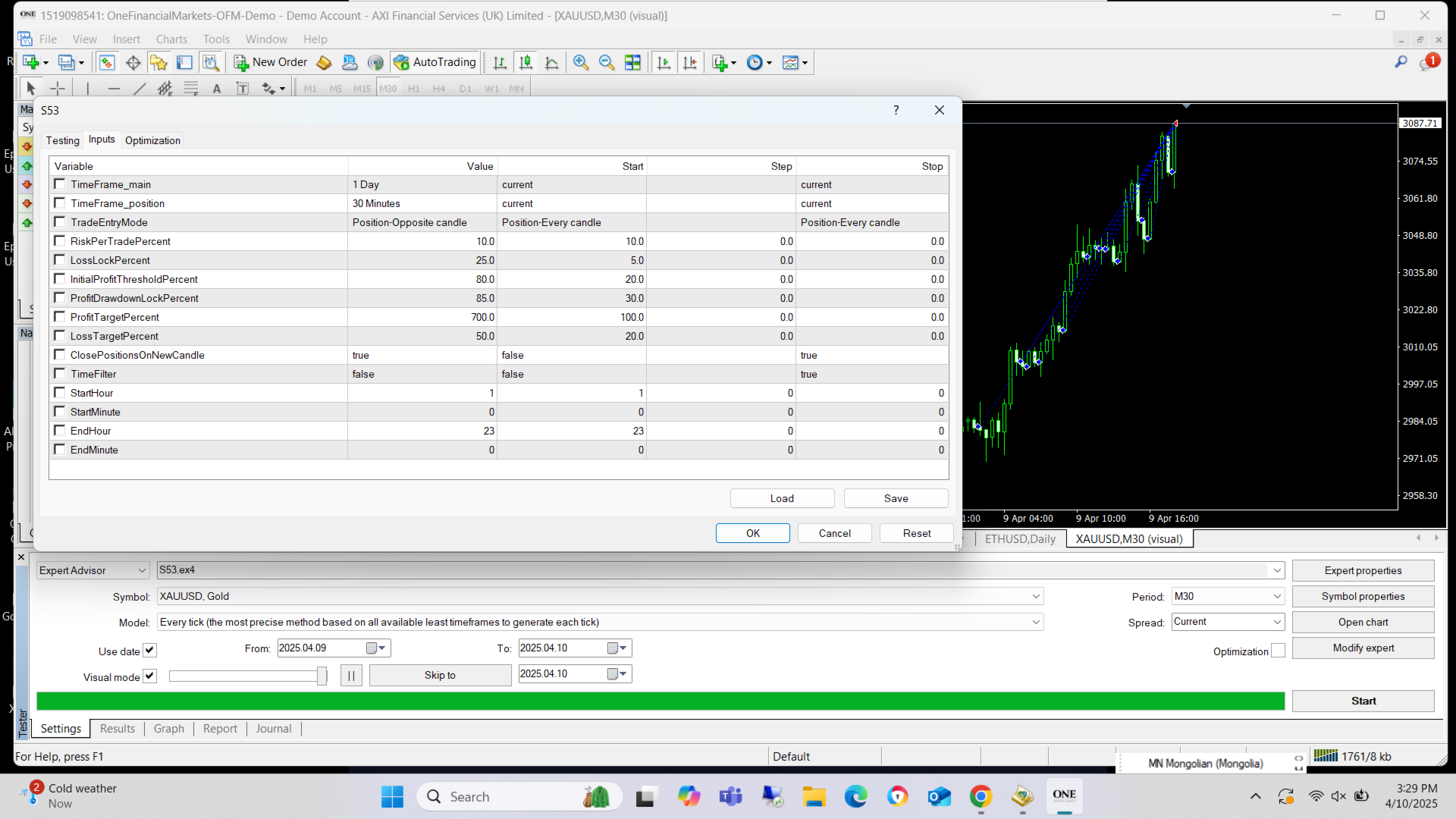
Settings:
| Inputs | Default | Explanation |
|---|---|---|
| TimeFrame_main | D1 | Candlestick color for trading direction |
| TimeFrame_position | M30 | Color of the candle to open a position |
| Position opening mode | Position-Every candle | Every - Open a position on each Position TF candle in the direction of the Main TF candle. Opposite - Open a position on each Position TF candle that is in the opposite direction to the Main TF candle. |
| Activate Profit Hedge | true | Whether to use profit lock |
| Profit Hedge Percentage (%) | 20 | Every profit made here will be locked. |
| Whether to manage with a hedge system | true | Whether this Hedge will be managed by a partial closing function |
| Risk percent trade | 10 | Indicator of how much of the account will be spent on the initial position |
| Profit target | 100 | When the profit reaches the percentage specified here, all positions are closed and the EA is removed. |
| Loss target | 40 | If the loss reaches the percentage specified here, all positions will be closed and the EA will be removed. |
| Loss lock hedge (%) | 5 | Steps to lock in losses |
| Enable Profit Drawdown Lock Hedge | true | Will it be locked if the profit margin decreases? |
| Initial profit threshold (%) | 20 | Function threshold |
| Profit drawdown lock (%) | 80 | If the profit decreases by this amount, it will be locked. |
| Close hedge at entry price | true | Hedge closing function for profit |
| Small profit above entry (%) | 0.1 | Profit percentage. The goal is to close the Hedge at a small profit before it becomes a loss. |
| Hedge profit threshold (%) | 5 | Function threshold |
| Hedge close percentage (%) | 30 | Partial closure amount (percentage) |
| Temporary threshold increase (%) | 3 | Temporary loss threshold increase |
| Temporary threshold duration (min) | 30 | Duration of temporary loss threshold |
| Enable hedge loss control | true | Loss Hedge Settings |
| Hedge loss threshold (%) | 10 | Function threshold |
| Hedge close rate (%) | 50 | Partial closure amount (percentage) |
| Enable momentum system | true | Whether to open additional positions in the form of candles |
| Enable smart pyramiding | true | Whether to enable the function of opening additional positions during a strong trend |
| Time Filter | true | Whether to use time filter |
| Start Hour | 1 | trading start hour |
| Start Minute | 0 | trading start minute |
| End Hour | 22 | trading end hour |
| End Minute | 0 | trading end minute |
| Delete EA while TIME FILTER is running | false | True - Time filter: EA will delete itself when End hour arrives. False - Time filter When the End hour arrives, the EA will operate in fully automatic mode. |
| Close all on TF_main candle close | false | True - Close all positions within that candle. Start again on the next candle. False - Still working towards profit and loss targets |
| Remove EA when target reached | true | True- Once the profit and loss targets are reached, close all positions and remove yourself. False- Operates in fully automatic mode. |
| Restart delay in minutes if not removed | 10 | After restarting, the EA will start working after the time specified here. |
| Close hedge at entry price | Option to close hedge position at opening price |
|---|---|
| Hedge profit threshold (%) | The Hedge profit threshold (%) function will be activated after the profit threshold specified here is exceeded. |
| Small profit above entry (%) | The hedged position will be closed at the profit specified here. /WARNING: increasing this is risky/ |
| Temporary threshold increase (%) | The hedge value will temporarily increase by the amount specified here. |
| Temporary threshold duration (sec) | Temporary threshold increase (%) duration. /Value in seconds/ |
Attention: This month, a 50% discount has been announced. The price will increase from June. Get it while you can.