Slave Order Receiver CSV MT4

This Expert Advisor works as a slave in a trade copier system. It reads trading instructions from a CSV file and replicates the orders in the MetaTrader 4 terminal. It is designed to work with a master EA that writes trades to the same file.

The EA continuously monitors the file for updates and synchronizes the local terminal by opening, modifying, or closing trades accordingly.

What it does:

  • Reads trade data from a CSV file located in the Common Files directory

  • Parses order ID, symbol, order type, volume, price, stop loss, and take profit

  • Compares the data with current open trades

  • Opens new trades, updates existing ones, or closes unmatched orders

  • Can copy market and pending orders

  • Handles SL and TP modifications

  • Includes price tolerance control to avoid slippage issues

  • Allows full control over trade size through different lot calculation methods

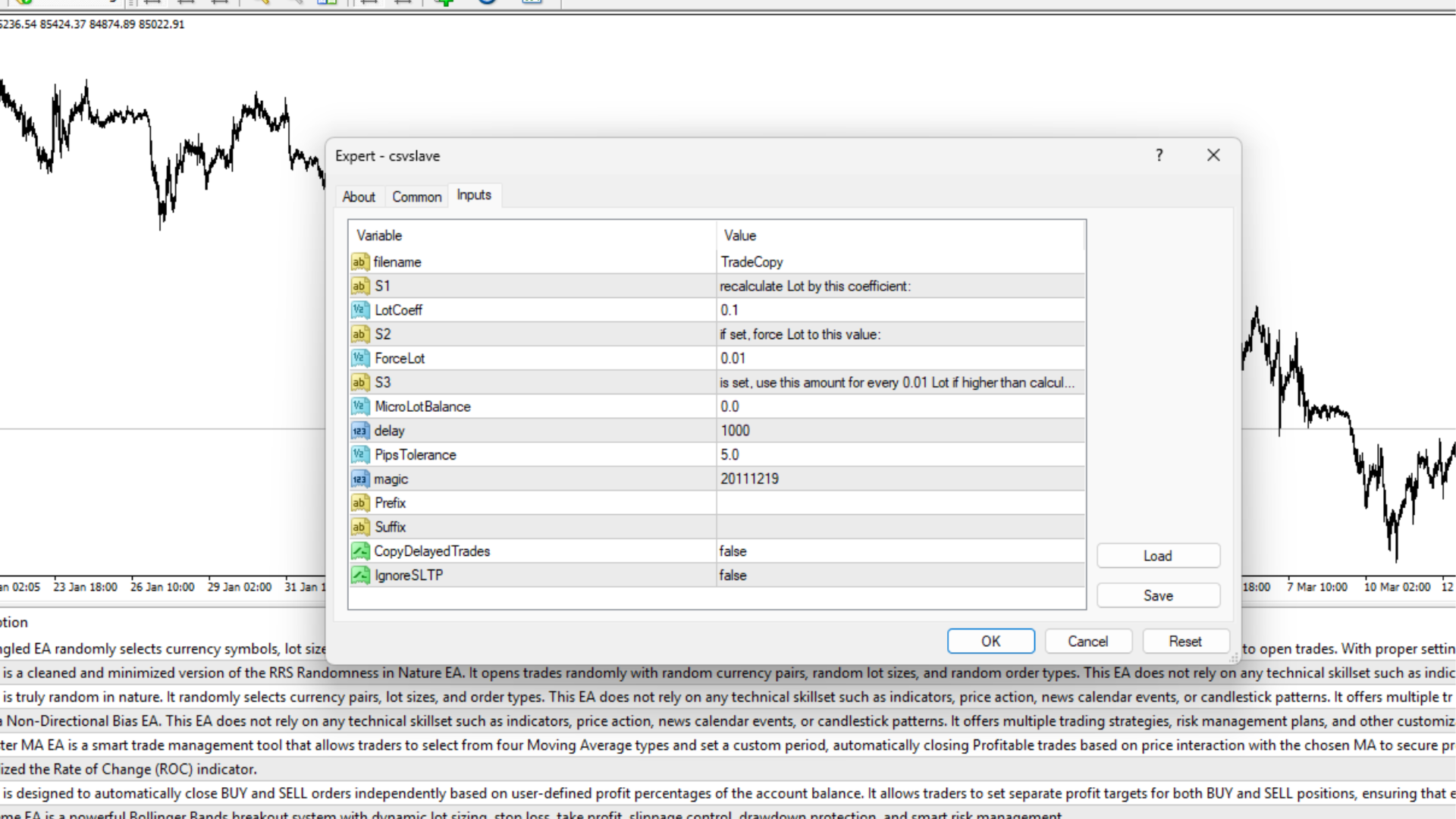
Input Parameters:

  • filename : Name of the CSV file to read from (no extension)

  • LotCoeff : Coefficient to adjust lot size

  • ForceLot : Force a fixed lot size (overrides calculated value)

  • MicroLotBalance : Adjusts lot size based on account balance levels

  • PipsTolerance : Maximum price difference allowed for market order execution

  • magic : Magic number used to track and manage trades

  • Prefix / Suffix : Optional symbol adjustments for broker-specific naming

  • CopyDelayedTrades : Enables copying of pending orders

  • IgnoreSLTP : Skips SL and TP when sending orders

Use Cases:

  • Mirror trades from a master terminal to multiple slave terminals

  • Build your own local copy trading setup

  • Useful for developers working on offline or hybrid trade distribution systems

  • Lightweight alternative to full API-based trade copiers

推荐产品
智能交易监控助手  —— 实时持仓统计、盈亏追踪与警报系统   实时监控 :自动统计持仓、平仓数据,清晰展示昨日/前日盈亏,告别手动计算!   智能警报 (仅付费版):持仓变动即时推送+声音提醒,不错过任何交易机会!   简洁直观 :一键加载,图表直接显示关键数据,提升决策效率。   兼容性强 :MT4/MT5双平台支持,适配任何交易策略。 免费版 vs. 付费版(订阅制) 功能 免费版 付费版(订阅) 持仓/平仓统计 ️ ️ +   历史数据导出 昨日/前日盈亏 ️ ️ +   多账户汇总 基础弹窗提醒 ️ 声音+推送警报 ️(支持自定义音效) 持仓异动即时通知 ️(如大额浮亏/盈利) 专属客服支持 ️(优先响应) 跟单和EA多品种交易高效统计和分析 “还在手动计算盈亏?90%的交易延迟来自反应滞后!【Smart Trade Monitor】自动监控持仓变动,付费版声音警报让您5秒内抓住机会,避免错过最佳平仓点!” 统计显示,使用警报功能的用户平均减少 23% 的非必要亏损。订阅付费版=每年节省 XX小
FREE
Position Selective Close MT4
Francisco Manuel Vicente Berardo
The Position Selective Close is a multi-symbol multi-timeframe script used to close simultaneously various positions.  General Description   The Position Selective Close   possesses   three operation modes (Intersection,   Union   and All) that control the way   as   four position features (symbol, magic number,   type   and profit) are used. The modes, available through the Selection Mode input parameter, relate to the features, available through the “Select by Feature” and “Feature” input pa
FREE
Please note: This demo will work only on EURUSD live chart. It will not run in the strategy tester. ChartTrader is a professional trading tool that every trader needs in their toolbox. It has been developed to work with the MetaTrader 4 platform. ChartTrader offers a number of options to make placing orders in the Forex market quick and easy. The GUI sits on the chart window, so there is no need to navigate to separate windows when placing orders. The program allows you to set pending and insta

FREE
Real-time spread tracking and monitoring software Displays spread values in form of histograms on current timeframe of chart Convenient for analyzing spread changes, as well as for comparing trading conditions of different brokers By placing on desired chart, the spread changes at different trading times are displayed Additionally Fully customizable Works on any instrument Works with any broker
FREE
The Saz_Timer indicator belongs to the Saz_Forex suite of professional indicators designed by Traders, for Traders. This indicator will show minutes and seconds of real time on the chart window. The indicator uses the OnTimer() event so it can update even while no ticks received on the chart. The text is shown toward the bottom right of the chart, encircled red in the screenshot. Inputs: Text Colour, allows selection of the colour for the text.
FREE
Signalator Lot Size Evaluator MT4 is a free local MetaTrader 4 utility for manual traders. It helps calculate an estimated lot size before opening a trade manually. The calculation is based on account size, trade direction, entry price, stop loss, risk percentage or fixed money risk, and broker symbol settings. The main purpose is simple: Enter your setup → define your risk → get the suggested lot size. The panel also shows useful pre-trade information such as spread, risk amount, SL/TP distance
FREE
Constructor
Aleksey Semenov
Constructor is a convenient tool for creating, (building strategies) testing and applying trading strategies and ideas, as well as testing and using separate indicators and their groups. Constructor includes opening, closing, deal tracking, averaging and recovery modules, as well as various trading options with and without averaging and martingale. You are able to connect up to 10 different external indicators. Find the detailed instructions in the attached pdf file. Trading settings averaging
FREE
This indicator show the candle remaining time on the chart and/or in the corner of the window. It also display notificaton (popup and push) when a new candle is formed (optional). You configure the timer on candles and at chart corner. I don't need to explain the functions because are very simple. MT5 version:  https://www.mql5.com/pt/market/product/38470 Any doubt or suggestion to a new feature please comment. Enjoy!
FREE
This indicator will mirror the assets in use in another metatrader, being able to choose the timeframe and a template. This is the Metatrader 4 Client, it needs the Metatrader 4 or 5 Server versions: Metatrader 4 Mirror Chart Server: https://www.mql5.com/en/market/product/88644 Metatrader 5 Mirror Chart Server:   https://www.mql5.com/en/market/product/88652 Details of how it works in the video.
FREE
This panel is a part of the SupDem-Pro trading system and is used to search for the best opportunities for any available instruments. Which can be selected manually in the Market Watch (open it with CTRL + M). Using this trading panel in combination with ShvedSupDem-Pro_Zone allows to analyze multiple currency pairs with a single click. The panel allows to load any instruments from the Market Watch, from 6 major currency pairs up to all instruments (480). The indicator parameters Button Width -
FREE
This MQL4 indicator creates a customizable grid of horizontal lines on your trading chart. Here's what it does: **Main Functions:** - Draws equally spaced horizontal lines across the visible price range - Supports two line types: horizontal lines or trend lines with forward projection - Automatically adjusts to price scale changes **Key Features:** 1. **Customizable Spacing**: Set grid distance in pips (20 pips by default) 2. **Flexible Starting Point**: Auto-calculates starting price or lets
FREE
TradePulseMonitor for MetaTrader 4 & 5 Overview: TradePulseMonitor   is a comprehensive, real-time dashboard indicator designed for MetaTrader 4 and MetaTrader 5. It provides traders with an at-a-glance overview of their account's financial health, risk exposure, position metrics, and historical performance. By consolidating critical data into a single, customizable on-chart dashboard, it eliminates the need to constantly check the Terminal window, allowing for faster and more informed trading
FREE
Session High Low
Jerome Asiusin
This indicator help to mark the high and low of the session Asian,London,Newyork , with custom hour setting This indicator is set to count from minute candle so it will move with the current market and stop at the designated hour and create a accurate line for the day. below is the customization that you can adjust : Input Descriptions EnableAsian Enables or disables the display of Asian session high and low levels. EnableLondon Enables or disables the display of London session high and
FREE
This simple but useful script calculates the lot in % of the deposit. It is indispensable for risk management. There is only one customizable parameter: MaxRisk - risk in % for lot calculation. The product works as a standard script. Launch it once on an appropriate chart and start trading using the calculated lot value. Genious is simplicity! Happy trading!
FREE
Show Pips
Roman Podpora
4.27 (59)
对于那些总是想了解帐户当前情况的人来说,此信息指示器将很有用。该指标显示诸如利润点数、百分比和货币等数据,以及当前货币对的点差以及柱在当前时间范围内收盘的时间。 MT5版本 -   更多有用的指标 有多种选项可用于在图表上放置信息线: 价格右侧(运行在价格后面); 作为评论(在图表的左上角); 在屏幕的选定角落。 还可以选择信息分隔符: | / 。 \ # 该指标具有内置热键: 键 1 - 退一步显示信息类型(价格、评论或角落的右侧) 关键2——信息显示类型的进步 键 3 - 更改信息行显示的位置 可以在设置中重新分配热键。 该指标易于使用且信息丰富。可以在设置中禁用不必要的信息项目。 设置 替换显示信息的热键(向后)   - 后退信息显示类型 用于替换显示信息的热键(前进)       - 信息显示类型向前迈进了一步 用于更改外观/角信息字符串类型的热键     - 更改信息行显示的位置 文字颜色     - 文字颜色 盈利颜色     - 有浮动利润时的文字颜色 失色     - 存在浮动损失时的文本颜色 分离器     - 一行中的数据分隔符。可以采用五个值:“|”、“/”、
FREE
SX Theme Setter MT4
Mojtaba Sarikhani
5 (1)
SX Theme Setter is intended for changing chart appearance in 2 modes: - Gradient background mode: In this mode, the indicator creates a gradient background for your chart. Colors, steps and gradient type can be selected by user. - Color theme: Color theme mode provides more than 50 built-in different color themes which can be selected from a list. Most of these themes are converted from official color themes of real trading platforms of the past and present. Try them out and see if they suit
FREE
EA Master Version any Follow Copy Account  (Acc. Number)  need a open MT Terminal, download multiple times Step1:   Open Master MT5 Terminal    =  install master- Version   (on any Symbol just one Time) Step2:   Open Follower MT5 Terminal = install follower- Version  (on any Symbol just one Time) Step3:   all Trades from any Symbol or any Robot are copy now to follow- Terminal immediately for simple copy set on Chart and   Start   no optimization. This Robot is a Trade Copier for MT5 that automa
FREE
Forex Market Profile and Vwap
Lorentzos Roussos
4.86 (7)
外汇市场概况(简称FMP) 这不是什么: FMP 不是经典的字母编码 TPO 显示,不显示整体图表数据配置文件计算,并且不将图表分段并计算它们。 它能做什么 : 最重要的是,FMP 指示器将处理位于用户定义频谱左边缘和用户定义频谱右边缘之间的数据。 用户只需用鼠标拉动指示器的每一端即可定义频谱。 当指标右边缘被拉到实时柱并进一步(到未来)时,指标被认为是“实时的”(它会更新新柱) 该指标将一个“锚点”对象放在它所附加的图表上,然后将该锚点与硬盘驱动器上的文件相关联。 这允许您在图表上运行一个持续的 FMP,您的设置在重新启动时持续存在,直到图表 - 或指标 - 关闭。 FMP 指标可以在一个图表上运行多个自身实例,并且您可以命名它们。(名称在指标数据中显示为半透明,以便您能够区分它们) 指标的数据窗口被快速切换控件包围,当它们的状态发生变化时,这些控件会更新该图表的指标设置的“内存”。 左手柄、右手柄和数据窗口的显示可以自定义。您可以从 13 种不同的样式组合中进行选择,或者选择每个部分的单独样式(从 13 种中选择)。 您可以选择显示与光谱左侧对齐、在中间对称居中、与光谱右侧
FREE
Cumulative Delta MT4
Evgeny Shevtsov
4.86 (29)
The indicator analyzes the volume scale and splits it into two components - seller volumes and buyer volumes, and also calculates the delta and cumulative delta. The indicator does not flicker or redraw, its calculation and plotting are performed fairly quickly, while using the data from the smaller (relative to the current) periods. The indicator operation modes can be switched using the Mode input variable: Buy - display only the buyer volumes. Sell - display only the seller volumes. BuySell -
FREE
IceFX TradeInfo
Norbert Mereg
4.77 (44)
IceFX 的 TradeInfo 是一款工具指标,显示当前账户和持仓的重要信息。 显示信息: 有关当前账户的信息 (结余, 净值, 可用保证金)。 当前点差, 当前回撤 (DD), 计划利润, 预计亏损, 等等。 开仓数量, 交易量 (手数), 盈利。 今日和昨日的范围。 距下一根柱线的剩余时间。 最后一日的盈利信息 (与 IceFX ProfitInfo 指标集成)。 风险- 基于开新仓的手数信息。 MagicNumber 过滤器。 注释过滤器。
FREE
Trendline indicator
David Muriithi
2 (1)
Are you tired of drawing trendlines every time you're analyzing charts? Or perhaps you would like more consistency in your technical analysis. Then this is for you. This indicator will draw trend lines automatically when dropped on a chart. How it works Works similar to standard deviation channel found on mt4 and mt5. It has 2 parameters: 1. Starting Bar 2. Number of bars for calculation The   starting bar   is the bar which drawing of the trend lines will begin, while the   number of bars for c
FREE
MQL5 博客: https://www.mql5.com/en/blogs/post/770814 MT4 版本: https://www.mql5.com/en/market/product/107986 上涨基线上涨 (RBR)、下跌基线上涨 (DBR)、下跌基线下跌 (DBD)、上涨基线下跌 (RBD)、公允价值缺口 (FVG) / 不平衡、隐藏基线 隆重推出“供需助手”(EA) 智能交易系统——助您精准自信地驾驭瞬息万变的金融市场。这款尖端智能交易系统经过精心设计,旨在为交易者提供实时供需动态洞察,助力其做出明智决策,并最大限度地发挥交易潜力。 主要功能: 自动区域识别:该智能交易系统采用先进的算法,自动检测并绘制价格图表上的关键供需区域。这些区域包括#rallybaserally、#rallybasedrop、#dropbaserally 和 #dropbasedrop,为交易者提供重要的参考点,帮助他们了解市场情绪和潜在的价格反转。 风险回报比计算:通过利用已识别的供需区域,该智能交易系统能够动态计算每个交易机会的风险回报比。这一关键指标使交易者能够评估交易
FREE
VR Color Levels MT4
Vladimir Pastushak
5 (2)
对于那些使用趋势线、矩形和文本等元素进行技术分析的人来说,VR 颜色级别是一个方便的工具。可以直接向图表添加文本并截取屏幕截图。 设置、设置文件、演示版本、说明、问题解决,可以从以下位置获取 [博客] 您可以在以下位置阅读或撰写评论 [关联] 版本为 [MetaTrader 5] 一键点击 即可使用该指标。为此,请单击带有线条的按钮,之后光标下方将出现一条趋势线。然后,通过移动光标,您可以选择 行位置 并通过再次单击来修复它。 该指标的特点 是,样式和颜色的所有更改都会自动保存,并随后应用于所有 新创建的 图形对象。 该指标配备了两个独立的按钮,用于设置不同样式的趋势线,两个独立的不同样式的矩形,一个具有自己风格的文本字段以及一个用于创建屏幕截图的按钮。 屏幕截图在 MetaTrader 终端目录的 Files 文件夹中创建,保存路径和文件名写入专家日志中。 大致路径:C:\Users\用户名\AppData\Roaming\MetaQuotes\Terminal\Character set\MQL5\Files\VR Color Levels 有大量类似于 VR Color Le
FREE
This is a light version of OneClickWonder. It has a limitation of lotsize ( 0.01 ) and also the trade direction (only SELL ) and magic number is fiexd (magic number = 11 ) ------------------------------------ OneClickWonder manages open trades by   Magic Number   and   Symbol , providing: ·            Individual or Basket Trailing Stop ·            Optional Averaging system   (adds new trades automatically) ·            OneClickOrder buttons   (BUY / SELL directly from chart) ·            Works
FREE
DF Fib Trader Pro DF Fib Trader Pro 是一款專為 MetaTrader 4 設計的自動交易系統。 它使用基於斐波那契的價格水平,結合趨勢和結構分析來定義入場點和出場點。此 EA 支援多頭和空頭部位,並內建風險管理參數。 核心功能: • 使用斐波那契回檔和擴展邏輯來繪製入場點、停損點和獲利點。 • 可設定交易手數和停損/獲利水平 • 可選擇 1 或 2 個入場點 • 根據市場情況支持固定或動態停損和獲利 • 適用於多種時間範圍和貨幣對 • 包含最大點差、滑點和交易頻率控制選項 • 自動交易管理:損益兩平、追蹤停損與部分平倉選項 • 如有需要,支持市價單。 輸入概覽: • 風險管理:交易手數、單筆交易風險、最大交易數量 • 入場條件:斐波那契水平選擇、趨勢過濾選項 • 出場管理:停損/停盈類型、追蹤停損設定、損益平衡參數 • 交易過濾:價差限制、滑點容忍度 基本規則 • 點擊“繪製斐波那契”,並根據您的需求繪製斐波那契框。 • 您選擇的斐波那契程度會顯示出來(完全可設定) • 點擊“執行斐波那契”,即可立即建立掛單以及停損和止盈 • 設定完畢後,讓PA
FREE
Safety
Sergey Ermolov
5 (2)
我想每个人都知道"安全"这样的资金管理规则。 对于那些不知道的人来说,安全假设在交易利润等于止损大小后关闭一半的头寸。 因此,即使价格反转并抓住止损,您也不会赔钱,因为在早些时候关闭部分头寸时获得了完全相同数量的利润。 安全专家顾问只有一个设置-关闭地段. 将其保留在0位置,顾问将关闭交易的一半。 安装专家顾问后,图表上会出现一条红色虚线,部分利润将由专家顾问固定。 如果您希望顾问在另一个级别关闭部分交易,您可以安全地将此行移动到另一个地方。 如果您在同一货币对上有多个交易打开,那么您应该用鼠标光标将EA拖到图表上,并将EA放在您希望通过安全关闭的订单打开水平附近。 专家顾问考虑订单票,只会处理这个订单。 Thank you!
FREE
Free automatic fibonacci
Tonny Obare
4.68 (50)
Free automatic Fibonacci is an indicator that automatically plots a Fibonacci retracement based on the number of bars you select on the BarsToScan setting in the indicator. The Fibonacci is automatically updated in real time as new highest and lowest values appears amongst the selected bars. You can select which level values to be displayed in the indicator settings. You can also select the color of the levels thus enabling the trader to be able to attach the indicator several times with differe
FREE
倒计时计时器至酒吧关闭,+ 进度状态 %:  #1 多功能实用工具 :   66+ 功能,包括此工具  |   联系我  如果您有任何问题   |    MT5 版本 在指标设置中,您可以配置: 计算时间框架; true / false: 更高时间框架选项(下一个当前使用的:M15->M30, H4->D1...) 位置: 1 = 左下角; 2 = 右下角; 3 = 左上角; 4 = 右上角; 字体大小; 颜色; 字体样式; #1 多功能实用工具 :   66+ 功能,包括此工具  |   联系我  如果您有任何问题   |    MT5 版本 #1 多功能实用工具 :   66+ 功能,包括此工具  |   联系我  如果您有任何问题   |    MT5 版本 #1 多功能实用工具 :   66+ 功能,包括此工具  |   联系我  如果您有任何问题   |    MT5 版本 #1 多功能实用工具 :   66+ 功能,包括此工具  |   联系我  如果您有任何问题   |    MT5 版本
FREE
Account Info EA It is a tool that presents on the graph all the positions of the account, and specific information concerning the positions, but also the account. It enables the user to have an image of his account at a glance. Use like any expert advisor. You can't attach it in the same chart with other expert advisor. It does not have the ability to open or manage positions. You can attach it on any chart and any timeframe.
FREE
Buffer Finder Tool
Afsal Meerankutty
4.75 (4)
CyberZingFx Buffer Finder Tool Developed for Finding Buffers of Indicator to use in Universal Indicator EA . This is Not an Indicator or EA CyberZingFx Buffer Finder Tool is utility tool designed specifically for MetaTrader 4 (MT4) users. It is a standalone application that helps you easily find the buffers of any MT4 indicator, allowing you to use them in your Universal Indicator EA. With the Buffer Finder Tool, you no longer have to search through the data window to find the buffers you need.
FREE
该产品的买家也购买
欢迎来到 Trade Manager EA——这是一个终极风险管理工具,旨在使交易变得更直观、精准和高效。它不仅仅是一个下单工具,而是一个用于无缝交易计划、仓位管理和风险控制的全面解决方案。不论您是新手交易员、资深交易员,还是需要快速执行的剥头皮交易员,Trade Manager EA 都可以满足您的需求,适用于外汇、指数、大宗商品、加密货币等各种市场。 借助 Trade Manager EA,复杂的计算已成过去。只需分析市场,在图表上用水平线标记入场、止损和止盈,设置您的风险水平,Trade Manager 就会立即计算出理想的头寸规模,并实时显示以点、账户货币计价的止损和止盈。每笔交易都得以轻松管理。 主要功能: 头寸规模计算器 :根据定义的风险瞬间确定交易规模。 简单的交易计划 :在图表上用可拖动的水平线直接计划交易,设置入场、止损和止盈。 实时显示 SL 和 TP :以账户货币、点或分显示止损和止盈,便于分析。 高级保护工具 盈亏平衡选项 : 基本盈亏平衡 :当您的交易达到设定水平时自动保护利润。 多级盈亏平衡 :设置多达 4 个级别以逐步保护利润。 尾随止损选项 : 基本尾随
Trade Indicator Assistant is a powerful MT4 utility designed to turn indicators into automated trading systems. Its main feature is the ability to automatically detect an indicator’s   BUY and SELL signal buffers , without requiring you to know the buffer numbers, search through indicator settings, or modify the indicator source code. Bonus Indicator: After purchasing Trade Indicator Assistant, contact me to receive Trade Signal Pro completely free as a bonus indicator. [Download Demo Version]
Local Trade Copier EA MT4
Juvenille Emperor Limited
4.96 (112)
Local Trade Copier EA MT4 是一款快速、灵活的交易复制工具,用于在同一台 Windows 电脑或 Windows VPS 上的多个 MetaTrader 4 账户之间复制和管理交易。 它将本地交易同步与 Receiver 端的手数管理、风险管理、交易过滤、品种映射、交易管理和账户保护功能结合在一起。 只需约 1 分钟 即可完成 Transmitter 和 Receiver 终端的设置,并可在同一经纪商或不同经纪商的账户之间复制手动交易或 EA 交易。在合适的条件下,本地 MetaTrader 终端之间的交易信息可以在 0.5 秒以内 完成同步。实际交易执行速度取决于经纪商延迟、网络状况、电脑/VPS 性能以及终端负载。 购买前先试用免费演示版 您可以在 MT4 模拟账户上测试 功能完整的 Local Trade Copier EA MT4 免费演示版 ,每次可使用 4 小时 : 下载 Local Trade Copier EA MT4 免费演示版 将下载的文件放入: MT4 → 文件 → 打开数据文件夹 → MQL4 → Experts 然后重新启动 MT
Exp COPYLOT CLIENT for MT4
Vladislav Andruschenko
4.69 (65)
MetaTrader 4 专业交易复制器 快速、专业、可靠的 MetaTrader 4 交易复制器。 COPYLOT 可在 MetaTrader 4 与 MetaTrader 5 终端之间复制外汇交易,并为不同账户类型和交易场景提供灵活的同步方案。 COPYLOT MT4 版本支持: MetaTrader 4 → MetaTrader 4 MetaTrader 5 Hedge → MetaTrader 4 MetaTrader 5 Netting → MetaTrader 4   MT5 版本 完整说明 + DEMO + PDF 如何购买 如何安装 如何获取日志文件 如何测试与优化 Expforex 的全部产品 您也可以使用 MetaTrader 5 版本,在 MetaTrader 5 → MetaTrader 5 和 MetaTrader 4 → MetaTrader 5 之间进行复制: COPYLOT CLIENT for MT5 COPYLOT 是一款专业级交易复制器,可稳定运行于 2、3 甚至 10 个终端之间。 支持从模拟账户和投资者密码账户进行复制 可同时运行在多个终端上
Trade Assistant MT4
Evgeniy Kravchenko
4.43 (197)
它有助于计算每笔交易的风险,容易安装新的订单,具有部分关闭功能的订单管理, 7 种类型的追踪止损和其他有用的功能。 附加材料和说明 安装说明 - 应用程序说明 - 模拟账户应用程序的试用版 线条功能  - 在图表上显示开仓线、止损线、止盈线。 有了这个功能,就可以很容易地设置一个新的订单,并在开仓前看到它的附加特性。   风险管理  - 风险计算功能在考虑到设定的风险和止损单的大小的情况下,计算新订单的成交量。它允许你设置任何大小的止损,同时观察设定的风险。 批量计算按钮 - 启用 / 禁用风险计算。 在 " 风险 " 一栏中设置必要的风险值,从 0 到 100 的百分比或存款的货币。 在 " 设置 " 选项卡上选择风险计算的变量: $ 货币, % 余额, % 资产, % 自由保证金, % 自定义, %AB 前一天, %AB 前一周, %AB 前一个月。   R/TP 和 R/SL - 设置止盈和止损的关系。 这允许你设置相对于损失的利润大小。 例如, 1 : 1 - 这决定了 TP = SL 的大小。 2 : 1 - 这意味着 TP 是 SL 的两倍。 RR - 它禁用比率。  
Telegram to MT4 Multi-Channel Copier   可将您 Telegram 频道中的交易信号自动复制到 MetaTrader 4。无需机器人、无需浏览器扩展、无需手动复制。信号一到 Telegram,EA 几秒内就在您的终端开仓。 在复制某个频道之前,内置回测器还能告诉您该频道在您的账户上会有怎样的表现。 产品包含两个组件:一个监听您 Telegram 频道的 Windows 应用程序,以及在 MT4 终端执行信号的本 EA。同时提供 MT5 版本   点此 . 设置指南与应用下载:   https://www.mql5.com/en/blogs/post/768988 了解如何 回测任何 Telegram 信号频道 。 当前价格将来会上调。 工作原理 应用通过您自己的 Telegram 账号连接,因此能看到您关注的所有频道、群组、话题和机器人,包括私密和 VIP 频道。信号到达时,应用读取它,EA 按您的手数和设置在终端中开仓。 整个过程全自动,无需守在电脑前。专为 24/7 无人值守运行设计:Telegram 连接断开时,应用会自动重连。 打开应用并登录
MT4 至 Telegram 信号提供者 是一款易用、可完全自定义的工具,它使发送信号到 Telegram 成为可能,将您的账户变成信号提供者。 消息的格式 可以完全自定义! 但是,为了简便使用,您也可以选择一个预设模板,并能够启用或禁用消息的特定部分。 [ 演示 ]  [ 手册 ] [ MT5 版本 ] [ Discord 版本 ] [ Telegram 频道 ]  New: [ Telegram To MT5 ] 设置 可通过 用户指南 获取逐步说明。 无需了解 Telegram API;开发者提供所需的一切。 主要特性 自定义发送给订阅者的订单详情的能力 您可以创建分层订阅模型,例如铜牌、银牌、金牌。金牌订阅可获得所有信号等。 按订单号、符号或备注过滤订单 包括执行订单的图表的屏幕截图 在发送的屏幕截图上绘制已关闭的订单,以便额外验证 推迟发送新订单消息的可能性,以便在发送前对位置进行调整 订单详情的全透明度: 新的市场订单 *附带屏幕截图 订单修改(止损、获利点) 已关闭订单 *附带屏幕截图 部分关闭订单 ** 新的挂起订单 修改的挂起订单(进场价格) 挂起订单激活(
Trade copier MT4
Alfiya Fazylova
4.61 (36)
Trade Copier 是一种专业实用程序,旨在复制和同步交易账户之间的交易。 复制发生从供应商的帐户/终端到收件人的帐户/终端,安装在同一台计算机或 vps 上。 在购买之前,您可以在演示帐户上测试演示版本。 演示 这里 。 完整说明 这里 。 主要功能和优点: 支持复制MT4>MT4、MT4>MT5、MT5>MT4,包括МТ5 netting账户。 供应商和收件人模式在同一产品中实现。 简单直观的界面,允许您直接从图表中实时控制复制。 连接中断或终端重新启动时不会丢失设置和位置。 允许您选择要复制的符号,也可以替换接收者的符号,例如 EURUSD> USDJPY。 允许为每个符号设置个性化的复制设置。 支持回拷贝。 能够仅复制某些订单。 允许您设置开仓交易价格的最大差异和最大时间延迟。 正确复制部分订单关闭的执行。 计算复制手数的几种方法。 同步止盈和止损。有几种方法可以计算它们的位置。 支持通过执行在“Market account”上工作,其中 SL / TP 仅在开仓后设置。 如何使用简单的设置复制交易 将供应商终端和接收终端安装在同一台计算机或 VPS 上。 在供应商终端上
Take a Break
Eric Emmrich
5 (31)
Take a Break pauses your Expert Advisors when trading is a bad idea: before news, after a daily loss, outside your trading hours, or when a rule you wrote yourself says so. When the pause is over, your EAs simply continue. Account protection for all your EAs in one tool: news filter, drawdown and equity protection, time filter and custom rules. One EA on one chart protects the whole account, the free indicator gives every chart its own rules on top. Free demo | What is new in 26.09 | Support Ass
VirtualTradePad mt4 Extra
Vladislav Andruschenko
4.85 (61)
一键交易的交易面板。处理头寸和订单!通过图表或键盘进行交易 交易小组进行人工交易。您可以从图表(图表窗口)或键盘进行交易。打开和关闭,反向和锁定。处理职位和订单! МetaТrader4中主要订单的交易控制面板:买入,卖出,买入,买入,卖出,卖出限制,收盘,删除,修改,追踪止损,止损,止损。 全新高级版本现已推出: 使用   VirtualTradePad PRO SE   升级您的交易流程 — 适用于   MetaTrader 5   和   MetaTrader 4   的新一代专业交易面板。 MT5版本 详细描述 +DEMO +PDF 如何购买 如何安装    如何获取日志文件    如何测试和优化    Expforex 的所有产品 从符号窗口交易并从键盘交易! 您正在为MetaTrader 4终端提供一个独特的插件 - 虚拟控制面板VirtualTradePad。 Description on English 注意!如果您想学习如何交易 策略测试器  ,请查看我们的免费 TesterPad 实用程序 VirtualTradePad在“  MQL5语言最佳图形面板  ”竞
Smart Copy Local MT4
Kyra Nickaline Watson-gordon
5 (7)
Smart Copy is an Easy-to-Use EA that supports Multi Copying Metatrader4 and Metatrader5 and Local/Remote Copying. (Remote Version is coming soon) Free version is available on Smart Copy Local Free MT4 Specifications :     Real Time, Multi Terminal - Multi Account - MT4/MT5 trade copying     Copy from netting to hedge and hedge to netting is supported.     Fast and instant copy     All settings are input visually.     Easy modifying symbol names, prefix, suffix     Enable/Disable copying s
Telegram to MT4 Coppy
Sergey Batudayev
4.09 (11)
Telegram 到 MT4: 终极信号复制解决方案 使用 Telegram 转 MT4 简化您的交易流程,这款先进的实用程序旨在将交易信号直接从 Telegram 频道和聊天复制到您的 MetaTrader 4 平台,无需 DLL 文件。这款强大的解决方案确保信号执行的无缝衔接,拥有无与伦比的精度和丰富的自定义选项,从而节省您的时间并提高您的效率。 [ Instructions and DEMO ] 主要特点 直接 Telegram API 集成 通过电话号码和安全码进行身份验证。 使用用户友好的 EXE 桥轻松获取和管理聊天 ID。 添加、删除和刷新多个频道/聊天以同时复制信号。 使用高级过滤器进行信号解析 跳过包含自定义例外词(例如“报告”、“摘要”)的不需要的信号。 支持灵活的 SL 和 TP 格式:价格、点数或点数。 当信号指定点而不是价格时自动计算入场点。 订单定制和灵活性 使用多种模式定制订单规模:固定手数、动态手数(% 风险)或特定符号手数。 使用信号数据或自定义参数调整 SL/TP。 配置滑点、挂单到期和重试设置以实现完美执行。 综合符号管理 排除特定符号或匹配自定义
KT Equity Protector MT4
KEENBASE SOFTWARE SOLUTIONS
3.75 (4)
每一位 MetaTrader 交易者都应该运行,却很多人还没有使用的一款 EA。 大多数账户爆仓,并不是因为策略本身错了。真正的原因往往是在某个糟糕的时刻,交易者让亏损继续扩大、加仓硬扛、把订单留到周末、把一整周的盈利还给市场,或者因为一次错误点击而忘记了 prop firm 的每日亏损限制。 KT Equity Protector 就是那个不会让这种事情发生的自动账户守护者。 把它安装在任意一个图表上。通过清晰易懂的引导式设置向导,一次性设定你的规则:每日亏损、最大回撤、盈利目标、净值追踪止盈、周末前平仓。从那一刻开始,这款 EA 会实时监控你的整个 MetaTrader 账户。每一笔持仓。每一个交易品种。每一个 tick。当某条红线被触发时,它会立即执行你选择的动作:提醒、关闭亏损订单、关闭盈利订单、关闭全部订单,或者关闭全部订单并从终端中移除所有其他 EA,防止任何程序重新开仓。 没有情绪。没有延迟。没有犹豫。只有你每天都希望自己能够严格遵守的自动化纪律规则。 KT Equity Protector 实际上做什么 KT Equity Protector 不是交易机器人。它不会开
Want automatically to put the pending order, take profit and stop loss? This EA will do it on your behalf! The Fibo Heart EA strategy will place limit order after the ‘check point’ breakout. The position will be triggered when the price make a successful retest. If not, the pending order will automatically deleted after price hit certain level. You also have option to enable market order (instant execution) and custom take profit in the inputs setting. This EA must be attached with Fibo Heart In
试用版下载 Copy Cat More (跟单猫) MT4 交易跟单器 (Trade Copier) 不仅仅是一个简单的本地交易跟单器;它是一套 完整的风险管理与执行框架 (risk management and execution framework), 专为当今的交易挑战而设计。从自营公司 (prop firm) 挑战到个人投资组合管理,它凭借 稳健的执行、资金保护、灵活的配置和先进的交易处理的结合,适应各种情况。 该跟单器同时支持   主控端 (Master,发送方) 与 受控端 (Slave,接收方)   两种模式,可实时同步市价单与挂单、交易修改、部分平仓以及对锁平仓 (Close By) 操作。它兼容模拟与真实账户、交易或投资者登录,并通过持久化交易记忆 (Persistent Trade Memory) 系统确保恢复——即使 EA、终端或 VPS 重启也不例外。可借助唯一 ID 同时管理多个主控端与受控端,跨经纪商差异则通过前缀/后缀调整或自定义品种映射自动处理。 试用版:  先试用看看 :   你可以从下方链接下载并体验   Copy Cat More (跟单猫
Partial Closure EA MT4
Juvenille Emperor Limited
5 (3)
Partial Closure EA MT4 允许您部分平仓账户中的任何交易,可以根据选择的手数百分比和/或交易票号手动执行,也可以在指定的止盈/止损水平按设定的百分比自动执行,在最多10个止盈和10个止损级别中平掉初始手数的部分比例。它可以通过指定或排除特定的魔术编号、备注或交易品种,管理您账户中的全部或部分交易。 提示: 下载部分关闭 EA MT4 的免费演示版并在您的演示账户上试用: 这里 将下载的免费演示文件粘贴到您的 MT4 >> 文件 >> 打开数据文件夹 >> MQL4 >> 专家文件夹并重新启动您的终端。  免费演示版本每次可在 4 小时内发挥全部功能,仅限演示帐户。 要重置试用期,请转至 MT4 >> 工具 >> 全局变量 >> Control + A >> 删除。 请仅在非关键模拟账户上执行此操作,不要在挑战道具公司账户中执行此操作。 部分关闭 EA MT4 安装和用户指南     |    购买产品的更新 特征 极其简单明了的界面 适用于任何图表、账户类型或经纪商,运行流畅 在指定的止盈/止损水平自动部分平仓,按独立百分比关闭初始手数,最多支持10
TradePanel MT4
Alfiya Fazylova
4.84 (95)
交易面板是一款多功能交易助手。该应用包含超过50种手动交易功能,并允许您自动执行大多数交易任务。 应用程序说明 : https://www.mql5.com/zh/blogs/post/761102 用于模拟账户的应用程序试用版: https://www.mql5.com/zh/blogs/post/762579 如何安装应用程序: https://www.mql5.com/zh/blogs/post/762580 如何在可视化模式下测试应用程序: https://www.mql5.com/zh/blogs/post/770278 如何在VPS MetaTrader上安装应用程序: https://www.mql5.com/zh/blogs/post/770196 贸易. 只需单击一下即可执行交易操作: 打開掛單和頭寸,並自動計算風險。 一鍵打開多個訂單和頭寸。 打開訂單網格。 按組別關閉掛單和頭寸。 反轉頭寸方向(關閉買入>打開賣出,關閉賣出>打開買入)。 鎖定頭寸(通過開啟缺少的頭寸,使買入和賣出頭寸的數量相等)。 一鍵部分關閉所有頭寸。 將所有頭寸的止盈和止損設置在同一價格水平。
King Trade Copier MT4
Mohammed Maher Al-sayed Mohammed Ahmed Saleh
5 (1)
King Trade Copier 可连接运行在同一台电脑或 VPS 上的 MetaTrader 终端。在一个账户上开出的交易会出现在其他账户上。该文件同时包含两种角色,因此同一个下载文件会根据您为 Mode 设置的值,成为发送端或接收端。 在每个图表上,面板都会显示此终端是在发送还是在接收,注明对方的账户,统计已应答的接收端数量,并给出最近一次信号的时间。未被复制的订单会在面板上留下原因,而不是无声消失。 复制内容 市价单,开仓和平仓 挂单:下单、修改和删除 Stop Loss 和 Take Profit,包括初始值以及之后的每一次变更 部分平仓和加仓手数 由于每一次变更都会被单独跟踪,先移至保本位再进行跟踪的止损,只要订单保持持仓,就会以同样的方式到达接收账户。 速度与无人值守运行 发送端不会按固定时间表轮询任何内容。订单一发生变化,更新就会立即写入,接收端每毫秒读取一次通道,因此剩下的延迟取决于您的经纪商。 重启后再次启动接收端,它会与发送端进行比对并补上差距。已复制订单与其源订单之间的关联保存在磁盘上,因此在重启、重新加载到图表、部分平仓,以及经纪商改写备注的情况下都不会丢失
MetaTrader 4 货币强弱指标 这款 货币强弱指标 分析多达 28 个主要货币对,为 8 种主要货币各给出一个数值:USD、EUR、GBP、JPY、CHF、CAD、AUD 和 NZD。您不必逐个打开图表去判断谁在主导,只需查看 MetaTrader 4 图表上的一个面板,就能知道哪种货币被买入、哪种被卖出。 面板显示什么 8 种货币各自的强弱条和百分比,按强弱排序 多时间周期 矩阵:每种货币并排显示三个时间周期,入场前可确认 M15、H1 和 H4 是否一致 每行的强弱历史:从 20 升到 60 的货币,与从 90 回落到 60 的货币并不相同 最佳货币对 :强弱差值最大的组合,已排序。点击即可打开该货币对的图表 应避开的货币对 :两种货币同向移动就没有交易空间,它们会被列出而不是隐藏 一键打开 28 货币对面板,一次查看所有差值 将当前数值导出为 CSV,保存到您的 MQL4 Files 文件夹 如何使用 将指标拖到任意图表上。它读取的是市场,而不是图表品种 根据您的交易方式设置计算周期和计算根数 寻找强势货币与弱势货币之间的较大差值,再确认三个时间周期方块是否一致 用强弱历
ATTENTION: The Indicator cannot be backtested, as it is generated exclusively from live intraday calculations based on options flow. GEX Level Converter – Gamma Exposure Mapping for CFD Charts NASDAQ-100 edition — for US100 · NDX · NAS100 · USTECH and every Nasdaq-100 CFD equivalent Instantly see professional options-market levels directly on your MetaTrader Nasdaq-100 CFD chart. The GEX Level Converter translates the daily Gamma Exposure (GEX) zones of the NDX options market into precise pri
天机跟单系统-MT4接收端 天机文件跟单系统是一款专业的跨平台跟单EA,让您在MT4和MT5之间自由复制交易。无论您是管理多个账户、在模拟盘与实盘之间验证策略,还是在不同券商之间迁移交易,天机都能为您提供稳定、灵活、安全的跟单体验。 重要提示:本系统由「发送端 + 接收端」两个EA文件组成,缺一不可,需成对使用。请确保下载了对应您平台(MT4或MT5)的两个文件。 下载   MT5发送端   访问: https://www.mql5.com/zh/market/product/187073 下载   MT5接收端   访问: https://www.mql5.com/zh/market/product/187071 下载   MT4发送端   访问: https://www.mql5.com/zh/market/product/187078 下载   MT4接收端   访问: https://www.mql5.com/zh/market/product/187074 如果这个跟单系统对你有帮助,请给个好评,你的认可是我持续更新最大的动力 核心功能 真正的
天机跟单系统 -MT4发送端 天机文件跟单系统是一款专业的跨平台跟单EA,让您在MT4和MT5之间自由复制交易。无论您是管理多个账户、在模拟盘与实盘之间验证策略,还是在不同券商之间迁移交易,天机都能为您提供稳定、灵活、安全的跟单体验。 重要提示:本系统由「发送端 + 接收端」两个EA文件组成,缺一不可,需成对使用。请确保下载了对应您平台(MT4或MT5)的两个文件。 下载   MT5发送端   访问: https://www.mql5.com/zh/market/product/187073 下载   MT5接收端   访问: https://www.mql5.com/zh/market/product/187071 下载   MT4发送端   访问: https://www.mql5.com/zh/market/product/187078 下载   MT4接收端   访问: https://www.mql5.com/zh/market/product/187074 如果这个跟单系统对你有帮助,请给个好评,你的认可是我持续更新最大的动力 核心功能 真正的跨
This is a program in the form of an EA that attaches to a chart in MetaTrader 4. Then, by using API from Bittrex, Binance websites, it downloads the history of altcoins. By selecting a pair name, the EA automatically downloads all time frames history (Daily,H12,H4,H2,H1,M30,M15,M5,M3,M1) so there is no need to attach multiple EAs to different charts. You can select one pair from Bittrex and 4 pairs from Binance exchange with one running EA and create up to 15 timeframes for 5 different pairs. Th
跟单->方便快捷的界面交互,用户上手即用       ->>>> 推荐在windows电脑,或者VPS Windows上使用 特色功能: 多样化个性跟单设置: 1.对不同的信号源可以设置不同的手数模式 2.不同的信号源分别设置正向反向跟单 3.信号分别设置注释 4.是否根据合约手数校准手数 多样化个性跟单设置2: 1.对不同的品种可以设置不同的手数模式 2.不同的品种分别设置正向反向跟单 3.信号分别设置注释 4.是否根据合约手数校准手数 注释过滤,MAGIC过滤,信号手数过滤,本地品种过滤 净持仓模式(该模式下手数计算仅支持倍率) 工作时间设置 反向同步接收端的平仓 订单绑定功能:任意订单可以绑定到设置信号源订单上 (双击表格更改) 账户风险控制  基本功能: 跟单正常交互速度0.5s以下 自动检测信号源,并显示信号源账号列表 自动匹配品种,不同平台常用交易品种(后缀不同等特殊情况)95%自动匹配,基本无需手动设置,品种映射表可随意双击更改对应品种.(映射表具有快速搜索品种功能) 4种手数计算模式(1.倍率 2.固定手数 3.自适应资金风险 4.源账户资金比例风险) 特殊手数模式
EA Local Trade Copier Pro MT4:终极无 DLL 交易复制器 您是否厌倦了那些需要不安全的外部 DLL、导致终端崩溃,或者用独立的“Master”和“Client”文件让您感到困惑的复杂交易复制器? 使用 EA Local Trade Copier Pro MT4 体验新一代的交易复制。这款工具专为最大程度的稳定性、闪电般的执行速度和极致的简单性而设计,允许您在同一台 Windows PC 或 VPS 上的多个 MetaTrader 终端之间无缝复制交易。 无论您是管理多个自营基金(Prop Firm)账户、分享信号,还是管理投资者资金,EA Local Trade Copier Pro 都能提供完美无瑕、零延迟的同步。 LOCAL TRADE COPIER PRO 的优势(解决痛点) 与市场上大多数复制器不同,EA Local Trade Copier Pro 使用 100% 原生 MQL5 代码(零 DLL)。这意味着它绝对安全,绝不会触发防病毒警告,并且完全符合 MQL5 市场规则。 我们 EA 的一个巨大优势是只读复制功能。您不需要主账户的交易权限!您
X2 Copy MT4
Liubov' Shkandrii
快速。精准。创新。技术驱动。使用革命性的 X2 Copy MT4 体验即时交易复制。只需 10 秒简单设置,您将获得一个强大的工具,用于在单台计算机或 Windows VPS 上的 MetaTrader 终端之间以空前的速度同步交易。 无论您是管理多个账户、跟随信号还是扩展策略,X2 Copy MT4 都能以前所未有的精度和控制力适应您的工作流程。使用最技术驱动的交易复制解决方案,更快、更可靠地工作。尝试免费试用版,在您的系统上测试其速度。 *重要提示:使用MT5终端需要单独的X2 Copy MT5版本 X2 Copy MT4/5 设置和功能说明 | 如何安装 X2 Copy 试用版 功能特点 高速复制 — 交易传输时间小于0.1秒 全面支持所有复制类型:MT4>MT4, MT4>MT5, MT5>MT4, MT5>MT5 10秒即时设置,界面直观 24/7稳定运行 — 与Windows PC和Windows VPS完全兼容 灵活复制于任何账户类型之间:所有经纪商均可进行真实>真实、真实>模拟、模拟>真实、模拟>模拟账户复制 多通道复制 — 支持从一个或多个发送账户复制到一个或多个接收
CloseIfProfitorLoss with Trailing
Vladislav Andruschenko
4.88 (32)
Close If Profit or Loss with Trailing for MetaTrader 4 — 按总盈利或总亏损自动平仓 这是一款适用于 MetaTrader 4 的实用型交易管理工具。当总盈利或总亏损达到您设置的水平时,EA 可以自动关闭选定的持仓。 Expert Advisor 会监控当前交易,计算浮动盈亏,并可使用利润跟踪功能,帮助交易者比手动操作更快地管理风险和锁定结果。 MetaTrader 4 仍然被大量手动交易者、剥头皮交易者、网格交易者和 EA 用户使用。但 MT4 本身没有一个方便的内置工具,可以按一组订单的总结果来自动平仓。这个工具正是为了解决这个问题。 Close If Profit or Loss with Trailing 可用于手动交易,也可以与其他 Expert Advisors、网格系统、加仓策略、恢复策略和多品种交易一起使用。您设置规则,EA 负责监控结果,并在条件达到时执行平仓。 MT5 版本 | 完整说明 + DEMO + PDF | 如何购买 | 如何安装 | 如何获取日志文件 | Expforex 的所有产品 为什么 MT4
Multi Copy
Kaijun Wang
5 (1)
跟单->方便快捷的界面交互,用户上手即用     ->>>> 推荐在windows电脑,或者VPS Windows上使用 基本功能: 跟单正常交互速度0.5s以下 自动检测信号源,并显示信号源账号列表 自动匹配品种,不同平台常用交易品种(后缀不同等特殊情况)95%自动匹配,基本无需手动设置,品种映射表可随意双击更改对应品种.(映射表具有快速搜索品种功能) 4种手数计算模式(1.倍率 2.固定手数 3.自适应资金风险 4.源账户资金比例风险) 特殊手数模式:可以根据止损资金风险反算手数(可能止损过小计算的手数过大,请谨慎使用) 多个平台,多组信号源,多组接收端随意组合(   MT4 和MT5数据可互通, 需分别购买安装 )        发送端接收端二合一,加载的时候选择模式 接收减仓信号,可以进行减仓操作. 可以反向跟单 可以分别控制跟单类型,是否跟随止损止盈 提供4种跟单开仓价格模式设置(1.开仓价格范围 2.跟单比信号更有优势的价格  3.跟单开仓在比信号劣势的价格  4.不限制开仓价格) 支持语言自动识别[中文,英文] 常见使用小技巧: 一个账户仅加载一个接收端即可自动交易所有
Trend Line Optimizer
Evgenii Aksenov
4.11 (19)
这是趋势线PRO指标的自动参数优化器 轻松快速地为您最喜爱的趋势线PRO指标选择最佳参数。  优化只需几秒钟。 优化器允许您找到每对和周期的最佳参数:振幅,TP1-TP3,止损,以及所选历史部分(天)上的时间过滤器和HTF过滤器的值  要优化不同的时间框架,您需要不同的历史范围: M5-M15设置计算范围参数(天)=60(三个月) M30-H1设置计算范围参数(天)=120(6个月) H4设置参数计算范围(天)=240(一年) D1-W1设置参数计算范围(天)=720(三年) MN1设置参数计算范围(天)=1200(五年) 优化后,参数自动保存到文件夹中的现成设置文件中:MQL4>Files>trendlineoptimizedsettings  如何使用优化器实用程序: 在需要优化的符号和时间的图形上运行优化器实用程序。 优化结束后单击保存按钮 将趋势线PRO指标添加到图表,然后将趋势线PRO扫描仪 Trend Line PRO指标面板上TP1、TP2、TP3、止损和利润指标的值将变得更好,Trend Line PRO 扫描仪中会出现一个按钮(红色或蓝色  Manual G
Trade Dashboard MT4
Fatemeh Ameri
4.96 (54)
疲于复杂的订单下达和手动计算?Trade Dashboard 是您的解决方案。凭借其用户友好的界面,订单下达变得轻而易举,只需点击一下,您就可以开设交易、设置止损和止盈水平、管理交易手数,并计算风险回报比,让您只需专注于您的策略。告别手动计算,使用 Trade Dashboard 简化您的交易体验。 立即下载演示版本 。 您可以在这里找到仪表盘功能和特性的详细信息 。 加入 Telegram 频道 。 购买后请给我发消息以获取支持。如果您需要添加更多功能,可以在产品的评论区留下您的想法,我愿意听取任何建议,希望您能在使用我的产品时获得最佳体验 。 这是 MT5 版本。 风险管理:使用 Trade Dashboard,可以将您的风险设置为账户余额或权益的百分比,或将风险设置为总金额。在图表上直观地定义您的止损,让工具准确计算每个货币对的适当手数。该工具还可以根据您期望的风险回报比自动设置止盈水平。它甚至可以在手数计算中涵盖佣金和点差费用。此外,您的止损和止盈可以转变为虚拟水平,隐藏于经纪商。通过 Trade Dashboard 的高级风险管理功能,掌控风险,保护您的资本。 交易线
作者的更多信息
VWAP Intraday Free
Joaquin Nicolas Metayer
4.75 (4)
The volume weighted average price (VWAP) is a trading benchmark used by traders that gives the average price a security has traded at throughout the day, based on both volume and price. VWAP is calculated by adding up the dollars traded for every transaction (price multiplied by the number of shares traded) and then dividing by the total shares traded. You can see more of my publications here: https://www.mql5.com/en/users/joaquinmetayer/seller
FREE
TradeDeck Lot Calculator
Joaquin Nicolas Metayer
LotCalc is a minimalist MT5 indicator designed for fast, precise position sizing. Set your risk amount in dollars, click the button, then click your entry and stop-loss levels directly on the chart — the lot size and point distance are calculated and displayed instantly. No clutter, no extra panels, just the one tool you actually need before placing a trade.
FREE
TradeDeck
Joaquin Nicolas Metayer
MTF TradeDeck is an all-in-one trading dashboard for MetaTrader 5 that combines multi-timeframe visualization, line-cross alerts, a lot-size calculator, symbol switcher, and Forex session boxes in a single indicator. Key Features Multi-Timeframe Candles (up to 5 TFs):   Compact higher-timeframe candles render to the right of the last price on the current chart. Each TF group is scaled to the visible price range to preserve proportions. Choose which TFs (M1 → MN1) and how many candles per group.
FREE
Nermal Round Levels
Joaquin Nicolas Metayer
5 (3)
Nermal Round Levels is an indicator of round numbers in the form of a grid drawing horizontal lines. You can use it in many ways ... as it could be activating for an expert advisor to enter the market, confirmation of entry for your strategy, entrance area, mark areas of important levels, possible rebounds and others. Place it in your chart and verify as the price respects those round levels. Inputs GridSpace linecolor lineStyle
FREE
One Click Close All Script
Joaquin Nicolas Metayer
5 (1)
One Click Close All is a script that when thrown on any chart will automatically close all orders regardless of the asset or what type of orders they are, it will close everything much faster than a human could. You will find paid versions of the same style of this script, but read carefully and you will see that it performs the same function ... here you have it for free, enjoy it.
FREE
Arlene Sessions Backgrounds 2
Joaquin Nicolas Metayer
Arlene Sessions Background is an indicator that draws colored vertical background on the chart depending on your session. You can see the version 1 here: https://www.mql5.com/en/market/product/68822 You can see more of my publications here: https://www.mql5.com/en/users/joaquinmetayer/seller If you only want to paint a session on your chart, you must set the color "none" to deactivate it.
FREE
Arlene Sessions Backgrounds
Joaquin Nicolas Metayer
Arlene Sessions Background is an indicator that draws colored rectangles on the chart depending on your session, within the price range that has moved and when the sessions overlap, it will be painted in a color that will be the mixture of the colors of the respective sessions. You can see the version 2 here:  https://www.mql5.com/en/market/product/68934 Inputs NumberOfDays AsiaBegin AsiaEnd AsiaColor EurBegin EurEnd EurColor USABegin USAEnd USAColor If you only want to paint a session on your
FREE
StochRSI
Joaquin Nicolas Metayer
5 (1)
The   Stochastic RSI   indicator (StochRSI) is essentially an indicator of an indicator. It is used in technical analysis to provide a stochastic calculation to the RSI indicator. This means that it is a measure of RSI relative to its own high/low range over a user defined period of time. The Stochastic RSI is an oscillator that calculates a value between 0 and 1 which is then plotted as a line. This indicator is primarily used for identifying overbought and oversold conditions.
FREE
Master Order Sender MT5
Joaquin Nicolas Metayer
This Expert Advisor captures and sends information about all open positions to a REST API server in real-time using HTTP POST requests. It is ideal for building synchronization tools, external monitoring systems, or custom trade copier solutions. What does this EA do? Iterates through all active orders in the account. Compares current positions with the previously sent ones. If any change is detected (SL, TP, price, symbol, volume, type, etc.), it sends updated information to the defined endpoi
FREE
Odie Trade Manager
Joaquin Nicolas Metayer
Odie Trade Manager EA is a simple semi-automatic (two in one) assistant for a manual trader, when having a losing trade the EA begins its work in the form of a martingale or hedging (recovery zone) to leave it in breakeven or positive, it depends on its configuration. For professional traders and gamblers . Adapt it to your strategy, MANAGE YOUR RISK CORRECTLY  and all your operations will be positive. TEST ON STRATEGY TESTER WITH YOU STRATEGY AND CREATE YOUR SET FILE AND...  GOODBYE LOSSES.
FREE
Simply Trailing Stop EA
Joaquin Nicolas Metayer
5 (1)
Simply Trailing Stop is a simple Expert Advisor that automatically trails stop on the chart that has been activated. It can be used as a complement to orders placed manually or through another expert advisor that does not perform a trailing stop, you only have to activate it in a new chart, not in the same one in which you already have your expert advisor but it will not work. You can see more of my products here: www.mql5.com/en/users/joaquinmetayer/seller
FREE
Auto Stop Trail And Profit
Joaquin Nicolas Metayer
5 (1)
Auto Stop Trail And Profit is an expert advisor that monitors orders, when it detects that one has been placed, on the same chart that has been activated or on all assets, depending on its configuration, it will place its respective stop loss, take profit and perform trail stop loss (in a classic way, keeping a distance or "step by step"). You can see more of my products here: www.mql5.com/en/users/joaquinmetayer/seller
FREE
Stop and Reverse Martingale EA
Joaquin Nicolas Metayer
4 (1)
Stop and Reverse Martingale EA is an expert advisor that integrates the following inputs within it: Start lot size Lot multiplier Take profit distance in points Take profit distance in points *this input is a stop loss, is misspelled within the code of the EA Magic number A and B Start cycle with round number The distance of round number  Daily maximum orders per cycle and close all Daily loss (maximum orders per cycle when this last order hit the stop loss the EA close all orders in the same m
FREE
Server Time On Chart
Joaquin Nicolas Metayer
Server Time On Chart is a simple indicator that shows the time of the broker's server with hours, minutes and seconds in the lower left corner of the chart's. Within the inputs you can only change the size of the font and the color you want depending on your taste. You can see more of my publications here: https://www.mql5.com/en/users/joaquinmetayer/seller
FREE
Minimal MT5 to Discord
Joaquin Nicolas Metayer
Send signals to your Discord channel in a simple way. Enjoy. All instructions on YouTube video, this don't need a large description. I add unnecessary text that Metatrader asks me for: Once upon a time, in a quaint little village, there lived a curious and adventurous young girl named Lily. Lily had big, bright eyes that sparkled with excitement, and she loved exploring the enchanted forest that bordered her home. One sunny morning, Lily decided to embark on a special adventure deep i
FREE
Simple Strategy Checklist Panel
Joaquin Nicolas Metayer
4 (2)
Simple Strategy Checklist Panel, as its name suggests, is a panel that works as a checklist, and can place up to twenty lines of text. This was created for traders who want to have their trading plan or to-do list at hand, a simple but useful product for many. I will write this pointless paragraph since Metatrader asks me to put a minimum of 6300 characters, so I also explain that the list can also be used to make purchases from the supermarket! Example bread, milk, flour and much more... Enjo
FREE
Reverse Buttoms
Joaquin Nicolas Metayer
Tired of losing and never winning? It has never crossed your mind that if you did everything backwards you would always win, but when you see the orders, or accept that "you put an operation on the contrary" you can't do it right? Here is the solution if you are an expert in losing like me. A panel of buttons... when you press buy it opens a sell and when you press sell it opens a buy. Clever right? Let's see if that's how we become profitable! You can download more of my products here: htt
FREE
Reverse Hedging EA
Joaquin Nicolas Metayer
This EA is literally a reverse of Recovery Zone Assistance, as its name says ... It is an assistant, an expert advisor that monitors all the orders for the asset in which it has been placed, no matter if that order was by some other expert advisor or by the trader placed on the Manually, he will start his work after each order that is negative. Find  Recovery Zone Assistance on  https://www.mql5.com/en/market/product/68909 This Expert Advisor is based on this sistem on video "Recovery Zone" on
FREE
Recovery Zone Assistance, as its name says ... It is an assistant, an expert advisor that monitors all the orders for the asset in which it has been placed, no matter if that order was by some other expert advisor or by the trader placed on the Manually, he will start his work after each order that is negative. This Expert Advisor is based on this sistem on video "Recovery Zone" on https://www.youtube.com/watch?v=DJz4E7VyeSw. See more products on:  https://www.mql5.com/en/users/joaquinmetayer/
FREE
Simply Parabolic SAR EA
Joaquin Nicolas Metayer
Simply Parabolic SAR EA is an expert advisor that places orders in favor of the trend changes of the "Parabolic Stop And Reverse" indicator, placing its take profit, stop loss and trailing stop. You can see more of my products here: https://www.mql5.com/en/users/joaquinmetayer/seller Inputs: Lots TakeProfit in points StopLoss in points TrailingStop distance in points Step PSAR Max PSAR
FREE
Show the account information on the chart, change the color automatically depending on the background, it adjusts to each chart and is updated every time the price moves a tick, that's why it is an expert advisor even if it is used as an indicator. Cannot change size. You can see my other products here: https://www.mql5.com/en/users/joaquinmetayer/seller
FREE
Minutes 51
Joaquin Nicolas Metayer
On the other hand, we denounce with righteous indignation and dislike men who are so beguiled and demoralized by the charms of pleasure of the moment, so blinded by desire, that they cannot foresee the pain and trouble that are bound to ensue; and equal blame belongs to those who fail in their duty through weakness of will, which is the same as saying through shrinking from toil and pain. These cases are perfectly simple and easy to distinguish. In a free hour, when our power of choice is untram
FREE
This Expert Advisor monitors all open trades and saves them to a CSV file whenever a change is detected. It’s a lightweight tool for exporting trade data from MetaTrader 4 in real time. What it does: Monitors all open positions on the terminal Detects changes (order type, volume, price, SL, TP, etc.) Writes updated trade data to a .csv file ( TradeCopy.csv ) Includes order ID, symbol, type, lot size, price, SL, and TP Saves files in the Common Files folder for easy access by other applications H
FREE
Master Order Sender MT4
Joaquin Nicolas Metayer
This Expert Advisor captures and sends information about all open positions to a REST API server in real-time using HTTP POST requests. It is ideal for building synchronization tools, external monitoring systems, or custom trade copier solutions. What does this EA do? Iterates through all active orders in the account. Compares current positions with the previously sent ones. If any change is detected (SL, TP, price, symbol, volume, type, etc.), it sends updated information to the defined endpoi
FREE
Dexter EA
Joaquin Nicolas Metayer
1 (1)
Dexter EA is a 100% automatic robot that executes random orders of simultaneous buys and sells. For each losing operation, a management with an increase in the lot will begin, better known as “martingale” that will cause the price to fall back to the area where it was established. the profit the robot closes in profit or breakeven, depends on its configuration. I catalog it as a utility even though it works totally automatic because EVERY TRADER'S WORK IS NEEDED to be able to make it work corre
FREE
Garfield Equity Loss Closer is an expert advisor who will stay in control of the equity / float of the account, when the negative float reaches the amount defined from the inputs, he will close all existing orders. Only one input, it is the negative amount in the currency of your account that you must reach to start closing all positions. Its use is recommended for those expert advisors who use a volume increase system, either hedging (recovery zone) or martingale since sometimes without real
FREE
Martingale Assistance
Joaquin Nicolas Metayer
3 (1)
Martingala Assistance, as its name says ... It is an assistant, an expert advisor that monitors all the orders for the asset in which it has been placed, no matter if that order was by some other expert advisor or by the trader placed on the Manually, he will start his work after each order that is negative. See more products on:  https://www.mql5.com/en/users/joaquinmetayer/seller .
FREE
Close All Pendings
Joaquin Nicolas Metayer
Close All Pendings is a simple script that, when thrown on the graph, closes all pending orders that are open, ONLY pending orders, orders already open will not be closed, no matter in which pair it is thrown ... it will close all. It has no inputs, just throw it on the chart and it will run. You can see more of my products here: https://www.mql5.com/en/users/joaquinmetayer/seller
FREE
PBE and Flash
Joaquin Nicolas Metayer
This is an expert advisor that works more like an indicator. Its functions are the following: - Print the balance and equity in Arial font size 40 (cannot be changed) - Change chart background and candle colors depending on the close of the previous candle and the current price level. Now... what is this for or what can I use it for? Good. Personally I use it to put it as the main chart while in other charts I leave other expert advisors working, what I care to see is the balance and equity..
FREE
Retxed EA
Joaquin Nicolas Metayer
This expert advisor is a reverse version of the operation of "Dexter EA" ( https://www.mql5.com/en/market/product/67307 ) which works with the martingale method ... therefore it works in the opposite way. For each positive order, it will open one in the same direction with its respective increase in volume if the trader so wishes, on the side of negative orders, its lot will not increase. Inputs Lot size Multiplier  First order stop loss Profit distance to place a stop limit order  Revert aver
FREE
筛选:
无评论
回复评论