·
1
|
12+ yıl
deneyim
|
57
ürünler
|
461
demo sürümleri
|
|
0
işler
|
0
sinyaller
|
0
aboneler
|
Below some of my FFx trading tools available on MQL:
For MT5 platform:
- FFx Pivot SR Suite: https://www.mql5.com/en/market/product/25794
- FFx Basket Scanner: https://www.mql5.com/en/market/product/24882
- FFx USM PRO: https://www.mql5.com/en/market/product/22799
- FFx Universal MTF Dashboard Alerter (All-In-One): https://www.mql5.com/en/market/product/23115
- FFx Watcher Pro: https://www.mql5.com/en/market/product/23161
- FFx Patterns Alerter (All-In-One): https://www.mql5.com/en/market/product/23199
For MT4 platform:
- FFx Pivot SR Suite: https://www.mql5.com/en/market/product/25793
- FFx Basket Scanner: https://www.mql5.com/en/market/product/24881
- FFx USM PRO: https://www.mql5.com/en/market/product/12648
- FFx Watcher PRO: https://www.mql5.com/en/market/product/7527
- FFx Hidden TPSL Manager: https://www.mql5.com/en/market/product/4503
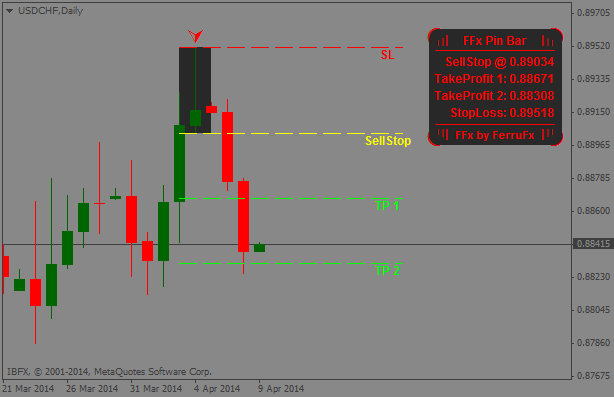
- FFx PinBar Setup Alerter: https://www.mql5.com/en/market/product/3734
- FFx Engulfing Setup Alerter: https://www.mql5.com/en/market/product/3716
- FFx InsideBar Setup Alerter: https://www.mql5.com/en/market/product/3718
- FFx RSI Dashboard MTF ALERTER: https://www.mql5.com/en/market/product/5352
- FFx Ichimoku Dashboard MTF ALERTER: https://www.mql5.com/en/market/product/5354
- FFx ADX Dashboard MTF ALERTER: https://www.mql5.com/en/market/product/5382
- FFx Stochastic Divergences: https://www.mql5.com/en/market/product/4912
- FFx RSI Divergences: https://www.mql5.com/en/market/product/4940
- FFx Risk Calculator: https://www.mql5.com/en/market/product/4688
- ... and many more!
MT4/MT5 Coding for my Forex clients is my full time job 15hours a day 7/7 since 2007.
I've released some usefull tools like the FFxStandard Indicators, the MTF-BarPower, the Probability Meter, the Heart of Forex, the NewsTimesFilter, the Multi-Indic Watcher, the CCFp-Diff, and many others ...
I've also coded 1'000s of EAs, indies, dashboards and alerts for my clients. I always give the most professional support ...
If you have a strategy to be automated, an indicator or dashboard, an alert or simply a filter to your existing EAs ... feel free to contact me.
Example of features to be added to an existing EA :
- Partial closure to step your exit
- Hidden TakeProfit/StopLoss/TrailingStop
- LotSize calculation to manage your risk
- Filter the trades during the economic news events
- Add indicators to filter your entry or define exit points
- etc ...
A great thank you to all for your perpetual confidence and loyalty since so many years!
FerruFx
For MT5 platform:
- FFx Pivot SR Suite: https://www.mql5.com/en/market/product/25794
- FFx Basket Scanner: https://www.mql5.com/en/market/product/24882
- FFx USM PRO: https://www.mql5.com/en/market/product/22799
- FFx Universal MTF Dashboard Alerter (All-In-One): https://www.mql5.com/en/market/product/23115
- FFx Watcher Pro: https://www.mql5.com/en/market/product/23161
- FFx Patterns Alerter (All-In-One): https://www.mql5.com/en/market/product/23199
For MT4 platform:
- FFx Pivot SR Suite: https://www.mql5.com/en/market/product/25793
- FFx Basket Scanner: https://www.mql5.com/en/market/product/24881
- FFx USM PRO: https://www.mql5.com/en/market/product/12648
- FFx Watcher PRO: https://www.mql5.com/en/market/product/7527
- FFx Hidden TPSL Manager: https://www.mql5.com/en/market/product/4503
- FFx PinBar Setup Alerter: https://www.mql5.com/en/market/product/3734
- FFx Engulfing Setup Alerter: https://www.mql5.com/en/market/product/3716
- FFx InsideBar Setup Alerter: https://www.mql5.com/en/market/product/3718
- FFx RSI Dashboard MTF ALERTER: https://www.mql5.com/en/market/product/5352
- FFx Ichimoku Dashboard MTF ALERTER: https://www.mql5.com/en/market/product/5354
- FFx ADX Dashboard MTF ALERTER: https://www.mql5.com/en/market/product/5382
- FFx Stochastic Divergences: https://www.mql5.com/en/market/product/4912
- FFx RSI Divergences: https://www.mql5.com/en/market/product/4940
- FFx Risk Calculator: https://www.mql5.com/en/market/product/4688
- ... and many more!
MT4/MT5 Coding for my Forex clients is my full time job 15hours a day 7/7 since 2007.
I've released some usefull tools like the FFxStandard Indicators, the MTF-BarPower, the Probability Meter, the Heart of Forex, the NewsTimesFilter, the Multi-Indic Watcher, the CCFp-Diff, and many others ...
I've also coded 1'000s of EAs, indies, dashboards and alerts for my clients. I always give the most professional support ...
If you have a strategy to be automated, an indicator or dashboard, an alert or simply a filter to your existing EAs ... feel free to contact me.
Example of features to be added to an existing EA :
- Partial closure to step your exit
- Hidden TakeProfit/StopLoss/TrailingStop
- LotSize calculation to manage your risk
- Filter the trades during the economic news events
- Add indicators to filter your entry or define exit points
- etc ...
A great thank you to all for your perpetual confidence and loyalty since so many years!
FerruFx