Deal Trading Trend
- Göstergeler
- Sürüm: 3.0
- Güncellendi: 29 Ağustos 2026
- Etkinleştirmeler: 5

Simple Trading System Update
!!! Follow this link to see our 2024 Strategy !!! ( Download the EAs scanner )
Deal Trading Trend All-in-One Professional Trend System
Trend Trading, Dynamic Support and Resistance, and Pullback Signals with Alerts
Deal Trading Trend is a technical indicator developed for MetaTrader 4. It combines trend direction analysis, dynamic support and resistance levels, and Stochastic momentum pullback signals into a structured chart layout.
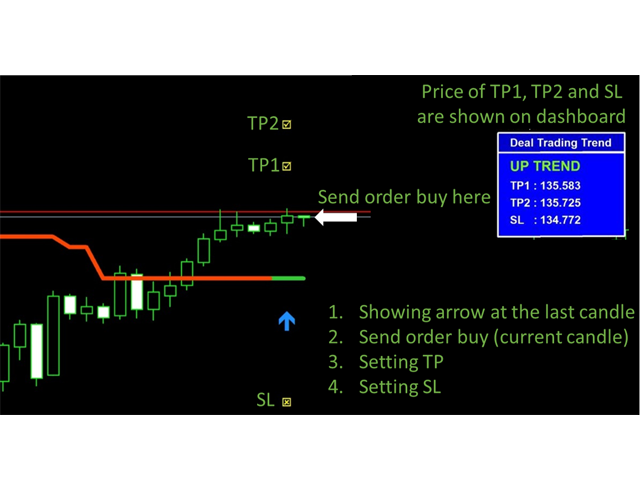
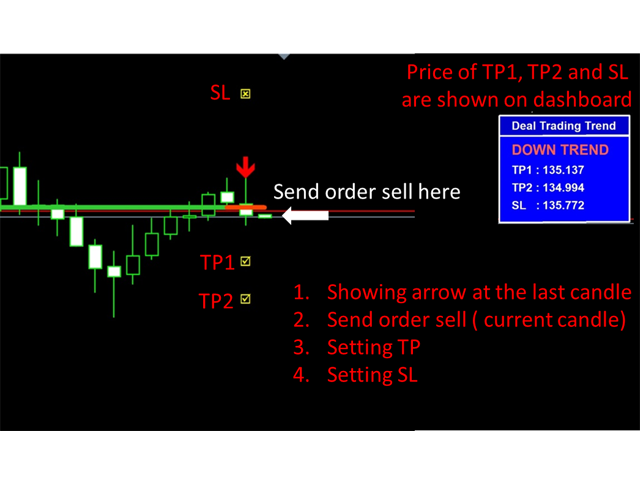
The indicator is suitable for scalping, day trading, and swing trading. It provides directional trend lines, signal arrows, dynamic target levels (TP1, TP2), and calculated stop loss levels on completed setups.
Key Features
-
Non-Repainting Signals: All calculations and signals lock on the close of the bar. Once the candle closes, the indicator values remain fixed.
-
4-in-1 Analytical Structure: Combines trend direction, dynamic support and resistance levels, overbought and oversold momentum pullbacks, and alert notifications.
-
Automated Target and Stop Levels: Projects objective target levels (TP1, TP2) and stop loss levels based on market volatility.
-
Native MT4 Operation: Built using standard MQL4 code without external dynamic link libraries (no DLL required).
-
Multi-Asset Compatibility: Applicable across currency pairs, precious metals (XAUUSD), equity indices, and cryptocurrencies on timeframes from M1 to D1.
-
Visual Customization: Color schemes, line widths, and arrow styles can be adjusted directly in the input settings.
-
Alert Integration: Supports MT4 pop-up messages, audible alerts, email notifications, and mobile push notifications to the MetaTrader 4 app.
How To Trade (3 Practical Steps)
Step 1: Identify Market Trend Direction
-
Bullish Bias: The trend line indicates an upward direction and the current price is positioned above the dynamic support line.
-
Bearish Bias: The trend line indicates a downward direction and the current price is positioned below the dynamic resistance line.
Step 2: Signal Confirmation and Position Placement
-
Evaluate entries on the open of the bar immediately following a closed signal:
-
Enter a buy order when a Trend Up Arrow or SPT Up Arrow is confirmed on bar close.
-
Enter a sell order when a Trend Down Arrow or SPT Down Arrow is confirmed on bar close.
-
Optional pullback entry: Confirm a Stochastic reversal signal aligned with the broader trend direction.
-
-
Stop Loss Placement: Position the stop loss at the calculated SL point or behind the nearest dynamic support or resistance line. Alternatively, close buy positions upon an opposite sell signal, and close sell positions upon an opposite buy signal.
Step 3: Trade and Target Management
-
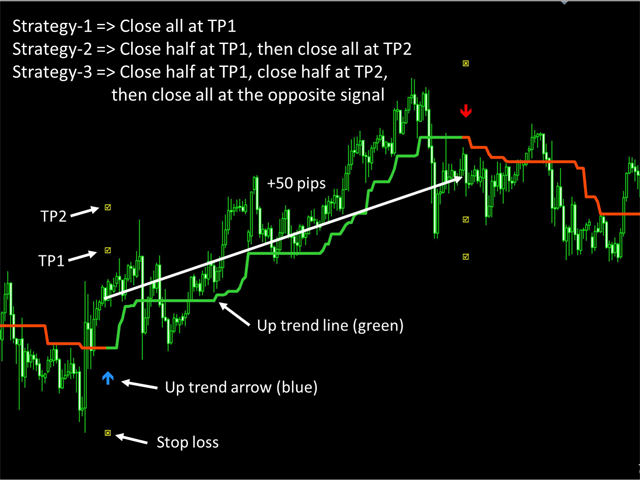
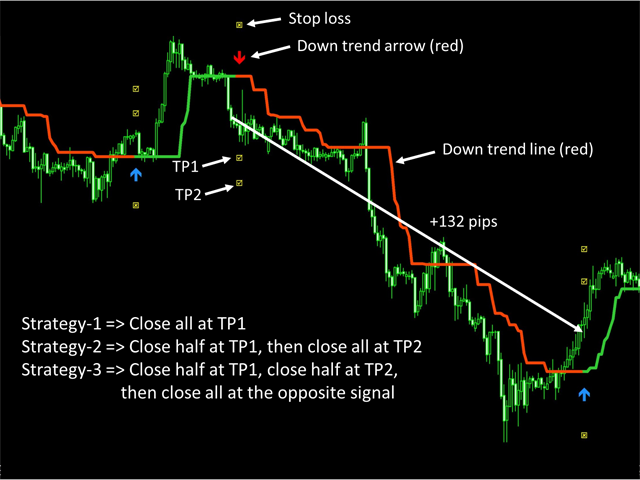
Approach 1: Close the entire position at Target 1 (TP1).
-
Approach 2: Close half of the position at Target 1 (TP1), adjust the stop loss to breakeven, and retain the remainder toward Target 2 (TP2).
-
Approach 3: Trail the position until an opposing trend signal is confirmed.