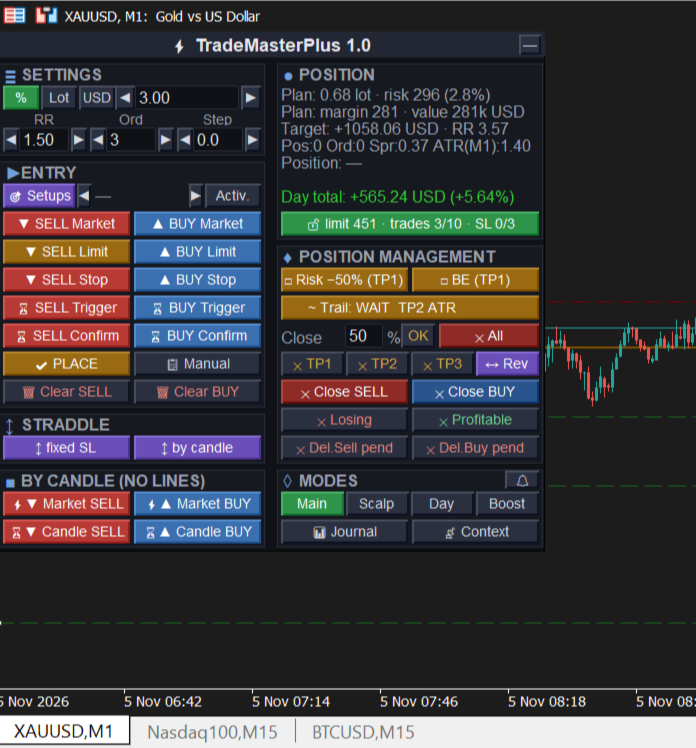
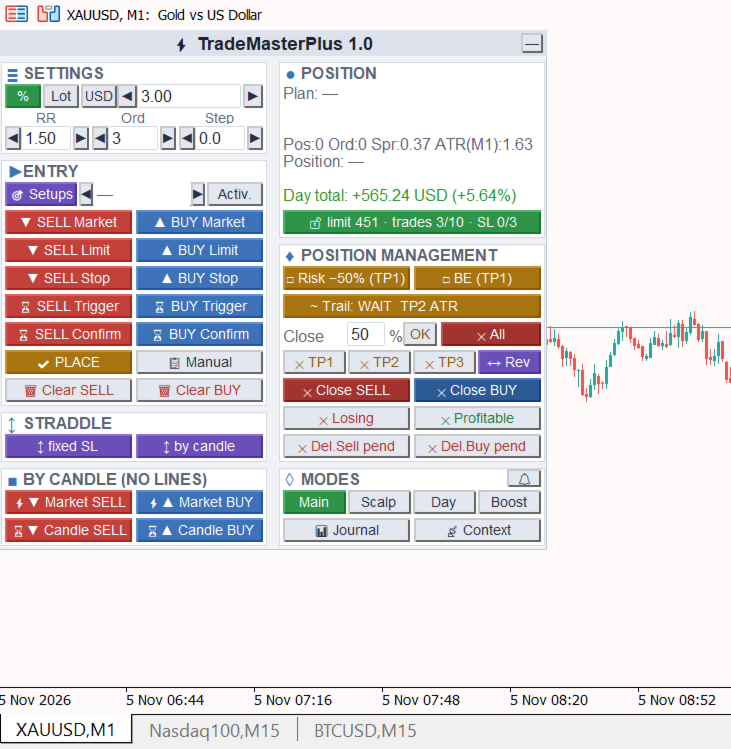
TradeMasterPlus

Easy in use, multifunctional  trade manager panel for MetaTrader 5, for manual and semi-automated trading: risk-based lot calculator, multi-leg trades with partial take profits, staged management (risk reduction, breakeven, trailing stop), confirm and level-touch entries, popular auto setups on your own lines. Four mode presets, account protection with daily limits, a 0–100 context score before entry and a trade journal in R.

Full description  

TradeMasterPlus is a trade manager panel for MetaTrader 5 that handles position sizing, order placement and trade management. The entry decision stays with you; the EA makes sure your risk, limits and trade plan are respected.

Risk and size

•         Risk as % of balance or equity, a fixed lot or an amount in account currency.

•         Built-in lot calculator: the volume is calculated from the distance to SL, including broker commission and a slippage reserve, and is rounded down only, so risk never exceeds the set value.

•         A trade may be split into 1–10 legs with their own targets (TP1, TP2…) and volume shares. Legs can share one price or form a grid with a step.

•         The panel RR is the RR of the first target (TP1). The other legs' targets scale with it — RR multipliers are set in the «Legs TP, ×RR» parameter (default 1 / 2 / 3 / 4 / 5: with RR 2 you get TP1 = 2, TP2 = 4, TP3 = 6), volume shares in «Legs volume, %» (empty — equal). Legs beyond the list get each target 1×RR further.

•         Volume, risk and position value are shown before the order is sent — on the Entry, SL and TP lines and in the panel. If the broker commission is large relative to the risk to SL (adjustable threshold) or its rate for the symbol is not known yet, the panel warns you.

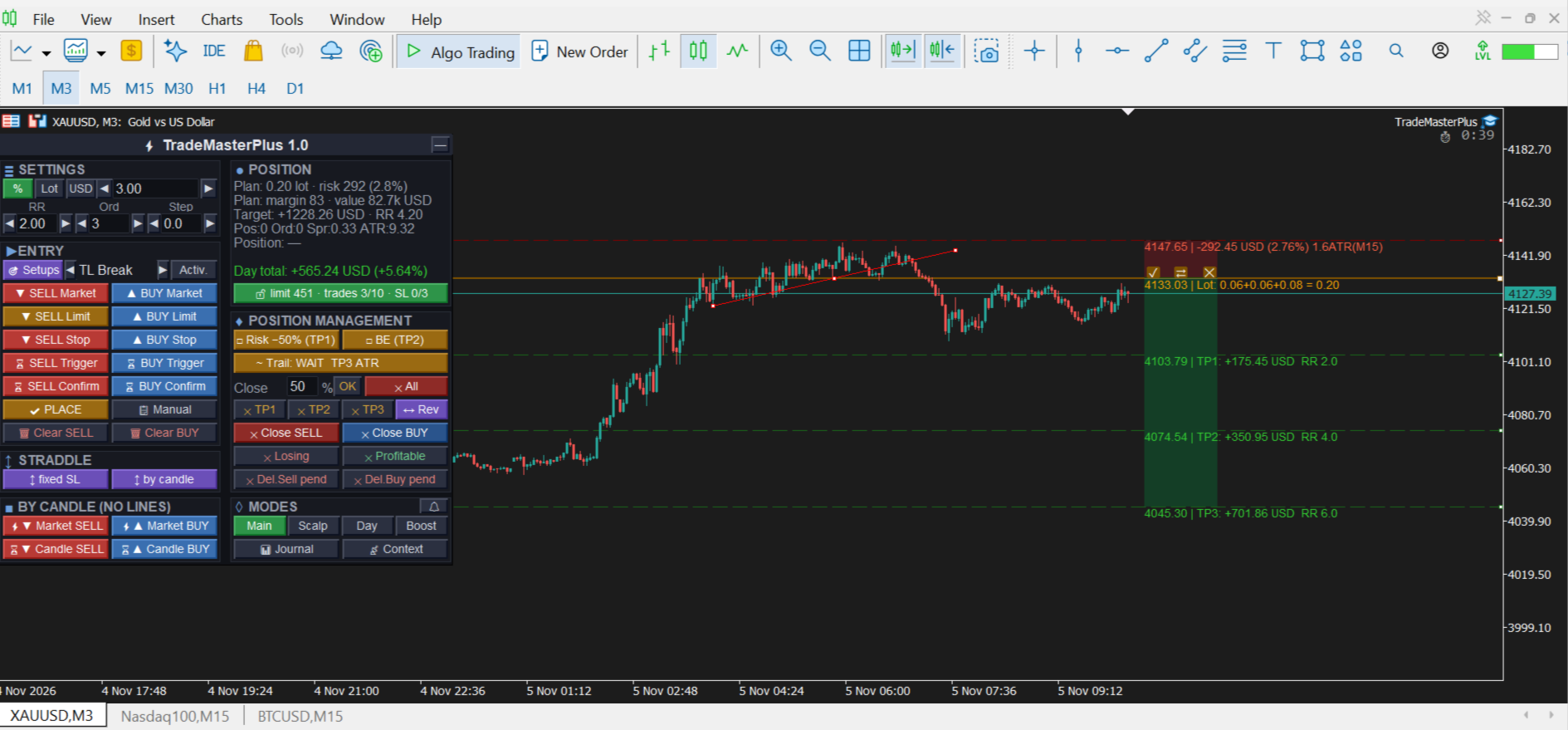
•         The trade plan is shown as Long/Short zones (risk in red, target in green). Drag the zone and Entry, SL and all TPs move together with the same lot and risk; any line can still be dragged on its own and the zone follows it. Entry and SL cannot swap and a TP cannot cross Entry — the line stops at the limit.

•         Zone buttons: ✓ — place the plan, ⇄ — flip it to the other direction (SL and TP mirrored around Entry, RR kept), ✕ — clear. The plan stays on the chart when you change the timeframe or the inputs.

•         The «Target» row in the panel shows the profit of all legs at their TPs net of commission and the total RR of the trade. It is calculated for armed Confirm and Trigger orders too.

Entries

•         Market, Limit, Stop — by lines you drag on the chart.

•         Confirm — entry after a candle of the chosen timeframe closes beyond the level (protection against a false touch).

•         Trigger — a level touch places a stop order, then the averaging limit orders.

•         An armed Confirm or Trigger is removed if the price reaches its SL before the entry (can be turned off in the inputs).

•         By candle — market entry now or at the next candle open, SL beyond the candle extreme.

•         Straddle — buy stop and sell stop at once; when one side fills, the other is removed.

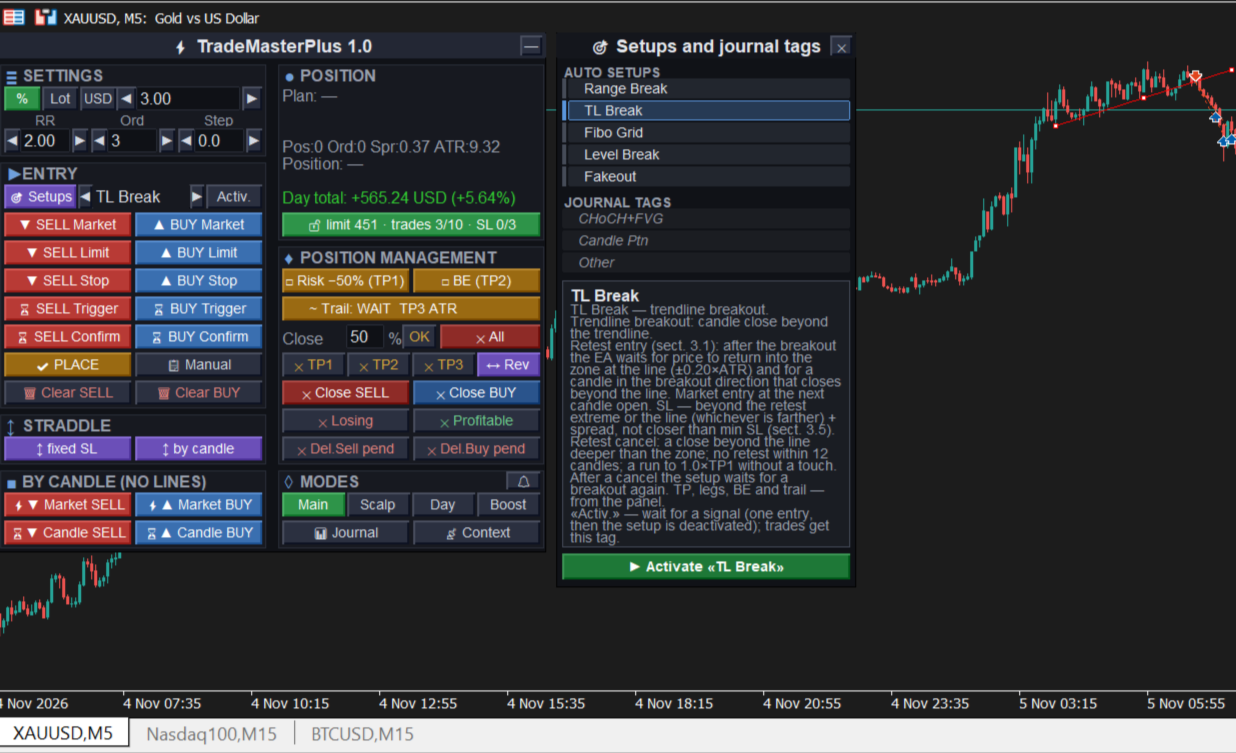
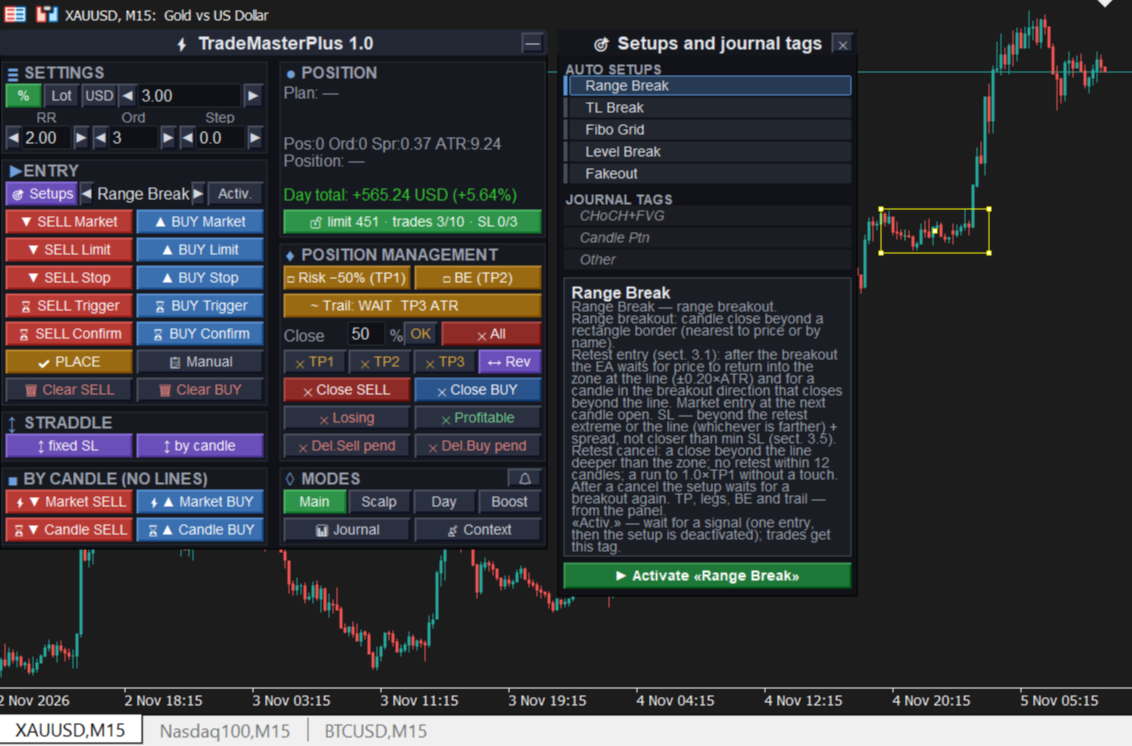
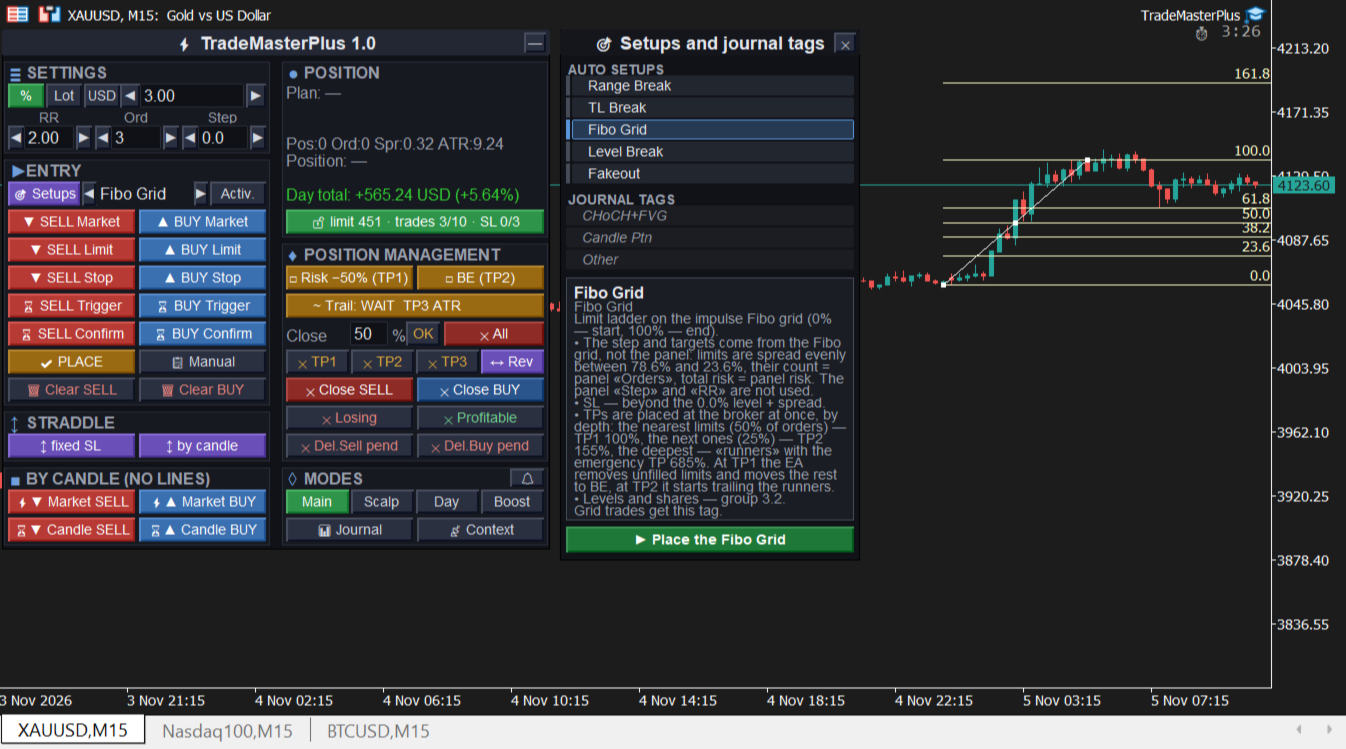
•         Popular auto setups on your own lines: level breakout, trendline breakout, range breakout, fakeout, Fibo Grid (limit grid on a pullback). By default breakouts enter on a retest: the EA waits for price to return to the broken line and for a confirmation candle, SL goes beyond the retest; if there is no retest or the breakout fails, the entry is cancelled. The mode can be turned off in the settings.

•         Reverse the position with one button.

Management

•         Staged management — each stage after its own TP, set separately. By default: after TP1 — risk reduction (SL moves 50% of the way from the initial SL to entry), after TP2 — breakeven, after TP3 — trailing. The «Risk −50%» and «BE» buttons run a stage at once.

•         Breakeven covers commission and swap. If the level that covers costs is still beyond the price, SL moves at once to the best possible level, no worse than pure breakeven, and is tightened further as the price allows.

•         Trailing stop: ATR of the chosen timeframe, % of the initial SL, distance at start or behind an EMA (closed bar). SL only moves in the profit direction.

•         One SL line for the whole trade: drag it and the SL of every leg changes. If the risk would exceed the plan, the EA asks for confirmation or reduces the volume of unfilled legs.

•         Partial close: by TP1–TP3, by percentage, losing or profitable, by direction.

Mode presets

Four modes — Main, Scalp, Day and Boost — switch with one button. Each holds its own position size (risk), RR, number of orders and step between them, so the trade parameters change in one click to fit the current market. A mode also sets the timeframes and structure settings the EA uses to analyse the context.

Context score before entry

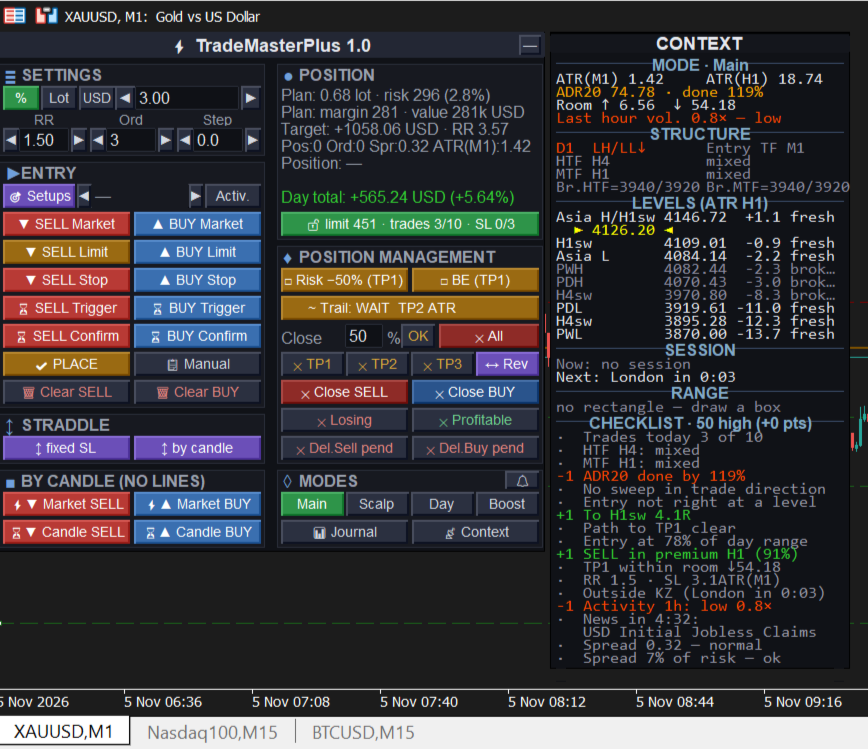
Before every entry the EA checks the context: higher-timeframe structure, levels and room to target, day range, entry position in the MTF range (premium/discount), news, spread and costs, discipline. The result is a 0–100 score with the list of reasons. The filter works in three score bands: a high score — full risk, a medium one — reduced trade volume, a low one — entry confirmation or a block (it can also just show the score without restricting anything). The volume reduction applies to manual entries too — with a warning. Band thresholds and weights are adjustable; any code can be made a hard block.

In Main mode the timeframes are set in the inputs: by default entry M15, structure H4 and D1. If you set the entry timeframe to «Current», the entry timeframe is the chart timeframe and the higher timeframes are matched to it: on M1–M15 — MTF and HTF from the inputs, on M30–H1 — H4 and D1, on H4 — D1 and W1, on D1 — W1 and MN. With an entry timeframe of H4 and above the assessment switches to swing scale: the average weekly range instead of the daily one, previous month levels and D1 swings instead of session levels, and KillZones and last-hour activity are not scored. Scalp, Day and Boost modes use their own fixed timeframes regardless of the chart.

Asia, London and New York sessions and KillZones are set in local exchange time (London 08:00, NY 09:30). Daylight saving changes in Europe and the US and the broker server offset are handled automatically.

Account protection (risk manager)

•         Daily loss limit from the start-of-day balance, including the SL of open positions.

•         Max number of trades per day and a pause after an SL series.

•         Strict mode for prop accounts: no opposite positions, no entries without SL, closing new trades during a block, hard day stop.

•         Several charts on one account: the strictest limit of all instances applies. A limit can only be loosened from the next day.

•         The protection button shows the daily limit room, trades and SL series; its color warns about the last attempt.

Journal

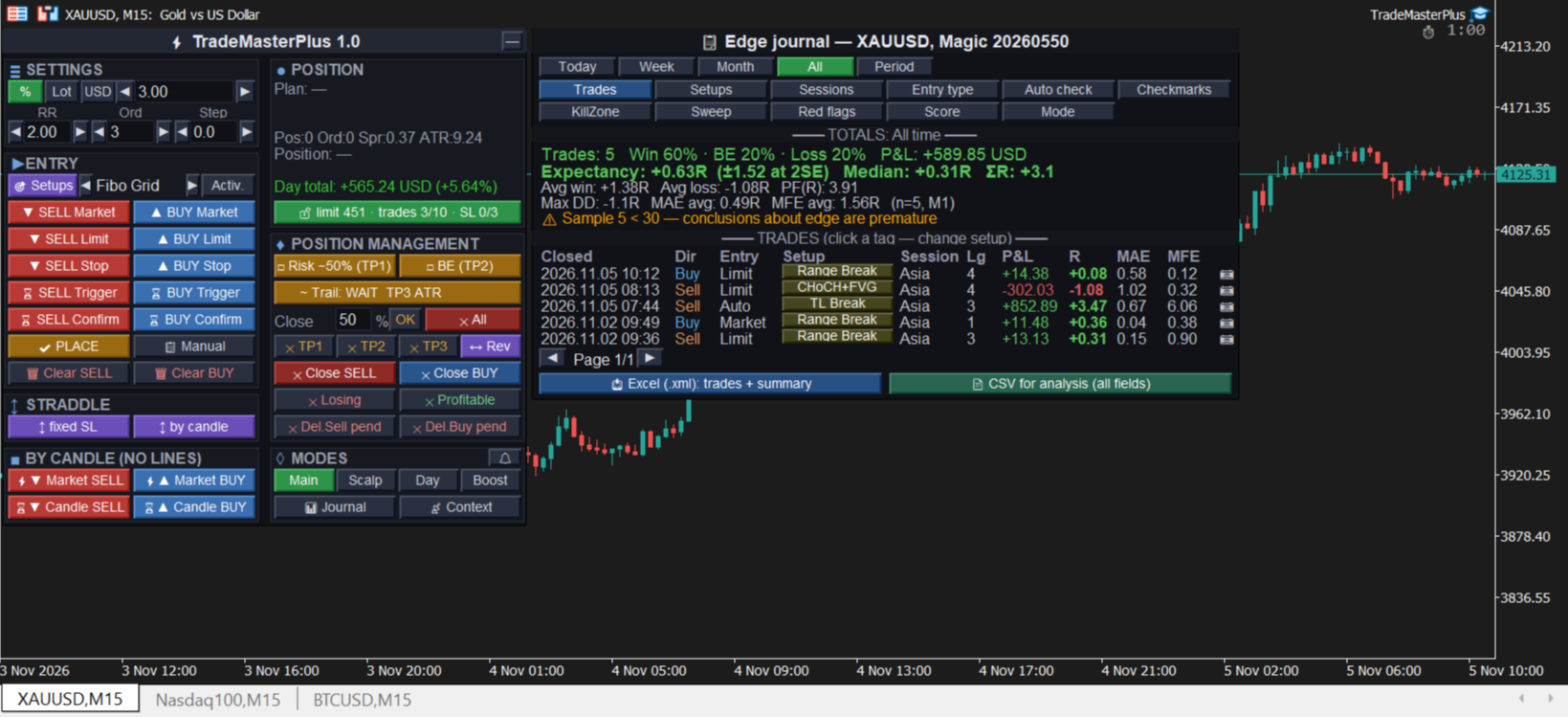
•         Every trade is recorded in R with setup tag, session, entry type and a context snapshot.

•         Expectancy in R with a confidence interval, MAE/MFE, breakdowns by setup, session, score and red flags.

•         The Red flags tab shows which conditions actually hurt your results and recommends weights.

•         Export to Excel and CSV.

•         Automatic trade screenshots at entry and at close (PNG, linked in the journal and the Excel export).

•         Entry and result screenshots with a caption (entry, SL, TP, risk, result in R) sent to Telegram; optionally — messages about TP, SL, pause and day stop.

Interface

Russian and English, dark and light theme, panel scale, one or two columns, tooltips on every button. Works on Windows and Mac.

The panel can be dragged by its header and collapsed with one button — the collapsed view keeps the day status (limit room, trades, SL series), while management and protection keep working.

Price alerts — the 🔔 button: a short marker appears at the price, drag it to the level you need. When the price reaches it, you get a notification by popup with sound, push to your phone and Telegram. Works while the terminal is running.

All in all, the panel combines broad functionality with a compact, intuitive interface: everything you need to enter and manage a trade is in one window on the chart.

Other notes

Account protection is a discipline tool. Daily limits (loss, number of trades, pause after an SL series) prevent impulsive rule-breaking: a block cannot be removed from the panel, and a limit can only be loosened from the next day. However, the EA runs in your terminal and does not replace broker or prop-firm limits. For prop accounts use the «Whole account» protection scope and the «After day stop close new» mode.

One fully managed trade at a time. The EA fully manages one trade (group of orders) — the most recent one. This does not prevent opening new trades: before a replacement the EA warns and asks for confirmation. Previous positions and orders stay at the broker with their SL and TP, and a «safety net» keeps watching them: when a TP of such a group is hit, its other positions are moved to breakeven and its unfilled orders are removed. Previous groups are not trailed. To fully manage several trades at once, including on the same symbol, run the EA on several charts with different Magic numbers.

Pending orders and the trade limit. Orders placed before the daily trade limit was reached are not closed when they fill (unless «While blocked close new trades» is on).

Which lines auto setups use. By default a setup finds the object on the main chart by itself: the horizontal line, trendline or rectangle nearest to the price, and the most recently drawn Fibo. Objects of indicators, other programs and the terminal trade history are ignored. If the chart has many lines, pin the one you need: give it a name in the object properties (for example, «TL1») and enter that name in the setup parameter in section 3.1 or 3.2. The line a setup is currently watching is shown in the Experts log.

Telegram (optional). Enter the bot token (@BotFather) and chat_id in section 4.1 and allow https://api.telegram.org in «Tools → Options → Expert Advisors → Allow WebRequest». Sending does not work in the strategy tester.

Strategy tester and demo version. The Market demo version runs only in the strategy tester. Without visualization the EA opens service trades with the minimum lot and the TM5_TEST comment — this is required for the automatic MQL5 Market check and is not a strategy. In visual mode the MT5 tester does not pass the mouse to the EA, so lines and zones cannot be dragged: use the «Lines — for tester only» block below the panel instead (pick a line, move it ▲▼ or type an exact price). Use the lowest speed without acceleration: actions run while the tester is running; when paused — after a step forward (▶|). Input fields may not refresh on screen — click the field, the value is correct. Server time cannot be detected in the tester — set «Server GMT offset» manually; there is no deal history — for risk with commission set «Commission per lot, if unknown».

Commission. MT5 does not report the commission rate in advance — the EA takes it from your deals on the symbol over the last 90 days. Before the first trade on a new symbol, enter the round-trip rate per lot in «Commission per lot, if unknown»; otherwise risk is calculated without commission (the panel will warn you).

Important  

This is not a trading strategy. The EA does not open trades on its own: you make the entries — with buttons, lines or activated setups. Its job is to take over the routine of opening and managing trades and to reduce technical mistakes: a wrong lot, a forgotten SL, an extra trade over the limit.

Account type. The EA is designed for hedging accounts (Forex/CFD, most prop firms), where all features are available. The account type is detected automatically; on a netting account the panel header shows «netting».

Netting accounts only

On netting accounts (one position per symbol) a simplified mode is used. The limitations below do not apply to hedging accounts:

•         all legs of a trade are opened as one order; partial TPs (except the last one) are closed by the EA, so the terminal must stay running;

•         leg step, Straddle and Fibo Grid are not available;

•         one EA trade per symbol at a time; manual trades on the same symbol merge with the EA position.

TradeMasterPlus — an easy-to-use assistant with a rich and convenient feature set. Happy trading!
Önerilen ürünler
Easy Trade Copy (Client / Receiver) The easiest and most reliable way to copy trades to your account without missing a beat. If you want to copy trades from a master account to your own account, you need a tool you can trust. Most copiers glitch, miss trades, or accidentally open duplicates when your internet drops or your computer restarts. The Easy Trade Copy is built differently. It is a "smart" copier that double-checks every single trade to make sure your account perfectly matches the mast
This is a common, simple and easy to use but effective tool to manage trading risks for all traders. It also help trader places stop loss and take profit levels at the same time the order is filled. How to set the expert advisor's parameters to support your trading style? Lots size. Fixed lots size - For traders who prefered to trade with fixed lots size, they can input the lots size in 'User lots' menu in the expert advisor's properties. The input value should be from the 'Minimum Volume' to th
Smart Risk Panel MT5 is an advanced execution and risk management panel designed for manual traders and Prop Firm traders (FundingPips, FTMO, FundedNext, the5ers, etc.).  Built with a NON-BLOCKING architecture, the EA runs smoothly without freezing your chart—even during high volatility or fast-moving markets. ================================================== KEY FEATURES ================================================== • Auto Lot Calculation: Automatically calculates your exact lot siz
Tired of fumbling with lot size calculations and manually managing every trade? The Visual Risk Manager (VRM) is a professional-grade trading panel designed to streamline your trading and enforce discipline. This Expert Advisor is not a strategy; it's a powerful utility that allows you to manage your risk and execute trades with unparalleled speed and precision, directly from your chart. Why You Need the Visual Risk Manager Stop letting emotions and guesswork control your trading. VRM ensures t
Amazing Edge Maker
Satendra Kumar Gupta
Amazing XAU Edge Maker Overview Amazing XAU Edge Maker is an Expert Advisor for MetaTrader 5 designed to automate trading using configurable entry methods, position management, and risk management tools. It is optimized for XAU/USD (Gold) but can also be configured for other symbols supported by your broker. The EA combines signal-based trading with flexible trade management, allowing traders to customize its behavior according to their trading strategy. Main Features Trading Modes Signal Tradin
PropPilot – Prop Firm Risk & Trade Manager PropPilot is a professional risk management and manual trading utility for MetaTrader 5, designed for Prop Firm Challenges, Funded Accounts and Personal Accounts. It helps you calculate risk, execute manual trades, monitor Daily and Maximum Drawdown, manage open positions and keep your account rules visible from one clean dashboard. PropPilot does not automatically choose trade entries. You remain in control of BUY and SELL decisions while PropPilot
VM Auto SLTP Pro - Advanced Order and Risk Management EA VM Auto SLTP Pro, MetaTrader 5 için geliştirilmiş profesyonel bir işlem yönetimi ve risk kontrolü Expert Advisor'ıdır. Manuel olarak veya diğer Expert Advisor'lar tarafından açılan pozisyonlar için Stop Loss, Take Profit, Trailing Stop, Breakeven ve Partial Close işlemlerini otomatik olarak ayarlar ve yönetir. EA ayrıca otomatik lot hesaplama, Recovery modları, Prop Firm filtreleri, haber ve işlem seansı filtreleri, bekleyen emir araçları
Visual Netting order manager with margin-aware sizing, commission estimates and optional grid progression. TradeArchitect Perpetuals is a chart-based manual order and risk manager for MetaTrader 5 accounts that use Netting position accounting. It combines visual trade planning, margin-aware position sizing, commission-aware estimates, market and pending order execution, position management and optional same-direction order progression. The utility does not generate trading signals and does no
GorMaster Pro
Manuel Damian Ortiz Fernandez
GorMaster_Pro — Sesgo confiable, noticias y técnica en una sola pantalla Visión GorMaster_Pro es una herramienta indispensable para cualquier tipo de trader (scalper, intradía o swing) porque combina información fundamental y técnica para darte una lectura fiel y accionable del mercado. En una sola vista verás: sesgo direccional BUY/SELL/RANGO , ventanas de noticias en tiempo real que congelan la operativa, métricas técnicas clave (ATR_Z, RangeRatio, ADX, SpreadZ), sesiones y alertas . Todo org
Professional risk management utility. Auto lot-size calculator + live risk panel. Works alongside any other EA — does not open trades independently. - **Auto lot size**: calculated from % risk per trade + SL distance in pips + balance - **Live dashboard**: Balance | Equity | Drawdown % | Suggested Lot | R:R ratio - **Daily drawdown alert**: notification when daily DD exceeds threshold - **Auto-close option**: closes all positions on daily DD breach (configurable) - Zero trade opening — purely a
Powerful Multi-Strategy Forex EA – Flexible Automated Trading System for MT5 Powerful Multi-Strategy Forex EA is a fully automated Expert Advisor developed for traders who want a customizable trading system with multiple signal-generation methods, integrated risk management, and flexible trade execution controls. The EA combines two independent trading strategies that can operate separately or together, allowing users to adapt the system to different market conditions and trading styles. The sy
RRtoolbox - Professional Tools: Risk:Reward Trading Tool (SL/TP Horizontals + Pending orders + Diagonals), Alerts set on trend lines (for alerts on diagonal levels), SelfManagement (BE, partials...), close/cancelling by time, Statistics, Info and trading on chart. One-Click Trading with Visual Risk:Reward Management RRtoolbox is a comprehensive trading panel that combines one-click order execution,  statistics and  powerful visual Risk:Reward tools, alerts set with trendlines, on chart butt
MTM Manual Trade Manager is a professional trading dashboard designed for manual traders who want better control over risk and trade management. This Expert Advisor does NOT open trades automatically. All trading decisions and order executions are fully controlled by the trader. Main Features: - Manual Buy and Sell execution from the dashboard - Visual Stop Loss and Take Profit using drag & drop lines - Fixed Lot and Risk Percentage position sizing - Automatic Break Even management - Multiple
FREE
Gold M3 Doji Breakout H1 Gold M3 Doji Breakout H1 is an automated MetaTrader 5 Expert Advisor designed to identify a fixed M3 compression structure inside a closed H1 candle and evaluate a breakout during the following H1 trading window. This product is designed for Gold symbols. Its default absolute-price distances are not intended for Forex pairs, cryptocurrencies or stock indices. Position management The EA divides the position into three stages: - Stage 1 closes at the configured first
All EAs running on live accounts. Investor Id password is in telegram group. Professional XAUUSD Trading Robot Based on TMA Reversal, Adaptive Trend Filtering & Intelligent Baske FTA TMA V7 is a professional Expert Advisor developed specifically for XAUUSD (Gold) trading on MetaTrader 5. It combines multiple confirmation systems into a single intelligent trading engine designed to identify high-probability reversal opportunities while filtering out weak market conditions. Unlike traditional T
FREE
Equinox Gold
Dmitriq Evgenoeviz Ko
Equinox Gold is a high-tech trading expert advisor (EA) specifically designed for the gold market ( XAUUSD ). The system is based on a unique Market Equilibrium algorithm that identifies areas of imbalance between supply and demand during extreme volatility. Unlike most robots that use dangerous sit-and-wait methods, Equinox Gold relies on mathematical momentum confirmation and strict risk control for every trade. MAIN ADVANTAGES VRP Filter (Volatility Range Filter): The robot automatically ada
Hedge Scalper EA Hedge Scalper EA is an advanced MQL5 Expert Advisor designed for scalping on volatile indices.Built on the foundation of the popular EA Bull Scalper v4, it extends buy-side grid trading with limited hedging capabilities—allowing long positions for bullish momentum capture, while capping shorts for controlled downside protection. Key Features: Dynamic Grid Spacing : Uses AI-driven calculations (based on candle volatility and bearish sentiment) or manual points to maintain a minim
Intelligent Trade Copier with Missed Trade Recovery Require Free Master EA:  https://www.mql5.com/en/market/product/178682 This Slave EA REQUIRES the FREE SyncTrade Copier Master EA to function. Without the Master EA installed and running on a second MT5 terminal, this product will not copy any trades. Download the FREE Master EA from the MQL5 Market before or after purchasing this Slave EA. Both EAs must be running simultaneously. Both MT5 terminals must be installed on the SAME computer for fi
B2U Ultimate HARSI is a market state & momentum indicator designed for discretionary traders. Part of the B2U Market State System A professional indicator suite designed to analyze market structure, trend state, and momentum. B2U Market State System 의 구성 요소입니다. 시장 구조, 추세 상태, 모멘텀을 입체적으로 분석하기 위한 전문 인디케이터 시스템입니다. Focused on identifying trend state, strength, and sustainability. It visualizes trend direction, strength, and transition, helping you understand the current market condition. No buy/sell
Non-Repaint SMC Quant Structure Engine Pro Advanced MT5 Market Structure & Price Action Indicator SMC Quant Structure Engine Pro is a professional MT5 indicator designed for traders who want a cleaner, more structured way to analyze Market Structure, BOS, CHOCH, Order Blocks, Fair Value Gaps and confirmed zone retests . Instead of overwhelming your chart with constant signals, the indicator focuses on structured setups and closed-candle confirmation , helping traders identify potential opportuni
Pip Melody
Nguyen Thanh Cong
Introducing Pip Melody , the Forex expert advisor that captures the rhythmic ebb and flow of the market with the finesse of a seasoned trader. Just as a composer crafts melodies, Pip Melody identifies and seizes market waves, transforming them into profitable trading opportunities. This expert advisor analyzes market trends and patterns, recognizing the harmonic cycles that others miss, and executes trades with precision and grace. OPENING SALE! Only 5 copy left at 66$, price will be increased b

Free Slave Version – Remote Trade Receiver MT5. This is the FREE Slave version of our professional Remote Trade Copier system. It allows you to receive trades from a Master account running our full Copy Trade solution. Designed for simplicity and reliability, this version is read-only and cannot send trades or operate independently. Key Features: One-click setup – simply connect to the Master. Fast and accurate order copying. Supports all symbols, order types, and brokers. Minimal resource us
FREE
Trend Pulse Expert
Viktoriia Liubchak
TrendPulse Expert is an automated trading system specifically optimized for trading highly volatile instruments, particularly XAUUSD (Gold), on ultra-short timeframes (M1). The algorithm is designed for systematic and disciplined trading with clearly defined risk controls. It completely excludes risky trading methods such as Martingale and position averaging. Key Features and Capabilities Specialization: Fully adapted to rapid price movements on the M1 timeframe. Professional Risk Management: Bu
https://www.mql5.com/tr/users/bilisimprofesoru/seller Flash Copy Pro MT5 - Profesyonel & Ultra Hızlı Yerel İşlem Kopyalayıcı Kısa Açıklama (Short Description):   Prop firmalar ve çoklu hesap yönetimi için tasarlanmış, gecikmesiz, akıllı sembol eşleşmeli ve hata korumalı profesyonel Trade Copier. Tam Açıklama: Flash Copy Pro MT5 , tek bir Master hesaptan sınırsız sayıda Slave hesaba milisaniyeler içinde işlem kopyalamanızı sağlayan yüksek performanslı bir araçtır. Özellikle Prop Firm traderları v
LOCAL TRADE COPIER — Master → Slave(s), symbol-aware, fully private ==================================================================== WHAT IT IS A professional local trade copier that mirrors every action of a Master account onto one or more Slave accounts, running as a single Expert Advisor whose role (Master or Slave) you choose at startup. Built for traders who manage several accounts/brokers on the same PC or VPS and want fast, private, controllable copying, without a cloud signal service
EA Risk Manager is a professional risk‑management Expert Advisor designed to protect your trading account and enforce disciplined money management. The EA does not open trades by itself – it only monitors and manages all existing positions (manual and automated) on the account. It is especially useful for traders who want to: Hard‑limit daily / weekly / monthly losses and profits. Restrict lot size and the number of open trades. Trade a basket of G7‑related Forex pairs using one centralized
Visual Risk Trade Manager MT5 Professional Visual Trade Management for MetaTrader 5 Visual Risk Trade Manager MT5 is a powerful trade management utility designed for manual traders who want complete control over their positions directly from the chart. The tool provides visual risk analysis, position management, profit protection, and real-time trade monitoring without generating signals or opening trades automatically. Whether you are a scalper, day trader, swing trader, or prop firm trader, V
Murrey Math Levels
Ronald Moses Mawanda
It shows the Murrey Math levels on chart and also provides an alert when price touch a particular level. T. Henning Murrey, in 1995, presented a trading system called Murrey Math Trading System, which is based on the observations made by W.D Gann. Applications For Murrey Math lovers, this is a must-have indicator in their arsenal. There is no need to be present on the screen all the time. Whenever the price touches a level, it will send an alert. Spot upcoming reversals in advance by speculatin
MelloGuard protects every trade and the whole account. It adds a stop loss and a take profit to any position that has none, moves stops to breakeven and trails them, and enforces a daily loss limit, a maximum drawdown and a daily profit target by closing positions and blocking new trades until the next day. Automatic stop loss and take profit - Works on manual trades, on trades from other Expert Advisors, or on one magic number - All symbols from one chart, or the chart symbol only - Stop loss
AlgoDevMT5 Trade Manager Pro AlgoDevMT5 Trade Manager Pro is a professional trade management and risk control utility for MetaTrader 5. Designed for discretionary traders and funded account traders, this utility helps traders plan trades visually, calculate position size instantly, and manage risk with precision. Trade Manager Pro does not generate trading signals, open trades automatically, or provide investment advice. It is a trader-assistance utility designed to improve consistency and risk
Bu ürünün alıcıları ayrıca şunları da satın alıyor
Trade Assistant MT5
Evgeniy Kravchenko
4.43 (216)
It helps to calculate the risk per trade, the easy installation of a new order, order management with partial closing functions, trailing stop of 7 types and other useful functions. Additional materials and instructions Installation instructions - Application instructions Line function -   shows on the chart the Opening line, Stop Loss, Take Profit. With this function it is easy to set a new order and see its additional characteristics before opening.   Risk management  - The risk calculation
Trade Manager EA’ye hoş geldiniz! Ticaretin daha sezgisel, hassas ve verimli hale gelmesi için tasarlanmış nihai risk yönetim aracı ile tanışın. Bu sadece bir emir verme aracı değil; ticaret planlaması, pozisyon yönetimi ve risk kontrolü için kapsamlı bir çözüm. İster yeni başlayan bir yatırımcı olun, ister deneyimli bir trader ya da hızlı emir gerektiren bir scalper, Trade Manager EA ihtiyaçlarınıza uyum sağlar ve forex, endeksler, emtialar ve kripto paralar dahil tüm piyasalarda esneklik sunar
Farmed Hedge Yield Farming | All Markets (Manual - Hybrid - Semi/Automated EA) VERIFIED TRADING RESULTS - Farmed Hedge Yield Axi Copy:  https://www.mql5.com/en/signals/2356376 - Farmed Hedge Yield Exn Copy:   https://www.mql5.com/en/signals/2356404 - Farmed Hedge Yield V Copy:  https://www.mql5.com/en/signals/2357156 IMPORTANT NOTICE: FarmedHedge is a MANUAL-FOCUSED TRADING UTILITY ,not a fully automated EA. Results shown on this Signal include manual trades and overall strategic management.
Telegram to MT5 Multi-Channel Copier   , Telegram ve Discord kanallarınızdaki alım-satım sinyallerini doğrudan MetaTrader 5'e otomatik kopyalar. Bot yok, tarayıcı uzantısı yok, elle kopyalama yok. Sinyal Telegram'a veya Discord'a düşer ve EA birkaç saniye içinde terminalinizde işlemi açar. Ve bir kanalı kopyalamadan önce, yerleşik backtester o kanalın hesabınızda ne yapmış olacağını gösterir. Ürün iki bileşenden oluşur: Telegram kanallarınızı dinleyen bir Windows uygulaması ve sinyalleri MT5 ter
TradePanel MT5
Alfiya Fazylova
4.88 (172)
Trade Panel, çok işlevli bir ticaret asistanıdır. Uygulama, manuel ticaret için 50'den fazla ticaret fonksiyonu içerir ve çoğu ticaret görevini otomatikleştirmeyi mümkün kılar. Uygulama talimatları: https://www.mql5.com/en/blogs/post/756482 Demo hesabı için uygulamanın deneme sürümü: https://www.mql5.com/en/blogs/post/750865 Uygulamayı nasıl kurulur: https://www.mql5.com/en/blogs/post/756239 Uygulamayı görsel modda nasıl test edilir: https://www.mql5.com/en/blogs/post/770277 Uygulamayı VPS MetaT
News Trade EA MT5
Konstantin Kulikov
4.55 (11)
Birkaç yıldır kullandığım çok yararlı bir robotu tanıtıyorum. Hem yarı otomatik hem de tam otomatik modlarda kullanılabilir. >>> Chat <<< Program, ekonomik takvim haberlerinde esnek ticaret ayarlarını içeriyor. Stratejiler test cihazında kontrol edilemez. Sadece gerçek bir iş. Ayarların en son arşivini indirin: https://www.mql5.com/en/blogs/post/747929 Sinyal izleme: https://www.mql5.com/en/signals/author/test-standart Bu bilirkişi için kendi ayarlar setinizi oluştururken, blogdaki tüm paramet
Telegram sinyallerini kendi işlem kurallarınızla kopyalayın Telegram to MT5 Signal Trader , herkese açık ve özel Telegram kanallarındaki ve gruplarındaki metin tabanlı işlem sinyallerini otomatik olarak MetaTrader 5'e kopyalar. Tek bir masaüstü uygulamasından birden fazla sinyal sağlayıcısını ve MT5 hesabını yönetin; her sağlayıcı için ayrı risk ve işlem ayarları belirleyin. Sinyal kopyalamak için Telegram botu veya API kurulumu gerekmez. Kendi Telegram hesabınızla telefon numarası veya QR kod k
================================================================================ POC BREAKOUT - V20.72. Full Professional Grade Toolkit ================================================================================ POC Breakout is a full MetaTrader 5 trading dashboard for discretionary traders who want breakout signals, Point of Control (POC) context, volume profiles, order flow, market structure, news, alerts, and advanced trade planning in one professional workspace. Attached directly to you
The product will copy all telegram signal to MT5 ( which you are member) , also it can work as remote copier.  Easy to set up, copy order instant, can work with almost signal formats, image signal,  s upport to translate other language to English Work with all type of channel or group, even channel have "Restrict Saving Content", work with  multi channel, multi MT5 Work as remote copier: with signal have ticket number, it will copy exactly via ticket number. Support to backtest signal. How to s
EA Overfitter
Stephen J Martret
5 (3)
That backtest looks great. But will it still be making money tomorrow, next week, next month? EA Overfitter re-runs your EA on 100 price histories it has never seen. One score tells you if the edge is real. A backtest tells you what an EA did on one price history — the one that happened to occur. What you cannot tell from it is how much of that result was the strategy and how much was the particular path. EA Overfitter answers that. It builds up to 100 synthetic price histories your EA has n
Power Candles Strateji Tarayıcısı - Kendi Kendini Optimize Eden Çoklu Sembol Kurulum Bulucu Power Candles Strateji Tarayıcısı , Power Candles göstergesini çalıştıran aynı kendinden optimize edici motoru, Piyasa İzleyicinizdeki her sembol üzerinde yan yana çalıştırır. Tek bir panel, şu anda istatistiksel olarak hangi sembollerin işlem yapılabilir olduğunu, her birinde hangi stratejinin kazandığını, en uygun Stop Loss / Take Profit çiftini gösterir ve yeni bir sinyal geldiği anda size bildirim gön
Your EAs cannot see each other, but Anchor can. Anchor gives you one place to coordinate your EAs, manage risk, and decide when trading is allowed. It works alongside the trading bots you already use without any changes to them. The Problem One EA opens a trade. Then another starts trading. The next thing you know, you wake up to multiple grids built across your account. Each EA may be doing exactly what it was designed to do, but together they can place far more risk on your account than you in
VirtualTradePad PRO SE MT5 — MetaTrader 5 için profesyonel işlem kontrol merkezi VirtualTradePad PRO SE , MetaTrader 5 için grafik tabanlı premium bir işlem paneli ve trade yönetim çalışma alanıdır. Daha hızlı emir yürütme, daha net pozisyon kontrolü, yapılandırılmış trade yönetimi, görsel seviye planlama ve doğrudan grafik üzerinden profesyonel bir çalışma akışı isteyen traderlar için tasarlanmıştır. Bu yalnızca basit bir BUY / SELL paneli değildir. PRO SE; manuel işlem, bekleyen emirler, pozis
Trade Indicator Assistant   is a powerful MT5 utility designed to turn indicators into automated trading systems. Its main feature is the ability to automatically detect an indicator’s   BUY and SELL signal buffers , without requiring you to know the buffer numbers, search through indicator settings, or modify the indicator source code. Bonus Indicator:   After purchasing Trade Indicator Assistant, contact me to receive   Trade Signal Pro   completely free as a bonus indicator. [Download Demo V
Riskinizi otomatik olarak hesaplarken işlemlere hızlı bir şekilde girip çıkmanıza yardımcı olacak Ticaret Yöneticisi. Aşırı Ticaret, İntikam Ticareti ve Duygusal Ticaretten korunmanıza yardımcı olacak özellikler içerir. İşlemler otomatik olarak yönetilebilir ve hesap performans ölçümleri bir grafikte görselleştirilebilir. Bu özellikler, bu paneli tüm manuel yatırımcılar için ideal kılar ve MetaTrader 5 platformunun geliştirilmesine yardımcı olur. Çoklu Dil desteği. MT4 Sürümü  |  Kullanım Kılavu
Sonraki Güncelleme — Sürüm 2.52 Çok Yakında! [YENİ] Piyasa Analizinizi ve İşlem Sürecinizi Geliştirmek İçin Tasarlanmış 4 Büyük Yeni Özelliğe Hazır Olun İşlem ihtiyaçlarınızı karşılamak üzere tasarlanmış 4 yeni özellikle piyasa analizini bir üst seviyeye taşıyoruz. İşte yeni özellikler: TRADE OVERVIEW DASHBOARD CONFLUENCE AT ZONE STRONG & WEAK HIGH/LOW OTE 1. TRADE OVERVIEW DASHBOARD Piyasanın genel görünümünü daha kolay anlamanıza yardımcı olan, işlem kararlarınızı desteklemek için rehberlik s
MT5 to Telegram Signal Provider , hesabınızı bir sinyal sağlayıcı haline getirerek belirtilen sinyalleri Telegram'ın sohbetine, kanalına veya grubuna göndermeyi sağlayan kullanımı kolay, tamamen özelleştirilebilir bir araçtır. Rakip ürünlerin çoğunun aksine, DLL içe aktarması yapmaz. [ Demo ] [ Kılavuz ] [ MT4 Versiyonu ] [ Discord Versiyonu ] [ Telegram Kanalı ]  New: [ Telegram To MT5 ] Kurulum Adım adım bir kullanıcı kılavuzu mevcuttur. Telegram API'si hakkında bilgi gerekmemektedir; ihtiyac
DrawDown Limiter
Haidar Lionel Haj Ali
5 (23)
DrawDown Limiter v5.0 — Gelişmiş Hesap Koruma Kontrolcüsü DrawDown Limiter v5.0, trading hesabınızı izlemek ve yapılandırılmış risk, kâr, haber, zamanlama, rollover veya pozisyon sayısı limitlerine ulaşıldığında otomatik olarak tepki vermek üzere tasarlanmış istemci taraflı bir hesap koruma kontrolcüsüdür. Tek bir özel grafik üzerinden manuel işlemleri, otomatik stratejileri, birden fazla Expert Advisor'ı, bekleyen emirleri ve açık pozisyonları izleyebilir. Tüm hesabı koruyabilir veya Magic Numb
RETAILBERG FOOTPRINT CHART PRO — Order-Flow Workspace for MetaTrader 5 Version 7.00  |  Professional System  |  31 tools  |  One chart A full 150-page illustrated User Manual is included. Please read the full manual to understand this feature packed footprint chart elements and ui. https://www.mql5.com/en/blogs/post/777982 DEMO / STRATEGY TESTER — PLEASE READ FIRST
Grafik Üzeri İşlem Asistanı & Risk Yönetimi Paneli Çoklu Mod SL & TP (ATR, R:R, Puan, Hesap Para Birimi), Canlı Analitik ve Ekonomik Takvim Sunan Eksiksiz Grafik Üzeri Araç Ergotick Trade Manager ; manuel (diskresyonel) işlemciler, fon firması (prop firm) mücadelesi verenler ve scalper'lar için tasarlanmış hepsi bir arada profesyonel bir işlem panelidir. Anlık otomatik lot büyüklüğü hesaplamalarını, çoklu mod Stop Loss ve Take Profit kurulumlarını, gelişmiş sepet (basket) yönetimini, canlı hesap
Master Your Trading Discipline   Stop losing your hard-earned gains to overtrading and emotional decisions. The Discipline Tool is your ultimate trading assistant, ensuring strict risk management in real-time. Key Protection Features: Advanced Drawdown Defense : Automatically halts trading if your daily drawdown exceeds a preset threshold (percentage or dollar amount). Real-Time Equity Lock : Safeguard profits by referencing peak equity, ensuring drawdown stays within control. Hard Profit Target
PROFESSIONAL MULTI-ACCOUNT TRADE COPYING FOR METATRADER 5 Sentinel Master is a trade-publishing Expert Advisor designed to work together with Sentinel Follower , providing a reliable and configurable solution for copying trades between MetaTrader 5 accounts. The system is designed for traders who manage multiple accounts and want to replicate their trading activity without manually opening and closing positions on every account. Sentinel Master continuously monitors the source account and publis
Dealer's Panel No signal decides anything here — a hand does. One click, and the panel calculates what's underneath: lot size from risk, target from a 30-step balance ladder that remembers exactly how far an account has climbed. Toggle between market and pending without touching an input field. Set a stop, and the take-profit can write itself — a fixed share of the balance, translated into price with no arithmetic left for the trader to get wrong. One trade live at a time; it won't let a seco
25% discount on the release of the tool: only for the next 3 buyers Send a message to receive a demo version. AstroTrade Trading Assistant AstroTrade is a comprehensive multi-functional trading utility developed for the MetaTrader 5 platform. It integrates essential tools for trade execution, risk management, and technical monitoring into a single unified interface. The application is designed to assist traders in managing their daily operations through a visual and structured environment. Vi
My Chart Generator
Trade The Volume Waves Single Member P.C.
5 (1)
What if your chart adapted to the market instead of the clock?   THE PROBLEM IT SOLVES   Instead of trying to find the best indicator that fits your timeframe chart, build a chart and find the most appropriate indicator.   My Chart Generator is a MetaTrader 5 background service that builds  live, fully historical three types of custom charts :1. Range/Volume Balanced chart, 2.  Range/Volume Absorption chart and 3. Constant Volume chart from any symbol — Forex pairs, crypto, indices, commodities,
Auto DCA EA
Truong Giang Hoang
5 (1)
All new interface and function Add telegram notify (you have to get Telegram bot API and chat ID). With this ea, you can earn 10-40% even more profit/month! 1. This EA is used to automatically take profit or DCA your orders on MT5 according to the parameters you set. You can enter first order on your phone or MT5 terminal on your computer and it automatically take profit or DCA your orders. 2. Enter buy/sell limit-stop price * Buy limit price/ Sell limit price/ Buy stop price/ Sell stop price:
AlgoRadar
Stephen J Martret
5 (4)
AlgoRadar is an on-chart analytics dashboard for MT5 that aggregates Expert Advisor performance across multiple accounts, brokers, and platforms, including both MT4 and MT5 data, into a single live view on your MT5 chart. All analysis runs from the chart interface, with no external applications or manual report processing required. EA Analysis and Ranking For traders running multiple Expert Advisors, AlgoRadar provides a consolidated view of each EA's performance across accounts. Active EAs a
REVDEN AI Desk: Trading'inizi Kendi Yapay Zekanızla Tek Bir Sohbetten Yönetin, REVDEN'in Piyasa Bağlamıyla Trading'inizi tek bir sohbetten yönettiğinizi düşünün. REVDEN AI Desk bunu MetaTrader 5'e getiriyor: kendi yapay zekanıza piyasayı nasıl okuduğunu sorarsınız, o da işlem yaptığınız semboller hakkında REVDEN'in tam bağlamından, yani durumlarından, risk görünümlerinden ve yaklaşan açıklamalardan yanıt verir. Önerileri giriş, stop, hedef ve riskle gelir; uygun olanları siz onaylarsınız. Kurall
MULTI-ACCOUNT TRADE COPYING WITH ADVANCED RISK MANAGEMENT Sentinel Follower is an automated trade-copying Expert Advisor for MetaTrader 5, designed to receive and execute trading positions published by Sentinel Master . The system allows traders to replicate trading activity across multiple accounts while maintaining independent control over position sizing, risk exposure, basket management, and trade execution. Unlike traditional trade copiers, Sentinel Follower includes additional risk-managem
Signal TradingView to MT5 Pro Automator TradingView ve MetaTrader 5 arasında anında profesyonel uygulama TradingView alarmları ile MT5'teki gerçek uygulama arasındaki en güçlü iletişim köprüsüyle ticaret stratejinizi otomatikleştirin. Hız, esneklik ve kusursuz risk yönetimi talep eden yatırımcılar için tasarlanan bu Uzman Danışman (Expert Advisor), herhangi bir alarm mesajını hassas bir piyasa (market) veya limit emrine dönüştürür. GÜÇLÜ YÖNLER VE AVANTAJLAR Evrensel Ayrıştırma Motoru (Tescilli)
Filtrele:
Değerlendirme yok
Değerlendirmeye yanıt