MacroStructure
- Göstergeler
- Sürüm: 1.90

*** 1 MONTH FREE ***
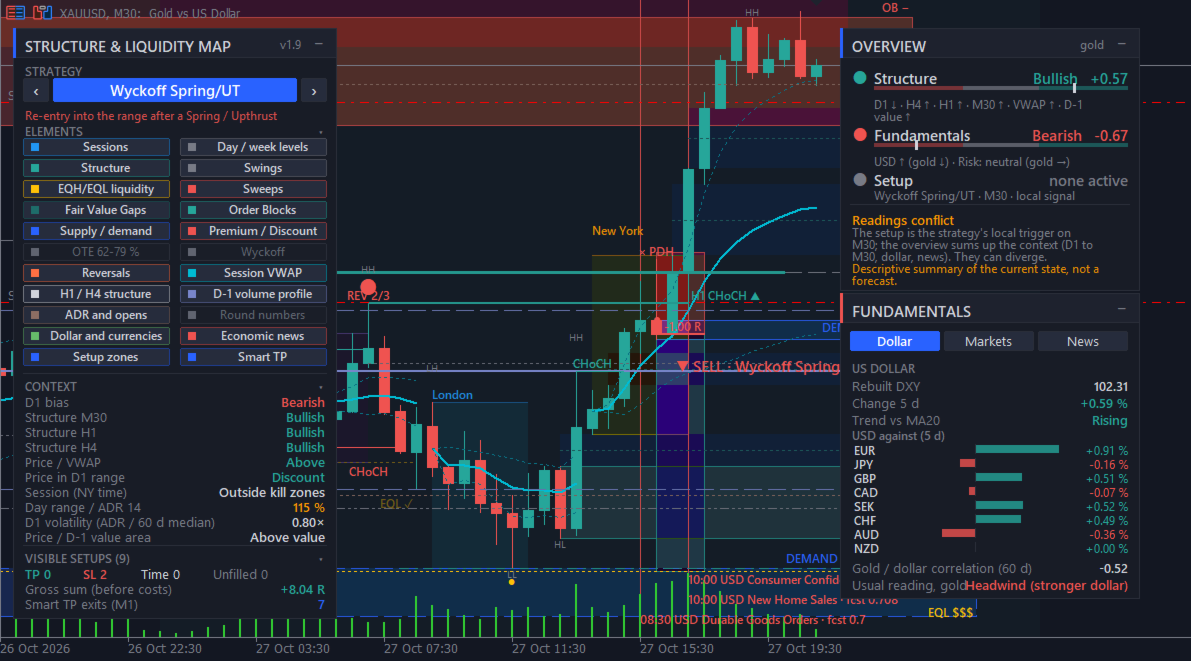
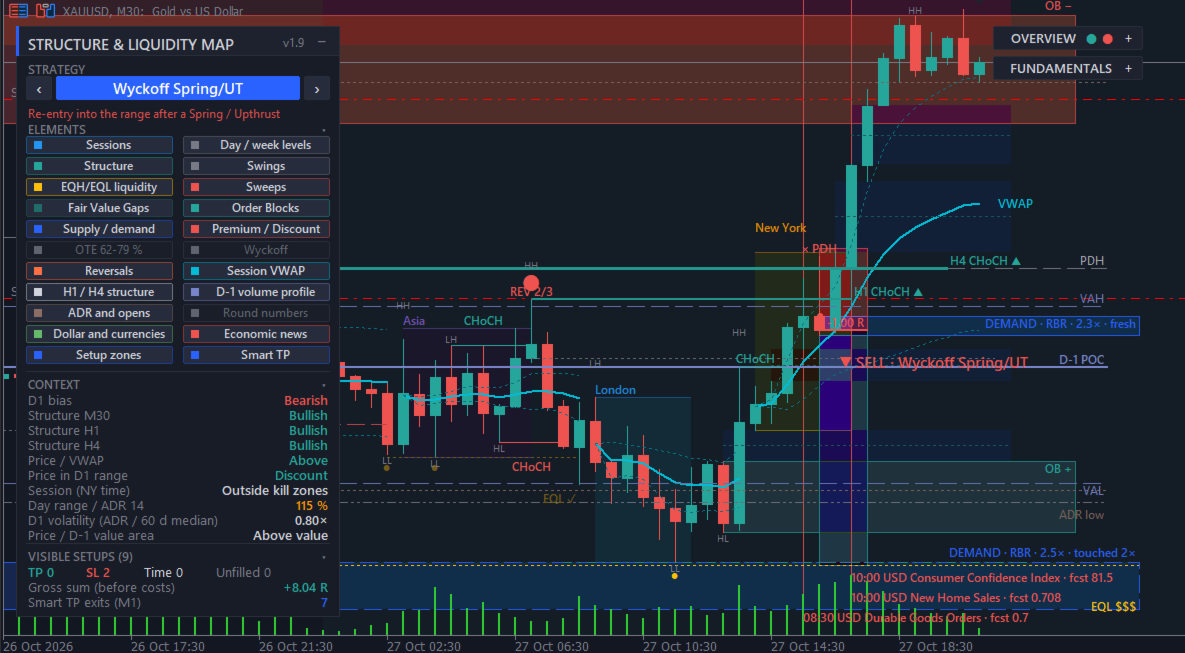
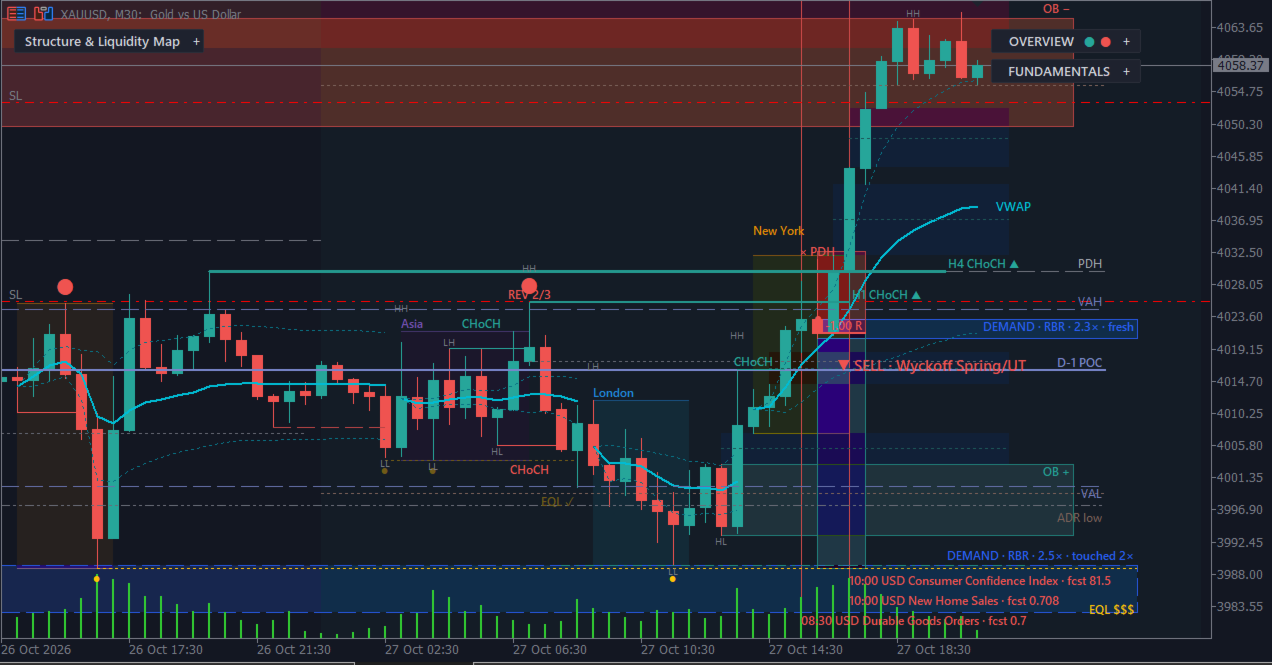
MacroStructure puts market structure, liquidity, session levels and the macro context of MetaTrader 5 on one chart. It draws documented, rule-based elements (Break of Structure, Change of Character, Fair Value Gaps, Order Blocks, liquidity sweeps, Wyckoff events), reference levels, and a fundamental panel with a rebuilt dollar index and the MT5 economic calendar. It is a visual analysis tool: it places, modifies and closes no orders.
WHY ONE INDICATOR
Discretionary traders who follow Smart Money Concepts, ICT-style sessions or Wyckoff often keep several tools open at the same time: one indicator for structure and zones, manual lines for sessions and previous highs and lows, a separate VWAP or volume profile, a dollar index chart, a currency strength table and an economic calendar website. MacroStructure gathers these readings in one chart and one panel, with the same colours, the same time reference (New York time) and the same rules everywhere.
Every element follows a written rule. Hover over any object to read its tooltip: type, price, time and, for setups, entry, stop, target and outcome. Nothing is hidden behind an unexplained score.
HOW TO START
1. Attach MacroStructure to a chart. It is designed for gold (XAUUSD) and the Nasdaq 100 index (NAS100) from M1 to H1, and it works on any symbol and timeframe.
2. Set the input "Server time minus New York time (h)". For a broker server at GMT+2 in winter and GMT+3 in summer, the value is usually 7. To check it, compare the 9:30 New York candle with the opening of the US stock index. If this value is wrong, sessions, kill zones, the midnight open and the session-based strategies are shifted.
3. Use the left panel to choose a strategy view and to show or hide each of the 22 elements with one click. Your choice is saved per chart and restored when the chart is reopened.
4. Read the fundamental panel on the right (Dollar, Markets, News tabs) and the summary dial.
MARKET STRUCTURE AND LIQUIDITY
Market structure
- A Break of Structure (BOS) is marked when a candle closes beyond the last fractal swing in the direction of the trend.
- A Change of Character (CHoCH) is marked when a candle closes beyond the last fractal swing against the trend.
- Swing size is set by the number of fractal bars on each side (2 by default).
Swings
- Higher high (HH), higher low (HL), lower high (LH) and lower low (LL) labels on confirmed fractals.
Equal highs and equal lows
- Two highs or two lows within 0.10 Average True Range (ATR) are marked as resting liquidity.
Liquidity sweeps
- A sweep is marked when price trades beyond a swing or beyond the previous-day high or low, then closes back inside.
Reversals
- A Change of Character is scored out of 3: the CHoCH itself, a liquidity sweep before it, and an RSI divergence. The score is shown on the chart.
Wyckoff events
- Trading range detection.
- Spring (false break below the range) and Upthrust (false break above the range).
- Test or Last Point of Support on lesser volume.
- Jump Across the Creek (JAC) or Sign of Weakness (SOW) when price leaves the range.
- An optional volume filter can be applied. MT5 mostly provides broker tick volume.
ZONES
Fair Value Gaps (FVG)
- The gap between the wicks of candle 1 and candle 3 of a three-candle move.
- A dotted line marks the 50 percent level (consequent encroachment).
- A minimum size in ATR filters small gaps; filled gaps are hidden by default and can be shown.
Order Blocks (OB)
- The last opposite candles before a Break of Structure.
Supply and demand zones
- A tight base followed by a departure of at least 2 ATR: rally-base-rally, drop-base-rally, drop-base-drop and rally-base-drop.
- The tooltip counts how many times price returned into the zone.
Premium and discount
- The daily reference range is split in two: the upper half is premium, the lower half is discount.
Optimal Trade Entry (OTE)
- The 62 to 79 percent retracement band of the last leg.
LEVELS AND SESSIONS
Sessions (New York time, adjustable)
- Asian range 20:00 to 24:00.
- London kill zone 02:00 to 05:00.
- New York kill zone 07:00 to 10:00.
- Midnight open line.
Day and week levels
- Previous-day high and low (New York day).
- Previous-week high and low.
Session VWAP
- Volume-weighted average price reset at each session, with standard deviation bands.
Higher timeframes
- Structure trend of two higher timeframes (H1 and H4 by default), ignored when lower than the chart timeframe.
Previous-day volume profile
- Point of control (POC), value area high (VAH) and value area low (VAL).
- Untouched points of control from earlier days.
Average daily range and opens
- 14-day average daily range (ADR) projected from the day's low and from the day's high.
- Week open and month open.
Round numbers
- An automatic step of about half the average daily range. Off by default.
FUNDAMENTAL PANEL
Dollar tab
- Dollar index rebuilt from the broker's currency pairs with the ICE formula, or the broker's own DXY symbol if you enter it.
- Change over a chosen number of days and trend against its moving average.
- Change of the dollar against 8 currencies.
- Correlation of daily returns between gold and the dollar. This correlation is measured on the same days; it describes the past relationship and does not predict the next move.
Markets tab
- Equity index, VIX, silver, oil and the US 10-year yield, when your broker offers these symbols.
- Gold to silver ratio and a risk-on or risk-off reading.
- Usual readings are shown in plain words, for example: equities down and VIX up point to safe-haven demand; higher yields raise the opportunity cost of holding gold.
News tab and chart lines (MT5 economic calendar)
- A vertical line at the exact release time, with an optional band of plus or minus N minutes around it. Many proprietary trading firms restrict trading around high-impact releases; the band helps you see these windows. Check the rules of your own firm.
- Next releases with a countdown.
- Once published: actual versus forecast, and the size of the surprise scaled by a robust deviation of that release's past surprises.
- The chart symbol's past reaction to the same release.
- Currencies and minimum importance are selectable.
- Optional alert N minutes before a release.
- Release names follow the display language.
Summary dial
- A structural side: weighted reading of chart structure, higher timeframes, premium or discount, and recent sweeps.
- A fundamental side: weighted reading of the dollar, related markets and the latest releases.
- Each item is listed with its weight, so you can see why the dial points where it does.
- The dial describes the current context. It is not a forecast. A local setup on the chart timeframe can disagree with the wider context; the dial shows both so that you decide.
STRATEGY VIEW
Choose one strategy, or all of them, in the panel. Each setup is drawn as a position box: entry, stop (red) and target (green). The tooltip shows the prices, the time and the outcome on the chart.
- 2022 Model: liquidity raid, market structure shift, then entry on the fair value gap, in the direction of the daily bias.
- Previous-day sweep: sweep of the previous-day high or low, then reversal.
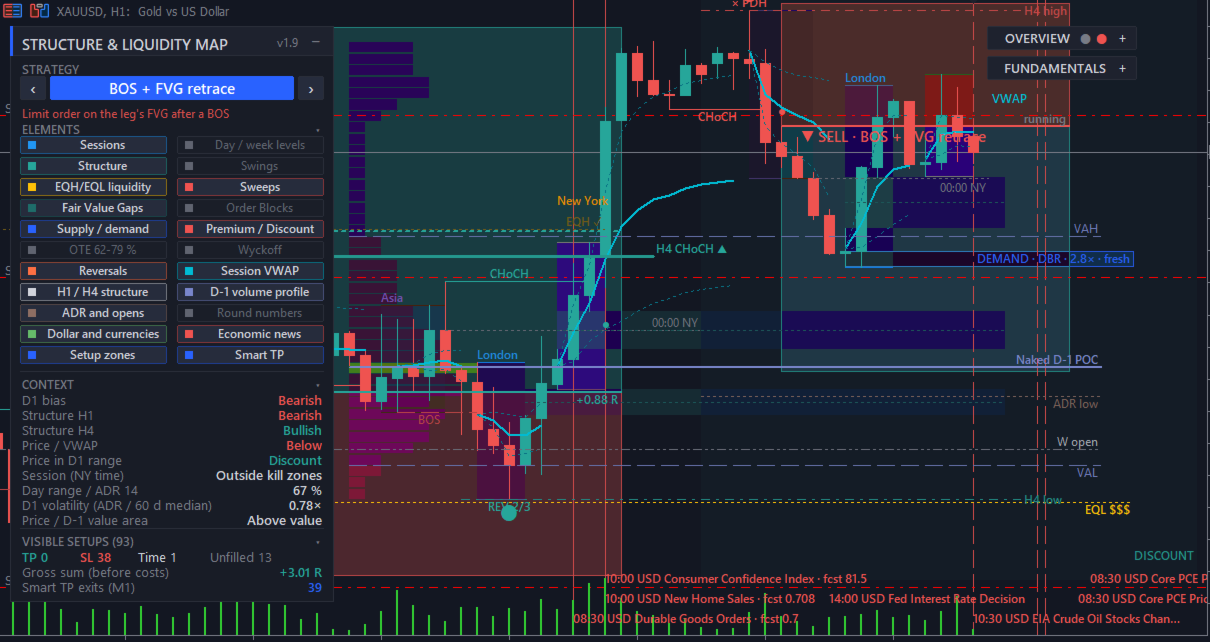
- BOS and FVG: limit order on the fair value gap of the leg that broke structure.
- Wyckoff: re-entry into the range after a Spring or an Upthrust, with an optional low-volume filter.
- Judas swing: false break of the Asian range, then reversal.
- Reversal: Change of Character scored with sweep and RSI divergence.
- News surprise: see below.
The target in R and the time limits are adjustable.
The panel counts the visible setups (target reached, stop reached, time exits, unfilled orders, Smart TP exits) and their sum in R. These counts are gross: they do not include spread, commission or slippage, and they use the small sample visible on your chart. They describe what happened on the chart; they do not measure an edge and do not predict future results.
NEWS SURPRISE STRATEGY
For each past release of the selected currencies with a known actual and forecast value:
1. Surprise = (actual minus forecast) divided by a robust deviation of that release's past surprises (1.4826 times the median absolute deviation, with at least 5 past values).
2. The surprise is significant when its absolute value reaches the threshold you set (0.5 by default). Smaller surprises are ignored.
3. Direction: the usual effect of the release on its currency, taken from the MetaQuotes impact history or from keywords, then converted to the chart symbol. For gold, a positive US surprise that strengthens the dollar gives a sell zone.
4. Entry at the close of the release minute (M1). Protective stop in chart ATR (1 by default), target in R, and a time exit N minutes after the release (30 by default).
The tooltip shows the release name, its New York time, the actual and forecast values and the surprise in deviations. This view works on gold and on currency pairs that contain a calendar currency. On an index such as NAS100, no zone is drawn and the panel says so.
Please note: most of the price reaction to a release often happens within the first minute, before this entry, and spreads usually widen around releases. Judge these zones after your own costs.
SMART TP (OPTIONAL DYNAMIC EXIT)
Tick "Smart TP" in the panel to replace the fixed exit of every strategy with a dynamic exit. Untick it to return to the fixed stop and target.
After the entry is filled, the indicator follows price minute by minute on M1 bars:
1. Stop: if a bar trades through the current stop, the trade exits at the stop, or at the bar's open if price gapped through it.
2. Activation: once the trade has gained the chosen amount (1 R by default), the stop moves to break-even.
3. Trailing: the stop then follows each new M1 swing formed after the fill, only in the trade's favour.
4. Time exit: if nothing is hit, the trade closes at the strategy's usual time limit.
Three modes:
- Trail M1 swings, no fixed target: the target is ignored and the trade runs until the trailing stop is hit.
- Keep target, exit early on M1 reversal: the fixed target stays; the trailing stop only closes the trade earlier on a reversal.
- At target, keep running: trailing starts when the target is reached, with the stop locked one R below the target.
On the chart, a dashed line marks the Smart TP exit price and a dotted line shows the current trailing stop of a running trade.
Notes:
- Up to 120 days of M1 history are loaded. Older setups, or charts where M1 data is not available, use the chart's own bars, which is less precise. The panel shows when M1 data was used.
- Inside the fill bar, the order of price moves is unknown, so trailing starts on the next bar.
- A dynamic exit changes the shape of results (more small winners, a few larger ones, fewer full targets). It does not by itself create an edge.
CONTROL AND CUSTOMISATION
- 22 elements, each switched on or off with one button, saved per chart.
- Display languages: English (default), French, Spanish, Russian and Chinese for all text on the chart.
- Dark theme, light theme, or keep your current chart colours. The original chart colours are restored when the indicator is removed.
- All colours are adjustable.
- The panels can be moved and collapsed.
- Optional alerts on each new setup or reversal, and before economic releases.
- Lookback depth adjustable (1,500 bars by default).
Inputs are grouped by topic: General, Appearance, Elements shown at start, Sessions, Structure / FVG / OB, Supply and demand zones, Liquidity, Reversals, Session VWAP, Multi-timeframe structure, Volume profile / ADR / round numbers, Summary, Fundamentals (dollar and currencies, related markets, economic calendar), Wyckoff, Setups, News surprise strategy, Smart TP, Colors.
FOR DEVELOPERS: iCustom BUFFERS
- Buffers 0 and 1: setup entry prices (buy, sell).
- Buffers 2 and 3: reversals (buy, sell).
- Buffers 4 to 9: session VWAP and its bands (two alternating series per session).
IMPORTANT INFORMATION
- MacroStructure is a visual analysis tool. It places, modifies and closes no orders. It is not a signal service and not investment advice.
- Each rule is documented, but no rule shown here is presented as profitable. Past setup outcomes on a chart do not predict future results. Judge the tool on your own charts, in demo first, and after your own trading costs.
- Fractals and fair value gaps are confirmed one or two bars after they form, as with any swing-based tool. An element can therefore appear with a short delay.
- MT5 mostly provides broker tick volume, which can differ from exchange volume. Volume-based elements (VWAP, volume profile, Wyckoff volume filter) use this data.
- The MT5 economic calendar is not available in the Strategy Tester. In the tester, the fundamental panel shows "Calendar unavailable in the tester" and the calendar features are inactive. All other elements can be viewed in the tester's visual mode. Calendar features work on a live chart.
- Related-market readings appear only for the symbols your broker offers.
- Everything is recomputed on each new bar. On M1 with more than 5,000 bars of lookback, the display can slow down. Smart TP with M1 data adds some load on higher timeframes.
- The fundamental panel can cover the last candles at the top right: collapse it or move it with the panel margin input.
SUPPORT
Questions, bug reports and suggestions are welcome in the comments of this product page or by private message on MQL5. Please mention your broker, symbol and timeframe, and attach a screenshot of the panel when reporting an issue.