Candle TimeZone Panel

Your broker's chart runs on server time. Candle TimeZone Panel shows, for any candle under the mouse, when it really happened in your own time zone, plus how much it moved and its spread. No mental math, no wrong hour after a daylight-saving switch.

What you see when you point at a candle

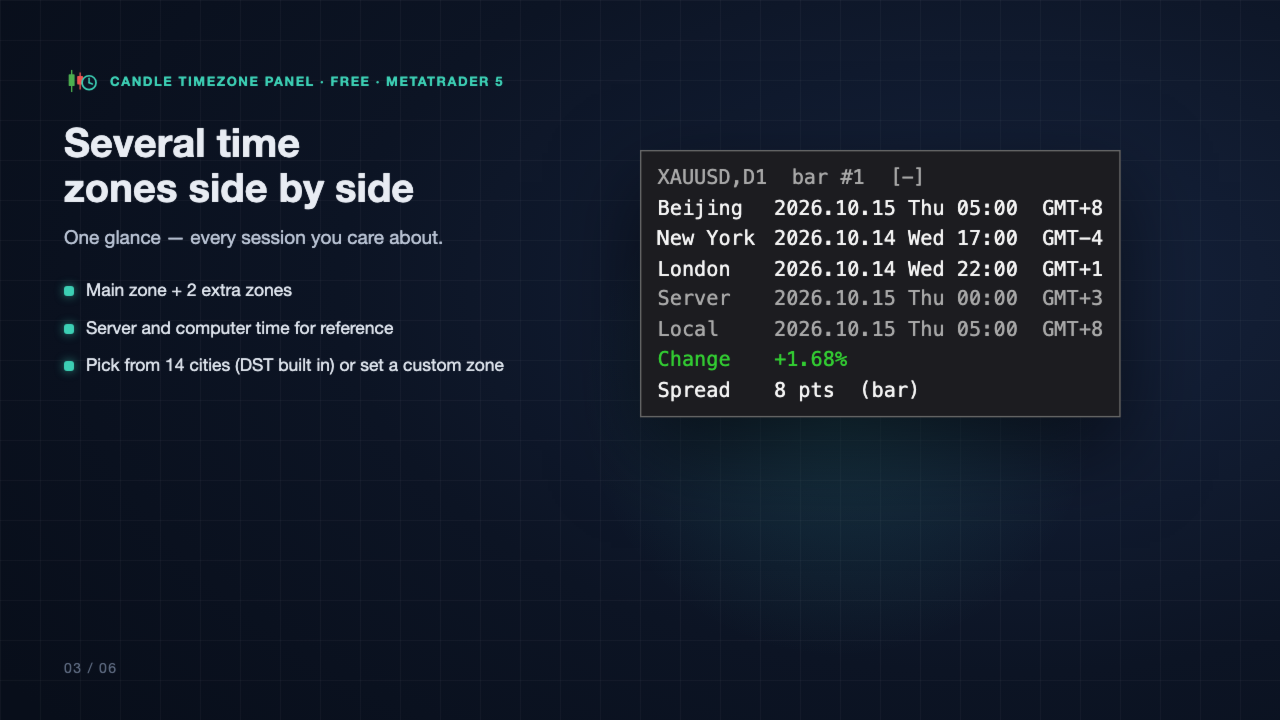
  • Its open time in your main time zone, with the GMT offset (default: Beijing).
  • Up to 2 extra time zones side by side, e.g. New York and London.
  • Server time and this computer's time for reference (can be hidden).
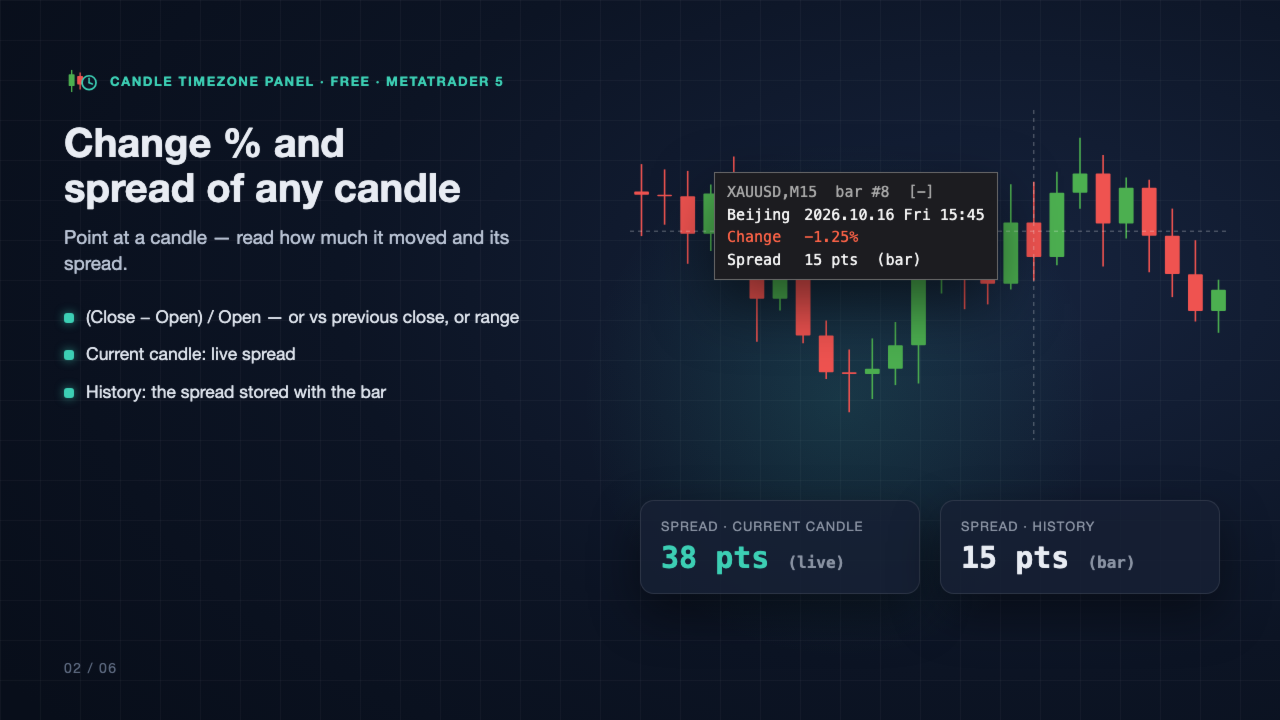
  • Change % of the candle: (Close − Open) / Open, or vs the previous close, or the range.
  • Spread: live on the current candle; on older candles, the spread value stored with that bar.
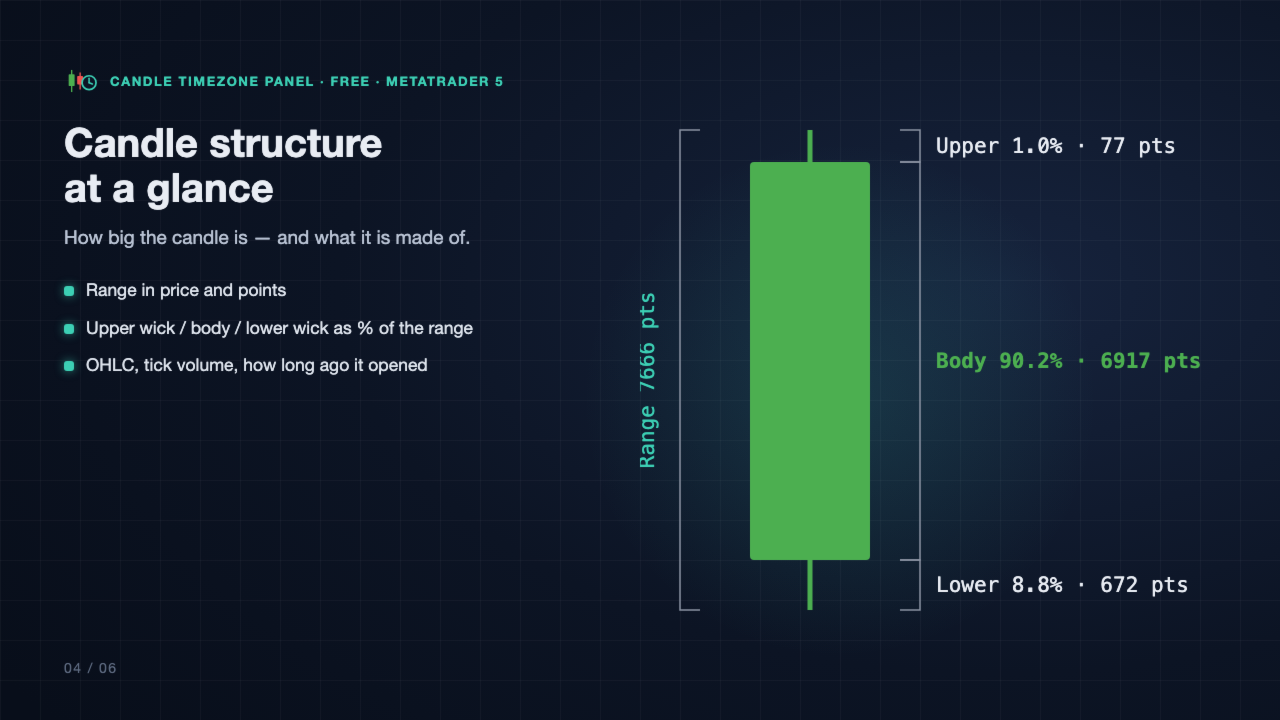
  • Open / high / low / close, range in price and points.
  • Upper wick, body and lower wick as % of the range and in points.
  • Tick volume and how long ago the candle opened.

Time zones done right

  • Pick a zone from the list: Beijing, Hong Kong, Singapore, Tokyo, Seoul, Sydney, Mumbai, Dubai, Moscow, Frankfurt, London, UTC, New York, Chicago, or set a custom one (half-hour offsets such as +5:30 are supported).
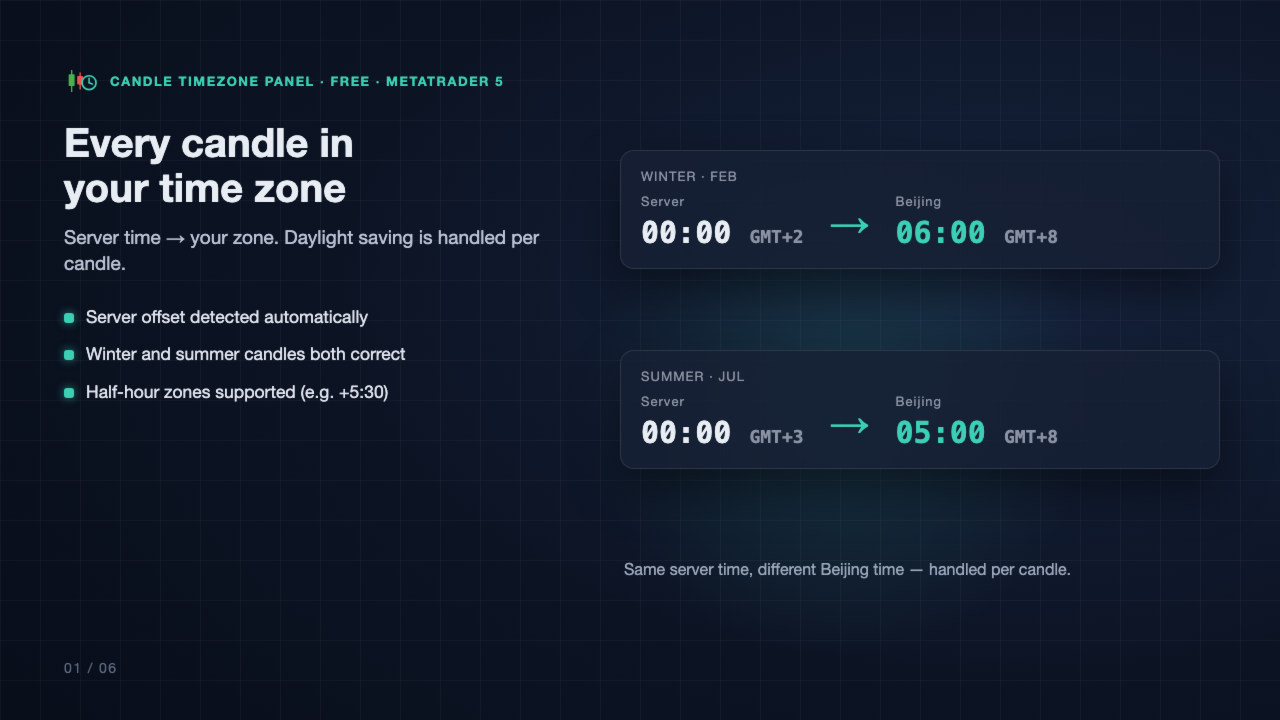
  • Daylight saving (US, EU, Australia) is applied by the date of each candle, so summer and winter candles are both correct.
  • The server's time offset is detected automatically.

Stays out of the way

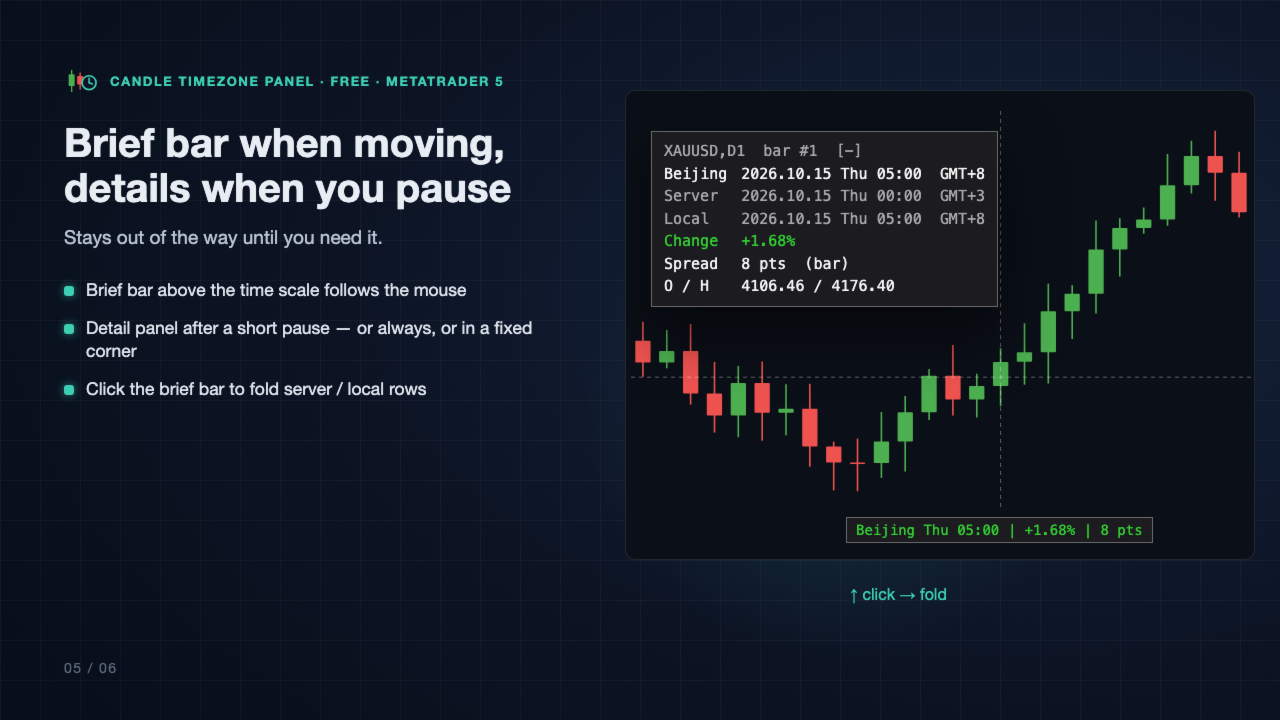
  • A one-line brief bar above the time scale follows the mouse.
  • The detail panel opens after a short pause on a candle (or always, or off), and flips side near the chart edges.
  • Or pin the panel to a fixed corner.
  • Click the brief bar to fold the server and local time rows.
  • Hidden when the mouse is on the time scale or leaves the chart.

Fits your terminal

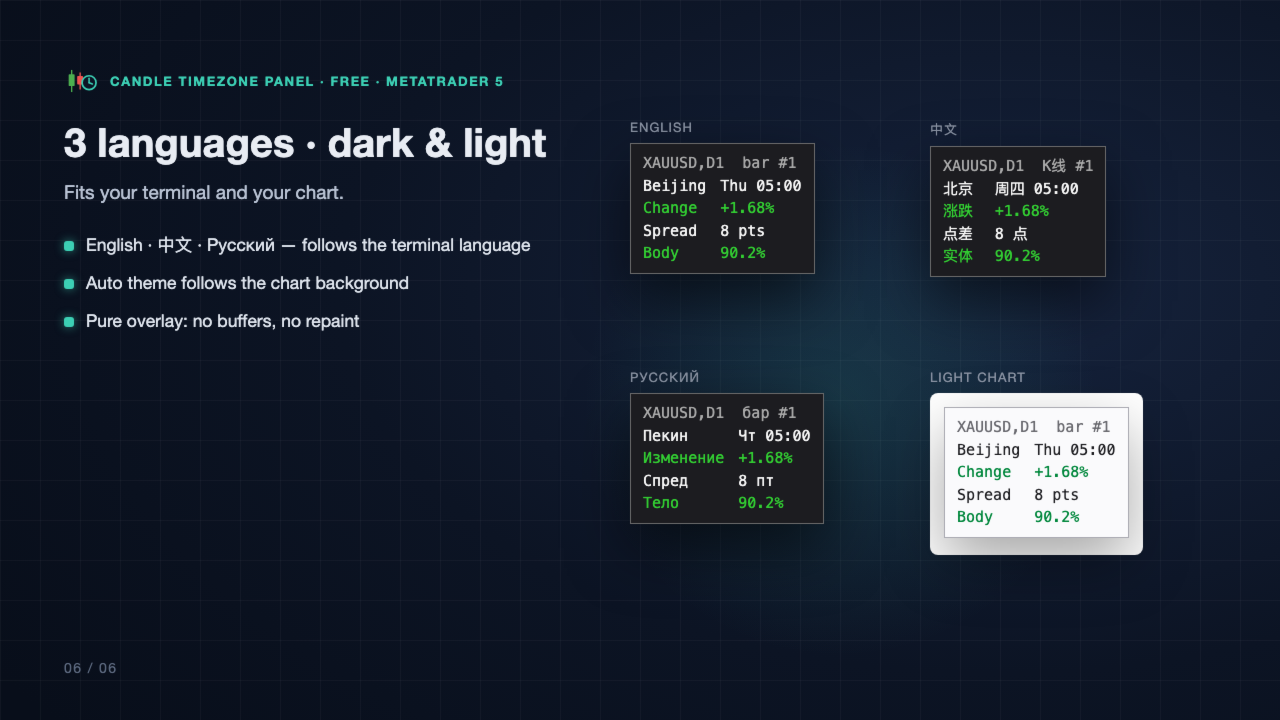
  • Panel text in English, Chinese or Russian; follows the terminal language by default.
  • Auto theme follows the chart background (dark or light), or choose Dark, Light or your own colors.
  • Sharp on high-DPI screens.

Good to know

  • Pure display overlay: no indicator buffers, nothing drawn on history, no repaint. It does not trade.
  • Spread on older candles is the value the terminal stored with that bar, not an average over the bar and not the spread you actually got.
  • Local (computer) time on older candles uses today's offset of your computer.
  • Server daylight-saving rule: most brokers follow the US rule (the default). If your broker's server time does not change with the seasons, set "Server DST rule" to None.
  • Works on any symbol and any timeframe.

Main inputs

  • Display: panel language, color theme, detail panel mode and delay, brief bar, follow mouse / fixed corner, font.
  • Time zones: main zone, extra zones 2 and 3, custom zone (name, offset, DST rule), show server / computer time, server time zone (Auto / Manual) and its DST rule.
  • Candle info: change % formula and decimals, spread on/off and unit (points / price), OHLC, structure, tick volume, candle age.
  • Custom colors: used when Theme = Custom.

Questions or ideas? Leave a comment on this page — feedback is welcome.
Yazarın diğer ürünleri
VolPulse shows where volume traded in every session and turns it into a clear plan on your chart. Full user guide (setup, settings, how the arrows work): https://www.mql5.com/en/blogs/post/777075 What you get • Session volume profiles (1–10 sessions) with POC, value area (VAH / VAL) and HVN / LVN rows • Session VWAP and developing POC / VAH / VAL lines that build up bar by bar • Naked POCs — earlier POCs price has not returned to yet, with price and date • Market-state panel: Bullish / Bearish /
FREE
TradeAssist Risk Panel MT5 — a professional manual-trading panel for MetaTrader 5: risk-based lot sizing, draggable Entry/SL/TP chart lines, multi-level partial close, 6 trailing-stop variants, automatic break even and full on-chart order management. TradeAssist Risk Panel MT4 (click to download)           TradeAssist Risk Panel MT5 (click to download) Application instructions   -     Trading a prop firm challenge?   This panel helps you plan entries, stops and lot size by hand — but one sli
FREE
TradeAssist Lot Calculator — the free position size calculator that cannot touch your account. Drag the stop-loss line on your chart and instantly see the correct lot size for your risk budget. No spreadsheets, no web calculators, no mental math — and no trading permissions needed, because this tool contains zero trading code. It calculates. That is all it does. WHY THIS ONE • 9 risk modes — fixed $, % of Balance / Equity / Free Margin / Custom base, % of previous Day / Week / Month balance, and
FREE
VolPulse Telegram Bridge forwards the alerts of the free VolPulse Volume Profile indicator to Telegram: market-state changes, touches of key levels (POC, VAH, VAL, naked POC) and new entry signals with stop and target. It does not trade. It does not read your positions, balance or account number. Setup (about 2 minutes) Install the free indicator "VolPulse Volume Profile" and attach it to your charts: https://www.mql5.com/en/market/product/200141 Tools → Options → Expert Advisors → tick "Allow W
FREE
Prop Firm Risk Guardian MT5 — pass the risk rules, not just the profit target. Prop Firm Risk Guardian MT5 (click to download) Application instructions   Most prop-firm challenges are failed not because you can't trade — but because one bad day or a single oversized position breaches the daily or overall drawdown limit. Prop Firm Risk Guardian is a lightweight monitoring utility that enforces those limits for you, automatically , 24/5. It is a pure protection tool . It never opens trades, send
` Account Limit Guard MT5 ` is a free account-level daily limit protection utility for MetaTrader 5. It is not a trading strategy, does not open trades, does not generate signals, and does not rely on any specific indicator. Its purpose is simple: monitor your account-level daily loss and automatically apply protection once your configured limit is reached. For prop / funded-challenge traders   Need more than a daily-loss cap?   Prop Firm Risk Guardian (MT5)   is the full prop-challenge p
FREE
TradeAssist Risk Panel MT4 — a professional manual-trading panel for MetaTrader 4: risk-based lot sizing, draggable Entry/SL/TP chart lines, multi-level partial close, 6 trailing-stop variants, automatic break even and full on-chart order management. TradeAssist Risk Panel MT4 (click to download)           TradeAssist Risk Panel MT5 (click to download) Application instructions   -   RISK MANAGEMENT - Automatic lot calculation from the risk amount and the SL distance - 8 risk modes: Fixed $, %
FREE
` Emergency Webhook Alert ` is an MT5 Expert Advisor for trade event notifications. It monitors position opening, closing, stop loss, take profit, partial close, and reversal events, then sends trade events through a notification relay server to WeChat and Telegram. The EA includes an on-chart panel, supports English and Chinese UI, and is designed for real-time status, pairing status, and pending event monitoring.   Want more than event alerts? Emergency Webhook Alert forwards your trade eve
FREE
Risk Guardian Pro MT5 is an account-level risk protection utility for MetaTrader 5.   It does not open trades, generate signals or replace your strategy. Instead, it acts as a safety layer above your account and helps   enforce risk discipline across manual trading and other Expert Advisors.   This tool is designed for traders who want clear account protection rules, visible risk status and automatic response when limits are   reached.   Main Features   - Daily loss limit   - Total drawdo
Your terminal is at home. You are not. TradeAssist Remote Monitor sends every fill, pending order, SL/TP change and risk event from your MT5 account straight to Telegram, with a chart screenshot marked with entry, stop loss and take profit. A remote MT5 account monitor for traders running on a VPS or away from the desk. Check account balance, equity, margin and open positions from Telegram at any time, get instant disconnect / offline alerts if your VPS or terminal drops, and receive drawdown an
Filtrele:
Değerlendirme yok
Değerlendirmeye yanıt