SecondsTicksChart

SecondsTicksChart displays seconds and tick candlestick charts in MetaTrader 5.

Use fixed time intervals or a fixed number of ticks to examine price movement in more detail than a standard one-minute chart. SecondsTicksChart builds candles from your broker's tick data and displays them on the same chart through a custom symbol. No separate feeder chart is required.

This is a charting utility implemented as an Expert Advisor. It is designed for display and analysis and does not place or manage orders.


Chart modes and features

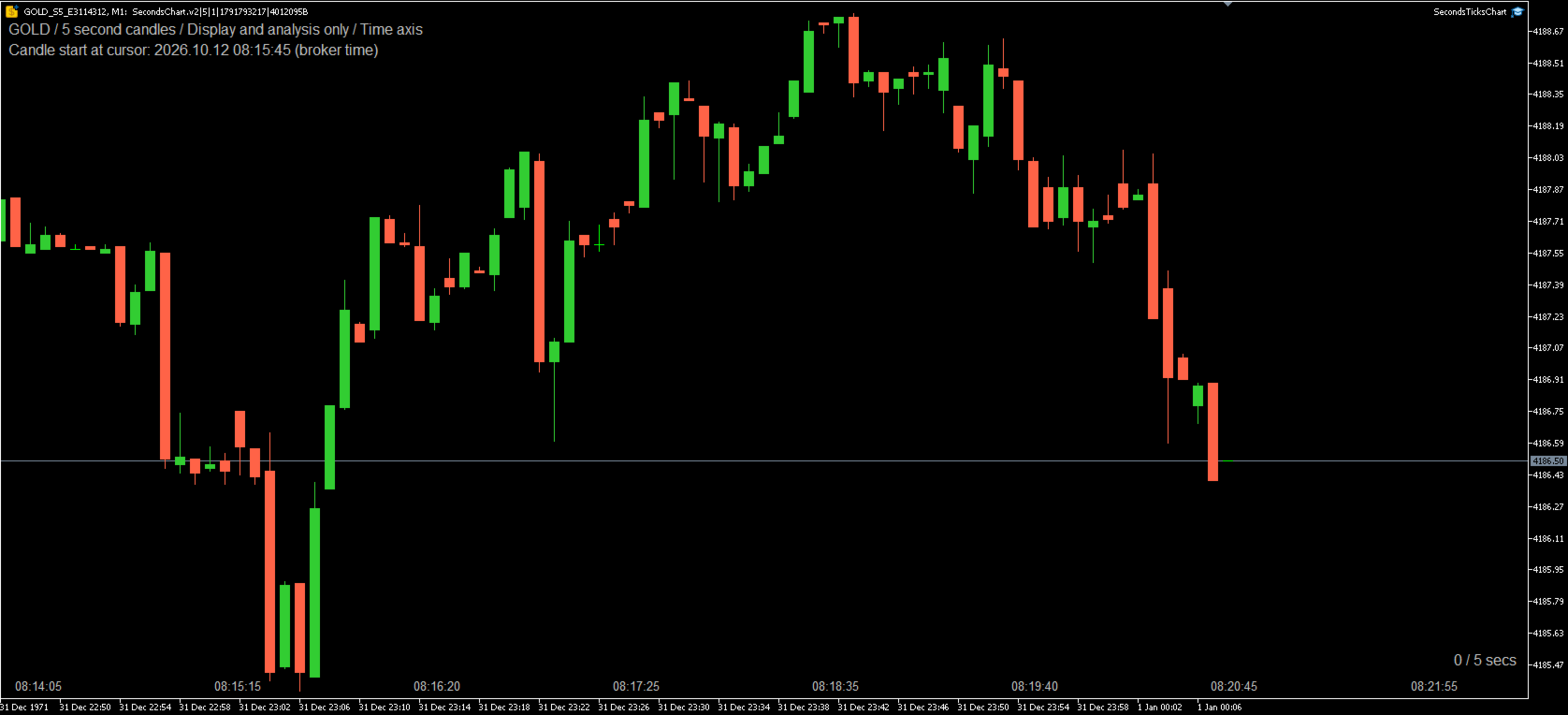
Seconds mode groups valid price ticks into fixed intervals from 1 to 3,600 seconds. The default is 5 seconds per candle. You can choose intervals such as 1, 7, 10 or 15 seconds. Each candle opens at the first valid price in its interval and closes at the last. Intervals without ticks are omitted; the utility does not create artificial candles to fill gaps.

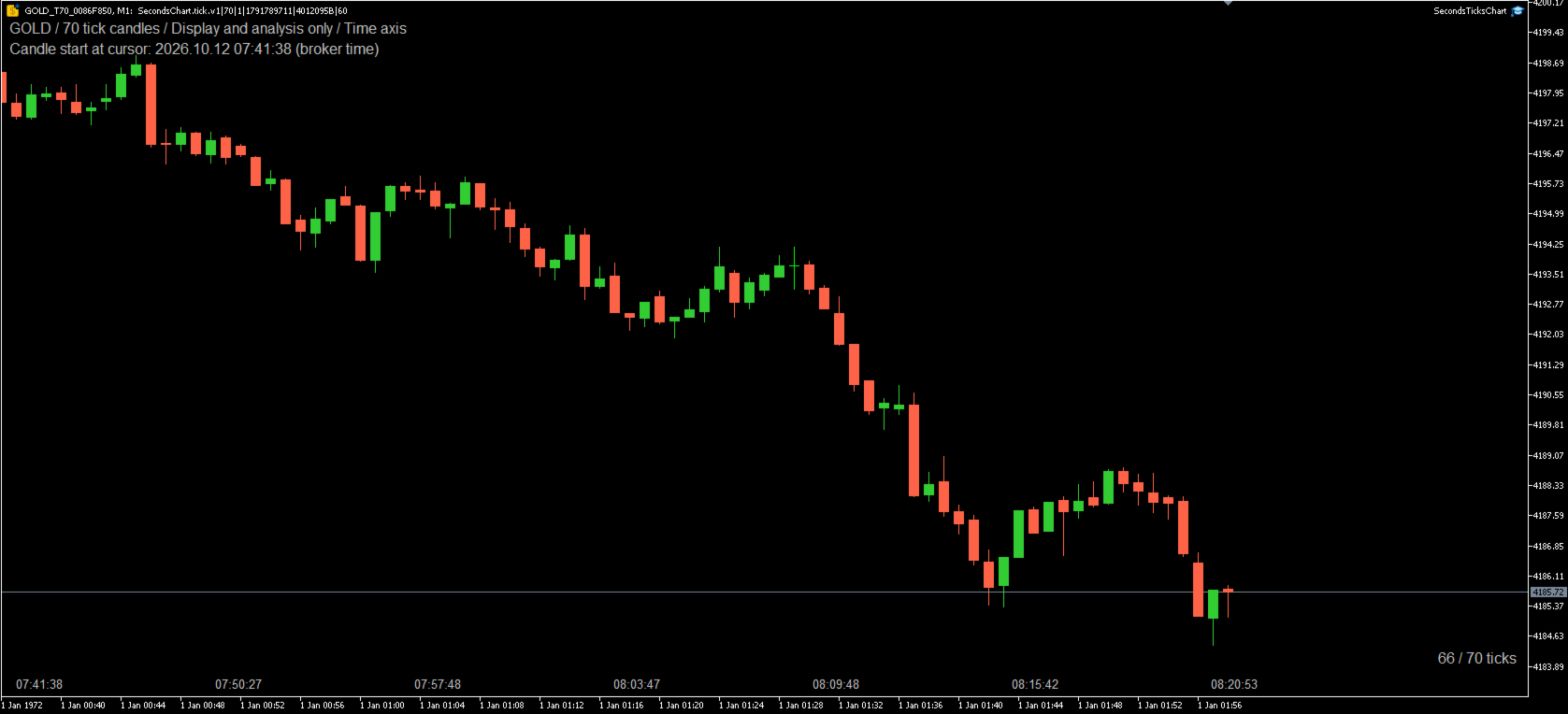
Tick mode creates a candle from a selected number of valid ticks, from 1 to 1,000,000. The default is 70 ticks per candle. Candle duration varies with market activity. Repeated prices still count as ticks. Bid, Ask and midpoint modes use quote events, while Last mode uses trade events.

Choose the source symbol and price basis: the source symbol's default Bid/Last setting, Bid, Ask, Last or the Bid/Ask midpoint. Recent candles are restored from available broker tick history, and the current candle updates as new data arrives.

Customize bullish and bearish candle bodies, wicks and borders. Actual candle start-time labels, top-left status information and candle formation progress can be shown or hidden independently. The formation display shows elapsed seconds or the accepted tick count, such as "2 / 10 secs" or "10 / 70 ticks", in the bottom-right or top-right chart corner.

You can add compatible indicators and drawing objects to the generated chart. Indicators that depend on real timestamps, trading sessions, exact symbol names or other timeframes may require adaptation.


Getting started

  1. Attach SecondsTicksChart from the Navigator's Expert Advisors section to a normal chart of your broker's source symbol.
  2. Select Seconds candles or Tick candles and set the relevant candle size. Adjust the price source and display settings as needed.
  3. Wait for tick history to load. The same chart switches to the generated custom symbol. Add your indicators and drawings after the generated chart appears.

Keep the utility attached and the terminal connected to receive updates. Initial loading time depends on the requested history and the data available from your broker.


Input parameters

Candle settings

Parameter Default Description
Chart type Seconds candles Select Seconds candles or Tick candles.
Seconds per candle (1-3600) 5 Fixed interval in seconds; used only in seconds mode.
Ticks per candle (1-1000000) 70 Number of valid ticks per candle; used only in tick mode.
Source symbol (blank = current or saved source) Blank Broker symbol to read. A blank value uses the current symbol, or the saved source on a generated chart.
Candle price Same as source symbol Use the source's Bid/Last setting, Bid, Ask, Last or the Bid/Ask midpoint.
Initial history to restore (minutes) 60 Request 1-10,080 minutes of tick history before the latest source tick, subject to availability.
Refresh interval (milliseconds) 250 Update interval from 100 to 5,000 milliseconds; separate from candle size.


Candle colors

Parameter Default Description
Bullish candle body color LimeGreen Body color for bullish candles.
Bearish candle body color Tomato Body color for bearish candles.
Bullish wick and border color LimeGreen Wick and border color for bullish candles.
Bearish wick and border color Tomato Wick and border color for bearish candles.


Display settings

Parameter Default Description
Show top-left information true Show source, chart type, status and time information.
Show actual candle start times true Show actual start-time labels in broker time, without timezone conversion.
Show candle formation true Show elapsed seconds or the current candle's tick count.
Candle formation position Bottom right Select Bottom right or Top right.
Time and status text color Silver Text color for time, status and formation labels.
Font size 9 Information and formation text size, from 6 to 24.
Bottom-left actual-time font size 12 Actual-time label size, from 6 to 24, independent of the information text size.


Chart behavior and requirements

The generated chart uses the custom symbol's M1 timeframe to display each seconds or tick candle. The M1 label does not mean that a candle represents one real minute. The standard time axis, crosshair, Data Window and indicator timestamps use virtual time. Use the utility's actual start-time labels to read candle times in broker time.

The utility requires the MetaTrader 5 desktop terminal, a logged-in trading account and tick data for the selected broker symbol. Historical coverage and chart updates depend on the broker's data and the terminal connection. Last-price mode requires trade ticks with valid Last prices. The Strategy Tester is not supported.

Use one generator instance per custom symbol. The utility occupies the chart's Expert Advisor slot; attaching another Expert Advisor to that chart replaces it and stops updates. Additional charts can display the same generated symbol without another generator instance.

Removing the utility stops updates but retains the custom symbol, stored history and your drawings. To return to a standard chart, remove the utility and select the original broker symbol and a normal timeframe. While the utility is attached, changing the timeframe returns the generated chart to M1.

Drawings from the original chart are not automatically converted. Check time-based drawings when changing the source, chart mode or candle settings. Tick charts reuse their saved history origin when restarted with the same configuration, so restoration may cover more than the requested history period and take longer. If retrieved tick history no longer matches saved candle start times, updates stop with a status message; changing the history setting creates a new generated symbol.

No DLL imports or WebRequest access are required.
Önerilen ürünler
Session Trade Controller — Keep session schedules, weekday permissions and current order or position context together. Who it is for Designed for traders whose operating workflow depends on broker-time windows and explicit session boundaries. Main functions User-configured trading windows Live countdown to the next session change Weekday permission rules Clear open, closed and transition states Position and pending-order visibility Explicit reasons when trading is outside the permitted schedule
Candlestick Pattern Scanner is a multi-timeframe and multi-symbol dashboard and alert system that checks all timeframes and currency pairs for different candlestick patterns that are formed in them. Scanner is integrated   with support and resistance zones so you can check the candlestick patterns in most important areas of the chart to find breakout and reversal patterns in the price chart. Download demo version   (works on M4,M6,M12,H3,H8 timeframes and 20 symbols of Market Watch window) Read
This MQL5 indicator detects Volume Spread Analysis (VSA) patterns for BUY/SELL/NEUTRAL signals. Features minimizable GUI showing symbol and patterns. Scans candles from current to 4 bars ago. Patterns BUY/SELL: SellingClimax, StoppingVolume, Shakeout, Test, End of Rising Market, No Demand, Upthrust, Supply Coming In. Part of Trader Menu Info v5 - All in One.
TXBeeBox TradingPanel Pro TXBeeBox TradingPanel Pro is a multifunctional manual trading and position-management panel designed for MetaTrader 5. It provides fast order entry, centralized position controls, real-time account information and practical risk-management tools in a clean, compact interface. This product is a manual trading utility. It does not generate trading signals, predict market direction or open trades automatically. All entry and position-management commands are initiated by th
LIMITED OFFER! We're having a sale to celebrate the launch of our products. This product, which normally costs $200, is on sale for $40 for a limited time. In exchange, we'd like you to try out the tool and leave us an honest review about your experience. So we want you to give it a try. It's sure to become a companion you'll never want to let go of.  Trend Line Trader – A Trading Tool Using Trend Lines ・Want to place a limit order only until a specific time ・Buy entry if the downtrend line is
# TradeRoad Risk Panel Advanced TradeRoad Risk Panel Advanced is a MetaTrader 5 utility panel designed to help traders prepare and monitor their risk before and during a trading session. It does not open trades automatically, does not provide trading signals, and does not promise results. Its purpose is simple: make risk, drawdown and trading discipline easier to read directly on your MT5 chart. ## Main features - Position size / lot calculation based on planned risk - Risk amount and risk
## WPRV2 İşaretçisi Tam Açıklaması WPRV2, William's Yüzde Aralığı (%R) olarak bilinen geleneksel teknik analiz aracının iyileştirilmiş bir versiyonudur. Hisse senetleri piyasalarında, Forex ve kripto para platformlarında kullanılır ve piyasa eğilimlerini analiz etmeye ve ticari pozisyonlar için en uygun giriş ve çıkış noktalarını belirlemeye yardımcı olur. ### İşaretçinin Amacı WPRV2'nin temel amacı, şu anki fiyatın yakın zamanda gerçekleşen en yüksek ve en düşük seviyelerine göre yerini ölçm
ET CARBON MTF DMA v3.00 Çoklu zaman dilimi çift hareketli ortalama: daha hızlı bir zaman diliminin ortalamaları grafiğinizde, ikisi arasındaki uyumla birlikte. GENEL BAKIŞ Carbon MTF DMA, daha hızlı bir zaman diliminin çift hareketli ortalamasını (örneğin H1 grafiğinde M15) rib bandıyla birlikte doğrudan grafiğinize çizer ve diğer zaman dilimi ile bu grafiğin uyumlu olup olmadığını size söyler. Yalnızca diğer zaman diliminin kapanmış mumları kullanılır; bu nedenle çizgi sonradan asla değişmez.
Check the file before it becomes your backtest history. A CSV can look tidy in a spreadsheet and still contain a repeated minute, an impossible candle or a date that silently changes when parsed. Bar CSV Import Check gives you a read-only inspection inside MT5 before you import a file into a custom symbol. Find the rows worth reviewing - Detect unsupported field layouts, malformed dates and numeric values, integer overflow and inconsistent open/high/low/close bounds. - Count backwards ordering
Constantly monitor the progress of your trading at daily intervals of your choice.  For positive readings - maintain discipline and stick to your strategy. In case of gradually worsening results - react as soon as possible.  Be aware of the quality of your work!  The panel calculates the account balance You can track your progress for both the current instrument and the entire account The number of days back (5 items) - you set freely  Learning to count days: if today is October 3 (day number
##   ONLY GOLD ##   Тiльки Золото ## **Mercaria Professional Trading Zones - Complete Guide** ## **Mercaria Professional Trading Zones - Повний посібник** ### **How Mercaria Zones Work / Як працюють зони Mercaria** **English:** Mercaria Zones is an advanced trading indicator that identifies high-probability support and resistance areas using ZigZag extremes combined with mathematical zone calculations. The indicator works on multiple timeframes simultaneously, providing a comprehensive view
Moving averages are a simple and serious indicator for evaluating the development of a price. But which configuration to choose? 12 periods ? 20 periods? There is not a single moving average setup for all instruments, at all times, for all time periods, simply because not all instruments have the same volatility, they are all very different. They have a signature. The Signature App is a powerful decision support tool. It is based on the use of moving average envelopes. The program calculates th
The Multilevel PnL Calculator EA is an advanced trading tool designed for Forex and CFD traders who need precise position sizing and risk management calculations. This intuitive panel-based calculator allows you to simulate multiple entry positions with automatic profit and loss calculations in real-time USD values. Key Features Multi-Position Management Calculate Profit and Loss for up to 10 or more simultaneous positions (configurable) Support for both LONG and SHORT trading modes Real-time
Cumulative Volume Delta MA-X MTF (Gradient Momentum ile) Bu indikatör, MetaTrader 5 için çoklu zaman dilimi (MTF) Kümülatif Hacim Deltası (CVD) analizi gerçekleştirir. Tick veya gerçek hacim verilerini analiz ederek alış ve satış baskısı arasındaki net farkı hesaplar ve emir akışı duyarlılığının görsel bir temsilini sunar. İndikatör Mantığı ve Özellikleri İndikatör, hacim analizi için matematiksel bir yaklaşım kullanır: Veri Kaynağı: Hem Gerçek Hacim (Borsa varlıkları için Real Volume ) hem de
Trading Utility for Forex Currency Pairs Only not for Gold  Functions Auto Lot Calculation based on Risk Auto stoploss  Auto TakeProfit Breakeven Auto Close Half % Close in percentage with respect to the PIPs Pending Orders BuyLimit Sell Limit with distances BuyStop Sell Stop    with distances Trading Informations Risk in percentage For Multiple trades Combine Takeprofit and Combine Stoplosses
YazanPro Pattern Scanner
Yazan Adnan Ramadan Ibrahim
Genel bakış YazanPro Pattern Scanner, birçok piyasada grafik formasyonlarıyla çalışan yatırımcılar için bir MetaTrader 5 indikatörüdür. 150 sembole kadar, 9 periyoda kadar klasik grafik formasyonlarını ve 40 mum formasyonunu tarar ve her şeyi, her formasyonun ulaştığı aşamayla birlikte tek bir tabloda listeler. Grafikleri tek tek açmak yerine, bir formasyonun nerede yeni tamamlandığını, kırıldığını, retest edildiğini veya onaylandığını görürsünüz; tek tıklama o grafiği formasyon çizilmiş olarak
This indicator is the same as the popular Heiken Ashi Smoothed. The Heikin Ashi indicator for MetaTrader 5 already exists, but it has two disadvantages: It paints the candles not accurate. It's not possible to change the candle width. See also Heikin Ashi in MQL5 Code Base . In this version there are no such disadvantages.
Analytics Window — Account Performance & Prop Limit Dashboard for MetaTrader 5 Overview Analytics Window is a clean, compact dashboard that sits in its own resizable window beneath your chart. It shows everything you need to manage an account at a glance: balance, equity, drawdown, open-trade risk, your prop firm or personal account limits, and a full performance history, without the clutter of traditional trade-info panels. It runs as an indicator, not an EA , so it works alongside any Expert A
TradePilotmt5
Hossein Khalil Alishir
TradePilot Expert Advisor (EA) for MetaTrader 5 TradePilot is a professional and user-friendly Expert Advisor (EA) for MetaTrader 5 (MT5) . It simplifies automated trading , risk management , and trade execution with a smart trading panel . Perfect for beginners and experienced traders looking for a reliable trade manager EA with automated lot size calculation and smart position management. Key Advantages User-Friendly Trading Panel: Customizable panel with buttons and hotkeys for fast ex
CosmiCLab SMC FIBO CosmiCLab SMC FIBO is a professional trading indicator designed for traders who use Smart Money Concepts (SMC), market structure analysis and Fibonacci retracement levels. The indicator automatically detects market swings and builds Fibonacci levels based on the latest impulse movement. It also identifies market structure changes such as BOS (Break of Structure) and CHOCH (Change of Character), helping traders understand the current market direction. CosmiCLab SMC FIBO also pr
TradeGuard Capital Protection Professional Risk, Exposure & Trade Manager for MetaTrader 5 This utility acts as a professional insurance system for your trading account. TradeGuard Capital Protection is a professional-grade risk & money management utility designed to protect your trading account from excessive losses, emotional trading, and uncontrolled exposure. This tool does NOT open trades . It strictly manages risk, drawdown, exposure, and safety protections . Perfect for manual traders, EA
An indicator of pattern #31 ("Long Island") from Encyclopedia of Chart Patterns by Thomas N. Bulkowski. The second gap is in the opposite direction. Parameters: Alerts - show alert when an arrow appears   Push - send a push notification when an arrow appears (requires configuration in the terminal) GapSize - minimum gap size in points ArrowType - a symbol from 1 to 17 ArrowVShift - vertical shift of arrows in points   ShowLevels - show levels ColUp - color of an upward line ColDn - color of a d
Sinyalleri kaçırmayı bırakın. Elle girmeyi bırakın. Sinyal kanalınız "BUY XAUUSD, SL 3885, TP1 3910, TP2 3930" paylaşıyor. Bildirimi görüp telefonun kilidini açana, MT5'i açıp işlemi girene kadar fiyat çoktan hareket etmiş oluyor. Ya da uyuyordunuz, işteydiniz veya araç kullanıyordunuz ve işlem sizsiz gerçekleşti. Ya da 3885 yerine 3858 yazdınız. TG2MT5, takip ettiğiniz her kanaldaki her sinyali paylaşıldığı anda okur ve birkaç saniye içinde MT5'inize yerleştirir. Zarar durdurma ve tüm kâr alma
Seconds Pro
Federico Ruben Vissio
Seconds Chart -- Seconds Candlestick Chart for MT5 --  MetaTrader 5 only offers timeframes starting from 1 minute. This utility adds a seconds candlestick chart in a floating window over your chart Key Features: Displays your open positions with entry lines, Stop Loss, and Take Profit. Modify the Stop Loss and Take Profit by dragging the lines directly onto the seconds chart. Floating window that you can freely move, resize, minimize, and close. Selectable timeframes of 1, 3, 5, 10, 15, and 30
RiskShield Guardian is a protection layer for your MetaTrader 5 account. It does not open trades or try to predict the market. It watches your equity in real time and enforces the risk rules you set, whether trades come from you, your phone or any Expert Advisor. Attach it to one chart. It monitors the whole account. WHO IT IS FOR Prop-firm traders who cannot afford to break a daily-loss or max-drawdown rule Traders running several EAs on one account who need one place to cap total risk Manual t
Pro Order Lot Size Calculator Pro Order Lot Size Calculator , almak istediğiniz riske göre uygun lot miktarını hesaplamanıza yardımcı olan basit ve pratik bir araçtır. Bu ürün sayesinde hesabınızdaki para miktarına göre almak istediğiniz riski doğrudan panel üzerinden kolayca hesaplayabilirsiniz. Kolay Risk ve Lot Hesaplama Panelimiz oldukça basit ve kolay bir kullanıma sahiptir. Riski nasıl belirlemek istediğinizi seçebilirsiniz: İstediğiniz risk miktarını girebilirsiniz. Parasal olarak ne kada
CoPilot — Günlük Trading Panosu Sayılarınızı bilin. Netlikle işlem yapın. MT4 Sürümü CoPilot Nedir? CoPilot, tüm günlük performans istatistiklerinizi doğrudan grafik üzerinde gerçek zamanlı olarak görüntüleyen profesyonel düzeyde bir trading asistanıdır — her işlemde güncellenen bir canlı öz sermaye eğrisi ile birlikte. Grafikten ayrılmadan serinye anında görünürlük ihtiyacı duyan aktif yatırımcılar için tasarlanan CoPilot, tüm sembollerdeki günün her kapatılmış işlemini toplar ve temiz, renk ko
"Impulses and Corrections 5" is created to help traders navigate the market situation. The indicator shows multi-time frame upward and downward "Impulses" of price movements. These impulses are the basis for determining the "Base" , which is composed of zones of corrections of price movements, as well as "Potential" zones for possible scenarios of price movement. Up and down impulses are determined based on a modified formula of Bill Williams' "Fractals" indicator. The last impulse is always "U
StrategyDeck — a cockpit for manual, discretionary trading. StrategyDeck draws and measures. It does not decide, and it never sends an order on its own. What it draws on the chart Opening range boxes for the Asia, Europe and US sessions, a linear regression channel, previous-day high and low with the day's open, and key candlestick patterns. Each drawing layer can be turned off, set to drawing only, or set to signal — and the signal position exists only where a measured scope is available.
TradeArchitect Grid Manager  is a chart-based manual trading utility for MetaTrader 5. It combines visual trade planning, risk-based position sizing, market and pending order execution, position management, and optional martingale or anti-martingale progression. The utility does not generate trading signals and does not decide when to buy or sell. The trader chooses the direction, Entry, Stop Loss and Take Profit. GridPlan Trade Manager performs the calculations, checks the plan and manages th
Bu ürünün alıcıları ayrıca şunları da satın alıyor
Trade Assistant MT5
Evgeniy Kravchenko
4.43 (216)
It helps to calculate the risk per trade, the easy installation of a new order, order management with partial closing functions, trailing stop of 7 types and other useful functions. Additional materials and instructions Installation instructions - Application instructions Line function -   shows on the chart the Opening line, Stop Loss, Take Profit. With this function it is easy to set a new order and see its additional characteristics before opening.   Risk management  - The risk calculation
Trade Manager EA’ye hoş geldiniz! Ticaretin daha sezgisel, hassas ve verimli hale gelmesi için tasarlanmış nihai risk yönetim aracı ile tanışın. Bu sadece bir emir verme aracı değil; ticaret planlaması, pozisyon yönetimi ve risk kontrolü için kapsamlı bir çözüm. İster yeni başlayan bir yatırımcı olun, ister deneyimli bir trader ya da hızlı emir gerektiren bir scalper, Trade Manager EA ihtiyaçlarınıza uyum sağlar ve forex, endeksler, emtialar ve kripto paralar dahil tüm piyasalarda esneklik sunar
Black Week: satın alma fiyatı 69.99 USD. Teklif 27 Kasım Cuma günü sona eriyor. Telegram to MT5 Multi-Channel Copier   , Telegram ve Discord kanallarınızdaki alım-satım sinyallerini doğrudan MetaTrader 5'e otomatik kopyalar. Bot yok, tarayıcı uzantısı yok, elle kopyalama yok. Sinyal Telegram'a veya Discord'a düşer ve EA birkaç saniye içinde terminalinizde işlemi açar. Ve bir kanalı kopyalamadan önce, yerleşik backtester o kanalın hesabınızda ne yapmış olacağını gösterir. Ürün iki bileşenden oluş
Local Trade Copier EA MT5
Juvenille Emperor Limited
4.94 (150)
Local Trade Copier EA MT5, aynı Windows bilgisayarı veya Windows VPS üzerinde çalışan birden fazla MetaTrader 5 hesabı arasında işlemleri kopyalamak ve yönetmek için hızlı ve esnek bir işlem kopyalayıcıdır. Yerel işlem senkronizasyonunu, Receiver tarafında lot büyüklüğü, risk yönetimi, işlem filtreleme, sembol eşleştirme, işlem yönetimi ve hesap koruması kontrolleriyle birleştirir. Transmitter ve Receiver terminallerinizi yaklaşık 1 dakika içinde ayarlayın ve aynı veya farklı brokerlardaki hesa
Farmed Hedge Yield Farming | All Markets (Manual - Hybrid - Semi/Automated EA) VERIFIED TRADING RESULTS - Farmed Hedge Yield Axi Copy:  https://www.mql5.com/en/signals/2356376 - Farmed Hedge Yield Exn Copy:   https://www.mql5.com/en/signals/2356404 - Farmed Hedge Yield V Copy:  https://www.mql5.com/en/signals/2357156 IMPORTANT NOTICE: FarmedHedge is a MANUAL-FOCUSED TRADING UTILITY ,not a fully automated EA. Results shown on this Signal include manual trades and overall strategic management.
EA Overfitter
Stephen J Martret
5 (5)
That backtest looks great. But will it still be making money tomorrow, next week, next month? EA Overfitter re-runs your EA on 100 price histories it has never seen. One score tells you if the edge is real. A backtest tells you what an EA did on one price history — the one that happened to occur. What you cannot tell from it is how much of that result was the strategy and how much was the particular path. EA Overfitter answers that. It builds up to 100 synthetic price histories your EA has n
TradePanel MT5
Alfiya Fazylova
4.89 (176)
Trade Panel, çok işlevli bir ticaret asistanıdır. Uygulama, manuel ticaret için 50'den fazla ticaret fonksiyonu içerir ve çoğu ticaret görevini otomatikleştirmeyi mümkün kılar. Uygulama talimatları: https://www.mql5.com/en/blogs/post/756482 Demo hesabı için uygulamanın deneme sürümü: https://www.mql5.com/en/blogs/post/750865 Uygulamayı nasıl kurulur: https://www.mql5.com/en/blogs/post/756239 Uygulamayı görsel modda nasıl test edilir: https://www.mql5.com/en/blogs/post/770277 Uygulamayı VPS MetaT
Strategy Ledger Pro
Abdullah Uygar Tuna
5 (17)
Şimdi Türkçe dil desteği ile. Strategy Ledger Pro , MetaTrader 5 için salt okunur bir hesap analiz panelidir. Hesap sonuçlarını Uzman Danışman (EA), strateji, sembol ve magic numaraya göre ayırır; böylece her birinin gerçekte ne kattığını görürsünüz. Panel 11 dilde kullanılabilir: English, Français, Deutsch, Español, Italiano, Português, Русский, Türkçe, 中文, 日本語 ve 한국어. Demoyu deneyin. Strateji Test Cihazının görsel modunda çalıştırın: panel, yerleşik bir örnek hesapta açılır ve her sayfayı etk
Telegram sinyallerini kendi işlem kurallarınızla kopyalayın Telegram to MT5 Signal Trader , herkese açık ve özel Telegram kanallarındaki ve gruplarındaki metin tabanlı işlem sinyallerini otomatik olarak MetaTrader 5'e kopyalar. Tek bir masaüstü uygulamasından birden fazla sinyal sağlayıcısını ve MT5 hesabını yönetin; her sağlayıcı için ayrı risk ve işlem ayarları belirleyin. Sinyal kopyalamak için Telegram botu veya API kurulumu gerekmez. Kendi Telegram hesabınızla telefon numarası veya QR kod k
Exp COPYLOT CLIENT for MT5
Vladislav Andruschenko
3.97 (35)
MetaTrader 5 için profesyonel işlem kopyalayıcı MetaTrader için hızlı, profesyonel ve güvenilir bir işlem kopyalayıcı . COPYLOT , MT4 ve MT5 terminalleri arasında Forex işlemlerini kopyalamanıza olanak tanır ve Hedge ile Netting hesaplarını destekler. COPYLOT MT5 sürümü şunları destekler: - MT5 Hedge → MT5 Hedge - MT5 Hedge → MT5 Netting - MT5 Netting → MT5 Hedge - MT5 Netting → MT5 Netting - MT4 → MT5 Hedge - MT4 → MT5 Netting MT4 sürümü Tam açıklama + DEMO + PDF Nasıl satın alınır Nasıl kurul
AI Agent Supervisor is NOT an Expert Advisor. AI Agent Supervisor   is a   multi-agent AI risk & portfolio supervisor   that watches every EA on your account and intervenes in real time.  WANT AN AI PORTFOLIO MANAGER WATCHING YOUR FLEET 24/7?   Run your fleet on the same brokers I do:   IC MARKETS , IC TRADING   .  Unlike the centralized stock market, Forex has no single, unified price feed.  Every broker sources liquidity from different providers, creating unique data streams. The Supervisor r
================================================================================ POC BREAKOUT - V20.72. Full Professional Grade Toolkit ================================================================================ POC Breakout is a full MetaTrader 5 trading dashboard for discretionary traders who want breakout signals, Point of Control (POC) context, volume profiles, order flow, market structure, news, alerts, and advanced trade planning in one professional workspace. Attached directly to you
HINN MAGIC ENTRY 4 – grafiğe tıkla, işlem hazır! BASİT. HIZLI. KESİN. Stop, giriş ve kâr al doğrudan grafikte – lot, riskine göre otomatik hesaplanır. tam açıklama   ::  kurulum ve SSS   ::  destek sohbeti Neler var: - LIMIT 3 tıkla, MARKET 2 tıkla – risk %, $, lot veya klasik Fixed Lots - DEFAULTS: kâr al, kısmi kâr ve başa baş şablonun her yeni işleme hazır gelir – MARKET tek tıkla - Sınırsız kısmi kâr al, hacim % ile paylaştırılır - İstediğin tetik ve ofsetle başa baş, her seviyede iz süren
Unlimited Trade Copier Pro MT5 is a tool to copy trade remotely to multiple MT4, MT5 and cTrader accounts at different computers/locations over internet. This is an ideal solution for you if you are a signal provider and want to copy your trades to other receivers globally on your own rules. One provider can copy trades to multiple receivers and one receiver can get trade from multiple providers as well. The provider can even set the subscription expiry for each receiver, so that receiver will n
News Trade EA MT5
Konstantin Kulikov
4.55 (11)
Birkaç yıldır kullandığım çok yararlı bir robotu tanıtıyorum. Hem yarı otomatik hem de tam otomatik modlarda kullanılabilir. >>> Chat <<< Program, ekonomik takvim haberlerinde esnek ticaret ayarlarını içeriyor. Stratejiler test cihazında kontrol edilemez. Sadece gerçek bir iş. Ayarların en son arşivini indirin: https://www.mql5.com/en/blogs/post/747929 Sinyal izleme: https://www.mql5.com/en/signals/author/test-standart Bu bilirkişi için kendi ayarlar setinizi oluştururken, blogdaki tüm paramet
The product will copy all telegram signal to MT5 ( which you are member) , also it can work as remote copier.  Easy to set up, copy order instant, can work with almost signal formats, image signal,  s upport to translate other language to English Work with all type of channel or group, even channel have "Restrict Saving Content", work with  multi channel, multi MT5 Work as remote copier: with signal have ticket number, it will copy exactly via ticket number. Support to backtest signal. How to s
EA Auditor
Stephen J Martret
5 (7)
EA Auditor is an independent analysis tool for traders evaluating Expert Advisors and trading signals on MetaTrader 5. It audits backtest reports, reviews posted developer signals, and cross-verifies the two against each other to help traders assess strategies before committing capital. The MQL5 market offers a wide range of Expert Advisors from many developers, with varying approaches, quality, and transparency. EA Auditor provides a consistent, data-driven framework for reviewing them, answer
Equity Protect Pro: Endişesiz İşlem İçin Kapsamlı Hesap Koruma Uzmanınız Hesap koruması, öz sermaye koruması, portföy koruması, çoklu strateji koruması, kar koruması, kar toplama, işlem güvenliği, risk kontrol programları, otomatik risk kontrolü, otomatik tasfiye, koşullu tasfiye, planlı tasfiye, dinamik tasfiye, iz süren stop loss, tek tıklamayla kapatma, tek tıklamayla tasfiye ve tek tıklamayla geri yükleme gibi özellikler arıyorsanız, Equity Protect Pro ihtiyacınız olan programdır. Kurulumu
Trade copier MT5
Alfiya Fazylova
4.62 (58)
Trade Copier, ticaret hesapları arasındaki işlemleri kopyalamak ve senkronize etmek için tasarlanmış profesyonel bir yardımcı programdır. Kopyalama, tedarikçinin hesabından/terminalinden alıcının aynı bilgisayarda veya vps'de kurulu olan hesabına/terminaline gerçekleşir. Satın almadan önce demo sürümünü bir demo hesabında test edebilirsiniz. Demo versiyonu burada . Tüm talimatlar burada . Ana işlevler ve avantajlar: Emirlerin kopyalanmasını destekler: МТ5> МТ5, МТ4> МТ5, МТ5> МТ4. Emirlerin kopy
25% discount on the release of the tool: only for the next 3 buyers Send a message to receive a demo version. AstroTrade Trading Assistant AstroTrade is a comprehensive multi-functional trading utility developed for the MetaTrader 5 platform. It integrates essential tools for trade execution, risk management, and technical monitoring into a single unified interface. The application is designed to assist traders in managing their daily operations through a visual and structured environment. Vi
Timeless Charts
Samuel Manoel De Souza
5 (9)
Timeless Charts, profesyonel yatırımcılar için hepsi bir arada bir trading aracıdır. Saniye Grafikleri ve Renko gibi özel grafik türlerini, Footprints , Clusters , Hacim Profilleri , VWAP çalışmaları ve gelişmiş piyasa analizi sağlayan sabitlenmiş analiz araçlarıyla gelişmiş emir akışı analiziyle birleştirir. İşlem ve pozisyon yönetimi, entegre işlem yönetim paneli aracılığıyla doğrudan grafik üzerinden gerçekleştirilirken, Market Replay ve Sanal Hesaplar trading becerileri ve stratejileri üzeri
Power Candles Strategy Scanner: Kendini Optimize Eden Çoklu Sembol Kurulum Bulucu Her kıpırtıda öten bir tarayıcı, size onu görmezden gelmeyi öğretir. Hareketli tek bir mum kapanışı, peş peşe uyarılar ve gerçekten işlem yaptığınız o tek kurulum gürültünün içinde kaybolur. Power Candles Strategy Scanner , kendini optimize eden Power Candles motorunu Market Watch'unuzdaki her sembolde çalıştırır ve yalnızca kendi filtrelerinizden geçen durumlar için uyarır: son kapanan mumun gücü, kurulumun ödül/r
Trade Manager DashPlus
Henry Lyubomir Wallace
4.85 (13)
DashPlus , MetaTrader 5 platformunda işlem verimliliğinizi ve etkinliğinizi artırmak için tasarlanmış gelişmiş bir işlem yönetim aracıdır. Risk hesaplama, emir yönetimi, gelişmiş ızgara sistemleri, grafik tabanlı araçlar ve performans analitiği gibi kapsamlı bir özellik yelpazesi sunar. Temel Özellikler 1. Kurtarma Izgarası Olumsuz piyasa koşullarında işlemleri yönetmek için ortalama alma ve esnek bir ızgara sistemi uygular. İşlem kurtarma çabalarını optimize etmek için stratejik giriş ve çıkış
Zentral Trading Manager
Ray Zeanrik Parreno Fredeluces
5 (4)
Zentral Manager Your Command Center for Precision Trading — Now Stronger than Ever Take control of your trades like never before. Zentral Trading Manager is your all-in-one manual trading panel for MetaTrader 5 — built for scalpers, day traders, and serious strategy execution. Fully compatible with both Mac and Windows laptops. High-DPI safe. No more layout issues. Key Features (Latest 2025 Update): • One-Click Close – Instantly close Buy/Sell, winning/losing trades, or even half positions with
KT Equity Protector MT5
KEENBASE SOFTWARE SOLUTIONS
3.6 (5)
An equity protection EA for MetaTrader that enforces your loss limits and profit target for you: when your account reaches a rule you set, it closes your trades on every symbol, before one bad day turns into a lost account. It suits prop firm challenges and personal accounts alike. Attach it to one chart, answer a few questions in the on-chart setup wizard, and it watches your whole account in the background while you trade by hand or with other EAs. What it protects Daily loss limit: a percenta
Custom Alerts: Birden Fazla Piyasayı Takip Edin ve Hiçbir Önemli Sinyali Kaçırmayın Genel Bakış Custom Alerts , birden fazla enstrümanı tek bir yerden takip etmek isteyen yatırımcılar için dinamik bir çözümdür. FX Power, FX Volume, FX Dynamic, FX Levels ve IX Power gibi önde gelen araçlarımızdan gelen verileri entegre ederek, Custom Alerts sizi grafikler arasında geçiş yapmak zorunda kalmadan önemli piyasa gelişmeleri hakkında otomatik olarak bilgilendirir. Artık broker’ınızın sunduğu tüm varl
A clearer plan before your next trade You have a trading idea. Can you explain the risk, the evidence that supports it and the reasons to wait? APEX AI Advisor puts a structured second opinion beside your chart, without taking the decision away from you. Prepare with an AI market brief, check the trade you actually want to take, and review your exposure through your own trading rules. This is an AI-assisted trading workspace, not an autonomous signal robot or a promise of better returns. Every n
Grafik Üzeri İşlem Asistanı & Risk Yönetimi Paneli Çoklu Mod SL & TP (ATR, R:R, Puan, Hesap Para Birimi), Canlı Analitik ve Ekonomik Takvim Sunan Eksiksiz Grafik Üzeri Araç Ergotick Trade Manager ; manuel (diskresyonel) işlemciler, fon firması (prop firm) mücadelesi verenler ve scalper'lar için tasarlanmış hepsi bir arada profesyonel bir işlem panelidir. Anlık otomatik lot büyüklüğü hesaplamalarını, çoklu mod Stop Loss ve Take Profit kurulumlarını, gelişmiş sepet (basket) yönetimini, canlı hesap
Seconds Chart - MetaTrader 5 için saniye bazlı grafikler oluşturmanıza olanak sağlayan eşsiz bir araçtır. Seconds Chart sayesinde saniye cinsinden zaman dilimleriyle grafik oluşturabilir, standart dakika veya saatlik grafiklerde mümkün olmayan esneklik ve analiz hassasiyetine ulaşabilirsiniz. Örneğin, S15 zaman dilimi 15 saniyelik mum çubuklarını ifade eder. Desteklenen özel sembollerle herhangi bir gösterge ve danışman kullanabilirsiniz. Onlarla çalışmak, standart grafiklerde işlem yapmak kadar
Tıklamadan önce riskinizi bilin. İşlemi sonra yönetin. Çizgileri sürükleyin, BUY veya SELL'e tıklayın, lot büyüklüğü sizin için hesaplanır. Ardından işlemi break even, kısmi kapatma, çoklu hedefler ve daha fazlasıyla yönetin. Mercurial Position Sizing PRO, manuel işlem yapan trader'lar için bir MT5 aracıdır. Bakiyenize, risk yüzdenize ve stop loss mesafenize göre doğru lot büyüklüğünü hesaplar, ardından işlemi SL ve TP zaten eklenmiş şekilde açar. Ücretsiz sürümdeki her şeyi içerir ve ayrıca da
Yazarın diğer ürünleri
RoundReflection
RainyChord Inc.
RoundReflection Live trading signal RoundReflection is a MetaTrader 5 Expert Advisor for USDJPY that trades reversals near round-number levels. Core strategy settings are preset. Users control trading volume, protection filters, tester time settings, and the dashboard. Strategy and risk settings The EA uses a limited sequence of entries at predefined price intervals. Later entries use larger volumes, and each trading set shares a Stop Loss level and a price-based exit target. It does not double
Filtrele:
Değerlendirme yok
Değerlendirmeye yanıt