Telegram To MT5 Easy
- Utilità
- Versione: 1.0
- Attivazioni: 5

Telegram to MT5 Professional Copier is a complete Expert Advisor designed to receive trading signals and management commands from a private Telegram channel and execute them directly on MetaTrader 5.
The EA connects directly to the Telegram Bot API. No Python bridge, DLL, third-party copier, or additional application is required.
Main Features
- Direct Telegram-to-MT5 connection
- Supports private Telegram channels
- Exact channel-ID verification
- Automatic BUY and SELL execution
- Fixed-lot or risk-percentage money management
- Selectable TP1, TP1–TP2, or TP1–TP2–TP3 execution
- Separate position for each selected take-profit
- Automatic market and pending-order handling
- Broker-symbol suffix support
- Configurable slippage
- Time and weekday filters
- Automatic break-even management
- Optional trailing stop
- Telegram execution confirmations
- Detailed failure and broker-rejection messages
- Remote position management through Telegram
- Professional dashboard and clean chart appearance
- Duplicate Telegram message protection
- Customizable Telegram command phrases
Supported Signal Format
The EA supports signals formatted as follows:
XAUUSD BUY Entry: 4296.889 SL: 4286.090 TP1: 4304.448 TP2: 4312.007 TP3: 4319.566
SELL signals use the same structure.
The number of take-profit orders is selected from the EA inputs. Every selected TP uses the configured lot-sizing method.
Intelligent Entry Handling
The EA provides three entry modes:
- Open immediately at market
- Automatically place a pending order if the signal entry has already been passed
- Always place the order at the exact signal entry
When automatic entry handling is selected, the EA determines whether a Limit or Stop order is required based on the current market price.
This prevents the EA from chasing a signal after price has moved too far from its original entry.
Symbol Mapping
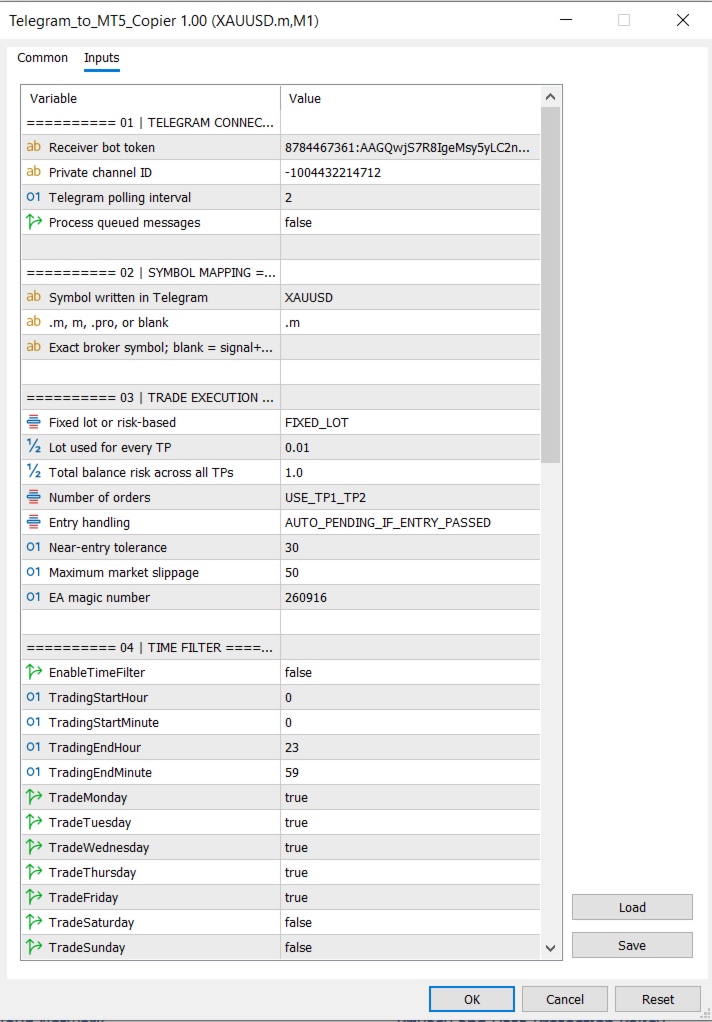
Telegram and broker symbols can be mapped automatically.
Example:
Telegram symbol: XAUUSD
Broker suffix: .m
Broker symbol: XAUUSD.m
The suffix can be changed or removed. An exact broker-symbol override is also available.
Lot-Sizing Modes
Two lot-sizing methods are available:
Fixed Lot
Every selected TP position uses the configured fixed lot.
Risk Percentage
The EA calculates the lot size using:
- Account balance
- Entry price
- Stop-loss distance
- Broker contract specifications
- Minimum and maximum volume
- Volume step
The selected risk percentage represents the total risk across all TP positions.
Automatic Stop-Loss Management
The break-even dropdown provides four modes:
- Disabled
- Move SL to Entry when TP1 is reached
- Move SL to TP1 when TP2 is reached
- Apply both rules progressively
Each Telegram signal stores its own TP levels, allowing the EA to manage multiple signals independently.
Optional Trailing Stop
The trailing stop is disabled by default and provides configurable:
- Activation distance
- Trailing distance
- Trailing step
Time Filter
The optional time filter uses MetaTrader broker/server time and includes:
- Start hour and minute
- End hour and minute
- Individual weekday controls
- Overnight-session support
The time filter affects new signals only. Existing trade management and Telegram commands remain active.
Telegram Remote Commands
The EA can manage trades directly from the configured private Telegram channel.
Default commands include:
bot help bot status bot stop bot resume bot move sl bot sl to 4220 bot tp1 to 4300 bot tp2 to 4310 bot close half bot close all bot close buy bot close sell bot cancel pending
The prices shown above are examples. Any valid price can be entered.
All command phrases are customizable from the EA inputs.
Remote Order Execution
Market orders can be opened using:
bot buy
bot sell
An order can be placed at a specific price:
bot buy 4296.889 bot sell 4310.000
The EA automatically determines whether a Limit or Stop order is required.
Explicit Limit orders are also supported:
bot buy limit 4296.889
bot sell limit 4310.000
Optional SL and TP values can be included:
bot buy limit 4296.889 sl 4286.090 tp 4304.448 bot sell limit 4310.000 sl 4320.000 tp 4300.000
If risk-percentage lot sizing is selected, an SL must be included so the EA can calculate the correct volume.
Telegram Notifications
The EA sends confirmation messages containing:
- Market or pending execution
- BUY or SELL direction
- Broker symbol
- MT5 order ticket
- Lot size
- Entry price
- Stop-loss
- Take-profit
- Number of accepted orders
If execution fails, the EA sends the actual MT5 rejection reason, including:
- Market closed
- Invalid price
- Invalid stops
- Insufficient margin
- Missing signal value
- Symbol mismatch
- Disabled direction
- Time-filter restriction
- EA stopped
- Lot-calculation failure
Professional Dashboard
The on-chart dashboard displays:
- EA status
- Telegram channel ID
- Signal-to-broker symbol mapping
- Lot-sizing method
- Number of TP orders
- Entry mode
- Time-filter status
- Break-even mode
- Trailing-stop status
- Slippage
- Open and pending order counts
- Floating profit or loss
- Last received signal
- Last EA action
The EA also applies a clean chart layout with:
- White background
- Blue bullish candles
- Red bearish candles
- Hidden chart grid
Installation
- Create a Telegram bot using BotFather.
- Add the bot as an administrator in the private signal channel.
- Copy the bot token and private channel ID.
- In MetaTrader 5, open:
Tools → Options → Expert Advisors - Enable WebRequest and add:
- Attach the EA to the broker-symbol chart.
- Enter the Telegram bot token and private channel ID.
- Enable Algo Trading.
Important Information
- A separate receiver bot is recommended.
- The Telegram bot must be an administrator in the private channel.
- A hedging account is required to maintain separate TP1, TP2, and TP3 positions.
- On a netting account, multiple positions for the same symbol may be combined.
- MetaTrader 5 must remain connected and running.
- Telegram signals and a Telegram channel are not included with the product.
- The EA executes instructions received through Telegram; it does not generate trading signals.
- Correct signal formatting and valid broker prices remain the user’s responsibility.
- Trading involves financial risk. This product does not guarantee profits or prevent losses