Purse Guard Trailing Stop Manager
- Yardımcı programlar
- Sürüm: 1.0

Purse Guard v1.00 — User Manual
1. What Purse Guard Does
Purse Guard is a trailing stop manager, Stop Loss manager, trade manager, and position-management utility for MetaTrader 5. It provides practical risk management for existing trades by managing Stop Loss on open positions with two conventional trailing methods:
-
Points Trailing — a fixed-distance points trailing stop that follows price by a selected number of MetaTrader 5 points.
-
Candle Trailing — a candle trailing stop that follows the structure of closed candles, with a user-defined candle count and buffer.
Purse Guard does not open trades, close trades, place pending orders, calculate basket breakeven, or manage positions as a basket. Every open position is evaluated independently.
Purse Guard manages all open positions for the symbol of the chart it is attached to, including manual trades and trades opened by other Expert Advisors. It does not filter by Magic Number.
Core Features
-
MetaTrader 5 trailing stop manager for existing positions
-
Stop Loss management by fixed points
-
Candle-based trailing stop using closed candle structure
-
Adjustable candle count and candle buffer
-
Independent position management, not basket management
-
Combined Points + Candle trailing mode
-
Broker-aware Stop Level and Freeze Level protection
-
Clean on-chart trade management panel with multiple themes
-
Works with manual trades and positions opened by other Expert Advisors on the same chart symbol
Important: If you have positions from several strategies on the same symbol, Purse Guard will manage all of them while its trailing modes are enabled.
2. Before You Start
-
Install Purse Guard in MetaTrader 5.
-
Open the chart for the symbol you want Purse Guard to manage.
-
Attach Purse Guard to that chart.
-
Make sure Algo Trading / AutoTrading is enabled in MetaTrader 5 and that the Expert Advisor is permitted to trade.
-
Open or already have one or more positions on that symbol.
-
Enable the trailing mode you want from the Purse Guard panel.
Purse Guard does nothing when there are no open positions to manage.
3. Panel Controls
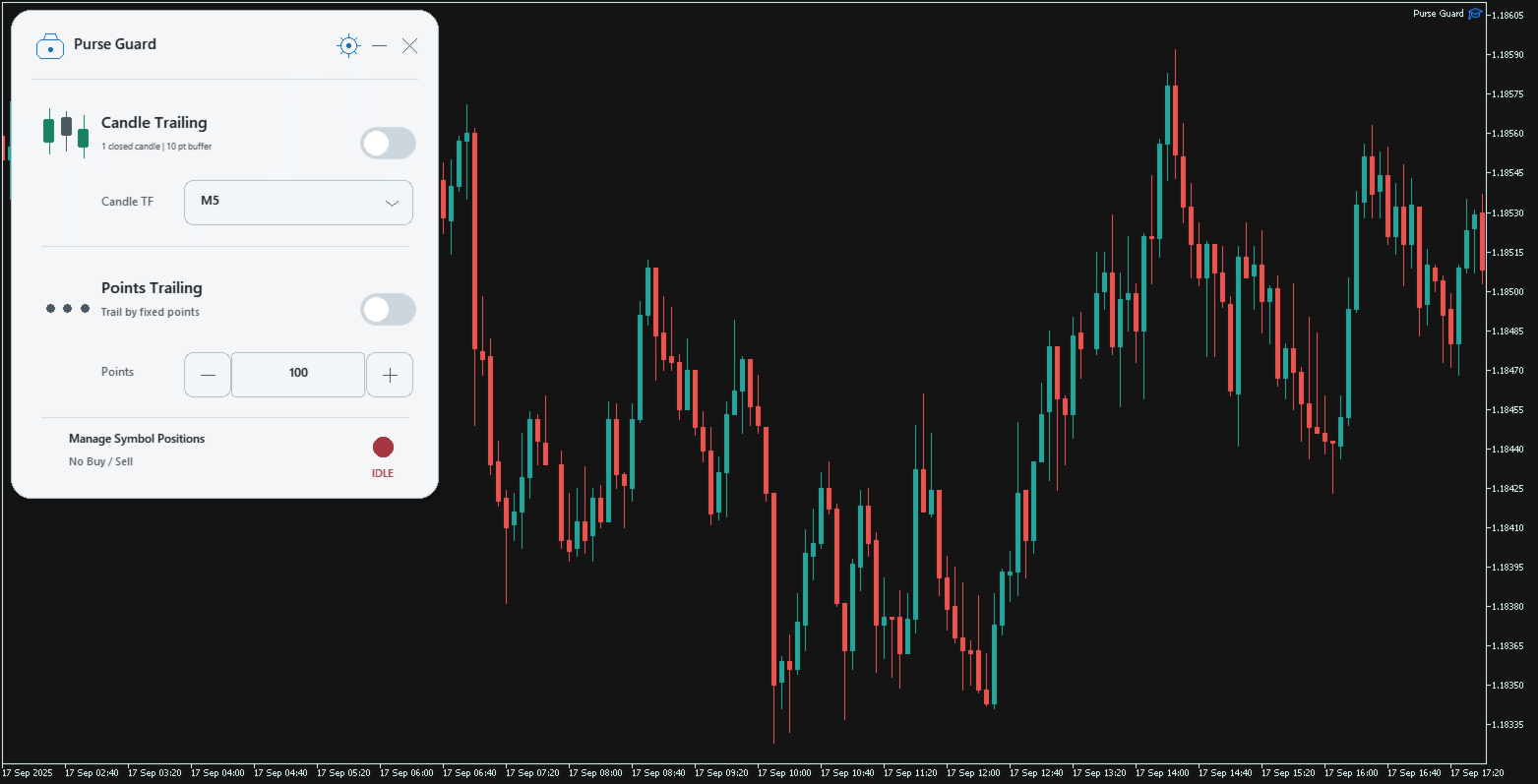
1 — Display Settings
Click the gear icon to open display settings.
Available options:
-
Scale: 90% / 100% / 110%
-
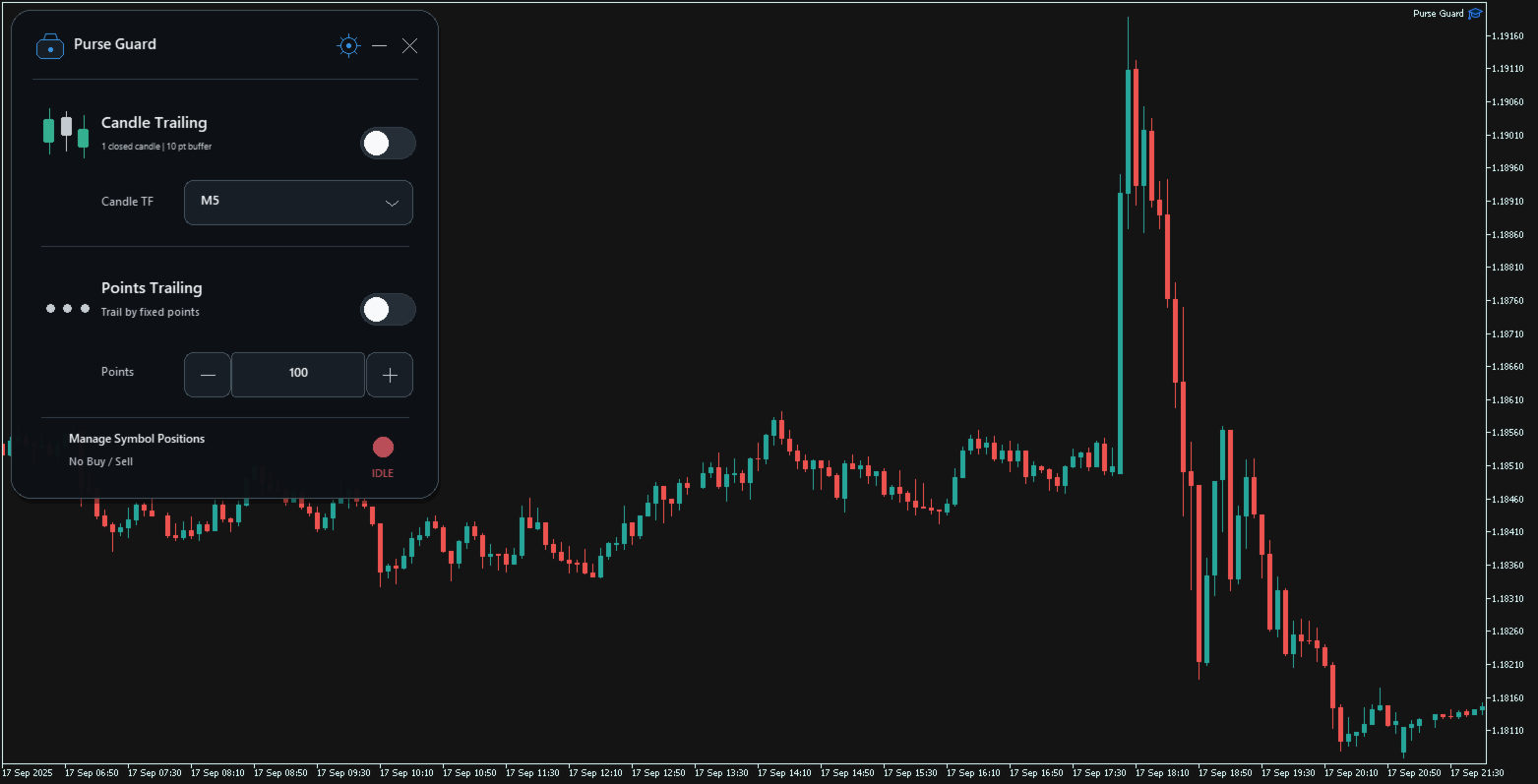
Theme: Midnight / Obsidian / White
Your display preferences can be remembered between uses when preference memory is enabled in the Expert Advisor Inputs.
2 — Minimize
Click the minus icon to collapse Purse Guard into its compact status bar.
Trailing remains active while the panel is minimized.
3 — Close to Launcher
Click the X icon to hide the full panel and leave the small OPEN launcher on the chart.
This does not remove the EA and does not switch off active trailing. Click OPEN to restore the panel.
To completely remove Purse Guard, remove the EA from the chart using normal MetaTrader 5 controls.
4 — Candle Trailing Toggle
Switches Candle Trailing ON/OFF.
When enabled, Purse Guard manages each position using the selected closed-candle structure.
5 — Candle Structure Information
The panel shows the current candle settings, for example:
3 closed candles | 10 pt buffer
The number of candles and buffer size are configured in the Expert Advisor Inputs.
6 — Candle Timeframe
Selects the timeframe used by Candle Trailing.
Available panel timeframes (using standard MetaTrader timeframe labels):
-
M1
-
M5
-
M15
-
M30
-
H1
-
H4
-
D1
-
W1
The Candle Timeframe is independent of the chart timeframe. For example, Purse Guard may run on a 5-minute chart while trailing from 15-minute candle structure.
7 — Points Trailing Toggle
Switches Points Trailing ON/OFF.
Each position activates independently after that position has moved far enough in a favorable direction for the selected trailing distance.
8 — Points Value
Sets the trailing distance in the symbol's native MetaTrader 5 points.
You can:
-
click − or + to change the value;
-
hold − or + for repeated adjustment;
-
click the number and type a new value;
-
press Enter to confirm;
-
press Escape to cancel editing.
The adjustment step is controlled by InpPointsStep in the Expert Advisor Inputs.
9 — Live Status
The status indicator shows the current management state:
-
IDLE — no trailing mode enabled;
-
CANDLE ON — Candle Trailing enabled;
-
POINTS ON — Points Trailing enabled;
-
BOTH ON — both modes enabled.
10 — Move the Panel
Click and drag an unused area of the panel header to reposition Purse Guard on the chart.
4. Points Trailing — How It Works
Points Trailing is a conventional per-position trailing stop mode for traders who want a fixed-distance Stop Loss manager.
BUY position
A BUY begins trailing only after Bid has moved at least the selected Points distance above that position's own entry price.
Once active:
Stop Loss = Bid − Points distance
SELL position
A SELL begins trailing only after Ask has moved at least the selected Points distance below that position's own entry price.
Once active:
Stop Loss = Ask + Points distance
Example
If Points is set to 100:
-
every position waits until it has at least 100 points of favorable movement;
-
after activation, the stop follows price at approximately 100 points distance, subject to broker trading rules.
Each ticket is handled independently. If you have three positions at different entry prices, each one activates according to its own entry.
Important: Points are not always pips
Purse Guard uses the symbol's native MetaTrader 5 point size. The meaning of 100 points depends on the instrument and its quote precision.
5. Candle Trailing — How It Works
Candle Trailing is a structure-based candle trailing stop. It uses closed candles only; the currently forming candle is never used.
You configure:
-
Candle Timeframe
-
Candle Count
-
Candle Buffer in points
BUY position
Purse Guard finds the lowest low of the selected number of closed candles and places the candidate Stop Loss below it:
Stop Loss = Lowest Low − Buffer
SELL position
Purse Guard finds the highest high of the selected number of closed candles and places the candidate Stop Loss above it:
Stop Loss = Highest High + Buffer
Example
Settings:
-
Candle Timeframe: M15
-
Candle Count: 3
-
Buffer: 10 points
For a BUY, Purse Guard looks at the last 3 completed M15 candles, finds their lowest low, and places the candidate stop 10 points below that level.
For a SELL, it finds the highest high of those same 3 completed candles and places the candidate stop 10 points above it.
The buffer gives the candle structure breathing room instead of placing the stop directly on the candle extreme.
6. Using Points and Candle Trailing Together
Both modes can be enabled at the same time.
Purse Guard calculates both valid Stop Loss candidates for each position and uses the more protective one:
-
For a BUY, the higher valid Stop Loss is used.
-
For a SELL, the lower valid Stop Loss is used.
Purse Guard never deliberately moves an existing Stop Loss backwards or widens risk.
This means the two modes cooperate rather than fighting each other.
7. Expert Advisor Inputs
Open Expert Advisor Properties → Inputs to configure the starting behavior.
User Interface / Display
-
Theme — starting theme.
-
Scale Percent — starting interface scale; snapped to 90%, 100%, or 110%.
-
Remember Position — remembers panel location.
-
Remember Preferences — remembers theme, scale, Candle Timeframe, and Points value.
-
Start X / Start Y — initial panel location when no saved position exists.
-
Start Minimized — starts in compact mode.
Candle Trailing
-
Candle Timeframe — starting Candle Timeframe.
-
Candle Count — number of closed candles used for structure.
-
Candle Buffer Pts — extra points beyond the candle high/low.
-
Start Candle On — starts Candle Trailing enabled when set to true.
Points Trailing
-
Initial Points — starting trailing distance.
-
Points Step — amount added/subtracted by the panel −/+ buttons.
-
Start Points On — starts Points Trailing enabled when set to true.
For normal discretionary use, the two Start ... On inputs can remain false, allowing you to arm trailing manually from the panel.
8. Broker Protection and Why Purse Guard May Wait
Purse Guard checks the broker's trading restrictions before attempting to move a Stop Loss.
It respects:
-
minimum Stop Level;
-
Freeze Level;
-
symbol tick size;
-
symbol trading permissions;
-
account and Expert Advisor trading permissions.
If the desired Stop Loss is temporarily too close to market price, inside a freeze zone, or otherwise invalid for the broker, Purse Guard waits instead of repeatedly sending an invalid request.
When price and broker conditions permit a valid protective move, trailing can continue.
9. Existing Stop Loss and Take Profit
Purse Guard only manages Stop Loss.
-
It preserves the existing Take Profit.
-
It does not remove or replace the existing Take Profit.
-
It does not widen an existing Stop Loss.
-
It does not close the position itself.
A position may still close normally because its Stop Loss, Take Profit, manual close, another Expert Advisor, or broker-side event was triggered.
10. Multiple Positions
Purse Guard is an individual position manager, not a basket manager.
If several positions are open on the chart symbol:
-
each position keeps its own entry price;
-
each position gets its own trailing calculation;
-
one position may begin Points Trailing before another;
-
each position's existing SL is evaluated independently.
There is no average entry calculation and no shared basket stop.
11. Chart Symbol Scope
One attached Purse Guard instance manages the current chart symbol only.
Example:
-
Purse Guard attached to EURUSD manages EURUSD positions.
-
It will not manage GBPUSD positions from that chart.
To manage another symbol, attach another instance of Purse Guard to a chart for that symbol.
12. Changing Chart Timeframe
Changing the host chart timeframe does not change the selected Candle Timeframe unless you change Candle Timeframe from the Purse Guard panel.
Purse Guard preserves its active trailing state through a normal host-chart timeframe change.
If the Expert Advisor is deliberately removed and attached again later, trailing does not silently reactivate unless the relevant startup input is enabled.
13. Quick Start Recipes
Simple fixed-distance trailing
-
Attach Purse Guard to the symbol chart.
-
Set the desired Points value.
-
Switch Points Trailing ON.
-
Leave Candle Trailing OFF.
Candle-structure trailing
-
Open Expert Advisor Inputs and choose Candle Count and Candle Buffer.
-
Attach Purse Guard.
-
Select the desired Candle Timeframe on the panel.
-
Switch Candle Trailing ON.
Combined trailing
-
Configure Candle Count and Buffer.
-
Set the desired Points distance.
-
Switch both modes ON.
-
Purse Guard uses the valid candidate that results in the tighter Stop Loss for each position.
14. Troubleshooting
Purse Guard is attached but the SL is not moving
Check:
-
Is at least one trailing mode ON?
-
Is there an open position on the current chart symbol?
-
Is Algo Trading / AutoTrading enabled?
-
Does the Expert Advisor have trading permission?
-
Has a Points-trailing position moved far enough into profit to activate?
-
Is the desired Stop Loss outside the broker's Stop Level and Freeze Level restrictions?
-
For Candle Trailing, is enough closed-candle history available for the selected timeframe and candle count?
I minimized or closed the panel and trailing is still working
That is expected. Minimize and X / close-to-launcher only change the interface state. They do not switch active trailing modes off.
I want trailing to stop
Switch the active Candle Trailing and/or Points Trailing toggles OFF. Confirm the status reads IDLE.
Purse Guard is managing trades I did not expect
Purse Guard manages all positions for its chart symbol, without Magic Number filtering. Remove it from that chart or switch trailing OFF if those positions should not be managed.
15. Product Boundary
Purse Guard is intentionally narrow:
It manages Stop Loss. It does not make the trade decision for you.
No Buy orders. No Sell orders. No basket logic. No automatic position closing. Purse Guard provides conventional per-position Stop Loss management using Points and Candle structure.
Purse Guard is built for traders who want a focused MetaTrader 5 utility that manages Stop Loss on open positions without taking over the trading decision.