HBT Global Range
- Uzmanlar
- Sürüm: 2.119
- Etkinleştirmeler: 10

1. Product Overview
HBT GLOBAL RANGE is a MetaTrader 5 Expert Advisor designed to monitor a diversified set of markets and participate in qualifying range-breakout opportunities through broker-visible pending orders. Each supported symbol uses its own sealed strategy configuration.
What the product provides?
• A multi-symbol portfolio built around ten canonical market families.
• Automatic broker-symbol matching, including common aliases, prefixes and suffixes.
• Independent symbol availability checks: one missing market does not stop the others.
• Five customer-selectable position-sizing modes plus a portfolio fixed-lot override.
• Ten independent new-entry switches and ten optional broker-symbol overrides.
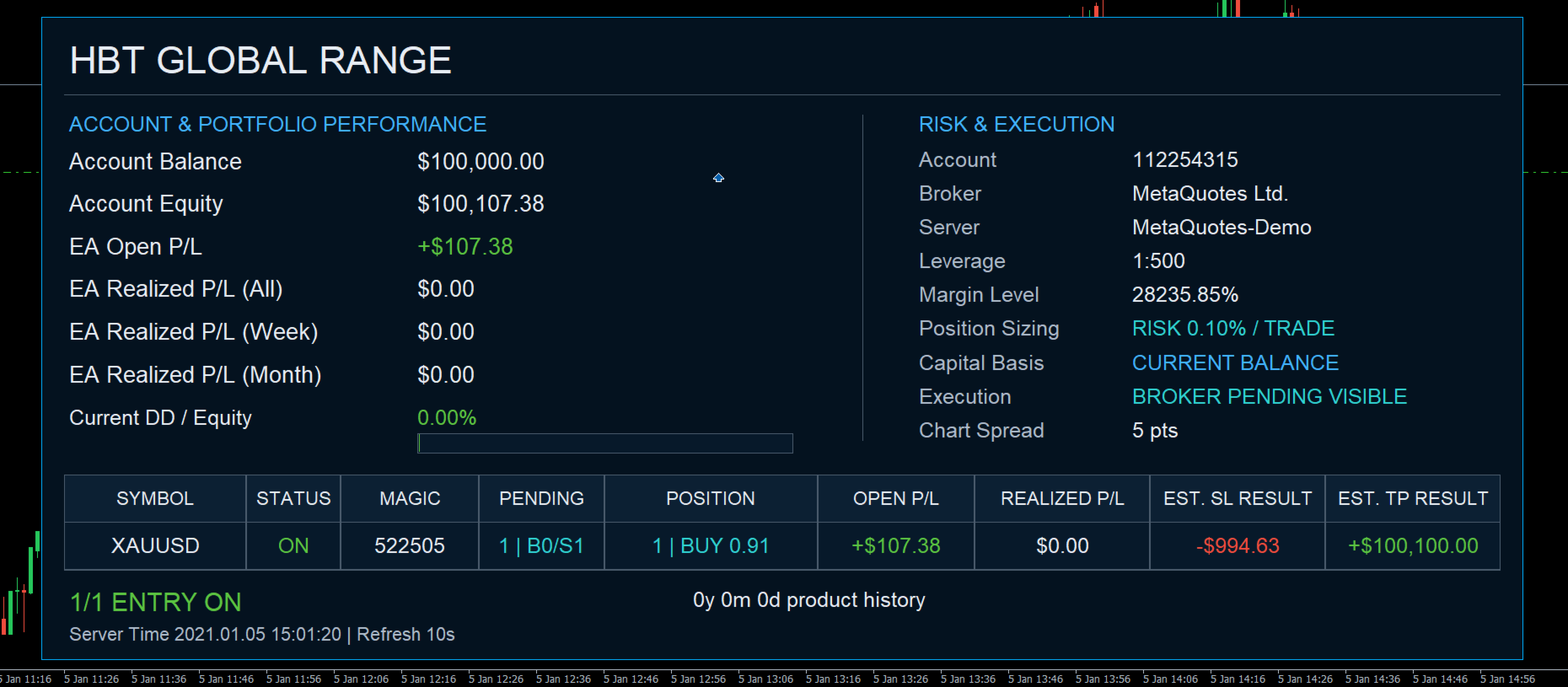
• A read-only portfolio panel for account, execution, position and P/L monitoring.
System requirements
Requirement Customer check Platform MetaTrader 5 desktop terminal Trading access Algo Trading enabled for the terminal and Expert Advisor Broker coverage At least one intended market available in the broker symbol catalog Connection Stable access to quotes, trade server and account history Validation Strategy Tester and demo verification before live use
2. Symbol Coverage and Routing
The product recognizes broker symbols by canonical family. The broker's literal name may include an alias, prefix, suffix, or both.
Canonical family Recognized aliases BTCUSD BTCUSD, XBTCUSD GER40 GER40, DE40, DAX40, GER30, DE30 ETHUSD ETHUSD EURJPY EURJPY EURUSD EURUSD GBPUSD GBPUSD DJ30 DJ30, US30, WS30, DOW30 SP500 SP500, US500, SPX500 USDJPY USDJPY NAS100 NAS100, USTEC, USTECH, US100, NDX100
Accepted broker-name patterns
Examples include m.EURUSD, pro_NAS100, EURUSD.a, USTECm, GBPUSD+, and m.NAS100.a. If automatic matching is ambiguous, enter the broker's exact symbol in the corresponding Symbol Override input.
Routing contract
• Live/demo: available Top 10 families are resolved independently; an unavailable family is skipped without stopping the remaining portfolio.
• Strategy Tester on a recognized family (for example NAS100, USTEC, USTECH.a or m.USTEC): portfolio mode remains active.
• Strategy Tester on a symbol outside all Top 10 families (for example XAUUSD): the EA runs that tester host symbol only.
• If a broker offers 8 of 10 families, the EA runs those 8 and skips the other 2; it does not fall back to a single host symbol.
EXPECTED STATUS: Missing broker markets are an availability condition, not a portfolio-wide failure. The panel lists only symbols that resolved successfully for the current run.
3. Installation and Quick Start
-
Install HBT GLOBAL RANGE in MetaTrader 5.
-
Open one chart in one of the Canonical family listed above and attach HBT GLOBAL RANGE once for the intended portfolio instance.
-
Attach the EA to the chart.
-
Enable Algo Trading and allow automated trading in the EA settings.
-
Keep Symbol Overrides empty for automatic routing unless the broker requires an exact name
-
Confirm the panel shows the expected resolved symbols and ENTRY ON count.
-
Backtest and forward-test on demo before considering live deployment.
Conservative first check
Input Initial value Apply These Risk Settings to All Symbols True Position Sizing Method Fixed lot Fixed Lot Size 0.01 Force One Fixed Lot for All Symbols False Top 10 new-entry switches True op 10 Symbol Overrides Empty = automatic Show Panel True
IMPORTANT: 0.01 is not automatically safe for every instrument or account. Contract size, margin, minimum volume, volume step, spread and leverage vary by broker. Verify every intended market in Strategy Tester and on demo.
4. Inputs - Trade Identity and Sizing Modes
Product Trade Identity
Setting Default Meaning Magic Number Suffix (0-999; 0 = Sealed Base) 0 Adds a customer suffix to each sealed trade identifier. Use a different suffix for separate instances; the sealed base identifiers are not shown in this manual. Comment Suffix (Optional; 14 ASCII Characters Max) Empty Adds an optional suffix to the default HBT_GLOBAL_RANGE trade comment. Allowed characters: letters, numbers, underscore and hyphen.
Position Sizing Method
Control priority
Dropdown choice Primary field Customer meaning Fixed lot Fixed lot size Uses the requested fixed volume, subject to broker volume rules and the configured maximum. Balance-Based Sizing Balance per 0.01 Lot Scales volume from the selected capital basis using the customer balance-step setting. Risk per Trade (%) Risk per Trade (%) Targets a percentage-based trade risk using the active capital basis and available protective price level. Fixed Cash Risk Cash Risk per Trade Targets a cash-denominated trade risk using the available protective price level. Strategy DD Budget (%) Strategy DD Budget (%) Uses the selected portfolio budget with sealed per-symbol calibration. It is a sizing input, not a guaranteed drawdown limit.
• Force One Fixed Lot for All Symbols = true has the highest sizing priority.
• Otherwise, Apply These Risk Settings to All Symbols = true applies the common risk block to every resolved symbol.
• When the common risk block is false, each symbol keeps its sealed product sizing configuration. The panel may show MIXED SIZING.
RISK TARGETS ARE NOT GUARANTEES Gaps, slippage, spread expansion, commission, swaps, broker execution and missing or changed protection levels can make actual results differ from any requested risk amount or percentage.
5. Inputs - Risk Management
Only values relevant to the selected sizing mode are used. Invalid or non-positive values for the active mode can prevent a new order.
Setting Default Meaning Apply These Risk Settings to All Symbols True Apply this common customer risk block to every resolved portfolio symbol. Position Sizing Method Fixed lot Select one of the five modes described on the previous page. Fixed Lot Size 0.01 Requested volume for Fixed Lot mode. Risk per Trade (%) 0.0 Percentage target used only by Risk per Trade mode; enter a positive value before selecting that mode. Cash Risk per Trade 100.00 Account-currency target used only by Fixed Cash Risk mode. Balance per 0.01 Lot 500.00 Capital step used only by Balance-Based Sizing. Strategy DD Budget (%) 2.0 Sizing budget used only by Strategy DD Budget mode; not a hard account DD stop. Capital Override (0 = Current) 0.0 Optional capital reference; zero uses the current selected account basis. Lot Update Threshold (%) 5 Minimum capital change used before eligible dynamic pending sizing is refreshed. Adaptive Lot Scaling False Allows the product's supported adaptive volume adjustment where applicable. Maximum Lot Size 99.0 Customer cap before broker maximum-volume and volume-step checks. Use Equity for Sizing False False uses balance; true uses equity for supported dynamic sizing. Increase Lot Only True For supported dynamic modes, prevents resizing from following decreases in the selected capital base. Reset Sizing High-Water Mark False Advanced maintenance switch that resets the stored sizing reference. Return it to false after the intended reset. Check Free Margin Before Entry True Checks available margin before sending a new trade request. Force One Fixed Lot for All Symbols False Overrides every active sizing mode with one common fixed lot when enabled. Forced Fixed Lot Size 0.01 Requested volume used by the portfolio fixed-lot override.
BROKER BINDING RULES The final accepted volume remains subject to the symbol's minimum, maximum, step and free-margin requirements. A requested value may be adjusted or rejected by the trading environment.
6. Inputs - Symbols and New Entries
Top 10 New Entry Selection
Setting Default Scope Allow New BTCUSD Entries True BTCUSD family Allow New GER40 Entries True GER40 family Allow New ETHUSD Entries True ETHUSD family Allow New EURJPY Entries True EURJPY family Allow New EURUSD Entries True EURUSD family Allow New GBPUSD Entries True GBPUSD family Allow New DJ30 Entries True DJ30 family Allow New SP500 Entries True SP500 family Allow New USDJPY Entries True USDJPY family Allow New NAS100 Entries True NAS100 family
Top 10 Broker Symbol Overrides - Empty = AutoWHAT FALSE MEANS: False blocks only a new entry generation for that family. Existing pending-order lifecycle, fills, position protection and exits remain under management. It does not force-close positions.
Setting Canonical family BTCUSD Symbol Override (Empty = Auto) BTCUSD GER40 Symbol Override (Empty = Auto) GER40 ETHUSD Symbol Override (Empty = Auto) ETHUSD EURJPY Symbol Override (Empty = Auto) EURJPY EURUSD Symbol Override (Empty = Auto) EURUSD GBPUSD Symbol Override (Empty = Auto) GBPUSD DJ30 Symbol Override (Empty = Auto) DJ30 SP500 Symbol Override (Empty = Auto) SP500 USDJPY Symbol Override (Empty = Auto) USDJPY NAS100 Symbol Override (Empty = Auto) NAS100
Default for every override is empty. Enter the broker's exact symbol only when automatic matching does not produce the intended result.
7. Core Developer Credit
• Tran Thien Huy
• Nguyen Thai Binh
• Phung Hung Thanh