King Assistant Trade
- Yardımcı programlar
-
Misbakhul Huda
 Professional MetaTrader 5 developer specializing in Expert Advisors, Trade Management Panels, and Copy Trading solutions. My mission is to build powerful, reliable, and easy-to-use trading tools that help traders manage positions efficiently while maintaining strict risk management. Every product is
 - Sürüm: 7.0
- Etkinleştirmeler: 5
Professional Manual + Auto Trading Panel for MetaTrader 5
Trade Like a King — One Panel for Everything Built for real traders. Tested on real accounts. Works on ALL brokers · ALL symbols · ALL account types.
🎯 WHAT IS KING ASSISTANT TRADE?
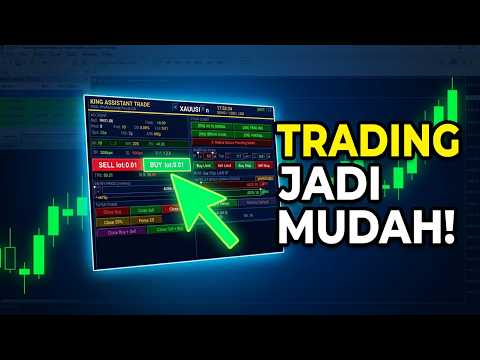
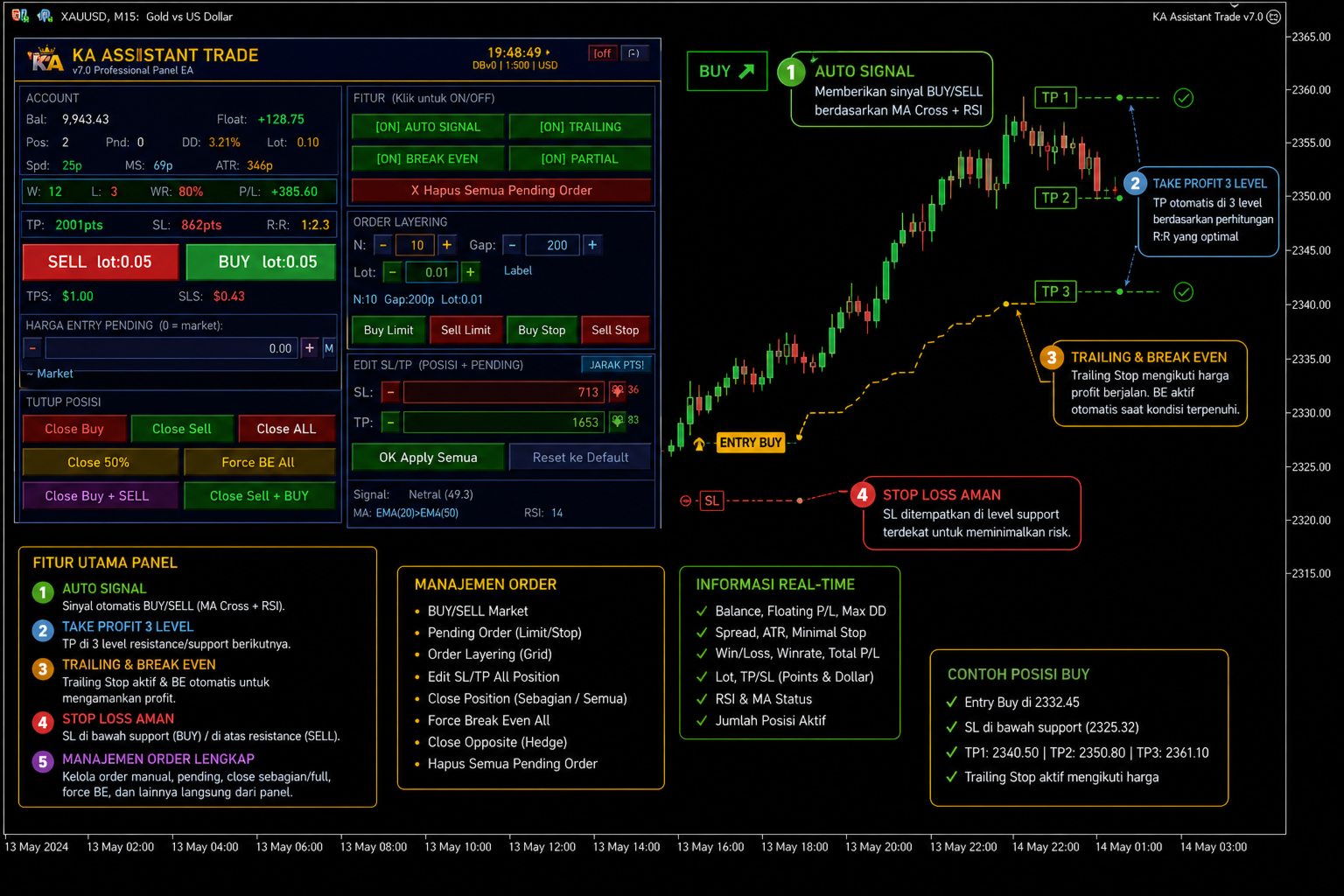
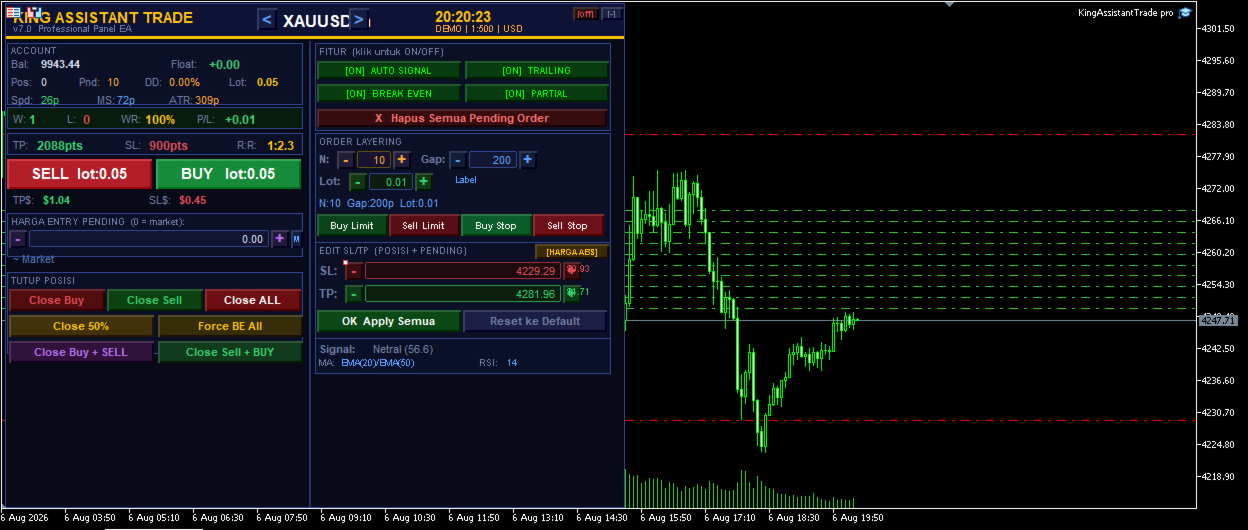
King Assistant Trade (KAT) is a professional-grade trading panel Expert Advisor for MetaTrader 5 that combines one-click manual trading, automatic signal detection, smart order layering, and full position management — all in one sleek, interactive dashboard directly on your chart.
Whether you are a scalper, swing trader, or prop firm trader — KAT gives you everything you need in a single EA.
✅ CORE FEATURES
🖱️ ONE-CLICK MANUAL TRADING
- BUY / SELL buttons with live lot size displayed on button
- Close Buy, Close Sell, Close ALL with confirmation dialog
- Close 50% — instant partial close
- Force Breakeven All — protect all positions at once
- Close Buy + Sell / Close Sell + Buy — reverse position in one click
📊 ORDER LAYERING SYSTEM
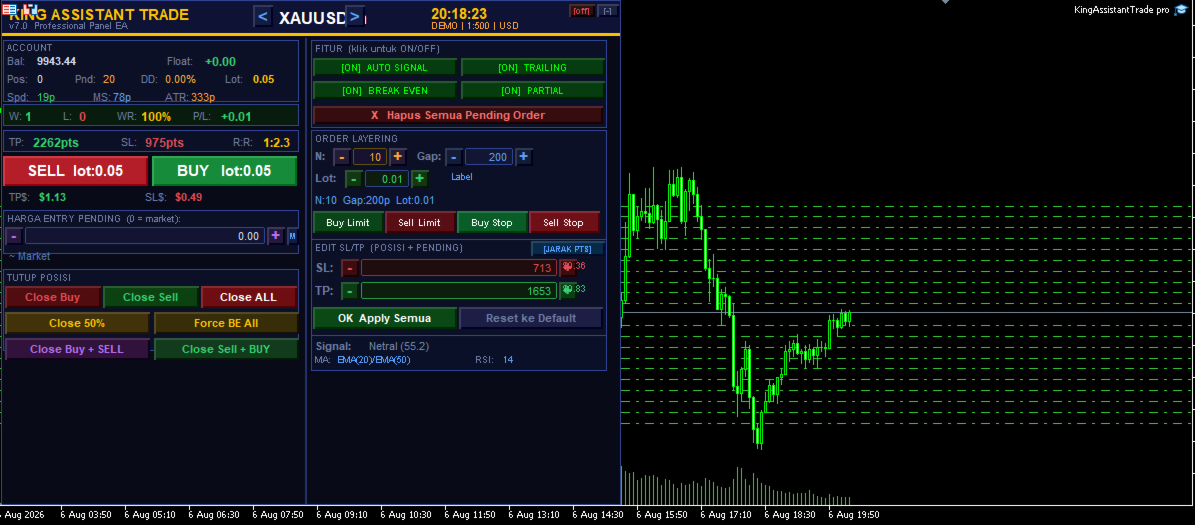
- Place N pending orders (BuyLimit / SellLimit / BuyStop / SellStop) simultaneously
- Stepper buttons (+/-) for N layers, Gap distance, and Lot size
- Custom entry price with +/- stepper
- Auto gap calculation from broker minimum stop level
- Delete all pending orders with one click
✏️ EDIT SL/TP ALL ORDERS
- Two modes: JARAK PTS (distance in points from entry) and HARGA ABS (absolute price)
- Stepper +/- buttons for SL and TP in both modes
- Apply to ALL open positions AND pending orders simultaneously
- Validates SL/TP direction automatically — prevents invalid stops
- Shows estimated USD value for each SL/TP setting
- Skip invalid positions instead of forcing SL=0 (safe)
🤖 AUTO SIGNAL ENGINE
- EMA Crossover (customizable fast/slow periods)
- RSI Confirmation (overbought/oversold filter)
- Higher Timeframe (HTF) Filter — only trade with H4/D1 trend
- MACD Confirmation — additional momentum filter
- Stochastic Confirmation — overbought/oversold secondary filter
- Fires only on confirmed bar close — no repaints
- Toggle ON/OFF directly from panel without restarting EA
🛡️ POSITION PROTECTION
- Auto Trailing Stop — ATR-based or fixed points
- Auto Breakeven — moves SL to entry after X points profit
- Auto Partial Close — closes % of position at target
- All toggleable live from panel during trading
💰 SMART RISK MANAGEMENT
- Auto Lot Calculator — calculates lot from % of balance risk
- Max Daily Loss % — EA stops trading automatically
- Daily Profit Target % — auto-stop when target hit
- Equity Stop — stop if equity drops below level
- Max Daily Trades — perfect for prop firm rules
- Margin Level Guard — stops when margin too low
- Order Cooldown — prevents accidental double orders
- Spread Filter — blocks orders during high spread
📈 CHART OVERLAY
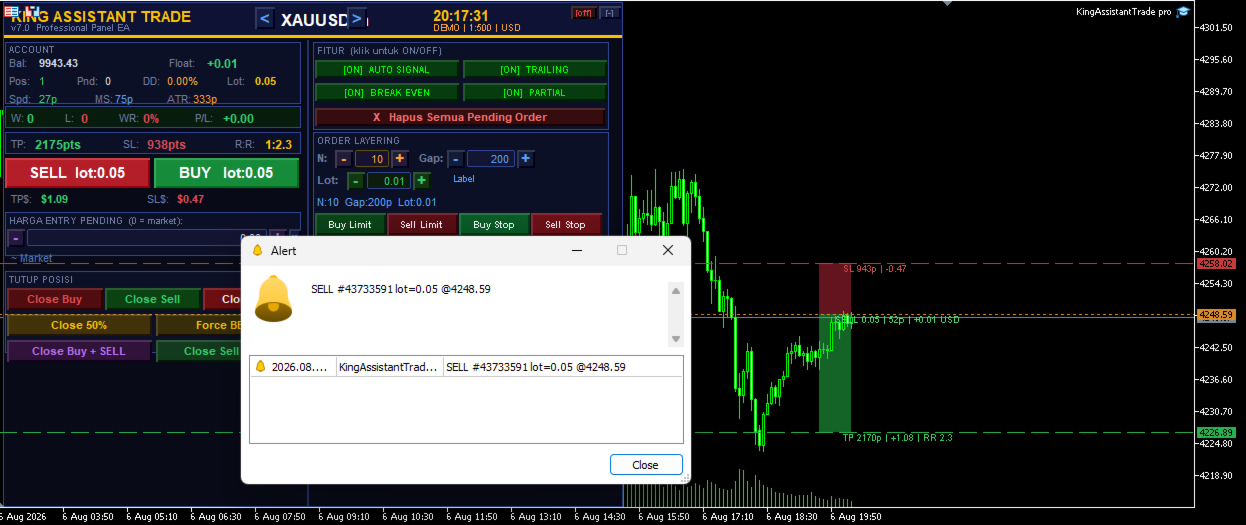
- TP / SL lines drawn directly on chart for every position
- Profit zone (green shading) and Loss zone (red shading)
- Position labels showing pips, P&L in USD, RR ratio
- Toggle chart overlay ON/OFF from panel header
🕐 SESSION & DAY FILTER
- Filter by trading session: Asia, London, New York
- Filter by day of week: Mon, Tue, Wed, Thu, Fri
- Auto-close positions when session ends (optional)
📱 NOTIFICATIONS
- Alert popup on signal
- Push notification to mobile MT5 app
- Sound alert
- Email alert
🎨 PANEL UX
- Dual-column professional layout — all info visible at once
- Real-time clock in header
- Symbol navigator — switch symbols with < > buttons
- Win/Loss/WinRate session statistics
- Daily P&L tracker
- TP$ / SL$ dollar value display
- R:R ratio display
- Panel minimize button — hide panel when not needed
- Keyboard shortcuts: B=Buy, S=Sell, C=Close All, X=Close Half, A=Auto Toggle, M=Minimize, Q=Close Buy, W=Close Sell
🌍 UNIVERSAL COMPATIBILITY
Uses POINTS system — works identically on ALL brokers and ALL account types without any adjustment.
| Broker | Account Type | Compatible |
|---|---|---|
| Exness | Standard, Cent, Raw Spread, Pro, Zero | YES |
| IC Markets | Standard, Raw, cTrader | YES |
| XM | Micro, Standard, XM Zero | YES |
| FBS | Cent, Standard, ECN | YES |
| Pepperstone | Standard, Razor | YES |
| RoboForex | All types | YES |
| Any ECN/STP | Standard, Cent, Islamic | YES |
⚙️ QUICK SETUP GUIDE (POINTS)
| Symbol | TP | SL | Max Spread | Slippage |
|---|---|---|---|---|
| EURUSD / EURUSDc | 100 | 50 | 50 | 10 |
| GBPUSD / GBPUSDc | 100 | 50 | 80 | 10 |
| XAUUSD / XAUUSDc | 500 | 200 | 500 | 30 |
| BTCUSDc | 50000 | 20000 | 500000 | 100 |
| US30 / NAS100 | 500 | 200 | 5000 | 50 |
TIP: Enable I_AutoConfig = true to let the EA auto-calculate TP/SL/Gap from your broker's minimum stop level.
📋 INPUT PARAMETERS (91 total)
| Group | Key Parameters |
|---|---|
| Symbol & Lot | AutoLot, RiskPct, FixedLot |
| TP/SL | AutoConfig, TPmult, SLmult, TP, SL, Slippage, MaxPos |
| Order Layering | Layers, LayerGap, GapMult, LayerLot, LayerTP, LayerSL |
| Trailing Stop | TrailOn, TrailATR, ATRPer, ATRMult, TrailPts, TrailStep |
| Break Even | BEOn, BEAt, BEExtra |
| Partial Close | PartOn, PartAt, PartPct |
| Auto Signal | AutoOn, FastMA, SlowMA, RSIPer, RSI_OB, RSI_OS |
| HTF Filter | UseHTF, HTFTf |
| MACD | UseMACD |
| Stochastic | UseStoch, StochK, StochD, StochOB, StochOS |
| Risk Protection | DailyLoss, MaxDDPct, DailyProfit, MarginMin, EquityStop, MaxDailyTrades |
| Session Filter | SessOn, SessAsian, SessLondon, SessNY |
| Day Filter | DayMon, DayTue, DayWed, DayThu, DayFri |
| Spread Filter | SpreadOn, MaxSpread |
| Notifications | AlertOn, PushOn, SoundOn, EmailOn |
| Chart Overlay | ShowOverlay, ShowShading, ColProfit, ColLoss |
| Panel | PanelX, PanelY, ColBuy, ColSell, KeyShortcut |
| EA | Magic, Comment, Cooldown |
🚀 GETTING STARTED
- Copy EA to MQL5/Experts/ folder
- Open MetaEditor → press F7 to compile (0 errors, 0 warnings)
- Drag EA to any chart
- In the EA settings dialog → Common tab → check Allow live trading
- Make sure the Algo Trading button in MT5 toolbar is GREEN
- Set I_MaxSpread appropriate for your symbol
- Click BUY or SELL on the panel — done!
⚠️ REQUIREMENTS
- MetaTrader 5 only (NOT compatible with MT4)
- Any timeframe supported
- Algo Trading must be enabled in MT5
- Internet connection required for push/email notifications
📊 PERFORMANCE NOTES
- EA does not trade automatically by default ( I_AutoOn = false )
- All risk management features are optional and configurable
- Backtest is supported in MetaTrader 5 Strategy Tester
- Past performance does not guarantee future results
- Always test on demo account first
🆘 SUPPORT
- Questions? Post in the Comments section (fastest response)
- Include your broker name, symbol, and error message from Journal tab
- Check the setup guide in EA header comments for symbol-specific settings
Version History:
- v7.0 — Full rebuild: stepper buttons, chart overlay, dual-column panel, auto signal multi-filter, all errors fixed