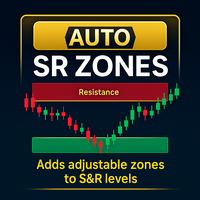
Auto SR Zones
- Göstergeler
-
Liam Alex Thomas Webb
 Merhaba, ben Liam — evet, orta isimlerimi yanlışlıkla isim kutusuna yazdım (klasik bir hata, biliyorum).
 - Sürüm: 2.10
- Güncellendi: 11 Haziran 2026
Otomatik Destek/Direnç Bölgesi – MetaTrader 5
Anahtar Fiyat Seviyelerini Kolayca Vurgulayın.
Otomatik Destek/Direnç Bölgesi, MetaTrader 5 (MT5) için grafiğinizdeki yatay çizgiler etrafında otomatik olarak özelleştirilebilir bölgeler oluşturarak teknik analizi geliştiren sezgisel bir göstergedir. Kullanıcı tarafından belirlenen bir pip uzaklığı ile tanımlanan bu bölgeler, önemli destek ve direnç alanlarını görsel olarak vurgulayarak yatırımcıların kilit fiyat aralıklarını ve potansiyel dönüş alanlarını hızla belirlemesine yardımcı olur.
Ana Özellikler
Dinamik Bölge Oluşturma – Ayarlanabilir pip uzaklığı (varsayılan: 10 pip) ile bölgenin genişliğini tanımlayarak yatay çizgiler etrafında otomatik olarak bölgeler oluşturur.
Destek ve Direnç Tanımlama – Bölgeler, mevcut fiyata göre renk kodludur (Destek: LimeGreen, Direnç: Tomato) hızlı görsel tanıma için.
Özelleştirilebilir Görünüm – Bölge şeffaflığını (0-255), renkleri ve yapılandırılabilir yazı tipi boyutu ve rengi ile isteğe bağlı destek/direnç etiketlerini ayarlayın.
Çizgi Filtreleme – Yatay çizgileri isteğe bağlı olarak kullanıcı tanımlı bir ön ek ile filtreleyerek belirli çizgiler için seçici bölge oluşturma imkanı sağlar.
Hata Ayıklama Bilgisi – Sorun giderme ve gösterge performansını izlemek için MT5 Uzmanlar sekmesinde isteğe bağlı hata ayıklama çıktısı.
Sorunsuz MT5 Entegrasyonu – MetaTrader 5 ile tam uyumlu olup, akıcı performans ve kolay kurulum sağlar.
Performans Odaklı – MT5 grafik performansı üzerinde minimum etkiye sahip hafif tasarım.
Ana Avantajlar
Gelişmiş Fiyat Seviyesi Analizi – Net bir şekilde tanımlanmış bölgeler, kilit destek ve direnç alanlarını belirlemeyi ve izlemeyi kolaylaştırarak işlem kararlarını iyileştirir.
Zaman Kazandıran Otomasyon – Yatay çizgiler eklendikçe, taşındıkça veya silindikçe bölgeleri otomatik olarak oluşturur ve günceller, manuel bölge çizimini ortadan kaldırır.
Görsel Netlik – Renk kodlu bölgeler ve isteğe bağlı etiketler, fiyat hareketini kritik seviyelere göre değerlendirmek için sezgisel bir yol sağlar.
Esnek Özelleştirme – Bölge genişliğini, renkleri, şeffaflığı ve etiketleri işlem stilinize ve tercihlerinize uyacak şekilde uyarlayın.
Çok Yönlü Kullanım – MT5'te destek ve direnç seviyelerine güvenen scalper'lar, swing yatırımcılar ve uzun vadeli yatırımcılar için idealdir.
Nasıl Çalışır
-
Göstergenin Kurulumu – Yatay Çizgi Bölgesi göstergesini MQL5 pazarı üzerinden veya özel içe aktarma ile MT5 platformunuza ekleyin.
-
Ayarları Yapılandırma – Bölge pip uzaklığı, renkler, şeffaflık ve etiket seçenekleri gibi giriş parametrelerini gösterge ayarlarında düzenleyin.
-
Yatay Çizgiler Ekleyin – MT5 grafiğinize yatay çizgiler çizin (manuel olarak veya diğer araçlarla), gösterge bunların etrafında otomatik olarak bölgeler oluşturacaktır.
-
Bölgeleri İzleyin – Bölgeler, çizgiler oluşturuldukça, taşındıkça veya silindikçe dinamik olarak güncellenir; renkler, mevcut fiyata göre destek veya direnç olarak hareket edip etmediklerini gösterir.
-
İhtiyaca Göre Özelleştirin – Bölge görünümünü kontrol etmek veya etiketler ile hata ayıklama bilgilerini etkinleştirmek/devre dışı bırakmak için ayarları değiştirin.
Uyumluluk
Platform – Yalnızca MetaTrader 5 (MT5).
Kurulum – MT5 platformunun MQL5 pazarı üzerinden veya .mq5 dosyasını içe aktararak kolay kurulum.
Sistem Gereksinimleri – MetaTrader 5 dışında ek donanım veya yazılım gereksinimi yoktur.
Kullanım Alanları
Scalping ve Gün İçi İşlem – Hızlı tempolu işlem kararları için MT5'te kilit destek ve direnç bölgelerini hızla belirleyin.
Swing Trading – Tarihsel fiyat seviyelerine dayalı olarak potansiyel dönüş veya kırılma alanlarını belirlemek için bölgeleri kullanın.
Teknik Analiz – Kritik destek ve direnç seviyelerinde fiyat hareketini doğrulamak için bölgeleri diğer göstergelerle birleştirin.
Eğitim ve Paylaşım – Sunumlar, işlem günlükleri veya müşteriler ve meslektaşlarla paylaşmak için etiketli bölgelerle net, profesyonel grafikler oluşturun.
Kurulum Talimatları
MQL5 Pazarı Üzerinden:
-
MT5'yi açın, Terminal penceresinde Market sekmesine gidin.
-
"Auto SR Zones" için arama yapın ve göstergeyi satın alın veya indirin.
-
Göstergeyi Navigator panelinden veya grafiğe sürükleyerek grafiğe ekleyin.
Özel İçe Aktarma Yoluyla:
-
Sağlayıcıdan Yatay Çizgi Bölgesi .mq5 dosyasını indirin.
-
MT5'te, Dosya > Veri Klasörünü Aç > MQL5 > Indicators yolunu izleyin ve .mq5 dosyasını Indicators klasörüne yerleştirin.
-
MT5'yi yeniden başlatın, ardından göstergeyi Navigator panelinde "Indicators" altında bulun.
-
Göstergeyi grafiğinize sürükleyin, ayarları yapılandırın (örn. ZonePips, SupportColor, ResistanceColor) ve etkinleştirmek için Tamam'a tıklayın.
Destek
Müşteri Desteği – Yardım için MQL5 platformunun mesajlaşma sistemi veya destek e-postası aracılığıyla benimle iletişime geçin.
Topluluk Geri Bildirimi – İpuçları ve özellik talepleri için MQL5 topluluk forumlarındaki tartışmalara katılın.
Kilit fiyat seviyelerini kolayca vurgulayın. Yatay Çizgi Bölgesi göstergesi, MetaTrader 5 yatırımcılarının destek ve direnç bölgelerini zahmetsizce görselleştirmesine olanak tanıyarak her ciddi yatırımcının MT5 araç seti için temel bir araç haline gelir.









































Kullanıcı değerlendirmeye herhangi bir yorum bırakmadı