Daily Sacrifice Pro

3

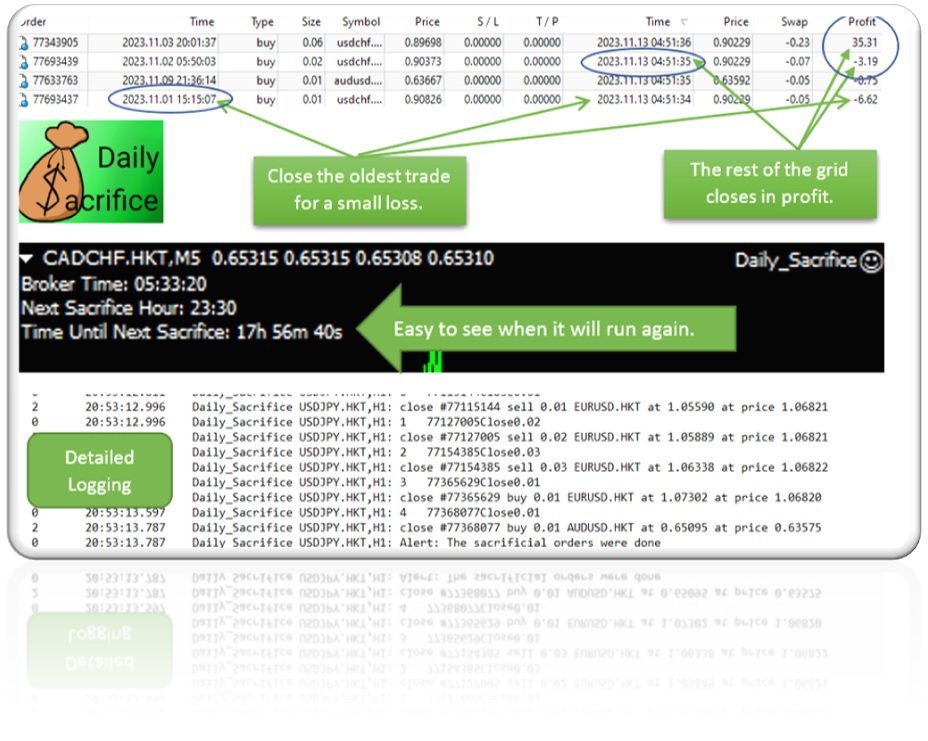
This is an expanded version of my Daily Sacrifice EA that closes old losing trades at the expense of a portion of your profits. This helps to slowly work away drawdown and accelerate the closure of martingale grids

*** Pro Features ***

Include/Exclude symbols.  These fields are empty by default, but if populated allow you to include only specific symbols or alternatively exclude specific symbols

Execute on an hourly interval.  Allows the EA to be ran every so many hours rather than on a fixed schedule.  If both hourly and daily options are selected the EA will run on both schedules.  It is suggested that you run one or the other, but not both.


Anyone who has traded with martingale knows that you can get trapped in grids and be hoping for a quicker recovery.  This led me to create this EA with the goal of helping to reduce drawdown and speed the recovery of martingale grids.

The configuration of Daily Sacrifice allows you to specify a drawdown threshold, minimum age of trades, maximum percent of profits to sacrifice and schedule to routinely close the least likely to recover trades on your account.


The logic is simple, close the oldest (or optionally furthest) trades first.  Regardless of what pair/s generate the profit, Daily Sacrifice will analyze the losing trades on the account and close them based on the parameters you set.  Closing these trades will allow a martingale grid to break even and close sooner.  For this strategy to work you must have some profit to close the old trades.  If you are only trading a single pair/EA you may not have profits to sacrifice. This strategy works best when you are trading 3 or more pairs/strategies.


With the default settings it doesn’t matter what EA or pair creates the profit, the Daily Sacrifice EA will sacrifice up to 33% of your daily profit to close losing trades over 72 hours old each trading day.  Of course, you can edit this to your liking.

Since Daily Sacrifice works across the account you only need to run it on one chart.  While running it on multiple charts is not necessary, and may cause duplicate runs, it is an option if you want it to run multiple times a day or with different settings on a particular day.

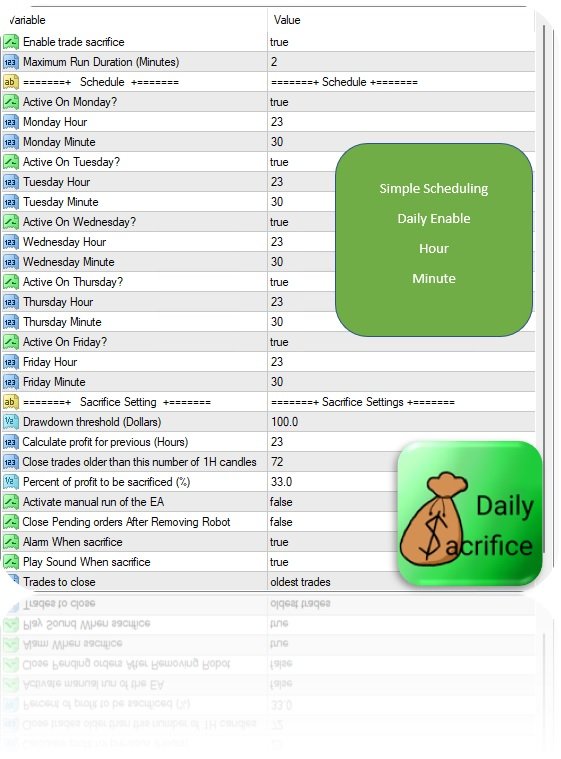
Here are the parameters.

Maximum Run Duration (Minute). This limits the duration of the run. There is no reason to edit this.

Daily settings to select which day/s and time to run.  ***Daily Sacrifice runs on “broker time” so I have included a clock and countdown in the upper left of the screen to demystify scheduling. ***

Drawdown threshold (Dollars) sets the minimum drawdown level in dollars required to activate Daily Sacrifice.  Daily Sacrifice will do nothing if the account does not meet this level of drawdown.  That’s a good thing though, carrying a little drawdown is part of many trading strategies.

Calculate profit for previous (Hours). Allows you to set how many previous hours of profit are eligible to sacrifice.  By default, the EA reviews the last 24 hours of profit.  Changing this allows you to have a “rolling” type of profit calculation where you may use the profits from several previous days to close orders. For instance, setting it to 72 hours would evaluate the last 3 days profit on a rolling basis and cancel trades up to the percentage each time.  This is a valid strategy, but it may cause individual days to close in loss.    

Close trades older than (number of 1H candles).  Trades younger than this will not be closed.  Has no effect if mode is set to close “furthest from profit”

Percent of profit to be sacrificed.  Old trades will be closed to a value offsetting this percent of your profits.  Remember this is based on closed trades in the previous number of hours you define.  Daily Sacrifice should not close trades greater than the profit that has already been closed.

Activate manual run of the EA.  Triggers the sacrifice EA to run once immediately on initialization.  If you use this on live make sure you turn it off or it will cause subsequent runs on EA initialization.

Alarm When sacrifice.  Displays a simple message on the terminal after the Daily Sacrifice EA has closed some trades.  If no trades meet the requirement (hence no trades are closed), it will not alarm.

Play sound when sacrifice.  Plays a sound when the sacrifice module closes trades.  Keep in mind this will not be audible if executed on a VPS or remote server.

Trades to close.  Allows you to select between closing the oldest or the furthest from profit trades first.


The default settings were chosen as a starting point suitable for most traders.  The EA will attempt to close the oldest trades first, but you should tweak these settings to meet your individual needs.  As always it is advisable to test Daily Sacrifice on demo before using on live accounts.

It is a simple EA I hope you find helpful.  Adding this to my trading strategy has helped me to reduce drawdown and improve profits.


!!! Due to rounding and the imperfect cost of trades your sacrificed amount may underrun or slightly overrun the percent of profit!!!  Please test in demo before live.


Happy trading.
 

https://t.me/DailySacrifice


Önerilen ürünler
Fully functional manual trade panel with risk/reward, auto SL, lot size calculation, one-click trading, hidden (virtual) stop loss/take profit and pending orders, scale in and out of trades (partial close), news events and more. Works with all symbols not just currency pairs. Brings an incredible amount of functionality to MetaTrader for free and for both demo and live accounts. Features Lot size calculation - based on % of account to risk, fixed amount or dynamic lots Automatic take profit base
FREE
Lot by Risk
Sergey Vasilev
4.83 (23)
Lot by Risk ticaret paneli elle işlem yapmak üzere tasarlanmıştır. Bu, emir göndermek için alternatif bir araçtır. Panelin ilk özelliği, kontrol hatlarını kullanarak siparişlerin uygun bir şekilde düzenlenmesidir. İkinci özellik, stop loss hattı mevcut olduğunda belirli bir risk için işlem hacminin hesaplanmasıdır. Kontrol hatları kısayol tuşları kullanılarak ayarlanır: kar al - varsayılan olarak T tuşu; price - varsayılan olarak P tuşu; kaybı durdur - varsayılan olarak S tuşu; Tuşları ticar
FREE
Important! Demo version will work only on EURGBP. One Click Trader is a tool designed for MetaTrader 4 platform, which enables you to take your trading to the next level. It enables you to open, manage and close your trades in simple an efficient way by just one click of your mouse button. Up arrow minimizes the OCT panel Down arrow maximizes the OCT panel Right arrow displays the next panel with additional features Left arrow hides the panel with additional features Red SELL button enables you
FREE
Auto Close is an expert advisor that can assist you with your money and risk management rules. The EA can monitor your Balance, Equity, Margin, Global Profit and Global Loss and alert you in case any of these reaches a specified threshold. This Demo Version has Notification and Close features disabled, full version can be found https://www.mql5.com/en/market/product/29141 How does it work? Load the Auto Close EA in the chart and set the parameters you want to keep monitored. If any of the risk
FREE
Account Info EA It is a tool that presents on the graph all the positions of the account, and specific information concerning the positions, but also the account. It enables the user to have an image of his account at a glance. Use like any expert advisor. You can't attach it in the same chart with other expert advisor. It does not have the ability to open or manage positions. You can attach it on any chart and any timeframe.
FREE
IceFX’s TradeInfo is an utility indicator which displays the most important information of the current account and position. Displayed information: Information about the current account (Balance, Equity, Free Margin). Current spread, current drawdown (DD), planned profit, expected losses, etc. Number of open position(s), volume (LOT), profit. Today’s and yesterday’s range. Remaining time to the next candle. Last day profit information (with integrated IceFX ProfitInfo indicator). Risk-based LOT
FREE
Safety
Sergey Ermolov
5 (2)
Sanırım herkes böyle bir para yönetimi kuralını «Kasa» olarak biliyor. Bilmeyenler için kasa, işlemdeki kazançlar ayak büyüklüğüyle eşitlendikten sonra pozisyonun yarısını kapatmayı varsayar. Böylece, fiyat açılıp dursa bile, artık para kaybetmeyeceksiniz, çünkü pozisyonun bir kısmı daha önce kapandığında tam olarak aynı miktarda kar elde edildi. Güvenlik Danışmanının yalnızca bir ayarı vardır – kapanış lotu. Onu 0 konumunda bırakarak, danışman anlaşmanın tam yarısını kapatacaktır. Danışmanın
FREE
一键平仓小工具,可以针对买单、卖单和挂单进行批量操作,可以操作当前图表订单和所有订单,简单高效。 第一行第一个按钮是关闭当前图表 品种 所有买单,第二个按钮是关闭当前图表品种的所有卖单,第三个按钮是关闭当前图表 品种 的所有订单; 第二行 第一个按钮是删除当前图表 品种 所有买单挂单,第二个按钮是 删除 当前图表品种的所有卖单 挂单 ,第三个按钮是 删除 当前图表 品种 的所有 挂单 ; 第三行第一个按钮是关闭所有 品种的全部买单,第二个按钮是关闭所有 品种的全 卖单,第三个按钮是关闭所有 品种的全部订单; 第四行第一个按钮是删除所有 品种全部买单挂单 ,第二个按钮是 删除 全部品种 的全部卖单挂单 ,第三个按钮是删除 全部品种 的全部挂单 。 希望此程序能对您有用
FREE
Neonplox Trade Manager
Mr Roberto Carlos Ferreira Silva
n3oNpLoX Trade Manager Market Order. Stop Order. Limit Order. To help you Place trades based on the amount of Money in Dollars you want to risk. As it will show in the screenshots you can calculate the right Lot size for the money you want to risk. Calculates Lot Size based on the distance between Stop Loss and Entry Point. 5 Options for TP - (1RR,2RR,3RR,4RR,5RR) It will help you manage your risk and Place trades with the correct Lot Size. So you will not over expose yourself and your money
FREE
Bar kapanışına kadar geri sayım timerı, + ilerleme durumu %:  #1 çok fonksiyonlu araç :   66+ özellik, bu araç dahil  |   Sorularınız varsa bana ulaşın    |    MT5 sürümü Göstergenin ayarlarında şu şekilde yapılandırma yapabilirsiniz: Hesaplama için zaman dilimi; true / false: Daha yüksek zaman dilimi seçeneği (şu anda kullanılan sonrakine: M15->M30, H4->D1...) Konum: 1 = Sol alt köşe; 2 = Sağ alt köşe; 3 = Sol üst köşe; 4 = Sağ üst köşe; Yazı tipi boyutu; Renk; Yazı tipi stili; ``` ​​​​​​​​​​
FREE
Show Pips
Roman Podpora
4.27 (59)
Bu bilgi göstergesi her zaman hesaptaki güncel durumdan haberdar olmak isteyenler için faydalı olacaktır. Gösterge, puan cinsinden kâr, yüzde ve para birimi gibi verilerin yanı sıra mevcut çiftin spreadini ve mevcut zaman diliminde çubuğun kapanmasına kadar geçen süreyi görüntüler. VERSİYON MT5 -   Daha kullanışlı göstergeler Bilgi satırını grafiğe yerleştirmek için birkaç seçenek vardır: Fiyatın sağında (fiyatın arkasında); Yorum olarak (grafiğin sol üst köşesinde); Ekranın seçilen köşesinde.
FREE
Profitstat is a free indicator that scans your history and displays it on the chart. The free version shows the number of trades and profit made on the current and previous day. The data is updated instantly as soon as a trade closes. Simply attach it to any chart and it gives the account data irrespective of the chart currency nor timeframe.
FREE
MQLTA Auto Close
MQL4 Trading Automation
5 (4)
Auto Close is an expert advisor that can assist you with your money and risk management rules. The EA can monitor your Balance, Equity, Margin, Global Profit and Global Loss and alert you in case any of these reaches a specified threshold. Free version with limited features can be found https://www.mql5.com/en/market/product/29179 How does it work Load the Auto Close EA in the chart and set the parameters you want to keep monitored. If any of the risk management parameters is met you can be not
FREE
If you are using scalping strategies (or any strategy that uses stop loss orders for position closing) you need to know your slippage. Slippage is the difference between your order price and the price that your brokers uses to execute your order. This can be really different and depends on the broker as well as on the market conditions (news, trading hours, etc..) With this small script you can calculate the slippage you "paid" in points and also in your account currency. You also get average va
FREE
This MQL4 indicator creates a customizable grid of horizontal lines on your trading chart. Here's what it does: **Main Functions:** - Draws equally spaced horizontal lines across the visible price range - Supports two line types: horizontal lines or trend lines with forward projection - Automatically adjusts to price scale changes **Key Features:** 1. **Customizable Spacing**: Set grid distance in pips (20 pips by default) 2. **Flexible Starting Point**: Auto-calculates starting price or lets
FREE
PZ Trade Pad EA
PZ TRADING SLU
4.29 (31)
This simple visual expert advisor allows you to trade easily from the chart. It handles risk management for you and can perform several useful tasks with your existing trades, saving time and making risk-management for each individual trade easier.  [ Installation Guide | Update Guide | Troubleshooting | FAQ | All Products   |  Get Help ] Trade easily from the chart Trade with precise risk management, hassle free Trade pending order with drag and drop price selection Set SL and TP levels with
FREE
InnovaDash Smart Sync, MetaTrader terminalinizi doğrudan InnovaDash Analytics kontrol panelinize bağlamak için tasarlanmış resmi veri bağlayıcısıdır. Profesyonel yatırımcılar için oluşturulan bu hafif yardımcı program, arka planda sessizce çalışarak canlı varlık (equity) güncellemelerinizi, açık pozisyonlarınızı ve geçmiş alım satım verilerinizi otomatik olarak InnovaDash'e aktarır. Neden InnovaDash? InnovaDash, ham alım satım verilerinizi ticaret performansınızı artırmak için eyleme dönüştü
FREE
Levels and risk calculator for the Antimartingale (or Antimartingala) technique Totally visual, setup everything from control panel Decide your risk and margin, it will calculate and show trading lavels on the chart Free version of the orginal Antimartingale EA:  https://www.mql5.com/en/market/product/53653 Public Signals using the Antimartingale's technique: https://www.mql5.com/en/signals/1016250 https://www.mql5.com/en/signals/1018964 This EA does not open trades, it only shows the trading le
FREE
This indicator alerts you when/before new 1 or 5 minute bar candle formed. In other words,this indicator alerts you every 1/5 minutes. This indicator is especially useful for traders who trade when new bars formed. *This indicator don't work propery in strategy tester.Use this in live trading to check functionality. There is more powerful Pro version .In Pro version,you can choose more timeframe and so on. Input Parameters Alert_Or_Sound =Sound ----- Choose alert or sound or both to notify y
FREE
This utility keeps a watchful eye on your trading terminals and ensures that you are notified if any of them are disconnected. Simply attach the utility to a chart and connect to a monitoring service who can notify you. We use UptimeRobot for both VPS and terminal monitoring; however, any service supporting heartbeat monitoring can be employed. Many such services offer free plans and various notification methods, such as Cronitor.io
FREE
A small trading panel makes it easier for a trader to visually place pending orders, market,  as well as trailing and unloading the grid of orders.  It is installed as a regular adviser.   Parameters and description:   Lot Volume: 100 - in this field you can set, change the order volume at any time   Line UP - visual horizontal level for pending BuyStop and SellLimit orders   Line DN - visual horizontal level for BuyLimit and SellStop pending orders   Delete Lines - delete all lines from t
FREE
This simple but useful script calculates the lot in % of the deposit. It is indispensable for risk management. There is only one customizable parameter: MaxRisk - risk in % for lot calculation. The product works as a standard script. Launch it once on an appropriate chart and start trading using the calculated lot value. Genious is simplicity! Happy trading!
FREE
Scalping Day Trading Support Utility Scalping One MT4 free One position is displayed with one button. View P & L, Lot, and Point in real time. It is possible to switch the display of positions of only chart currencies and all currency pairs.  (The free version has only 3 positions) Supports automatic identification in Japanese and English   Account currency notation corresponds to dollar, euro, pound, yen (automatic identification) The timeline drawing function can be linked with the clock disp
FREE
Core Positioning Advanced analytical tool designed specifically for MT4, providing in-depth analysis of trading history, uncovering data insights, optimizing strategies, and enhancing profitability. Core Usage Strategy Performance Evaluation: Analyzes profitability, stability, and risk to provide an objective rating from A+ to D. Trading Pattern Discovery: Identifies high-quality assets, time periods, and profit-making habits suited to different market conditions. Risk Management Optimization: C
FREE
This is a forex supporting tool for all manual traders. You can close positions immediately at once on the MT4 Terminal by a single click. CLOSE SELL: You can close SHORT positions of the target currency pair (same as the chart you’re using this EA). CLOSE BUY: Same as above but LONG positions will be closed. CLOSE ALL: All opened positions will be closed (no matter of currency pairs). You can select the closing method from CLOSE ALL or CLOSE ONE BY ONE. You can choose the positions to be closed
FREE
ClearEdge Daily Candle MT4 New York-close daily candle on any timeframe, with candle countdown, live spread and volatility information. Overview  ClearEdge Daily Candle draws the current day's candle next to the live price on any chart timeframe. On the 1-minute, 5-minute, 15-minute, 1-hour or higher charts, you can see where the trading day opened, how far price has moved in both directions, and whether the day is currently bullish or bearish, without switching to the daily (D1) chart. Why
KALIFX POSITION SIZE Calculator  – Risk & Lot Size Tool (MT4) KALIFX PS Calculator is a chart-based utility designed to help traders calculate position size and manage risk directly from a simple on-screen panel. It provides a structured way to define trade parameters and view calculated results before placing an order. Key Features On-Chart Control Panel: Manage all inputs and actions from a compact interface on the chart. Mode Switching: Toggle between Risk % and Fixed Lot modes. Order Type S
FREE
WOz
Andrej Hermann
5 (3)
Universal trading advisor "WOz" with a built-in trading panel The EA's capabilities can be easily tested in the strategy tester in visual mode. The EA can simulate real trading with the ability to move the SL and TP levels.  The EA has 5 modes of operation:  1. AUTOTRADING automatic trading mode on a set signal  2. ONLY SIGNAL mode of tracking the set signal without auto trading  3. RANGE MODUS mode of automatic placement of equidistant orders on Bayi Sell at a specified time  4. HAND MODUS
FREE
Watch a few videos in the playlist, turn on subtitles, and select a translation into your language. MOPS ( Managing Open PositionS ) is an expert advisor for managing open trades. Its key features include sending notifications to Telegram and automatically closing all positions when specified virtual take-profit and stop-loss levels are reached for all currency pairs, a specific pair, or a "magic number." The advisor not only sends sound alerts and push notifications to the mobile app but also
FREE
VR Renk Seviyeleri, trend çizgisi, dikdörtgen ve metin gibi unsurları kullanarak teknik analiz uygulayanlar için kullanışlı bir araçtır. Grafiğe doğrudan metin eklemek ve ekran görüntüsü almak mümkündür. Ayarlar, set dosyaları, demo versiyonları, talimatlar, problem çözme, adresinden edinilebilir. [Blog] İncelemeleri şu adresten okuyabilir veya yazabilirsiniz: [bağlantı] Sürümü [MetaTrader 5] Göstergeyle çalışma tek tıklamayla gerçekleştirilir. Bunu yapmak için, çizginin bulunduğu düğmeye tıkl
FREE
Bu ürünün alıcıları ayrıca şunları da satın alıyor
Local Trade Copier EA MT4
Juvenille Emperor Limited
4.96 (111)
Local Trade Copier EA MT4, aynı Windows bilgisayarı veya Windows VPS üzerinde çalışan birden fazla MetaTrader 4 hesabı arasında işlemleri kopyalamak ve yönetmek için hızlı ve esnek bir işlem kopyalayıcıdır. Yerel işlem senkronizasyonunu, Receiver tarafında lot büyüklüğü, risk yönetimi, işlem filtreleme, sembol eşleştirme, işlem yönetimi ve hesap koruması kontrolleriyle birleştirir. Transmitter ve Receiver terminallerinizi yaklaşık 1 dakika içinde ayarlayın ve aynı veya farklı brokerlardaki hesa
Trade Manager EA’ye hoş geldiniz! Ticaretin daha sezgisel, hassas ve verimli hale gelmesi için tasarlanmış nihai risk yönetim aracı ile tanışın. Bu sadece bir emir verme aracı değil; ticaret planlaması, pozisyon yönetimi ve risk kontrolü için kapsamlı bir çözüm. İster yeni başlayan bir yatırımcı olun, ister deneyimli bir trader ya da hızlı emir gerektiren bir scalper, Trade Manager EA ihtiyaçlarınıza uyum sağlar ve forex, endeksler, emtialar ve kripto paralar dahil tüm piyasalarda esneklik sunar
Trade Assistant MT4
Evgeniy Kravchenko
4.43 (197)
It helps to calculate the risk per trade, the easy installation of a new order, order management with partial closing functions, trailing stop of 7 types and other useful functions. Additional materials and instructions Installation instructions   -   Application instructions   -   Trial version of the application for a demo account Line function -   shows on the chart the Opening line, Stop Loss, Take Profit. With this function it is easy to set a new order and see its additional characteris
Trade Indicator Assistant is a powerful MT4 utility designed to turn indicators into automated trading systems. Its main feature is the ability to automatically detect an indicator’s   BUY and SELL signal buffers , without requiring you to know the buffer numbers, search through indicator settings, or modify the indicator source code. Bonus Indicator: After purchasing Trade Indicator Assistant, contact me to receive Trade Signal Pro completely free as a bonus indicator. [Download Demo Version]
Exp COPYLOT CLIENT for MT4
Vladislav Andruschenko
4.69 (65)
MetaTrader 4 için profesyonel işlem kopyalayıcı MetaTrader 4 için hızlı, güvenilir ve profesyonel bir işlem kopyalayıcı. COPYLOT , MetaTrader 4 ve MetaTrader 5 terminalleri arasında Forex işlemlerinin kopyalanmasını sağlar ve farklı hesap türleri ile işlem senaryoları için esnek senkronizasyon sunar. COPYLOT MT4 sürümü şunları destekler: MetaTrader 4 → MetaTrader 4 MetaTrader 5 Hedge → MetaTrader 4 MetaTrader 5 Netting → MetaTrader 4   MT5 sürümü Tam açıklama + DEMO + PDF Nasıl satın alınır Nası
Take a Break pauses your Expert Advisors when trading is a bad idea: before news, after a daily loss, outside your trading hours, or when a rule you wrote yourself says so. When the pause is over, your EAs simply continue. Account protection for all your EAs in one tool: news filter, drawdown and equity protection, time filter and custom rules. One EA on one chart protects the whole account, the free indicator gives every chart its own rules on top. Free demo | What is new in 26.09 | Support Ass
Riskinizi otomatik olarak hesaplarken işlemlere hızlı bir şekilde girip çıkmanıza yardımcı olacak Ticaret Yöneticisi. Aşırı Ticaret, İntikam Ticareti ve Duygusal Ticaretten korunmanıza yardımcı olacak özellikler içerir. İşlemler otomatik olarak yönetilebilir ve hesap performans ölçümleri bir grafikte görselleştirilebilir. Bu özellikler, bu paneli tüm manuel yatırımcılar için ideal kılar ve MetaTrader 4 platformunun geliştirilmesine yardımcı olur. Çoklu Dil desteği. MT5 Sürümü  |  Kullanım Kılavu
Telegram to MT4 Multi-Channel Copier   , Telegram kanallarınızdaki alım-satım sinyallerini doğrudan MetaTrader 4'e otomatik kopyalar. Bot yok, tarayıcı uzantısı yok, elle kopyalama yok. Sinyal Telegram'a düşer ve EA birkaç saniye içinde terminalinizde işlemi açar. Ve bir kanalı kopyalamadan önce, yerleşik backtester o kanalın hesabınızda ne yapmış olacağını gösterir. Ürün iki bileşenden oluşur: Telegram kanallarınızı dinleyen bir Windows uygulaması ve sinyalleri MT4 terminalinizde yürüten bu Exp
Trade copier MT4
Alfiya Fazylova
4.61 (36)
Trade Copier, ticaret hesapları arasındaki işlemleri kopyalamak ve senkronize etmek için tasarlanmış profesyonel bir yardımcı programdır. Kopyalama, tedarikçinin hesabından/terminalinden alıcının aynı bilgisayarda veya vps'de kurulu olan hesabına/terminaline gerçekleşir. Satın almadan önce demo sürümünü bir demo hesabında test edebilirsiniz. Demo versiyonu burada . Tüm talimatlar burada . Ana işlevler ve avantajlar: Emirlerin kopyalanmasını destekler: МТ4> МТ4, МТ4> МТ5, МТ5> МТ4. Emirlerin kopy
KT Equity Protector MT4
KEENBASE SOFTWARE SOLUTIONS
3.75 (4)
Her MetaTrader yatırımcısının çalıştırması gereken, ama çoğu kişinin hâlâ kullanmadığı tek EA. Çoğu hesap, strateji yanlış olduğu için batmaz. Kötü bir anda yatırımcı zararı büyümeye bırakır, pozisyonu artırır, işlemleri hafta sonuna taşır, kazançlı bir haftayı piyasaya geri verir veya tek bir hatalı tıklamayla prop firm günlük limitini unutur. Hesaplar genelde bu yüzden zarar görür. KT Equity Protector, bunun olmasına izin vermeyen otomatik koruyucudur. Tek bir grafiğe kurun. Kuralları anlaşılı
Telegram'dan MT4'e:   Nihai Sinyal Kopyalama Çözümü Telegram ile MT4'e   işlemlerinizi kolaylaştırın, DLL'lere ihtiyaç duymadan doğrudan Telegram kanallarından ve sohbetlerinden MetaTrader 4 platformunuza işlem sinyallerini kopyalamak için tasarlanmış son teknoloji yardımcı program. Bu sağlam çözüm, sinyallerin benzersiz hassasiyet ve özelleştirme seçenekleriyle sorunsuz bir şekilde yürütülmesini sağlayarak size zaman kazandırır ve verimliliğinizi artırır. [ Instructions and DEMO ] Temel Özellik
Partial Closure EA MT4
Juvenille Emperor Limited
5 (3)
Partial Closure EA MT4 , hesabınızdaki herhangi bir işlemi kısmen kapatmanıza olanak tanır. İşlemleri, lot büyüklüğünün seçilen bir yüzdesiyle ve/veya işlem biletiyle manuel olarak veya TP/SL seviyelerindeki belirli yüzdelerle otomatik olarak kapatabilir; bu, başlangıç lot büyüklüğünün yüzdesini en fazla 10 take profit ve 10 stop loss seviyesinde kapatır. Belirli magic numaralarını, yorumları veya sembolleri belirterek veya hariç tutarak hesabınızdaki tüm veya seçili işlemleri yönetebilir. İpu
MT4 to Telegram Signal Provider , Telegram'a sinyal göndermeyi sağlayan ve hesabınızı bir sinyal sağlayıcısına dönüştüren kullanımı kolay ve tamamen özelleştirilebilir bir araçtır. Mesajların formatı tamamen özelleştirilebilir! Ancak basit kullanım için, önceden tanımlanmış bir şablonu seçebilir ve mesajın belirli kısımlarını etkinleştirebilir veya devre dışı bırakabilirsiniz. [ Demo ]  [ Kullanım Kılavuzu ] [ MT5 Sürümü ] [ Discord Sürümü ] [ Telegram Kanalı ]  New: [ Telegram To MT5 ] Kurulum
TradePanel MT4
Alfiya Fazylova
4.84 (95)
Trade Panel, çok işlevli bir ticaret asistanıdır. Uygulama, manuel ticaret için 50'den fazla ticaret fonksiyonu içerir ve çoğu ticaret görevini otomatikleştirmeyi mümkün kılar. Uygulama talimatları : https://www.mql5.com/en/blogs/post/756482 Demo hesabı için uygulamanın deneme sürümü: https://www.mql5.com/en/blogs/post/750865 Uygulamayı nasıl kurulur: https://www.mql5.com/en/blogs/post/756239 Uygulamayı görsel modda nasıl test edilir: https://www.mql5.com/en/blogs/post/770277 Uygulamayı VPS Meta
Universal copier of deals from MetaTrader 4 to MetaTrader 4 ( MT5<->MT5 version is available ; with both versions, you can copy MetaTrader 5<->MetaTrader 4, MetaTrader 4<->MetaTrader 5, MetaTrader 5<->MetaTrader 5, MetaTrader 4<->MetaTrader 4). Spread filter. Select the best price (start copying positions with a profit or loss). Configure the lot size, fixed or ratio-based (provider signals can be copied with an increased lot). Configure order copying (include pending orders or copy only open po
MT4 Sürümü: https://www.mql5.com/tr/market/product/91169 MT5 Sürümü: https://www.mql5.com/tr/market/product/110193 Canlı Sinyal: https://www.mql5.com/tr/signals/2345410 Eşsiz uyum kabiliyeti ve son teknoloji risk yönetimi stratejileriyle dünya çapında profesyonel yatırımcıların güvendiği en üst düzey araç olan "Smart Trader" işlem asistanı uzman danışmanını sunuyoruz. "Smart Trader"ın merkezinde, sürekli değişen piyasa koşullarına dinamik olarak uyum sağlayacak şekilde titizlikle tasarlanmış
VirtualTradePad mt4 Extra
Vladislav Andruschenko
4.85 (61)
1 tıklama ile ticaret için Ticaret Paneli.   Pozisyonlar ve emirlerle çalışmak!   Grafikten veya klavyeden alım satım. Alım satım panelimizi kullanarak, grafikten tek bir tıklamayla alım satım yapabilir ve alım satım işlemlerini standart MetaTrader kontrolünden 30 kat daha hızlı gerçekleştirebilirsiniz. Bir tüccar için hayatı kolaylaştıran ve bir tüccarın ticaret faaliyetlerini çok daha hızlı ve daha rahat gerçekleştirmesine yardımcı olan parametrelerin ve işlevlerin otomatik hesaplamaları. Graf
Fotokopi->Kullanışlı ve hızlı arayüz etkileşimi, kullanıcılar hemen kullanabilir       ->>>> Windows bilgisayarlarda veya VPS Windows'ta kullanılması önerilir Özellikler: Çeşitlendirilmiş ve kişiselleştirilmiş kopyalama ticareti ayarları: 1. Farklı sinyal kaynakları için farklı lot modları ayarlanabilir 2. İleri ve geri kopyalama ticareti için farklı sinyal kaynakları ayarlanabilir 3. Sinyaller yorumlarla ayarlanabilir 4. Lotun sözleşme lotuna göre kalibre edilip edilmeyeceği Çeşitlendirilmiş v
Çalışan Deneme Sürümünü İndir Copy Cat More (Taklitçi Kedi) — İşlem Kopyalayıcı (Trade Copier) MT4 sadece basit bir yerel işlem kopyalayıcı değildir; bugünün ticaret zorlukları için tasarlanmış eksiksiz bir risk yönetimi ve yürütme çerçevesidir (risk management and execution framework). Prop firm challenge'larından kişisel portföy yönetimine kadar, sağlam yürütme, sermaye koruması, esnek yapılandırma ve gelişmiş işlem yönetimi karışımıyla her duruma uyum sağlar. Kopyalayıcı hem   Master (Mast
MetaTrader 4 için para birimi gücü göstergesi Bu para birimi gücü göstergesi 28 kadar ana pariteyi okur ve 8 ana para birimi için birer değer üretir: USD, EUR, GBP, JPY, CHF, CAD, AUD ve NZD. Kimin önde olduğunu anlamak için grafik üstüne grafik açmak yerine, MetaTrader 4 grafiğinizdeki tek bir paneli okur ve hangi para biriminin alındığını, hangisinin satıldığını görürsünüz. Panelde ne görürsünüz 8 para biriminin her biri için sıralanmış güç çubuğu ve yüzdesi Çoklu zaman dilimi matrisi: para bi
King Trade Copier MT4
Mohammed Maher Al-sayed Mohammed Ahmed Saleh
5 (1)
King Trade Copier, aynı bilgisayarda veya VPS'te çalışan MetaTrader terminallerini birbirine bağlar. Bir hesapta açılan işlemler diğerlerinde de görünür. Dosya her iki rolü de taşır, bu yüzden aynı indirme, Mode'u neye ayarladığınıza bağlı olarak gönderici ya da alıcı olur. Her grafikte panel, bu terminalin gönderip göndermediğini ya da alıp almadığını gösterir, karşı taraftaki hesabın adını verir, yanıt veren alıcıları sayar ve son sinyalin yaşını bildirir. Kopyalanmayan bir emir, kaybolmak ye
Smart Copy Local MT4
Kyra Nickaline Watson-gordon
5 (7)
Smart Copy is an Easy-to-Use EA that supports Multi Copying Metatrader4 and Metatrader5 and Local/Remote Copying. (Remote Version is coming soon) Free version is available on Smart Copy Local Free MT4 Specifications :     Real Time, Multi Terminal - Multi Account - MT4/MT5 trade copying     Copy from netting to hedge and hedge to netting is supported.     Fast and instant copy     All settings are input visually.     Easy modifying symbol names, prefix, suffix     Enable/Disable copying s

Fotokopi->Kullanışlı ve hızlı arayüz etkileşimi, kullanıcılar hemen kullanabilir       ->>>> Windows bilgisayarlarda veya VPS Windows'ta kullanılması önerilir Temel işlevler: Kopyalama ticaretinin normal etkileşim hızı 0,5 saniyeden azdır Sinyal kaynaklarını otomatik olarak algıla ve sinyal kaynağı hesaplarının bir listesini görüntüle Sembolleri otomatik olarak eşleştirin, farklı platformlarda yaygın olarak kullanılan ticaret sembollerinin %95'i (farklı ekler gibi özel durumlar) otomatik olarak
Close If Profit or Loss with Trailing for MetaTrader 4 — toplam kâr veya toplam zarar ile otomatik kapatma MetaTrader 4 için pratik bir işlem yönetimi aracıdır. Toplam kâr veya toplam zarar belirlediğiniz seviyeye ulaştığında, seçilen pozisyonları otomatik olarak kapatabilir. Expert Advisor açık işlemleri izler, değişken kâr/zarar sonucunu hesaplar, Trailing Profit kullanabilir ve pozisyonları manuel müdahaleden daha hızlı yönetmenize yardımcı olur. MetaTrader 4 hâlâ manuel trader’lar, scalper’
Risk manager Risk manager - it will simplify the tracking of drawdown and will notify you (alert) when the specified risk is reached, and close/lock orders when the critical DD risk level is reached. If the specified drawdown is exceeded, you can choose two options for actions: All orders will be closed that mean loss will be fixed on depo. The terminal also closes. Instead of fixing the loss on depo, the opposite order will be opened - orders locking will occure. Not a single order will be c
This product can be used to synchronize multiple Charts, and each Chart can be set to a different sync mode. With this product you can better view and manipulate charts: different time frames for a single Symbol, the same time frame for multiple Symbols... and more. PS: The link below is the FreeDemo product, you can use it on EURUSD/XUAUSD/USDCNH symbol: https://www.mql5.com/en/market/product/38557 Feature: Chart settings  can be synchronized, including : background, indentation, size, etc. M
Trade Dashboard simplifies how you open, manage, and control your trades, with built-in lot size calculation. It allows you to execute trades, manage risk, and control positions directly on the chart, with tools such as partial close, breakeven, and trailing stop. Designed to reduce manual work and help you stay focused on your trading decisions. A demo version is available for testing. Detailed explanations of features are provided within the MQL5 platform. Installation instructions are include
The product will copy all telegram signal to MT4   ( which you are member  ) , also it can work as remote copier.  Easy to set up, copy order instant, can work with almost signal formats, image signal, s upport to translate other language to English Work with all type of channel or group, even channel have "Restrict Saving Content", work with  multi channel, multi MT5 Work as remote copier: with signal have ticket number, it will copy exactly via ticket number. Support to backtest signal. How to
Second and Custom Timeframe Charts See the market between standard timeframes. Second and Custom Timeframe Charts is a professional chart utility for MetaTrader 4 that creates synthetic candles for non-standard timeframes directly from market data. It is designed for traders who need more flexibility than the default MT4 timeframe set can provide. Standard charts show only fixed periods. But the market does not always move in standard blocks. Sometimes the most important structure is visible on
Shepherd Safety EA
AW Trading Software Limited
4.92 (13)
AW Shepherd Safety EA, açık pozisyonları yönetmek için tasarlanmış bir Uzman Danışmandır. İlk emri yatırımcı panelden açar, sepeti bundan sonra EA kendisi yönetir: trend filtresiyle kurtarma emirleri ekler, tarafı TakeProfit, trailing veya stop ile kapatır ve kapanış seviyelerini grafikte gösterir. Alımlar ve satımlar ayrı ayrı yönetilir, iki taraf aynı anda açık olabilir. Kurtarma emri yalnızca fiyat adımına göre değil, Parabolic SAR, iki MA veya mum rengine göre pozisyon yönünde bir dönüş gerç
Yazarın diğer ürünleri
This simple EA closes old losing trades at the expense of a portion of your profits. This helps to slowly work away drawdown and accelerate the closure of martingale grids *** New Features *** Added - Option to close oldest or furthest from current price trades Added -   Calculation of profits that will be sacrificed. Anyone who has traded with martingale knows that you can get trapped in grids and be hoping for a quicker recovery.   This led me to create this EA with the goal of helping to r
FREE
Filtrele:
Zhalgaskali Ussengaliyev
825
Zhalgaskali Ussengaliyev 2026.07.02 10:47 
 

не пашет

Değerlendirmeye yanıt