Telegram ChartSnap MT5

5


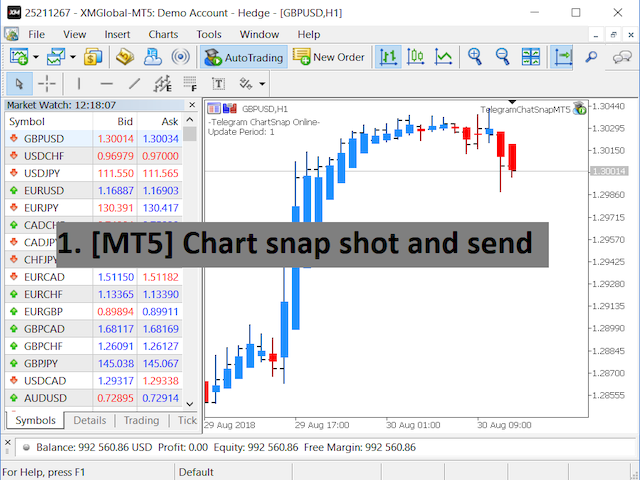
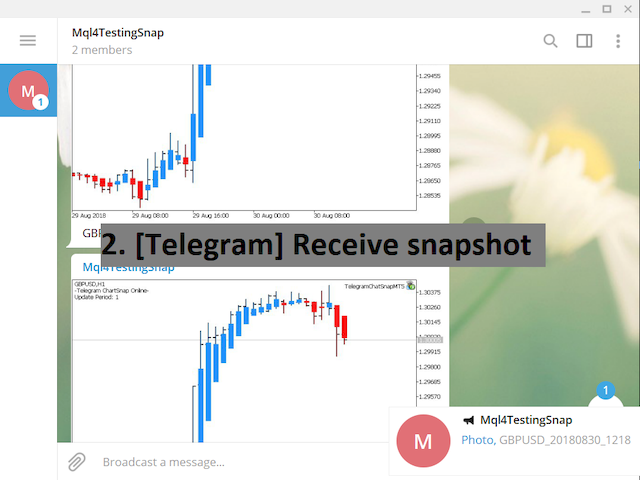
Telegram ChartSnap MT5 is an utility tool to bridge your MetaTrader 5 activities to your Telegram chat/group/channel. It will screen shot your MetaTrader 5 chart and send it to your dedicated Telegram chat/group/channel through a Telegram bot. The whole process will keep repeating based on a time cycle that predetermined by the user. It is a convenient tool for those who like to get access to their favorite system/dashboard that only available at MetaTrader Desktop. Beside that, trader can easily share their favorite system/dashboard to their Telegram group/channel members. This utility is very useful especially for those who like to trade using their mobile devices. 


*Special Setup

  • In case your chart is running an EA and you wish to run this utility EA at the same time:
  • Let's name the chart with the running EA = Chart_A.
  • Stop the EA on Chart_A and run the ChartSnap EA with option ShowChartIdOnly=true.
  • Copy the Chart_A's ChartID that show on the terminal window and remove the ChartSnap EA. DO NOT CLOSE the Chart_A window.
  • Re-attach the running EA and open another chart. Let's name the newly open chart = Chart_B.
  • Attach the ChartSnap EA on Chart_B and fill the ChartID for Chart_A.
  • The Chart_B ChartSnap EA will now screen shot your Chart_A and send it to your Telegram chat.


Parameters

  • Token="" - enter your bot API token.
  • ChatID=0 - enter your Telegram ChatID.
  • DisableNotification=false - screenshot will send to Telegram with or without notification.
  • UpdatePeriod=M1 - repeat cycle timer. (based on candle opening time)
  • CaptionOption=cCustom - option for screenshot caption.
  • CustomCaption="" - custom text for screenshot caption if CaptionOption=cCustom.
  • ChartID=0 - target chart to be screen shot. '0' indicate the attached chart will be the screen shot target.
  • Width=800 - screenshot file width.
  • Height=600 - screenshot file height.
  • ShowChartIdOnly=false - show the attached chart's ID on screen.


Telegram Bot Setup guideline

  1. Open your Telegram APP and search for "BotFather".
  2. Type /start and click/type /newbot to create a new bot.
  3. Give your bot a nickname and username (e.g., nickname: TestingABC and username: TestingABCbot <-- username has to be ended by 'bot').
  4. Congratulations! You have created your Telegram bot.
  5. Save your bot API token (e.g. 227330911:AAEWHnT9B9bAARDiKhESwXd7hk-G4nxmEpI) and click t.me/TestingABCbot to chat with it.
  6. Go back to Telegram APP and search for 'userinfobot'.
  7. Type /start and retrieve your personal Telegram Chat ID (e.g., 12345678).
  8. Back in MetaTrader 4, go to Tools > Options > Expert Advisors > tick 'Allowed WebRequest for listed URL' and add 'https://api.telegram.org'.
  9. Attach the utility into your MetaTrader 4 chart and fill up the Token (from step 5) and ChatID (from step 7).
  10. Hooray! Your ChartSnap utility is ready to work for you.
  11. Fill up the Chat ID with your Channel ID and set your bot as a channel administrator in order for your bot to work in the channel.

Отзывы 1
Виктор Крайнов
73
Виктор Крайнов 2023.09.20 13:36 

Очень полезное программное обеспечение. Респект автору что учёл его необходимость.

Рекомендуем также
Trade Control Panel
Jerry Jilun Anak Liban
Trade Control Panel Function Normal One Click Function Close All Close All Profit Close All Loss Close All Pending Order Close All Sell Close All Buy Advance One Click Function 1.  Close Partial Lot Sell by Percent It will help you partial close for all open position by desire percent you wanted. No longer partial close one by one for every open position Manual input for desire percent 2. Close Partial Lot Buy by Percent It will help you partial close for all open position by desire percent
Этот экспертный советник отслеживает все открытые позиции по всем символам в MetaTrader 5. Как только вручную устанавливается или изменяется уровень Stop Loss (SL) или Take Profit (TP) на любой позиции, советник автоматически применяет это значение ко всем другим открытым позициям , независимо от символа или типа ордера (Buy/Sell). Это обеспечивает синхронизацию уровней SL и TP по всему счёту. Идеально подходит для мобильного трейдинга с планшета или смартфона!
FREE
One Click Trader  is a tool designed for MetaTrader 4 platform, which enables you to take your trading to the next level. It enables you to open, manage and close your trades in simple an efficient way by just one click of your mouse button. "-"   ,  "+"  change OCT window size  Up arrow minimizes the OCT panel Down arrow maximizes the OCT panel Right arrow displays the next panel with additional features Left arrow hides the panel with additional features Red  SELL  button enables you to open s
The real‑time view of what is happening inside the market. Footprint Secrets brings detailed analysis directly into MetaTrader 5. It shows where volume is trading, how buyers and sellers are interacting, and how liquidity shifts as the market evolves. Designed for traders who want a precise, real‑time understanding of market behavior. Check out the free preview version here:  https://www.mql5.com/en/market/product/172398 Benefits for the Trader See the real activity behind price . Footprint ch
ApexForge Economic Calendar Safety Dashboard Экономический календарь MT5 | Forex Calendar | News Filter | Оповещения о важных новостях | Обратный отсчёт до экономических событий | Экстренное закрытие | Close All | Рыночные праздники | Раннее закрытие рынка | KTimer | Таймер свечи | Push-уведомления | 12 языков + Auto ApexForge Economic Calendar Safety Dashboard — это комплексная информационная торговая панель для MetaTrader 5, объединяющая экономический календарь MT5, Forex News Filter, оповещен
Этот инструмент поможет вам закрыть все открытые ордера одним щелчком мыши, просто нажмите «Закрыть все». Если вы хотите закрыть только прибыльные ордера, нажмите кнопку «Закрыть прибыльные», после нажатия все плавающие ордера будут закрыты; Если вы хотите закрыть только ордера с плавающими убытками, нажмите кнопку «Закрыть убыточные», после нажатия все ордера с плавающими убытками будут закрыты.
Pro Trade Manager Panel объединяет весь ручной трейдинг на одной панели на графике MetaTrader 5: планируйте сделку визуально, панель сама рассчитает объём по вашему риску, отправит ордера, а затем поможет управлять ими и защитить счёт. Работает на Forex, металлах, индексах и других символах. ВИЗУАЛЬНОЕ ПЛАНИРОВАНИЕ СДЕЛКИ Прямоугольники входа, Stop Loss и Take Profit на графике: перетаскивайте, чтобы изменить. 1, 2 или 3 уровня Take Profit (разделение лота). Опция Step SL: SL переносится на вход
Данный скрипт анализирует все символы в Market Watch для установленного таймфрейма. Результат выводится на вкладке Experts и в указанный файл. Для более удобного просмотра и редактирования результат выводится в csv-файл. Для расчета используется формула Пирсона. Значение коэффициента корреляции пар, близкое к 1, означает что пары двигаются практически идентично. Значение близкое к -1 означает, что пары двигаются зеркально одинаково.  Данный инструмент будет полезен тем, кто пользуется хеджирован
Risk Basket Planner
Mohamed Qosyairy Bin Shamsuddin
Risk Basket Planner Risk Basket Planner — это утилита для ручного планирования совокупного риска в MetaTrader 5. Она помогает трейдеру планировать несколько уровней входа, задавать технический Stop Loss и рассчитывать размер лота и фактический риск по каждому уровню до ручного открытия сделок. Основные функции Планирование от 1 до 5 уровней входа . Выбор направления BUY или SELL . Риск задается в процентах от Equity счета . Цены L1-L5 можно вводить вручную или перетаскивать на графике. Общий Tec
FREE
Neuron News Risk Manager MT5 Neuron News Risk Manager MT5 — это система защиты от экономических новостей, управления рисками и удаленного контроля через Telegram для MetaTrader 5. Система отслеживает экономический календарь MT5 и отображает следующую новость, валюту, время, важность, влияние и оставшееся время. Можно фильтровать события уровня Low, Medium и High и отображать линии новостей непосредственно на графике. Функция Global Algo Trading Guard может автоматически отключать Algo Trading пе
Position Prime
Mariana Cordeiro Neves Fernandes
Скачайте бесплатную демо-версию прямо сейчас и протестируйте все функции управления рисками в вашем Strategy Tester, прежде чем совершить покупку! Position Prime — это визуальный помощник по исполнению ордеров и риск-менеджер институционального уровня для MetaTrader 5. Разработанный для трейдеров, которым важны скорость и точность, он избавляет от необходимости ручного расчета лота и превращает ваш график в настоящий торговый терминал. Планируйте, исполняйте и защищайте свои сделки за доли сек
Smart Basket Manager
Tamer Mohamed Montaser Mohamed Tawfik Moussa
Smart Basket Manager Overview Smart Basket Manager is a trade management utility for MetaTrader 5. It is designed for traders who open several positions on a symbol and want to manage them together as one basket. It does not open trades and does not generate entry signals. It manages positions that already exist, according to the rules below. What it does Basket profit protection. When the combined profit of the managed positions reaches a start level, the utility locks a percentage of the highe
Telegram to mt5 pro
Janet Abu Khalil
4 (4)
Telegram to MT5 Pro — Расширенный копировщик сигналов Telegram с Auto-Fix, Multi-TP, управлением риском и полным управлением сделками Telegram to MT5 Pro — профессиональный копировщик сигналов Telegram Telegram to MT5 Pro автоматически копирует торговые сигналы из Telegram прямо в ваш аккаунт MetaTrader 5 в реальном времени с полным контролем риска, исполнения и управления сделками. Система состоит из двух компонентов: • Expert Advisor (EA), работающий внутри MetaTrader 5 • Desktop bridge прило
Trade Panel HotKey – MT5 Scalping Utility Fast Trade Panel HotKey is a lightweight MT5 trading utility designed for traders who need to open, manage, and close positions as quickly as possible . The main purpose of this tool is to reduce the time between a trading decision and execution. Instead of moving the mouse, opening order windows, or manually modifying multiple positions, most important actions can be performed instantly through customizable keyboard hotkeys or directly from the compact
T Manager, the ultimate trade management solution designed by traders for traders. If you are searching for a simple and efficient trade panel, trade manager, or trade assistant, you are at the right place.   The market contains a diverse number of those tools , but this one is designed by traders for traders . I designed this tool, and I am using it daily. Take my advice and stop buying tools blended with un-useful features that you will never use,   T Manager provides you with the essential y
Expert was built on the basis of Trap . EA can trade in automatic and semi-automatic mode. In automatic mode, it will place pending orders. However, in semi-automatic mode, it will wait for the first manually opened order. It will then go into automatic mode. Before starting work, the expert will download 28 currency pairs:         "AUDCAD","AUDCHF","AUDJPY","AUDNZD","AUDUSD","CADCHF","CADJPY",         "CHFJPY","EURAUD","EURCAD","EURCHF","EURGBP","EURJPY","EURNZD",         "EURUSD","GBPAUD","GBP
Launch price: $39 - increases to $49 once the first 10 copies sell. Message me after purchase and I'll help you set it up for your exact symbol/broker. Drag a line. Watch every chart update. Never break your risk plan by accident. Most risk panels stop at "drag SL, see lot size." This one goes further: move your Stop Loss and Take Profit follows automatically to hold your exact R:R — move your Entry and SL/TP travel with it, so your risk never silently drifts. And every level you plan appears
Session panel
Timo Mario Hoffmann
Session Panel for MT5 Session Panel is a free MT5 indicator that gives you a fast and convenient live overview of the major trading sessions directly from the chart. Monitor Tokyo, London, and New York session times, see which session is currently active, track countdowns to the next session, and view session overlap information in one compact dashboard. Built for traders who want better market timing, clearer session awareness, and a cleaner chart workflow in live market conditions. Session Pan
FREE
GS trade report
Aleksander Gladkov
5 (1)
3 in 1 : Отчет+мониторинг+отправка сообщений (Телеграм,...) для оптимизации торговли и использования советников. Мониторинг: Панель на графике Отправка сообщений в Телеграм Отправка сообщений на Email Отправка Notifications Отправка всплывающих сообщений Подача звуковых сообщений при превышения установленных уровней Прибыли/Убытка Мониторинг включается по нажатию кнопки Start. Прибыль за период по валютным парам, часам и Magic number для текущего счета. Формирует четыре таблицы: по символам
Blade Position Manager Pro – MT5 Trade Management Utility Take Control of Your Trades with One Professional Dashboard Blade Position Manager Pro is a MetaTrader 5 trade management utility designed to help traders manage open positions, control risk, protect floating profits, and simplify everyday trading operations. Whether you trade Gold (XAUUSD), Forex, indices, or other supported instruments, Blade Position Manager Pro provides practical tools for managing your trades from a compact, easy-to-
Добрый день, уважаемые трейдеры! Я ваш помощник в торговле. Кратко скажу, а затем расскажу о моих сильных сторонах: Я специализируюсь на управлении вашим портфелем, и независимо от того, с какой стороны вы открываете ордер, я могу немедленно добавить для вас разумные стоп-лоссы и скользящие стопы. 2. Я могу помочь вам избежать спекуляции и поспешных действий, устраняя с корня слабость человеческой природы, которая не позволяет придерживаться принципов. 3. Я отправлю вам уведомление на MT5 - кли
Pending Orders Grid Complete System   opens any combination of Buy Stop, Sell Stop, Buy Limit and Sell Limit pending orders and closes all existing pending orders. Only one time of the pending order at the same time!!! You will have a possibility to put a legitimate   Open Price   for the first position in the grid. Usually it should in the area of Support/Resistance lines. You just need to drop this script on the chart of a desired currency pair. Input Parameters Before placing all pending ord
TC-Supportは手動取引とEA運用のために開発されたパネルになります。 このパネルでは、リスクリワード、リスク計算、リスク管理など資金管理、 トレーリングストップ機能、ブレークイーブンなどポジション管理が可能になります。 その他、便利な機能があります。 詳細な情報はこちらにサイトがあります。 デモ口座で動作するEAはこちらに置いてあります。   https://toushika.top/ mt5-tc-support / Disable Auto Trading  の 機能はMQL5では外部のDLLの利用は許可されませんので使用できません。 おもな機能一覧 資金管理 リスクリワード計算 ロット計算 損失金額計算 最大ロット数の設定 設定したリスクパーセンテージでヘッジポジション EA運用 最大損失金額またはパーセンテージによる強制クローズ EA運用 資金破綻回避  ポジション管理 成行、指値、Stop Limit注文に対応 ポジションを部分的にクローズ トレーリングストップ機能 一定の距離を超えてたらSLを移動 利確条件設定
Overview Breakout Meter is a price action tool that identifies key breakout zones based on recent daily price activity. It highlights areas where momentum is likely to trigger, helping traders anticipate breakouts or reversals with minimal configuration. How It Works The EA analyzes a user-defined number of recent daily candles and marks high and low zones where price has shown strong reactions. It automatically updates levels with new data and removes outdated zones to keep charts clear. Users
WHAT IS SureNAS100 EA? SureNAS100 EA is a fully automated Expert Advisor built for the NAS100 index CFD on MetaTrader 5. It runs a single, fully documented strategy — the opening range breakout — rather than a basket of overlapping ideas. No martingale. No grid. No fixed-price averaging in. One trade per day, opened only on a confirmed breakout, closed by a predefined reward-to-risk target that the stop advances toward automatically as the trade proves itself. Every position is opened on signal
Simple Telegram Notification – Stay Informed on Your MT5 Trading Activity! Stay connected with your MetaTrader 5 trading activity using Simple Telegram Notification , the Expert Advisor that sends real-time notifications to your Telegram app whenever orders are opened, modified, or closed . Whether you're at your desk or on the move, you’ll always be up-to-date with critical trading information. Key Features: Order Notifications : Receive instant Telegram alerts whenever an order is opened, mod
Visual Trade Manager for MT5 is an interactive trade execution and position management tool designed for traders who want fast chart-based control over risk and execution. The panel provides a visual trade box with entry, stop and target lines directly on the chart. Position size is calculated from the selected risk percentage, and the tool supports both market execution and pending order placement. Main features - BUY and SELL switching directly from chart buttons - Draggable Entry, Stop and
Trade Guardian Risk Manager is a MT5 utility Expert Advisor dedicated to risk control and equity protection. Many know how to trade. Few know when to stop. Trade Guardian formalizes discipline and mechanically enforces your limits when emotions or over-exposure take over. Risk management utility No trading logic — Does NOT open trades : does not open positions, does not provide signals, contains no strategy, and does not guarantee results. Operating principle — Equity Monitoring + rule enf
This EA help trader to manage his pending orders, when you place many Pending Orders this utility monitor them and when of them get filed (executed) the EA cancel and delete all rest of pending orders, to avoid  opening of all of pending orders at the same time , and lose your risk management. this utility is very useful for trader when he /she is not available on the desk.
С этим продуктом покупают
Farmed Hedge Yield Farming | All Markets (Manual - Hybrid - Semi/Automated EA) VERIFIED TRADING RESULTS - Farmed Hedge Yield Axi Copy:  https://www.mql5.com/en/signals/2356376 - Farmed Hedge Yield Exn Copy:   https://www.mql5.com/en/signals/2356404 - Farmed Hedge Yield V Copy:  https://www.mql5.com/en/signals/2357156 IMPORTANT NOTICE: FarmedHedge is a MANUAL-FOCUSED TRADING UTILITY ,not a fully automated EA. Results shown on this Signal include manual trades and overall strategic management.
News Trade EA MT5
Konstantin Kulikov
4.55 (11)
Представляю полезного робота, которым пользуюсь сам уже несколько лет. Может использоваться как в полуавтоматическом, так и в полностью автоматическом режиме. >>> Chat <<< Программа содержит гибкие настройки торговли на новостях экономического календаря. В тестере стратегий проверить нельзя. Только реальная работа. В настройках терминала необходимо добавить новостной сайт в список разрешенных URL. Кликните Сервис > Настройки > Советники. Поставьте галочку в "Разрешить WebRequest для следующих U
Master Your Trading Discipline   Stop losing your hard-earned gains to overtrading and emotional decisions. The Discipline Tool is your ultimate trading assistant, ensuring strict risk management in real-time. Key Protection Features: Advanced Drawdown Defense : Automatically halts trading if your daily drawdown exceeds a preset threshold (percentage or dollar amount). Real-Time Equity Lock : Safeguard profits by referencing peak equity, ensuring drawdown stays within control. Hard Profit Target
The Patch
Mian Rameez Ali
The Patch It never opens a trade. It walks behind the ones that did. Every open position, every pending order — checked twice a second for the one thing that's easy to forget: a stop, a target. Found bare, it doesn't ask. It writes the missing number in, measured in points from wherever the position began, and moves on to the next. No strategy, no opinion on direction. Just the quiet assumption that nothing should ever sit on the market unprotected — not because someone decided it shouldn't,
Floor Watch
Syed Tauqeer Hussain Shah
Floor Watch One number, watched every thirty seconds: how far equity has fallen since the day began — or since its highest point, if it's told to trail the peak instead of the open. Cross the line and it doesn't argue. Every open position closes, every pending order vanishes, and anything that slips through afterward gets shut the moment it appears. Not asked. Removed. The floor holds until the clock turns 5 AM Pakistan time — then, and only then, does the day start over. One rule. No except
Одна покупка — все мои индикаторы для MT4 и MT5, уже доступные и выпущенные в будущем, без дополнительной оплаты. После покупки свяжитесь со мной, чтобы узнать, как их получить. Планируется повышать цену на 50$ после каждых 10 покупок, до 999$. Действует цена Market на момент оформления покупки. Сохраните индикатор, которому доверяете. Автоматизируйте работу с ним. Ваш сигнал. Ваши правила. Ваше исполнение. У вас уже есть надежный индикатор MT5, но приходится следить за графиком, ждать сигнала,
YuClusters
Yury Kulikov
4.93 (43)
Внимание: Ознакомиться с работой программы можно с помощью бесплатной версии  YuClusters DEMO . YuClusters это профессиональная система анализа рынка. Для трейдера открываются уникальные возможности анализа потока ордеров, объемов торговли, движения цены используя различные графики, профили, индикаторы, графические объекты. YuClusters оперирует данными на основе ленты сделок или тиковой информации, в зависимости от того, что доступно в котировках финансового инструмента.  YuClusters позволяет с
Quant AI Agents
Ho Tuan Thang
5 (1)
Quant AI Agents are independent trading Expert Advisors. Instead of trading using a fixed strategy like other conventional EAs, Quant AI Agents   is a   multi-agent AI trading framework   that turns natural-language strategy prompts into live.  WANT THE SAME RESULTS AS MY LIVE SIGNAL?   Use the exact same brokers I do:   IC MARKETS , IC TRADING   .  Unlike the centralized stock market, Forex has no single, unified price feed.  Every broker sources liquidity from different providers, creating un
Trading Chaos Expert
Hennadii Stanilevych
5 (11)
Этот программный продукт не имеет аналогов в мире, поскольку он является универсальным "пультом управления" торговых операций, начиная от получения торговых сигналов, автоматизации входа в позиции, установки стоп-лоссов и тейк-профитов, а также трейлинга прибыли одновременно по множеству сделок в одном открытом окне. Интуитивно понятное управление экспертом в "три клика" на экране монитора позволяет полноценно использовать все его функции на разного рода компьютерах, включая планшетные. Взаимоде
Суть: используя юзер-интерфейс вы настраиваете параметры, которым должен соответствовать график до входа в позицию(позиции), настраиваете какие входные модели использовать, настраиваете правила по которым надо завершать торговлю и планирование. А всю рутину по наблюдению за графиком и исполнению Lazy Trader берет на себя. полное описание  :: 3 ключевых видео [1] -> [2] -> [3]  :: [ ДЕМО-ВЕРСИЯ ] Что он умеет? - Понимает структуру рынка по Ларри Вильямсу - Понимает Swing-структуру рынка по Майк
AI Arbitron — an MT5 Spot vs Future Gold Arbitrage Bot designed to capture price discrepancies between correlated Spot and Future instruments through hedged, non-directional trading. Platform: MT5 Use Swap Free Accounts, many of the regulated broker gives swap free accounts for 7 days, make use of it by only buying lower price asset and selling higher price asset, hold your position for 2-3 days. Asset: Mainly Gold (XAUUSD) using Spot + Future/CFD price feeds. Core strategy: It monitors the p
Mentfx Mmanage mt5
Anton Jere Calmes
4.25 (8)
The added video will showcase all functionality, effectiveness, and uses of the trade manager. Drag and Drop Trade Manager. Draw your entry and have the tool calculate the rest. Advanced targeting and close portions of a trade directly available in tool (manage trades while you sleep). Market order or limit order on either side with factored spread. Just draw the entry, the tool does the rest. Hotkey setup to make it simple. Draw where you want to enter, and the stop loss, the tool calculates al
MT5 Trading Deck
Manuel Michiels
5 (2)
One button. One trade. MT5 Trading Deck is a hotkey trading panel for MetaTrader 5 that turns the platform into a keyboard-driven execution cockpit. Stop loss, take profit and lot size are pre-calculated for every key; the moment you press, a market order is live on the broker. A complete technical user manual is attached in the product Comments section. It documents every input parameter, the full hotkey map, the recommended Stream Deck XL layout, and the advanced workflows for Pre-Limit orders
Unlimited Trade Copier Pro - это мощный инструмент для удаленного копирования сделок между несколькими счетами MetaTrader 4/MetaTrader 5, расположенными удаленно друг от друга, по сети интернет. Это идеальное решение для провайдеров сигналов, которые хотят поделиться своей торговлей с другими трейдерами по всему миру. Один поставщик может копировать сделки на неограниченное количество счетов-получателей, а один получатель также может копировать сделки неограниченного количества провайдеров. Пост
Adam FTMO MT5
Vyacheslav Izvarin
5 (2)
ADAM EA Special Version for FTMO Please use ShowInfo= false for backtesting ! Our 1st EA created using ChatGPT technology Trade only GOOD and checked PROP FIRMS  Default parameters for Challenge $100,000 Tested on EURUSD and GBPUSD only  Use 15MIN Time Frame Close all deals and Auto-trading  before Weekend at 12:00 GMT+3  Friday For Prop Firms MUST use special Protector  https://www.mql5.com/en/market/product/94362 --------------------------------------------------------------------------------
QCML Assistant
Maxime Turcotte-lafreniere
QCML Assistant MT5 Your Trading. Our Assistant. Your Edge. Looking for a tool that completely transforms your experience on MetaTrader 5? QCML Assistant is the all-in-one solution built by traders, for traders. Just one tool installed on your chart, and you get access to an ultra-complete, ultra-fast, and ultra-simple trading platform. No more hours wasted setting up your workspace. No more complicated trade entries. With QCML Assistant, everything becomes simple, smooth, and efficient right fro
TradePad
Ruslan Khasanov
5 (1)
TradePad - это инструмент как для ручной, так и алгоритмической торговли.  Представляем вам простое решение для быстрых торговых операций и контроля позиций на нескольких торговых инструментах. Внимание, приложение не работает в тестере стратегий! Пробная версия приложения для демо-счета и описание всех инструментов Интерфейс приложения адаптирован для мониторов с высоким разрешением, прост и интуитивно понятен. Для комфортной работы, трейдеру предлагается следующий набор инструментов: менеджер
Hedge Trimmer & Roll-Over EA Managing a hedged position means carrying two opposing trades simultaneously. Over time, the losing side grows while the profitable side offsets it. The standard problem is that closing the loser costs money you may not have sitting in cash — it has to come from somewhere. Hedge Trimmer EA solves this by using the floating profit on your winning trades as the funding source to progressively close down the losing side. It identifies which trades are in profit, uses a
Gamma Edge Pro MT5 — GexBot Classic API Integration Gamma Edge Pro brings institutional-grade Gamma Exposure (GEX) data directly onto your MetaTrader 5 chart — the same data used by professional options traders to anticipate price magnets, hedging flows, and dealer positioning. Powered by the GexBot Classic API, this indicator automatically maps options market data from US-listed instruments onto any MT5 CFD instrument — Forex pairs, Gold, indices, and more — with intelligent price conversion bu
News Trader Pro - уникальный робот, позволяющий торговать на новостях по вашей стратегии. Он загружает все новости с нескольких популярных Forex-сайтов. Вы можете выбрать любую новость и настроить стратегию на торговлю по ней, а затем советник News Trader Pro будет торговать автоматически по выбранной стратегии на этой новости. Выход новости позволяет выиграть пипсы, так как в это время, как правило, происходит большое значение цены. Благодаря этому инструменту торговля на новостях стала проще,
Если вы хотите рисовать линии Поддержки и Сопротивления, просматривать: дневные уровни открытия рынка, классические уровни разворота, уровни разворота Фибоначчи, трендовые линии, уровни Фибоначчи, время до закрытия свечи, а также текущий спред. Если вы хотите выставлять ваши ордера с точным лотом, который отвечает вашему желаемому риску стоп-лосса. Если вы хотите делать все это и много другое всего одним кликом, тогда это идеальный инструмент для вас. Этот инструмент позволит вам чувствовать себ
The new version of  MirrorSoftware 2021  has been completely rewriten and optimized.  This version requires to be loaded only on a single chart because  it can detect all actions on every symbol and not only the actions of symbol where it is loaded. Even the  graphics and the configuration mode  have been completely redesigned. The MirrorSoftware is composed of two components (all components are required to work):  MirrorController  (free indicator): This component must be loaded into the MASTER
ClusterSecond
Rafil Nurmukhametov
4.78 (32)
Утилита позволяет строить различные виды графиков: Секундный график от 1 секунды до 86400 секунд Тиковый график от 1 тика и выше Объемный график Дельтовый график Ренко график Рендж график Демоверсия утилиты https://www.mql5.com/ru/channels/clustersecond Встроенные индикаторы для объемного анализа:  дневной профиль рынка и профиль рынка выбираемого таймфрейма, Cluster Search, Imbalance, VWAP, Dynamic POC, VAH, VAL профиль стакана цен вертикальный объем с различными вариантами отображения, дельта
Программа (скрипт) выводит на монитор информацию о корпоративных отчетах и дивидендах акций; информация скачивается с сайта   investing.com: Дата отчета Прибыль на акцию (EPS) Доход (Revenue) Рыночная капитализация Размер дивидендов Дата выплаты дивидендов Дивидендный доход Продукт нельзя протестировать в тестере   (так как там нет возможности получать информацию из интернета). Перед использованием :   н еобходимо добавить   2   URL  https://ru.investing.com/earnings-calendar/Service/getCalend
The  Easy Strategy Builder (ESB)  is a " Do It Yourself " solution that allows you to create a wide range of the automated trading strategies without any line of codes. This is the world’s easiest method to automate your strategies that can be used in STP, ECN and FIFO brokers. No drag and drop is needed. Just by set conditions of your trading strategy and change settings on desired values and let it work in your account. ESB has hundreds of modules to define unlimited possibilities of strategi
Quick operation, quick purchase, sale, empty operation. Provide three buttons: Buy, Sell, empty. Buy: Quickly place more orders after clicking, default 1 hand, profit point and stop-loss point are 110 points, after successful order can be manually modified. Sell: Quickly place an empty order after clicking, default 1 hand, profit point and stop-loss point are 110 points, can be manually modified after the order is successful. Empty: Quickly clear all orders, including purchase and s
1. Фиксирую данные о ценах на каждую транзакцию. Контент файла данных: "время Tick", "цена ASK", "цена BID", "цена SPREAD", "количество предложений Tick". 2. В то же время, создается файл с цитируемыми данными на Один минутный цикл. Содержимое файла данных: "ASK time", "ASK OPEN цен", "ASK HIGH цен", "ASK CLOSE", "ASK CLOSE", "ASK CLOSE", "ASK CLOSE", "ASK CLOSE", "ASK CLOSE", "BID lose цен", "BID lose цен", "BID lose цен", "BID lose цен", "BID CLOSE цен", "BID CLOSE цен", "BID CLOSE цен", "BID
Mt5BridgeBinary
Leandro Sanchez Marino
Я автоматизировал их бизнес-стратегии для использования бинарных MT5 в Интернете и Mt5BridgeBinary наши заказы на ваш счет в Binary, и вы готовы начать работать так просто! Опытные консультанты просты в настройке, оптимизации и тестировании на прочность; Кроме того, в тесте мы можем прогнозировать долгосрочную рентабельность, поэтому мы создали механизмы для Mt5BridgeBinary своих лучших стратегий к Binary. Характеристики: -Вы можете использовать как можно больше стратегий. (Expert Advisor). -
Серия продуктов под маркой  FiboPlusWave Готовая торговая система на основе  волн Эллиотта и уровней Фибоначчи . Просто и доступно. Отображение разметки волн Эллиотта (основной или альтернативный вариант) на графике. Построение горизонтальных уровней, линий поддержек и сопротивления, канала. Наложение уровней Фибоначчи на волны 1, 3, 5, A Система алертов (на экран, E-Mail, Push уведомления).    Особенности: не вникая в волновую теорию Эллиотта, можно сразу открыть один из возможных вариантов вхо
Xrade EA
Yao Maxime Kayi
Xrade EA is an expert advisor as technical indicator. For short period trade it's the best for next previsions of the trend of the market. +--------------------------------------------------------------------------------------- Very Important Our robot(data anylizer) does'nt take a trade procedure. If using only our robot you must take positions by yoursels +--------------------------------------------------------------------------------------- The technical indiator provide for a given sma
Другие продукты этого автора
Утилита Notify Telegram позволяет подключить ваш терминал MetaTrader 4 к чату/каналу в Telegram. Это позволит вам отслеживать события на вашем счете, например, открытие сделок, изменение стоп-уровней и т.д., благодаря присылаемым утилитой уведомлениям. Утилита не совершает сделок на вашем счете, а лишь отслеживает активность советников и ваши собственные действия. Параметры Token ="" - авторизационный токен (API token) вашего бота ChatID =0 - ваш Chat или Channel ID AlertOnTelegram =true - алер
Утилита ChartSnap связывает ваши действия в MetaTrader 4 с вашим чатом/каналом/группой в Telegram. Она сделает снимок графика MetaTrader 4, к которому прикреплена, и отправит его в выделенный чат/группу/канал Telegram. Этот процесс снятия и отправки скриншотов будет повторяться на основе временного интервала, заданного пользователем. Это удобный инструмент для тех, кто любит получать информацию от своего индикатора, доступного только на компьютере с MetaTrader. Эта утилита особенно полезна при т
Telegram Notify MT5 Telegram Notify MT5 is an utility tool to bridge your MetaTrader 5 activities to your Telegram chat/channel. It is useful for monitoring your MetaTrader 5 account by sending a notification to your particular Telegram chat/channel when someone/EA is placing trades, modifying order's TP/SL, closing trades and etc. This EA does not place any trade for your account. This EA also could be a convenient tool for monitoring other's EA trading activities or a tool for publishing your
Фильтр:
Виктор Крайнов
73
Виктор Крайнов 2023.09.20 13:36 

Очень полезное программное обеспечение. Респект автору что учёл его необходимость.

Ответ на отзыв